Page 197 of 565
uuHeating and Cooling*uUsing Vents, Heating and A/C
196
Controls
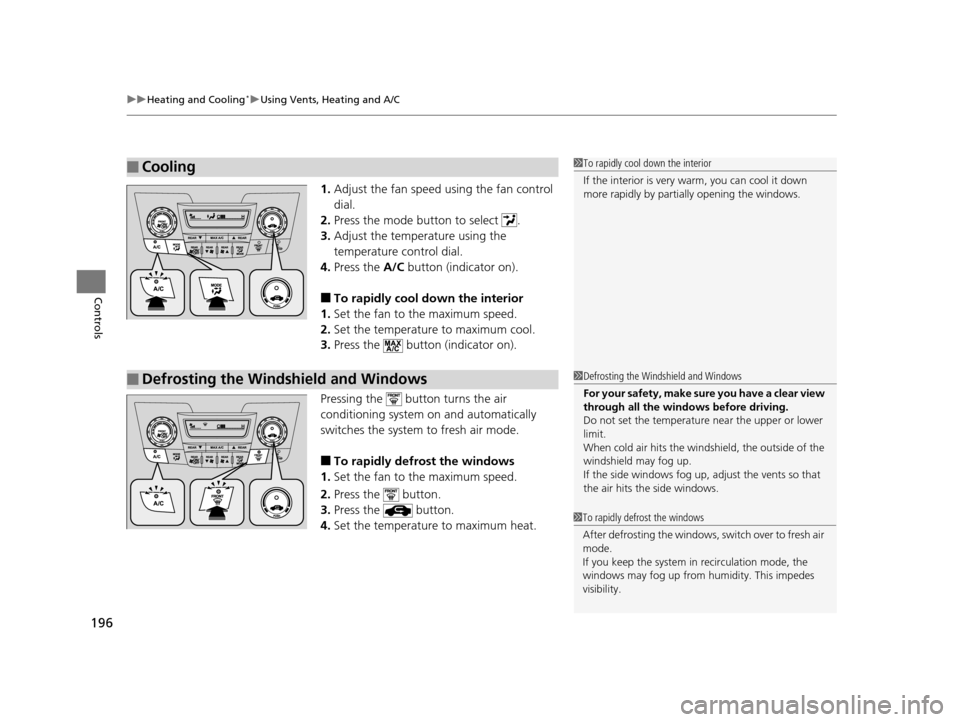
1. Adjust the fan speed using the fan control
dial.
2. Press the mode button to select .
3. Adjust the temperature using the
temperature control dial.
4. Press the A/C button (indicator on).
■To rapidly cool down the interior
1. Set the fan to the maximum speed.
2. Set the temperature to maximum cool.
3. Press the button (indicator on).
Pressing the button turns the air
conditioning system on and automatically
switches the system to fresh air mode.
■To rapidly defrost the windows
1. Set the fan to the maximum speed.
2. Press the button.
3. Press the button.
4. Set the temperature to maximum heat.
■Cooling1To rapidly cool down the interior
If the interior is very warm, you can cool it down
more rapidly by parti ally opening the windows.
■Defrosting the Windshield and Windows1Defrosting the Windshield and Windows
For your safety, make sure you have a clear view
through all the windows before driving.
Do not set the temperatur e near the upper or lower
limit.
When cold air hits the windshield, the outside of the
windshield may fog up.
If the side windows fog up, adjust the vents so that
the air hits th e side windows.
1To rapidly defrost the windows
After defrosting the windows, switch over to fresh air
mode.
If you keep the system in recirculation mode, the
windows may fog up from humidity. This impedes
visibility.
17 US ODYSSEY (KA KC)-31TK86600.book 196 ページ 2016年10月24日 月曜日 午後4時2分
Page 198 of 565
197
uuHeating and Cooling*uRear A/C Controls
Controls
Rear A/C Controls
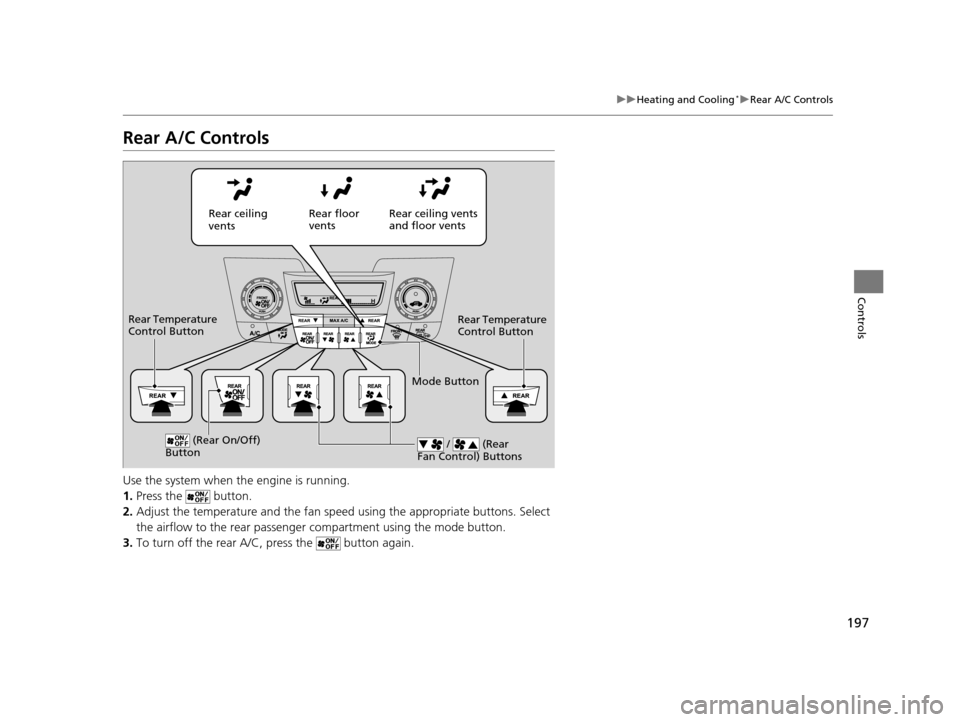
Use the system when the engine is running.
1. Press the button.
2. Adjust the temperature and the fan spee d using the appropriate buttons. Select
the airflow to the rear passenger compartment using the mode button.
3. To turn off the rear A/C, press the button again.
Rear ceiling
vents Rear floor
vents
Rear ceiling vents
and floor vents
Rear Temperature
Control Button
Rear Temperature
Control Button
(Rear On/Off)
Button / (Rear
Fan Control) Buttons
Mode Button
17 US ODYSSEY (KA KC)-31TK86600.book 197 ページ 2016年10月24日 月曜日 午後4時2分
Page 199 of 565
198
Controls
Climate Control System*
Using Automatic Climate Control
The automatic climate control system maintains the interior temperature you select.
The system also selects the proper mix of heated or cooled air that raises or lowers
the interior temperature to your pr eference as quickly as possible.
Use the system when the engine is running.
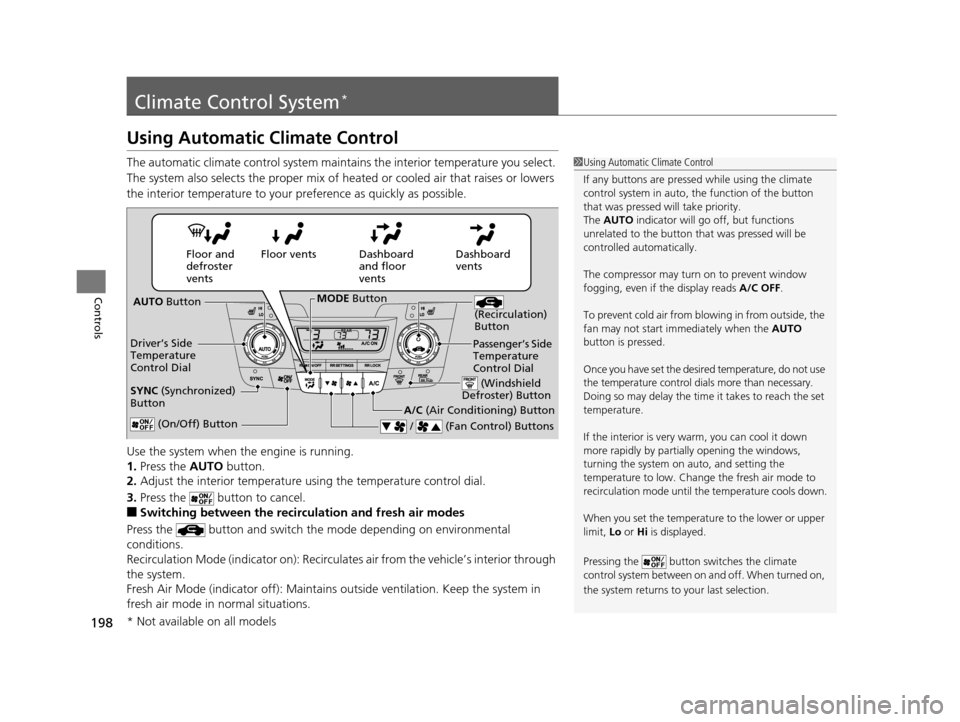
1. Press the AUTO button.
2. Adjust the interior temperature us ing the temperature control dial.
3. Press the button to cancel.
■Switching between the recirculation and fresh air modes
Press the button and switch the mode depending on environmental
conditions.
Recirculation Mode (indicator on): Recirculates air from the vehicle’s interior through
the system.
Fresh Air Mode (indicator off): Maintains outside ventilation. Keep the system in
fresh air mode in normal situations.
1 Using Automatic Climate Control
If any buttons are presse d while using the climate
control system in auto, the function of the button
that was pressed will take priority.
The AUTO indicator will go off, but functions
unrelated to the button th at was pressed will be
controlled automatically.
The compressor may turn on to prevent window
fogging, even if the display reads A/C OFF.
To prevent cold air from bl owing in from outside, the
fan may not start i mmediately when the AUTO
button is pressed.
Once you have set the desi red temperature, do not use
the temperature control di als more than necessary.
Doing so may delay the time it takes to reach the set
temperature.
If the interior is very warm, you can cool it down
more rapidly by partial ly opening the windows,
turning the system on auto, and setting the
temperature to low. Change the fresh air mode to
recirculation mode until the temperature cools down.
When you set the temperat ure to the lower or upper
limit, Lo or Hi is displayed.
Pressing the button sw itches the climate
control system between on and off. When turned on,
the system returns to your last selection.
Dashboard
vents
Dashboard
and floor
vents
Floor vents
Floor and
defroster
vents
AUTO Button
Driver’s Side
Temperature
Control Dial
A/C (Air Conditioning) Button
/ (Fan Control) Buttons
(Recirculation)
Button
(On/Off) Button
SYNC (Synchronized)
Button
Passenger’s Side
Temperature
Control Dial
(Windshield
Defroster) Button
MODE Button
* Not available on all models
17 US ODYSSEY (KA KC)-31TK86600.book 198 ページ 2016年10月24日 月曜日 午後4時2分
Page 200 of 565
199
uuClimate Control System*uUsing Automatic Climate Control
Controls
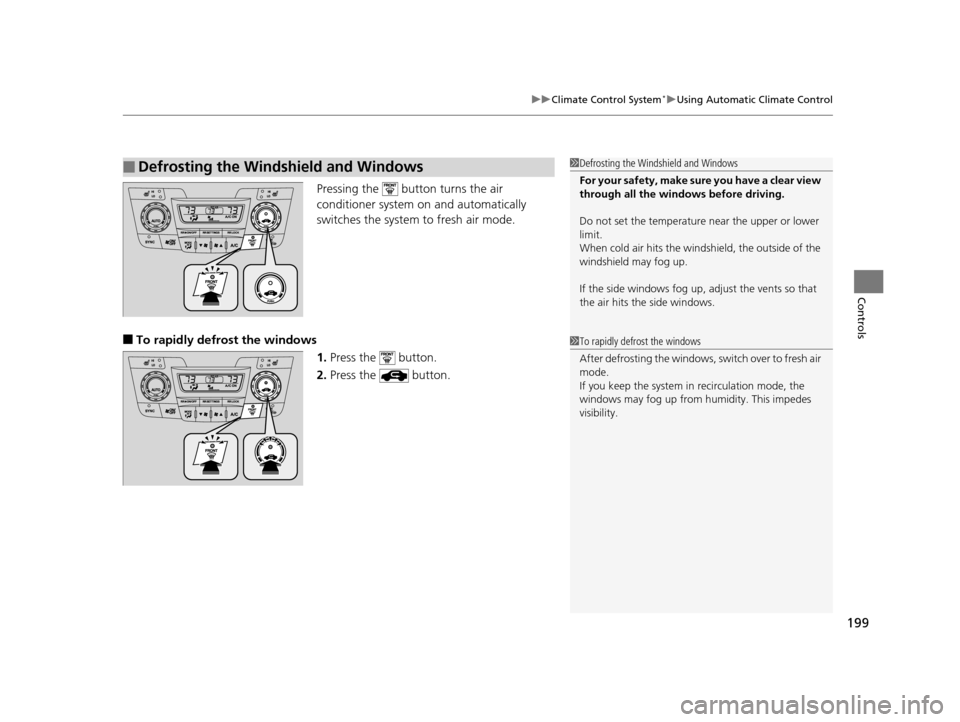
Pressing the button turns the air
conditioner system on and automatically
switches the system to fresh air mode.
■To rapidly defrost the windows
1.Press the button.
2. Press the button.
■Defrosting the Windshield and Windows1Defrosting the Windshield and Windows
For your safety, make sure you have a clear view
through all the windows before driving.
Do not set the temperatur e near the upper or lower
limit.
When cold air hits the windshield, the outside of the
windshield may fog up.
If the side windows fog up, adjust the vents so that
the air hits th e side windows.
1To rapidly defrost the windows
After defrosting the windows, switch over to fresh air
mode.
If you keep the system in recirculation mode, the
windows may fog up from humidity. This impedes
visibility.
17 US ODYSSEY (KA KC)-31TK86600.book 199 ページ 2016年10月24日 月曜日 午後4時2分
Page 201 of 565
200
uuClimate Control System*uSynchronized Mode
Controls
Synchronized Mode
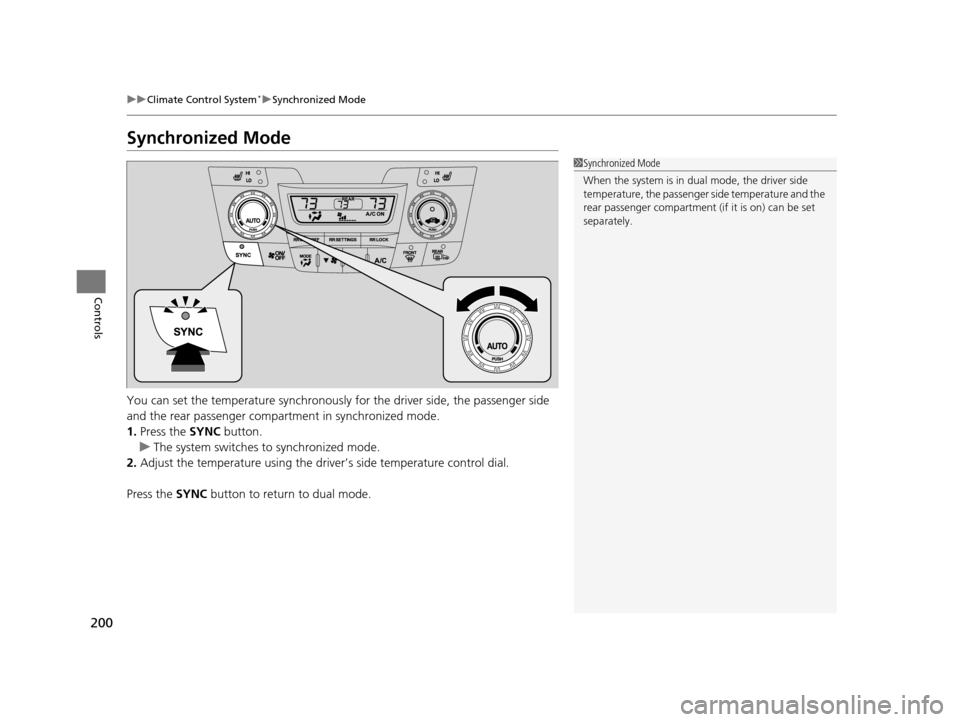
You can set the temperature synchronously for the driver side, the passenger side
and the rear passenger compartment in synchronized mode.
1. Press the SYNC button.
u The system switches to synchronized mode.
2. Adjust the temperature using the driv er’s side temperature control dial.
Press the SYNC button to return to dual mode.
1Synchronized Mode
When the system is in dua l mode, the driver side
temperature, the passenger side temperature and the
rear passenger compartment (if it is on) can be set
separately.
17 US ODYSSEY (KA KC)-31TK86600.book 200 ページ 2016年10月24日 月曜日 午後4時2分
Page 202 of 565
201
uuClimate Control System*uRear Climate Control System
Continued
Controls
Rear Climate Control System
Use the system when the engine is running.
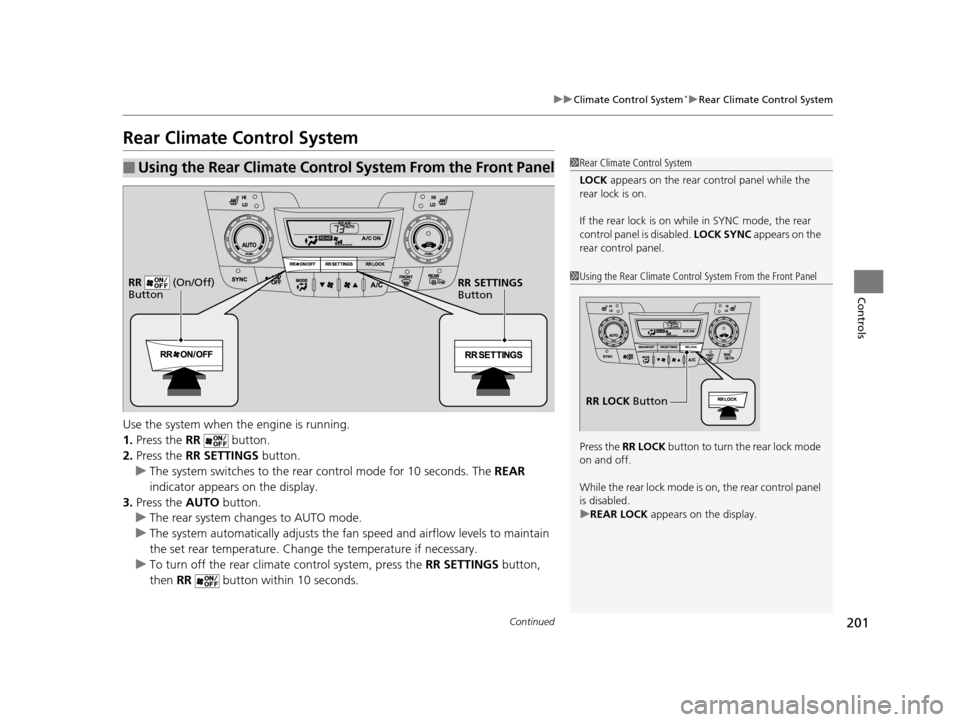
1. Press the RR button.
2. Press the RR SETTINGS button.
u The system switches to the rear control mode for 10 seconds. The REAR
indicator appears on the display.
3. Press the AUTO button.
u The rear system changes to AUTO mode.
u The system automatically adjusts the fan speed and airfl ow levels to maintain
the set rear temperature. Change the temperature if necessary.
u To turn off the rear climat e control system, press the RR SETTINGS button,
then RR button within 10 seconds.
■Using the Rear Climate Control System From the Front Panel1Rear Climate Control System
LOCK appears on the rear control panel while the
rear lock is on.
If the rear lock is on while in SYNC mode, the rear
control panel is disabled. LOCK SYNC appears on the
rear control panel.
1 Using the Rear Climate Control System From the Front Panel
Press the RR LOCK button to turn the rear lock mode
on and off.
While the rear lock mode is on, the rear control panel
is disabled.
u REAR LOCK appears on the display.
RR LOCK Button
RR SETTINGS
Button
RR (On/Off)
Button
17 US ODYSSEY (KA KC)-31TK86600.book 201 ページ 2016年10月24日 月曜日
午後4時2分
Page 203 of 565
uuClimate Control System*uRear Climate Control System
202
Controls
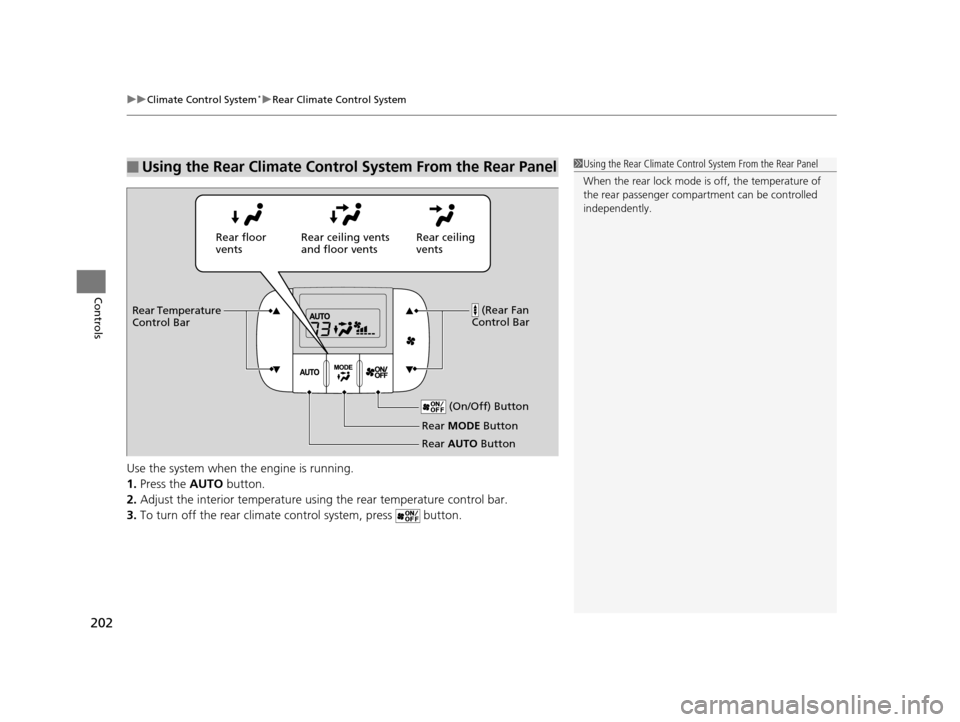
Use the system when the engine is running.
1. Press the AUTO button.
2. Adjust the interior temperature usi ng the rear temperature control bar.
3. To turn off the rear climate control system, press button.
■Using the Rear Climate Control System From the Rear Panel1Using the Rear Climate Control System From the Rear Panel
When the rear lock mode is off, the temperature of
the rear passenger compar tment can be controlled
independently.
Rear ceiling
vents
Rear floor
vents
Rear ceiling vents
and floor vents
(Rear Fan
Control Bar
Rear Temperature
Control Bar
(On/Off) Button
Rear MODE Button
Rear AUTO Button
17 US ODYSSEY (KA KC)-31TK86600.book 202 ページ 2016年10月24日 月曜日 午後4時2分
Page 206 of 565
205
Features
This chapter describes how to operate technology features.
Audio SystemAbout Your Audio System ................ 206
USB Port .......................................... 207
Auxiliary Input Jack .......................... 207
Audio System Theft Protection
*....... 208
Region Setting ................................. 209
Audio Remote Controls .................... 210
Audio System Basic Operation ........ 211
Audio/Information Screen ................ 212
Display Setup ................................... 217
Adjusting the Sound ........................ 216
Playing AM/FM Radio ....................... 218
Models with one display
Playing a CD .................................... 221
Playing an iPod ................................ 224
Playing Internet Radio ...................... 227
Playing a USB Flash Drive ................. 229
Playing Bluetooth ® Audio................. 232
Audio System Basic Operation ........ 234
Audio with Touch Screen ................. 235
Audio/Information Screen ................ 238
Display Setup ................................... 244
Adjusting the Sound ........................ 243
Playing AM/FM Radio ....................... 245
Playing SiriusXM ® Radio
*................. 249
Models with two displays
Playing a CD .................................... 252
Playing an iPod ................................ 255
Playing Internet Radio ...................... 259
Playing a USB Flash Drive ................. 262
Playing Bluetooth ® Audio ................ 265
Audio Error Messages ...................... 267
General Information on the Audio System ............................................. 272
Rear Entertainment System
*........... 276
Customized Features ........................ 295
HomeLink ® Universal Transceiver
*.. 325
Bluetooth ® HandsFreeLink® ..... 327, 360
Compass
*.......................................... 392
* Not available on all models
17 US ODYSSEY (KA KC)-31TK86600.book 205 ページ 2016年10月24日 月曜日 午後4時2分