Page 193 of 565
uuInterior Lights/Interior Convenience Items uInterior Convenience Items
192
Controls
■To operate:
1. Set the parking brake.
2. Set the power mode to ACCESSORY.
2. Start the engine.
3. Press the button to turn on the system.1To operate:
The vacuum automatica lly shuts off and the PWR
SAVE indicator comes on if the system detects that
running the vacuum is over discharging the battery.
After seven minutes of operation:
The beeper sounds intermittently.
When eight minutes elapse:
The beeper sounds once and the PWR SAVE
indicator comes on. The va cuum automatically shuts
off.
To continue vacuumin g, start the engine.
Operate the engine only when there is sufficient
ventilation.
Without engine running
With engine running
Without engine running
With engine running
17 US ODYSSEY (KA KC)-31TK86600.book 192 ページ 2016年10月24日 月曜日 午後4時2分
Page 199 of 565
198
Controls
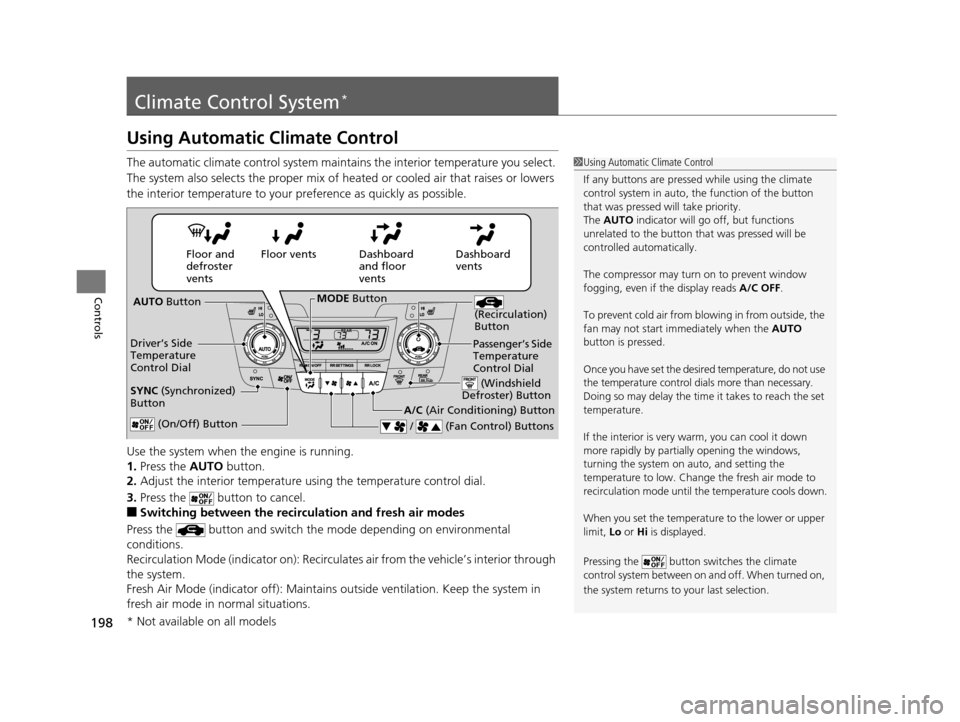
Climate Control System*
Using Automatic Climate Control
The automatic climate control system maintains the interior temperature you select.
The system also selects the proper mix of heated or cooled air that raises or lowers
the interior temperature to your pr eference as quickly as possible.
Use the system when the engine is running.
1. Press the AUTO button.
2. Adjust the interior temperature us ing the temperature control dial.
3. Press the button to cancel.
■Switching between the recirculation and fresh air modes
Press the button and switch the mode depending on environmental
conditions.
Recirculation Mode (indicator on): Recirculates air from the vehicle’s interior through
the system.
Fresh Air Mode (indicator off): Maintains outside ventilation. Keep the system in
fresh air mode in normal situations.
1 Using Automatic Climate Control
If any buttons are presse d while using the climate
control system in auto, the function of the button
that was pressed will take priority.
The AUTO indicator will go off, but functions
unrelated to the button th at was pressed will be
controlled automatically.
The compressor may turn on to prevent window
fogging, even if the display reads A/C OFF.
To prevent cold air from bl owing in from outside, the
fan may not start i mmediately when the AUTO
button is pressed.
Once you have set the desi red temperature, do not use
the temperature control di als more than necessary.
Doing so may delay the time it takes to reach the set
temperature.
If the interior is very warm, you can cool it down
more rapidly by partial ly opening the windows,
turning the system on auto, and setting the
temperature to low. Change the fresh air mode to
recirculation mode until the temperature cools down.
When you set the temperat ure to the lower or upper
limit, Lo or Hi is displayed.
Pressing the button sw itches the climate
control system between on and off. When turned on,
the system returns to your last selection.
Dashboard
vents
Dashboard
and floor
vents
Floor vents
Floor and
defroster
vents
AUTO Button
Driver’s Side
Temperature
Control Dial
A/C (Air Conditioning) Button
/ (Fan Control) Buttons
(Recirculation)
Button
(On/Off) Button
SYNC (Synchronized)
Button
Passenger’s Side
Temperature
Control Dial
(Windshield
Defroster) Button
MODE Button
* Not available on all models
17 US ODYSSEY (KA KC)-31TK86600.book 198 ページ 2016年10月24日 月曜日 午後4時2分
Page 242 of 565
Continued241
uuAudio System Basic Operation uAudio/Information Screen
Features
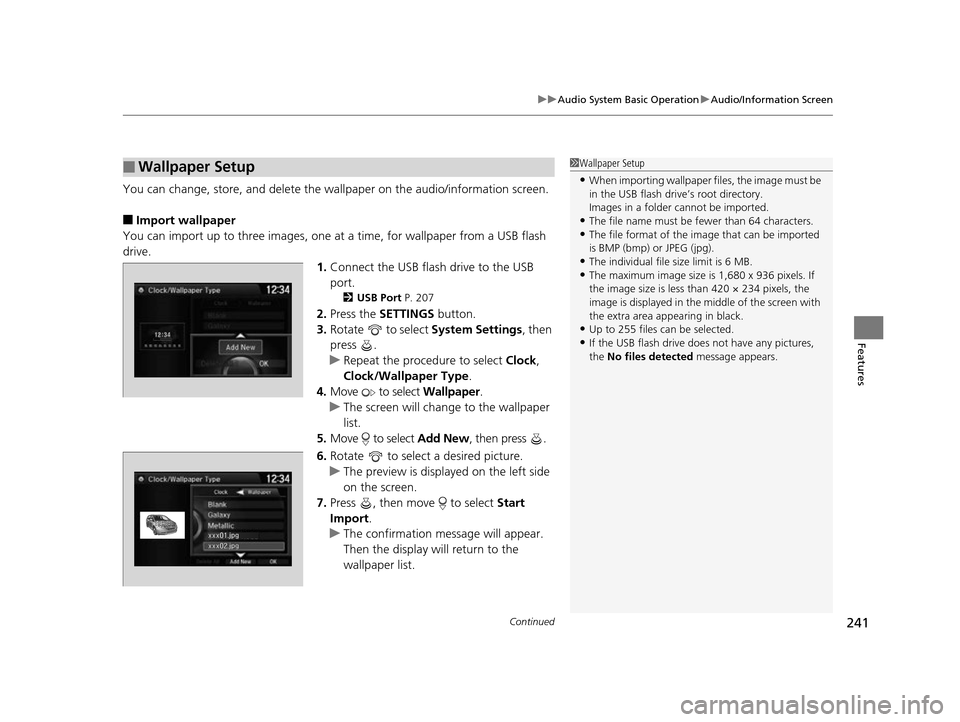
You can change, store, and delete the wa llpaper on the audio/information screen.
■Import wallpaper
You can import up to three images, one at a time, for wallpaper from a USB flash
drive.
1.Connect the USB flash drive to the USB
port.
2 USB Port P. 207
2.Press the SETTINGS button.
3. Rotate to select System Settings, then
press .
u Repeat the procedure to select Clock,
Clock/Wallpaper Type .
4. Move to select Wallpaper.
u The screen will change to the wallpaper
list.
5. Move to select Add New, then press .
6. Rotate to select a desired picture.
u The preview is displayed on the left side
on the screen.
7. Press , then move to select Start
Import.
u The confirmation message will appear.
Then the display will return to the
wallpaper list.
■Wallpaper Setup1Wallpaper Setup
•When importing wallpaper files, the image must be
in the USB flash drive’s root directory.
Images in a folder cannot be imported.
•The file name must be fewer than 64 characters.•The file format of the im age that can be imported
is BMP (bmp) or JPEG (jpg).
•The individual file size limit is 6 MB.•The maximum image size is 1,680 x 936 pixels. If
the image size is less than 420 × 234 pixels, the
image is displayed in the middle of the screen with
the extra area appearing in black.
•Up to 255 files can be selected.
•If the USB flash drive doe s not have any pictures,
the No files detected message appears.
17 US ODYSSEY (KA KC)-31TK86600.book 241 ページ 2016年10月24日 月曜日 午後4時2分
Page 281 of 565
uuRear Entertainment System*uOperating the System
280
Features
■Playing a DVD
• Insert a DVD into the lower slot of the front audio unit.
u The system automatically starts the DVD.
• To fast forward, press and hold the (SEEK /SKIP) bar, and to reverse, press and
hold the bar on the front panel or the remote.
• To go to the next chapter, press the bar, and to go to the beginning of the
current chapter, press the bar on the front panel or the remote. Quickly press
the bar twice to go to the previous chapter.
■DVD setup from the front panel
Press the REAR AUDIO button on the front panel while a DVD is playing.
Audio/Subtitle:
Selects a language for audio and subtitles that is available on the DVD.
1. Press the MENU button to display Menu in front.
2. Rotate to select Other Function, then press .
u Repeat the procedure to select Audio/Subtitle.
3. Move and to select the upper and lower part of the screen.
4. In the upper part, rotate to select a language for audio, then press .
In the lower part, rotate to select a subtitle language, then press .
u To turn off subtitles, rotate to select OFF, then press .
1Playing a DVD
DVD is available for the rear seat passenger only.
17 US ODYSSEY (KA KC)-31TK86600.book 280 ページ 2016年10月24日 月曜日 午後4時2分
Page 282 of 565
Continued281
uuRear Entertainment System*uOperating the System
Features
Angle:
Changes the view angle.
1. Press the MENU button to display Menu in front.
2. Rotate to select Other Function, then press .
u Repeat the procedure to select Angle .
3. Rotate to select a desired angle, then press .
Search:
Selects the title or chapter you want to play.
1. Press the MENU button to display Menu in front.
2. Rotate to select Other Function, then press .
u Repeat the procedure to select Search .
3. Move and to select the upper and lower part of the screen.
4. In the upper part, rotate to s earch for a title, then press .
In the lower part, rotate to s earch for a chapter, then press .
Number Input:
Enters a three digit number, if issued to the DVD, to find the segment you want to
start to play.
1. Press the MENU button to display Menu in front.
2. Rotate to select Other Function, then press .
u Repeat the procedure to select Number Input .
3. Rotate to select number(s), then press .
4. Rotate to select OK, then press .1DVD setup from the front panel
If the DVD currently playing does not carry multiple
angles, only one option Angle 1 comes on.
17 US ODYSSEY (KA KC)-31TK86600.book 281 ページ 2016年10月24日 月曜日 午後4時2分
Page 286 of 565
285
uuRear Entertainment System*uOperating the System
Continued
Features
Search:
You can search for a DVD segment from the following methods.
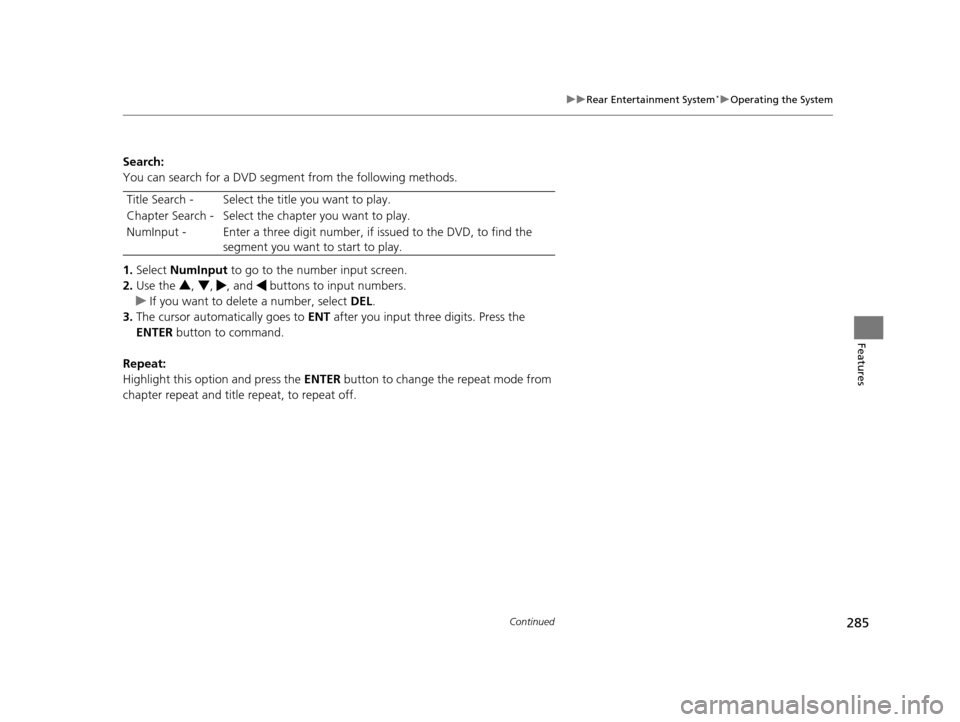
1. Select NumInput to go to the nu mber input screen.
2. Use the 3, 4 , , and buttons to input numbers.
u If you want to delete a number, select DEL.
3. The cursor automatically goes to ENT after you input three digits. Press the
ENTER button to command.
Repeat:
Highlight this option and press the ENTER button to change the repeat mode from
chapter repeat and title repeat, to repeat off. Title Search - Select the ti
tle you want to play.
Chapter Search - Select the chapter you want to play.
NumInput - Enter a three digit number, if issued to the DVD, to find the
segment you want to start to play.
17 US ODYSSEY (KA KC)-31TK86600.book 285 ページ 2016年10月24日 月曜日 午後4時2分
Page 310 of 565
309
uuCustomized Features u
Continued
Features
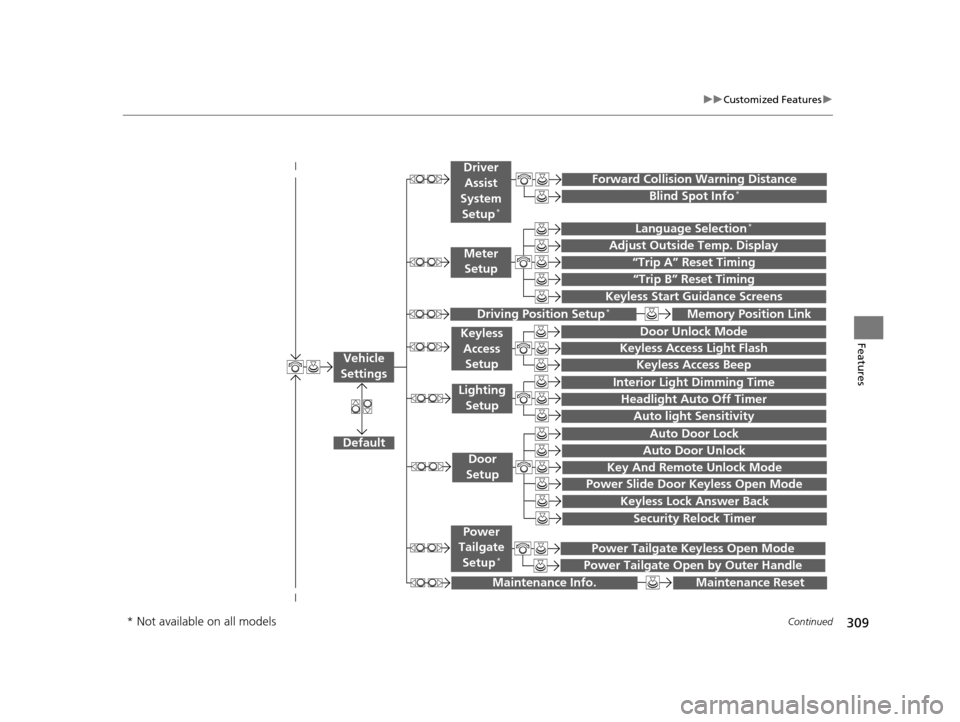
“Trip A” Reset Timing
“Trip B” Reset Timing
Language Selection*
Adjust Outside Temp. Display
Forward Collision Warning Distance
Keyless Start Guidance Screens
Default
Memory Position Link
Door Unlock Mode
Keyless Access Light Flash
Interior Light Dimming Time
Headlight Auto Off Timer
Auto light Sensitivity
Key And Remote Unlock Mode
Keyless Lock Answer Back
Security Relock Timer
Auto Door Lock
Auto Door Unlock
Maintenance Reset
Meter
Setup
Driver
Assist
System
Setup
*
Driving Position Setup*
Keyless Access Setup
Lighting Setup
Door
Setup
Maintenance Info.
Keyless Access Beep
Blind Spot Info*
Power Slide Door Keyless Open Mode
Power Tailgate Keyless Open Mode
Power Tailgate Open by Outer Handle
Power
Tailgate
Setup
*
Vehicle
Settings
* Not available on all models
17 US ODYSSEY (KA KC)-31TK86600.book 309 ページ 2016年10月24日 月曜日 午後4時2分
Page 316 of 565
315
uuCustomized Features u
Continued
Features
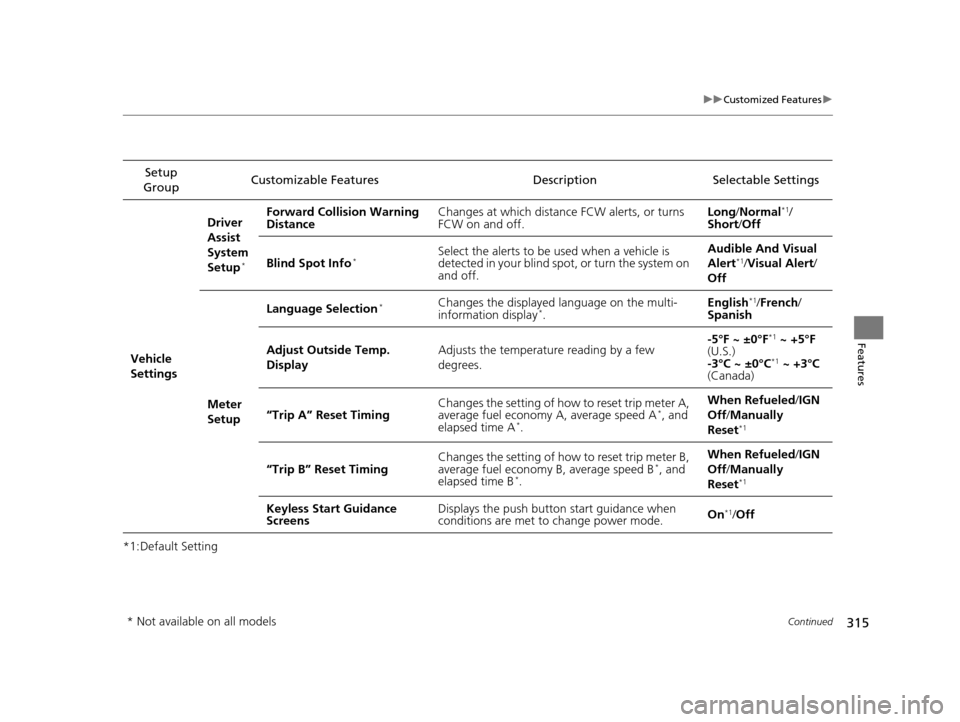
*1:Default SettingSetup
Group Customizable Features Description Selectable Settings
Vehicle
Settings Driver
Assist
System
Setup
*
Forward Collision Warning
Distance
Changes at which distance FCW alerts, or turns
FCW on and off. Long
/Normal*1/
Short/ Off
Blind Spot Info
*Select the alerts to be used when a vehicle is
detected in your blind spot, or turn the system on
and off. Audible And Visual
Alert*1/
Visual Alert /
Off
Meter
Setup Language Selection
*Changes the displayed language on the multi-
information display*.
English
*1/
French /
Spanish
Adjust Outside Temp.
Display Adjusts the temperature reading by a few
degrees. -5°F ~ ±0°F
*1
~ +5°F
(U.S.)
-3°C ~ ±0°C
*1 ~ +3°C
(Canada)
“Trip A” Reset Timing Changes the setting of how to reset trip meter A,
average fuel economy A, average speed A
*, and
elapsed time A*. When Refueled
/IGN
Off /Manually
Reset*1
“Trip B” Reset Timing Changes the setting of how to reset trip meter B,
average fuel economy B, average speed B*, and
elapsed time B*. When Refueled
/IGN
Off /Manually
Reset*1
Keyless Start Guidance
Screens Displays the push button
start guidance when
conditions are met to change power mode. On*1/
Off
* Not available on all models
17 US ODYSSEY (KA KC)-31TK86600.book 315 ページ 2016年10月24日 月曜日 午後4時2分