Page 166 of 489

165Continued
Controls
Climate Control System*
Using Automatic Climate Control
The automatic climate control system maintains the interior temperature you select.
The system also selects the proper mix of heat ed or cooled air that raises or lowers
the interior temperature to your pr eference as quickly as possible.
Use the system when the engine is running.
1. Select the AUTO icon.
2. Adjust the interior temperature us ing the temperature control icons.
3. Select the icon to cancel.1Using Automatic Climate Control
If any icons are selected while using the climate
control system in auto, the function of the icon that
was selected will take priority.
The AUTO indicator will go off, but functions
unrelated to the icon that was selected will be
controlled automatically.
To prevent cold air from bl owing in from outside, the
fan may not start i mmediately when the AUTO icon
is selected.
If the interior is very warm, you can cool it down
more rapidly by partial ly opening the windows,
turning the system on auto, and setting the
temperature to low. Change the fresh air mode to
recirculation mode until the temperature cools down.
When you set the temperat ure to the lower or upper
limit, Lo or Hi is displayed.
You can raise or lower the temperature or fan speed
setting flicking either control icon.
Models without SYNC icon
Dashboard
vents Dashboard
and floor
ventsFloor vents Floor and
defroster
vents
Temperature Control
Icons
AUTO Icon Mode Control Icon
Fan Control Icons
(On/Off) Icon
(Recirculation) IconA/C (Air Conditioning) Icon (Fresh Air) Icon
* Not available on all models
17 HR-V HDMC-31T7A6100.book 165 ページ 2016年7月20日 水曜日 午前9時50分
Page 171 of 489
uuClimate Control System*uUsing Automatic Climate Control
170
Controls
You hear the beep when operating the clim ate control system on the touch screen.
This can be turned on and off. To turn off the beep:
1.Turn the ignition switch to ON
(w*1.
2. Touch the of the temperature control
icon five times while pressing and holding
the .
3. Release the , after -- blinks five times
and OF is displayed.
*1: Models with the smart entry system have an ENGINE START/STOP button instead of an
ignition switch.
■Turning On and Off the Touch Screen Beep1 Turning On and Off the Touch Screen Beep
If you touch any other icon s during this procedure,
the setting may fail. In this case, once you turn the
ignition switch to OFF
( 0*1, then follow this
procedure again.
Models without SYNC icon
Models with SYNC icon
17 HR-V HDMC-31T7A6100.book 170 ページ 2016年7月20日 水曜日 午前9時50分
Page 172 of 489
171
uuClimate Control System*uUsing Automatic Climate Control
Controls
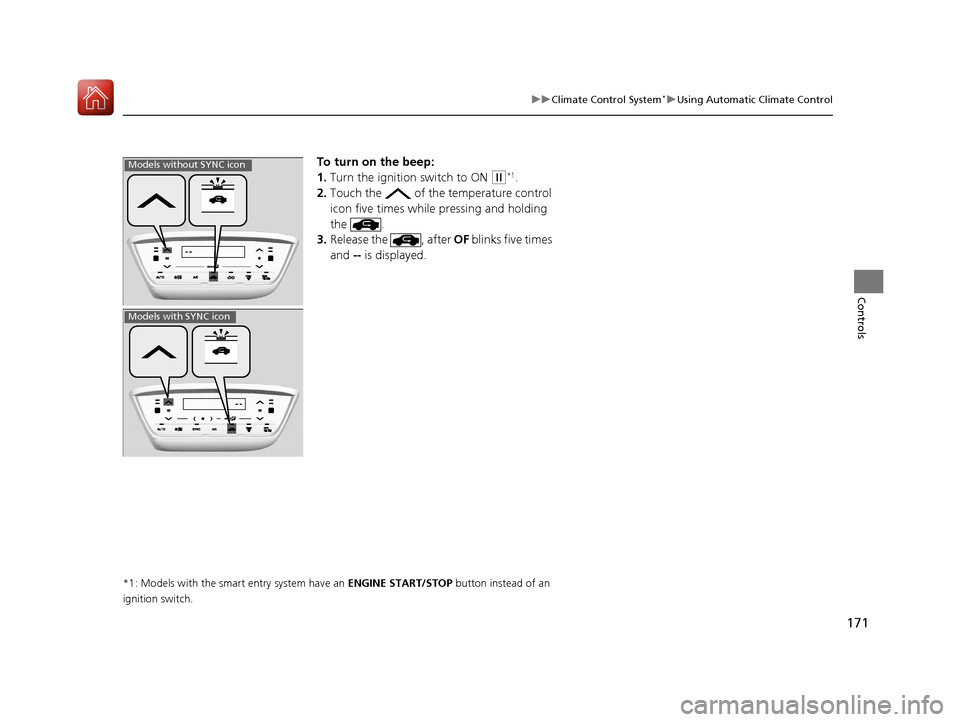
To turn on the beep:
1. Turn the ignition switch to ON
(w*1.
2. Touch the of the temperature control
icon five times while pressing and holding
the .
3. Release the , after OF blinks five times
and -- is displayed.
*1: Models with the smart entry system have an ENGINE START/STOP button instead of an
ignition switch.
Models without SYNC icon
Models with SYNC icon
17 HR-V HDMC-31T7A6100.book 171 ページ 2016年7月20日 水曜日 午前9時50分
Page 180 of 489
179
uuAudio System uAudio System Theft Protection
Features
Audio System Theft Protection
The audio system is disabled when it is disconnected from the power source, such as
when the battery is disconnected or goes dead. In certain conditions, the system
may display a cord entry screen. If this occurs, reactivate the audio system.
■Reactivating the audio system
1. Turn the ignition switch to ON
(w*1.
2. Turn on the audio system.
3. Press and hold the audio system powe r button for more than two seconds.
u The audio system is reac tivated when the audio co ntrol unit establishes a
connection with the vehicl e control unit. If the control unit fails to recognize
the audio unit, you must go to a dealer and have the audio unit checked.
*1: Models with the smart entry system have an ENGINE START/STOP button instead of an
ignition switch.
17 HR-V HDMC-31T7A6100.book 179 ページ 2016年7月20日 水曜日 午前9時50分
Page 204 of 489

203
Features
Audio System Basic Operation
To use the audio system function, the ignition swit ch must be in ACCESSORY (q or
ON
(w*1.
: Select to go to the HOME screen.
2Switching the Display P. 204
: Touch to select any mode.
The available mode includes Change Source,
Station List , Save Preset, Radio Text ,
Music Search , and play mode s. Play modes
can be also selected from Scan, Random/
Repeat , and so on.
: Select to go back to the previous display
when it is displayed.
(Day/Night) button: Press to change
the audio/information screen brightness.
Press once and select or to make
an adjustment. u Each time you press , the mode
switches between the daytime mode,
nighttime mode and OFF mode.
*1: Models with the smart entry system have an ENGINE START/STOP button instead of an
ignition switch.
1 Audio System Basic Operation
Audio Menu Items
2 Station List P. 212
2 Music Search P. 215, 218, 223
2 Random/Repeat P. 216, 224
2 Scan P. 213, 216, 224Models with display audio system
VOL
HOME
MENU
BACK
(Day/Night)
Button (HOME)
Icon
(MENU) Icon
(BACK) Icon
17 HR-V HDMC-31T7A6100.book 203 ページ 2016年7月20日 水曜日 午前9時50分
Page 208 of 489

Continued207
uuAudio System Basic Operation uAudio/Information Screen
Features
You can change, store, and delete the wallpaper on the audio/ information screen.
■Import wallpaper
You can import up to five images, one at a time, for wallpaper from a USB flash
drive. 1.Connect the USB flash drive to the USB
port.
2 USB Port(s) P. 177
2.Select Settings to go to the Settings
screen.
3. Select Info.
4. Select Clock/Wallpaper Type , then the
Wallpaper tab.
5. Select Add New .
u The picture name is displayed on the list.
6. Select a desired picture.
u The preview is displayed on the left side
on the screen.
7. Select Start Import to save the data.
u Then the display will return to the
wallpaper list.
■Wallpaper Setup1Wallpaper Setup
•When importing wallpaper files, the image must be
in the USB flash drive’s root directory. Images in a
folder cannot be imported.
•The file name must be fewer than 256 characters.•The file format of the im age that can be imported
is BMP (bmp) or JPEG (jpg).
•The individual file size limit is 5 MB.•The maximum image size is 4,096 x 4,096 pixels. If
the image size is less than 800 × 480 pixels, the
image is displayed in the middle of the screen with
the extra area appearing in black.
•Up to 5 files can be selected.
•If the USB flash drive doe s not have any pictures,
the No files detected message appears.
17 HR-V HDMC-31T7A6100.book 207 ページ 2016年7月20日 水曜日 午前9時50分
Page 222 of 489

221
uuAudio System Basic Operation uPlaying Internet Radio
Features
You can operate some of the Pandora ® menu items from your vehicle’s audio
system. The available items are:
• Bookmark
• Station List
• New Station
• Change Source
• Sound
■Operating a menu item
1.Select MENU .
2. Select an item.
■Pandora ® Menu1 Playing Internet Radio
Pandora ® is free, personalized radio that plays music
and comedy you’ll love. Just start with the name of
one of your favorite arti sts, songs, comedians or
composers and Pandora ® will create a custom station
that plays similar tracks. Pandora ® also features
hundreds of genre stations ranging from Dubstep to
Smooth Jazz to Power Workout.
If you cannot operate Pandora ® through the audio
system, it may be streaming through Bluetooth®
Audio. Make sure Pandora ® mode on your audio
system is selected.
Changing Stations
To change stations, activate the Pandora ® menu,
select Station List , and then select a new station.
1Pandora ® Menu
Available operating functi ons vary on software
versions. Some functions ma y not be available on the
vehicle’s audio system.
If there is a problem, you may see an error message
on the audio/information screen.
2 Pandora ® P. 233
Pandora ® may limit the total number of skips allowed
on the service. If you dislike a track after the skip limit
has been reached, your fe edback will be saved but
the current track will continue to play.
17 HR-V HDMC-31T7A6100.book 221 ページ 2016年7月20日 水曜日 午前9時50分
Page 246 of 489
Continued245
uuCustomized Features u
Features
■How to customize
While the vehicle is at a complete st op with the ignition switch in ON
(w*1, select
Settings , then select a setting item.
*1: Models with the smart entry system have an ENGINE START/STOP button instead of an
ignition switch.
Models with display audio system1 Customized Features
When you customize settings:
•Make sure that the vehicle is at a complete stop.
•
Shift to (P.
•
Set the parking brake.
Continuously variable transmission models
Manual transmission models
1 How to customize
To customize other features, select Settings .
2 List of customizable options P. 251
VOL
HOME
MENU
BACK
Audio/Information Screen
17 HR-V HDMC-31T7A6100.book 245 ページ 2016年7月20日 水曜日 午前9時50分