Page 103 of 465
uuLocking and Unlocking the Doors uLocking/Unlocking the Doors from the Inside
102
Controls
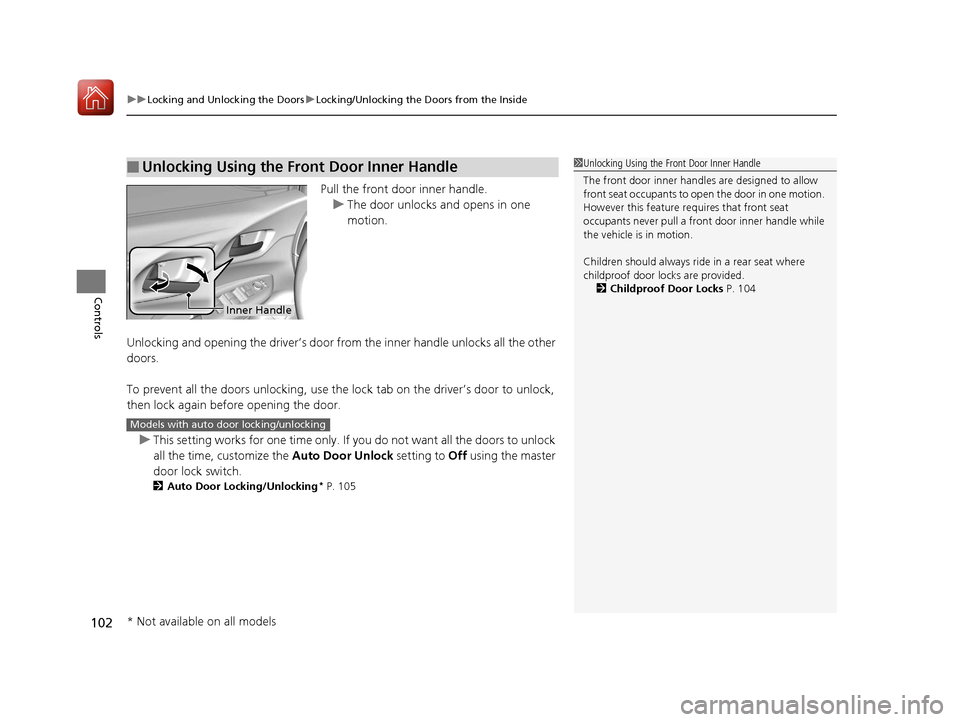
Pull the front door inner handle.
u The door unlocks and opens in one
motion.
Unlocking and opening the driver’s door from the inner handle unlocks all the other
doors.
To prevent all the doors unlock ing, use the lock tab on the driver’s door to unlock,
then lock again before opening the door.
u This setting works for one time only. If you do not want all the doors to unlock
all the time, customize the Auto Door Unlock setting to Off using the master
door lock switch.
2 Auto Door Locking/Unlocking* P. 105
■Unlocking Using the Front Door Inner Handle1Unlocking Using the Front Door Inner Handle
The front door inne r handles are designed to allow
front seat occupants to open the door in one motion.
However this feature requires that front seat
occupants never pull a front door inner handle while
the vehicle is in motion.
Children should always ride in a rear seat where
childproof door locks are provided.
2 Childproof Door Locks P. 104
Inner Handle
Models with auto door locking/unlocking
* Not available on all models
17 FIT -31T5A6200.book 102 ページ 2016年5月27日 金曜日 午後6時33分
Page 105 of 465
104
uuLocking and Unlocking the Doors uChildproof Door Locks
Controls
Childproof Door Locks
The childproof door locks prevent the rear doors from being opened from the inside
regardless of the position of the lock tab.
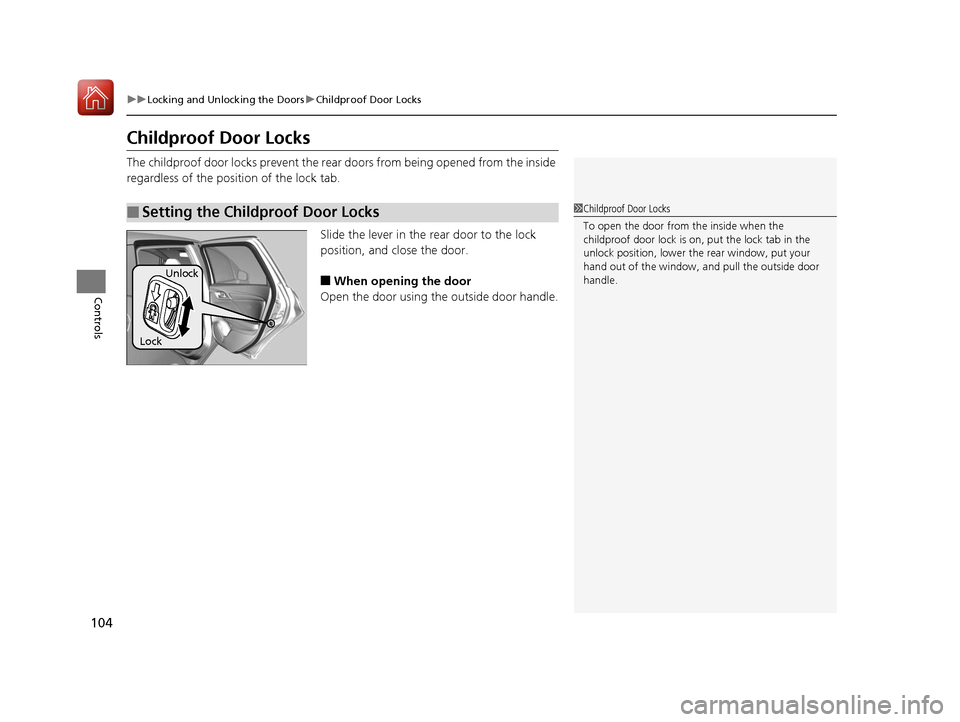
Slide the lever in the rear door to the lock
position, and close the door.
■When opening the door
Open the door using the outside door handle.
■Setting the Childproof Door Locks1 Childproof Door Locks
To open the door from the inside when the
childproof door lock is on, put the lock tab in the
unlock position, lower the rear window, put your
hand out of the window, and pull the outside door
handle.
Lock Unlock
17 FIT -31T5A6200.book 104 ページ 2016年5月27日 金曜日 午後6時33分
Page 110 of 465
109
Controls
Opening and Closing the Tailgate
Precautions for Opening/Closing the Tailgate
Always make sure individuals and objects are clear of the tailgate before opening or
closing it.
■Opening the tailgate
• Open the tailgate all the way.
u If it is not fully opened, the tailgate may come down accidentally by its own
weight.
• Be careful when it is windy. The wi nd may cause the tailgate to close.
■Closing the tailgate
Keep the tailgate closed while driving to: u Avoid possible damage.
u Prevent exhaust gas from leaking into the vehicle.
2 Carbon Monoxide Gas P. 66
1Precautions for Opening/Closing the Tailgate
Be careful not to hit your head on the tailgate or to
put your hands between th e tailgate and the cargo
area when closing the tailgate.
When you are storing or pi cking up luggage from the
cargo area while the engine is idling, do not stand in
front of the exhaust pipe. You may get burned.
Do not allow any passenger in the cargo space. They
may get hurt during hard braking, sudden
acceleration, or a crash.
17 FIT -31T5A6200.book 109 ページ 2016年5月27日 金曜日 午後6時33分
Page 113 of 465

112
Controls
Security System
Immobilizer System
The immobilizer system prevents a key that has not been pre-registered from
starting the engine. Each key contains el ectronic transmitters that use electronic
signals to verify the key.
Pay attention to the following when inserti ng the key into the ignition switch or
pressing the ENGINE START/STOP button:
• Do not allow objects that emit strong radio waves near the ignition switch or the
ENGINE START/STOP button.
• Make sure the key is not covered by or touching a metal object.
• Do not bring a key from anot her vehicle’s immobilizer system near the ignition
switch.
Security System Alarm
The security system alarm activates when the tailgate, hood or doors are forcibly
opened. The alarm does not go off if the tailgate or doors are opened with the key,
remote transmitter or smart entry system.
However, the alarm goes off when a door is opened with the key, then the shift
lever is moved out of
(P (continuously variable transmission models) or the hood is
opened before the ignition switch is turned to ON
(w*1.
■When the security system alarm activates
The horn sounds intermittently and all of the exterior lights flash.
*1 : Models with the smart entry system have an ENGINE START/STOP button instead of an ignition switch.
1Immobilizer System
NOTICE
Leaving the ignition key in the vehicle can result in
theft or accidental move ment of the vehicle.
Always take the ignition key with you whenever you
leave the vehicle unattended.
Do not alter the system or add other devices to it.
Doing so may damage the system and make your
vehicle inoperable.
1 Security System Alarm
The security alarm continues for a maximum of two
minutes until the security system deactivates.
17 FIT -31T5A6200.book 112 ページ 2016年5月27日 金曜日 午後6時33分
Page 122 of 465
121
uuOperating the Switches Around the Steering Wheel uENGINE START/STOP Button
Controls
If you open the driver’s door when the power mode is set to ACCESSORY, a warning
buzzer sounds.
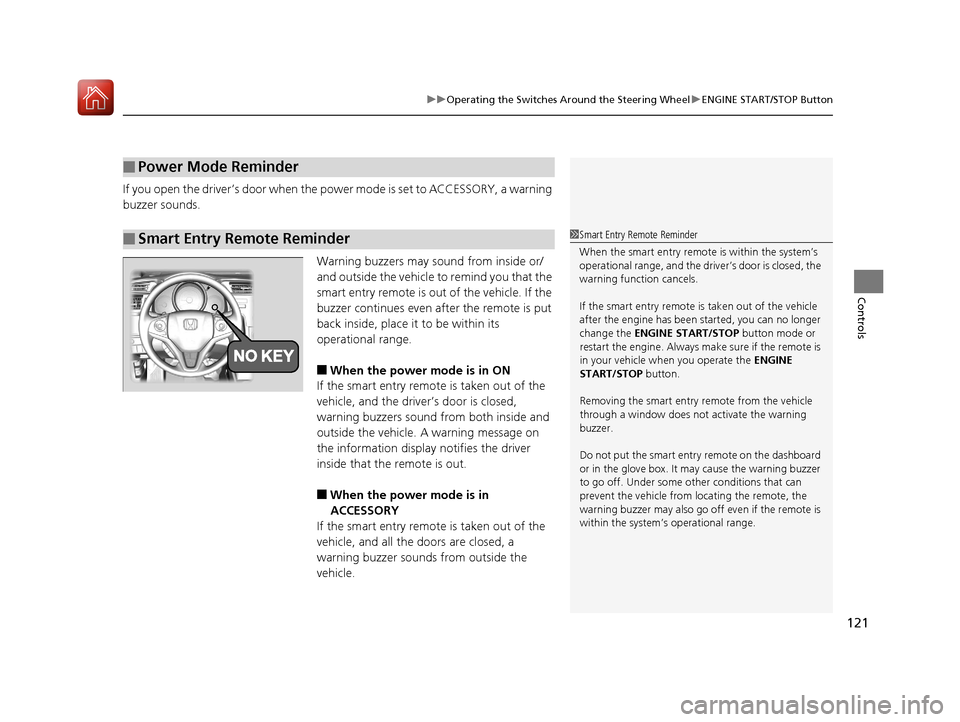
Warning buzzers may sound from inside or/
and outside the vehicle to remind you that the
smart entry remote is out of the vehicle. If the
buzzer continues even after the remote is put
back inside, place it to be within its
operational range.
■When the power mode is in ON
If the smart entry remote is taken out of the
vehicle, and the driver’s door is closed,
warning buzzers sound from both inside and
outside the vehicle. A warning message on
the information display notifies the driver
inside that the remote is out.
■When the power mode is in
ACCESSORY
If the smart entry remote is taken out of the
vehicle, and all the doors are closed, a
warning buzzer sounds from outside the
vehicle.
■Power Mode Reminder
■Smart Entry Remote Reminder1 Smart Entry Remote Reminder
When the smart entry remote is within the system’s
operational range, and the driv er’s door is closed, the
warning function cancels.
If the smart entry remote is taken out of the vehicle
after the engine has been started, you can no longer
change the ENGINE START/STOP button mode or
restart the engine. Always make sure if the remote is
in your vehicle when you operate the ENGINE
START/STOP button.
Removing the smart entry remote from the vehicle
through a window does not activate the warning
buzzer.
Do not put the smart entr y remote on the dashboard
or in the glove box. It may cause the warning buzzer
to go off. Under some other conditions that can
prevent the vehicle from locating the remote, the
warning buzzer may al so go off even if the remote is
within the system’s operational range.
17 FIT -31T5A6200.book 121 ページ 2016年5月27日 金曜日 午後6時33分
Page 130 of 465
129
uuOperating the Switches Around the Steering Wheel uWipers and Washers
Controls
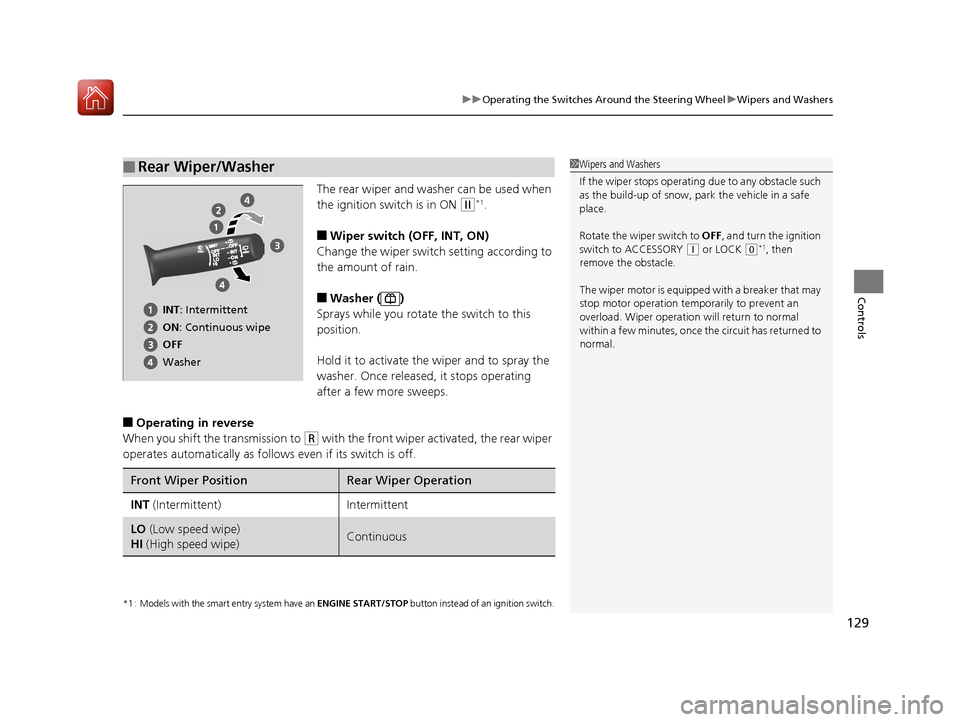
The rear wiper and washer can be used when
the ignition switch is in ON
(w*1.
■Wiper switch (OFF, INT, ON)
Change the wiper switch setting according to
the amount of rain.
■Washer ( )
Sprays while you rotate the switch to this
position.
Hold it to activate th e wiper and to spray the
washer. Once released, it stops operating
after a few more sweeps.
■Operating in reverse
When you shift the transmission to
(R with the front wiper activated, the rear wiper
operates automatically as follows even if its switch is off.
*1 : Models with the smart entry system have an ENGINE START/STOP button instead of an ignition switch.
■Rear Wiper/Washer1Wipers and Washers
If the wiper stops operating due to any obstacle such
as the build-up of snow, pa rk the vehicle in a safe
place.
Rotate the wiper switch to OFF, and turn the ignition
switch to ACCESSORY
( q or LOCK (0*1, then
remove the obstacle.
The wiper motor is equipped with a breaker that may
stop motor operation temp orarily to prevent an
overload. Wiper operation will return to normal
within a few minutes, once the circuit has returned to
normal.
INT: Intermittent
ON : Continuous wipe
OFF
Washer
Front Wiper PositionRear Wiper Operation
INT (Intermittent)Intermittent
LO (Low speed wipe)
HI (High speed wipe)Continuous
17 FIT -31T5A6200.book 129 ページ 2016年5月27日 金曜日 午後6時33分
Page 153 of 465
uuInterior Lights/Interior Convenience Items uInterior Convenience Items
152
Controls
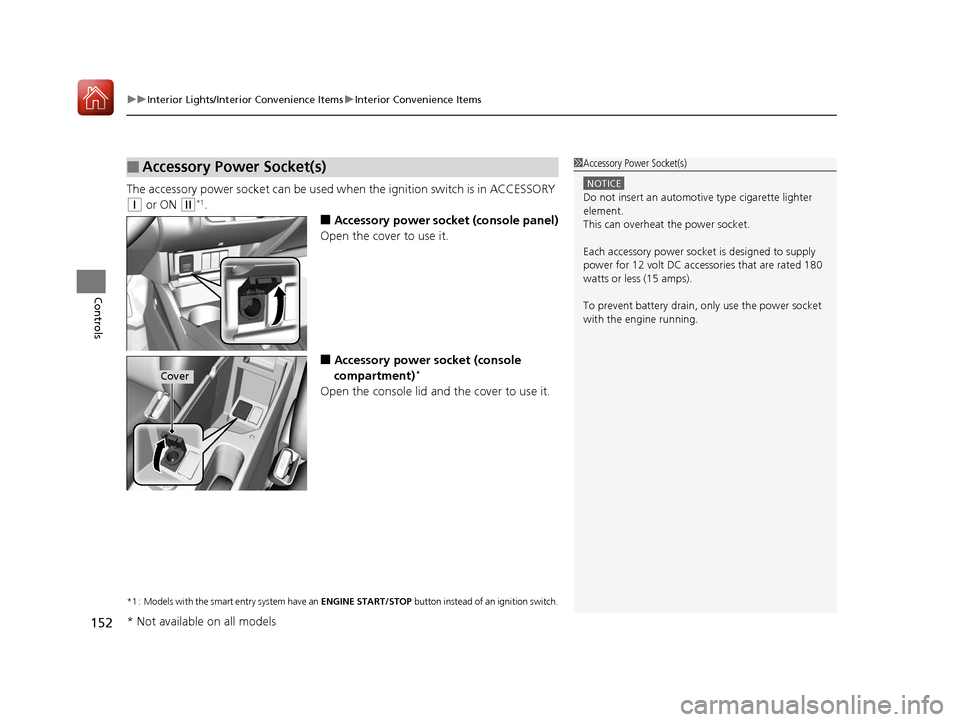
The accessory power socket can be used wh en the ignition switch is in ACCESSORY
(q or ON (w*1.
■Accessory power socket (console panel)
Open the cover to use it.
■Accessory power socket (console
compartment)*
Open the console lid and the cover to use it.
*1 : Models with the smart entry system have an ENGINE START/STOP button instead of an ignition switch.
■Accessory Power Socket(s)1Accessory Power Socket(s)
NOTICE
Do not insert an automotive type cigarette lighter
element.
This can overheat the power socket.
Each accessory power soc ket is designed to supply
power for 12 volt DC access ories that are rated 180
watts or less (15 amps).
To prevent battery drain, only use the power socket
with the engine running.
Cover
* Not available on all models
17 FIT -31T5A6200.book 152 ページ 2016年5月27日 金曜日 午後6時33分
Page 158 of 465
157Continued
Controls
Heating and Cooling System*
Using Vents, Heating and A/C*
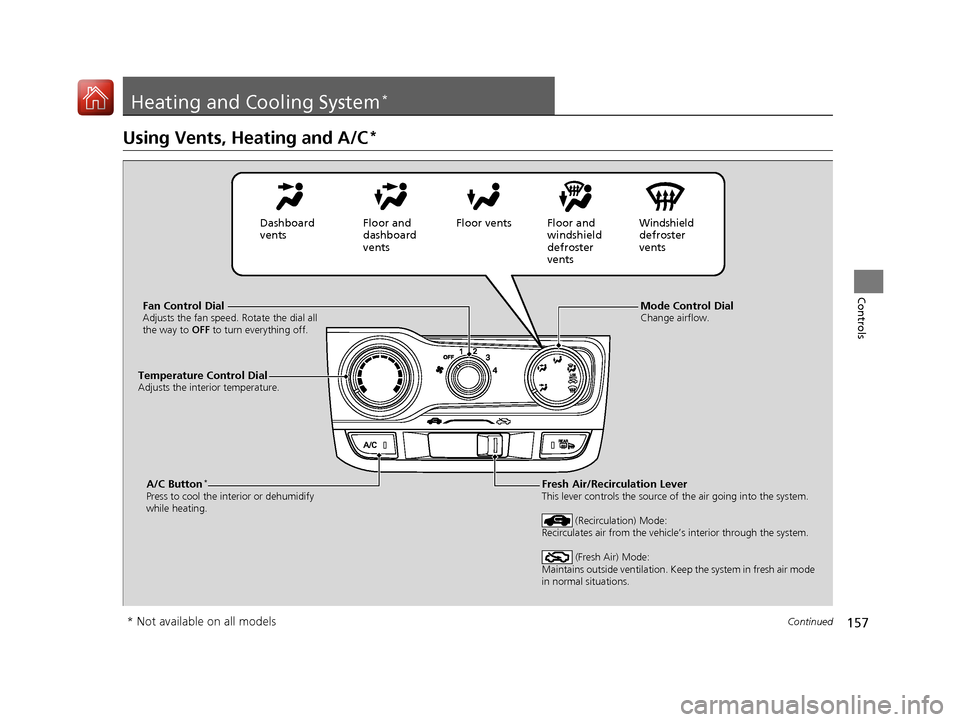
Mode Control DialChange airflow.Fan Control DialAdjusts the fan speed. Rotate the dial all
the way to OFF to turn everything off.
A/C Button*
Press to cool the interior or dehumidify
while heating.
Temperature Control DialAdjusts the interior temperature.
Fresh Air/Recirculation LeverThis lever controls the source of the air going into the system.
(Recirculation) Mode:
Recirculates air from the vehicle’s interior through the system.
(Fresh Air) Mode:
Maintains outside ventilation. Keep the system in fresh air mode
in normal situations.
Dashboard
vents Floor and
dashboard
ventsFloor vents Floor and
windshield
defroster
vents Windshield
defroster
vents
* Not available on all models
17 FIT -31T5A6200.book 157 ページ 2016年5月27日 金曜日 午後6時33分