Page 274 of 465
Continued273
uuBluetooth ® HandsFreeLink ®u HFL Menus
Features
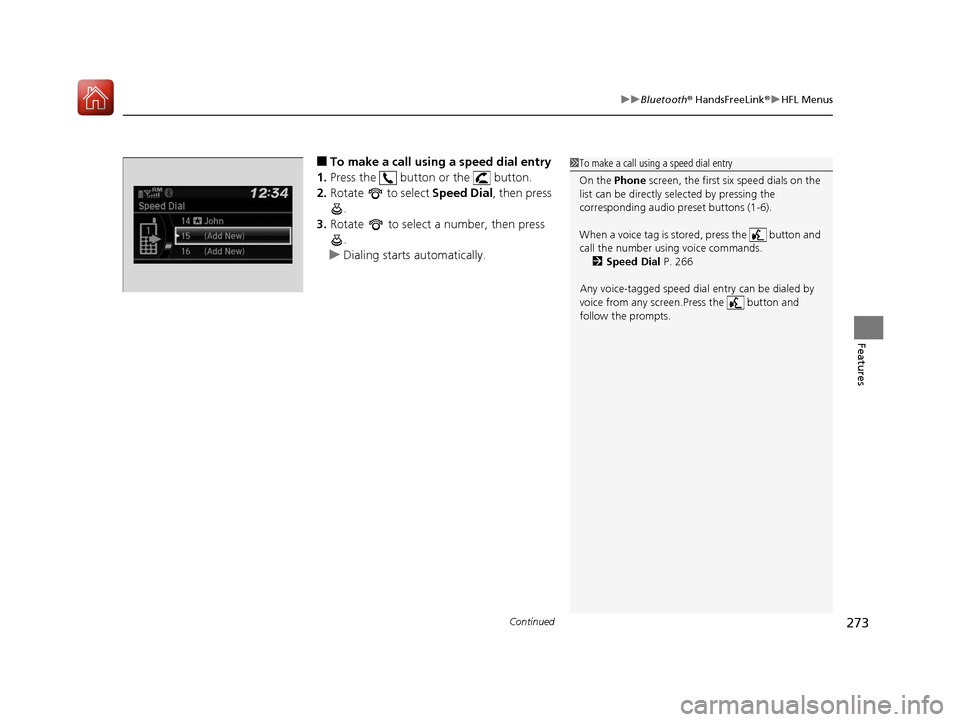
■To make a call using a speed dial entry
1. Press the button or the button.
2. Rotate to select Speed Dial, then press
.
3. Rotate to select a number, then press
.
u Dialing starts automatically.1To make a call using a speed dial entry
On the Phone screen, the first six speed dials on the
list can be directly selected by pressing the
corresponding audio preset buttons (1-6).
When a voice tag is stored, press the button and
call the number using voice commands.
2 Speed Dial P. 266
Any voice-tagged speed dial entry can be dialed by
voice from any screen.Press the button and
follow the prompts.
17 FIT -31T5A6200.book 273 ページ 2016年5月27日 金曜日 午後6時33分
Page 275 of 465
uuBluetooth ® HandsFreeLink ®u HFL Menus
274
Features
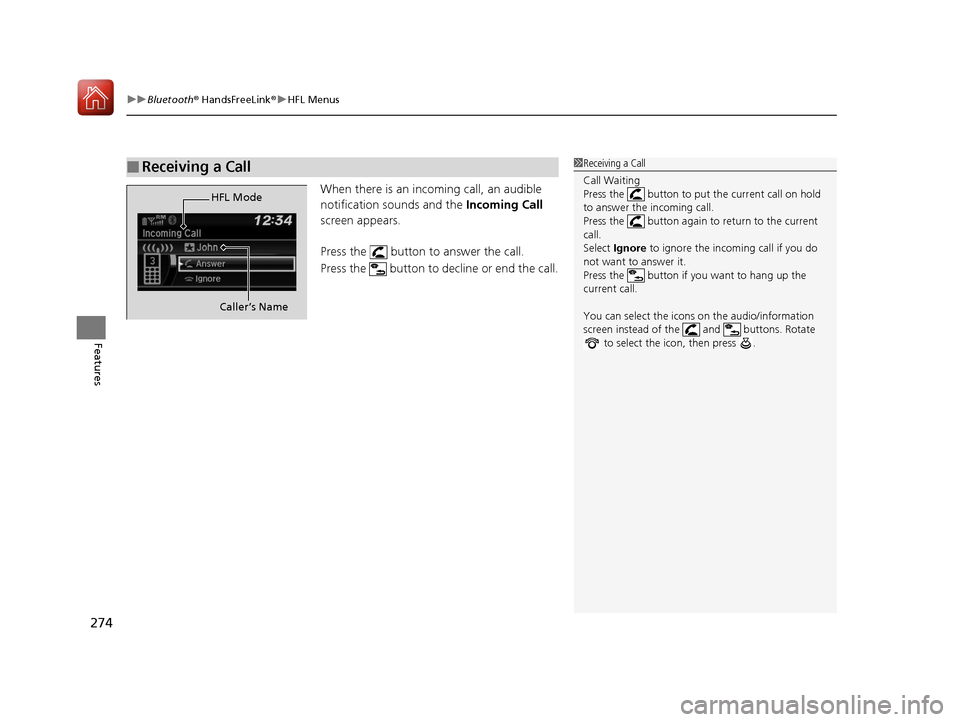
When there is an incoming call, an audible
notification sounds and the Incoming Call
screen appears.
Press the button to answer the call.
Press the button to decline or end the call.
■Receiving a Call1Receiving a Call
Call Waiting
Press the button to put the current call on hold
to answer the incoming call.
Press the button again to return to the current
call.
Select Ignore to ignore the incoming call if you do
not want to answer it.
Press the button if you want to hang up the
current call.
You can select the icons on the audio/information
screen instead of the and buttons. Rotate to select the icon, then press .
HFL Mode
Caller’s Name
17 FIT -31T5A6200.book 274 ページ 2016年5月27日 金曜日 午後6時33分
Page 277 of 465
276
uuBluetooth ® HandsFreeLink ®u Using HFL
Features
Using HFL
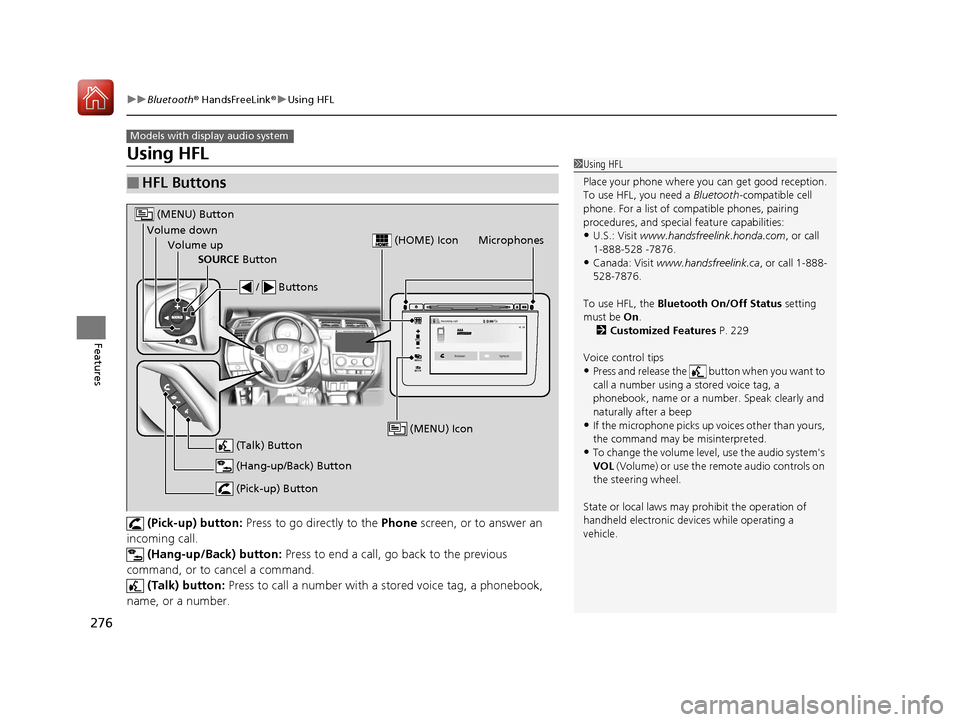
(Pick-up) button: Press to go directly to the Phone screen, or to answer an
incoming call.
(Hang-up/Back) button: Press to end a call, go back to the previous
command, or to cancel a command. (Talk) button: Press to call a number with a stored voice tag, a phonebook,
name, or a number.
■HFL Buttons
Models with display audio system
1 Using HFL
Place your phone where y ou can get good reception.
To use HFL, you need a Bluetooth-compatible cell
phone. For a list of compatible phones, pairing
procedures, and special feature capabilities:
•U.S.: Visit www.handsfreelink.honda.com , or call
1-888-528 -7876.
•Canada: Visit www.handsfreelink.ca , or call 1-888-
528-7876.
To use HFL, the Bluetooth On/Off Status setting
must be On .
2 Customized Features P. 229
Voice control tips
•Press and release the button when you want to
call a number using a stored voice tag, a
phonebook, name or a numbe r. Speak clearly and
naturally after a beep
•If the microphone picks up vo ices other than yours,
the command may be misinterpreted.
•To change the volume level, use the audio system's
VOL (Volume) or use the remote audio controls on
the steering wheel.
State or local laws may prohibit the operation of
handheld electronic devices while operating a
vehicle.
VOL
HOME
MENU
BACK
Microphones
(Pick-up) Button
(Hang-up/Back) Button
Volume up (Talk) Button
(MENU) Button
Volume downSOURCE Button / Buttons
(MENU) Icon
(HOME) Icon
17 FIT -31T5A6200.book 276 ページ 2016年5月27日 金曜日 午後6時33分
Page 297 of 465
uuBluetooth ® HandsFreeLink ®u HFL Menus
296
Features
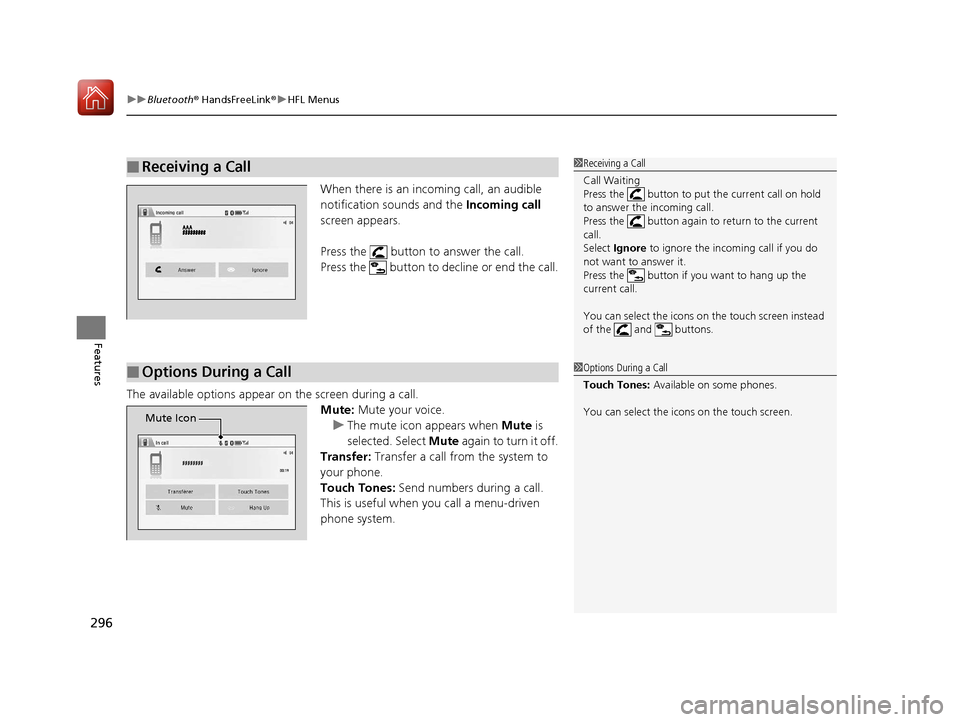
When there is an incoming call, an audible
notification sounds and the Incoming call
screen appears.
Press the button to answer the call.
Press the button to decline or end the call.
The available options appear on the screen during a call.
Mute: Mute your voice.
u The mute icon appears when Mute is
selected. Select Mute again to turn it off.
Transfer: Transfer a call from the system to
your phone.
Touch Tones: Send numbers during a call.
This is useful when you call a menu-driven
phone system.
■Receiving a Call1 Receiving a Call
Call Waiting
Press the button to put the current call on hold
to answer the incoming call.
Press the button again to return to the current
call.
Select Ignore to ignore the incoming call if you do
not want to answer it.
Press the button if you want to hang up the
current call.
You can select the icons on the touch screen instead
of the and buttons.
■Options During a Call1 Options During a Call
Touch Tones: Available on some phones.
You can select the icons on the touch screen.
�A�A�A�A�A�A�A�A
Mute Icon
17 FIT -31T5A6200.book 296 ページ 2016年5月27日 金曜日 午後6時33分
Page 336 of 465
335
uuWhen Driving uCruise Control*
Driving
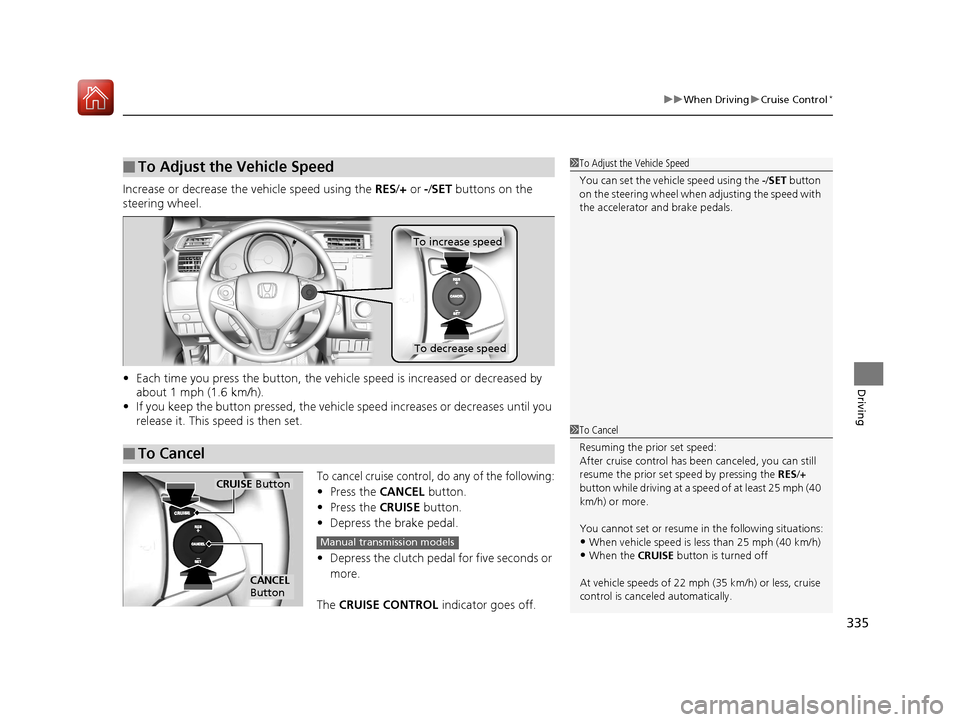
Increase or decrease the vehicle speed using the RES/+ or -/ SET buttons on the
steering wheel.
• Each time you press the button, the vehicl e speed is increased or decreased by
about 1 mph (1.6 km/h).
• If you keep the button pressed, the vehicl e speed increases or decreases until you
release it. This speed is then set.
To cancel cruise control, do any of the following:
• Press the CANCEL button.
• Press the CRUISE button.
• Depress the brake pedal.
• Depress the clutch pedal for five seconds or
more.
The CRUISE CONTROL indicator goes off.
■To Adjust the Vehicle Speed1To Adjust the Vehicle Speed
You can set the vehicle speed using the -/SET button
on the steering wheel when adjusting the speed with
the accelerator and brake pedals.
■To Cancel
To decrease speed
To increase speed
1 To Cancel
Resuming the prior set speed:
After cruise control has be en canceled, you can still
resume the prior set speed by pressing the RES/+
button while driving at a speed of at least 25 mph (40
km/h) or more.
You cannot set or resume in the following situations:
•When vehicle speed is less than 25 mph (40 km/h)•When the CRUISE button is turned off
At vehicle speeds of 22 m ph (35 km/h) or less, cruise
control is canceled automatically.
CRUISE Button
CANCEL
Button
Manual transmission models
17 FIT -31T5A6200.book 335 ページ 2016年5月27日 金曜日 午後6時33分
Page 407 of 465
406
uuRemote Transmitter Care uReplacing the Button Battery
Maintenance
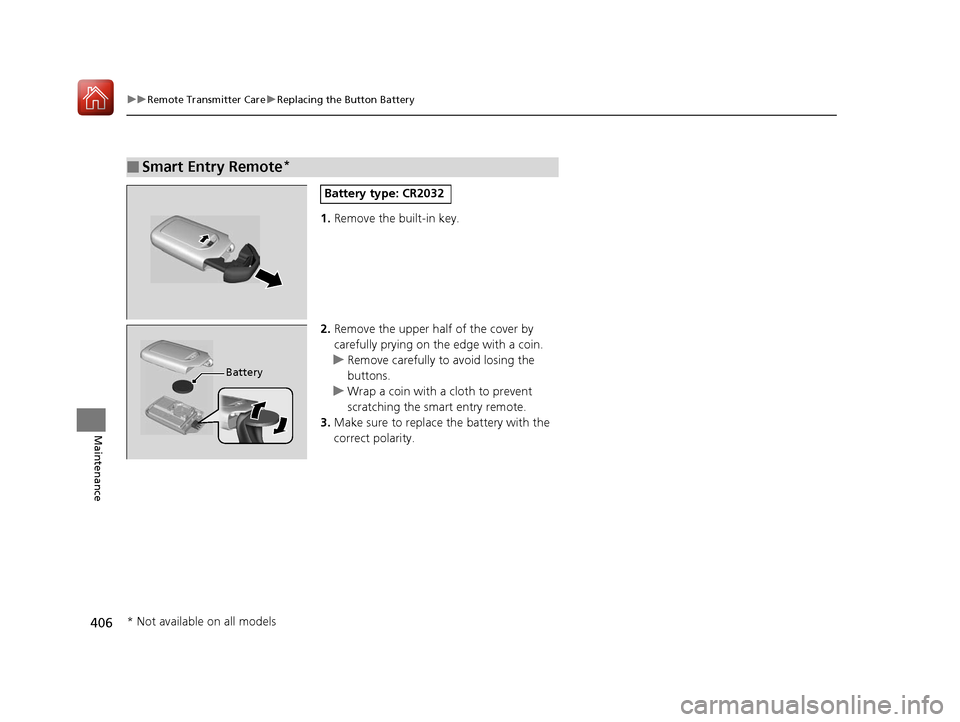
1. Remove the built-in key.
2. Remove the upper half of the cover by
carefully prying on the edge with a coin.
u Remove carefully to avoid losing the
buttons.
u Wrap a coin with a cloth to prevent
scratching the smart entry remote.
3. Make sure to replace the battery with the
correct polarity.
■Smart Entry Remote*
Battery type: CR2032
Battery
* Not available on all models
17 FIT -31T5A6200.book 406 ページ 2016年5月27日 金曜日 午後6時33分
Page 423 of 465
422
uuEngine Does Not Start uIf the Smart Entry Remote Battery is Weak
Handling the Unexpected
If the Smart Entry Remote Battery is Weak
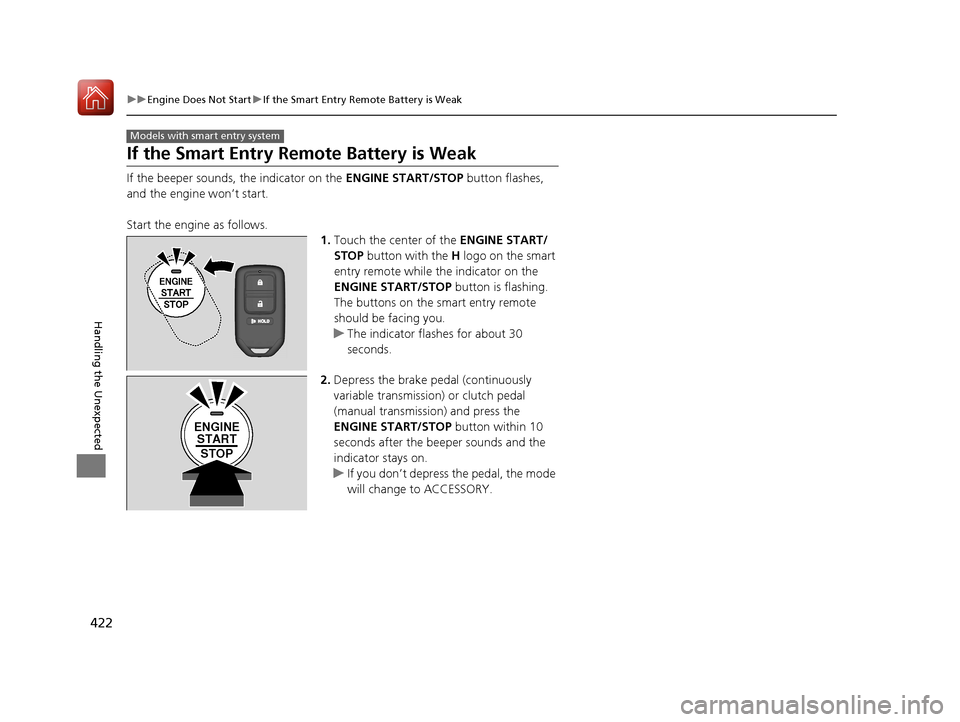
If the beeper sounds, the indicator on the ENGINE START/STOP button flashes,
and the engine won’t start.
Start the engine as follows. 1.Touch the center of the ENGINE START/
STOP button with the H logo on the smart
entry remote while the indicator on the
ENGINE START/STOP button is flashing.
The buttons on the smart entry remote
should be facing you.
u The indicator flashes for about 30
seconds.
2. Depress the brake pedal (continuously
variable transmission) or clutch pedal
(manual transmission) and press the
ENGINE START/STOP button within 10
seconds after the beeper sounds and the
indicator stays on.
u If you don’t depress the pedal, the mode
will change to ACCESSORY.
Models with smart entry system
ENGINE
START
STOP
17 FIT -31T5A6200.book 422 ページ 2016年5月27日 金曜日 午後6時33分
Page:
< prev 1-8 9-16 17-24