Page 340 of 465
339
uuWhen Driving uForward Collision Warning (FCW)*
Driving
FCW may not activate or may not detect a vehicle in front of your vehicle, and may activate even when you are aware of a vehicle ahead
of you, or when there is no vehicle ahead under the following conditions.
■FCW Limitations
Condition
●The distance between your vehicle and the vehicle ahead of you is too short.●A vehicle cuts in front of you at a slow speed, and it brakes suddenly.●A vehicle suddenly crosses in front of you.●When either your vehicle or the vehicle ahead of you a ccelerates rapidly.●The vehicle ahead of you is a motorcycle, a small vehicle, or a unique vehicle such as a tractor.●When you drive off-road or on a mountain road , or curved and winding road for an extended period that makes it difficult for th e camera to properly
detect a vehicle in front of you.
●When there are pedestrians or an imals in front of your vehicle.●When you drive in bad weather (rain, fog, etc.).●A heavy load in the rear or modificati ons to the suspension tilts your vehicle.●An abnormal tire condition is detected (wrong tire size, flat tire, etc.).●When the windshield is blocked by dirt, mud, leaves, wet snow, etc.●When the temperature inside the system is high.●A sudden change between light and dark such as an entr ance or exit of a tunnel.●You drive into the sunlight (e.g. at dawn or dusk).●When the windshield is dirty or cloudy.●When streetlights are perceived as the ta illight of a vehicle in front of yours.●When driving at night, the vehicle ahead of you is running with either taillight bulb burned out.●When you drive in the shadows of trees, buildings, etc.
17 FIT -31T5A6200.book 339 ページ 2016年5月27日 金曜日 午後6時33分
Page 343 of 465
uuWhen Driving uLane Departure Warning (LDW)*
342
Driving
LDW may not activate or may not recogniz e lanes, and may activate even when
keeping in the middle of a lane under the following conditions.
■LDW Limitations
Condition
●When you drive in bad weather (rain, fog, etc.).●A heavy load in the rear or modificati ons to the suspension tilts your vehicle.●An abnormal tire condition is detected (wrong tire size, flat tire, etc.).●When the windshield is blocked by dirt, mud, leaves, wet snow, etc.●When the temperature inside the system is high.●A sudden change between light and dark such as an entrance or exit of a tunnel.●You drive into the sunlight (e.g. at dawn or dusk).●When the windshield is dirty or cloudy.●When you drive in the shadows of trees, buildings, etc.●When you drive on a wet road su rface following another vehicle.
uThe camera may perceive the tire tracks in the water as lane lines.●When there is snow or wheel tracks on the side of the road.●When the road has many repaired areas or an erased lane line.●When the vehicle is running over painted signs or crosswalk markings.●When you drive in a lane with worn-out lane markups.
1LDW Camera
If the CAMERA HOT message appears:
•Use the heating and cooling system to cool down
the interior and, if nece ssary, the defroster mode
when windows are fogged.
•Start driving the vehicle to lower the windshield
temperature, which cool s down the area around
the LDW system.
17 FIT -31T5A6200.book 342 ページ 2016年5月27日 金曜日 午後6時33分
Page 386 of 465
385
uuReplacing Light Bulbs uSide Marker Light Bulbs
Continued
Maintenance
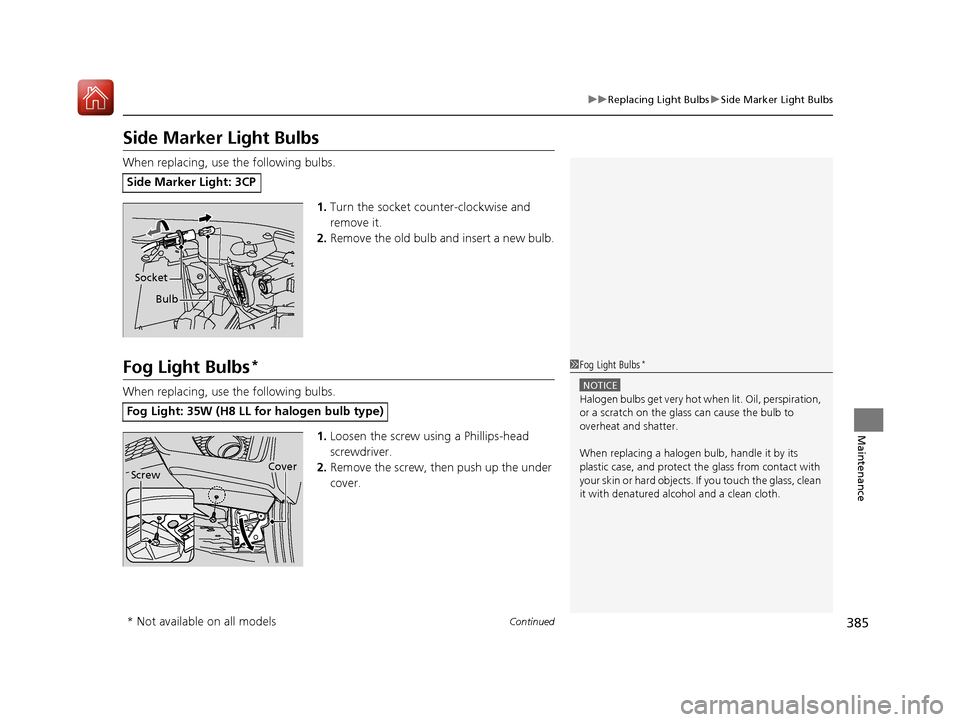
Side Marker Light Bulbs
When replacing, use the following bulbs.
1.Turn the socket counter-clockwise and
remove it.
2. Remove the old bulb and insert a new bulb.
Fog Light Bulbs*
When replacing, use the following bulbs.
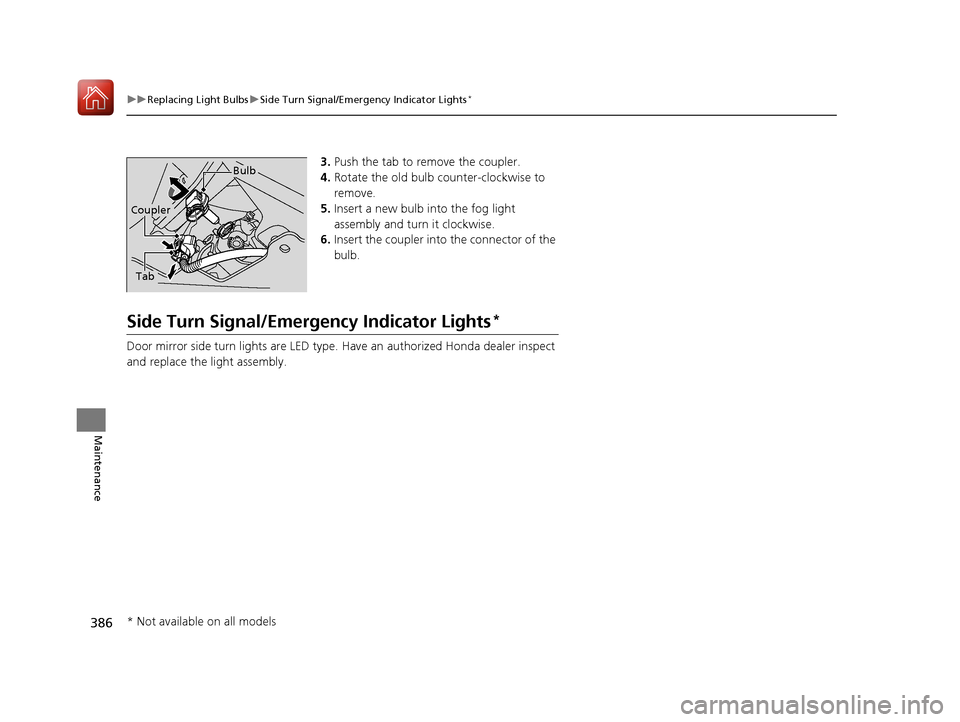
1.Loosen the screw using a Phillips-head
screwdriver.
2. Remove the screw, th en push up the under
cover.
Side Marker Light: 3CP
Bulb
Socket
Fog Light: 35W (H8 LL for halogen bulb type)
1 Fog Light Bulbs*
NOTICE
Halogen bulbs get very hot wh en lit. Oil, perspiration,
or a scratch on the glass can cause the bulb to
overheat and shatter.
When replacing a halogen bulb, handle it by its
plastic case, and protect the glass from contact with
your skin or hard objects. If you touch the glass, clean
it with denatured alc ohol and a clean cloth.
CoverScrew
* Not available on all models
17 FIT -31T5A6200.book 385 ページ 2016年5月27日 金曜日 午後6時33分
Page 387 of 465
386
uuReplacing Light Bulbs uSide Turn Signal/Emergency Indicator Lights*
Maintenance
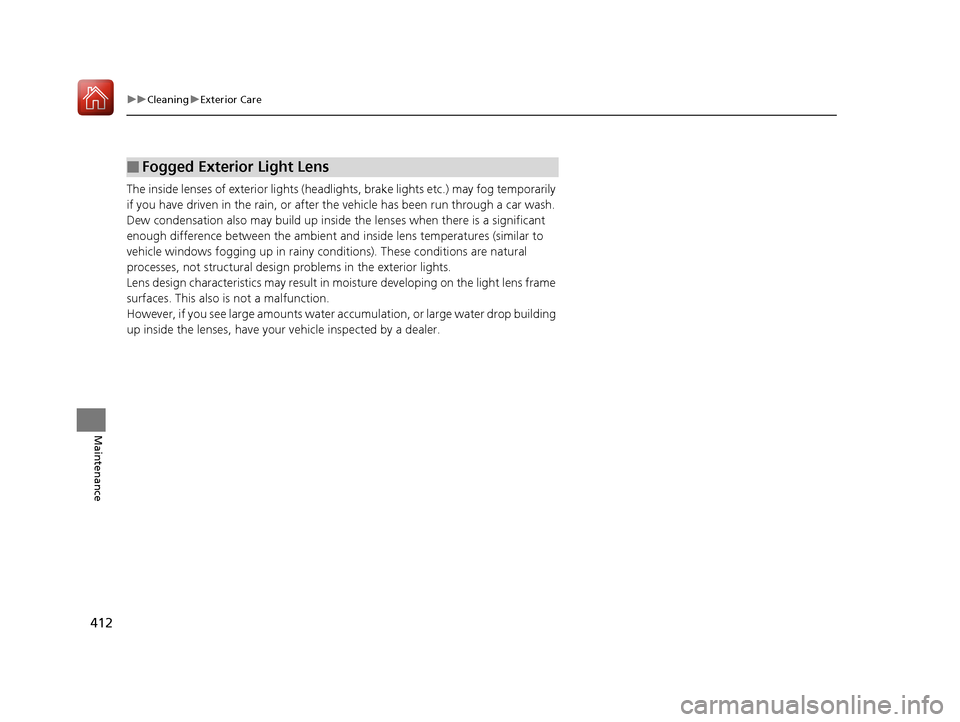
3. Push the tab to remove the coupler.
4. Rotate the old bulb counter-clockwise to
remove.
5. Insert a new bulb into the fog light
assembly and turn it clockwise.
6. Insert the coupler into the connector of the
bulb.
Side Turn Signal/Emergency Indicator Lights*
Door mirror side turn lights are LED type. Have an authorized Honda dealer inspect
and replace the light assembly.
Tab
Bulb
Coupler
* Not available on all models
17 FIT -31T5A6200.book 386 ページ 2016年5月27日 金曜日 午後6時33分
Page 413 of 465
412
uuCleaning uExterior Care
Maintenance
The inside lenses of exterior lights (head lights, brake lights etc.) may fog temporarily
if you have driven in the rain, or after the vehicle has been run through a car wash.
Dew condensation also may build up inside the lenses when there is a significant
enough difference between the ambient and inside lens temperatures (similar to
vehicle windows fogging up in rainy conditions). These conditions are natural
processes, not structural design problems in the exterior lights.
Lens design characteristics may result in mo isture developing on the light lens frame
surfaces. This also is not a malfunction.
However, if you see large amounts water ac cumulation, or large water drop building
up inside the lenses, have your vehicle inspected by a dealer.
■Fogged Exterior Light Lens
17 FIT -31T5A6200.book 412 ページ 2016年5月27日 金曜日 午後6時33分
Page 430 of 465

429
Handling the Unexpected
Indicator, Coming On/Blinking
If the Low Oil Pressure Indicator Comes On
■Reasons for the indicator to come on
Comes on when the engine oil pressure is low.
■What to do as soon as the indicator comes on
1. Immediately park the vehicle on level ground in a safe place.
2. If necessary, turn the hazard warning lights on.
■What to do after parking the vehicle
1. Stop the engine and let it sit for about three minutes.
2. Open the hood and check the oil level.
u Add oil as necessary.
2 Oil Check P. 374
3.Start the engine and check th e low oil pressure indicator.
u The indicator goes off: Start driving again.
u The indicator does not go off within 10 seconds: Stop the engine
and contact a dealer for repairs immediately.
If the Charging System Indicator Comes On
■Reasons for the indicator to come on
Comes on when the battery is not being charged.
■What to do when th e indicator comes on
Turn off the heating and cooling system*/climate control system*, rear
defogger, and other electrical system s, and immediately contact a dealer
for repairs.
1 If the Low Oil Pressure Indicator Comes On
NOTICE
Running the engine with low oil pressure can cause
serious mechanical damage almost immediately.
1If the Charging System Indicator Comes On
If you need to stop temporarily, do not turn off the
engine. Restarting the engi ne may rapidly discharge
the battery.
* Not available on all models
17 FIT -31T5A6200.book 429 ページ 2016年5月27日 金曜日 午後6時33分
Page 434 of 465

433Continued
Handling the Unexpected
Fuses
Fuse Locations
If any electrical devices are not working,
turn the ignition switch to LOCK
(0*1 and
check to see if any appl icable fuse is blown.
■Fuse box A
Located near the brake fluid reservoir. Push
the tabs to open the box.
Fuse locations are shown on the fuse box
cover. Locate the fuse in question by the
fuse number and box cover number.
■Engine Compartment Fuse Box
Tab
■Circuit protected and fuse rating
Circuit ProtectedAmps
1Headlight Low Beam Main20 A
2CDC*(30 A)
3Hazard10 A
4DBW15 A
5Wiper(30 A)
6Stop10 A
7IGP15 A
8IG Coil15 A
9EOP*(10 A)
10INJ(20 A)
11––
12Main Fan30 A
13Starter SW(30 A)
14MG Clutch(7.5 A)
15Battery Sensor(7.5 A)
16––
17Daytime Running Lights(7.5 A)
18Horn10 A
19Fog Light*(15 A)
20UB ECU*(7.5 A)
*1 : Models with the smart entry system have an ENGINE START/STOP button instead of an ignition
switch.
*2 : Models with smart entry system
*3 : Models without smart entry system
Circuit ProtectedAmps
21Back Up Main15 A
22Interior Lights7.5 A
23Sub Fan(30 A)
24––
25Smart Entry Auto Start*2(7.5 A)
26ST MG*3(7.5 A)
27––
28––
29Back Up(10 A)
30IGP LAF(10 A)
31IGPS(7.5 A)
32Right Headlight Low Beam10 A
33Left Headlight Low Beam10 A
* Not available on all models
17 FIT -31T5A6200.book 433 ページ 2016年5月27日 金曜日 午後6時33分
Page 437 of 465
436
uuFuses uFuse Locations
Handling the Unexpected
■Fuse box B
Remove the cover by putting the flat-tip
screwdriver into the side slot as shown.
Cover
■Circuit protected and fuse rating
Circuit ProtectedAmps
1
EPS70 A
IG Main30 A*1
50 A*2
Fuse Box Main 250 A
ABS/VSA Motor40 A
Fuse Box Main 130 A
Fuse Box Main 340 A
2 ––
––
––
––
––
––
*1 : Models with smart entry system
*2 : Models without smart entry system
Circuit ProtectedAmps
3Heater30 A
4*1IG Main 230 A
4*2––
5ABS/VSA FSR30 A
6FCW*/LDW*(15 A)
7––
8– –
9Small Light10 A
10 ACC Socket (Console)*(20 A)
11Rear Defogger30 A
12*1−−
12*2ACC Key Lock (7.5 A)
13Heated Door Mirror*(10 A)
14 A/C Blower SW (7.5 A)
15*1––
15*2Wiper30 A
* Not available on all models
17 FIT -31T5A6200.book 436 ページ 2016年5月27日 金曜日 午後6時33分