Page 554 of 657

553
uuMaintenance Under the Hood uOpening the Hood
Maintenance
Opening the Hood
1. Park the vehicle on a level surface, and set
the parking brake.
2. Pull the hood release handle under the
lower left corner of the dashboard.
u The hood will pop up slightly.
3. Push the hood latch lever (located under
the front edge of the hood to the center) to
the side and raise the hood. Once you have
raised the hood slightly , you can release the
lever.
4. Remove the support rod from the clamp
using the grip. Mount the support rod in
the hood.
When closing, remove the support rod, and
stow it in the clamp, then gently lower the
hood. Remove your hand at a height of
approximately 12 inches (30 cm) and let the
hood close.1 Opening the Hood
NOTICE
Do not open the hood when the wiper arms are
raised. The hood will strike the wipers, resulting in
damage to the hood and/or the wipers.
When closing the hood, check that the hood is
securely latched.
If the hood latch lever moves stiffly, or if you can
open the hood without lifti ng the lever, the latch
mechanism should be cleaned and lubricated.
Hood Release Handle
Pull
Lever
Support Rod
Grip
Clamp
17 CR-V-31TLA6000.book 553 ページ 2016年10月11日 火曜日 午後6時37分
Page 558 of 657
557
uuMaintenance Under the Hood uAdding Engine Oil
Maintenance
Adding Engine Oil
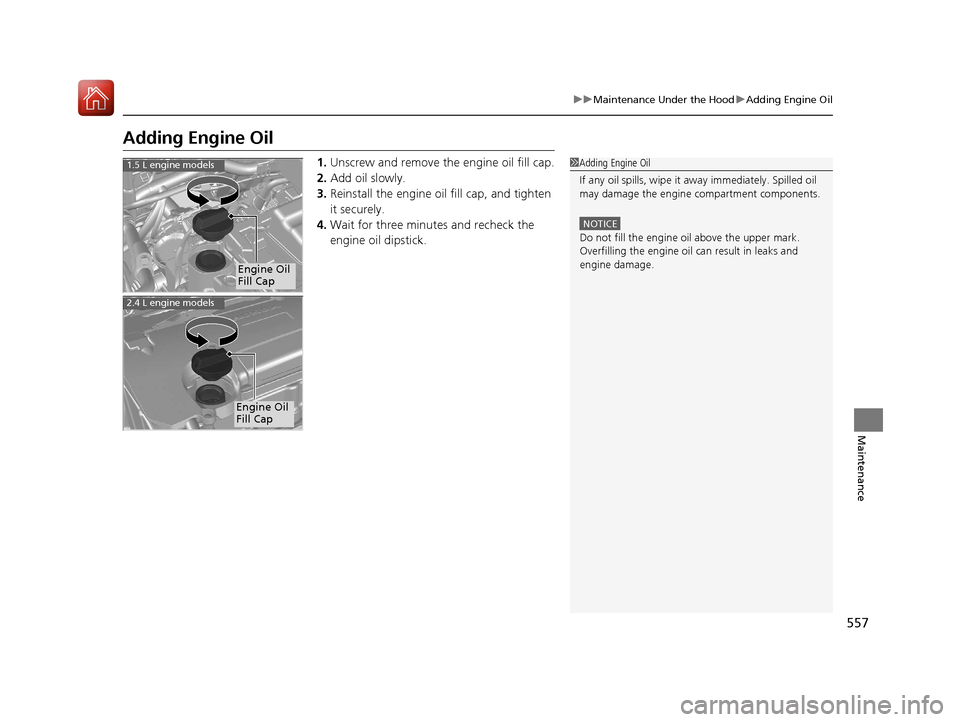
1. Unscrew and remove the engine oil fill cap.
2. Add oil slowly.
3. Reinstall the engine oil fill cap, and tighten
it securely.
4. Wait for three minutes and recheck the
engine oil dipstick.1Adding Engine Oil
If any oil spills, wipe it away immediately. Spilled oil
may damage the engine compartment components.
NOTICE
Do not fill the engine oil above the upper mark.
Overfilling the engine oil can result in leaks and
engine damage.
Engine Oil
Fill Cap
1.5 L engine models
2.4 L engine models
Engine Oil
Fill Cap
17 CR-V-31TLA6000.book 557 ページ 2016年10月11日 火曜日 午後6時37分
Page 561 of 657

uuMaintenance Under the Hood uChanging the Engine Oil and Oil Filter
560
Maintenance
5. Remove the oil filter and dispose of the
remaining oil.
6. Check that the filter ga sket is not stuck to
the engine contact surface.
u If it is stuck, you must detach it.
7. Wipe away dirt and dust adhering to the
contact surface of the engine block, and
install a new oil filter.
u Apply a light coat of new engine oil to
the oil filter gasket.
8. Put a new washer on the drain bolt, then
reinstall the drain bolt.
u Tightening torque:
30 lbf∙ft (40 N∙m, 4.0 kgf∙m)
9. Pour the recommended engine oil into the
engine.
u Engine oil change capacity (including filter):
3.7 US qt (3.5 L)
4.6 US qt (4.4 L)
10. Reinstall the engine oil fill cap securely and
start the engine.
11. Run the engine for a few minutes, and
then check that ther e is no leak from the
drain bolt or oil filter.
12. Stop the engine, wait for three minutes, and
then check the oil level on the dipstick.
u If necessary, add more engine oil.1Changing the Engine Oil and Oil Filter
You will need a special wrench to replace the oil
filter. You can buy this wrench from a dealer.
When installing the new oil filter, follow the
instructions supplied with the oil filter.
Reinstall the engine oil fill cap. Start the engine. The
low oil pressure indicator should go off within five
seconds. If it does not, turn off the engine, and check
your work.
Be sure to verify that the o il filter is designed for your
vehicle. A genuine Honda oil filter is recommended
for optimum lubrication flow and filtration properties
to assure the reliability of the engine.1.5 L engine models
Oil Filter
2.4 L engine models
Oil Filter1.5 L engine models
2.4 L engine models
17 CR-V-31TLA6000.book 560 ページ 2016年10月11日 火曜日 午後6時37分
Page 595 of 657

uuCleaning uInterior Care
594
Maintenance
The driver's floor mat hooks over floor
anchors, which keep them from sliding
forward. To remove a mat for cleaning, turn
the anchor knobs to the unlock position.
When reinstalling the mat after cleaning, turn
the knobs to the lock position.
Do not put additional floor mats on top of
the anchored mat.
To properly clean leather:
1. Use a vacuum or soft dry cloth first to remove any dirt or dust.
2. Clean the leather with a soft cloth dampen ed with a solution comprised of 90%
water and 10% neutral soap.
3. Wipe away any soap residu e with a clean damp cloth.
4. Wipe away residual water and allow leather to air dry in the shade.
■Floor Mats1Floor Mats
If you use any floor mats that were not originally
provided with your vehicle, make sure they are
designed for your specific ve hicle, fit correctly, and
are securely anchored by the floor anchors.
Position the rear seat floor mats properly. If they are
not properly positioned, the floor mats can interfere
with the front seat functions.
Lock Unlock
■Maintaining Genuine Leather*1 Maintaining Genuine Leather*
It is important to clean or wipe away dirt or dust as
soon as possible. Spills can soak into leather resulting
in stains. Dirt or dust ca n cause abrasions in the
leather. In addition, pl ease note that some dark
colored clothing can rub onto the leather seats
resulting in discol oration or stains.
* Not available on all models
17 CR-V-31TLA6000.book 594 ページ 2016年10月11日 火曜日 午後6時37分
Page 605 of 657

uuIf a Tire Goes Flat uChanging a Flat Tire
604
Handling the Unexpected
1. Place the jack under the jacking point
closest to the tire to be changed.
2. Turn the end bracket clockwise (as shown
in image) until the top of the jack contacts
the jacking point.
u Make sure that the jacking point tab is
resting in the jack notch.
3. Raise the vehicle, using the jack handle bar
and the jack handle, until the tire is off the
ground.
■How to Set Up the Jack1How to Set Up the Jack
Do not use the jack with people or luggage in the
vehicle.
Use the jack provided in y our vehicle. Other jacks may
not support the weight (“load”) or their shape may
not match.
The following instructions must be followed to use
the jack safely:
•Do not use while the engine is running.
•Use only where the ground is firm and level.
•Use only at the jacking points.•Do not get in the vehicl e while using the jack.
•Do not put anything on top of or underneath the
jack.
Loose items can fly around the interior in a crash and
can seriously inju re the occupants.
Store the wheel, jack, a nd tools securely before
driving.
3WARNING
The vehicle can easily roll off the jack,
seriously injuring anyone underneath.
Follow the directions for changing a tire
exactly and never get under the vehicle
when it is supported only by the jack.
Jack
Handle
Bar Wheel Nut
Wrench as Jack Handle
17 CR-V-31TLA6000.book 604 ページ 2016年10月11日 火曜日 午後6時37分
Page 607 of 657
uuIf a Tire Goes Flat uChanging a Flat Tire
606
Handling the Unexpected
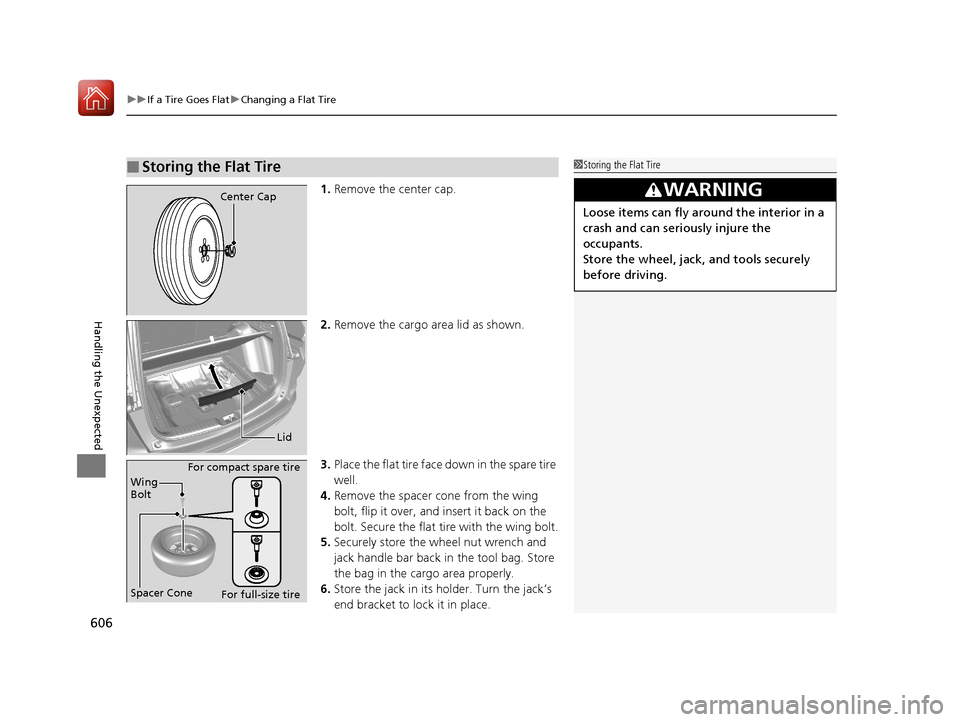
1. Remove the center cap.
2. Remove the cargo area lid as shown.
3. Place the flat tire face down in the spare tire
well.
4. Remove the spacer cone from the wing
bolt, flip it over, and insert it back on the
bolt. Secure the flat tire with the wing bolt.
5. Securely store the wheel nut wrench and
jack handle bar back in the tool bag. Store
the bag in the cargo area properly.
6. Store the jack in its holder. Turn the jack’s
end bracket to lock it in place.
■Storing the Flat Tire1Storing the Flat Tire
3WARNING
Loose items can fly around the interior in a
crash and can seriously injure the
occupants.
Store the wheel, jack, and tools securely
before driving.
Center Cap
Lid
Spacer Cone Wing
Bolt For compact spare tire
For full-size tire
17 CR-V-31TLA6000.book 606 ページ 2016年10月11日 火曜日 午後6時37分
Page 612 of 657

611Continued
Handling the Unexpected
Jump Starting
Turn off the power to electric devices, such as the audio and lights. Turn off the
engine, then open the hood. 1.Open the terminal cover on your vehicle’s
battery positive + terminal.
2. Connect the first jumper cable to your
vehicle's battery + terminal.
3. Connect the other end of the first jumper
cable to the booster battery + terminal.
u Use a 12-volt booster battery only.
u When using an automotive battery
charger to boost your 12-volt battery,
select a lower charging voltage than 15
volts. Check the ch arger manual for the
proper setting.
4. Connect the second jumper cable to the
booster battery - terminal.
■Jump Starting Procedure1Jump Starting
Securely attach the jumper cables clips so that they
do not come off when the e ngine vibrates. Also be
careful not to tangle the ju mper cables or allow the
cable ends to touch each other while attaching or
detaching the jumper cables.
Battery performance degrades in cold conditions and
may prevent the engi ne from starting.
3WARNING
A battery can explode if you do not follow
the correct procedure, seriously injuring
anyone nearby.
Keep all sparks, open flames, and smoking
materials away from the battery.
+ Terminal
Booster Battery
1.5 L engine models
17 CR-V-31TLA6000.book 611 ページ 2016年10月11日 火曜日 午後6時37分
Page 626 of 657

625Continued
Handling the Unexpected
Fuses
Fuse Locations
If any electrical devices are not working,
turn the ignition switch to LOCK
(0*1 and
check to see if any appl icable fuse is blown.
Fuse locations are shown on the fuse box
cover. Locate the fuse in question by the
fuse number and box cover number.
Located near the brake fluid reservoir. Push
the tabs to open the box.
■Engine Compartment Fuse Box
Tab
■Circuit protected and fuse rating
Circuit ProtectedAmps
1
Audio AMP*(30 A)
Electric Brake Booster40 A
Main Fan Motor30 A
Relay Module 130 A
IG Main 2*230 A
Relay Module 230 A
Battery125 A
2
EPS70 A
IG Main 130 A*2
50 A*3
Fuse Box Option(40 A)
Fuse Box60 A
Front Wiper Motor30 A
Sub Fan Motor30 A
3
Rear Defroster40 A
Starter Motor30 A
Fuse Box40 A
ABS/VSA Motor40 A
ABS/VSA FSR40 A
Blower Motor40 A
4
Option Block 1*(40 A)
Option Block 2*(40 A)
−−
Power Tail Gate*(40 A)
5VB ACT*4(7.5 A)
*1:Models with the smart entry system have an ENGINE START/STOP button
instead of an ignition switch.
*2:Models with smart entry system
*3:Models without smart entry system
*4:1.5L engine models
*5:2.4L engine models
6Washer15 A
7FI Main15 A
8FI Sub*415 ADBW*5
9Stop Lights10 A
10Injector20 A
11LAF7.5 A
12FI ECU*4
−*510 A
−
13Front Wiper Deicer*(15 A)
14Hazard10 A
15IG Coil15 A
16Transmission*4
−*5(15 A) −
17−−
18Back Up10 A
19Audio15 A
20AWD*(20 A)
Circuit ProtectedAmps
* Not available on all models
17 CR-V-31TLA6000.book 625 ページ 2016年10月11日 火曜日 午後6時37分