Page 112 of 601
Continued111
uuGauges and Displays uInformation Display*
Instrument Panel
Shows the estimated average fuel economy of each trip meter in mpg or l/100 km.
The display is updated at set intervals. Wh en a trip meter is reset, the average fuel
economy is also reset.
Shows the instant fuel economy as a bar graph in mpg or l/100km.
Shows the remaining oil life and Maintenance Minder
TM.
2 Maintenance MinderTM P. 485
Shows the estimated distance you can travel on the remaining fuel. This distance is
estimated from the fuel economy of your previous trips.
■Average Fuel Economy
■Instant Fuel Economy Gauge
■Engine Oil Life
■Range
1Average Fuel Economy
Press and hold the km/mile change knob to switch
the measurement.
1Instant Fuel Economy Gauge
Press and hold the km/mile change knob to switch
the measurement.
1 Range
Press and hold the km/mile change knob to switch
the measurement.
17 CIVIC 4D HCM (KA KC KL)-31TBA6100.book 111 ページ 2016年8月31日 水曜日 午後6時5分
Page 114 of 601
113
uuGauges and Displays uDriver Information Interface*
Continued
Instrument Panel
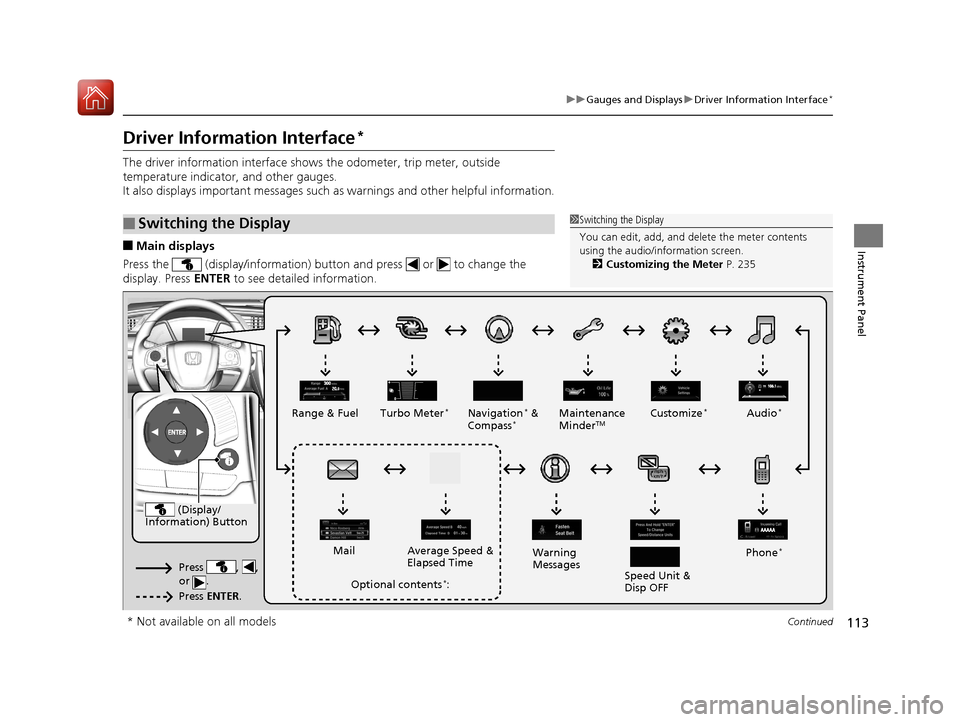
Driver Information Interface*
The driver information interface show s the odometer, trip meter, outside
temperature indicator, and other gauges.
It also displays important messages such as warnings and other helpful information.
■Main displays
Press the (display/information) button and press or to change the
display. Press ENTER to see detailed information.
■Switching the Display1Switching the Display
You can edit, add, and de lete the meter contents
using the audio/information screen. 2 Customizing the Meter P. 235
(Display/
Information) Button
Press , ,
or .
Press ENTER .
Range & Fuel Turbo Meter*Navigation* &
Compass*Maintenance
MinderTMCustomize*Audio*
Phone*
Speed Unit &
Disp OFF
Warning
Messages
Average Speed &
Elapsed Time
Mail
Optional contents*:
* Not available on all models
17 CIVIC 4D HCM (KA KC KL)-31TBA6100.book 113 ページ 2016年8月31日 水曜日 午後6時5分
Page 115 of 601
uuGauges and Displays uDriver Information Interface*
114
Instrument Panel
■Trip computer
Press the ( TRIP) knob to change the display.
Shows the total number of miles or kilome ters that your vehicle has accumulated.
Shows the total number of miles or kilomete rs driven since the last reset. Meters A
and B can be used to measure two separate trips.
■Resetting a trip meter
To reset a trip meter, display it, then pr ess and hold the knob. The trip meter is
reset to 0.0 .
■Odometer
■Trip Meter
Menu Menu Menu
Odometer
Outside temperatureTrip ATrip B
(
TRIP)
Knob
1 Trip Meter
Switch between trip meter A and trip meter B by
pressing the knob.
17 CIVIC 4D HCM (KA KC KL)-31TBA6100.book 114 ページ 2016年8月31日 水曜日 午後6時5分
Page 116 of 601

Continued115
uuGauges and Displays uDriver Information Interface*
Instrument Panel
Shows the estimated average fuel economy of each trip meter in mpg or l/100 km.
The display is updated at set intervals. Wh en a trip meter is reset, the average fuel
economy is also reset.
Shows the estimated distance you can travel on the remaining fuel. This distance is
estimated from the fuel economy of your previous trips.
Shows the time elapsed since Trip A or Trip B was reset.
Shows the average speed in mph or km/h since Trip A or Trip B was reset.
Shows the remaining oil life and Maintenance Minder
TM.
2 Maintenance MinderTM P. 485
■Average Fuel Economy
■Range
■Elapsed Time
■Average Speed
■Engine Oil Life
1Average Fuel Economy
You can change when to reset the average fuel
economy.
2 Customized Features P. 118, 308
1Elapsed Time
You can change when to reset the elapsed time.
2 Customized Features P. 118, 308
1Average Speed
You can change when to reset the average speed.
2 Customized Features P. 118, 308
17 CIVIC 4D HCM (KA KC KL)-31TBA6100.book 115 ページ 2016年8月31日 水曜日 午後6時5分
Page 122 of 601
121
uuGauges and Displays uDriver Information Interface*
Continued
Instrument Panel
■List of customizable options
*1:Default Setting Setup Group Customizable Features
Description Selectable Settings
TPMS
Calibration—Calibrates the TPMS.Cancel/Calibrate
Clock Setup Adjust Clock
Adjusts clock.
2
Clock P. 128—
Clock Display Selects the digital clock display from 12H to 24H. 24h/12h
*1/OFF
Driver Assist
System
Setup
Forward Collision
Warning DistanceChanges at which distance the CMBSTM alerts.Long /Normal*1/ Short
ACC Forward Vehicle
Detect BeepCauses the system to beep when the system detects a
vehicle, or when the vehicle goes out of ACC range.ON /OFF*1
Road Departure
Mitigation SettingChanges the setting fo r the road departure
mitigation system.Normal*1/ Wide /Warning
Only
Lane Keeping Assist
Suspend BeepCauses the system to b eep when the LKAS is
suspended.ON /OFF*1
17 CIVIC 4D HCM (KA KC KL)-31TBA6100.book 121 ページ 2016年8月31日 水曜日 午後6時5分
Page 123 of 601

122
uuGauges and Displays uDriver Information Interface*
Instrument Panel
*1:Default SettingSetup Group Customizable Features Description Selectable Settings
Meter Setup Language Selection
Changes the displayed language. English
*1/French /Spanish
Adjust Outside Temp.
Display Adjusts the temperature reading by a few degrees.
-5°F ~ ±0°F
*1 ~ +5°F
“Trip A” Reset Timing Changes the setting of how to reset trip meter A,
average fuel economy A,
average speed A, and
elapsed time A. When Refueled
/IGN OFF /
Manually Reset
*1
“Trip B” Reset Timing Changes the setting of how to reset trip meter B,
average fuel economy B,
average speed B, and
elapsed time B. When Refueled
/IGN OFF /
Manually Reset*1
Adjust Alarm Volume Changes the alarm volume, such as buzzers,
warnings, turn signal sound, and so on.
High
/Mid*1/Low
Fuel Efficien cy Backlight Turns the ambient meter feature on and off. ON
*1/OFF
Speed/Distance Units Selects the trip computer units. mph∙miles
*1/km/ h∙km
Tachometer Selects whether the tachometer come on the driver
information interface. ON
*1/
OFF
17 CIVIC 4D HCM (KA KC KL)-31TBA6100.book 122 ページ 2016年8月31日 水曜日 午後6時5分
Page 124 of 601
123
uuGauges and Displays uDriver Information Interface*
Continued
Instrument Panel
*1: Default SettingSetup Group Customizable Features
Description Selectable Settings
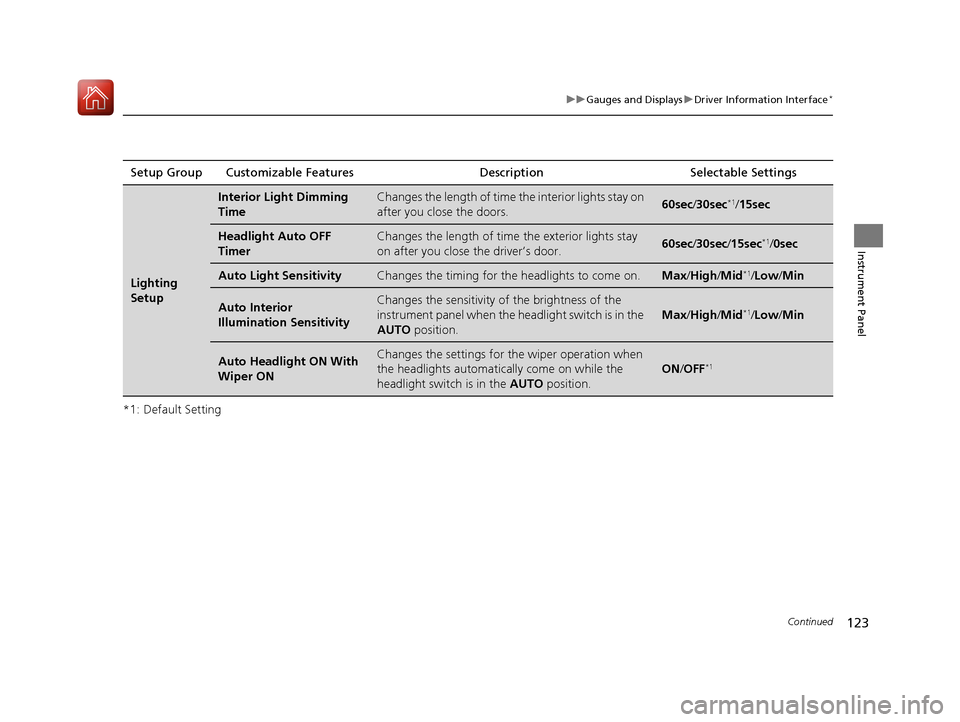
Lighting
Setup
Interior Light Dimming
TimeChanges the length of time the interior lights stay on
after you close the doors.60sec/30sec*1/15sec
Headlight Auto OFF
TimerChanges the length of time the exterior lights stay
on after you close the driver’s door.60sec /30sec /15sec*1/ 0sec
Auto Light SensitivityChanges the timing for th e headlights to come on.Max/High /Mid*1/Low /Min
Auto Interior
Illumination SensitivityChanges the sensitivity of the brightness of the
instrument panel when the headlight switch is in the
AUTO position.
Max/High /Mid*1/Low /Min
Auto Headlight ON With
Wiper ONChanges the settings for th e wiper operation when
the headlights automatica lly come on while the
headlight switch is in the AUTO position.
ON/OFF*1
17 CIVIC 4D HCM (KA KC KL)-31TBA6100.book 123 ページ 2016年8月31日 水曜日 午後6時5分
Page 125 of 601

124
uuGauges and Displays uDriver Information Interface*
Instrument Panel
*1: Default SettingSetup Group Customizable Features Description Selectable Settings
Door Setup Auto Door Lock
Changes the setting for when the doors
automatically lock. With Vehicle Speed
*1/
Shift
from P /OFF
Auto Door Unlock Changes the setting for when the doors
automatically unlock. When Driver’s Door Opens
*1/
When Shifting Into Park/
When Ignition Switched
OFF /OFF
Key And Remote Unlock
Mode Sets up either the driver’s door or all doors to unlock
on the first operation of the remote or built-in key.
Driver Door
*1/ All Doors
Keyless Lock Answer
Back LOCK/UNLOCK- The exterior lights flash.
LOCK (2nd push)- The beeper sounds.
ON
*1/
OFF
Security Relock Timer Changes the time it takes for the doors to relock and
the security system to set after you unlock the
vehicle without opening any door.
90sec
/60sec /30sec
*1
Maintenance
Reset—Resets/Cancels the engine oil life display when you
have performed the maintenance service. Cancel /All Due Items
Default All —Cancels/Resets all the customized settings as
default. Cancel
/Set
17 CIVIC 4D HCM (KA KC KL)-31TBA6100.book 124 ページ 2016年8月31日 水曜日 午後6時5分