2017 HONDA CIVIC tow
[x] Cancel search: towPage 167 of 601

166
uuOperating the Switches Around the Steering Wheel uWipers and Washers
Controls
Wipers and Washers
The windshield wipers and washers can be
used when the ignition switch is in ON (w*1.
■MIST
The wipers run at high speed until you release
the lever.
■Wiper switch (OFF, INT*2/AUTO*3, LO,
HI)
Move the lever up or down to change the
wiper settings.
■Adjusting wiper operation*
Turn the adjustment ring to adjust the wiper
operation.
■Washer
Sprays while you pull the lever toward you.
When you release the lever for more than one
second, the spray stops, the wipers sweep two
or three more times to clear the windshield,
then stop.
*1: Models with the smart entry system have an ENGINE START/STOP button instead of an
ignition switch.
*2: Models with manual intermittent operation
*3: Models with automati c intermittent operation
■Windshield Wiper/Washer1Wipers and Washers
NOTICE
Do not use the wipers when the windshield is dry.
The windshield will get sc ratched, or the rubber
blades will get damaged.
NOTICE
In cold weather, the blades may freeze to the
windshield.
Operating the wipers in this condition may damage
the wipers. Use the defroster to warm the
windshield, then turn the wipers on.
If the vehicle speeds up while the wipers are
operating intermittently, the length of the wipe
interval shortens.
When the vehicle speeds up, the wiper operation’s
shortest delay setting ( ) and the LO setting become
the same.
Turn the washers off if no washer fluid comes out.
The pump may get damaged.
The wiper motor may stop motor operation
temporarily to prevent an overload. Wiper operation
will return to normal within a few minutes, once the
circuit has returned to normal.
If the wiper stops operating due to any obstacle such as
the build-up of snow, park the vehicle in a safe place.
Rotate the wiper switch to OFF, and turn the ignition
switch to ACCESSORY ( q or LOCK (0*1, then
remove the obstacle.
Models with adjustment ring
All models
Intermittent Time
Adjustment Ring*
MIST
INT
*2/AUTO*3
OFF
LO: Low speed wipe
HI: High speed wipe Pull to
use
washer.Lower speed, fewer sweeps
Higher speed, more sweeps
* Not available on all models
17 CIVIC 4D HCM (KA KC KL)-31TBA6100.book 166 ページ 2016年8月31日 水曜日 午後6時5分
Page 189 of 601

uuInterior Lights/Interior Convenience Items uInterior Convenience Items
188
Controls
To use the wireless charger, the powe r mode must be in ACCESSORY or ON.
Charge a compatible device on the ar ea indicated by the mark as follows:
1. To turn the system on and off, press and
hold the (power) button.
u When the system is activated, the green
indicator light comes on.
2. Place the device you want to charge on the
charging area.
u The system will automatically start
charging the device, and the amber
indicator light will come on.
u Make sure that the device is compatible
with the system and placed with the
chargeable side in the center of the
charging area.
3. When charging is completed, the green
indicator light will come on.
u Depending on the device, the amber
indicator light will stay on.
■Wireless Charger*
Canadian models1Wireless Charger*
This system consumes a lot of power. Do not use the
system for a long time when the engine is not
running. This may weaken the battery, making it
difficult to start the engine.
When using the wireless charger, check the user’s manual
that came with the compatible device you want to charge.
3CAUTION
Metal objects between the charge pad
and the device to be charged will get
hot and can burn you.
• Always remove foreign objects from
the charge pad before charging the
device.
• Be sure the surface is clear of dust and
other debris before charging.
• Do not spill liquids (i. e. water, drinks,
etc.) on the charger and the device.
• Do not use oil, grease, alcohol,
benzine or thinner for cleaning the
charge pad.
• Do not cover the system with towels,
clothing, or other objects while
charging etc.
• Avoid spraying aerosols which may
come in contact with the charge pad
surface.
Green Indicator
Amber Indicator
Charging Area (Power) Button
* Not available on all models
17 CIVIC 4D HCM (KA KC KL)-31TBA6100.book 188 ページ 2016年8月31日 水曜日 午後6時5分
Page 396 of 601

395
Driving
This chapter discusses driving, refueling, and information on items such as accessories.
Before Driving
Driving Preparation .......................... 396
Maximum Load Limit........................ 399
Towing a Trailer ................................ 401
When Driving Starting the Engine .................. 402, 404
Precautions While Driving................. 409
Continuously Variable Transmission*... 410
Shifting .................................... 411, 413
ECON Button ................................... 416
Cruise Control
*................................ 417
Front Sensor Camera*...................... 420 Adaptive Cruise Control (ACC) with Low
Speed Follow (LSF)
*....................... 422Road Departure Mitigation (RDM) System*...... 436Lane Keeping Assist System (LKAS)*.... 440
Vehicle Stabilit y Assist (VSA®), aka Electronic
Stability Control (ESC), System........... 447
LaneWatchTM*.................................. 450Tire Pressure Monitoring System (TPMS) ...... 452Tire Pressure Monitoring System (TPMS) -
Required Federal Explanation ......... 455
Braking Brake System ................................... 457
Anti-lock Brake System (ABS) ........... 463 Brake Assist System ......................... 464
Collision Mitigation Braking System
TM
(CMBSTM)*..................................... 465
Parking Your Vehicle When Stopped ................................ 473
Multi-View Rear Camera .................. 474
Refueling Fuel Information .............................. 476
How to Refuel ................................. 477
Fuel Economy and CO
2 Emissions
Improving Fuel Economy and Reducing
CO
2 Emissions ................................ 479
Turbo Engine Vehicle*
Handling Precautions ....................... 480
* Not available on all models
17 CIVIC 4D HCM (KA KC KL)-31TBA6100.book 395 ページ 2016年8月31日 水曜日 午後6時5分
Page 400 of 601

399
uuBefore Driving uMaximum Load Limit
Continued
Driving
Maximum Load Limit
The maximum load for your vehicl e is 850 lbs (385 kg). See the
Tire and Loading Information la bel attached to the driver’s
doorjamb.
This figure includes the total weig ht of all occupants, cargo, and
accessories, and the tongue load if you are towing a trailer.
Steps for Determining Correct Load Limit -
(1) Locate the statement “The comb ined weight of occupants and
cargo should never exceed XXX kg or XXX lbs.” on your
vehicle’s placard.
(2) Determine the combined weight of the driver and passengers
that will be riding in your vehicle.
(3) Subtract the combined weight of the driver and passengers
from XXX kg or XXX lbs.
(4) The resulting figure equals the available amount of cargo and
luggage load capacity. For example, if the “XXX” amount
equals 1,400 lbs. and there will be five 150 lb. passengers in
your vehicle, the am ount of available cargo and luggage load
capacity is 650 lbs. (1,400 - 750 (5 x 150) = 650 lbs.)1 Maximum Load Limit
Gross Vehicle Weight Rating (GVWR):
The maximum allowable weight of the vehicle, all
occupants, all accesso ries and all cargo.
2 Specifications P. 576, 578
Gross Axle Weight Rating (GAWR):
The maximum allowable weight of the vehicle axle. 2 Specifications P. 576, 578
3WARNING
Overloading or improper loading
can affect handling and stability
and cause a crash in which you
can be hurt or killed.
Follow all load limits and other
loading guidelines in this manual.
Label Example
17 CIVIC 4D HCM (KA KC KL)-31TBA6100.book 399 ページ 2016年8月31日 水曜日 午後6時5分
Page 401 of 601

400
uuBefore Driving uMaximum Load Limit
Driving
(5) Determine the combined weight of luggage and cargo being
loaded on the vehicle. That we ight may not safely exceed the
available cargo and luggage load capacity calculated in step 4.
(6) If your vehicle will be towing a tra iler, load from your trailer will
be transferred to your vehicl e. Consult this manual to
determine how this reduces the available cargo and luggage
load capacity of your vehicle.
In addition, the total weight of the vehicle, all occupants,
accessories, cargo, and trailer tongue load must not exceed the
Gross Vehicle Weight Rating (GVW R) or the Gross Axle Weight
Rating (GAWR). Both are on a label on the driver’s doorjamb.
Load Limits Example
Example1
Max Load 850 lbs
(385 kg) Passenger Weight
150 lbs x 2 = 300 lbs (68 kg x 2 = 136 kg) Cargo Weight
550 lbs
(249 kg)
Example2 Max Load 850 lbs
(385 kg) Passenger Weight
150 lbs x 5 = 750 lbs (68 kg x 5 = 340 kg) Cargo Weight
100 lbs
(45 kg)
17 CIVIC 4D HCM (KA KC KL)-31TBA6100.book 400 ページ 2016年8月31日 水曜日 午後6時5分
Page 402 of 601
401
Driving
Towing a Trailer
Your vehicle is not designed to tow a trailer. Attempting to do so can void your
warranties.
Towing Your Vehicle
Your vehicle is not designed to be towed behind a motor home. If your vehicle needs
to be towed in an emergency, refer to the emergency towing information.
2Emergency Towing P. 571
17 CIVIC 4D HCM (KA KC KL)-31TBA6100.book 401 ページ 2016年8月31日 水曜日 午後6時5分
Page 422 of 601
421
uuWhen Driving uFront Sensor Camera*
Driving
1Front Sensor Camera*
If the Some Driver Assist Systems Cannot
Operate: Camera Temperature Too High message
appears:
•Use the climate control system to cool down the
interior and, if necessary, also use defroster mode
with the airflow directed towards the camera.
•Start driving the vehicle to lower the windshield
temperature, which cool s down the area around
the camera.
If the Some Driver Assist Systems Cannot
Operate: Clean Front Windshield message
appears:
•Park your vehicle in a sa fe place, and clean the
windshield. If the message does not disappear after
you have cleaned the windshield and driven for a
while, have your vehicle checked by a dealer.
* Not available on all models
17 CIVIC 4D HCM (KA KC KL)-31TBA6100.book 421 ページ 2016年8月31日 水曜日 午後6時5分
Page 443 of 601
uuWhen Driving uLane Keeping Assist System (LKAS)*
442
Driving
The system can be used when the following conditions are met.
• The lane in which you are driving has dete ctable lane markers on both sides, and
your vehicle is in the center of the lane.
• The vehicle speed is between 45 and 90 mph (72 and 145 km/h).
• You are driving on a straight or slightly curved road.
• The turn signals are off.
• The brake pedal is not depressed.
• The wipers are not in continuous operation.
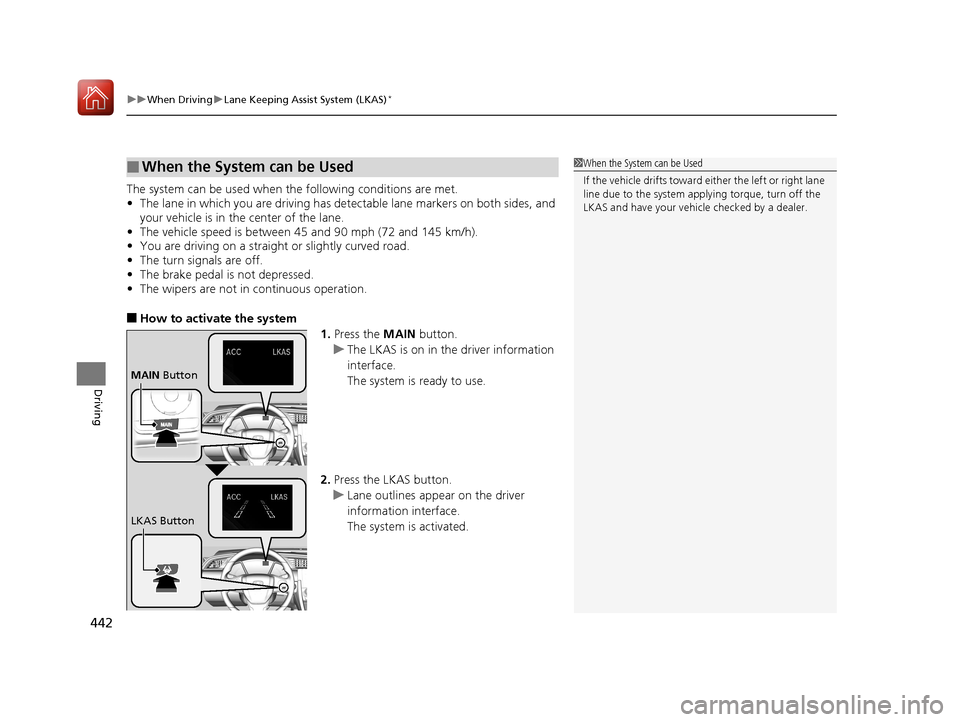
■How to activate the system
1.Press the MAIN button.
u The LKAS is on in the driver information
interface.
The system is ready to use.
2. Press the LKAS button.
u Lane outlines appear on the driver
information interface.
The system is activated.
■When the System can be Used1When the System can be Used
If the vehicle drifts toward either the left or right lane
line due to the system appl ying torque, turn off the
LKAS and have your vehi cle checked by a dealer.
MAIN Button
LKAS Button
17 CIVIC 4D HCM (KA KC KL)-31TBA6100.book 442 ページ 2016年8月31日 水曜日 午後6時5分