2017 HONDA CIVIC HATCHBACK lock
[x] Cancel search: lockPage 166 of 641

165
Controls
Operating the Switches Around the Steering Wheel
Ignition Switch*
1Ignition Switch*
You cannot take the key out unless the shift lever is
in
( P.
If you open the driver’s door when the key is in LOCK
(0 or ACCESSORY (q, a warning buzzer will sound
to remind you to take the key out.
When this happens, the following messages appear
on the driver information interface
*:•In LOCK ( 0: Remove Key From Ignition.
•In ACCESSORY (q: Return Ignition Switch To
Lock (0) Position . The buzzer will stop when you
take the key out.
If the key won’t turn from LOCK
( 0 to ACCESSORY
(q, turn the key while moving the steering wheel left
and right. The steering wh eel will unlock, allowing
the key to turn.
3WARNING
Removing the key from the ignition switch
while driving locks the steering. This can
cause you to lose control of the vehicle.
Remove the key from the ignition switch
only when parked.
Manual transmission models
Continuously variable transmission models
All models
( 0 LOCK: Insert and remove the key in this
position.
( q ACCESSORY: Operate the audio system and
other accessories in this position.
( w ON: This is the position when driving.
(e START: This position is for starting the engine.
The switch returns to ON ( w when you let go of
the key.
* Not available on all models
17 CIVIC 5D (KA KC KL)-31TGG6000.book 165 ページ 2016年6月8日 水曜日 午 後2時8分
Page 167 of 641

166
uuOperating the Switches Around the Steering Wheel uENGINE START/STOP Button*
Controls
ENGINE START/STOP Button*
*1:Canadian models
*2:Except Canadian models
■Changing the Power Mode1ENGINE START/STOP Button*
ENGINE START/STOP Button Operating Range
You can start the engine when the smart entry
remote is inside the vehicle.
The engine may also run if the smart entry remote is
close to the door or window, ev en if it is outside the
vehicle.
ON mode:
The button is off, if the engine is running.
If the smart entry remote battery is weak, beeper
sounds and the To Start, Hold Remote Near Start
Button message appears on th e driver information
interface. 2 If the Smart Entry Remote Battery is Weak
P. 594
Do not leave the power mode in ACCESSORY or ON
when you get out.
Operating RangeContinuously Variable Transmission Manual Transmission
VEHICLE OFF (LOCK)
The button is off.
The steering wheel is locked
*1.
The power to all electrical
components is turned off.
Blinking in white (When the door
is opened).
Press the button without the
shift lever in
( P.
Shift to
( P then press the button. Press the button.
Without pressing
the clutch pedal
Without pressing
the brake pedal ACCESSORY
The button blinks (in red).
Operate the audio system and
other accessories in this position.
ON
The button is on in red.
All electrical components can be
used.
Shift to (P*2.
*2
* Not available on all models
17 CIVIC 5D (KA KC KL)-31TGG6000.book 166 ページ 2016年6月8日 水曜日 午 後2時8分
Page 168 of 641

167
uuOperating the Switches Around the Steering Wheel uENGINE START/STOP Button*
Continued
Controls
If you leave the vehicle for 30 to 60 minutes with the shift lever in (P*1 and the
power mode in ACCESSORY, the vehicle automa tically goes into the mode similar to
VEHICLE OFF (LOCK) to avoid draining the battery.
When in this mode:
The steering wheel does not lock.
You cannot lock or unlock doors with th e remote transmitter or the smart entry
system.
Press the ENGINE START/STOP button twice to switch the mode to VEHICLE OFF
(LOCK).
*1: Continuously variab le transmission models
■Automatic Power Off
Canadian models
17 CIVIC 5D (KA KC KL)-31TGG6000.book 167 ページ 2016年6月8日 水曜日 午 後2時8分
Page 170 of 641

169
uuOperating the Switches Around the Steering Wheel uIgnition Switch and Power Mode Comparison
Controls
Ignition Switch and Po wer Mode Comparison
*1:Canadian models
Ignition Switch
PositionLOCK (0
(with/without
the key)ACCESSORY (qON (wSTART (e
Without Smart Entry
System●Engine is turned off and
power is shut down.
●The steering wheel is
locked.
●No electrical
components can be
used.
●Engine is turned off.●Some electrical
components such as the
audio system and the
accessory power socket
can be operated.
●Normal key position
while driving.
●All electrical components
can be used.
●Use this position to start
the engine.
●The ignition switch
returns to the ON
(w
position when you
release the key.
Power ModeVEHICLE OFF
(LOCK)ACCESSORYONSTART
With Smart Entry
System and ENGINE
START/STOP
ButtonButton-Off●Engine is turned off and
power is shut down.
●The steering wheel is
locked*1.●No electrical
components can be
used.
Button-Blinking●Engine is turned off.●Some electrical
components such as the
audio system and the
accessory power socket
can be operated.
Button-
Blinking (engine is turned
off)
On (engine is running)
●All electrical components
can be used.
Button-On●The mode automatically
returns to ON after the
engine starts.
Button is: Blinking On
17 CIVIC 5D (KA KC KL)-31TGG6000.book 169 ページ 2016年6月8日 水曜日 午 後2時8分
Page 171 of 641

170
uuOperating the Switches Around the Steering Wheel uTurn Signals
Controls
Turn Signals
The turn signals can be used when the ignition
switch is in ON
(w*1.
■One-touch turn signal
When you lightly push up or down and release
the turn signal lever, th e exterior turn signals
and turn signal indicator blink three times.
This feature can be used when signaling for a
lane change.
Light Switches
Rotating the light switch turns the lights on
and off, regardless of the power mode setting
or position of the ignition switch.
■High beams
Push the lever forward until you hear a click.
■Low beams
When in high beams, pull the lever back to
return to low beams.
■Flashing the high beams
Pull the lever back, and release it.
*1: Models with the smart entry system have an ENGINE START/STOP button instead of an
ignition switch.
Right Turn
Left Turn
■Manual Operation
1 Light Switches
If you leave the power mode in VEHICLE OFF (LOCK)
while the lights are on, a chime sounds when the
driver’s door is opened.
If you remove the key from the ignition switch while
the lights are on, a chime sounds when the driver’s
door is opened.
When the lights are on, the lights on indicator in the
instrument pane l will be on.
2 Lights On Indicator P. 87
Do not leave the lights on when the engine is off
because it will cause the battery to discharge.
If you sense that the le vel of the headlights is
abnormal, have the vehicl e inspected by a dealer.
Models with smart entry system
Models without smart entry system
All models
High Beams
Flashing the high beams
Low Beams
Turns on parking, side marker,
tail, and rear license plate lights
Turns on headlights, parking,
side marker, tail, and rear license
plate lights
17 CIVIC 5D (KA KC KL)-31TGG6000.book 170 ページ 2016年6月8日 水曜日 午 後2時8分
Page 173 of 641

uuOperating the Switches Around the Steering Wheel uLight Switches
172
Controls
The headlights automatically co me on when the wipers are used several times within
a certain number of intervals wi th the headlight switch in AUTO.
The headlights automatically go off a few minutes later if the wipers are stopped.
The headlights, all other exterior lights, an d the instrument panel lights turn off 15
seconds after you remove the key or set the power mode to VEHICLE OFF (LOCK),
take the remote with you, and close the driver’s door.
If you turn the igniti on switch to LOCK
(0*1 with the headlight switch on, but do
not open the door, the lights turn off after 10 minutes (3 minutes, if the switch is in
the AUTO position).
The lights turn on again when you unlock or open the driver’s door. If you unlock
the door, but do not open it within 15 seconds, the lights go off. If you open the
driver’s door, you will hear a lights on reminder chime.
*1: Models with the smart entry system have an ENGINE START/STOP button instead of an
ignition switch.
■Headlight Integration with Wipers
■Automatic Lighting Off Feature
1 Automatic Operation (aut omatic lighting control)
Adjust the auto light sensitivity as follows:
2 Customized Features P. 123, 324
SettingThe exterior lights come on
when the ambient light is at
Max
High
Mid
Low
Min
Bright
Dark
1 Headlight Integration with Wipers
This feature activates while the headlights are off in
AUTO .
The instrument panel br ightness does not change
when the headlights come on.
At dark ambient light levels, the automatic lighting
control feature turns on the headlights, regardless of
the number of wiper sweeps.
1 Automatic Lighting Off Feature
You can change the headlight auto off timer setting.
2 Customized Features P. 123, 324
Models with driver information interface
17 CIVIC 5D (KA KC KL)-31TGG6000.book 172 ページ 2016年6月8日 水曜日 午 後2時8分
Page 178 of 641

177
uuOperating the Switches Around the Steering Wheel uWipers and Washers
Continued
Controls
Wipers and Washers
The windshield wipers and washers can be
used when the ignition switch is in ON
(w*1.
■MIST
The wipers run at high speed until you release
the lever.
■Wiper switch (OFF, INT*, LO, HI)
Change the wiper switch setting according to
the amount of rain.
■AUTO*
2 Automatic Intermittent Wipers* P. 178
■Adjusting wiper operation*
Turn the adjustment ring to adjust wiper the
operation.
■Washer
Sprays while you pull the lever toward you.
When you release the le ver for more than one
second, the spray stops, the wipers sweep two
or three more times to clear the windshield,
then stop.
*1: Models with the smart entry system have an ENGINE START/STOP button instead of an
ignition switch.
■Windshield Wiper/Washer1 Wipers and Washers
NOTICE
Do not use the wipers when the windshield is dry.
The windshield will get sc ratched, or the rubber
blades will get damaged.
Turn the washers off if no washer fluid comes out.
The pump may get damaged.
The wiper motor may stop motor operation
temporarily to prevent an overload. Wiper operation
will return to normal within a few minutes, once the
circuit has returned to normal.
If the vehicle speeds up while the wipers are
operating intermittently, the length of the wipe
interval shortens.
When the vehicle speeds up, the wiper operation’s
shortest delay setting ( ) and the LO setting become
the same.
NOTICE
In cold weather, the blades may freeze to the
windshield.
Operating the wipers in th is condition may damage
the wipers. Use the defroster to warm the
windshield, then turn the wipers on.
If the wipers stop operating due to an obstacle such as
the build-up of snow, park the vehicle in a safe place.
Rotate the wiper switch to OFF, and turn the ignition
switch to ACCESSORY ( q or LOCK (0*1, then
remove the obstacle.
Models with intermittent time adjustment ringIntermittent Time
Adjustment Ring*
MIST
INT
*:
OFF
LO
: Low speed wipe
HI: High speed wipe Pull to
use
washer.Low speed with
intermittent
AUTO
*: Automatic intermittent operation
Lower speed, fewer sweeps
Higher speed, more sweeps
* Not available on all models
17 CIVIC 5D (KA KC KL)-31TGG6000.book 177 ページ 2016年6月8日 水曜日 午 後2時8分
Page 183 of 641
182
uuOperating the Switches Around the Steering Wheel uAdjusting the Steering Wheel
Controls
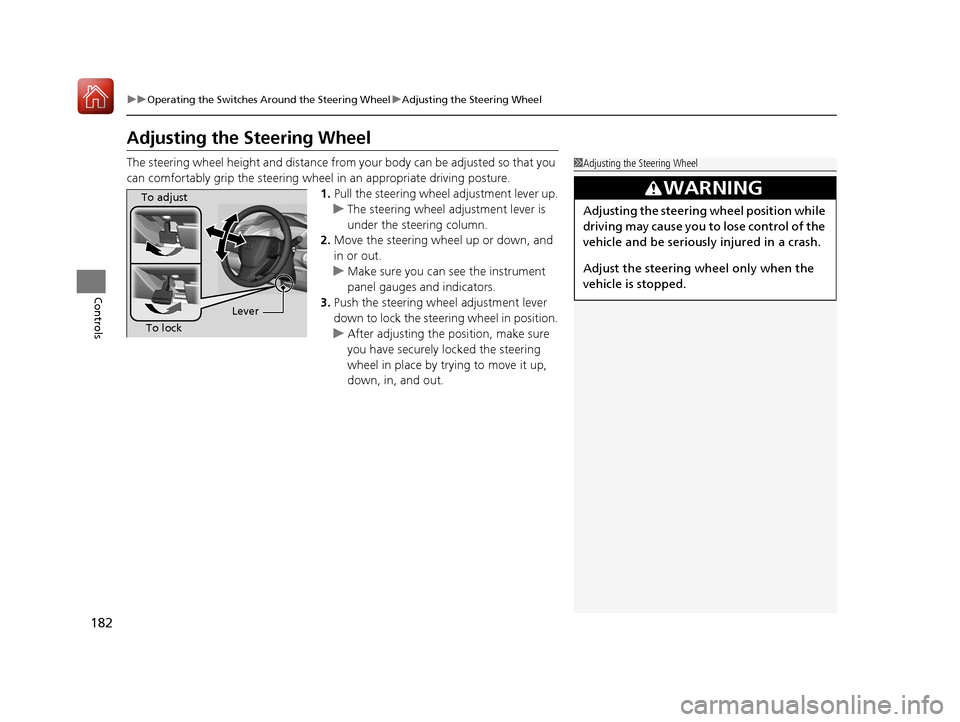
Adjusting the Steering Wheel
The steering wheel height and distance from your body can be adjusted so that you
can comfortably grip the steering wheel in an appropriate driving posture.
1.Pull the steering wheel adjustment lever up.
u The steering wheel adjustment lever is
under the steering column.
2. Move the steering wheel up or down, and
in or out.
u Make sure you can see the instrument
panel gauges and indicators.
3. Push the steering wheel adjustment lever
down to lock the steering wheel in position.
u After adjusting the position, make sure
you have securely locked the steering
wheel in place by trying to move it up,
down, in, and out.1Adjusting the Steering Wheel
3WARNING
Adjusting the steering wheel position while
driving may cause you to lose control of the
vehicle and be seriously injured in a crash.
Adjust the steering wheel only when the
vehicle is stopped.
To adjust
To lock Lever
17 CIVIC 5D (KA KC KL)-31TGG6000.book 182 ページ 2016年6月8日 水曜日 午
後2時8分