Page 325 of 641
324
Features
Customized Features
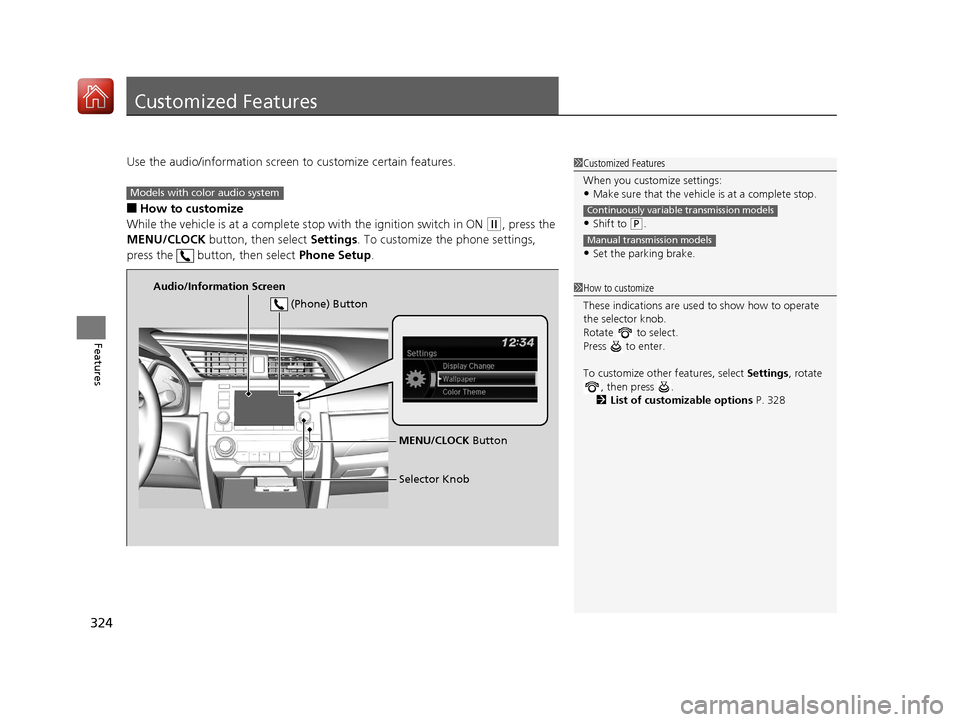
Use the audio/information screen to customize certain features.
■How to customize
While the vehicle is at a complete stop with the igniti on switch in ON
(w, press the
MENU/CLOCK button, then select Settings. To customize the phone settings,
press the button, then select Phone Setup.
1Customized Features
When you customize settings:
•Make sure that the vehicle is at a complete stop.
•Shift to (P.
•Set the parking brake.
Continuously variable transmission models
Manual transmission models
1 How to customize
These indications are used to show how to operate
the selector knob.
Rotate to select.
Press to enter.
To customize other features, select Settings, rotate
, then press .
2 List of customizable options P. 328
Models with color audio system
Audio/Information Screen
MENU/CLOCK Button
Selector Knob
(Phone) Button
17 CIVIC 5D (KA KC KL)-31TGG6000.book 324 ページ 2016年6月8日 水曜日 午
後2時8分
Page 326 of 641
325
uuCustomized Features u
Continued
Features
■Customization Flow
Press the MENU/CLOCK button.
Adjust Clock
SettingsRDS SettingsRDS Information
Radio Text
Display AdjustmentBrightness
Contrast
Black Level
Rear CameraCamera Guideline
BluetoothAdd New Device
Connect an Audio Device
17 CIVIC 5D (KA KC KL)-31TGG6000.book 325 ページ 2016年6月8日 水曜日 午 後2時8分
Page 327 of 641
326
uuCustomized Features u
Features
Display ChangeAudio
Wallpaper
WallpaperSelect
Import
Delete
Color ThemeBlue
Red
Amber
Gray
Language
Clock Format12h
24h
OSS Licenses
17 CIVIC 5D (KA KC KL)-31TGG6000.book 326 ページ 2016年6月8日 水曜日 午 後2時8分
Page 329 of 641
328
uuCustomized Features u
Features
■List of customizable options
*1:Default Setting
Setup
GroupCustomizable FeaturesDescriptionSelectable Settings
Adjust ClockAdjust Clock.
2 Clock P. 134—
Settings RDS
Settings
RDS Information
Turns on and off the RDS information. On
*1/Off
Radio Text Displays the radio text information. —
Bluetooth Add New Device Pairs a new phone to HFL, edits and deletes a
paired phone, and create a code for a paired
phone.
2
Phone Setup P. 363
—
Connect an Audio
Device Connects, disconnects or pairs a Bluetooth
®
Audio device to HFL. —
Display
Adjustment Brightness
Changes the brightness of the audio/
information screen.
—
Contrast Changes the contrast of the audio/
information screen. —
Black Level Changes the black level of the audio/
information screen. —
17 CIVIC 5D (KA KC KL)-31TGG6000.book 328 ページ 2016年6月8日 水曜日 午
後2時8分
Page 330 of 641
329
uuCustomized Features u
Continued
Features
*1:Default Setting
Setup
GroupCustomizable FeaturesDescriptionSelectable Settings
Settings Rear
Camera
Camera Guideline Selects whether the guidelines come on the
audio/information screen.
On
*1/
Off
Display Change Changes the display type. Audio
*1/Wallpaper
Wallpaper Select
Changes the wallpaper type. Clock*1/
Image1 /Image2/
Image3
Import Imports an image file for a new wallpaper.
2
Wallpaper Setup P. 228—
Delete Deletes an image file for a wallpaper. Image1
*1/Image2/Image3
Color Theme Changes the background color of the audio/
information screen. Blue
*1/
Red /Amber /Gray
Language Changes the display language. English
*1/French /Spanish
Clock Format Selects the digital clock display from 12H to
24H. 12H
*1/
24H
OSS Licenses Shows the legal information. —
17 CIVIC 5D (KA KC KL)-31TGG6000.book 329 ページ 2016年6月8日 水曜日 午 後2時8分
Page 333 of 641
332
uuCustomized Features u
Features
■Customization flow
Models with Display Audio
Select Settings.Clock
Wallpaper
Others
Clock/Wallpaper Type*1/Clock Type*2
Clock Adjustment
Clock Format
ClockClock
Auto Time Zone*
Manual Time Zone*
Auto Daylight Saving Time
Clock Display
Overlay Clock Location
Clock Reset
Info Screen Preference
Clock
Wallpaper
Others
Clock/Wallpaper Type*1/Clock Type*2
Clock Adjustment
Clock Format
Clock
Auto Time Zone*
Manual Time Zone*
Auto Daylight Saving Time
Clock Display
Overlay Clock Location
Clock Reset
Info Screen Preference
Info
HondaLinkDiagnostic & Location Data
HondaLinkDiagnostic & Location Data
*1 : Does not appear when you chan ge the screen interface design.
*2 : Appears only when you change the screen interface design.
* Not available on all models
17 CIVIC 5D (KA KC KL)-31TGG6000.book 332 ページ 2016年6月8日 水曜日 午 後2時8分
Page 337 of 641
336
uuCustomized Features u
Features
ClockClock/Wallpaper Type*1/
Clock Type*2
Clock Adjustment
Clock Format
Auto Time Zone*
Manual Time Zone*
Auto Daylight Saving Time
Clock Display
Overlay Clock Location
Clock Reset
Clock
Wallpaper
*1 : Does not appear when you chan ge the screen interface design.
*2 : Appears only when you change the screen interface design.
OthersLanguage
Voice Command Tips
Remember Last Screen*1
Memory Refresh
Refresh Time Adjustment
Swipe Direction
Change Skin
Factory Data Reset
Climate Screen Timeout
4way Switch Gesture
Volume Gestures
Detail Information
* Not available on all models
17 CIVIC 5D (KA KC KL)-31TGG6000.book 336 ページ 2016年6月8日 水曜日 午 後2時8分
Page 339 of 641
338
uuCustomized Features u
Features
Lighting SetupInterior Light Dimming Time
Headlight Auto Off Timer
Auto Light Sensitivity
Auto Interior Illumination Sensitivity
Auto Door Lock
Key and Remote Unlock Mode
Door/Window Setup
Maintenance Info.
Auto Headlight ON With Wiper ON
Keyless Lock Answer Back
Security Relock Timer
Walk Away Auto Lock*
Keyless Access Setup*
Door Unlock Mode
Keyless Access Light Flash
Keyless Access Beep
Remote Start System ON/OFF*
Auto Door Unlock
* Not available on all models
17 CIVIC 5D (KA KC KL)-31TGG6000.book 338 ページ 2016年6月8日 水曜日 午 後2時8分