2017 HONDA ACCORD HYBRID interior lights
[x] Cancel search: interior lightsPage 3 of 80
INTRODUCTIONTABLE OF CONTENTS
This owner’s Guide is intended to help you quickly get acquainted with your
2017 Honda Accord Hybrid Sedan. It provides basic information and instructions on
technology and convenience features, as well as emergency procedures and\
how to
get assistance.
This guide is for vehicles sold in the United States and Canada. It cove\
rs all Accord Hybrid Sedan models, so you may find descriptions of features and equi\
pment that are
not in your vehicle. Images throughout this guide are from U.S. vehicles\
and r
epresent
features and equipment that are available on some, but not all, models.
This guide is not intended to be a substitute for the
owner’s Manual. The owner
Information CD enclosed in your glove box kit includes the
owner’s Manual,
Navigation Manual, and vehicle and tire warranties in electronic format.\
This
information can be viewed on a computer (PC
or Mac platform) and saved or printed
for your reference. You can also visit
owners.honda.com (U.S.) or myhonda.ca
(Canada) to view the complete and most current information.
If you are the first registered owner of your vehicle, you may request\
a complimentary
printed copy of the
owner’s Manual, Navigation Manual, or vehicle Warranty within
the first six months of vehicle purchase. To request a copy
, visit owners.honda.com
(U.S.) and create or log in to your account. In Canada, please request\
a copy from
your Honda dealer.
American Honda Motor Company strives to be proactive in protecting our
environment and natural resources. By using electronic delivery for a co\
nsiderable
portion of the information typically found in a vehicle owner’s manual, we are further
reducing our impact on the environment.
Honda Automobile Customer Service
Your authorized Honda dealer should be able to answer any questions you h\
ave
about your vehicle. However, if you are dissatisfied with the information you receive,
you can call Honda Automobile Customer Service (see page 146).
Call (800) 999-1009 (U.S.) or (888) 946-6329 (Canada)
Honda Roadside Assistance
24-hour emergency road service is available to you in the United States \
and Canada
throughout your 3-year/36,000-mile warranty term. Services include jump starting,
flat tire and lockout assistance, towing, and more (limitations apply\
).
Call (866) 864-5211 (U.S.) or (800) 465-7587 (Canada)
*if equipped
VISUAL INDEX
..............................................................
1Steering Wheel and Nearby Controls ...............1
Dashboard and
other Controls .......................... 2
SPORT HYBRID I-MMD............................................... 3
SAFETY INFORMATION
.............................................. 4Important Safety Information .............................4
High-
voltage System Precautions ..................... 6
Seat Belts...............................................................
7
Airbags
................................................................. 10
Child Safety
......................................................... 16
Safety Label Locations
...................................... 23
reporting Safety Defects ..................................24
INSTRUMENT PANEL ................................................ 25Malfunction Indicators ......................................25
Condition Indicators
........................................... 27
on/off Indicators ................................................ 28
Multi-Information Display (MID)
...................... 29
VEHICLE CONTROLS .................................................. 31Using the remote Transmitter ..........................31
Smart
entry System ............................................ 32
Door
operation ................................................... 33
Power Window
operation ................................ 34
Power Moonroof
operation* ........................... 35
Interior and
exterior Lights ............................... 36
Auto High-Beam System*
................................. 37
Wiper
operation ................................................. 39
one-Touch T
urn Signal
...................................... 40
Adjusting the Seats
............................................ 41
Adjusting the Steering Wheel
.......................... 44
Driving Position Memory System
.................... 44
Adjusting the Mirrors
......................................... 45
HomeLink® Universal Transceiver* ................. 46
Climate Control System
.................................... 47
Seat Heaters*
..................................................... 48
Customized Features
......................................... 49
Setting the Clock
................................................ 50
AUDIO AND CONNECTIVITY ....................................51Basic Audio operation ......................................... 51
one Display Audio operation ..............................55
FM/AM
radio ...................................................... 56
Compact Disc (CD)
............................................. 57
iPod® .................................................................... 58
USB Flash Drive
.................................................. 59
Bluetooth® Audio ................................................ 60
Pandora® ............................................................. 61
Touchscreen
operation ....................................... 62
HondaLink® ......................................................... 64
Wi-Fi Connection
................................................ 65
Aha™
radio ......................................................... 65
Apple® CarPlay® ................................................ 66
Android Auto™....................................................67
FM/AM
radio ..................................................... 68
SiriusXM® radio* ............................................... 69
Compact Disc (CD)
............................................ 70
iPod® .................................................................... 71
USB Flash Drive
.................................................. 72
Bluetooth® Audio ................................................ 73
Pandora® ............................................................. 74
BLUETOOTH® HANDSFREELINK® (HFL) .................75Models with one display ...................................... 75
Basic HFL
operation .......................................... 75
Pairing a Phone
.................................................. 76
Making a Call.......................................................
77
SMS Text Messaging
......................................... 79
Models with touchscreen....................................
80
Basic HFL
operation .......................................... 80
Pairing a Phone
.................................................. 82
Making a Call.......................................................
83
SMS Text Messaging and
e-Mail* .................. 85
HondaLink® Assist .............................................. 86
Siri™
eyes Free ................................................... 87
NAVIGATION* ............................................................. 88Basic Navigation operation .............................88
Page 4 of 80

| 1
V
ISUAL INDEX
1 Lights/turn signals/LaneWatch
button p. 36, p. 40, p. 109
2 Brightness control p. 36
3 Wipers/washers p. 39
4 Adaptive Cruise Control (ACC)
buttons p. 105
5 Horn
6 voice recognition buttons p. 75,
p. 80,
p. 88
7 Instrument panel p. 25
8 Multi-information display p. 29
9 Info (p/ q) buttons p. 29
SeL/reSeT button p. 29
10 Audio controls p. 53
11 Lane Keeping Assist System (LKAS)
button p. 108
12 PoWer button p. 101
13 vehicle Stability Assist® (vSA)
oFF button p. 103
Collision Mitigation Braking System™
(CMBS™) oFF button p. 110
road Departure Mitigation (rDM)
button p. 107
Parking sensor system button* p. 111
Acoustic vehicle Alerting System
button* p. 102
14 eCoN button p. 103
VISUAL INDEX
*if equipped *if equipped
Quickly locate items in the vehicle’s interior.
Steering Wheel and Nearby Controls
12
5
107414
6
38
9111213
entering a Destination .......................................90
routing ................................................................. 93
DRIVING....................................................................... 95Before Driving .....................................................95
Maximum Load Limit
.......................................... 97
Towing a T
railer...................................................98
remote engine Start .......................................... 99
Starting to Drive
................................................ 100
Shifting
............................................................... 101
Change the shift position based on your
driving needs.
.................................................... 101
Braking
............................................................... 102
Acoustic
vehicle Alerting System ................. 102
eco Assist System ............................................ 103
vehicle Stability Assist (vSA®), aka electronic
Stability Control (eSC) System ....................... 103
SP
orT Mode ..................................................... 104
ev Mode ............................................................. 104
Adaptive Cruise Control (ACC)
....................... 105
road Departure Mitigation (rDM) .................107
Lane Keeping Assist System (LKAS)
............. 108
LaneWatch™
..................................................... 109
Collision Mitigation Braking System™
(CMBS™)
........................................................... 110
Parking Sensor System*
................................. 111
Multi-
view rear Camera ................................. 112
refueling ............................................................ 113
HANDLING THE UNEXPECTED ..............................115Smart entry remote Battery Strength ..........115
Shift Lever Does Not Move
............................. 115
Jump Starting
.................................................... 116
overheating ....................................................... 118
emergency engine Stop ..................................119
emergency Towing ........................................... 119Tire Pressure Monitoring System (TPMS)
...
120
Tire
repair Kit .................................................... 122
Fuse Locations
.................................................. 123
MAINTENANCE ........................................................ 126Safety Precautions ...........................................126
Maintenance Minder™
................................... 127
Under the Hood
................................................. 129
engine oil ........................................................... 130
engine Coolant ..................................................132
Brake Fluid
......................................................... 133
Inverter Coolant
................................................ 133
Checking the Battery
....................................... 134
Window Washer Fluid
..................................... 134
Changing Wiper Blades
.................................. 135
Tire Information
.................................................136
Tire Labeling
...................................................... 139
D
oT Tire Quality Grading ................................. 140
Testing of
readiness Codes ............................ 142
SPECIFICATIONS...................................................... 143
CUSTOMER INFORMATION
................................... 145Frequently Asked Questions/Troubleshooting ...
145
Contact Us
......................................................... 146
Honda
roadside Assistance .......................... 146
Warranty Coverages
........................................ 147
VOICE COMMAND INDEX ......................................148
INDEX
........................................................................\
. 150
Page 5 of 80

2 || 3
V
ISUAL INDEXVISUAL INDEX
Dashboard and Other Controls
1 Audio system/touchscreen*/
navigation* system p. 55,
p. 62,
p. 80,
p. 88
2 Hazard warning button
3 Climate control system p. 47
4 Seat heater switches* p. 48
5 USB port p. 51Wireless charger* p. 52
Accessory power socket p. 51
6 rearview mirror p. 45
7 Power window switches p. 34
Door lock switches p. 33
Door mirror controls p. 45
8 Fuel fill door release handle
p. 113
Trunk release p. 33
9 Shift lever p. 101
10 Hood release handle p. 129
11 Driving Position Memory System
buttons* p. 44
12 SPorT mode button p. 104
ev mode button p. 104
*if equipped
2
4
71
8
6
35910
11
SPORT HYBRID I-MMD
This Accord with SPorT HYBrID i-MMD uses both an electric motor and a gasoline
engine. A High
voltage battery powers the electric motor. The High voltage battery
is recharged by an engine-driven generator and regenerative braking.
i-MMD automatically manages the engine and motor, switching between them or
blending them as appropriate. Under certain circumstances, you can selec\
t
ev
mode (driving on electricity only) by pressing the
ev button (see page 104).
In addition to the High
voltage battery, this vehicle includes a standard 12-volt
battery to power the airbags, the interior and exterior lights, and othe\
r 12-volt systems.
Y
our driving style heavily impacts fuel efficiency and driving range. S\
pirited
acceleration, high-speed driving, or heavy climate-control use can quick\
ly reduce
the High
voltage battery’s charge. That can trigger the system to switch to the
gasoline-powered engine.
High
Batter y
voltage
Generator & electric Motor
Gasoline engin
e
12
Page 22 of 80
36 || 37
V
EHICLE CONTROLSVEHICLE CONTROLS
Interior and Exterior Lights
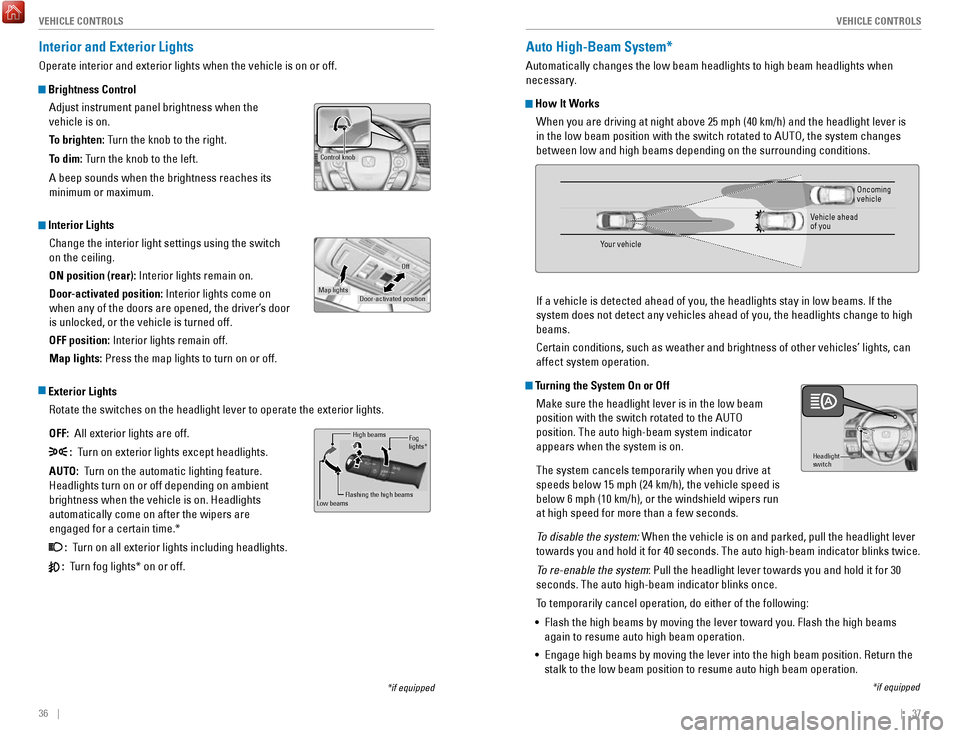
operate interior and exterior lights when the vehicle is on or off.
Brightness Control
Adjust instrument panel brightness when the
vehicle is on.
To brighten: Turn the knob to the right.
To dim: Turn the knob to the left.
A beep sounds when the brightness reaches its
minimum or maximum.
Interior LightsChange the interior light settings using the switch
on the ceiling.
ON position (rear): Interior lights remain on.
Door-activated position: Interior lights come on
when any of the doors are opened, the driver’s door
is unlocked, or the vehicle is turned off.
OFF position: Interior lights remain off.
Map lights: Press the map lights to turn on or off.
Exterior Lights
rotate the switches on the headlight lever to operate the exterior lights\
.
OFF: All exterior lights are off.
: Turn on exterior lights except headlights.
AUTO: Turn on the automatic lighting feature.
Headlights turn on or off depending on ambient
brightness when the vehicle is on. Headlights
automatically come on after the wipers are
engaged for a certain time.*
: Turn on all exterior lights including headlights.
: Turn fog lights* on or off.
*if equipped
Control knob
Door-activated position
Off
Map lights
High beams
Flashing the high beams
Low beamsFog
lights *
Auto High-Beam System*
Automatically changes the low beam headlights to high beam headlights wh\
en
necessary.
How It Works
When you are driving at night above 25 mph (40 km/h) and the headlight\
lever is
in the low beam position with the switch rotated to AUT
o, the system changes
between low and high beams depending on the surrounding conditions.
If a vehicle is detected ahead of you, the headlights stay in low beams.\
If
the
system does not detect any vehicles ahead of you, the headlights change \
to high
beams.
Certain conditions, such as weather and brightness of other vehicles’\
lights, can
affect system operation.
Turning the System On or Off
Make sure the headlight lever is in the low beam
position with the switch rotated to the AUT
o
position. The auto high-beam system indicator
appears when the system is on.
The system cancels temporarily when you drive at
speeds below 15 mph (24 km/h), the vehicle speed is
below 6 mph (10 km/h), or the windshield wipers run
at high speed for more than a few seconds.
To disable the system:
When the vehicle is on and parked, pull the headlight lever
towards you and hold it for 40 seconds. The auto high-beam indicator bli\
nks twice.
To re-enable the system: Pull the headlight lever towards you and hold it for 30
seconds. The auto high-beam indicator blinks once.
To temporarily cancel operation, do either of the following:
•
Flash the high beams by moving the lever toward you. Flash the high beam\
s
again to resume auto high beam operation.
•
engage high beams by moving the lever into the high beam position. return the
stalk to the low beam position to resume auto high beam operation.
Headlight
switch
*if equipped
Your vehicle
oncoming
vehicle
vehicle ahead
of you
Page 51 of 80

94 || 95
DRIVING
NAVIGATION
Traffic
view traffic flow and incidents in major metro areas. You can also select traffic to
avoid. T
raffic coverage is limited in Canada.
Viewing traffic
1.
From the map screen, select the traffic icon.
2.
Select Traffic Conditions.
3.
Traffic icons are shown on the map. Select the
magnifying glass icon to display a full list of traffic
delays.
Avoiding traffic on your route
1.
From the map screen, select the traffic icon.
2.
Select Traffic on route.
3.
Select an incident to avoid from the list.
4.
Select the menu icon.
5.
Select Avoid.
DRIVING
Learn about preparation for driving, as well as other features.
Before Driving
Check the following items before you begin driving.
Exterior Checks •
Make sure there are no obstructions on the windows, door mirrors, exteri\
or
lights, or other parts of the vehicle.
•
remove any frost, snow, or ice.
•
Make sure the hood is securely closed.
•
Heat from the engine and exhaust can ignite flammable materials left u\
nder
the hood, causing a fire. If you’ve parked your vehicle for an exte\
nded period,
inspect and remove any debris that may have collected, such as dried gra\
ss and leaves that have fallen or have been carried in for use as a nest by\
a small animal. Also check under the hood for leftover flammable materials aft\
er you or
someone else has performed maintenance on your vehicle.
•
Make sure the tires are in good condition.
•
Make sure there are no people or objects behind or around the vehicle.
Interior Checks •
Store or secure all items on board properly.
•
Do not pile items higher in the cargo area than the seat-back height.
•
Do not place anything in the front seat footwells. Make sure to secure t\
he floor
mats.
•
If you have any animals on board, do not let them move freely around in \
the
vehicle.
•
Securely close and lock all doors and the trunk.
•
Adjust your seating position, mirrors, and steering wheel properly.
•
Make sure items placed on the floor behind the front seats cannot roll\
under the
seats.
•
everyone in the vehicle must fasten their seat belt.
•
Make sure that the indicators in the instrument panel come on when you s\
tart
the vehicle, and go off soon after.
If the doors are frozen shut, use warm water around the door edges to me\
lt any
ice. Do not try to force them open, as this can damage the rubber trim a\
round the
doors. When done, wipe dry to avoid further freezing.
NOTICE
Page 65 of 80

122 || 123
HANDLING THE UNEXPECTED
HANDLING THE UNEXPECTED
Tire Repair Kit
If a tire has a small puncture, you can use the tire repair kit to tempo\
rarily repair it.
The puncture must be smaller than 3/16-inch (4 mm) and not in the tire\
sidewall. Go
to a dealer to have the full-size tire permanently repaired or replaced.\
This vehicle is
not equipped with a spare tire.
Before Repairing the Tire
1.
Park the vehicle on a firm, level, and non-slippery surface.
2.
Move the shift lever to Park (P).
3.
Turn on the hazard warning lights and set the power mode to veHICLe oFF
(L
oCK).
Getting Ready to Repair the Tire
1.
open the trunk floor lid and take the kit out of the
case.
2.
Place the kit upright on flat ground near the
punctured tire and away from traffic. Do not place
the kit on its side.
3.
Follow the instructions in the kit to repair the tire.
If the required air pressure is not reached within 10 minutes, the tire \
may be too
severely damaged for the kit to provide the necessary seal and your vehi\
cle will need to be towed.
Do not operate the temporary tire repair kit compressor for more than 15\
minut
es.
The accessory power socket and compressor can overheat and become
permanently damaged.
NOTICE
running the engine with the vehicle in an enclosed or even partly enclose\
d
area can cause a rapid build-up of toxic carbon monoxide.
Breathing this colorless, odorless gas can cause unconsciousness and even
death.
only run the engine to power the air compressor with the vehicle
outdoors.
WARNING
Trunk Floor Lid
Tire repair Kit
Fuse Locations
If any electrical devices are not working, turn the vehicle off and chec\
k to see if any
applicable fuse is blown. Fuse locations are shown on the fuse box cover\
. Locate the
fuse in question by the fuse number and box cover number.
Engine Compartment Fuse Box
Located under the hood near the 12-volt battery. Push the tabs to open the box.
*if equipped
Circuit ProtectedAmps
1Battery15 0A
2ePS70 A
eS B40 Aright ePB*(30A )40 A
Fuse Box option 1Shift By Wire*(30A )
rF C4 0A
IG Main 1
3 0A
3
Headlight Low Beam Main 30Aengine electric Water Pump3 0AIG Main 230AWiper Moto r
4 3
0A
FI Main15 A5 PCU electric Water Pump
6 7.
5A
ev TC20 A
710 A
815 A
915 A
1010 A
11
12
10 A rear Defogger
60
A
Fuse Box Main 1 50 A
ABS/vSA FSr 60
A
IG Hol d
DBW
IG Coi l
Stop Light vBU Fuse Box Main 2
40A
Fuse Box
ABS/vSA Motor 3
0A
3 0A
Heater Motor 40A
Left ePB
*
Small Light (3
0A )
20 A40 A
13(40 A)
14(4 0A )
15
16 (1
0A )10A
1715 A
AmpsCircuit Protected
Fuse Box option 2
A/C PTC 4
A/CPTC 2
Front Fog Light + Dr L
Horn
IG Hold 3-L/r
18 Interior Light7. 5A
19−−
20 (20 A)Premium Amp*
21Back Up
22 10
A
Audio15 A
23P-ACT Drive*(7.5 A)
10 A
25 Left Headlight Low Beam26
24 right Headlight Low Bea m10 A
IGPS LAF10 A
Page 66 of 80

124 || 125
HANDLING THE UNEXPECTED
HANDLING THE UNEXPECTED
Interior Fuse Box
Located under the dashboard on the driver’s side.
*if equipped
Amps1Circuit Protecte d
A/C7.5 A2DrL7.5 A
3−−4−−5Meter10 A6SrS(7.5A )
7option(7.5A )
8−−9Fuel Pump20 A10ABS/vSA7.5A
11vB SoL10 A12Front Wipe r7.5A
13ACG10 A
14rear Accessory Power Socket20 A
15
reclining
(Console Compartment)
Driver’s Power Seat (20 A)
16
Moonroof*(20 A)
17Front Seat Heaters(20 A)
18−−
19Passenger Side Door 10 A
20
Unlock
Unlock
Driver Side rear Door 10A 21
Driver’s Door Lock10
A22 Passenger Side Door Loc k10A23Driver’s Door Unlock10A24SrS10A25Illumination10A
26Key Loc k7.5A
27Parking Lights10 A
28Lumbar Suppor t(10 A)
30Washer
29
right Headlight High Bea m10A15A
31A/C Main10 A32 Driver’s Power Window20A
Circuit Protected Amps
33Front Passenger’s Power 20A
34Window
rear Driver Side Power
20 A
35
Window
rear Passenger Side Power
20A
37ACCeSSorY7.5A
Window
36 Driver’s Power Seat Sliding (20A)
38
−−39 Left Headlight High Beam10A
40
Socket20 AFront Accessory Power
42
(Console Panel )
41 Driver Side rear Door Lock 10A
Door Lock20Aa10Ab(7.5A )
c10 A
d15 A
e
SMArT
SHIFTe r*
Hybrid System
Hazard
Passenger's Power Seat
f (20
A)
g (20
A)h (15
A)i (15
A)−j7.5A
reclinin
g
*
Passenger's Power Seat
Sliding*
rear Seat Heaters*
ACL*
−
IG MoN*
Fuse label
Inspecting and Changing Fuses
1.
Turn the vehicle off, including all lights and
accessories.
2.
remove the fuse box cover.
3.
Check the large fuse in the engine compartment.
If the fuse is blown, use a Phillips-head
screwdriver to remove the screws and replace
the fuse with a new one.
reinstall the screws.
4.
Inspect the small fuses in the engine
compartment and the vehicle interior.
If there is a burned out fuse, remove it with the
fuse puller and replace it with a new one.
Combined
fuse Blown fuse
Fuse puller
replacing a fuse with one that has a higher rating greatly increases the \
chances of
damaging the electrical system.
NOTICE
Page 79 of 80

150 || 151
INDEX
INDEX
INDEX
ABS........................................................................\
.. 26
ACC .................................................................... 26,
28
Accessory Power Socket
.................................... 51
Acoustic vehicle Alerting .................................. 102
Adaptive Cruise Control (ACC) .................... 26,
105
Address................................................................... 90
Advanced Airbags
................................................ 10
Aha radio ............................................................... 65
Airbags....................................................................
10
Airbag Care
......................................................... 15
Airbag System Components ............................. 14
Airbag System Indicators ................................. 12
Ambient Meter.....................................................
103
Android Auto
.......................................................... 67
Anti-lock Brake System (ABS) .................... 26,
102
Apple CarPlay
........................................................ 66
Apps ........................................................................\
63
Audio Commands ................................................ 149
Audio operation .................................................... 51
Aha radio ............................................................ 65
Android Auto ....................................................... 67
Apple CarPlay ..................................................... 66
Auxiliary Input Jack ........................................... 51
Bluetooth Audio ............................................ 60,
73
Compact Disc (CD)
....................................... 57, 70
FM/AM radio ................................................ 56,
68
HondaLink
............................................................ 64
iPod ................................................................. 58,
71
one Display Audio operation ...........................55
Pandora .......................................................... 61,
74
SiriusXM
radio ................................................... 69
Sound ................................................................... 54
Steering Wheel Controls ................................... 53
Touchscreen operation ..................................... 62
USB Flash Drive ............................................ 59,
72
USB Port
.............................................................. 51
Wi-Fi Connection ................................................ 65
Wireless Charger ............................................... 52
Auto High-Beam System................................
28, 37
Automatic (AUT
o) rain-Sensing Wipers .......... 40
Automatic Dimming rearview Mirror ................ 45
AUX Commands...................................................
149
Auxiliary Input Jack
.............................................. 51
Battery .................................................................. 134
Bluetooth Audio...............................................
60, 73
Bluetooth Audio Commands.............................. 149
Bluetooth Handsfreelink (HFL)
............................ 75
Call History .................................................... 78,
84
Dialing a Number
.......................................... 77,
83
e-Mail ...................................................................85
HFL Controls .................................................. 75,
80
HondaLink Assist
................................................ 86
Making a Call ................................................ 77,
83Pairing a Phone ............................................
76, 82
Phonebook ..................................................... 78,
84
Siri
eyes Free ...................................................... 87
SMS Text Messaging ................................... 79, 85
Speed Dial ..................................................... 77,
83
Talk Button Tips
.................................................. 81
Brake Assist System...........................................
102
Brake Fluid
........................................................... 133
Brake system ................................................... 25,
26
Braking.................................................................. 102
Brightness Control
................................................ 36
Call History ....................................................... 78,
84
Carbon Monoxide Gas............................................ 5
Changing Settings
................................................. 49
Charging system....................................................
25
Childproof Door Locks
.......................................... 33
Child Safety ............................................................ 16
Child Seat ............................................................... 18
Adding Security with a Tether .......................... 21
LATCH-Compatible Child Seat .......................... 19
Climate Control Commands ............................... 148
Climate Control System ........................................ 47
Clock........................................................................\
50
CMBS
...................................................................... 28
Collision .................................................................... 6
Collision Mitigation Braking System .......... 26,
110
Compact Disc (CD)
.......................................... 57,
70
Compact Disc (CD) Commands
......................... 149
Condition Indicators ............................................. 27
Contact Us ............................................................ 146
Continuously variable Transmission (CvT) ..... 101
CUSToMer Information.....................................
145
Customized Features
............................................ 49
Dashboard and other Controls ............................. 2
Destination ............................................................. 90
Dialing a Number ............................................ 77,
83
Door Mirrors
.......................................................... 45
Door open ............................................................... 27
Door operation ...................................................... 33
Doors ....................................................................... 32
DoT Tire Quality Grading ................................... 140
Driver’s Seat ........................................................... 41
Driving ..................................................................... 95
Accessory Mode .............................................. 101
Acoustic vehicle Alerting ............................... 102
Adaptive Cruise Control (ACC) ....................... 105
Braking ............................................................... 102
Collision Mitigation Braking System ............. 110
Continuously variable Transmission (CvT) .. 101eco Assist System ............................................ 103
PoWer button .................................................. 101ev Mode ............................................................. 104
Lane Keeping Assist System (LKAS) ............. 108 LaneWatch™
..................................................... 109
Maximum Load Limit
.......................................... 97
Multi-view rear Camera ................................. 112
Parking Sensor System ................................... 111
Power Mode ...................................................... 101refueling ............................................................ 113remote engine Start ..........................................99road Departure Mitigation (rDM).................
107
Shifting
............................................................... 101
SPorT Mode ..................................................... 104
Towing a T
railer
..................................................98vehicle Stability Assist (vSA®) .....................103
Wiper Blades .................................................... 135
Driving Position Memory System ....................... 44eco Assist System...............................................
103
eCoN Button ........................................................103eCoN mode ............................................................ 28electric Power Steering (ePS) ............................26electronic Stability Control (eSC) .....................103e-Mail ...................................................................... 85emergency engine Stop .....................................119emergency Towing ............................................. 119engine and Fuel ................................................... 143engine Coolant.....................................................
132
engine oil..............................................................
130
P
oWer button ..................................................... 101ev indicator ............................................................ 27ev mode ..........................................................28,
104
exterior lights ...................................................28,
36
Fastening a Seat Belt
............................................. 9
Floor Mats .............................................................. 42
Fluids ..................................................................... 144
FM/AM radio ................................................... 56,
68
FM/AM
radio Commands .................................. 149
Foot Brake ............................................................ 102
Frequently Asked Questions ............................. 145
Front Airbags (SrS) .............................................. 10
Front Door Inner Handle ...................................... 33
Fuel Information .................................................. 113
Fuse Locations.....................................................
123
Garage
opener ...................................................... 46
Hazards ................................................................... 28
Headlight-Wiper Integration ......................... 38,
39
Head
restraints ..................................................... 43
High beams ............................................................ 28
High-voltage System Precautions ....................... 6
Home Address ....................................................... 90
HomeLink Garage opener ................................... 46
HondaLink...............................................................
64
HondaLink Assist................................................... 86 Honda
roadside Assistance ............................. 146
Hood ...................................................................... 129
Immobilizer ............................................................. 27
Instrument Panel ................................................... 25
Interior Lights.........................................................
36Intermittent Wipers............................................... 39
Inverter Coolant................................................... 133
iPod.................................................................... 58, 71
iPod Commands................................................... 149
Jump Starting
......................................................
116
Key ........................................................................\
... 31
Lane Keeping Assist System (LKAS)..........
26, 108
LaneWatch
........................................................... 109
Lap/Shoulder Seat Belts ........................................ 7
LATCH-Compatible Child Seat ............................. 19
Light Bulbs............................................................
143
Lights ................................................................. 28, 36
LKAS .................................................................. 26,
28
Lock Tab
.................................................................. 33
Low fuel .................................................................. 27
Low oil pressure .................................................... 25
Low tire pressure .................................................. 27
Maintenance........................................................
126
Battery
................................................................ 134
Brake Fluid ......................................................... 133engine Coolant ..................................................132engine oil ........................................................... 130
Inverter Coolant ................................................ 133
Maintenance Minder ....................................... 127
Service Codes ................................................... 128
Under the Hood ................................................. 129
Window Washer Fluid ..................................... 134
Making a Call ................................................... 77,
83
Malfunction indicator lamp
................................. 26
Malfunction Indicators.........................................
25
Map Legend
........................................................... 93
Master Door Lock Switch .................................... 33
Maximum Load Limit............................................. 97
Mirrors
.................................................................... 45
Moonroof ................................................................ 35
Multi-Information Display (MID).........................
29
Multi-
view rear Camera ................................... 112
Music search ....................................................... 149
Navigation .............................................................. 88
Display and Controls .......................................... 89entering a Destination .......................................90
Home Address .................................................... 90
Map Legend ........................................................ 93
Place Category ................................................... 91recent Places ..................................................... 91routing ................................................................. 93
Saved Places ...................................................... 92
Steering Wheel Controls ................................... 88
Street Address .................................................... 90
System Guidance volume ................................. 88
Talk Button T
ips
..................................................88
Traffic ................................................................... 94
Turn-by-turn directions ..................................... 93
Navigation Commands ....................................... 148one Display Audio operation ..............................55