2017 GMC SIERRA 1500 AUX
[x] Cancel search: AUXPage 8 of 494

GMC Sierra/Sierra Denali Owner Manual (GMNA-Localizing-U.S./Canada/
Mexico-9955992) - 2017 - crc - 5/3/16
In Brief 7
1.Instrument Panel Illumination
Control 0172.
2. Integrated Trailer Brake Control (ITBC) System (If Equipped).
See Towing Equipment 0324.
3. Exterior Lamp Controls 0166.
Fog Lamps 0171 (If
Equipped).
4. Air Vents 0234.
5. Turn Signal Lever. See Turn
and Lane-Change
Signals 0170.
Windshield Wiper/
Washer 0114.
6. Favorite Switches (Out of View). See Steering Wheel
Controls 0113.
Volume Switches (Out of View).
See Steering Wheel
Controls 0113.
7. Instrument Cluster 0121.
8. Hazard Warning
Flashers 0170
9. Shift Lever. See Automatic
Transmission 0267. Tow/Haul Selector Button (If
Equipped). See
Tow/Haul
Mode 0273.
Range Selection Mode (If
Equipped). See Manual
Mode 0270.
10. Light Sensor. See Automatic
Headlamp System 0169.
11. Infotainment 0176.
12. Heated and Ventilated Front
Seats 055 (If Equipped).
13. Power Outlet (Alternating Current) (If Equipped). See
Power Outlets 0117.
14. Power Outlets 0117.
15. USB Port. See Infotainment 0176.
16.
gTraction Control/Electronic
Stability Control 0284.
0Pedal Adjust Switch (If
Equipped). See Adjustable
Throttle and Brake
Pedal 0258.
{Cargo Lamp 0172.
XParking Assist Button (If
Equipped). See Assistance
Systems for Parking or
Backing 0291.
ALane Keep Assist (LKA)
(1500 Series) 0298 (If
Equipped).
@Lane Departure Warning
(LDW) (2500/3500 Series)
0 296 (If Equipped).
5Hill Descent Control Switch
(If Equipped). See Hill Descent
Control (HDC) 0286.
qExhaust Brake (If
Equipped). See “Exhaust
Brake” in the Duramax diesel
supplement.
Auxiliary Button (If Equipped).
See Add-On Electrical
Equipment 0334.
17. Dual Automatic Climate Control
System 0231.
18. Steering Wheel Controls 0113
(If Equipped).
Page 20 of 494
GMC Sierra/Sierra Denali Owner Manual (GMNA-Localizing-U.S./Canada/
Mexico-9955992) - 2017 - crc - 5/3/16
In Brief 19
Vehicle Features
Infotainment System
The base radio and base radio with
touchscreen information is included
in this manual. See the infotainment
manual for information on the
uplevel radios, audio players,
phone, navigation system, Rear
Seat Entertainment (RSE), and
voice or speech recognition,
if equipped.
Radio(s)
Base Radio
O:Press to turn the system on.
Press and hold to turn it off. When
on, press to mute; press again to
unmute. Turn to increase or
decrease the volume.
RADIO : Press to choose between
FM, AM, and SiriusXM
®,
if equipped.
MEDIA : Press to change the audio
source between CD, USB, AUX,
and Bluetooth
®Audio, if equipped.
{: Press to go to the Home Page. MENU :
Press to select a menu.
g:Press to seek the previous
station or track.
l: Press to seek the next station
or track.
See “Base Radio” inOverview
(Base Radio with Touchscreen)
0 178 orOverview (Base
Radio) 0179.
Base Radio with Touchscreen
O:Press to turn the system on.
Press and hold to turn it off. When
on, press to mute; press again to
unmute. Turn to increase or
decrease the volume.
{: Press to go to the Home Page.
7:Press to seek the previous
station or track.
6: Press to seek the next station
or track.
See “Base Radio with Touchscreen”
in Overview (Base Radio with
Touchscreen) 0178 orOverview
(Base Radio) 0179.
Setting the Clock
See Clock 0115.
Satellite Radio
Vehicles with a SiriusXM®satellite
radio tuner and a valid SiriusXM
satellite radio subscription can
receive SiriusXM programming.
SiriusXM Satellite Radio
Service
SiriusXM is a satellite radio service
based in the 48 contiguous United
States and 10 Canadian provinces.
SiriusXM satellite radio has a wide
variety of programming and
commercial-free music, coast to
coast, and in digital-quality sound.
A fee is required to receive the
SiriusXM service.
For more information refer to:
. www.siriusxm.com or call
1-888-601-6296 (U.S.).
. www.siriusxm.ca or call
1-877-438-9677 (Canada).
Page 21 of 494

GMC Sierra/Sierra Denali Owner Manual (GMNA-Localizing-U.S./Canada/
Mexico-9955992) - 2017 - crc - 5/3/16
20 In Brief
SeeSatellite Radio (Base Radio)
0 188 orSatellite Radio (Base
Radio with Touchscreen) 0188.
Portable Audio Devices
This vehicle may have a 3.5 mm
(1/8 in) auxiliary input jack and USB
ports in the center console or
armrest. There may be a USB port
in the upper glove box. External
devices such as iPods
®, laptop
computers, MP3 players, and USB
storage devices may be connected,
depending on the audio system.
See USB Port (Base Radio) 0193
or USB Port (Base Radio with
Touchscreen) 0196 andAuxiliary
Jack 0202.
Bluetooth®
The Bluetooth®system allows users
with a Bluetooth-enabled cell phone
to make and receive hands-free
calls using the vehicle audio system
and controls. The Bluetooth-enabled cell phone
must be paired with the in-vehicle
Bluetooth system before it can be
used in the vehicle. Not all phones
will support all functions.
See
Bluetooth (Voice Recognition -
Base Radio) 0216 orBluetooth
(Infotainment Controls - Base
Radio) 0212 orBluetooth
(Overview) 0210 orBluetooth
(Infotainment Controls - Base Radio
with Touchscreen) 0220.
Steering Wheel Controls
If equipped, some audio controls
can be adjusted at the steering
wheel.
g:For vehicles with OnStar®or a
Bluetooth®system, press to interact
with those systems. See OnStar
Overview 0471 or“Bluetooth
(Overview)” in the infotainment
manual.
i: Press to reject an incoming
call, or end a current call. Press to
mute or unmute the infotainment
system when not on a call.
oorp: Press to go to the
previous or next menu option.
worx: Press to go to the next or
previous selection.
V: Press to select a highlighted
menu option.
Page 110 of 494
GMC Sierra/Sierra Denali Owner Manual (GMNA-Localizing-U.S./Canada/
Mexico-9955992) - 2017 - crc - 5/3/16
Storage 109
Rear
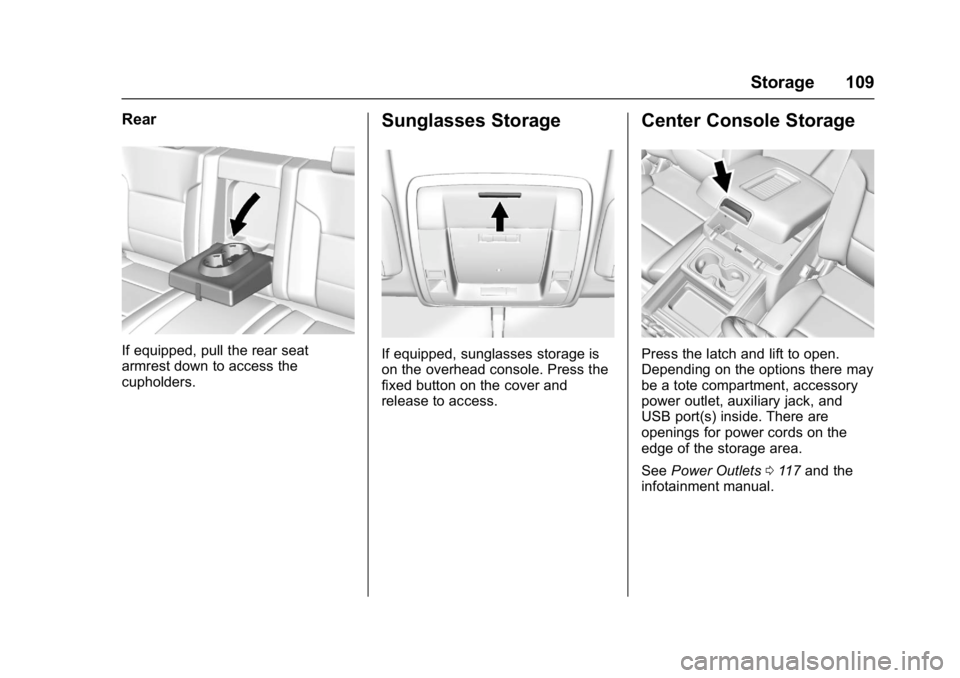
If equipped, pull the rear seat
armrest down to access the
cupholders.
Sunglasses Storage
If equipped, sunglasses storage is
on the overhead console. Press the
fixed button on the cover and
release to access.
Center Console Storage
Press the latch and lift to open.
Depending on the options there may
be a tote compartment, accessory
power outlet, auxiliary jack, and
USB port(s) inside. There are
openings for power cords on the
edge of the storage area.
SeePower Outlets 0117 and the
infotainment manual.
Page 167 of 494

GMC Sierra/Sierra Denali Owner Manual (GMNA-Localizing-U.S./Canada/
Mexico-9955992) - 2017 - crc - 5/3/16
166 Lighting
Lighting
Exterior Lighting
Exterior Lamp Controls . . . . . . . 166
Exterior Lamps OffReminder . . . . . . . . . . . . . . . . . . . 168
Headlamp High/Low-Beam Changer . . . . . . . . . . . . . . . . . . . . 168
Flash-to-Pass . . . . . . . . . . . . . . . . 169
Daytime Running Lamps (DRL) . . . . . . . . . . . . . . . 169
Automatic Headlamp System . . . . . . . . . . . . . . . . . . . . . . 169
Hazard Warning Flashers . . . . . 170
Turn and Lane-Change Signals . . . . . . . . . . . . . . . . . . . . . . 170
Fog Lamps . . . . . . . . . . . . . . . . . . . 171
Auxiliary Roof-Mounted Lamp . . . . . . . . 171
Interior Lighting
Instrument Panel IlluminationControl . . . . . . . . . . . . . . . . . . . . . . 172
Cargo Lamp . . . . . . . . . . . . . . . . . . 172
Dome Lamps . . . . . . . . . . . . . . . . . 173
Reading Lamps . . . . . . . . . . . . . . 173
Lighting Features
Entry Lighting . . . . . . . . . . . . . . . . 174
Exit Lighting . . . . . . . . . . . . . . . . . . 174 Battery Load Management . . . 174
Battery Power Protection . . . . . 175
Exterior Lighting
Exterior Lamp Controls
The exterior lamp control is on the
instrument panel to the left of the
steering wheel.
O:
Turns off the automatic
headlamps and Daytime Running
Lamps (DRL). Turn the headlamp
control to the off position again to
turn the automatic headlamps or
DRL back on.
For vehicles first sold in Canada, off
will only work when the vehicle is in
P (Park).
AUTO : Automatically turns on the
headlamps, parking lamps,
taillamps, instrument panel lights,
Page 172 of 494
GMC Sierra/Sierra Denali Owner Manual (GMNA-Localizing-U.S./Canada/
Mexico-9955992) - 2017 - crc - 5/3/16
Lighting 171
The lever returns to its starting
position whenever it is released.
If after signaling a turn or a lane
change the arrows flash rapidly or
do not come on, a signal bulb could
be burned out. If equipped with LED
turn signals, see your dealer.
Replace any burned out bulbs. If a
bulb is not burned out, check the
fuse. SeeFuses0376.
Turn Signal On Chime
If the turn signal is left on for more
than 1.2 km (0.75 mi), a chime
sounds at each flash of the turn
signal. The message TURN
SIGNAL ON will also appear in the
Driver Information Center (DIC). To
turn the chime and message off,
move the turn signal lever to the off
position.Fog Lamps
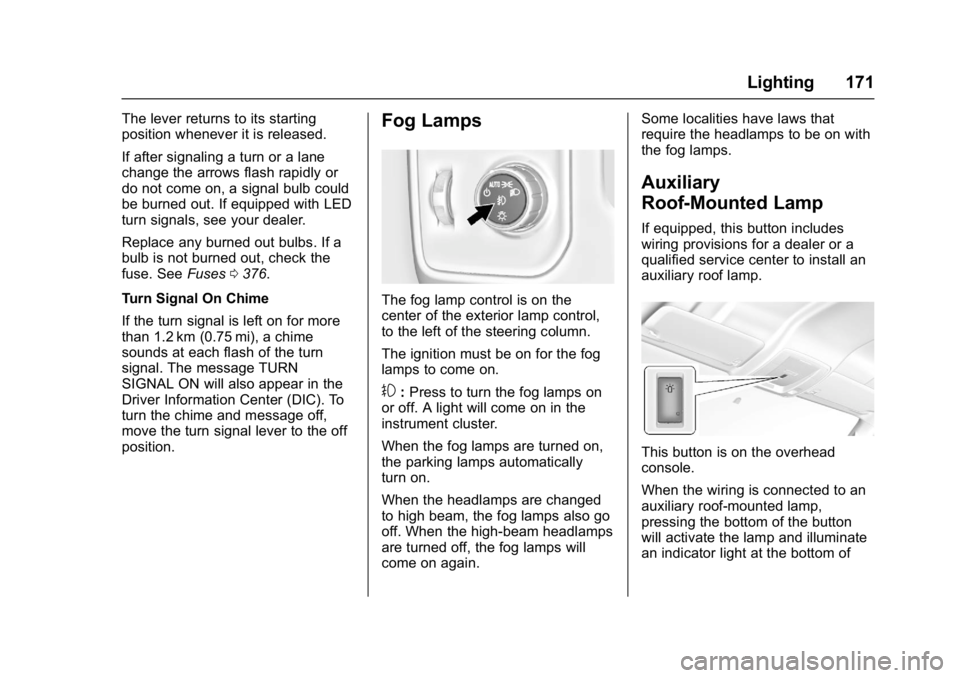
The fog lamp control is on the
center of the exterior lamp control,
to the left of the steering column.
The ignition must be on for the fog
lamps to come on.
#: Press to turn the fog lamps on
or off. A light will come on in the
instrument cluster.
When the fog lamps are turned on,
the parking lamps automatically
turn on.
When the headlamps are changed
to high beam, the fog lamps also go
off. When the high-beam headlamps
are turned off, the fog lamps will
come on again. Some localities have laws that
require the headlamps to be on with
the fog lamps.
Auxiliary
Roof-Mounted Lamp
If equipped, this button includes
wiring provisions for a dealer or a
qualified service center to install an
auxiliary roof lamp.
This button is on the overhead
console.
When the wiring is connected to an
auxiliary roof-mounted lamp,
pressing the bottom of the button
will activate the lamp and illuminate
an indicator light at the bottom of
Page 177 of 494
GMC Sierra/Sierra Denali Owner Manual (GMNA-Localizing-U.S./Canada/
Mexico-9955992) - 2017 - crc - 5/3/16
176 Infotainment System
Infotainment
System
Introduction
Infotainment . . . . . . . . . . . . . . . . . . 176
Theft-Deterrent Feature . . . . . . 177
Overview (Base Radio withTouchscreen) . . . . . . . . . . . . . . . 178
Overview (Base Radio) . . . . . . . 179
Home Page (Base Radio) . . . . 181
Home Page (Base Radio with Touchscreen) . . . . . . . . . . . . . . . 183
Software Updates . . . . . . . . . . . . 184
Radio
AM-FM Radio (Base Radio) . . . . . . . . . . . . . . . . . . . . . . 184
AM-FM Radio (Base Radio with Touchscreen) . . . . . . . . . . . 186
Satellite Radio (Base Radio) . . . . . . . . . . . . . . . . . . . . . . 188
Satellite Radio (Base Radio with Touchscreen) . . . . . . . . . . . 188
Radio Reception . . . . . . . . . . . . . . 190
Fixed Mast Antenna . . . . . . . . . . 190
Multi-Band Antenna . . . . . . . . . . 190
Audio Players
CD Player . . . . . . . . . . . . . . . . . . . . 191 USB Port (Base Radio) . . . . . . . 193
USB Port (Base Radio with
Touchscreen) . . . . . . . . . . . . . . . 196
Auxiliary Jack . . . . . . . . . . . . . . . . 202
Bluetooth Audio . . . . . . . . . . . . . . 203
Voice Recognition
Voice Recognition . . . . . . . . . . . . 204
Phone
Bluetooth (Overview) . . . . . . . . . 210
Bluetooth (Infotainment Controls - Base Radio) . . . . . . 212
Bluetooth (Voice Recognition - Base Radio) . . . . . . . . . . . . . . . . 216
Bluetooth (Infotainment Controls - Base Radio with
Touchscreen) . . . . . . . . . . . . . . . 220
Apple CarPlay and Android Auto . . . . . . . . . . . . . . . . 224
Trademarks and License
Agreements
Trademarks and LicenseAgreements . . . . . . . . . . . . . . . . . 225
Introduction
Infotainment
Base radio information is included in
this manual. See the infotainment
manual for information on other
available infotainment systems.
Read the following pages to
become familiar with the Base
Radio features.
{Warning
Taking your eyes off the road for
too long or too often while using
any infotainment feature can
cause a crash. You or others
could be injured or killed. Do not
give extended attention to
infotainment tasks while driving.
Limit your glances at the vehicle
displays and focus your attention
on driving. Use voice commands
whenever possible.
The infotainment system has built-in
features intended to help avoid
distraction by disabling some
Page 182 of 494
GMC Sierra/Sierra Denali Owner Manual (GMNA-Localizing-U.S./Canada/
Mexico-9955992) - 2017 - crc - 5/3/16
Infotainment System 181
current track will start from
the beginning. Press
lto
seek the next track.
. AM, FM, or SiriusXM (If
Equipped): Press
gorl
to seek to the previous or
next strong station.
. CD (If Equipped): Press
and hold
gto quickly
reverse through a track.
Release the button to return
to playing speed. Press and
hold
lto fast forward
through a track. Release
the button to return to
playing speed.
10. RADIO .Press to change the audio
source between AM, FM,
or SiriusXM, if equipped.
11. MEDIA .Press to change the audio
source between CD, USB,
AUX, and Bluetooth Audio,
if equipped. 12.
O
.
Press to turn the audio on.
. Press and hold to turn it off.
. When on, press to mute the
system. Press again to
unmute.
. Turn to increase or
decrease the volume.
Home Page (Base Radio)
Home Page Features
The infotainment system displays a
Home Page that makes it easy to
access all of the applications. Turn
the MENU knob to highlight feature
icons. Press the MENU knob to
access the feature’s options.
Various functions are disabled when
the vehicle is moving.
AUDIO : Select the AUDIO screen
icon to display the active source
page. The sources available are
AM, FM, SiriusXM
®(if equipped),
USB/iPod, AUX Input, and Bluetooth Audio (if equipped). See
AM-FM
Radio (Base Radio with
Touchscreen) 0186 orAM-FM
Radio (Base Radio) 0184, Satellite
Radio (Base Radio) 0188 or
Satellite Radio (Base Radio with
Touchscreen) 0188, Auxiliary Jack
0 202, and Bluetooth Audio 0203.
PHONE : Select the PHONE screen
icon to display the Phone main
page. See Bluetooth (Voice
Recognition - Base Radio) 0216 or
Bluetooth (Infotainment Controls -
Base Radio) 0212 orBluetooth
(Overview) 0210 orBluetooth
(Infotainment Controls - Base Radio
with Touchscreen) 0220.
NAV (Navigation, If Equipped) :
Select the NAV screen icon to
display the OnStar Turn-by-Turn
Navigation. See OnStar Overview
0 471, if equipped.
SETTINGS : Select the SETTINGS
screen icon to display the Settings
main page. See “Setting Radio
Preferences” following.