2017 FORD TRANSIT power steering
[x] Cancel search: power steeringPage 264 of 484

Tire Age
WARNINGS
Tires degrade over time
depending on many factors
such as weather, storage
conditions, and conditions of use
(load, speed, inflation pressure)
the tires experience throughout
their lives. In general, tires should be
replaced after six years
regardless of tread wear.
However, heat caused by hot
climates or frequent high loading
conditions can accelerate the
aging process and may require
tires to be replaced more
frequently. You should replace your
spare tire when you replace
the road tires or after six years due
to aging even if it has not been
used. Tire Replacement
Requirements
WARNINGS
Only use replacement tires
and wheels that are the same
size, load index, speed rating and
type, (for example P-metric versus
LT-metric or all-season versus
all-terrain) as those originally
provided by Ford. Only use
replacement tires and wheels that
are the same size, load index,
speed rating and type (such as
P-metric versus LT-metric or WARNINGS
all-season versus all-terrain) as
those originally provided by Ford.
The recommended tire and wheel
size may be found on either the
Safety Compliance Certification
Label (affixed to either the door
hinge pillar, door-latch post, or the
door edge that meets the
door-latch post, next to the
driver's seating position), or the
Tire Label which is located on the
B-Pillar or edge of the driver's
door. If this information is not
found on these labels, then you
should contact your authorized
dealer as soon as possible. Use of
any tire or wheel not
recommended by Ford can affect
the safety and performance of
your vehicle, which could result in
an increased risk of loss of vehicle
control, vehicle rollover, personal
injury and death. Use of any tire or
wheel not recommended by Ford
can affect the safety and
performance of your vehicle,
which could result in an increased
risk of loss of vehicle control,
vehicle rollover, personal injury
and death. Additionally the use of
non-recommended tires and
wheels could cause steering,
suspension, axle, transfer case or
power transfer unit failure. If you
have questions regarding tire
replacement, contact an
authorized dealer as soon as
possible.
261
Transit (TTH) Canada/United States of America, HK3J 19A321 AA enUSA, Edition date: 04/2016, First Printing Wheels and Tires
Page 268 of 484

Rear-wheel drive and
four-wheel drive vehicles with
dual rear wheels.
USING WINTER TIRES
WARNING
When you use winter tires on your
vehicle, you must make sure that you
use the correct lug nuts.
If winter tires are used, you must make sure
that you use the correct tire pressures. USING SNOW CHAINS WARNING
Snow tires must be the same size,
load index, speed rating as those
originally provided by Ford. Use of
any tire or wheel not recommended by
Ford can affect the safety and
performance of your vehicle, which could
result in an increased risk of loss of vehicle
control, vehicle rollover, personal injury and
death. Additionally, the use of
non-recommended tires and wheels could
cause steering, suspension, axle, transfer
case or power transfer unit failure. The tires on your vehicle have all-weather
treads to provide traction in rain and snow.
However, in some climates, you may need
to use snow tires or snow chains.
If you choose to install snow tires on your
vehicle, they must be the same size,
construction, and load range as the original
tires listed on the tire inflation pressure
label (located on the edge of driver door
or the B-Pillar) and they must be installed
on all four wheels. Mixing tires of different
size or construction on your vehicle can
adversely affect your vehicle
’s handling
and braking, and may lead to loss of
vehicle control.
If you use snow chains, we recommended
that steel wheels of the same size and
specifications are used, snow chains may
damage aluminum wheels.
Follow these guidelines when using snow
chains:
• Avoid fully loading your vehicle.
• Only certain snow chains or cables
have been approved by Ford as safe
for use on vehicles with either 235/65
R16C or 195/75 R16C tires.
• Snow chains or cables must be
mounted in pairs on the rear tires only.
265
Transit (TTH) Canada/United States of America, HK3J 19A321 AA enUSA, Edition date: 04/2016, First Printing Wheels and TiresE166988
Page 335 of 484
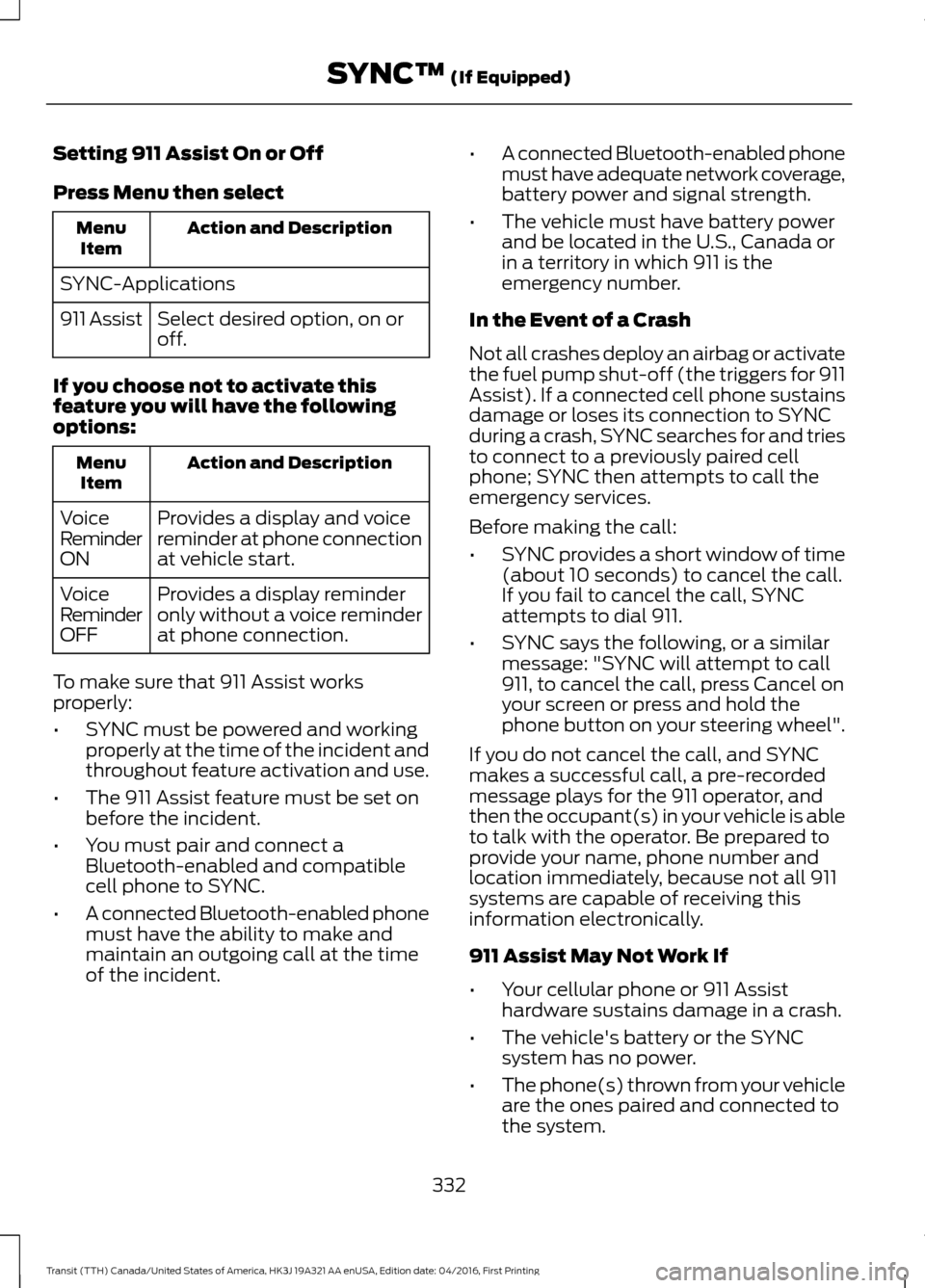
Setting 911 Assist On or Off
Press Menu then select
Action and Description
Menu
Item
SYNC-Applications Select desired option, on or
off.
911 Assist
If you choose not to activate this
feature you will have the following
options: Action and Description
Menu
Item
Provides a display and voice
reminder at phone connection
at vehicle start.
Voice
Reminder
ON
Provides a display reminder
only without a voice reminder
at phone connection.
Voice
Reminder
OFF
To make sure that 911 Assist works
properly:
• SYNC must be powered and working
properly at the time of the incident and
throughout feature activation and use.
• The 911 Assist feature must be set on
before the incident.
• You must pair and connect a
Bluetooth-enabled and compatible
cell phone to SYNC.
• A connected Bluetooth-enabled phone
must have the ability to make and
maintain an outgoing call at the time
of the incident. •
A connected Bluetooth-enabled phone
must have adequate network coverage,
battery power and signal strength.
• The vehicle must have battery power
and be located in the U.S., Canada or
in a territory in which 911 is the
emergency number.
In the Event of a Crash
Not all crashes deploy an airbag or activate
the fuel pump shut-off (the triggers for 911
Assist). If a connected cell phone sustains
damage or loses its connection to SYNC
during a crash, SYNC searches for and tries
to connect to a previously paired cell
phone; SYNC then attempts to call the
emergency services.
Before making the call:
• SYNC provides a short window of time
(about 10 seconds) to cancel the call.
If you fail to cancel the call, SYNC
attempts to dial 911.
• SYNC says the following, or a similar
message: "SYNC will attempt to call
911, to cancel the call, press Cancel on
your screen or press and hold the
phone button on your steering wheel".
If you do not cancel the call, and SYNC
makes a successful call, a pre-recorded
message plays for the 911 operator, and
then the occupant(s) in your vehicle is able
to talk with the operator. Be prepared to
provide your name, phone number and
location immediately, because not all 911
systems are capable of receiving this
information electronically.
911 Assist May Not Work If
• Your cellular phone or 911 Assist
hardware sustains damage in a crash.
• The vehicle's battery or the SYNC
system has no power.
• The phone(s) thrown from your vehicle
are the ones paired and connected to
the system.
332
Transit (TTH) Canada/United States of America, HK3J 19A321 AA enUSA, Edition date: 04/2016, First Printing SYNC™ (If Equipped)
Page 360 of 484

Cleaning the Touchscreen
You can remove fingerprints with a dry,
clean, soft cloth.
If dirt or fingerprints are still on the screen,
apply a small amount of alcohol to the
cloth and try to clean it again.
Note:
Do not use detergent or any type of
solvent to clean the touchscreen.
Note: Do not pour or spray alcohol onto the
touchscreen.
Using Voice Recognition
Using voice commands allows you to keep
your hands on the wheel and focus on
what is in front of you. The system provides
feedback through audible tones, prompts,
questions and spoken confirmations
depending on the situation and the chosen
level of interaction (voice settings).
The system also asks short questions
(confirmation prompts) when it is not sure
of your request or when there are multiple
possible responses to your request.
When using voice commands, words and
icons may appear in the status bar
indicating the status of the voice command
session. See Using Voice Recognition
(page 364).
Using the Steering Wheel Controls
Depending on your vehicle and option
package, you can use different controls on
your steering wheel to interact with the
touchscreen system in different ways.
VOL:
Control the volume of audio output.
Mute:
Mute the audio output.
Voice:
Press to start a voice session. Press
again to stop the voice prompt and
immediately begin speaking. Press and
hold to end a voice session. SEEK NEXT:
•
While in radio mode, press to seek
between memory presets.
• While in USB, Bluetooth Audio or CD
mode, press to seek between songs or
press and hold to fast seek.
SEEK PREVIOUS:
• While in radio mode, press to seek
between memory presets.
• While in USB, Bluetooth Audio or CD
mode, press to seek between songs or
press and hold to fast seek.
PHONE ACCEPT:
Press to answer a call
or switch between calls.
PHONE REJECT:
Press to end a call or
reject an incoming call.
Note: On some models, SEEK NEXT
may
be combined with PHONE REJECT and
SEEK PREVIOUS may be combined with
PHONE ACCEPT.
M:
Touch the control repeatedly to switch
between media sources (modes).
See
Steering Wheel (page 67).
Using Your Bezel Controls
Depending on your vehicle and option
package, you may also have these controls
on your instrument panel:
• Power:
Switch the audio system on
and off.
• VOL:
Control the volume of playing
audio.
• Seek
and Tune: se as you normally
would in audio modes.
• Eject:
Eject a CD from the audio
system.
• SOURCE
or MEDIA: Press repeatedly
to advance through available media
modes.
357
Transit (TTH) Canada/United States of America, HK3J 19A321 AA enUSA, Edition date: 04/2016, First Printing SYNC™ 3
Page 362 of 484

•
You must pair and connect a
Bluetooth-enabled and compatible
cell phone to SYNC.
• A connected Bluetooth-enabled phone
must have the ability to make and
maintain an outgoing call at the time
of the incident.
• A connected Bluetooth-enabled phone
must have adequate network coverage,
battery power and signal strength.
• The vehicle must have battery power
and be located in the U.S., Canada or
in a territory in which 911 is the
emergency number.
In the Event of a Crash
Not all crashes will deploy an airbag or
activate the fuel pump shut-off (the
triggers for 911 Assist). If a connected cell
phone sustains damage or loses its
connection to SYNC during a crash, SYNC
will search for and try to connect to a
previously paired cell phone; SYNC will
then attempt to call the emergency
services.
Before making the call:
• SYNC provides a short window of time
(about 10 seconds) to cancel the call.
If you fail to cancel the call, SYNC
attempts to dial 911.
• SYNC says the following, or a similar
message: "SYNC will attempt to call
911, to cancel the call, press Cancel on
your screen or press and hold the
phone button on your steering wheel."
If you do not cancel the call, and SYNC
makes a successful call, a pre-recorded
message plays for the 911 operator, and
then the occupant(s) in your vehicle is able
to talk with the operator. Be prepared to
provide your name, phone number and
location immediately, because not all 911
systems are capable of receiving this
information electronically. 911 Assist May Not Work If
•
Your cellular phone or 911 Assist
hardware sustains damage in a crash.
• The vehicle's battery or the SYNC
system has no power.
• The phone(s) thrown from your vehicle
are the ones paired and connected to
the system.
911 Assist Privacy Notice
When you switch on 911 Assist, it may
disclose to emergency services that your
vehicle has been in a crash involving the
deployment of an airbag or activation of
the fuel pump shut-off. Certain versions or
updates to 911 Assist may also be capable
of electronically or verbally disclosing to
911 operators your vehicle location or other
details about your vehicle or crash to assist
911 operators to provide the most
appropriate emergency services. If you do
not want to disclose this information, do
not switch the feature on.
Safety Information WARNING
Driving while distracted can result in
loss of vehicle control, crash and
injury. We strongly recommend that
you use extreme caution when using any
device that may take your focus off the
road. Your primary responsibility is the safe
operation of your vehicle. We recommend
against the use of any hand-held device
while driving and encourage the use of
voice-operated systems when possible.
Make sure you are aware of all applicable
local laws that may affect the use of
electronic devices while driving. 359
Transit (TTH) Canada/United States of America, HK3J 19A321 AA enUSA, Edition date: 04/2016, First Printing SYNC™ 3
Page 432 of 484

Check every six months
Battery connections. Clean if necessary.
Body and door drain holes for obstruc-
tions. Clean if necessary.
Cooling system fluid level and coolant
strength.
Door weatherstrips for wear. Lubricate if
necessary.
Hinges, latches and outside locks for
correct operation. Lubricate if necessary.
Parking brake for correct operation.
Safety belts and seat latches for wear
and function.
Safety warning lamps (brake, ABS, airbag
and safety belt) for operation.
Washer spray and wiper operation. Clean
or replace blades as necessary.
Multi-point Inspection
In order to keep your vehicle running
correctly, it is important to have the
systems on your vehicle checked regularly.
This can help identify potential issues and
prevent major problems. We recommend
having the following multi-point inspection
performed at every scheduled
maintenance interval to help make sure
your vehicle keeps running correctly. Multi-point inspection
Accessory drive belt(s).
Battery performance.
Engine air filter.
Exhaust system. Multi-point inspection
Exterior lamps and hazard warning
system operation.
Fluid levels *
; fill if necessary.
For oil and fluid leaks.
Horn operation.
Radiator, cooler, heater and A/C hoses.
Suspension component for leaks or
damage.
Steering and linkage.
Tires (including spare) for wear and
correct pressure **
.
Windshield for cracks, chips or pits.
Washer spray and wiper operation.
* Brake, coolant recovery reservoir,
automatic transmission, power steering (if
equipped with hydraulic power assist
steering) and window washer.
** If your vehicle is equipped with a
temporary mobility kit, check the tire
sealant expiration Use By date on the
canister. Replace as needed.
Be sure to ask your dealership service
advisor or technician about the multi-point
vehicle inspection. It is a comprehensive
way to perform a thorough inspection of
your vehicle. Your checklist gives you
immediate feedback on the overall
condition of your vehicle.
429
Transit (TTH) Canada/United States of America, HK3J 19A321 AA enUSA, Edition date: 04/2016, First Printing Scheduled Maintenance
Page 474 of 484

A
A/C
See: Climate Control........................................... 95
About This Manual...........................................7
ABS See: Brakes........................................................... 146
ABS driving hints See: Hints on Driving With Anti-Lock
Brakes................................................................ 146
Accessories....................................................422 Exterior Style........................................................ 422
Interior Style......................................................... 422
Lifestyle................................................................. 422
Peace of Mind ...................................................... 422
Accessories See: Replacement Parts
Recommendation............................................ 10
Adjusting the Headlamps
.........................229
Horizontal Aim Adjustment........................... 230
Vertical Aim Adjustment................................. 229
Adjusting the Steering Wheel
....................67
Airbag Disposal...............................................47
Air Conditioning See: Climate Control........................................... 95
Air Filter See: Changing the Engine Air Filter.............237
Alarm See: Anti-Theft Alarm........................................ 63
Anti-Theft Alarm
............................................63
Alarm System........................................................ 63
Arming the Alarm................................................. 63
Disarming the Alarm........................................... 63
Triggering the Alarm............................................ 63
Appendices....................................................445
Apps.................................................................394 ........................................................................\
.......... 394
SiriusXM Traffic and Travel Link.................. 396
Audible Warnings and Indicators.............84 Airbag Secondary Warning.............................. 84
Door Ajar................................................................. 84
Exterior Lamps On............................................... 84
Gearshift Lever not in Park (P)....................... 84
Key in Ignition........................................................ 84
Parking Brake On..................................................84
Safety Belt Minder............................................... 84
Audio Control...................................................67
Audio Input Jack
............................................313 Audio System
................................................298
General Information......................................... 298
Audio Unit - Vehicles With: AM/FM/CD/ SYNC/Satellite Radio
.............................306
Audio Unit - Vehicles With: AM/FM/CD/ SYNC.............................................................304
Audio Unit - Vehicles With: AM/ FM
..................................................................299
AUX Button.......................................................... 302
Clock Button......................................................... 301
Menu Button........................................................ 302
Sound Button...................................................... 302
Station Preset Buttons.................................... 302
Station Tuning Buttons.................................... 301
Audio Unit - Vehicles With: Premium AM/FM/CD..................................................302
Autolamps.........................................................73 Windshield Wiper Activated
Headlamps......................................................... 73
Automatic Transmission
.............................141
Automatic Transmission Adaptive
Learning............................................................. 144
Brake-Shift Interlock......................................... 143
If Your Vehicle Gets Stuck in Mud or Snow................................................................... 145
SelectShift Automatic ™
Transmission................................................... 142
Understanding the Positions of Your Automatic Transmission.............................. 141
Automatic Transmission Fluid Check
.............................................................222
Autowipers........................................................70 Autowipers Settings............................................. 71
Auxiliary Power Points...............................108 12 Volt DC Power Point..................................... 108
AC Power Point................................................... 108
Locations............................................................... 108
Auxiliary Switches
.......................................423
B
Battery See: Changing the 12V Battery..................... 226
Bonnet Lock See: Opening and Closing the Hood............211
Booster Seats..................................................25 Types of Booster Seats...................................... 25
Bottle Holder....................................................111
471
Transit (TTH) Canada/United States of America, HK3J 19A321 AA enUSA, Edition date: 04/2016, First Printing Index
Page 480 of 484

Parking Aids....................................................152
Principle of Operation....................................... 152
Parking Brake
..................................................147
Center Parking Brake......................................... 147
Passive Anti-Theft System.........................62 SecuriLock®........................................................... 62
PATS See: Passive Anti-Theft System..................... 62
Perchlorate........................................................10
Personalized Settings..................................88 Measure Units....................................................... 88
Phone................................................................381 During a Phone Call.......................................... 384
Making Calls........................................................ 383
Pairing Your Cell Phone for the First Time.................................................................... 381
Phone Menu........................................................ 382
Receiving Calls................................................... 384
Smartphone Connectivity.............................. 385
Text Messaging................................................... 385
Post-Crash Alert System
...........................187
Power Door Locks See: Locking and Unlocking.............................. 57
Power Running Boards
................................64
Power Seats...................................................102
Power Lumbar..................................................... 104
Power Steering Fluid Check.....................223 Adding Power Steering Fluid......................... 223
Power Windows..............................................76 Accessory Delay.................................................... 76
Bounce-Back.......................................................... 76
Driver Side One-Touch Down.......................... 76
Driver Side One-Touch Up................................ 76
Protecting the Environment........................14
R
Rear Passenger Climate Controls
............97
Rear Quarter Windows.................................78 Closing the Rear Quarter Windows...............78
Opening the Rear Quarter Windows.............78
Rear Seats
.......................................................104
Installing the Seats............................................ 105
Recline Adjustment........................................... 104
Removing Seats (Passenger Vehicles)........................................................... 104
Rear View Camera
.......................................154
Manual Zoom....................................................... 156Rear Camera Delay............................................
156
Using the Rear View Camera System.........154
Vehicles with Parking Aid................................ 156
Rear View Camera See: Rear View Camera.................................... 154
Recommended Towing Weights............170 Calculating the Maximum Loaded Trailer
Weight for Your Vehicle................................ 172
Reduced Engine Performance................180
Refueling
...........................................................127
System Warnings................................................ 128
Remote Control..............................................48 Car Finder................................................................ 49
Integrated Key head Transmitter................... 48
Programming a New Remote Control.........49
Replacing the Battery......................................... 49
Sounding a Panic Alarm.................................... 50
Removing a Headlamp
.............................230
Repairing Minor Paint Damage..............244
Replacement Parts Recommendation........................................10
Collision Repairs..................................................... 11
Scheduled Maintenance and Mechanical Repairs................................................................... 11
Warranty on Replacement Parts...................... 11
Replacing a Lost Key or Remote Control............................................................50
Reporting Safety Defects (Canada Only)..............................................................194
Reporting Safety Defects (U.S. Only)..............................................................194
Roadside Assistance
...................................183
Vehicles Sold in Canada: Getting Roadside
Assistance........................................................ 183
Vehicles Sold in Canada: Roadside Assistance Program Coverage.................184
Vehicles Sold in Canada: Using Roadside Assistance........................................................ 184
Vehicles Sold in the United States: Getting Roadside Assistance.................................... 183
Vehicles Sold in the United States: Using Roadside Assistance.................................... 183
Roadside Emergencies
...............................183
Running-In See: Breaking-In................................................. 180
Running Out of Fuel.....................................122 Adding Fuel From a Portable Fuel
Container........................................................... 122
477
Transit (TTH) Canada/United States of America, HK3J 19A321 AA enUSA, Edition date: 04/2016, First Printing Index