2017 FORD TAURUS seats
[x] Cancel search: seatsPage 267 of 504
1. Wipe up spilled liquid using a clean,soft cloth as quickly as possible.
2. Use Motorcraft Premium Leather andVinyl Cleaner or a commerciallyavailable leather cleaning product forautomotive interiors. Test any cleaneror stain remover on an inconspicuousarea.
3. Alternatively, wipe the surface with aclean, soft cloth and a mild soap andwater solution. Dry the area with aclean, soft cloth.
4. If necessary, apply more soap andwater solution or cleaning product toa clean, soft cloth and press it onto thesoiled area. Allow this to set at roomtemperature for 30 minutes.
5. Remove the soaked cloth, then with aclean, damp cloth, use a rubbingmotion for 60 seconds on the soiledarea.
6. Dry the area with a clean, soft cloth.
CLEANING LEATHER SEATS (If
Equipped)
Note:Follow the same procedure ascleaning leather seats for cleaning leatherinstrument panels and leather interior trimsurfaces.
For routine cleaning, wipe the surface witha soft, damp cloth and a mild soap andwater solution. Dry the area with a clean,soft cloth.
For cleaning and removing stains such asdye transfer, use Motorcraft PremiumLeather and Vinyl Cleaner or acommercially available leather cleaningproduct for automotive interiors.
Note:Test any cleaner or stain remover onan inconspicuous area.
You should:
•Remove dust and loose dirt with avacuum cleaner.
•Clean and treat spills and stains assoon as possible.
Do not use the following products as thesemay damage the leather:
•Oil and petroleum or silicone-basedleather conditioners.
•Household cleaners.
•Alcohol solutions.
•Solvents or cleaners intendedspecifically for rubber, vinyl andplastics.
REPAIRING MINOR PAINT
DAMAGE
Authorized dealers have touch-up paint tomatch your vehicle’s color. Your vehiclecolor code is printed on a sticker on thefront, left-hand side door jamb. Take yourcolor code to your authorized dealer tomake sure you get the correct color.
Before repairing minor paint damage, usea cleaner such as Motorcraft Bug and TarRemover to remove particles such as birddroppings, tree sap, insect deposits, tarspots, road salt and industrial fallout.
Always read the instructions before usingcleaning products.
CLEANING THE WHEELS
Note:Do not apply a cleaning chemical towarm or hot wheel rims and covers.
Note:Some automatic car washes maycause damage to the finish on your wheelrims and covers.
264
Taurus (CPH) Canada/United States of America, enUSA, First Printing
Vehicle Care
Page 331 of 504
Monday-Saturday, 8:30am-9:00pm EST.
Sunday, 10:30am-7:30pm EST.
In the United States, call 1-800-392-3673.
In Canada, call 1-800-565-3673.
Times are subject to change due toholidays.
SYNC Owner Account
Why do I need a SYNC owner account?
•Required to activate Vehicle HealthReport and to view the reports online.
•Required to activate thesubscription-based SYNC Services andto personalize your Saved Points andFavorites.
•Essential for keeping up with the latestsoftware downloads available forSYNC.
•Access to customer support for anyquestions you may have.
Driving Restrictions
For your safety, certain features arespeed-dependent and restricted when yourvehicle is traveling over 3 mph (5 km/h).
Safety Information
WARNING
Driving while distracted can result inloss of vehicle control, crash andinjury. We strongly recommend thatyou use extreme caution when using anydevice that may take your focus off theroad. Your primary responsibility is the safeoperation of your vehicle. We recommendagainst the use of any hand-held devicewhile driving and encourage the use ofvoice-operated systems when possible.Make sure you are aware of all applicablelocal laws that may affect the use ofelectronic devices while driving.
When using SYNC:
•Do not operate playing devices if thepower cords or cables are broken, splitor damaged. Place cords and cablesout of the way, so they do not interferewith the operation of pedals, seats,compartments or safe driving abilities.
•Do not leave playing devices in yourvehicle during extreme conditions as itcould cause them damage. See yourdevice's manual for further information.
•Do not attempt to service or repair thesystem. See an authorized dealer.
Privacy Information
When a cellular phone is connected toSYNC, the system creates a profile withinyour vehicle that is linked to that cellularphone. This profile is created in order tooffer you more cellular features and tooperate more efficiently. Among otherthings, this profile may contain data aboutyour cellular phone book, text messages(read and unread), and call history,including history of calls when your cellularphone was not connected to the system.In addition, if you connect a media device,the system creates and retains an index ofsupported media content. The system alsorecords a short development log ofapproximately 10 minutes of all recentsystem activity. The log profile and othersystem data may be used to improve thesystem and help diagnose any problemsthat may occur.
The cellular profile, media device index,and development log will remain in thevehicle unless you delete them and aregenerally accessible only in the vehiclewhen the cellular phone or media playeris connected. If you no longer plan to usethe system or the vehicle, we recommendyou perform a Master Reset to erase allstored information.
328
Taurus (CPH) Canada/United States of America, enUSA, First Printing
SYNC™
Page 380 of 504
911 Assist Privacy Notice
When you switch on 911 Assist, it maydisclose to emergency services that yourvehicle has been in a crash involving thedeployment of an airbag or activation ofthe fuel pump shut-off. Certain versions orupdates to 911 Assist may also be capableof electronically or verbally disclosing to911 operators your vehicle location or otherdetails about your vehicle or crash to assist911 operators to provide the mostappropriate emergency services. If you donot want to disclose this information, donot switch the feature on.
Safety Information
WARNING
Driving while distracted can result inloss of vehicle control, crash andinjury. We strongly recommend thatyou use extreme caution when using anydevice that may take your focus off theroad. Your primary responsibility is the safeoperation of your vehicle. We recommendagainst the use of any hand-held devicewhile driving and encourage the use ofvoice-operated systems when possible.Make sure you are aware of all applicablelocal laws that may affect the use ofelectronic devices while driving.
•Do not attempt to service or repair thesystem. Have an authorized dealercheck your vehicle.
•Do not operate playing devices if thepower cords or cables are broken, splitor damaged. Place cords and cablesout of the way, so they do not interferewith the operation of pedals, seats,compartments or safe driving abilities.
•Do not leave playing devices in yourvehicle during extreme conditions as itcould cause them damage. See yourdevice's user guide for furtherinformation.
•For your safety, some SYNC 3 functionsare speed-dependent. Their use islimited to when your vehicle is travelingat speeds under 3 mph (5 km/h). Makesure that you review your device'smanual before using it with SYNC 3.
Speed-restricted Features
Some features of this system may be toodifficult to use while your vehicle is movingso they are restricted from use unless yourvehicle is stationary.
•Screens crowded with information,such as Point of Interest reviews andratings, SiriusXM Traffic and Travel Linksports scores, movie times or skiconditions.
•Any action that requires you to use akeyboard is restricted, such as enteringa navigation destination or editinginformation.
•All lists are limited so the user can viewfewer entries (such as phone contactsor recent phone call entries).
See the following chart for more specificexamples.
377
Taurus (CPH) Canada/United States of America, enUSA, First Printing
SYNC™ 3
Page 384 of 504
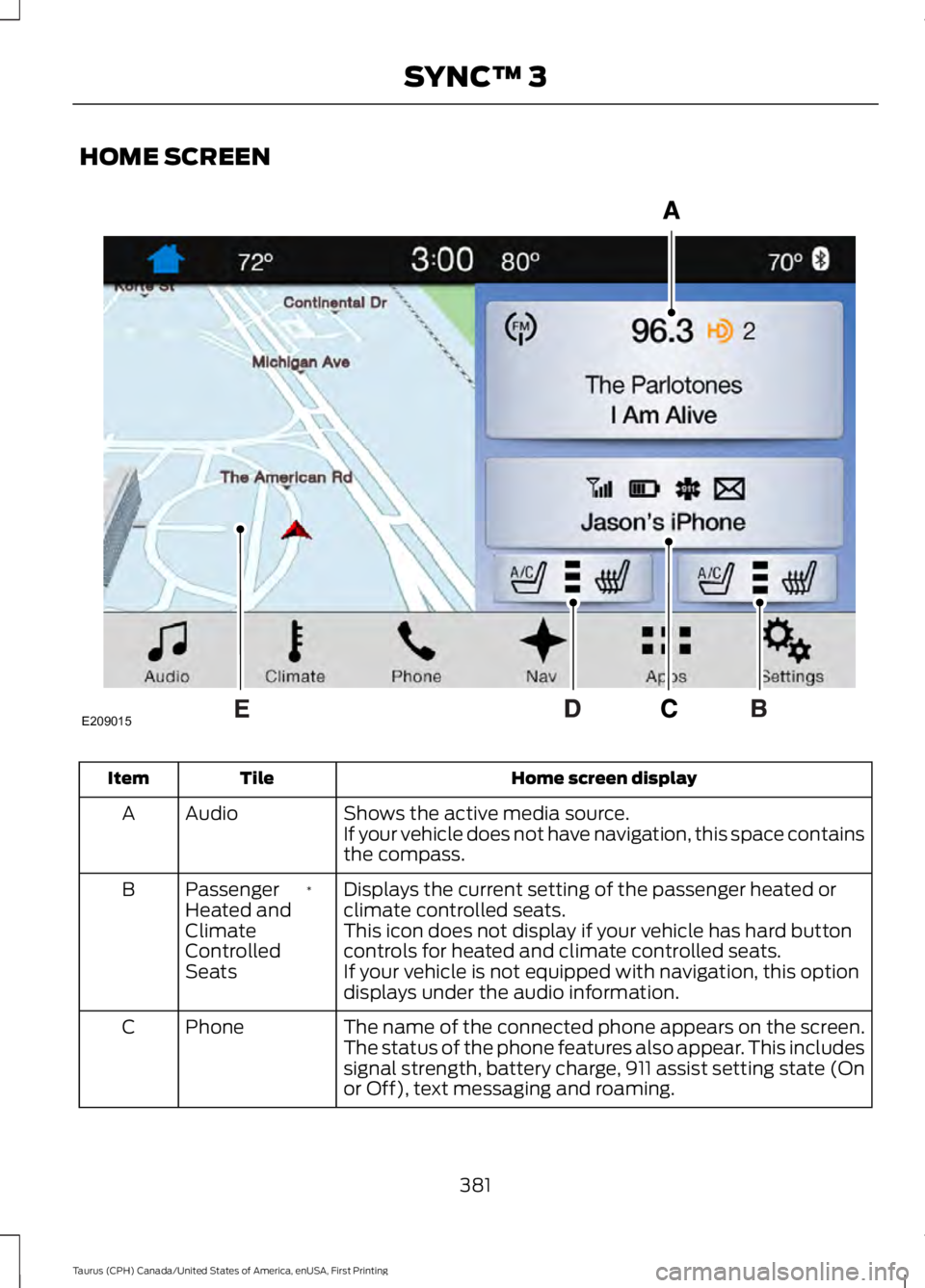
HOME SCREEN
Home screen displayTileItem
Shows the active media source.AudioAIf your vehicle does not have navigation, this space containsthe compass.
Displays the current setting of the passenger heated orclimate controlled seats.*PassengerHeated andClimateControlledSeats
B
This icon does not display if your vehicle has hard buttoncontrols for heated and climate controlled seats.If your vehicle is not equipped with navigation, this optiondisplays under the audio information.
The name of the connected phone appears on the screen.The status of the phone features also appear. This includessignal strength, battery charge, 911 assist setting state (Onor Off), text messaging and roaming.
PhoneC
381
Taurus (CPH) Canada/United States of America, enUSA, First Printing
SYNC™ 3E209015
Page 385 of 504
Home screen displayTileItem
Displays the current setting of the heated or climatecontrolled driver seat.*DriverHeated andClimateControlledSeats
D
This icon does not display if your vehicle has hard buttoncontrols for heated and climate controlled seats.If your vehicle is not equipped with navigation, this optiondisplays under the audio information.
This map displays your current location or current route inreal time.*NavigationE
When you have navigation active, you also see the nextturn and the length of time and distance to your destination.If your vehicle does not have navigation, this space containsthe audio information.
* If equipped.
You can touch any of the feature displaysto access that feature.
Anytime you select the home button, thesystem returns you to this screen.
USING VOICE RECOGNITION
The SYNC 3 system allows you to use voicecommands, to control features like audioand climate controls. By using voicecommands, you can keep your hands onthe wheel and your eyes on the road.
You can access each feature controlled bySYNC 3 through a variety of commands.
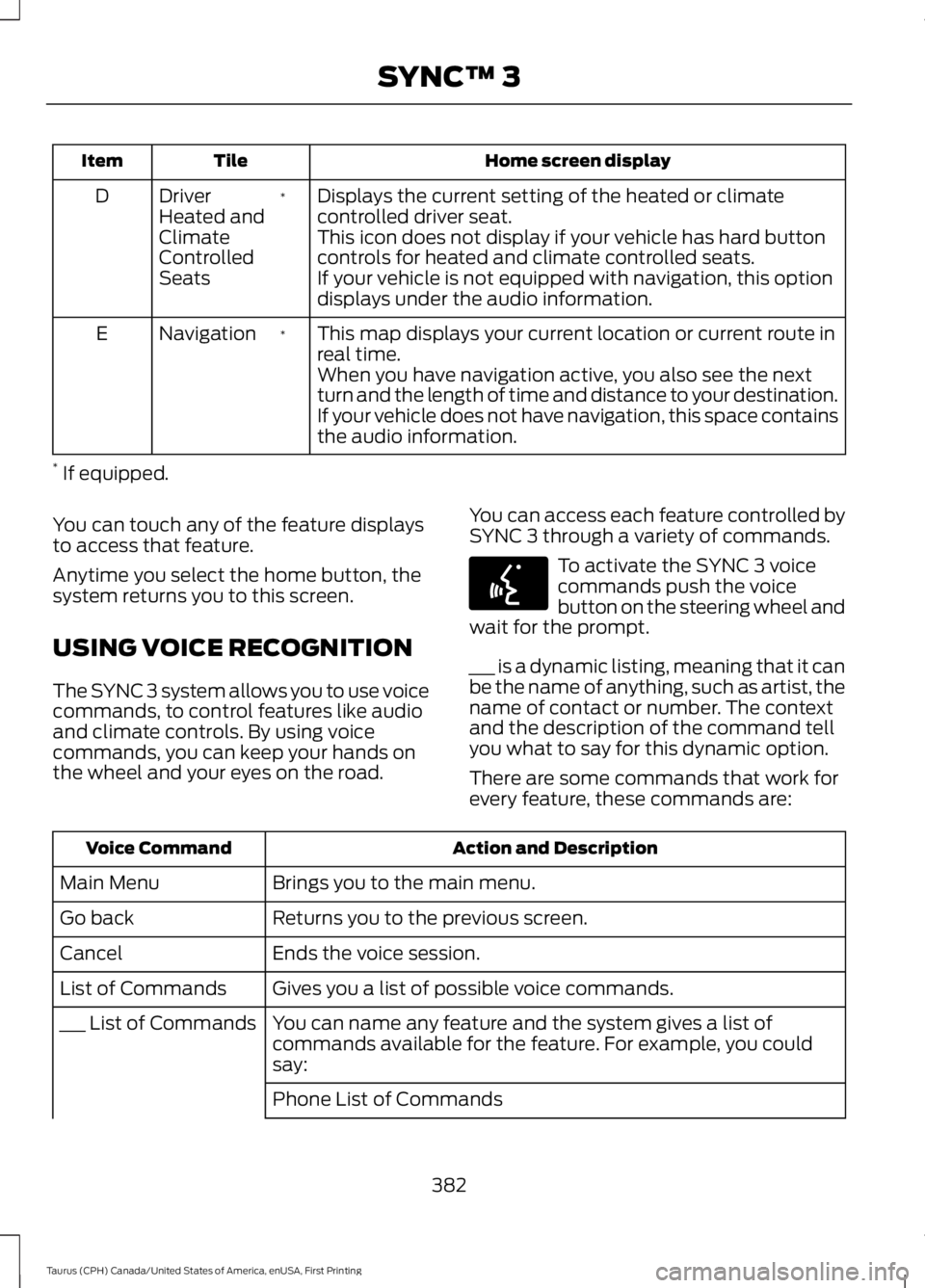
To activate the SYNC 3 voicecommands push the voicebutton on the steering wheel andwait for the prompt.
___ is a dynamic listing, meaning that it canbe the name of anything, such as artist, thename of contact or number. The contextand the description of the command tellyou what to say for this dynamic option.
There are some commands that work forevery feature, these commands are:
Action and DescriptionVoice Command
Brings you to the main menu.Main Menu
Returns you to the previous screen.Go back
Ends the voice session.Cancel
Gives you a list of possible voice commands.List of Commands
You can name any feature and the system gives a list ofcommands available for the feature. For example, you couldsay:
___ List of Commands
Phone List of Commands
382
Taurus (CPH) Canada/United States of America, enUSA, First Printing
SYNC™ 3E142599
Page 495 of 504

Automatic Transmission Fluid Check -2.0L EcoBoost™........................................2476F35 Transmission............................................247Automatic Transmission Fluid Check -3.5L Duratec/3.5L Ecoboost™............2476F50/6F55 Transmission...............................247Autowipers........................................................70Auxiliary Power Points................................13512 Volt DC Power Point.....................................135Locations...............................................................135AWDSee: All-Wheel Drive..........................................157
B
BatterySee: Changing the 12V Battery......................252Blind Spot Information System...............191Switching the System Off and On...............193System Errors.......................................................193System Limitations............................................193Using the System................................................192Bonnet LockSee: Opening and Closing the Hood..........236Booster Seats..................................................25Types of Booster Seats......................................25Brake Fluid Check.........................................251Brakes...............................................................164General Information..........................................164Breaking-In.......................................................211Bulb Specification Chart...........................257
C
Cabin Air Filter.................................................117California Proposition 65..............................11Capacities and Specifications - 2.0LEcoBoost™................................................304Specifications.....................................................304Capacities and Specifications - 3.5LDuratec.........................................................307Specifications.....................................................308Capacities and Specifications - 3.5LEcoboost™...................................................311Specifications........................................................311Capacities and Specifications................297Cargo Nets.....................................................200
Car WashSee: Cleaning the Exterior..............................260Center Console..............................................136Changing a Bulb...........................................256Front Fog Lamp..................................................256High-Intensity DischargeHeadlamps.....................................................256LED Lamps...........................................................256License Plate Lamp..........................................256Changing a Fuse...........................................234Fuses......................................................................234Changing a Road Wheel............................291Dissimilar Spare Wheel and Tire AssemblyInformation......................................................291Tire Change Procedure....................................292Changing the 12V Battery.........................252Battery Management System.......................253Changing the Engine Air Filter................259Changing the Wiper Blades.....................254Changing the Windshield WiperBlades...............................................................254Checking MyKey System Status...............54Checking the Wiper Blades.....................254Child Restraint and SeatbeltMaintenance.................................................35Child Restraint Positioning..........................27Child Safety.......................................................18General Information.............................................18Child Safety Locks.........................................28Left-Hand Side......................................................29Right-Hand Side...................................................29Cleaning Leather Seats.............................264Cleaning Products......................................260Materials...............................................................260Cleaning the Engine....................................262Cleaning the Exterior.................................260Exterior Chrome Parts.......................................261Exterior Plastic Parts.........................................261Stripes or Graphics.............................................261Underbody............................................................261Under Hood..........................................................261Cleaning the Instrument Panel andInstrument Cluster Lens.........................263Cleaning the Interior...................................263Cleaning the Wheels..................................264Cleaning the Windows and WiperBlades...........................................................262Clearing All MyKeys.......................................53
492
Taurus (CPH) Canada/United States of America, enUSA, First Printing
Index
Page 496 of 504

Climate............................................................399Climate Control............................................109Climate Controlled Seats..........................128Cooled Seats........................................................128Heated Seats........................................................128Collision Warning System..........................197PRINCIPLE OF OPERATION............................197Coolant CheckSee: Engine Coolant Check............................243Crash Sensors and Airbag Indicator.......44Creating a MyKey............................................52Programming/Changing ConfigurableSettings...............................................................52Cross Traffic Alert.........................................193False Alerts...........................................................196Switching the System Off and On...............196System Errors.......................................................196System Lights, Messages and AudibleAlerts..................................................................195System Limitations............................................195Using the System...............................................193Cruise Control.................................................68Principle of Operation.......................................178Type 1........................................................................68Type 2.......................................................................68Cruise controlSee: Using Cruise Control................................178Customer Assistance..................................219
D
Data Recording..................................................9Event Data Recording..........................................10Service Data Recording........................................9Daytime Running Lamps.............................74Direction Indicators........................................76Doors and Locks..............................................57Driver Alert......................................................186PRINCIPLE OF OPERATION...........................186USING DRIVER ALERT.....................................186Driver and Passenger Airbags...................39Children and Airbags..........................................39Proper Driver and Front Passenger SeatingAdjustment........................................................39Driving Aids.....................................................186Driving Hints.....................................................211Driving Through Water................................212
DRLSee: Daytime Running Lamps.........................74
E
Economical Driving.......................................211Emission Control System..........................150On-Board Diagnostics (OBD-II).....................151Readiness for Inspection and Maintenance(I/M) Testing.....................................................151End User License Agreement.................465VEHICLE SOFTWARE END USER LICENSEAGREEMENT (EULA) ................................465Engine Block Heater.....................................141Using the Engine Block Heater......................142Engine Coolant Check................................243Adding Coolant..................................................244Coolant Change.................................................245Engine Coolant TemperatureManagement..................................................246Fail-Safe Cooling...............................................245Recycled Coolant...............................................245Severe Climates.................................................245Engine ImmobilizerSee: Passive Anti-Theft System.....................64Engine Oil Check...........................................241Adding Engine Oil...............................................242Engine Oil Dipstick - 2.0LEcoBoost™..................................................241Engine Oil Dipstick - 3.5L Duratec/3.5LEcoboost™..................................................241Engine Specifications - 2.0LEcoBoost™.................................................297Drivebelt Routing...............................................297Engine Specifications - 3.5LDuratec..........................................................297Drivebelt Routing...............................................298Engine Specifications - 3.5LEcoboost™.................................................298Drivebelt Routing...............................................298Entertainment..............................................389AM/FM Radio......................................................390Apps.......................................................................398Bluetooth Stereo or USB.................................397CD (If equipped)................................................396HD Radio™ Information (IfAvailable)........................................................393
493
Taurus (CPH) Canada/United States of America, enUSA, First Printing
Index
Page 498 of 504

Hazard Warning Flashers...........................215Headlamp AdjustingSee: Adjusting the Headlamps.....................255Headlamp Exit Delay.....................................74Head Restraints.............................................119Adjusting the Head Restraint.........................120Tilting Head Restraints .....................................121Heated Seats..................................................127Rear Heated Seats..............................................127Heated Steering Wheel...............................68Heated Windows and Mirrors....................117Heated Exterior Mirror........................................117Heated Rear Window..........................................117HeatingSee: Climate Control.........................................109Hints on Controlling the InteriorClimate...........................................................115Cooling the Interior Quickly.............................116General Hints.........................................................115Heating the Interior Quickly.............................115Recommended Settings for Cooling............116Recommended Settings for Heating...........116Side Window Defogging in ColdWeather..............................................................117Hints on Driving With Anti-LockBrakes............................................................164Home Screen.................................................381Hood LockSee: Opening and Closing the Hood..........236
I
Ignition Switch................................................137In California (U.S. Only)............................220Information Display Control......................68Information Displays....................................89General Information...........................................89Information Messages.................................98Adaptive Cruise Control....................................98AdvanceTrac™.....................................................99Alarm........................................................................99All Wheel Drive...................................................100Automatic Engine Shutdown..........................99Automatic High Beam Control.......................99Battery and Charging System.......................100Blind Spot Information and Cross TrafficAlert System.....................................................101Brake System........................................................101
Collision Warning System...............................102Doors and Locks.................................................102Driver Alert............................................................102Fuel..........................................................................102Keys and Intelligent Access............................103Lane Keeping System.......................................103Maintenance........................................................104MyKey.....................................................................104Park Aid..................................................................105Passenger Sensing System Message.........105Power Steering....................................................105Reminder Messages..........................................105Remote Start.......................................................106Seats.......................................................................106Starting System..................................................106Tire Pressure Monitoring System.................106Traction Control...................................................107Transmission........................................................107Installing Child Restraints............................19Child Seats...............................................................19Using Lap and Shoulder Belts.........................20Using Lower Anchors and Tethers forCHildren (LATCH)............................................22Using Tether Straps.............................................23Instrument Cluster........................................83Instrument Lighting Dimmer......................74Instrument Panel Overview........................16Interior Lamps.................................................76Front Row Map Lamps.......................................76Second Row Map Lamps...................................77Interior Luggage CompartmentRelease............................................................62Interior Mirror....................................................81Auto-Dimming Mirror...........................................81Introduction.........................................................7
J
Jump Starting the Vehicle.........................216Connecting the Jumper Cables.....................216Jump Starting.......................................................217Preparing Your Vehicle......................................216Removing the Jumper Cables.........................217
495
Taurus (CPH) Canada/United States of America, enUSA, First Printing
Index