Page 81 of 504
POWER WINDOWS
WARNINGS
Do not leave children unattended inyour vehicle and do not let them playwith the power windows. They mayseriously injure themselves.
When closing the power windows,you should verify they are free ofobstructions and make sure thatchildren and pets are not in the proximityof the window openings.
Note:You may hear a pulsing noise whenjust one of the windows is open. Lower theopposite window slightly to reduce thisnoise.
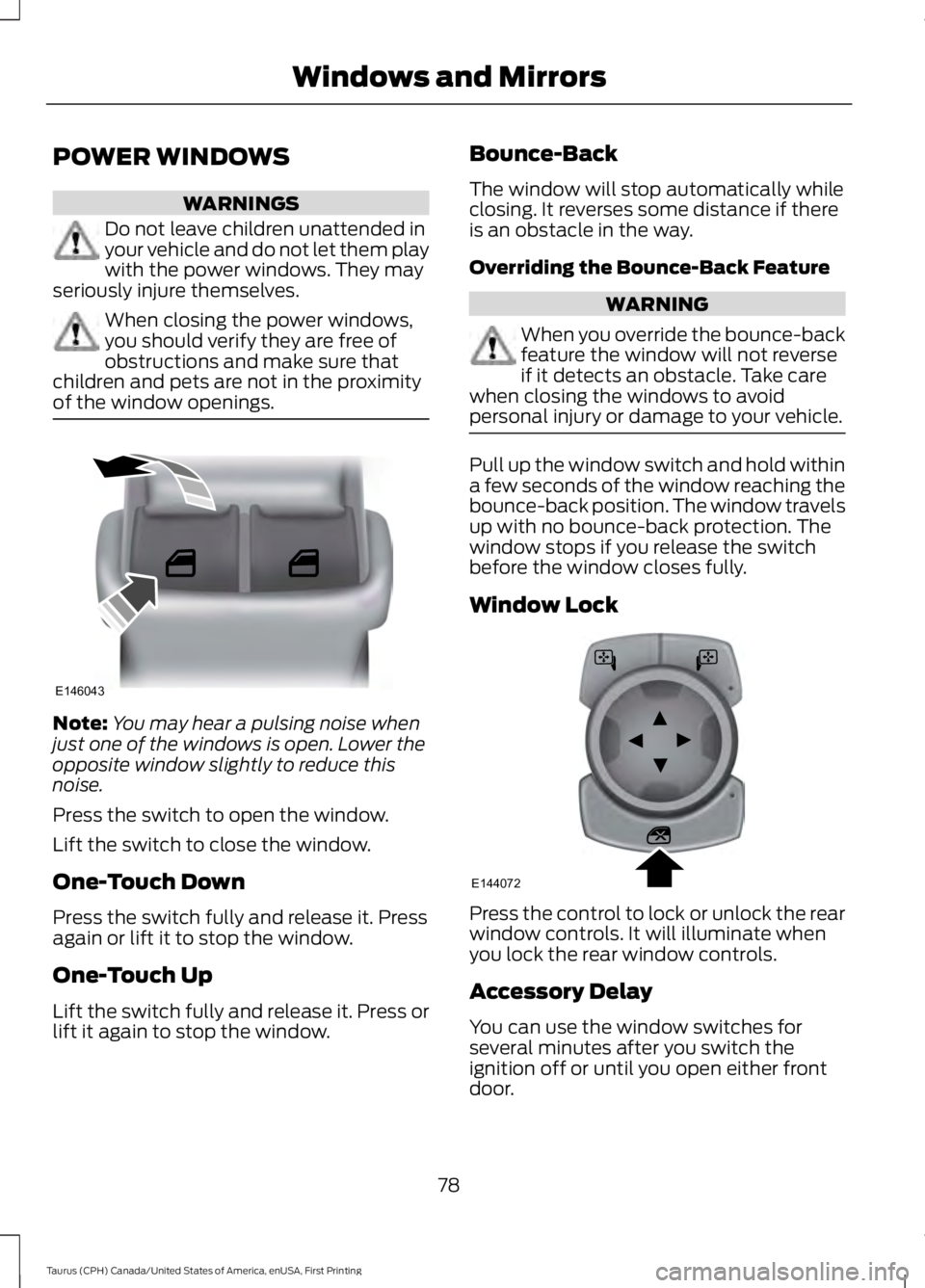
Press the switch to open the window.
Lift the switch to close the window.
One-Touch Down
Press the switch fully and release it. Pressagain or lift it to stop the window.
One-Touch Up
Lift the switch fully and release it. Press orlift it again to stop the window.
Bounce-Back
The window will stop automatically whileclosing. It reverses some distance if thereis an obstacle in the way.
Overriding the Bounce-Back Feature
WARNING
When you override the bounce-backfeature the window will not reverseif it detects an obstacle. Take carewhen closing the windows to avoidpersonal injury or damage to your vehicle.
Pull up the window switch and hold withina few seconds of the window reaching thebounce-back position. The window travelsup with no bounce-back protection. Thewindow stops if you release the switchbefore the window closes fully.
Window Lock
Press the control to lock or unlock the rearwindow controls. It will illuminate whenyou lock the rear window controls.
Accessory Delay
You can use the window switches forseveral minutes after you switch theignition off or until you open either frontdoor.
78
Taurus (CPH) Canada/United States of America, enUSA, First Printing
Windows and MirrorsE146043 E144072
Page 82 of 504
GLOBAL OPENING (If Equipped)
You can use the remote control to operatethe windows with the ignition off.
Note:You can enable or disable this featurein the information display, or see anauthorized dealer. See GeneralInformation (page 89).
Note:To operate this feature, accessorydelay must not be active.
Opening the Windows
You can open the windows for a short timeafter you unlock your vehicle with theremote control. After you unlock yourvehicle, press and hold the remote controlunlock button to open the windows andvent the moonroof. Release the buttononce movement starts. Press the lock orunlock button to stop movement.
Note:Only the front windows are operatedduring global opening.
EXTERIOR MIRRORS
Power Exterior Mirrors
WARNING
Do not adjust the mirrors when yourvehicle is moving.
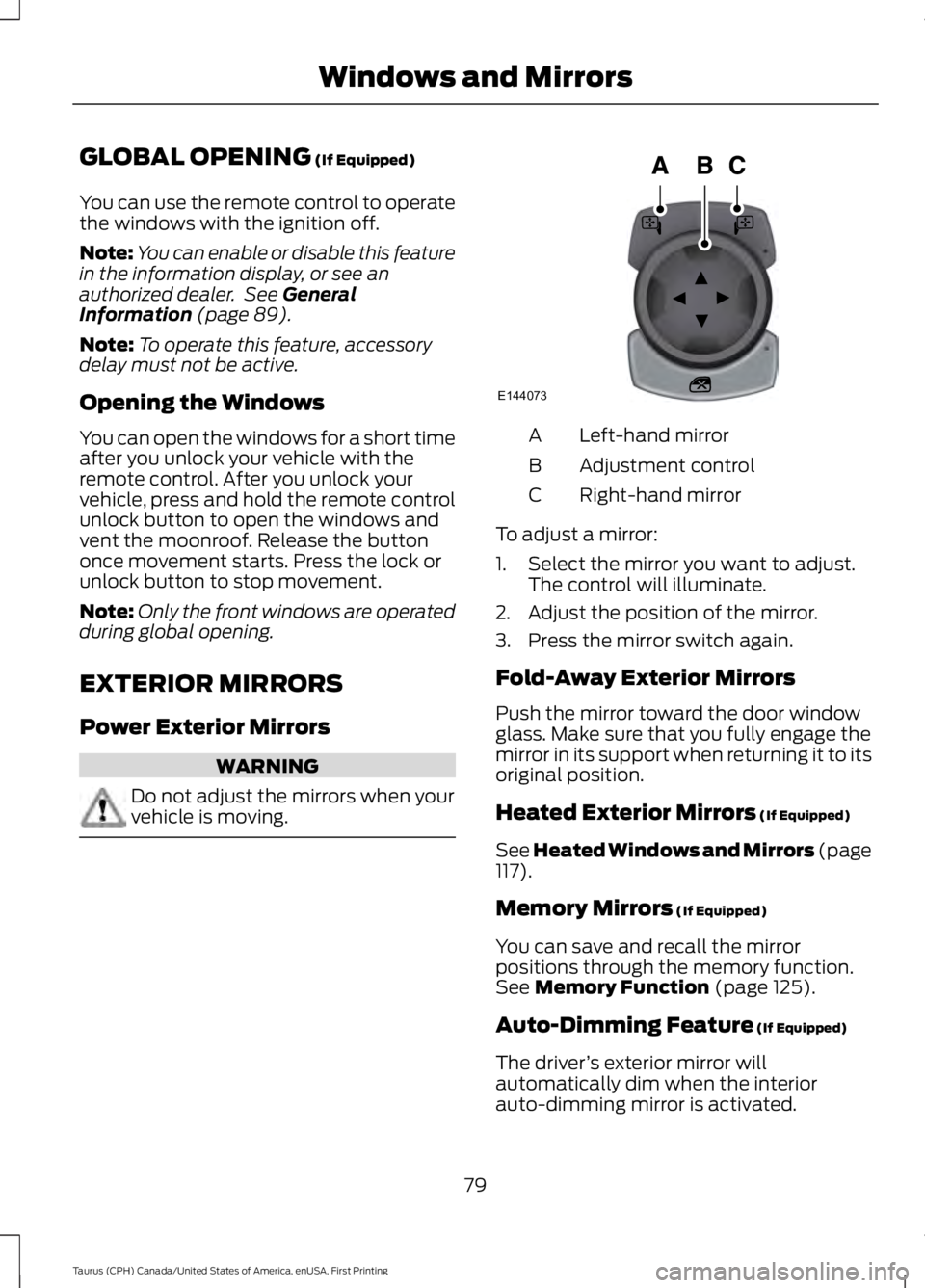
Left-hand mirrorA
Adjustment controlB
Right-hand mirrorC
To adjust a mirror:
1. Select the mirror you want to adjust.The control will illuminate.
2. Adjust the position of the mirror.
3. Press the mirror switch again.
Fold-Away Exterior Mirrors
Push the mirror toward the door windowglass. Make sure that you fully engage themirror in its support when returning it to itsoriginal position.
Heated Exterior Mirrors (If Equipped)
See Heated Windows and Mirrors (page117).
Memory Mirrors (If Equipped)
You can save and recall the mirrorpositions through the memory function.See Memory Function (page 125).
Auto-Dimming Feature (If Equipped)
The driver’s exterior mirror willautomatically dim when the interiorauto-dimming mirror is activated.
79
Taurus (CPH) Canada/United States of America, enUSA, First Printing
Windows and MirrorsE144073
Page 83 of 504
Puddle Lamps (If Equipped)
The lamps on the bottom part of the mirrorhousing light when you use yourtransmitter to unlock the doors or whenyou open a door.
Integrated Blind Spot Mirrors (If
Equipped)
WARNING
Objects in the blind spot mirror arecloser than they appear.
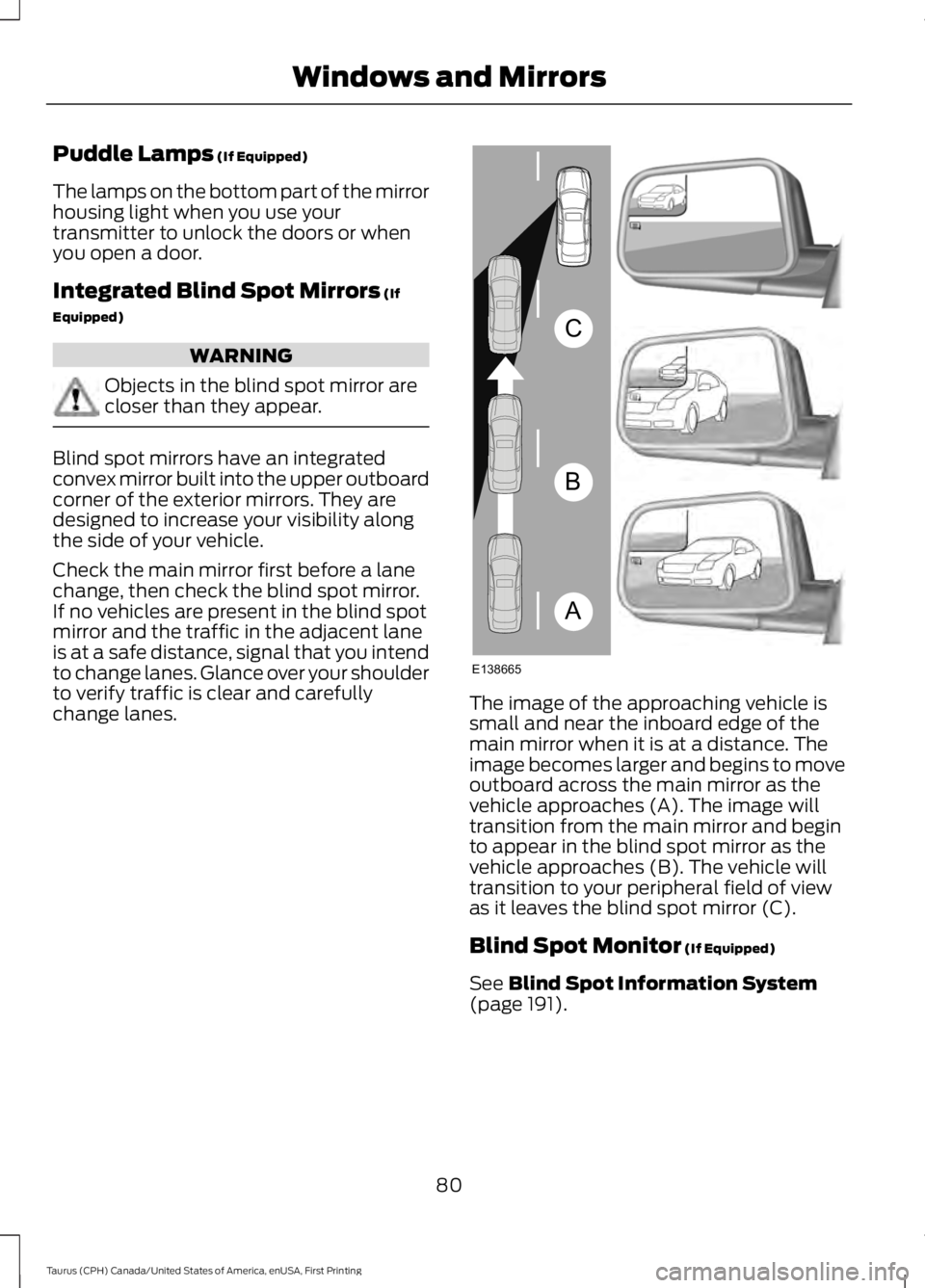
Blind spot mirrors have an integratedconvex mirror built into the upper outboardcorner of the exterior mirrors. They aredesigned to increase your visibility alongthe side of your vehicle.
Check the main mirror first before a lanechange, then check the blind spot mirror.If no vehicles are present in the blind spotmirror and the traffic in the adjacent laneis at a safe distance, signal that you intendto change lanes. Glance over your shoulderto verify traffic is clear and carefullychange lanes.The image of the approaching vehicle issmall and near the inboard edge of themain mirror when it is at a distance. Theimage becomes larger and begins to moveoutboard across the main mirror as thevehicle approaches (A). The image willtransition from the main mirror and beginto appear in the blind spot mirror as thevehicle approaches (B). The vehicle willtransition to your peripheral field of viewas it leaves the blind spot mirror (C).
Blind Spot Monitor (If Equipped)
See Blind Spot Information System(page 191).
80
Taurus (CPH) Canada/United States of America, enUSA, First Printing
Windows and MirrorsA
B
C
E138665
Page 95 of 504
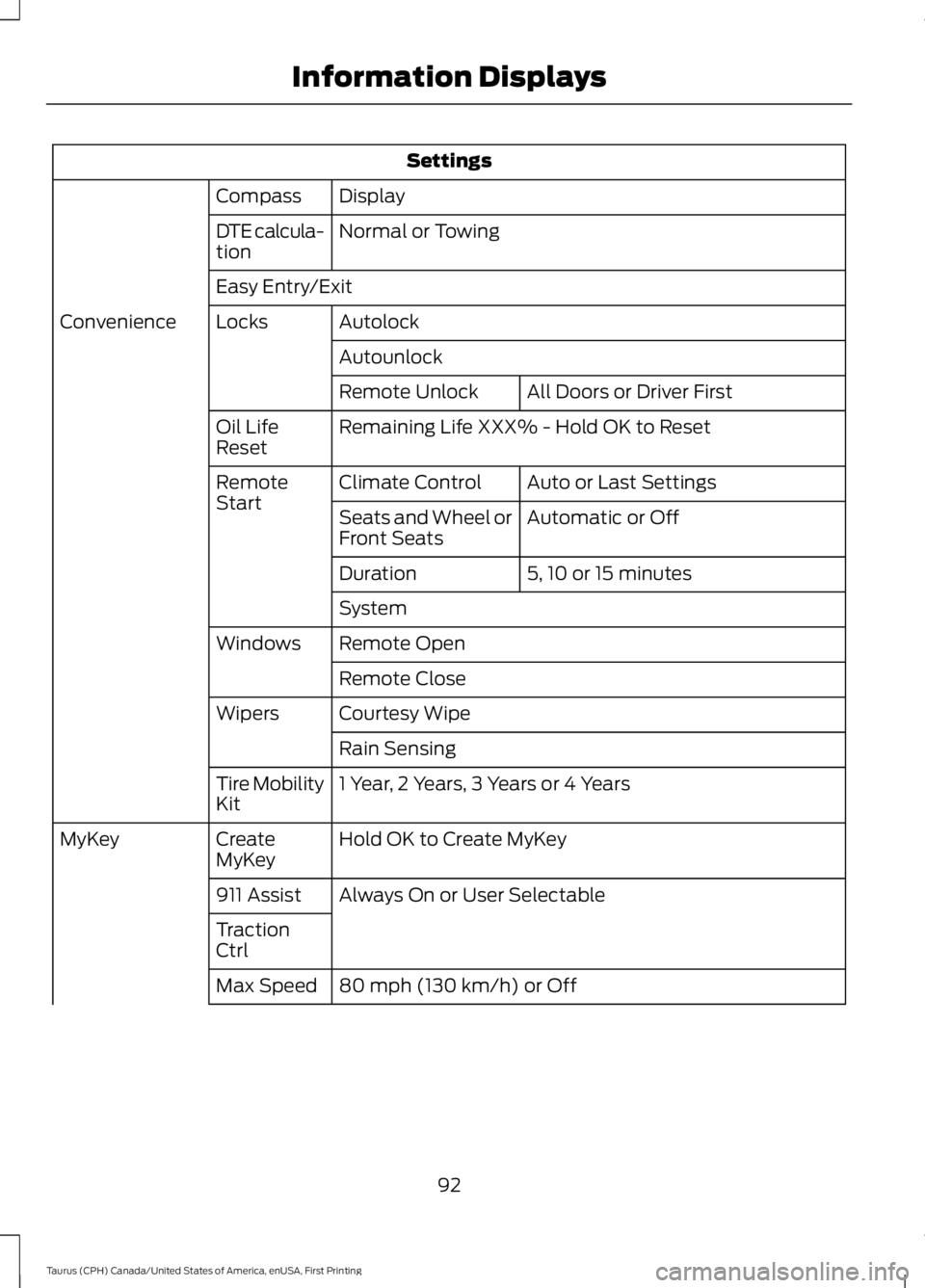
Settings
DisplayCompass
Normal or TowingDTE calcula-tion
Easy Entry/Exit
AutolockLocksConvenience
Autounlock
All Doors or Driver FirstRemote Unlock
Remaining Life XXX% - Hold OK to ResetOil LifeReset
Auto or Last SettingsClimate ControlRemoteStartAutomatic or OffSeats and Wheel orFront Seats
5, 10 or 15 minutesDuration
System
Remote OpenWindows
Remote Close
Courtesy WipeWipers
Rain Sensing
1 Year, 2 Years, 3 Years or 4 YearsTire MobilityKit
Hold OK to Create MyKeyCreateMyKeyMyKey
Always On or User Selectable911 Assist
TractionCtrl
80 mph (130 km/h) or OffMax Speed
92
Taurus (CPH) Canada/United States of America, enUSA, First Printing
Information Displays
Page 99 of 504
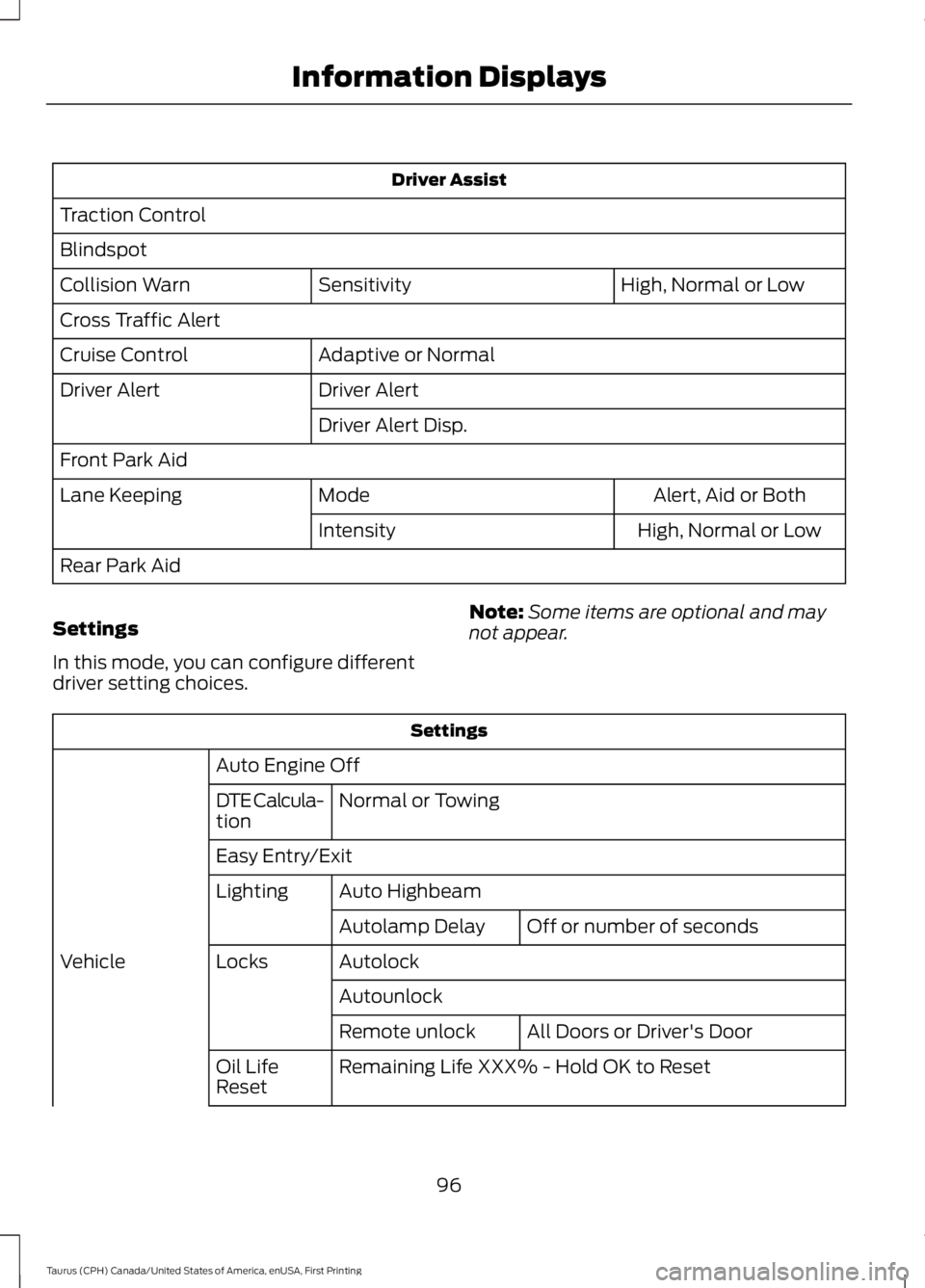
Driver Assist
Traction Control
Blindspot
High, Normal or LowSensitivityCollision Warn
Cross Traffic Alert
Adaptive or NormalCruise Control
Driver AlertDriver Alert
Driver Alert Disp.
Front Park Aid
Alert, Aid or BothModeLane Keeping
High, Normal or LowIntensity
Rear Park Aid
Settings
In this mode, you can configure differentdriver setting choices.
Note:Some items are optional and maynot appear.
Settings
Auto Engine Off
Normal or TowingDTE Calcula-tion
Easy Entry/Exit
Auto HighbeamLighting
Off or number of secondsAutolamp Delay
AutolockLocksVehicle
Autounlock
All Doors or Driver's DoorRemote unlock
Remaining Life XXX% - Hold OK to ResetOil LifeReset
96
Taurus (CPH) Canada/United States of America, enUSA, First Printing
Information Displays
Page 105 of 504

Collision Warning System
ActionMessage
There is a system malfunction with the collision warningsystem. The system is disabled. Contact an authorized dealeras soon as possible.
Collision WarningMalfunction
The collision warning system radar is blocked because of poorradar visibility due to bad weather or ice/mud/water in frontof the radar. Driver can typically clean the sensor to resolve.Contact an authorized dealer as soon as possible.
Collision Warning NotAvailable SensorBlocked See Manual
There is a system malfunction with the collision warningsystem. The system is disabled. Contact an authorized dealeras soon as possible.
Collision Warning NotAvailable
Doors and Locks
ActionMessage
Displays when a door is not completely closed.X Door Ajar
Displays when the trunk is not completely closed.Trunk Ajar
Driver Alert
ActionMessage
Stop and rest as soon as it is safe to do so.Driver Alert Warning RestNow
Take a rest soon.Driver Alert Warning RestSuggested
Fuel
ActionMessage
An early reminder of a low fuel condition.Fuel Level Low
The fuel fill inlet may not be properly closed.Check Fuel Fill Inlet
102
Taurus (CPH) Canada/United States of America, enUSA, First Printing
Information Displays
Page 108 of 504

Park Aid
ActionMessage
Displays when the transmission is in R (Reverse) and the parkaid is disabled.Check Park Aid
Displays when the transmission is in R (Reverse) and the rearpark aid is disabled.Check Rear Park Aid
Displays the park aid status.Rear Park Aid On Off
Passenger Sensing System Message
ActionMessage
Displays when objects are by the passenger seat. After youmove the objects away from the seat, if the warning stays onor continues to come on contact your authorized dealer assoon as possible.
Occupant SensorBLOCKED RemoveObjects Near PassengerSeat
Reminder Messages
ActionMessage
Displays as a reminder to shift into park.Shift to Park
Displayed when the engine is on, the vehicle is in park and thedriver’s door is opened.Engine ON
Power Steering
ActionMessage
The power steering system has detected a condition thatrequires service. Contact an authorized dealer.Steering malfunctionService now
The power steering system is not working. Stop your vehicleat a safe place. Contact an authorized dealer.Service Power SteeringNow
The power steering system has detected a condition withinthe power steering system, or passive entry or passive startsystem requires service. Contact an authorized dealer.
Power Steering AssistFault
105
Taurus (CPH) Canada/United States of America, enUSA, First Printing
Information Displays
Page 128 of 504
MEMORY FUNCTION (If Equipped)
WARNINGS
Before activating the memory seat,make sure that the area immediatelysurrounding the seat is clear ofobstructions and that all occupants areclear of moving parts.
Do not use the memory functionwhen your vehicle is moving.
This function automatically recalls theposition of these features.
•Driver seat.
•Power mirrors.
•Optional power adjustable pedals.
•Optional power steering column.
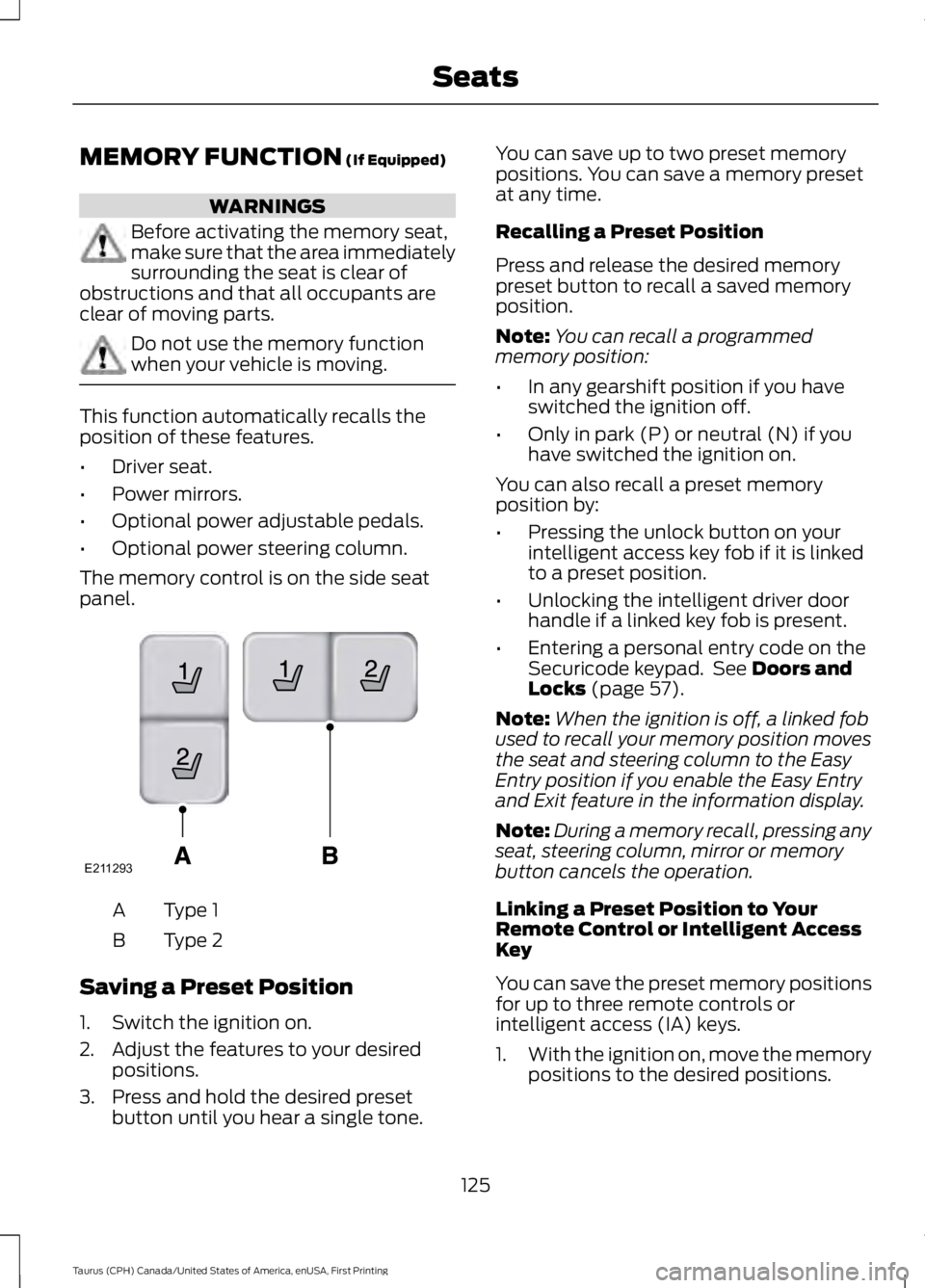
The memory control is on the side seatpanel.
Type 1A
Type 2B
Saving a Preset Position
1. Switch the ignition on.
2. Adjust the features to your desiredpositions.
3. Press and hold the desired presetbutton until you hear a single tone.
You can save up to two preset memorypositions. You can save a memory presetat any time.
Recalling a Preset Position
Press and release the desired memorypreset button to recall a saved memoryposition.
Note:You can recall a programmedmemory position:
•In any gearshift position if you haveswitched the ignition off.
•Only in park (P) or neutral (N) if youhave switched the ignition on.
You can also recall a preset memoryposition by:
•Pressing the unlock button on yourintelligent access key fob if it is linkedto a preset position.
•Unlocking the intelligent driver doorhandle if a linked key fob is present.
•Entering a personal entry code on theSecuricode keypad. See Doors andLocks (page 57).
Note:When the ignition is off, a linked fobused to recall your memory position movesthe seat and steering column to the EasyEntry position if you enable the Easy Entryand Exit feature in the information display.
Note:During a memory recall, pressing anyseat, steering column, mirror or memorybutton cancels the operation.
Linking a Preset Position to YourRemote Control or Intelligent AccessKey
You can save the preset memory positionsfor up to three remote controls orintelligent access (IA) keys.
1.With the ignition on, move the memorypositions to the desired positions.
125
Taurus (CPH) Canada/United States of America, enUSA, First Printing
SeatsE211293