2017 FORD TAURUS turn off
[x] Cancel search: turn offPage 364 of 504
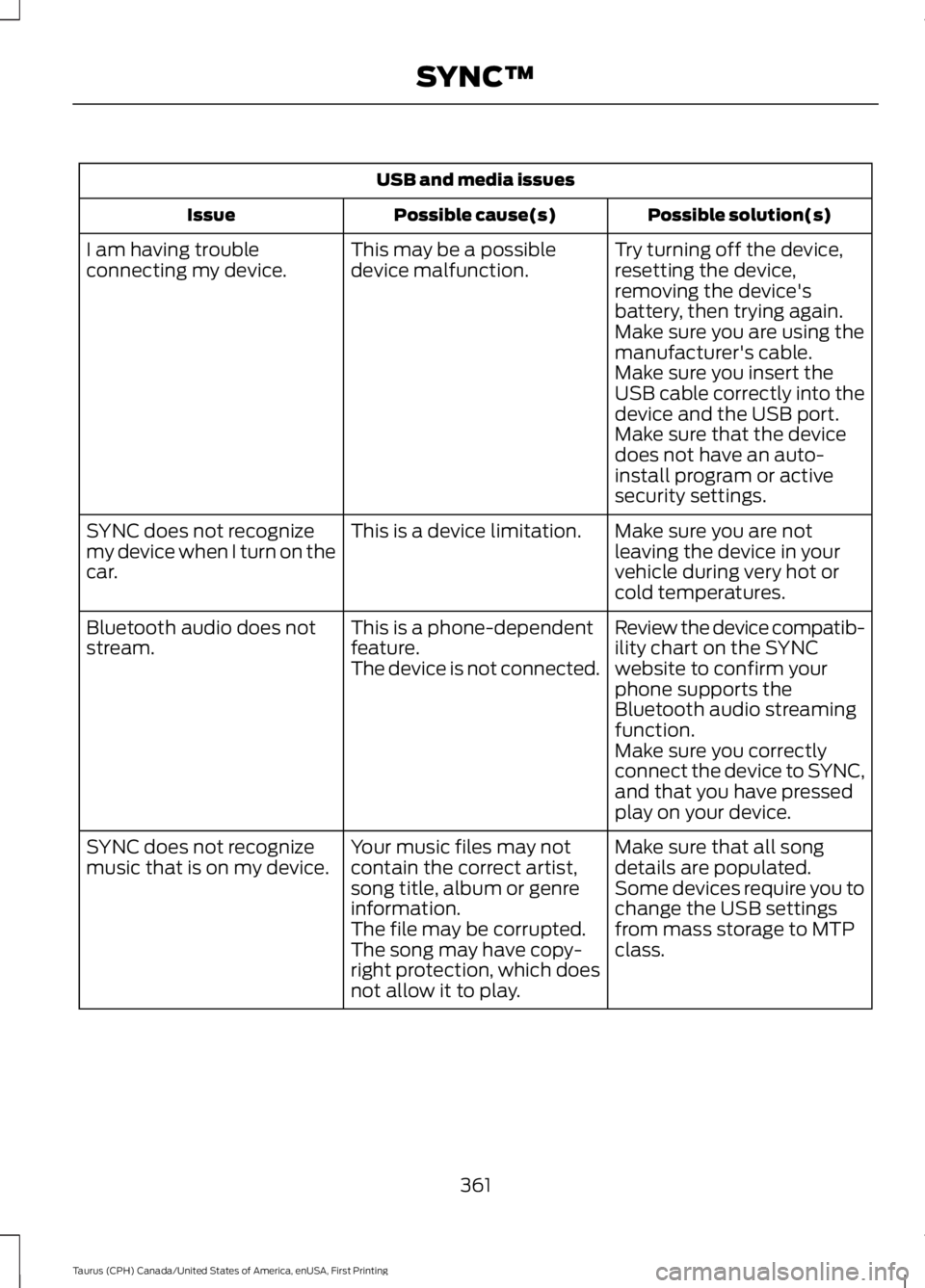
USB and media issues
Possible solution(s)Possible cause(s)Issue
Try turning off the device,resetting the device,removing the device'sbattery, then trying again.
This may be a possibledevice malfunction.I am having troubleconnecting my device.
Make sure you are using themanufacturer's cable.Make sure you insert theUSB cable correctly into thedevice and the USB port.Make sure that the devicedoes not have an auto-install program or activesecurity settings.
Make sure you are notleaving the device in yourvehicle during very hot orcold temperatures.
This is a device limitation.SYNC does not recognizemy device when I turn on thecar.
Review the device compatib-ility chart on the SYNCwebsite to confirm yourphone supports theBluetooth audio streamingfunction.
This is a phone-dependentfeature.The device is not connected.
Bluetooth audio does notstream.
Make sure you correctlyconnect the device to SYNC,and that you have pressedplay on your device.
Make sure that all songdetails are populated.Your music files may notcontain the correct artist,song title, album or genreinformation.
SYNC does not recognizemusic that is on my device.Some devices require you tochange the USB settingsfrom mass storage to MTPclass.The file may be corrupted.The song may have copy-right protection, which doesnot allow it to play.
361
Taurus (CPH) Canada/United States of America, enUSA, First Printing
SYNC™
Page 365 of 504
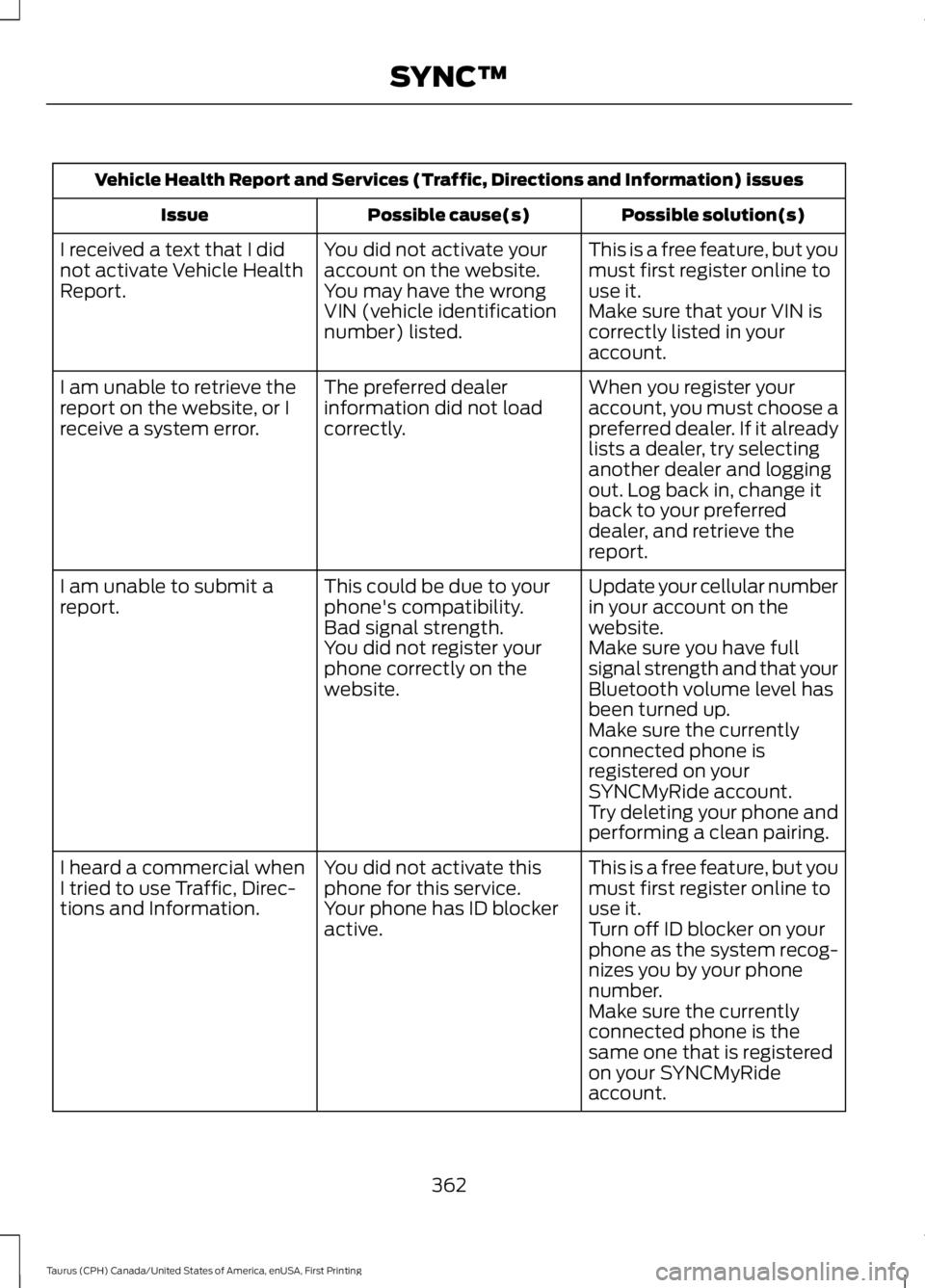
Vehicle Health Report and Services (Traffic, Directions and Information) issues
Possible solution(s)Possible cause(s)Issue
This is a free feature, but youmust first register online touse it.
You did not activate youraccount on the website.You may have the wrongVIN (vehicle identificationnumber) listed.
I received a text that I didnot activate Vehicle HealthReport.Make sure that your VIN iscorrectly listed in youraccount.
When you register youraccount, you must choose apreferred dealer. If it alreadylists a dealer, try selectinganother dealer and loggingout. Log back in, change itback to your preferreddealer, and retrieve thereport.
The preferred dealerinformation did not loadcorrectly.
I am unable to retrieve thereport on the website, or Ireceive a system error.
Update your cellular numberin your account on thewebsite.
This could be due to yourphone's compatibility.Bad signal strength.
I am unable to submit areport.
Make sure you have fullsignal strength and that yourBluetooth volume level hasbeen turned up.
You did not register yourphone correctly on thewebsite.
Make sure the currentlyconnected phone isregistered on yourSYNCMyRide account.Try deleting your phone andperforming a clean pairing.
This is a free feature, but youmust first register online touse it.
You did not activate thisphone for this service.Your phone has ID blockeractive.
I heard a commercial whenI tried to use Traffic, Direc-tions and Information.Turn off ID blocker on yourphone as the system recog-nizes you by your phonenumber.Make sure the currentlyconnected phone is thesame one that is registeredon your SYNCMyRideaccount.
362
Taurus (CPH) Canada/United States of America, enUSA, First Printing
SYNC™
Page 369 of 504
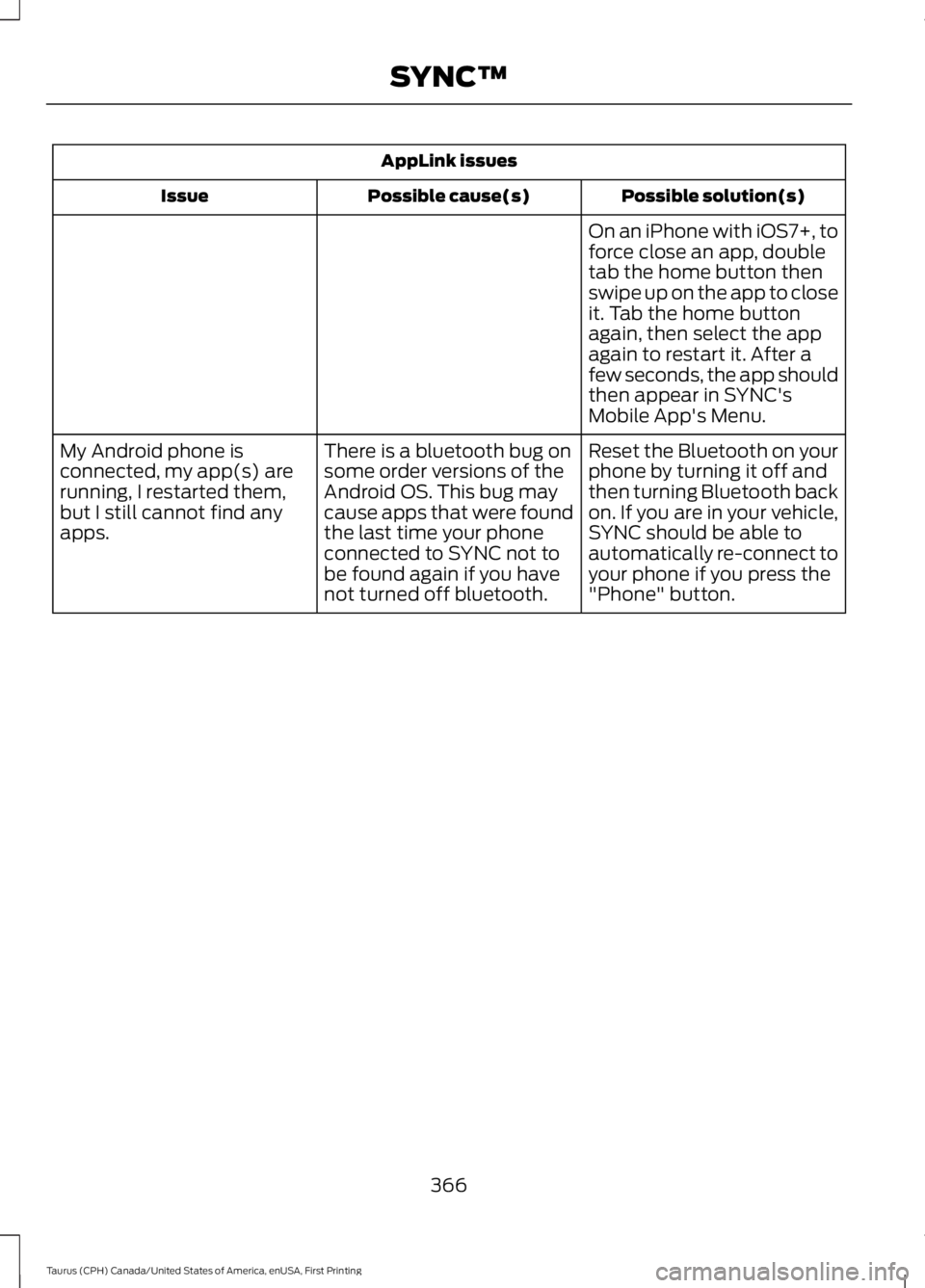
AppLink issues
Possible solution(s)Possible cause(s)Issue
On an iPhone with iOS7+, toforce close an app, doubletab the home button thenswipe up on the app to closeit. Tab the home buttonagain, then select the appagain to restart it. After afew seconds, the app shouldthen appear in SYNC'sMobile App's Menu.
Reset the Bluetooth on yourphone by turning it off andthen turning Bluetooth backon. If you are in your vehicle,SYNC should be able toautomatically re-connect toyour phone if you press the"Phone" button.
There is a bluetooth bug onsome order versions of theAndroid OS. This bug maycause apps that were foundthe last time your phoneconnected to SYNC not tobe found again if you havenot turned off bluetooth.
My Android phone isconnected, my app(s) arerunning, I restarted them,but I still cannot find anyapps.
366
Taurus (CPH) Canada/United States of America, enUSA, First Printing
SYNC™
Page 373 of 504
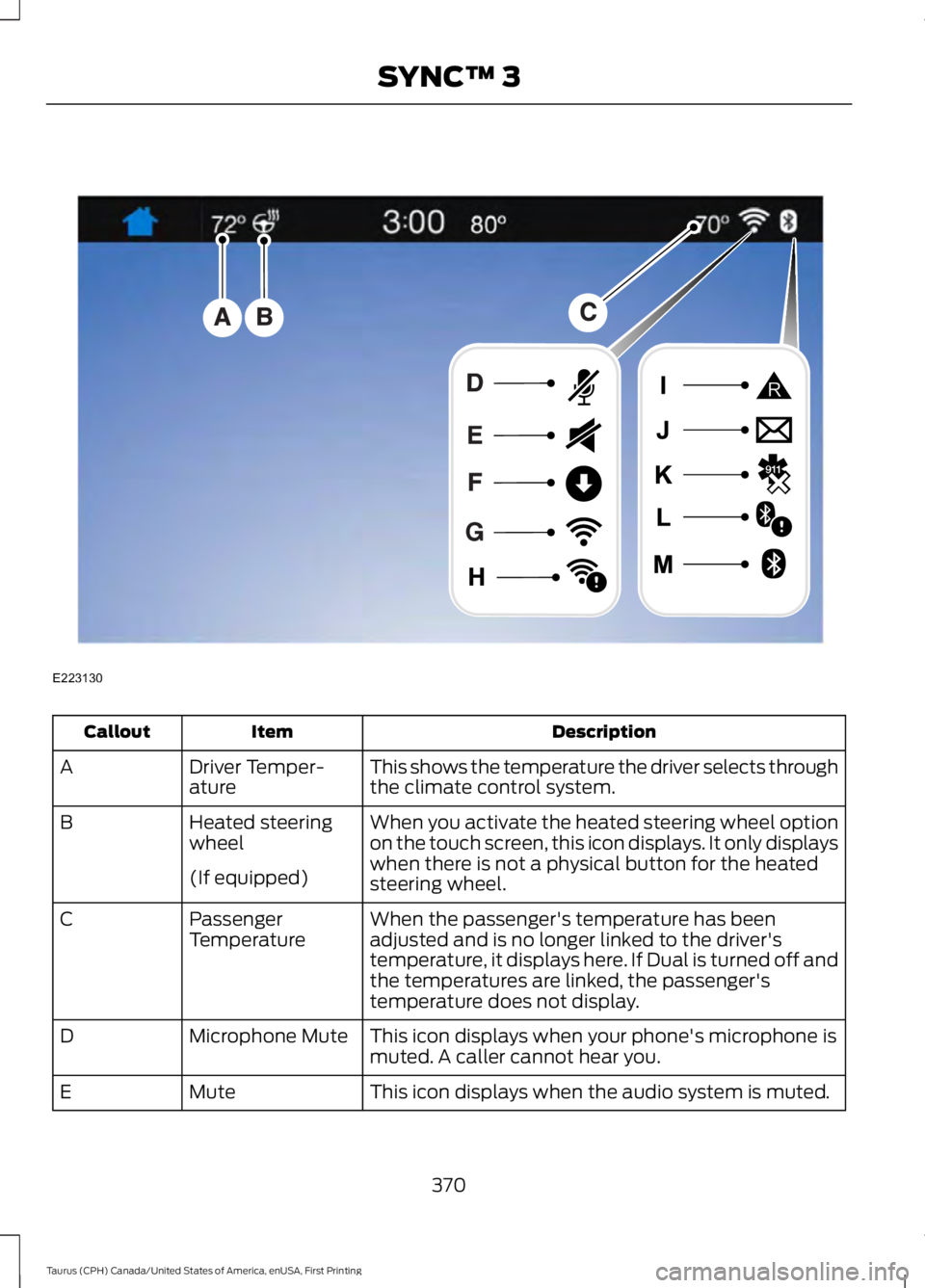
DescriptionItemCallout
This shows the temperature the driver selects throughthe climate control system.Driver Temper-atureA
When you activate the heated steering wheel optionon the touch screen, this icon displays. It only displayswhen there is not a physical button for the heatedsteering wheel.
Heated steeringwheelB
(If equipped)
When the passenger's temperature has beenadjusted and is no longer linked to the driver'stemperature, it displays here. If Dual is turned off andthe temperatures are linked, the passenger'stemperature does not display.
PassengerTemperatureC
This icon displays when your phone's microphone ismuted. A caller cannot hear you.Microphone MuteD
This icon displays when the audio system is muted.MuteE
370
Taurus (CPH) Canada/United States of America, enUSA, First Printing
SYNC™ 3E223130
Page 391 of 504
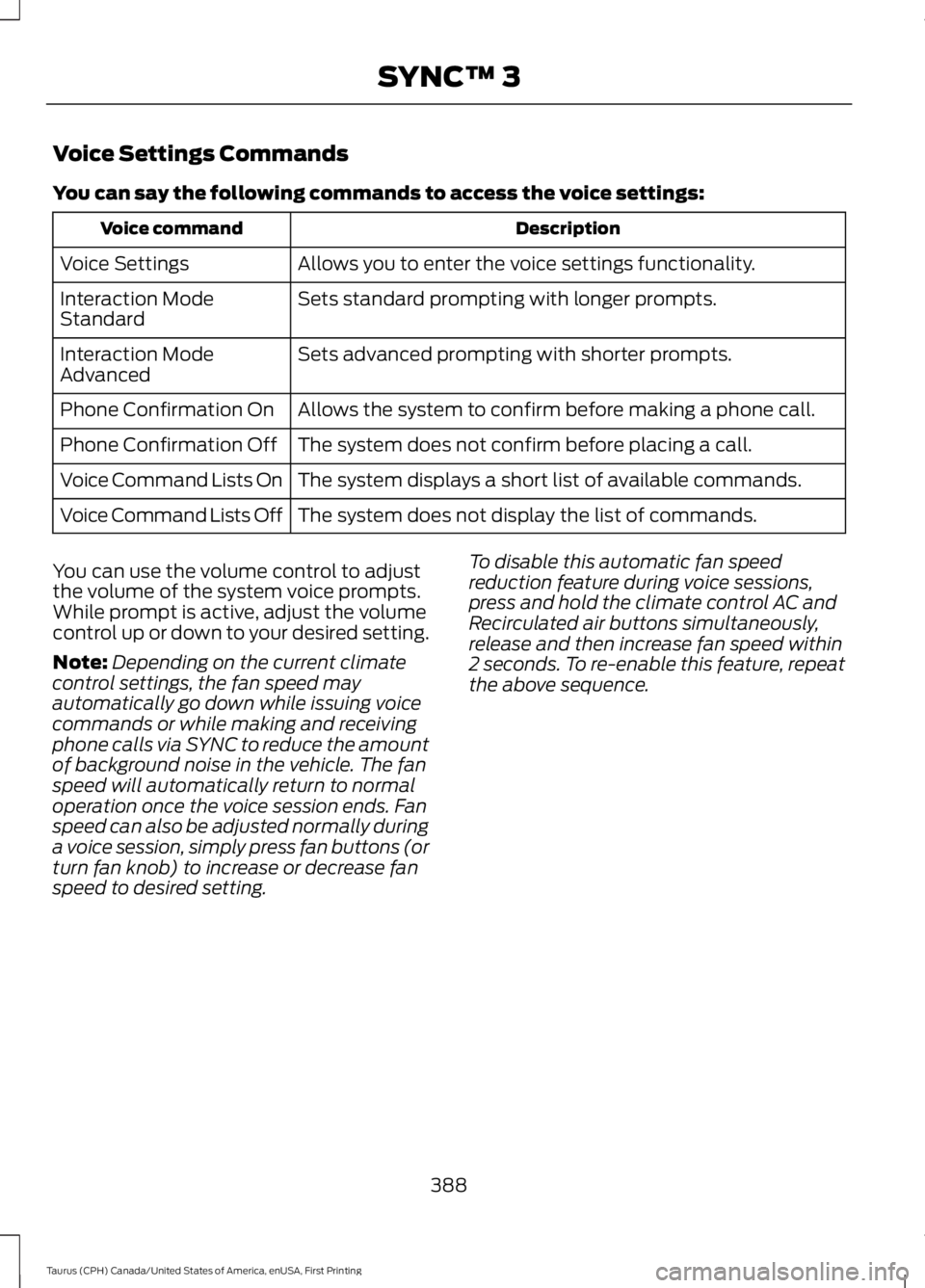
Voice Settings Commands
You can say the following commands to access the voice settings:
DescriptionVoice command
Allows you to enter the voice settings functionality.Voice Settings
Sets standard prompting with longer prompts.Interaction ModeStandard
Sets advanced prompting with shorter prompts.Interaction ModeAdvanced
Allows the system to confirm before making a phone call.Phone Confirmation On
The system does not confirm before placing a call.Phone Confirmation Off
The system displays a short list of available commands.Voice Command Lists On
The system does not display the list of commands.Voice Command Lists Off
You can use the volume control to adjustthe volume of the system voice prompts.While prompt is active, adjust the volumecontrol up or down to your desired setting.
Note:Depending on the current climatecontrol settings, the fan speed mayautomatically go down while issuing voicecommands or while making and receivingphone calls via SYNC to reduce the amountof background noise in the vehicle. The fanspeed will automatically return to normaloperation once the voice session ends. Fanspeed can also be adjusted normally duringa voice session, simply press fan buttons (orturn fan knob) to increase or decrease fanspeed to desired setting.
To disable this automatic fan speedreduction feature during voice sessions,press and hold the climate control AC andRecirculated air buttons simultaneously,release and then increase fan speed within2 seconds. To re-enable this feature, repeatthe above sequence.
388
Taurus (CPH) Canada/United States of America, enUSA, First Printing
SYNC™ 3
Page 396 of 504
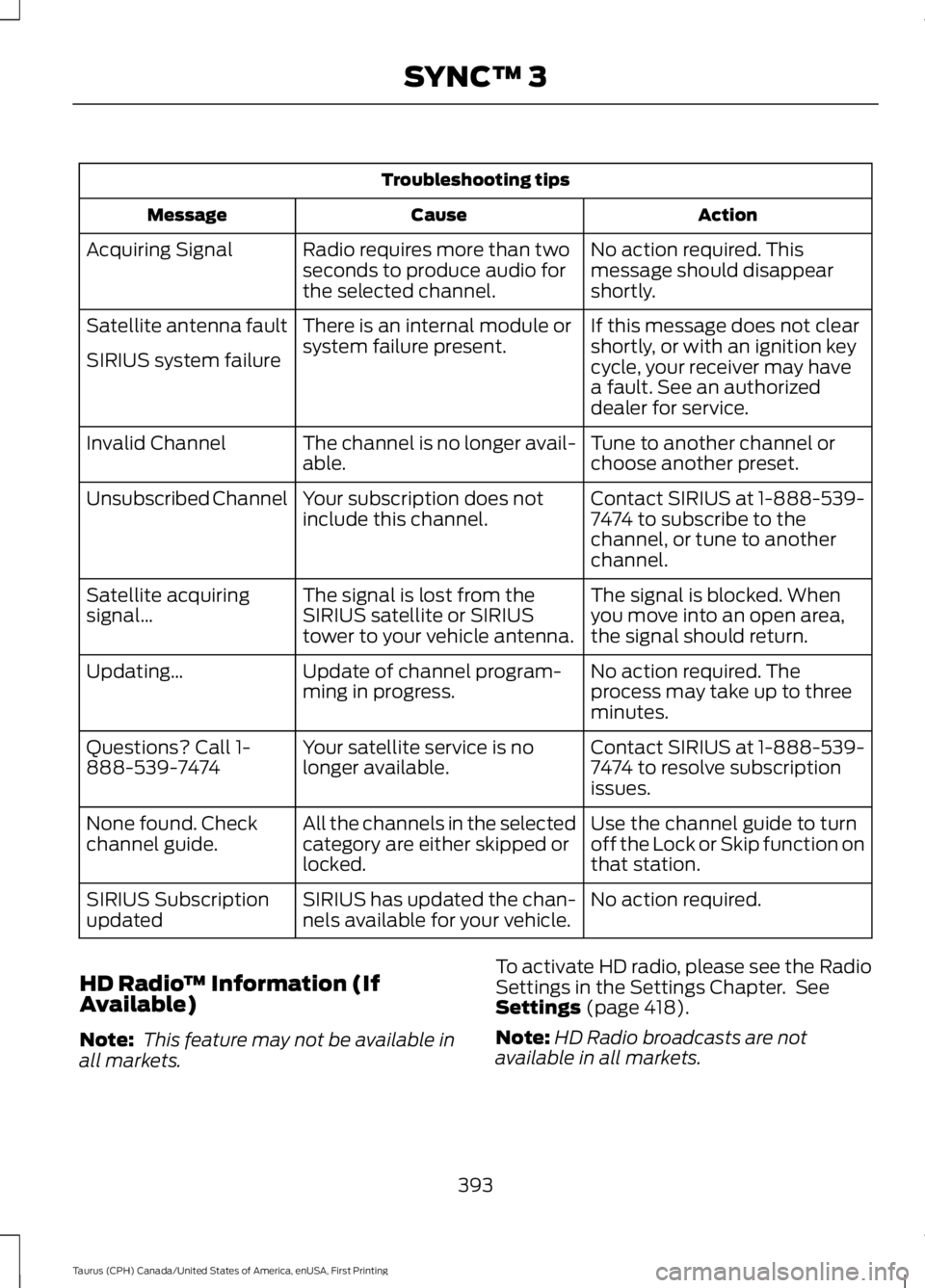
Troubleshooting tips
ActionCauseMessage
No action required. Thismessage should disappearshortly.
Radio requires more than twoseconds to produce audio forthe selected channel.
Acquiring Signal
If this message does not clearshortly, or with an ignition keycycle, your receiver may havea fault. See an authorizeddealer for service.
There is an internal module orsystem failure present.Satellite antenna fault
SIRIUS system failure
Tune to another channel orchoose another preset.The channel is no longer avail-able.Invalid Channel
Contact SIRIUS at 1-888-539-7474 to subscribe to thechannel, or tune to anotherchannel.
Your subscription does notinclude this channel.Unsubscribed Channel
The signal is blocked. Whenyou move into an open area,the signal should return.
The signal is lost from theSIRIUS satellite or SIRIUStower to your vehicle antenna.
Satellite acquiringsignal…
No action required. Theprocess may take up to threeminutes.
Update of channel program-ming in progress.Updating…
Contact SIRIUS at 1-888-539-7474 to resolve subscriptionissues.
Your satellite service is nolonger available.Questions? Call 1-888-539-7474
Use the channel guide to turnoff the Lock or Skip function onthat station.
All the channels in the selectedcategory are either skipped orlocked.
None found. Checkchannel guide.
No action required.SIRIUS has updated the chan-nels available for your vehicle.SIRIUS Subscriptionupdated
HD Radio™ Information (IfAvailable)
Note: This feature may not be available inall markets.
To activate HD radio, please see the RadioSettings in the Settings Chapter. SeeSettings (page 418).
Note:HD Radio broadcasts are notavailable in all markets.
393
Taurus (CPH) Canada/United States of America, enUSA, First Printing
SYNC™ 3
Page 403 of 504
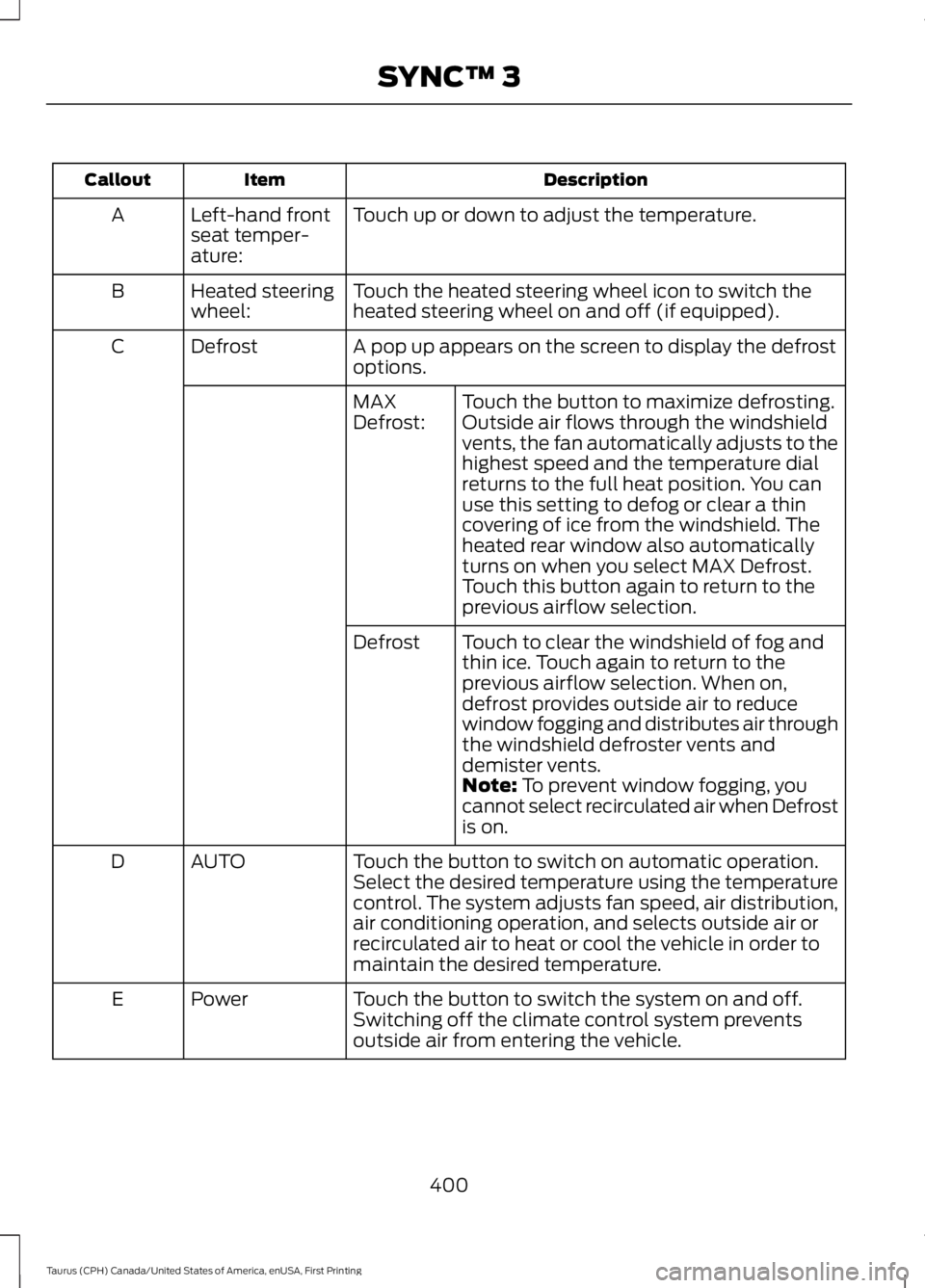
DescriptionItemCallout
Touch up or down to adjust the temperature.Left-hand frontseat temper-ature:
A
Touch the heated steering wheel icon to switch theheated steering wheel on and off (if equipped).Heated steeringwheel:B
A pop up appears on the screen to display the defrostoptions.DefrostC
Touch the button to maximize defrosting.Outside air flows through the windshieldvents, the fan automatically adjusts to thehighest speed and the temperature dialreturns to the full heat position. You canuse this setting to defog or clear a thincovering of ice from the windshield. Theheated rear window also automaticallyturns on when you select MAX Defrost.Touch this button again to return to theprevious airflow selection.
MAXDefrost:
Touch to clear the windshield of fog andthin ice. Touch again to return to theprevious airflow selection. When on,defrost provides outside air to reducewindow fogging and distributes air throughthe windshield defroster vents anddemister vents.
Defrost
Note: To prevent window fogging, youcannot select recirculated air when Defrostis on.
Touch the button to switch on automatic operation.Select the desired temperature using the temperaturecontrol. The system adjusts fan speed, air distribution,air conditioning operation, and selects outside air orrecirculated air to heat or cool the vehicle in order tomaintain the desired temperature.
AUTOD
Touch the button to switch the system on and off.Switching off the climate control system preventsoutside air from entering the vehicle.
PowerE
400
Taurus (CPH) Canada/United States of America, enUSA, First Printing
SYNC™ 3
Page 404 of 504
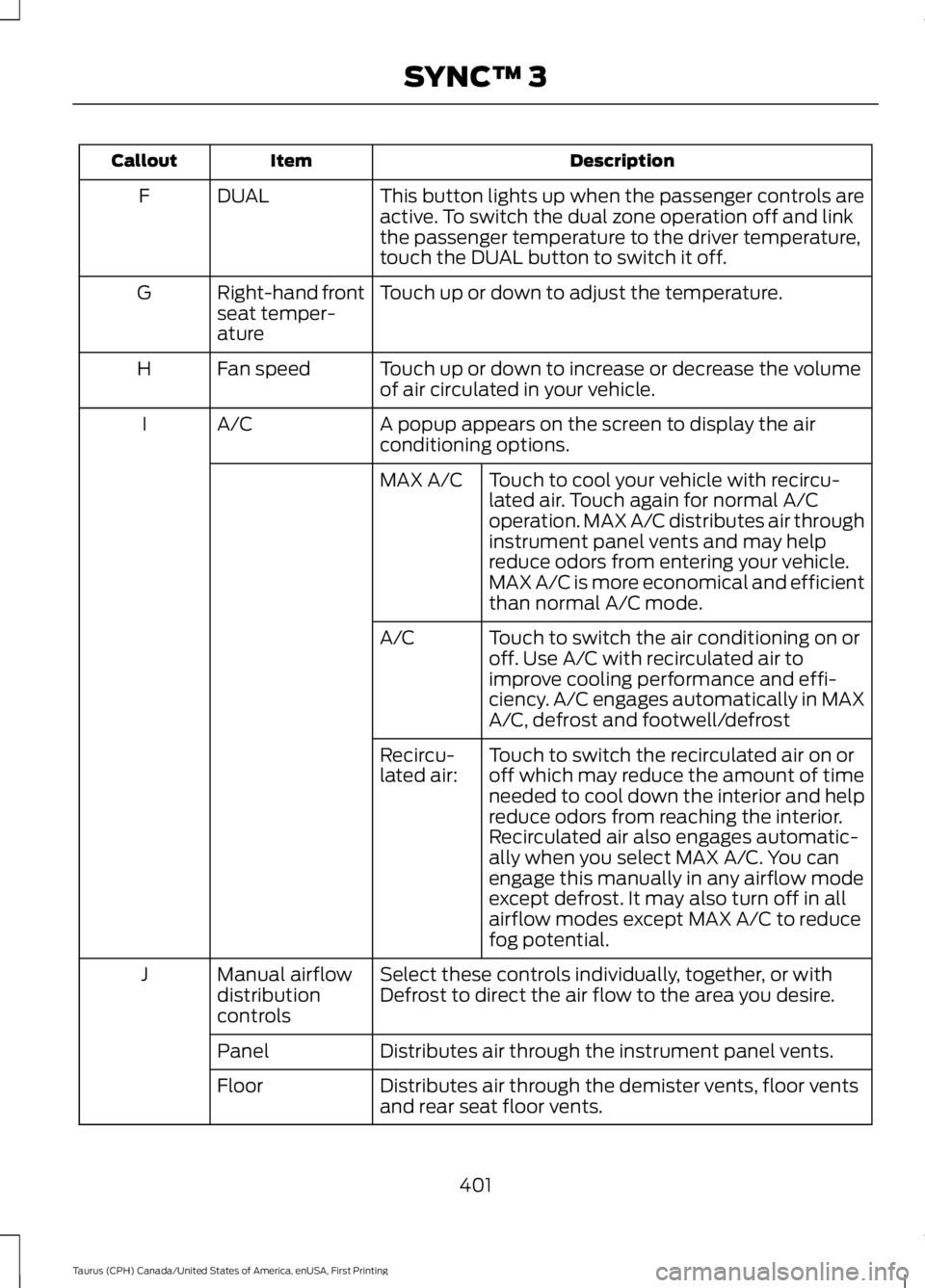
DescriptionItemCallout
This button lights up when the passenger controls areactive. To switch the dual zone operation off and linkthe passenger temperature to the driver temperature,touch the DUAL button to switch it off.
DUALF
Touch up or down to adjust the temperature.Right-hand frontseat temper-ature
G
Touch up or down to increase or decrease the volumeof air circulated in your vehicle.Fan speedH
A popup appears on the screen to display the airconditioning options.A/CI
Touch to cool your vehicle with recircu-lated air. Touch again for normal A/Coperation. MAX A/C distributes air throughinstrument panel vents and may helpreduce odors from entering your vehicle.MAX A/C is more economical and efficientthan normal A/C mode.
MAX A/C
Touch to switch the air conditioning on oroff. Use A/C with recirculated air toimprove cooling performance and effi-ciency. A/C engages automatically in MAXA/C, defrost and footwell/defrost
A/C
Touch to switch the recirculated air on oroff which may reduce the amount of timeneeded to cool down the interior and helpreduce odors from reaching the interior.Recirculated air also engages automatic-ally when you select MAX A/C. You canengage this manually in any airflow modeexcept defrost. It may also turn off in allairflow modes except MAX A/C to reducefog potential.
Recircu-lated air:
Select these controls individually, together, or withDefrost to direct the air flow to the area you desire.Manual airflowdistributioncontrols
J
Distributes air through the instrument panel vents.Panel
Distributes air through the demister vents, floor ventsand rear seat floor vents.Floor
401
Taurus (CPH) Canada/United States of America, enUSA, First Printing
SYNC™ 3