2017 FORD POLICE INTERCEPTOR SEDAN display
[x] Cancel search: displayPage 63 of 358

The daytime running lamps turn on when:
1. The ignition is switched to the on
position.
2. The lighting control is in the off position, parking lamps position or the
autolamps position, and the sensor
detects daylight.
3. Your vehicle is in drive (D).
Note: You can switch the daytime running
lamps on or off by selecting Police Silent
Mode through the information display. See
General Information (page 71).
Note: In markets where daytime running
lamps are mandated by law, Silent Mode
will not disable the daytime running lamps.
DIRECTION INDICATORS •
To operate the left direction indicator,
push the lever down until it stops.
• To operate the right direction indicator,
push the lever up until it stops.
Note: Tap the lever up or down to make the
direction indicators flash three times. INTERIOR LAMPS
Front Map Lamps
(If Equipped)
The lamps will switch on when:
•
You open any door.
• You press the instrument panel dimmer
button until the courtesy lamp turns
on.
• You press a remote control button and
the ignition is off.
To manually switch on the map lamps,
press the outer edge of the clear lens.
Note: On vehicles with the Dark Car or
Silent Mode feature, courtesy illumination
turns off when you switch Silent Mode on.
60
Taurus (CPH) Police, Canada/United States of America, enUSA, First Printing LightingE163272 E163273
Page 69 of 358
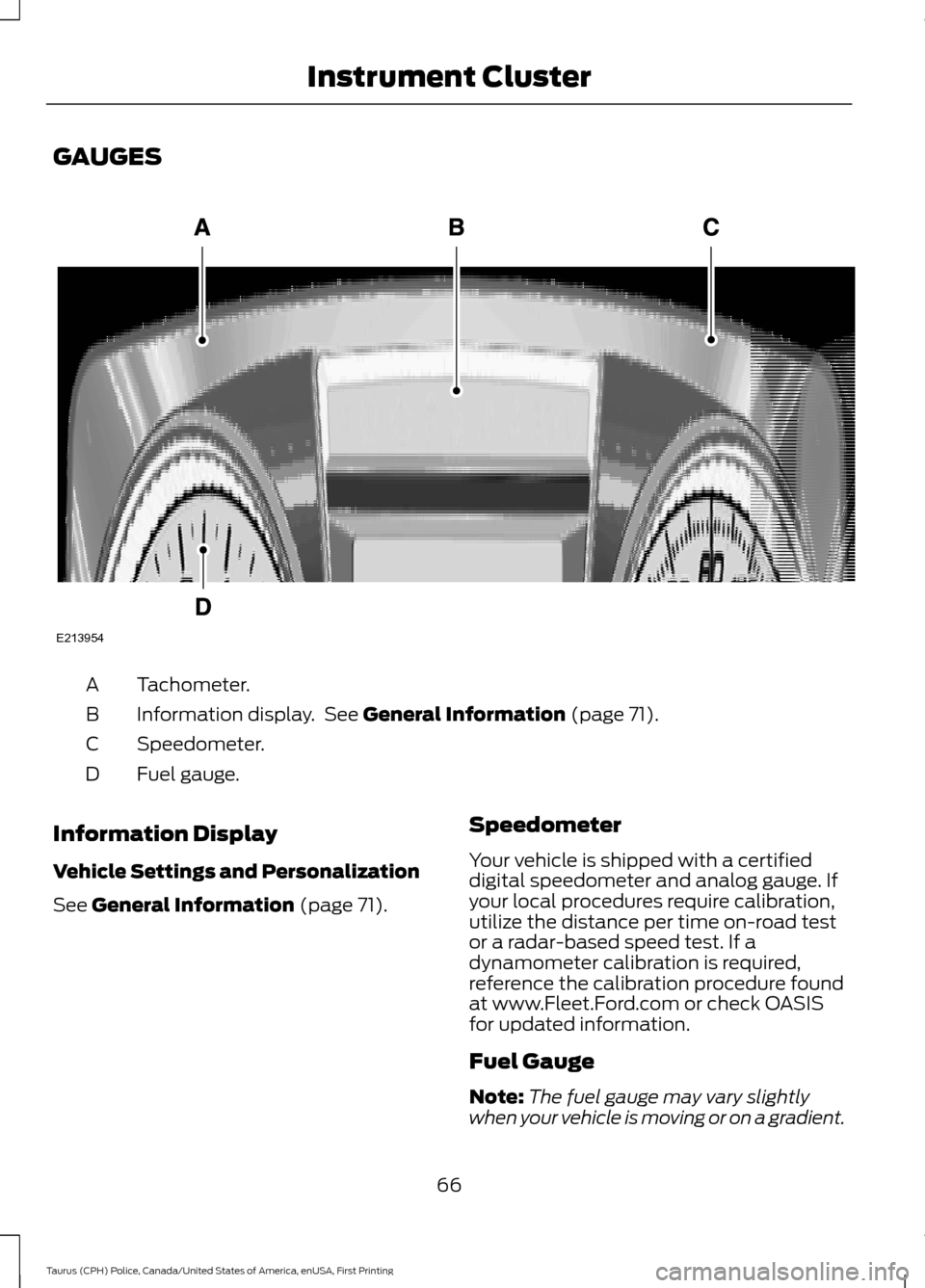
GAUGES
Tachometer.
A
Information display. See General Information (page 71).
B
Speedometer.
C
Fuel gauge.
D
Information Display
Vehicle Settings and Personalization
See
General Information (page 71). Speedometer
Your vehicle is shipped with a certified
digital speedometer and analog gauge. If
your local procedures require calibration,
utilize the distance per time on-road test
or a radar-based speed test. If a
dynamometer calibration is required,
reference the calibration procedure found
at www.Fleet.Ford.com or check OASIS
for updated information.
Fuel Gauge
Note:
The fuel gauge may vary slightly
when your vehicle is moving or on a gradient.
66
Taurus (CPH) Police, Canada/United States of America, enUSA, First Printing Instrument ClusterE213954
Page 70 of 358
Switch the ignition on. The fuel gauge will
indicate approximately how much fuel is
left in the fuel tank. The arrow adjacent to
the fuel pump symbol indicates on which
side of your vehicle the fuel filler door is
located.
The needle should move toward F when
you refuel your vehicle. If the needle points
to E after adding fuel, this indicates your
vehicle needs service soon.
After refueling some variability in needle
position is normal:
•
It may take a short time for the needle
to reach full after leaving the gas
station. This is normal and depends
upon the slope of pavement at the gas
station.
• The fuel amount dispensed into the
tank is a little less or more than the
gauge indicated. This is normal and
depends upon the slope of pavement
at the gas station.
• If the gas station nozzle shuts off
before the tank is full, try a different
gas pump nozzle.
• There is a small reserve left in the tank
when the fuel gauge reaches empty.
Low Fuel Reminder
A low fuel reminder triggers when the
distance to empty reaches, 75 mi (120 km),
50 mi (80 km), 25 mi (40 km), 12 mi
(20 km), 0 mi (0 km).
Variations:
Note: The low fuel reminder can appear at
different fuel gauge positions depending on
fuel economy conditions. This variation is
normal. WARNING LAMPS AND
INDICATORS
The following warning lamps and
indicators alert you to a vehicle condition
that may become serious. Some lamps
illuminate when you start your vehicle to
make sure they work. If any lamps remain
on after starting your vehicle, refer to the
respective system warning lamp for further
information.
Note:
Some warning indicators appear in
the information display and function the
same as a warning lamp, but do not display
when you start your vehicle.
Airbag readiness If this light fails to illuminate
when the ignition is turned on,
continues to flash or remains on,
contact your authorized dealer as soon as
possible. A chime will sound when there is
a malfunction in the indicator light.
Anti-Lock Braking System If it illuminates when you are
driving, this indicates a
malfunction. You continue to
have the normal braking system (without
ABS) unless the brake system warning
lamp is also illuminated. Have the system
checked by an authorized dealer.
Brake System It illuminates when you engage
the parking brake with the
ignition on.
If it illuminates when you are driving, check
that the parking brake is not engaged. If
the parking brake is not engaged, this
indicates low brake fluid level or a brake
system malfunction. Have the system
checked immediately by an authorized
dealer.
67
Taurus (CPH) Police, Canada/United States of America, enUSA, First Printing Instrument ClusterE67017 E144522
Page 71 of 358
WARNING
Driving your vehicle with the warning
lamp on is dangerous. A significant
decrease in braking performance
may occur. It will take you longer to stop
your vehicle. Have your vehicle checked as
soon as possible. Driving extended
distances with the parking brake engaged
can cause brake failure and the risk of
personal injury. Charging System
Illuminates when the battery is
not charging properly. If it stays
on while the engine is running,
there may be a malfunction with the
charging system. Contact your authorized
dealer as soon as possible. This indicates
a problem with the electrical system or a
related component.
Cruise Control (If Equipped) It illuminates when you switch
this feature on.
Direction Indicator Illuminates when you switch on
the left or right direction
indicator or the hazard warning
flasher. If the indicators stay on or flash
faster, check for a burned out bulb. See
Changing a Bulb
(page 189).
Door Ajar Displays when the ignition is on
and any door is not completely
closed. Engine Coolant Temperature Illuminates when the engine
coolant temperature is high.
Stop the vehicle as soon as
possible, switch off the engine and let cool.
See
Engine Coolant Check (page 176).
Engine Oil If it illuminates with the engine
running or when you are driving,
this indicates a malfunction.
Stop your vehicle as soon as it is safe to
do so and switch the engine off. Check the
engine oil level. See
Engine Oil Check
(page 174).
Note: Do not resume your journey if it
illuminates despite the level being correct.
Have the system checked by an authorized
dealer immediately.
Fasten Seatbelt It illuminates and a chime
sounds to remind you to fasten
your seatbelt. See
Seatbelt
Reminder (page 32).
High Beam It illuminates when you switch
the high beam headlamps on. It
flashes when you use the
headlamp flasher.
Low Fuel Level It illuminates when the fuel level
is low or the fuel tank is nearly
empty. Refuel as soon as
possible.
68
Taurus (CPH) Police, Canada/United States of America, enUSA, First Printing Instrument Cluster E71340 E213957 E71880
Page 74 of 358
GENERAL INFORMATION
WARNING
Driving while distracted can result in
loss of vehicle control, crash and
injury. We strongly recommend that
you use extreme caution when using any
device that may take your focus off the
road. Your primary responsibility is the safe
operation of your vehicle. We recommend
against the use of any hand-held device
while driving and encourage the use of
voice-operated systems when possible.
Make sure you are aware of all applicable
local laws that may affect the use of
electronic devices while driving. You can control various systems on your
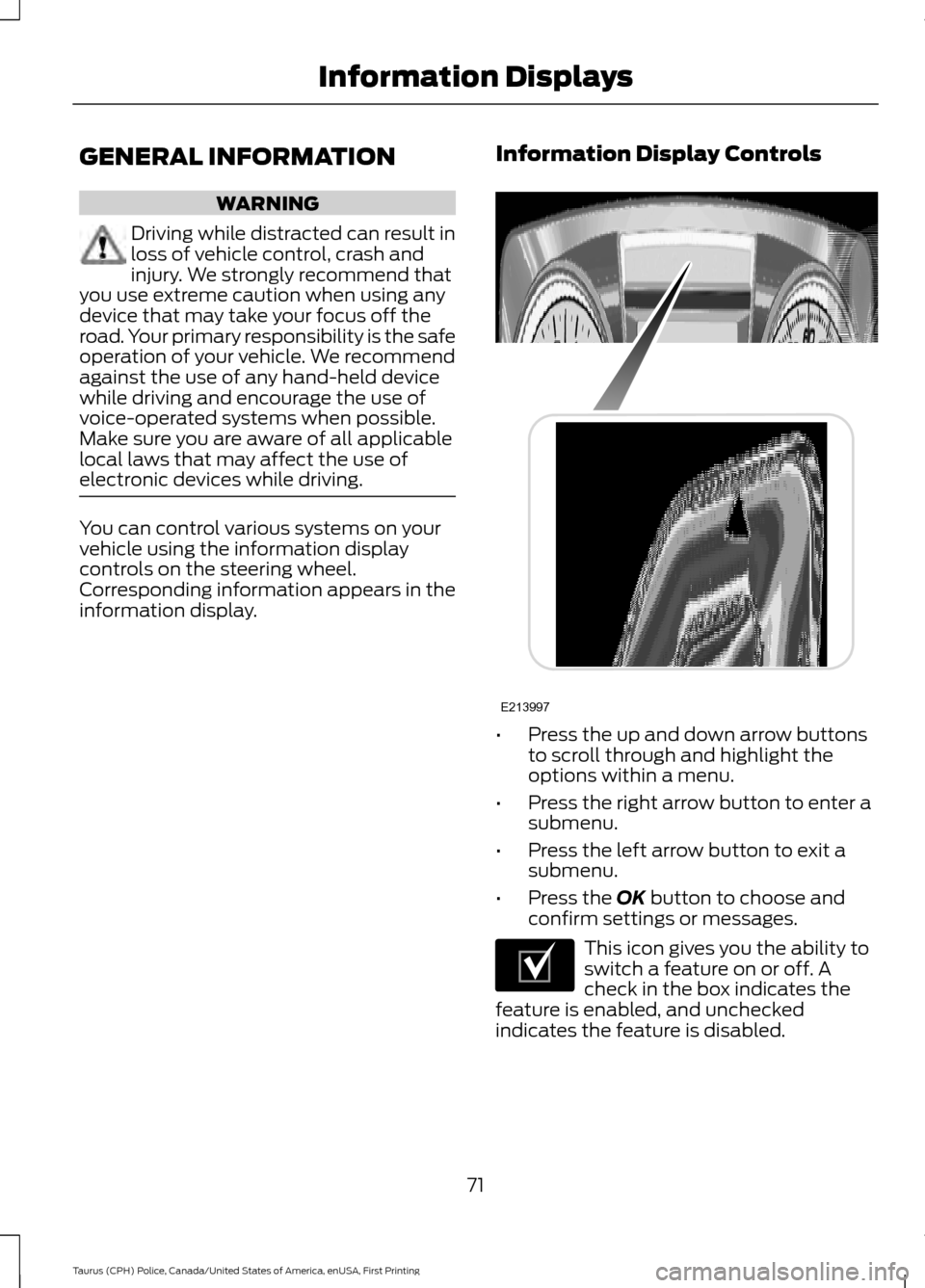
vehicle using the information display
controls on the steering wheel.
Corresponding information appears in the
information display.
Information Display Controls •
Press the up and down arrow buttons
to scroll through and highlight the
options within a menu.
• Press the right arrow button to enter a
submenu.
• Press the left arrow button to exit a
submenu.
• Press the OK button to choose and
confirm settings or messages. This icon gives you the ability to
switch a feature on or off. A
check in the box indicates the
feature is enabled, and unchecked
indicates the feature is disabled.
71
Taurus (CPH) Police, Canada/United States of America, enUSA, First Printing Information DisplaysE213997 E204495
Page 75 of 358

Trip 1 & 2
You can access the menu using the
information display control.
Note:
Some options may appear slightly
different or not at all if the items are
optional. Trip 1 & 2
Digital Speedometer
Trip Odometer
Trip Timer
Average Fuel
• Digital Speedometer - Shows a digital display of your vehicle speed.
• Trip Odometer — Registers the distance of individual journeys.
• Trip Timer — The timer stops when you turn your vehicle off and restarts when you
restart your vehicle.
• Average Fuel — Shows the average fuel economy for a given trip.
Note: Press and hold OK on the current screen to reset the respective trip, distance, time
and fuel information.
Fuel Economy Fuel Economy
Dist to empty
Inst Fuel Econ
Average Fuel
• Distance to Empty - Shows the approximate distance your vehicle can travel before
running out of fuel.
• Inst Fuel Economy - Shows a visual graph of your instantaneous fuel economy along
with your Avg MPG since the function was last reset.
• Average Fuel — Shows the average fuel economy since last reset.
Note: You can reset your average fuel economy by pressing and holding the
OK button on
the left hand steering wheel controls.
72
Taurus (CPH) Police, Canada/United States of America, enUSA, First Printing Information Displays
Page 76 of 358
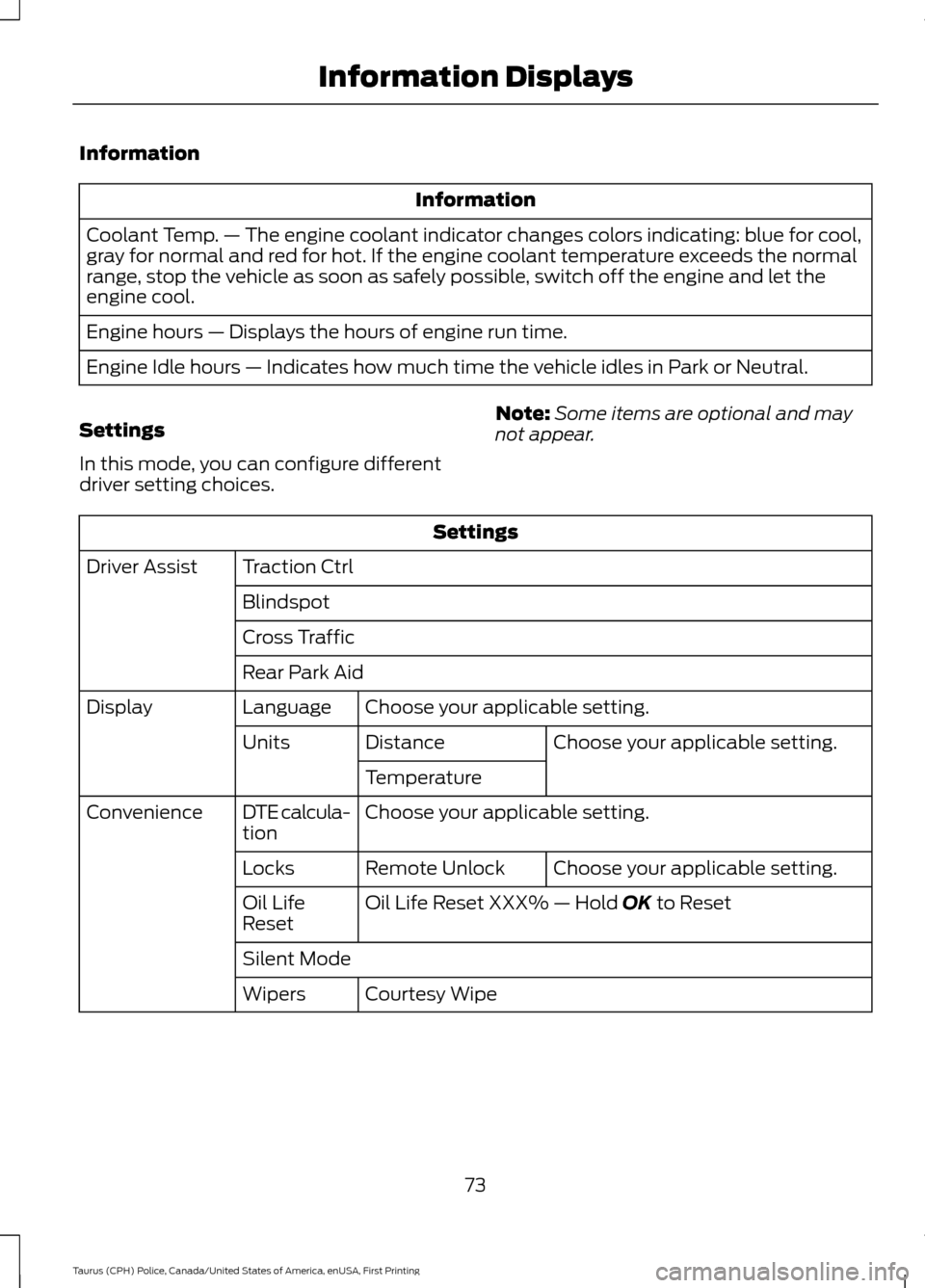
Information
Information
Coolant Temp. — The engine coolant indicator changes colors indicating: blue for cool,
gray for normal and red for hot. If the engine coolant temperature exceeds the normal
range, stop the vehicle as soon as safely possible, switch off the engine and let the
engine cool.
Engine hours — Displays the hours of engine run time.
Engine Idle hours — Indicates how much time the vehicle idles in Park or Neutral.
Settings
In this mode, you can configure different
driver setting choices. Note:
Some items are optional and may
not appear. Settings
Traction Ctrl
Driver Assist
Blindspot
Cross Traffic
Rear Park AidChoose your applicable setting.
Language
Display
Choose your applicable setting.
Distance
Units
Temperature
Choose your applicable setting.
DTE calcula-
tion
Convenience
Choose your applicable setting.
Remote Unlock
Locks
Oil Life Reset XXX% — Hold OK to Reset
Oil Life
Reset
Silent Mode
Courtesy Wipe
Wipers
73
Taurus (CPH) Police, Canada/United States of America, enUSA, First Printing Information Displays
Page 77 of 358

INFORMATION MESSAGES
Note:
Depending on the vehicle options
equipped with your vehicle, not all of the
messages will display or be available.
Certain messages may display abbreviated
or shortened depending upon which cluster
type you have. Press the OK button to acknowledge and
remove some messages from the
information display. Other messages
delete automatically after a short time.
You need to confirm certain messages
before you can access the menus.
AdvanceTrac ™ Action
Message
Displayed when the AdvanceTrac® system has detected a
condition that requires service. Contact your authorized dealer as soon as possible.
Service AdvanceTrac
The driver has disabled or enabled the traction control.
AdvanceTrac Off On
Alarm Action
Message
Displayed when the perimeter alarm system is armed and thevehicle is entered using the key on the driver ’s side door. In
order to prevent the perimeter alarm system from triggering,
the ignition must be turned to start or on before the 12 second chime expires.
Vehicle Alarm To Stop
Alarm, Start Vehicle.
74
Taurus (CPH) Police, Canada/United States of America, enUSA, First Printing Information DisplaysE213998