2017 FORD GT instrument cluster
[x] Cancel search: instrument clusterPage 151 of 313

1.
Inside the vehicle, pull the hood release
handle located on the left side panel
left of the pedals.
2. Slightly lift the hood. 3. Release the hood latch by pulling up
on the secondary release lever. 4.
Open the hood and support it with the
prop rod. Closing the Front Hood
1. Remove the hood prop rod from the
under hood slot and securely place it
back in its holder.
2. Lower the hood and lightly press down
until closed.
Note: If you do not close the front hood
correctly, an indicator lamp displays in the
instrument cluster. See Warning Lamps
and Indicators (page 64).
Opening the Rear Hatch
Production Model
You can open the rear hatch by three
different methods:
• A button on your remote control. See
Remote Control
(page 41).
• A button on the headlamp switch. See
Lighting Control
(page 57).
• In the case of a dead battery or other
electrical concerns, use the key blade
in your remote control. See
Remote
Control (page 41).
After you release the rear hatch latch, lift
the rear hatch into the open position.
A hydraulic cylinder holds the rear hatch
open.
Competition Model
Use the following procedure to open the
rear hatch on your competition model GT.
1. Unlock rear hatch using your key.
148
Ford GT (CGX) Canada/United States of America, enUSA, First Printing MaintenanceE233210 E233828
Page 169 of 313
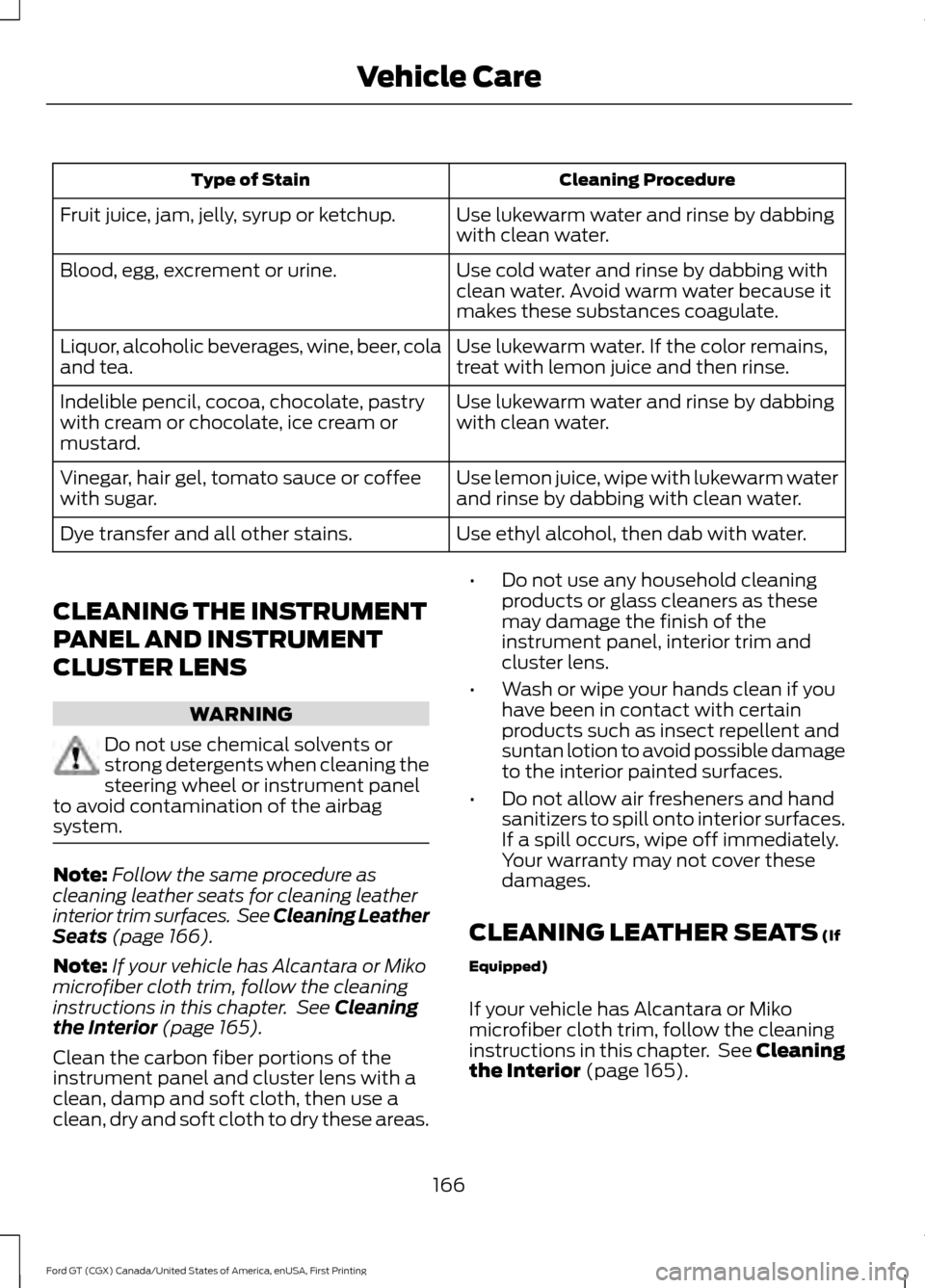
Cleaning Procedure
Type of Stain
Use lukewarm water and rinse by dabbing
with clean water.
Fruit juice, jam, jelly, syrup or ketchup.
Use cold water and rinse by dabbing with
clean water. Avoid warm water because it
makes these substances coagulate.
Blood, egg, excrement or urine.
Use lukewarm water. If the color remains,
treat with lemon juice and then rinse.
Liquor, alcoholic beverages, wine, beer, cola
and tea.
Use lukewarm water and rinse by dabbing
with clean water.
Indelible pencil, cocoa, chocolate, pastry
with cream or chocolate, ice cream or
mustard.
Use lemon juice, wipe with lukewarm water
and rinse by dabbing with clean water.
Vinegar, hair gel, tomato sauce or coffee
with sugar.
Use ethyl alcohol, then dab with water.
Dye transfer and all other stains.
CLEANING THE INSTRUMENT
PANEL AND INSTRUMENT
CLUSTER LENS WARNING
Do not use chemical solvents or
strong detergents when cleaning the
steering wheel or instrument panel
to avoid contamination of the airbag
system. Note:
Follow the same procedure as
cleaning leather seats for cleaning leather
interior trim surfaces. See Cleaning Leather
Seats (page 166).
Note: If your vehicle has Alcantara or Miko
microfiber cloth trim, follow the cleaning
instructions in this chapter. See
Cleaning
the Interior (page 165).
Clean the carbon fiber portions of the
instrument panel and cluster lens with a
clean, damp and soft cloth, then use a
clean, dry and soft cloth to dry these areas. •
Do not use any household cleaning
products or glass cleaners as these
may damage the finish of the
instrument panel, interior trim and
cluster lens.
• Wash or wipe your hands clean if you
have been in contact with certain
products such as insect repellent and
suntan lotion to avoid possible damage
to the interior painted surfaces.
• Do not allow air fresheners and hand
sanitizers to spill onto interior surfaces.
If a spill occurs, wipe off immediately.
Your warranty may not cover these
damages.
CLEANING LEATHER SEATS
(If
Equipped)
If your vehicle has Alcantara or Miko
microfiber cloth trim, follow the cleaning
instructions in this chapter. See Cleaning
the Interior
(page 165).
166
Ford GT (CGX) Canada/United States of America, enUSA, First Printing Vehicle Care
Page 264 of 313

General
Possible solution
Possible cause
Issue
SYNC 3 only supports four languages in a
single module for text display, voice control
and voice prompts. The country where you
bought your vehicle dictates the four
languages based on the most popular
languages spoken. If the selected language
is not available, SYNC 3 remains in the
current active language.
SYNC 3 does not support
the currently selected
language for the instru-
ment cluster and inform-
ation and entertainment
display.
The language
selected for the
instrument
cluster and
information and
entertainment
display does not
match the
SYNC 3
SYNC 3 offers several new voice control
features for a wide range of languages.
Dialing a contact name directly from the
phonebook without pre-recording (for
example,
“call John Smith ”) or selecting a
track, artist, album, genre or playlist directly
from your media player (for example, "play
artist Madonna").
language
(phone, USB,
Bluetooth
audio, voice
control and
voice prompts). SYNC 3 System Reset
The system has a System Reset feature that can be performed if the function of a SYNC
3 feature is lost. This reset is intended to restore functionality and will not erase any
information previously stored in the system (such as paired devices, phonebook, call
history, text messages, or user settings). To perform a System Reset, press and hold
the Seek Up (>>|) button while pressing and holding the Radio Power button. After
approximately 5 seconds the screen will go black. Allow 1-2 minutes for the system
reset to complete. You may then resume using the SYNC 3 system.
For additional assistance with SYNC 3
troubleshooting please call or visit the Ford
Website. Ford Support
United States: 1-800-392-3673
Customer Relation-
ship Center
Canada: 1-800-565-3673
owner.ford.com
Website
www.syncmyride.ca
www.syncmaroute.ca
261
Ford GT (CGX) Canada/United States of America, enUSA, First Printing SYNC™ 3 (If Equipped)
Page 267 of 313

Oils and Fluids
In many cases, fluid discoloration is a
normal operating characteristic and, by
itself, does not necessarily indicate a
concern or that the fluid needs to be
changed. However, a qualified expert, such
as the factory-trained technicians at your
dealership, should inspect discolored fluids
that also show signs of overheating or
foreign material contamination
immediately.
Make sure to change your vehicle
’s oils and
fluids at the specified intervals or in
conjunction with a repair.
NORMAL SCHEDULED MAINTENANCE
Normal Maintenance Intervals Annually or Every 5,000 mi (8,000 km)
Change oil and filter.
Inspect tires and check tire pressures.
Inspect the brake pads, rotors, hoses, brake cooling duct hoses and check parking brake
function. Check brake fluid level.
Inspect the engine cooling system strength and hoses. Check coolant level.
Inspect the exhaust system and heat shields.
Inspect the accessory drive belts.
Inspect the steering linkage, ball joints, suspension and tie-rod ends.
Inspect the wiper blades. Check washer fluid level.
Inspect hinges and latches. Lubricate if needed.
Inspect vehicle battery and state of charge.
Check the hydraulic fluid level.
Check operation of all lights.
Check operation of warning indicators inside the instrument cluster.
Check for any fluid leaks.
264
Ford GT (CGX) Canada/United States of America, enUSA, First Printing Scheduled Maintenance
Page 307 of 313

Child Safety........................................................17
General Information............................................. 17
Cleaning Leather Seats..............................166
Cleaning Products........................................162 Materials................................................................ 162
Cleaning the Engine....................................164
Cleaning the Exterior...................................162 Exterior Plastic Parts......................................... 164
Matte Paint Finish............................................... 163
Raising the Rear Wing...................................... 164
Standard Paint Finish....................................... 163
Under Hood.......................................................... 164
Cleaning the Instrument Panel and Instrument Cluster Lens
.........................166
Cleaning the Interior....................................165
Cleaning Alcantara Microfiber Cloth...........165
Cleaning the Wheels....................................167
Cleaning the Windows and Wiper Blades............................................................165
Climate Control
...............................................77
Coolant Check See: Engine Coolant Check............................. 152
Crash Sensors and Airbag Indicator.......38
Cruise Control..................................................52 Principle of Operation........................................ 113
Cruise control See: Using Cruise Control................................. 113
Cup Holders.....................................................86
Customer Assistance
..................................132
D
Data Recording
..................................................7
Event Data Recording........................................... 8
Service Data Recording......................................... 7
Daytime Running Lamps............................58
Direction Indicators
.......................................59
Doors and Locks.............................................45
Drive Mode Control........................................53 Active Aerodynamics ........................................ 118
Damper Comfort Mode..................................... 118
Drive Mode Selection......................................... 114
Front Lift................................................................. 118
Driver and Passenger Airbags...................34 Children and Airbags........................................... 34
Proper Driver and Front Passenger Seating Adjustment........................................................ 34
Driver and Passenger Knee Airbags
.........37 Driving Aids......................................................114
Driving at High Speed
.................................192
Tire Pressure - Speeds Greater Than .........192
Driving Hints
...................................................126
Driving Through Water................................126
DRL See: Daytime Running Lamps......................... 58
E
Electric Parking Brake.................................104 Applying the Electric Parking brake............104
Battery With No Charge................................... 105
Releasing the Electric Parking Brake...........105
Emergency Door Release
............................47
Emission Control System...........................96 On-Board Diagnostics (OBD-II)..................... 97
Readiness for Inspection and Maintenance (I/M) Testing..................................................... 97
End User License Agreement
...................277
VEHICLE SOFTWARE END USER LICENSE
AGREEMENT (EULA) .................................. 277
Engine Coolant Check
.................................152
Adding Coolant.................................................... 152
Coolant Change.................................................. 154
Engine Coolant Temperature Management
................................................... 155
Fail-Safe Cooling................................................ 154
Recycled Coolant................................................ 153
Severe Climates.................................................. 154
Engine Immobilizer See: Passive Anti-Theft System..................... 49
Engine Oil Check............................................151 Adding Engine Oil................................................ 151
Engine Oil Dipstick
........................................151
Engine Specifications.................................195
Entertainment..............................................220 AM/FM Radio........................................................ 221
Apps........................................................................\
223
Bluetooth Stereo or USB.................................. 221
Sources.................................................................. 220
Supported Media Players, Formats and Metadata Information................................. 223
USB Ports.............................................................. 223
Environment......................................................13
EPB See: Electric Parking Brake............................. 104
304
Ford GT (CGX) Canada/United States of America, enUSA, First Printing Index
Page 309 of 313

Keys and Intelligent Access..............................
73
Maintenance........................................................... 73
Park Brake............................................................... 74
Starting System .................................................... 74
Steering System.................................................... 74
Tire Pressure Monitoring System.................... 75
Transmission.......................................................... 75
Installing Child Restraints............................18
Child Seats............................................................... 18
Using Lap and Shoulder Belts.......................... 19
Using Tether Straps.............................................. 21
Instrument Cluster.........................................62
Instrument Lighting Dimmer
.....................58
Instrument Panel Overview........................14
Interior Lamps.................................................59
Interior Mirror
....................................................61
Introduction........................................................5
J
Jump Starting the Vehicle.........................129 Connecting the Jumper Cables..................... 129
Jump Starting...................................................... 130
Preparing Your Vehicle...................................... 129
Removing the Jumper Cables........................ 130
K
Keyless Starting
..............................................87
Ignition Modes....................................................... 87
Keys and Remote Controls........................40
L
Lighting Control
..............................................53
High Beams............................................................. 57
Lighting
...............................................................57
General Information............................................ 57
Load Carrying
.................................................120
Load Limit.......................................................120 Special Loading Instructions for Owners of
Pick-up Trucks and Utility-type
Vehicles............................................................. 124
Vehicle Loading - with and without a Trailer.................................................................. 120
Locking and Unlocking.................................45 Activating Intelligent Access ........................... 45
Autolock.................................................................. 46Battery Saver..........................................................
47
Illuminated Entry.................................................. 47
Illuminated Exit...................................................... 47
Power Door Locks................................................ 45
Remote Control.................................................... 45
Smart Unlocks for Intelligent Access Keys...................................................................... 46
Lug Nuts See: Changing a Road Wheel........................ 192
M
Maintenance...................................................147 General Information........................................... 147
Manual Climate Control...............................77
Manual Seats
...................................................83
Message Center See: Information Displays................................. 68
Mirrors See: Windows and Mirrors............................... 60
Mobile Communications Equipment........11
Motorcraft Parts
...........................................196
N
Navigation......................................................229 cityseeker.............................................................. 236
Destination Mode............................................... 231
Map Mode............................................................ 230
Navigation Map Updates................................ 236
Navigation Menu................................................ 234
Waypoints............................................................. 235
Normal Scheduled Maintenance..........264 Normal Maintenance Intervals..................... 264
O
Oil Check See: Engine Oil Check........................................ 151
Opening and Closing the Hood...............147 Closing the Front Hood.................................... 148
Closing the Rear Hatch..................................... 149
Opening the Front Hood.................................. 147
Opening the Rear Hatch.................................. 148
Opening the Doors
.........................................47
Opening the Doors from Inside....................... 47
306
Ford GT (CGX) Canada/United States of America, enUSA, First Printing Index