2017 FORD FUSION HYBRID reset
[x] Cancel search: resetPage 398 of 516

Potential station issues
ActionCauseIssues
No action required. The stationis not available in your currentlocation.
The previously stored multicastpreset or direct tune is notavailable in your current recep-tion area.
Cannot access HD2 orHD3 multicast channelwhen recalling a presetor from a direct tune.
Fill out the station issue form.*Data service issue by the radiobroadcaster.Text information doesnot match currentlyplaying audio.
Fill out the station issue form.*Data service issue by the radiobroadcaster.There is no textinformation shown forcurrently selectedfrequency.
HD Radio Technology manufactured underlicense from iBiquity Digital Corp. U.S. andforeign patents. HD Radio and the HD andHD Radio logos are proprietary trademarksof iBiquity Digital Corp. Ford MotorCompany and iBiquity Digital Corp. are notresponsible for the content sent using HDRadio technology. Content may bechanged, added or deleted at any time atthe station owner's discretion.
* You can find the form here:
Website
http://www.ibiquity.com/automotive/report_radio_station_experiences
CD (If equipped)
Once you select this option, the systemreturns you to the main audio screen.
The current audio information appears onthe screen.
The following buttons are also available:
FunctionButton
You can use the browse button to select a track.Browse
Select this button and a small number one displays to indicatethe track is set to repeat.Repeat
For MP3 CDs, this button allows you to toggle through repeatoff, repeat one track (a small number one displays), and repeatcurrent folder (a small folder displays).
Select the shuffle symbol to have the audio on the disk playin random order.Shuffle
You can use the forward, reverse, pause orplay buttons to control the audio playback.
395
Fusion Energi / Fusion Hybrid (CC7) Hybrid Electric Vehicle (HEV)/Plug-In Hybrid Electric Vehicle (PHEV), Canada/United States of America, enUSA, First Printing
SYNC™ 3
Page 408 of 516

Item
Immediately end aphone call. You canalso press thebutton on thesteering wheel.
End Call
Press this to accessthe phone keypad.Keypad
You can switch themicrophone off sothe caller does nothear you.
Mute
Item
PrivacyTransfer the call tothe cell phone orback to SYNC 3.
Text Messaging
Note:Downloading and sending textmessages using Bluetooth are cellphone-dependent features.
Note:Certain features in text messagingare speed-dependent and not availablewhen your vehicle is traveling at speeds over3 mph (5 km/h).
Receiving a Text Message
When a new message arrives, an audible tone sounds and the screen displays apop-up with the caller name and ID, if supported by your cell phone. You can select:
Action and DescriptionMenu Item
Have SYNC 3 read the message to you.Hear It
View the text on the touchscreen.View
To call the sender.Call
You can select from 15 preset messages. Press the messagethat you would like to use and confirm to send the message.SYNC 3 confirms when the message is sent successfully.
Reply
To exit the screen.Close
Smartphone Connectivity (If Equipped)
SYNC 3 allows you to use Apple CarPlayand Android Auto to access your phone.
When you use Apple CarPlay or AndroidAuto, you can:
•Make calls.
•Send and receive messages.
•Listen to music.
•Use your phone's voice assistant.
405
Fusion Energi / Fusion Hybrid (CC7) Hybrid Electric Vehicle (HEV)/Plug-In Hybrid Electric Vehicle (PHEV), Canada/United States of America, enUSA, First Printing
SYNC™ 3
Smartphone connectivity disables someSYNC 3 features.
Most smartphone connectivity featuresrequire mobile data usage.
Apple CarPlay
Apple CarPlay requires an iPhone 5 or newer with iOS 7.1 or newer (Ford recommends updating to the latest iOS version). To enable this feature, plug your phone into a USB port and select Apple CarPlay on your SYNC 3 screen. See Media Hub (page 328).
Page 410 of 516

Select the zoom in icon to see acloser view of the map.
Select the zoom out icon to seea farther away view of the map.
You can adjust the view in presetincrements. You can also pinch to zoom inor out of the map.
The information bar tells you the namesof streets, cities or landmarks as you hoverover them with the crosshair curser.
You can change your view of the map bytapping on the location indicator icon onthe right hand side of the screen. You canchoose from the following options:
Heading up (2D map) Thisalways shows the direction offorward travel to be upward onthe screen. This view is availablefor map scales up to 3 mi (5 km).
North up (2D map) alwaysshows the northern direction tobe upward on the screen.
3D map mode provides anelevated perspective of the map.Adjust this viewing angle androtate the map 180 degrees bytouching the map twice, andthen dragging your finger along the shadedbar with arrows at the bottom of the map.
Re-center the map by pressingthis icon whenever you scroll themap away from your vehicle’scurrent location.
Points of Interest (POI)grouping icon: You can chooseup to three POI icons to displayon the map. If the chosen POIsare located close together or areat the same location a box is used todisplay a single category icon instead ofrepeating the same icon, in order to reduceclutter. When you select the box on themap, a pop-up appears indicating howmany POIs are in this location. Select thepop up to see a list of the available POIs.You can scroll through and select POIsfrom this list.
If your vehicle is low on charge or fuel,station icons automatically display on themap.
If you have subscribed to SiriusXM Trafficand Travel Link (where available), trafficflow will be indicated on the map by green(clear), yellow (slowing), and red(stopped) road highlights. Traffic flow isindicated where the information isavailable and varies across the US.
You can choose to display traffic icons onthe map representing twelve differenttypes of incidents. See Settings (page437).
You can set a destination by hoveringabove a location and selecting:
Button
Start
Range Rings and Charge Points (EnergiOnly)
Shaded rings appear on the map when youare driving in EV Now mode. The inner ringwith no shading indicates a safe range youcan travel using plug-in power only. Thelightly shaded outer band reflects areasyou may or may not be able to reach while
407
Fusion Energi / Fusion Hybrid (CC7) Hybrid Electric Vehicle (HEV)/Plug-In Hybrid Electric Vehicle (PHEV), Canada/United States of America, enUSA, First Printing
SYNC™ 3E207752 E207753 E207750 E207749 E207748 E207751 E207754
Page 412 of 516

DescriptionMenu Item
You are given autocomplete options below the address bar to selectas you type.If you do not give an exact destination, a menu displays with yourpossible selections.
Collections of your last 40 navigation destinations display here.Previous Destina-tionsYou can select any option from the list to select it as your destination.These locations cannot be deleted individually. To delete them,preform a master reset. See SYNC™ 3 Troubleshooting (page 450).
Select to navigate to your set Home destination.HomeThe time it takes to travel from your current location to Home displays.To set your Home, press:
A prompt appears asking if you would like to create afavorite for home. Select:Home
Enter a location into the search bar and press:Yes
Save
Select to navigate to your set Work destination.WorkThe time it takes to travel from your current location to Work displays.To set your Work:
A prompt appears asking if you would like to create afavorite for work. Select:Work
Enter a location into the search bar and press:Yes
Save
Favorites include any location you have previously saved.FavoritesTo add Favorites:
Select this button and enter a location into the destinationbar.Add aFavorite
Select this option to have the system locate the addressyou have entered.Search
Select this button when the address you have enteredappears on the screen.Save
The address saves as a favorite and you see the favorites screen. Youcan now select this address from the favorites screen.
POI categories that may display (based on market and vehicleconfiguration):Point of Interest(POI) Categories
409
Fusion Energi / Fusion Hybrid (CC7) Hybrid Electric Vehicle (HEV)/Plug-In Hybrid Electric Vehicle (PHEV), Canada/United States of America, enUSA, First Printing
SYNC™ 3
Page 421 of 516

My GO Time summary displays the next GO Time and cabin temperaturesetting.A
Charging status and actual times displays charging status with the chargingstart time, end time, and duration.B
Charge profile and mode displays the charging profile and charging mode forthe vehicle's present location.C
Estimated charge time limits displays the estimated minimum and maximumtimes to fully charge the high-voltage battery and the battery’s present stateof charge as a percentage of total plug-in capacity.
D
418
Fusion Energi / Fusion Hybrid (CC7) Hybrid Electric Vehicle (HEV)/Plug-In Hybrid Electric Vehicle (PHEV), Canada/United States of America, enUSA, First Printing
SYNC™ 3E219521
Page 423 of 516
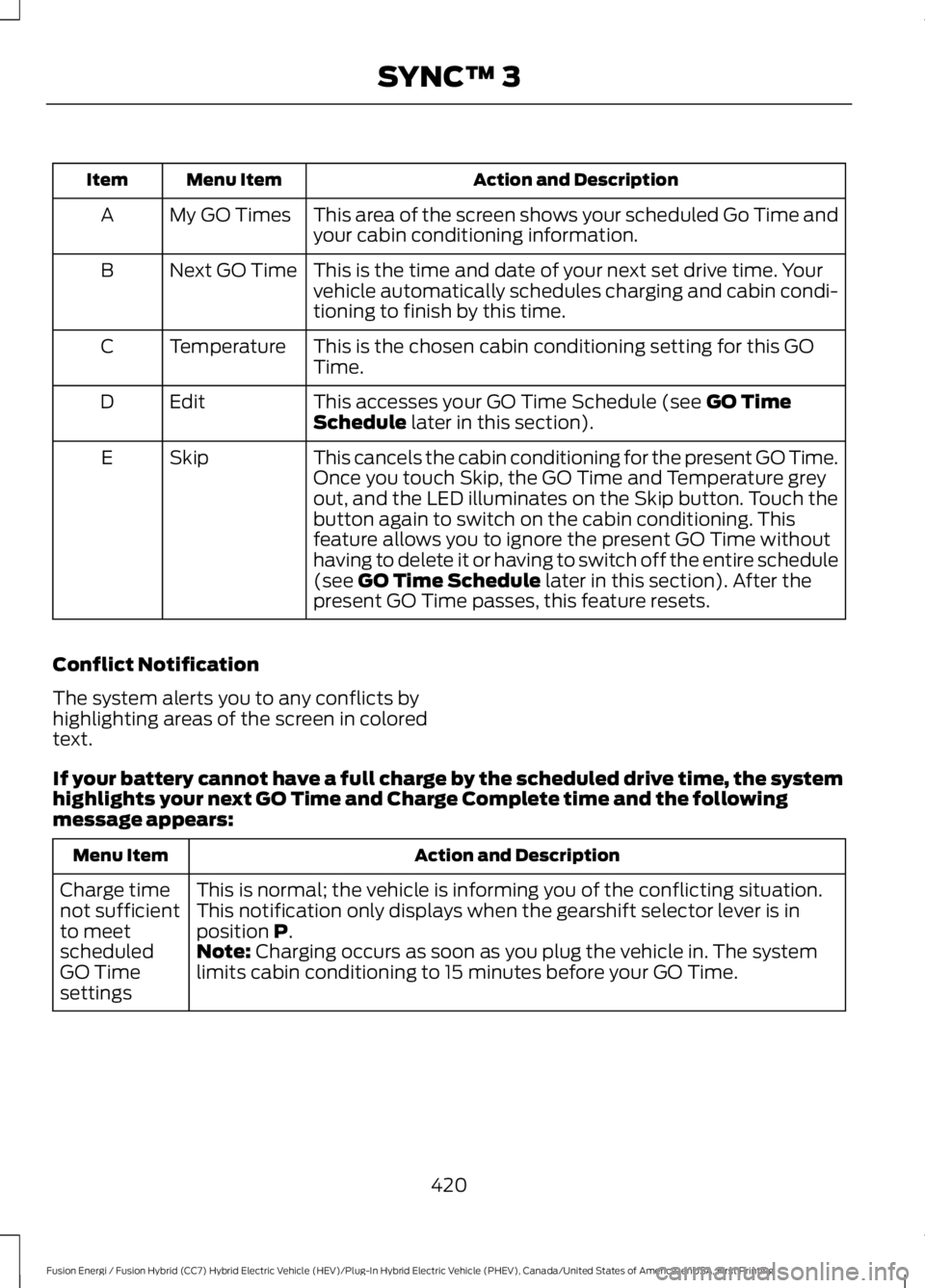
Action and DescriptionMenu ItemItem
This area of the screen shows your scheduled Go Time andyour cabin conditioning information.My GO TimesA
This is the time and date of your next set drive time. Yourvehicle automatically schedules charging and cabin condi-tioning to finish by this time.
Next GO TimeB
This is the chosen cabin conditioning setting for this GOTime.TemperatureC
This accesses your GO Time Schedule (see GO TimeSchedule later in this section).EditD
This cancels the cabin conditioning for the present GO Time.Once you touch Skip, the GO Time and Temperature greyout, and the LED illuminates on the Skip button. Touch thebutton again to switch on the cabin conditioning. Thisfeature allows you to ignore the present GO Time withouthaving to delete it or having to switch off the entire schedule(see GO Time Schedule later in this section). After thepresent GO Time passes, this feature resets.
SkipE
Conflict Notification
The system alerts you to any conflicts byhighlighting areas of the screen in coloredtext.
If your battery cannot have a full charge by the scheduled drive time, the systemhighlights your next GO Time and Charge Complete time and the followingmessage appears:
Action and DescriptionMenu Item
This is normal; the vehicle is informing you of the conflicting situation.This notification only displays when the gearshift selector lever is inposition P.
Charge timenot sufficientto meetscheduledGO Timesettings
Note: Charging occurs as soon as you plug the vehicle in. The systemlimits cabin conditioning to 15 minutes before your GO Time.
420
Fusion Energi / Fusion Hybrid (CC7) Hybrid Electric Vehicle (HEV)/Plug-In Hybrid Electric Vehicle (PHEV), Canada/United States of America, enUSA, First Printing
SYNC™ 3
Page 431 of 516

Action and DescriptionMenu Item
Allows you to edit the GO Time andcabin conditioning temperature.My GO Times
Indicates that you can add a GOTime to this slot.--:--GO Time 2
Note: If you set GO Time 2 to occur before GO Time 1, or if youset GO Time 1 to occur after an existing GO Time 2, the GO Timeswill automatically sort themselves and be displayed in the correctorder.
GO Time and Cabin Conditioning
This screen allows you to enter or changethe GO Time and cabin conditioningtemperature.
Press any GO Time on the Schedule screento enter the editing screen for that GOTime.
Action and DescriptionMenu Item
These change the hours and minutes of your GO Time. Theminutes change in increments of five. You can also switch thesettings for AM and PM by touching those buttons.
Time (+ and -)
These switch the setting for your selected cabin conditioningtemperature for this GO Time event. You can select from foursettings:
Cabin Conditioning(+ and -)
Off85°F (29.5°C)72°F (22°C)65°F (18.5°C)
Note: Cabin conditioning can perform differently depending onif you plug into a 120V convenience cord or 240V charging station.The power available for conditioning is limited to the chargingstation power available.Note: Your vehicle may not always reach the set cabin temper-ature due to charging and ambient temperature conditions. Thisis normal operation.
Touching this button erases the GO Time and cabin conditioningtemperature.Clear
Touching this button stores the GO Time and temperaturesettings.Save
Note:If you select a GO Time, but choose Off for the temperature setting, the vehicleschedules charging to be complete by your GO Time and does not condition the cabin.
Note:Make sure you save your settings before returning to the previous screen. If you donot touch Save, the system will not automatically store the settings.
428
Fusion Energi / Fusion Hybrid (CC7) Hybrid Electric Vehicle (HEV)/Plug-In Hybrid Electric Vehicle (PHEV), Canada/United States of America, enUSA, First Printing
SYNC™ 3
Page 437 of 516

Engine On due to
The engine is on to charge the high-voltage battery. Thevehicle returns to electric mode once the battery ischarged.
Battery Charging
The engine is on to maintain engine oil quality. Thevehicle returns to electric mode when low engine usemode is complete. See Engine Oil Check (page 255).
Low Use
(Energi Only)
The engine is on due to high or low high-voltage batterytemperature. This is a normal operating condition. Thevehicle returns to electric mode automatically whenpossible.
Battery Temperature
(Energi Only)
The engine is on to optimize vehicle operation. Thevehicle returns to electric mode when possible.Normal Operation
The engine is on to provide increased powertrainbraking. This can occur when you turn on the gradeassist feature, when speed control is on or when drivingwith your foot off the accelerator pedal. Turning offgrade assist or speed control may allow the vehicle toreturn to electric mode.
Engine Braking Active
Privacy Notice for GPS Mapping withMyFord
MyFord allows for GPS mapping when avehicle is registered to a MyFord Mobileaccount. To remove the vehicle from theaccount, thereby removing GPS mappingability, a Master Reset can be performedin the vehicle. See Settings (page 437).
Before transferring ownership of a vehicle,owners may choose to execute a MasterReset or Factory Reset (completed via theMyFord Mobile website). Either methodremoves the vehicle from all MyFordMobile accounts.
It is recommended that new ownersconduct a Master Reset upon takingpossession of the vehicle to remove it fromany existing MyFord Mobile accounts. Thenew owner can activate a MyFord Mobileaccount by completing registration processon the website.
Website
www.myfordmobile.comwww.syncmyride.cawww.syncmaroute.ca
APPS
The system enables voice, steering wheel,and touch screen control of SYNC 3AppLink enabled smartphone apps. Oncean app is running through AppLink, you cancontrol main features of the app throughvoice commands and steering wheelcontrols.
Note:Available AppLink enabled apps willvary by market.
Note:You must pair and connect yoursmartphone via Bluetooth to SYNC 3 toaccess AppLink.
434
Fusion Energi / Fusion Hybrid (CC7) Hybrid Electric Vehicle (HEV)/Plug-In Hybrid Electric Vehicle (PHEV), Canada/United States of America, enUSA, First Printing
SYNC™ 3