2017 FORD FUSION ENERGI manual transmission
[x] Cancel search: manual transmissionPage 181 of 526

when the engine has sufficient torque toprevent your vehicle from rolling down thegrade. This is an advantage when pullingaway on a slope, for example from a carpark ramp, traffic lights or when reversinguphill into a parking space.
The system will activate automatically onany slope that will cause significant vehiclerollback. For vehicles with a manualtransmission, you can switch this featureoff using the information display. SeeInformation Displays (page 94). Thesystem will remain on or off depending onhow it was last set.
Note:There is no warning lamp to indicatethe system is either on or off.
Note:If your vehicle is equipped with AutoHold, Hill Start Assist will not be availablewhile Auto Hold is active.
Using Hill Start Assist
1. Bring your vehicle to a completestandstill. Keep the brake pedalpressed and select an uphill gear (forexample, first (1) when facing uphill orreverse (R) when facing downhill).
2. If the sensors detect that your vehicleis on a slope, the system will activateautomatically.
3. When you remove your foot from thebrake pedal, your vehicle will remainon the slope without rolling away forabout two or three seconds. This holdtime will automatically be extended ifyou are in the process of driving off.
4. Drive off in the normal manner. Thebrakes will release automatically.
Switching the System On and Off
You can switch this feature on or off if yourvehicle is equipped with a manualtransmission and an information display.See General Information (page 94). Thesystem remembers the last setting whenyou start your vehicle.
If your vehicle is not equipped with amanual transmission and an informationdisplay, you cannot turn the system on oroff. When you switch the ignition on, thesystem automatically turns on.
178
Fusion Energi / Fusion Hybrid (CC7) Hybrid Electric Vehicle (HEV)/Plug-In Hybrid Electric Vehicle (PHEV), Canada/United States of America, enUSA, Edition date: 201602, Second Printing
Brakes
Page 187 of 526
You can switch the system off through theinformation display menu or from thepop-up message that appears once youshift the transmission into reverse (R). SeeGeneral Information (page 94). If yourvehicle has a parking aid button, you canswitch the system off by pressing thebutton.
Obstacle Distance Indicator (If
Equipped)
The system provides obstacle distanceindication through the information display.
The indicator displays:
•As the distance to the obstacledecreases the indicator blocksilluminate and move towards thevehicle icon.
•If there is no obstacle detected, thedistance indicator blocks are grayedout.
If the transmission is in reverse (R), thefront sensing system provides audiowarnings when your vehicle is moving andthe detected obstacle is moving towardsyour vehicle. Once the vehicle is stationary,the audio warning will be stopped after 2seconds. Visual indication is alwayspresent in reverse (R).
If the transmission is in drive (D) or anyother forward gear (for example, low (L),sport (S) or any forward gear in a manualtransmission), the front sensing systemprovides audio and visual warnings whenyour vehicle is moving below a speed of7 mph (12 km/h) and an obstacle is locatedinside the detection area. Once the vehicleis stationary, the audio warning will bestopped after 2 seconds and the visualindication stops after 4 seconds. If theobstacles detected are within 12 in(30 cm), the visual indication remains on.
If the transmission is in neutral (N), thesystem provides visual indication onlywhen your vehicle is moving at 7 mph(12 km/h) or below and an obstacle islocated inside the detection area. Onceyour vehicle is stationary, the visualindication will stop after 4 seconds.
SIDE SENSING SYSTEM
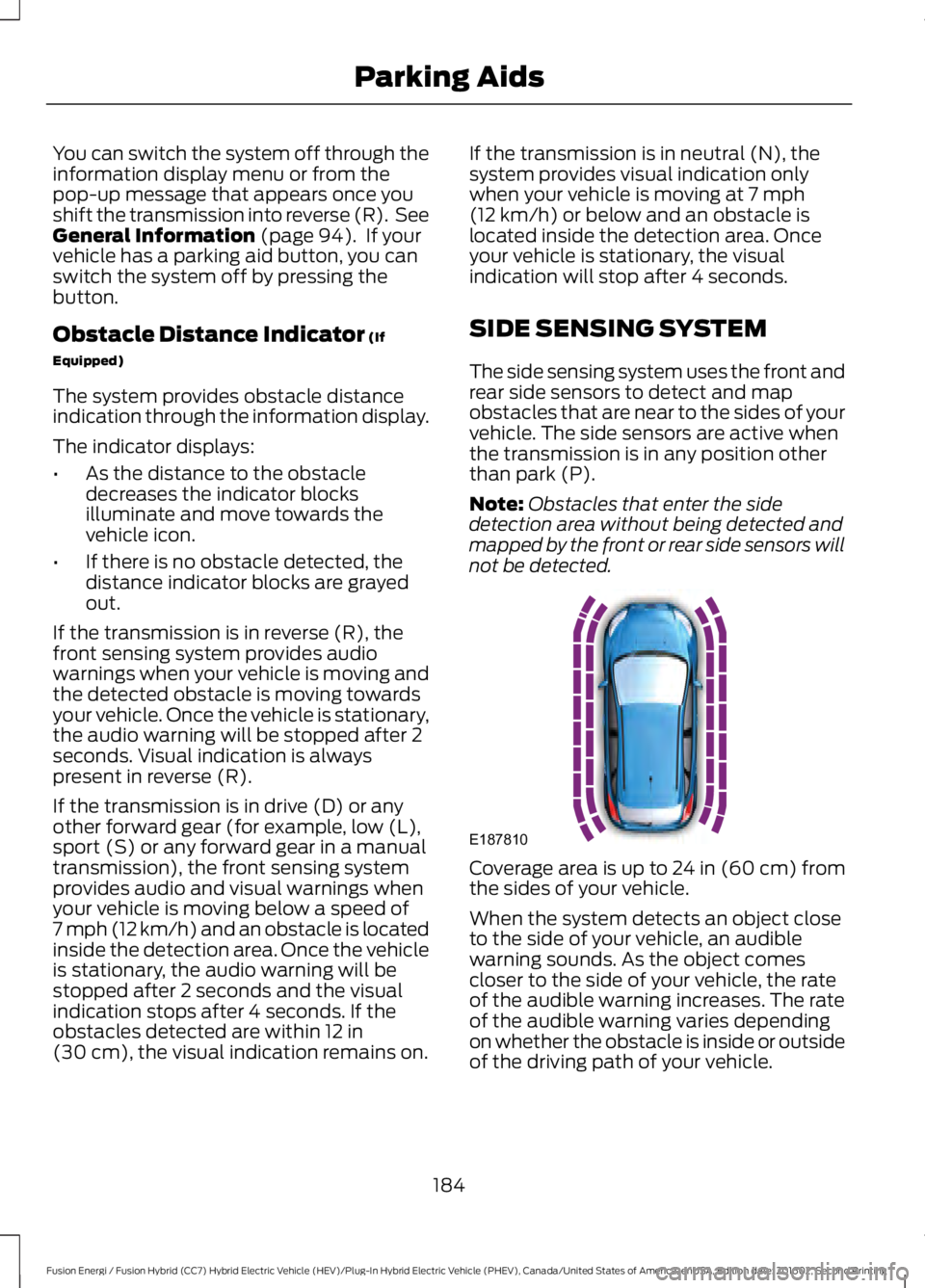
The side sensing system uses the front andrear side sensors to detect and mapobstacles that are near to the sides of yourvehicle. The side sensors are active whenthe transmission is in any position otherthan park (P).
Note:Obstacles that enter the sidedetection area without being detected andmapped by the front or rear side sensors willnot be detected.
Coverage area is up to 24 in (60 cm) fromthe sides of your vehicle.
When the system detects an object closeto the side of your vehicle, an audiblewarning sounds. As the object comescloser to the side of your vehicle, the rateof the audible warning increases. The rateof the audible warning varies dependingon whether the obstacle is inside or outsideof the driving path of your vehicle.
184
Fusion Energi / Fusion Hybrid (CC7) Hybrid Electric Vehicle (HEV)/Plug-In Hybrid Electric Vehicle (PHEV), Canada/United States of America, enUSA, Edition date: 201602, Second Printing
Parking AidsE187810
Page 188 of 526
Obstacle Distance Indicator (If
Equipped)
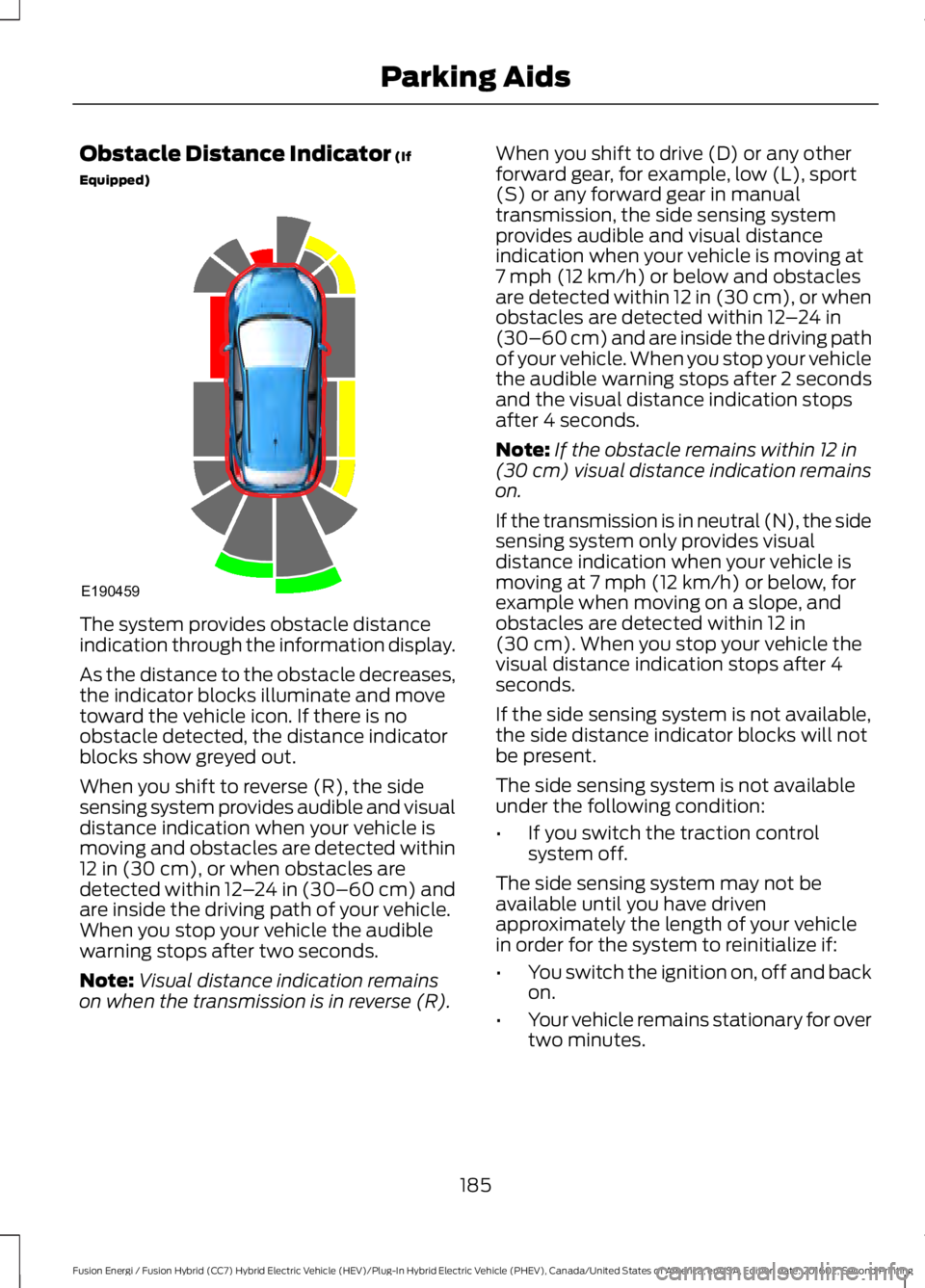
The system provides obstacle distanceindication through the information display.
As the distance to the obstacle decreases,the indicator blocks illuminate and movetoward the vehicle icon. If there is noobstacle detected, the distance indicatorblocks show greyed out.
When you shift to reverse (R), the sidesensing system provides audible and visualdistance indication when your vehicle ismoving and obstacles are detected within12 in (30 cm), or when obstacles aredetected within 12–24 in (30–60 cm) andare inside the driving path of your vehicle.When you stop your vehicle the audiblewarning stops after two seconds.
Note:Visual distance indication remainson when the transmission is in reverse (R).
When you shift to drive (D) or any otherforward gear, for example, low (L), sport(S) or any forward gear in manualtransmission, the side sensing systemprovides audible and visual distanceindication when your vehicle is moving at7 mph (12 km/h) or below and obstaclesare detected within 12 in (30 cm), or whenobstacles are detected within 12–24 in(30–60 cm) and are inside the driving pathof your vehicle. When you stop your vehiclethe audible warning stops after 2 secondsand the visual distance indication stopsafter 4 seconds.
Note:If the obstacle remains within 12 in(30 cm) visual distance indication remainson.
If the transmission is in neutral (N), the sidesensing system only provides visualdistance indication when your vehicle ismoving at 7 mph (12 km/h) or below, forexample when moving on a slope, andobstacles are detected within 12 in(30 cm). When you stop your vehicle thevisual distance indication stops after 4seconds.
If the side sensing system is not available,the side distance indicator blocks will notbe present.
The side sensing system is not availableunder the following condition:
•If you switch the traction controlsystem off.
The side sensing system may not beavailable until you have drivenapproximately the length of your vehiclein order for the system to reinitialize if:
•You switch the ignition on, off and backon.
•Your vehicle remains stationary for overtwo minutes.
185
Fusion Energi / Fusion Hybrid (CC7) Hybrid Electric Vehicle (HEV)/Plug-In Hybrid Electric Vehicle (PHEV), Canada/United States of America, enUSA, Edition date: 201602, Second Printing
Parking AidsE190459
Page 197 of 526

The fixed and active guidelines fade in andout depending on the steering wheelposition. The active guidelines do notdisplay when the steering wheel positionis straight.
Always use caution while reversing.Objects in the red zone are closest to yourvehicle and objects in the green zone arefarther away. Objects are getting closer toyour vehicle as they move from the greenzone to the yellow or red zones. Use theside view mirrors and rear view mirror toget better coverage on both sides and rearof the vehicle.
Obstacle Distance Indicator (If
Equipped)
The system will provide an image of yourvehicle and the sensor zones. The zoneswill highlight green, yellow and red whenthe parking aid sensors detect an object inthe coverage area.
Manual Zoom
WARNING
When manual zoom is on, the fullarea behind your vehicle may notshow. Be aware of your surroundingswhen using the manual zoom feature.
Note:Manual zoom is only available whenthe transmission is in reverse (R).
Note:When you enable manual zoom, onlythe centerline is shown.
Selectable settings for this feature areZoom in (+) and Zoom out (-). Press thesymbol in the camera screen to change theview. The default setting is Zoom OFF.
This allows you to get a closer view of anobject behind your vehicle. The zoomedimage keeps the bumper in the image toprovide a reference. The zoom is onlyactive while the transmission is in reverse(R).
Rear Camera Delay
Selectable settings for this feature are ONand OFF. The default setting for the rearcamera delay is OFF.
When shifting the transmission out ofreverse (R) and into any gear other thanpark (P), the camera image remains in thedisplay until:
•Your vehicle speed sufficientlyincreases.
•You shift your vehicle into park (P)(automatic transmission).
•You apply the parking brake (manualtransmission).
194
Fusion Energi / Fusion Hybrid (CC7) Hybrid Electric Vehicle (HEV)/Plug-In Hybrid Electric Vehicle (PHEV), Canada/United States of America, enUSA, Edition date: 201602, Second Printing
Parking AidsE190459
Page 203 of 526

Changing the Set Speed
•Press and release RES+ or SET-. Whenyou select km/h as the displaymeasurement in the informationdisplay the set speed changes inapproximately 2 km/h increments.When you select mph as the displaymeasurement in the informationdisplay the set speed changes inapproximately 1 mph increments.
•Press the accelerator or brake pedaluntil you reach the desired speed. Pressand release SET-.
•Press and hold RES+ or SET-. Releasethe control when you reach the desiredspeed. The set speed changes inapproximately 5 mph/10 km/hincrements.
•Press the RES+ or SET- button tochange the set speed in increments ofapproximately 1 mph or 2 km/h.
•Hold the RES+ or SET- button tochange the set speed in increments ofapproximately 5 mph or 10 km/h.
The system may apply the brakes to slowthe vehicle to the new set speed. The setspeed displays continuously in theinformation display when the system isactive.
Canceling the Set Speed
Press and release CNCL or tap the brakepedal. The set speed does not erase.
Resuming the Set Speed
Press and release RES+. The vehiclereturns to the previously set speed. The setspeed displays continuously in theinformation display while the system isactive.
Note:Only use resume if you are aware ofthe set speed and intend to return to it.
Automatic Cancellation
Automatic cancellation occurs if:
•The tires lose traction.
•The engine speed is too low.
•You apply the parking brake.
Note:If the engine speed drops too low,the information display indicates low enginespeed. Shift to a lower gear (manualtransmission only) to avoid automaticcancellation.
Hilly Condition Usage
Note:An audible alarm sounds and thesystem shuts down when it applies brakesfor an extended period of time. This allowsthe brakes to cool. The system functionsnormally after the brakes have cooled.
You should select a lower gear positionwhen the system is active in situationssuch as prolonged downhill driving onsteep grades, for example in mountainousareas. The system needs additional enginebraking in these situations to reduce theload on the vehicle’s regular brake systemto prevent them from overheating.
Switching Adaptive Cruise ControlOff
Press and release OFF when the system isin stand by mode or switch the ignition off.
Note:You erase the set speed when youswitch the system off.
200
Fusion Energi / Fusion Hybrid (CC7) Hybrid Electric Vehicle (HEV)/Plug-In Hybrid Electric Vehicle (PHEV), Canada/United States of America, enUSA, Edition date: 201602, Second Printing
Cruise Control
Page 212 of 526

Note:The Blind Spot Information Systemdoes not prevent contact with other vehiclesor objects; nor detect parked vehicles,people, animals or infrastructure (fences,guardrails, trees). It’s only designed to alertyou to vehicles in the blind spot zones.
Note:When a vehicle passes quicklythrough the blind spot zone, typically fewerthan two seconds, the system does nottrigger.
Using the System
The Blind Spot Information System turnson when you start the engine and you driveyour vehicle forward above 5 mph(8 km/h).
For automatic transmissions, the BlindSpot Information System remains on whilethe transmission is in drive (D). If shiftedinto reverse (R) or park (P) the Blind SpotInformation System turns off. Once shiftedback into drive (D), the Blind SpotInformation System turns back on whenyou drive your vehicle above 5 mph(8 km/h).
For manual transmissions, the Blind SpotInformation System is on for all gearsexcept the reverse (R).
Note:The Blind Spot Information Systemdoes not function in reverse (R) or park (P).
System Lights and Messages
The Blind Spot Information Systemilluminates an amber alert indicator in theoutside mirror on the side of your vehiclethe approaching vehicle is coming from.When the Blind Spot Information Systemis alerting on a vehicle and thecorresponding turn signal is ON, the BlindSpot Information System alert indicatorflashes as an increased warning level.
The alert indicator dims when the systemdetects nighttime darkness.
Note:The alert indicator flashes in case ofan alert and the turn signal is set to that sideat the same time.
System Sensor Blockage
WARNING
To help avoid injuries, NEVER use theBlind Spot Information System as areplacement for using the interiorand exterior mirrors or looking over yourshoulder before changing lanes. The BlindSpot Information System is not areplacement for careful driving.
The system uses radar sensors that arelocated behind the bumper fascia on eachside of your vehicle. Any dirt, mud andsnow in front of the sensors and/or drivingin heavy rain can cause systemdegradation. Also, other types ofobstructions in front of the sensor cancause system degradation. This is referredto as a ‘blocked’ condition.
209
Fusion Energi / Fusion Hybrid (CC7) Hybrid Electric Vehicle (HEV)/Plug-In Hybrid Electric Vehicle (PHEV), Canada/United States of America, enUSA, Edition date: 201602, Second Printing
Driving AidsE142442 E205199
Page 213 of 526

Note:Do not apply bumper stickers and/orrepair compound to these areas, this cancause degraded system performance.
If the system detects a degradedperformance condition, a message warningof a blocked sensor will appear in theinformation display. Also the BLIS alertindicators will remain ON and BLIS will nolonger provide any vehicle warnings. Youcan clear the information display warningbut the alert indicators will remainilluminated.
A "blocked" condition can be cleared intwo ways:
•After the blockage in front of thesensors is removed or therainfall/snowfall rate decreases orstops, drive for a few minutes in trafficto allow the sensors to detect passingvehicles.
•By cycling the ignition from ON to OFFand then back ON.
Note:If your vehicle has a tow bar with afactory equipped trailer tow module and itis towing a trailer, the sensors willautomatically turn the Blind SpotInformation System off. If your vehicle hasa tow bar but no factory equipped trailertow module, it is recommended to turn theBlind Spot Information System offmanually. Operating the Blind SpotInformation System with a trailer attachedwill cause poor system performance.
System Errors
If the system senses a problem with theleft or right sensor, the telltale willilluminate and a message will appear inthe information display. See InformationMessages (page 103).
Switching the System Off and On
You can temporarily switch the Blind SpotInformation System off in the informationdisplay. See General Information (page94). When the Blind Spot InformationSystem switches off, you will not receivealerts and the information display showsa system off message. The telltale in thecluster also illuminates. When you switchthe Blind Spot Information System on oroff, the alert indicators flash twice.
Note:The Blind Spot Information Systemremembers the last selected on or offsetting.
You can also have the Blind SpotInformation System switched offpermanently at an authorized dealer. Onceswitched off permanently, the system canonly be switched back on at an authorizeddealer.
CROSS TRAFFIC ALERT
WARNING
To help avoid personal injury, NEVERuse the Cross Traffic Alert system asa replacement for using the interiorand exterior mirrors and looking over yourshoulder before backing out of a parkingspace. Cross Traffic Alert is not areplacement for careful driving.
Cross Traffic Alert is designed to warn youof vehicles approaching from the sideswhen the transmission is in reverse (R).
Using the System
Cross Traffic Alert turns on when you startthe engine and you shift into reverse (R).Once shifted out of reverse (R), CrossTraffic Alert turns off.
Note:Cross Traffic Alert only functionswhile your transmission is in reverse (R).
210
Fusion Energi / Fusion Hybrid (CC7) Hybrid Electric Vehicle (HEV)/Plug-In Hybrid Electric Vehicle (PHEV), Canada/United States of America, enUSA, Edition date: 201602, Second Printing
Driving Aids
Page 215 of 526

Zone coverage also decreases whenparking at shallow angles. Here, the leftsensor is mostly obstructed; zone coverageon that side is severely limited.
System Lights, Messages andAudible Alerts
The Cross Traffic Alert illuminates anamber alert indicator in the outside mirroron the side of your vehicle the approachingvehicle is coming from. Cross Traffic Alertalso sounds an audible alert and amessage appears in the informationdisplay indicating a vehicle is coming fromthe right or left. Cross Traffic Alert workswith the reverse sensing system thatsounds its own series of tones. See RearParking Aid (page 182).
The system uses radar sensors that arelocated behind the bumper fascia on eachside of your vehicle. Do not allow mud,snow or bumper stickers to obstruct theseareas, this can cause degraded systemperformance. See Blind Spot
Information System (page 208). If theBlind Spot Information System is blocked,Cross Traffic Alert is also blocked. Acorresponding message appears in theinformation display as soon as you shiftthe transmission into reverse (R).
System Limitations
Cross Traffic Alert has its limitations;situations such as severe weatherconditions or debris build-up on the sensorarea may limit vehicle detection.
The following are other situations that maylimit the Cross Traffic Alert performance:
•Adjacently parked vehicles or objectsobstructing the sensors.
•Approaching vehicles passing atspeeds greater than 37 mph(60 km/h).
•Driving in reverse faster than 7 mph(12 km/h).
•Backing out of an angled parking spot.
False Alerts
Note:If your vehicle has a tow bar with afactory equipped trailer tow module and itis towing a trailer, the sensors willautomatically turn the Cross Traffic Alertoff. If your vehicle has a tow bar but nofactory equipped trailer tow module, it isrecommended to turn the Cross Traffic Alertoff manually. Operating Cross Traffic Alertwith a trailer attached will cause poor CrossTraffic Alert performance.
There may be certain instances when thereis a false alert by the Cross Traffic Alertsystem that illuminates the alert indicatorwith no vehicle in the coverage zone. Someamount of false alerts are normal; they aretemporary and self-correct.
212
Fusion Energi / Fusion Hybrid (CC7) Hybrid Electric Vehicle (HEV)/Plug-In Hybrid Electric Vehicle (PHEV), Canada/United States of America, enUSA, Edition date: 201602, Second Printing
Driving AidsE142442 E205199