2017 FORD FUSION ENERGI lock
[x] Cancel search: lockPage 285 of 526

Note:If you experience any unusualvibration, ride disturbance or noise whiledriving, reduce your speed until you cansafely pull off to the side of the road to callfor roadside assistance. Note: Do notproceed to the second stage of thisoperation.
Second Stage: Checking TirePressure
WARNINGS
If you are proceeding from the FirstStage: Re-inflating the Tire withSealing Compound and Air sectionand have injected sealant in the tire andthe pressure is below 20 psi (1.4 bar),continue to the next step.
The power plug may get hot after useand should be handled carefullywhile unplugging.
Check the air pressure of your tires asfollows:
1. Remove the valve cap from the tirevalve.
2. Firmly screw the air compressor hoseonto the valve stem by turningclockwise.
3.Push and turn the dial clockwise to theair position.
4.If required, turn on the compressor andadjust the tire to the recommendedinflation pressure shown on the tirelabel located on the driver's door ordoor jamb area. The tire pressureshould be checked with thecompressor turned OFF in order to getan accurate pressure reading.
5. Unplug the hoses, re-install the valvecap on the tire and return the kit to thestowage area.
What to do after the Tire has beenSealed
After using the kit to seal your tire, you willneed to replace the sealant canister.Sealant canisters and spare parts can beobtained at an authorized Ford dealer.Empty sealant canisters may be disposedof at home. However, canisters stillcontaining liquid sealant should bedisposed of by your local authorized Forddealer or tire dealer, or in accordance withlocal waste disposal regulation.
Note:After the sealing compound has beenused, the maximum vehicle speed is 50 mph(80 km/h) and the maximum drivingdistance is 120 mi (200 km). The sealed tireshould be inspected immediately.
You can check the tire pressure any timewithin the 120 mi (200 km) by performingthe steps listed previously in the Secondstage: Checking Tire Pressure procedure.
282
Fusion Energi / Fusion Hybrid (CC7) Hybrid Electric Vehicle (HEV)/Plug-In Hybrid Electric Vehicle (PHEV), Canada/United States of America, enUSA, Edition date: 201602, Second Printing
Wheels and TiresE175983
Page 314 of 526

SpecificationName
WSS-M17B21-AA/C refrigerant (Canada):R-1234yf RefrigerantHS7Z-19B519-BA
WSS-M2C31-B2A/C refrigerant compressor oil:Motorcraft® R-1234yf Refrigerant POE OilYN-34
ESB-M1C93-BMulti-purpose grease:Motorcraft Multi-Purpose Grease SprayXL-5
--Lock cylinders (U.S.):Penetrating and Lock LubricantXL-1
--Lock cylinders (Canada):Penetrating FluidCXC-51-A
--Lock cylinders (Mexico):Penetrating and Lock LubricantMXL-1
If you use oil and fluids that do not meetthe defined specification and viscositygrade, this may lead to:
•Component damage which is notcovered by the vehicle warranty.
•Longer engine cranking periods.
•Increased emission levels.
•Reduced engine performance.
•Reduced fuel economy.
•Degraded brake performance.
We recommend Motorcraft motor oil foryour vehicle. If Motorcraft oil is notavailable, use motor oils of therecommended viscosity grade that meetAPI SN requirements and display the APICertification Mark for gasoline engines. Donot use oil labeled with API SN servicecategory unless the label also displays theAPI certification mark.
An oil that displays this symbol conformsto current engine, emission system andfuel economy performance standards ofthe International Lubricants SpecificationAdvisory Committee (ILSAC).
Do not use supplemental engine oiladditives because they are unnecessaryand could lead to engine damage that maynot be covered by your vehicle warranty.
311
Fusion Energi / Fusion Hybrid (CC7) Hybrid Electric Vehicle (HEV)/Plug-In Hybrid Electric Vehicle (PHEV), Canada/United States of America, enUSA, Edition date: 201602, Second Printing
Capacities and SpecificationsE142732
Page 319 of 526
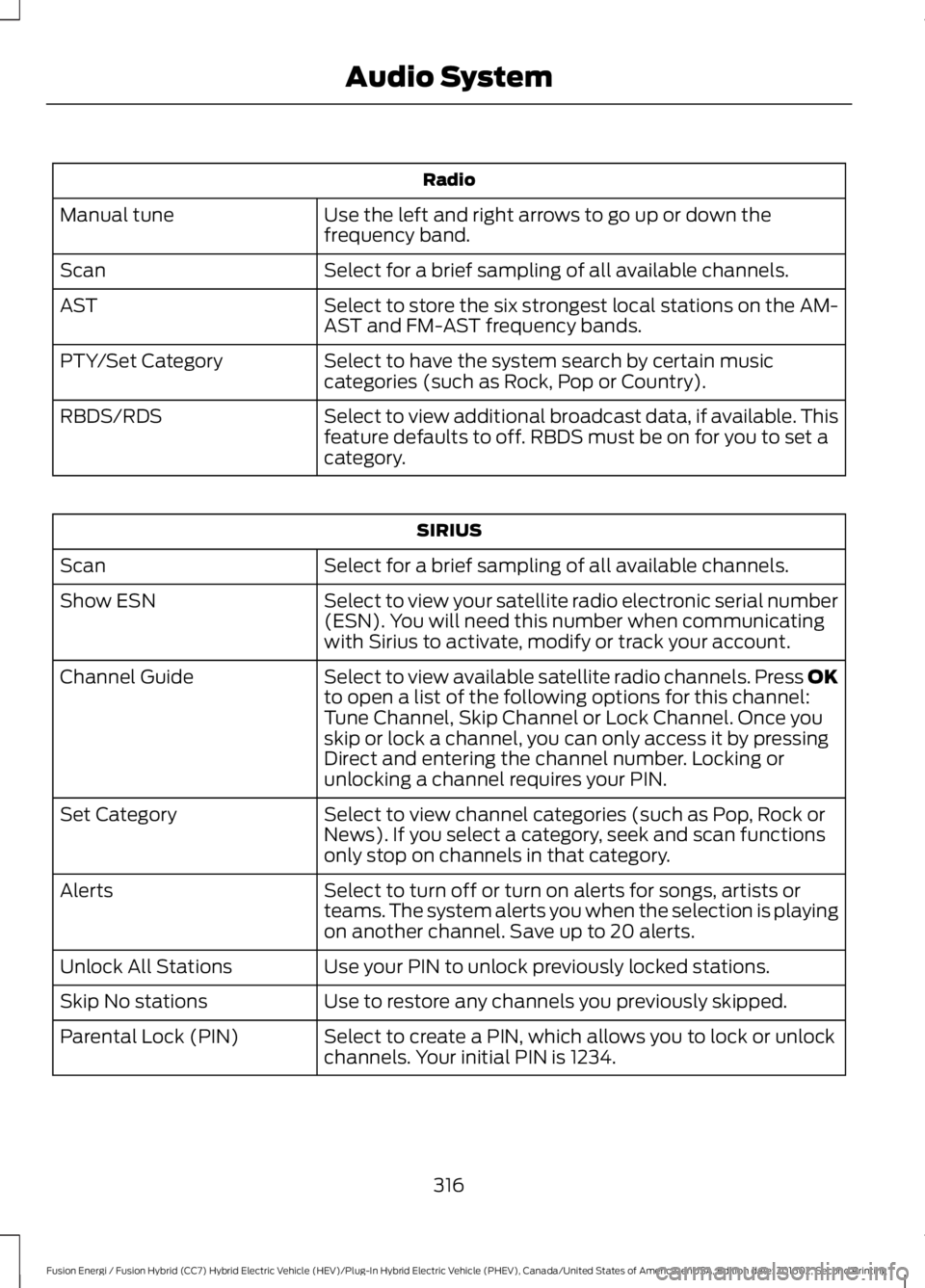
Radio
Use the left and right arrows to go up or down thefrequency band.Manual tune
Select for a brief sampling of all available channels.Scan
Select to store the six strongest local stations on the AM-AST and FM-AST frequency bands.AST
Select to have the system search by certain musiccategories (such as Rock, Pop or Country).PTY/Set Category
Select to view additional broadcast data, if available. Thisfeature defaults to off. RBDS must be on for you to set acategory.
RBDS/RDS
SIRIUS
Select for a brief sampling of all available channels.Scan
Select to view your satellite radio electronic serial number(ESN). You will need this number when communicatingwith Sirius to activate, modify or track your account.
Show ESN
Select to view available satellite radio channels. Press OKto open a list of the following options for this channel:Tune Channel, Skip Channel or Lock Channel. Once youskip or lock a channel, you can only access it by pressingDirect and entering the channel number. Locking orunlocking a channel requires your PIN.
Channel Guide
Select to view channel categories (such as Pop, Rock orNews). If you select a category, seek and scan functionsonly stop on channels in that category.
Set Category
Select to turn off or turn on alerts for songs, artists orteams. The system alerts you when the selection is playingon another channel. Save up to 20 alerts.
Alerts
Use your PIN to unlock previously locked stations.Unlock All Stations
Use to restore any channels you previously skipped.Skip No stations
Select to create a PIN, which allows you to lock or unlockchannels. Your initial PIN is 1234.Parental Lock (PIN)
316
Fusion Energi / Fusion Hybrid (CC7) Hybrid Electric Vehicle (HEV)/Plug-In Hybrid Electric Vehicle (PHEV), Canada/United States of America, enUSA, Edition date: 201602, Second Printing
Audio System
Page 320 of 526

Audio Settings
Automatically adjusts the volume to compensate forspeed and wind noise. You can set the system between0 and +7.
Speed CompensatedVolume
Select to adjust settings for Treble, Midrange, Bass, Fadeor Balance.Sound
Select to optimize sound quality for the chosen seatingposition.Occupancy Mode
Select to view additional broadcast data, if available. Thisfeature defaults to off. RBDS must be on for you to set acategory.
RBDS/RDS Text
Choose between the stereo modes.DSP
CD Settings
Select to scan all disc selections.Scan All
Select to scan all music in the current MP3 folder.Scan Folder
Select to bring soft and loud passages together for a moreconsistent listening level.CD Compression
Clock Settings
Select to set the time.Set Time
Select to set the calendar date.Set Date
Select to view clock time in a 12-hour mode or 24-hourmode.24h Mode
Display Settings
Select to change display brightness.Dimming
Select to display the language in English, French orSpanish.Language
Select to display the outside temperature in Fahrenheitor Celsius.Temp. setting
317
Fusion Energi / Fusion Hybrid (CC7) Hybrid Electric Vehicle (HEV)/Plug-In Hybrid Electric Vehicle (PHEV), Canada/United States of America, enUSA, Edition date: 201602, Second Printing
Audio System
Page 323 of 526

CD: Press to listen to a CD. Press the function buttons below the radio screento select on-screen options of Repeat or Shuffle.A
SOUND: Press to access settings for Treble, Midrange, Bass, Fade and Balance.Use the up and down arrow buttons to select the various settings. When youmake your selection, press the left and right arrow buttons to change thesettings. Press OK to set or press MENU to exit. Sound settings can be set foreach audio source independently.
B
Display screen: Shows audio and SYNC information.C
Number block: In radio mode, store your favorite stations for later access.When tuned to any station, press and hold a preset button until sound returns.In CD mode, press a button to select a track. In phone mode, press the buttonsto enter a phone number.
D
Function buttons: Select different functions of the audio system dependingon which mode you are in (such as Radio mode or CD mode).E
TUNE: Turn to search radio stations in individual increments.F
Eject: Press to eject a CD.G
320
Fusion Energi / Fusion Hybrid (CC7) Hybrid Electric Vehicle (HEV)/Plug-In Hybrid Electric Vehicle (PHEV), Canada/United States of America, enUSA, Edition date: 201602, Second Printing
Audio SystemE144488
Page 324 of 526

Seek: In radio mode, select a radio station and press this button. The systemstops at the next strongest station. Press and hold to move quickly to the nextstrong radio station or memory preset. In CD mode, press to select the nexttrack. Press and hold to move quickly forward through the current track.
H
End phone call: Press and hold to end a phone call.I
Cursor arrows and OK: Use the up and down arrow buttons to select thevarious settings. When you make your selection, press the left and right arrowbuttons to change the settings. Press OK to set or press MENU to exit.
J
CD slot: Insert a CD.K
Answer or Make phone call: Press to either answer an incoming phone callor to make a phone call.L
Seek: In radio mode, select a radio station and press this button. The systemstops at the previous strongest station. Press and hold the button to movequickly to the previous strong radio station or memory preset. In CD mode, pressto select the previous track. Press and hold to move quickly backward throughthe current track.
M
Play/Pause: Press to either play or pause a track when listening to a CD.N
VOL and Power: Press to switch the system on and off. Turn to adjust thevolume.O
PHONE: Press to access the phone features of the SYNC system. See SYNC™(page 327).P
MENU: Press to access different audio system features. See Menu Structurelater in this section.Q
MEDIA: Press to access your auxiliary input jack or switch between devicesyou plug into the input jack or USB port.R
Clock: Press to access the clock setting. Use the center arrow controls to changethe hours and minutes. You can also set the clock by pressing the MENU buttonand scrolling to Clock Settings.
S
RADIO: Press to listen to the radio or change radio stations. Press the functionbuttons below the radio screen to select different radio functions.T
SIRIUS or MUTE: If your vehicle is equipped with SIRIUS satellite radio, pressto listen to SIRIUS satellite radio. If your vehicle is not equipped with SIRIUSsatellite radio, press the button to mute the playing media.
U
DIGITAL RADIO
Note:HD Radio broadcasts are notavailable in all markets.
HD Radio technology is the digitalevolution of analog AM/FM radio. Yoursystem has a special receiver that allowsit to receive digital broadcasts (whereavailable) in addition to the analogbroadcasts, it already receives. Digitalbroadcasts provide a better sound quality
321
Fusion Energi / Fusion Hybrid (CC7) Hybrid Electric Vehicle (HEV)/Plug-In Hybrid Electric Vehicle (PHEV), Canada/United States of America, enUSA, Edition date: 201602, Second Printing
Audio System
Page 328 of 526

SIRIUS satellite radio is asubscription-based satellite radio servicethat broadcasts a variety of music, sports,news, weather, traffic and entertainmentprogramming. Your factory-installedSIRIUS satellite radio system includeshardware and a limited subscription term,which begins on the date of sale or leaseof your vehicle. See an authorized dealerfor availability.
For more information on extendedsubscription terms (a service fee isrequired), the online media player and acomplete list of SIRIUS satellite radiochannels, and other features, please visitwww.siriusxm.com in the United States,www.siriusxm.ca in Canada, or call SIRIUSat 1-888-539-7474.
Satellite Radio Electronic SerialNumber (ESN)
You need your ESN to activate, modify ortrack your satellite radio account. When insatellite radio mode, tune to channel 0.
Troubleshooting
ActionConditionMessage
No action required. Thismessage should disappearshortly.
Radio requires more thantwo seconds to produceaudio for the selectedchannel.
Acquiring…
If this message does notclear shortly, or with an igni-tion key cycle, your receivermay have a fault. See anauthorized dealer for service.
There is an internal moduleor system failure present.Satellite antenna fault
SIRIUS system failure
Tune to another channel orchoose another preset.The channel is no longeravailable.Invalid Channel
Contact SIRIUS at 1-888-539-7474 to subscribe tothe channel, or tune toanother channel.
Your subscription does notinclude this channel.Unsubscribed Channel
The signal is blocked. Whenyou move into an open area,the signal should return.
The signal is lost from theSIRIUS satellite or SIRIUStower to your vehicleantenna.
No Signal
No action required. Theprocess may take up tothree minutes.
Update of channelprogramming in progress.Updating…
325
Fusion Energi / Fusion Hybrid (CC7) Hybrid Electric Vehicle (HEV)/Plug-In Hybrid Electric Vehicle (PHEV), Canada/United States of America, enUSA, Edition date: 201602, Second Printing
Audio System
Page 329 of 526
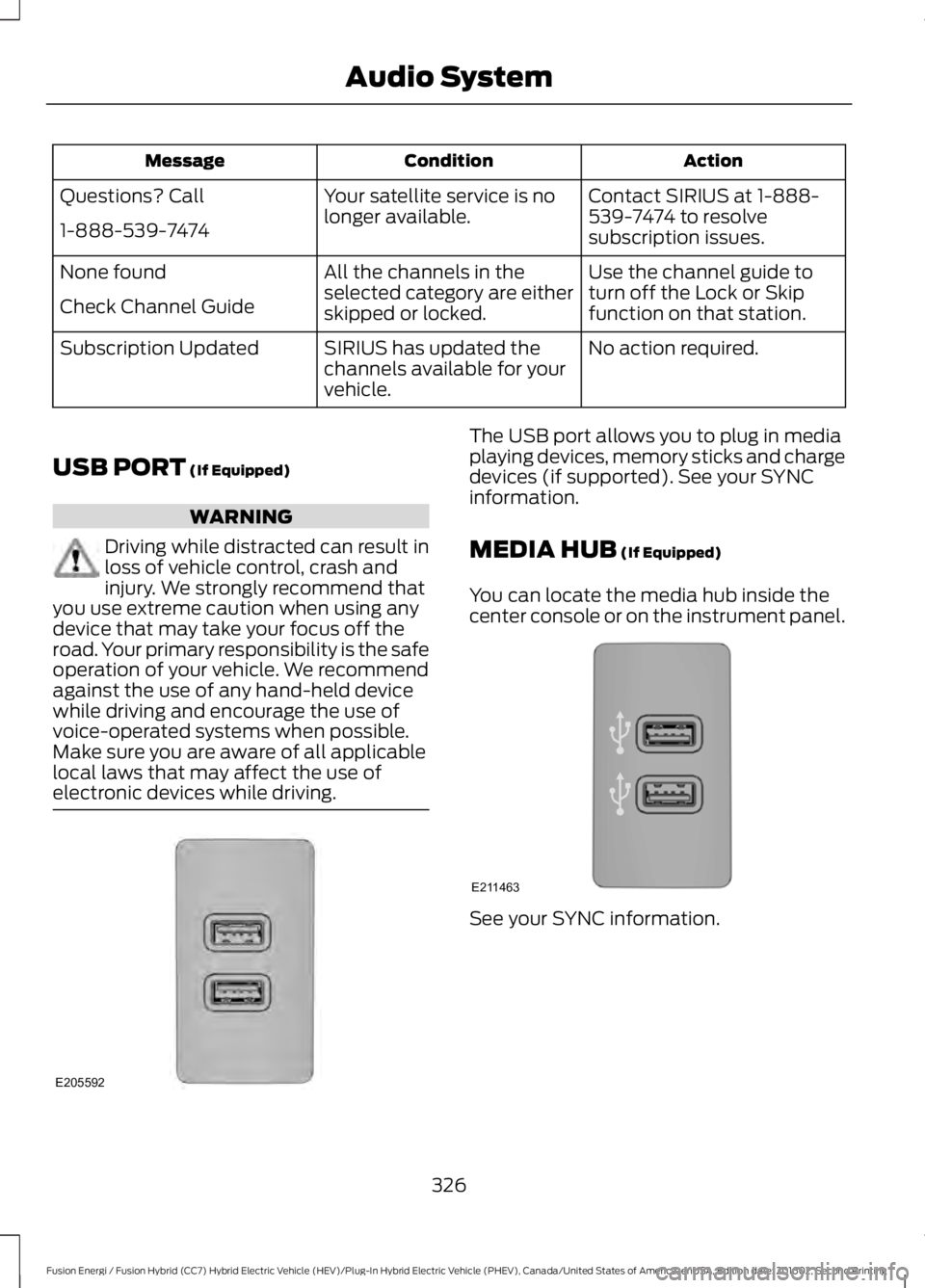
ActionConditionMessage
Contact SIRIUS at 1-888-539-7474 to resolvesubscription issues.
Your satellite service is nolonger available.Questions? Call
1-888-539-7474
Use the channel guide toturn off the Lock or Skipfunction on that station.
All the channels in theselected category are eitherskipped or locked.
None found
Check Channel Guide
No action required.SIRIUS has updated thechannels available for yourvehicle.
Subscription Updated
USB PORT (If Equipped)
WARNING
Driving while distracted can result inloss of vehicle control, crash andinjury. We strongly recommend thatyou use extreme caution when using anydevice that may take your focus off theroad. Your primary responsibility is the safeoperation of your vehicle. We recommendagainst the use of any hand-held devicewhile driving and encourage the use ofvoice-operated systems when possible.Make sure you are aware of all applicablelocal laws that may affect the use ofelectronic devices while driving.
The USB port allows you to plug in mediaplaying devices, memory sticks and chargedevices (if supported). See your SYNCinformation.
MEDIA HUB (If Equipped)
You can locate the media hub inside thecenter console or on the instrument panel.
See your SYNC information.
326
Fusion Energi / Fusion Hybrid (CC7) Hybrid Electric Vehicle (HEV)/Plug-In Hybrid Electric Vehicle (PHEV), Canada/United States of America, enUSA, Edition date: 201602, Second Printing
Audio SystemE205592 E211463