2017 FORD FUSION (AMERICAS) light
[x] Cancel search: lightPage 96 of 528

GENERAL INFORMATION
WARNING
Driving while distracted can result in
loss of vehicle control, crash and
injury. We strongly recommend that
you use extreme caution when using any
device that may take your focus off the
road. Your primary responsibility is the safe
operation of your vehicle. We recommend
against the use of any handheld device
while driving and encourage the use of
voice-operated systems when possible.
Make sure you are aware of all applicable
local laws that may affect the use of
electronic devices while driving. Note:
Your vehicle may or may not be
equipped with all the messages listed in this
chapter. Your vehicle will not display
messages of systems it is not equipped with.
Various systems on your vehicle can be
controlled using the information display
controls on the steering wheel.
Corresponding information is displayed in
the information display. Information Display Controls
(Type 1 and Type 2) •
Press the up and down arrow buttons
to scroll through and highlight the
options within a menu.
• Press the right arrow button to enter a
sub-menu.
• Press the left arrow button to exit a
menu.
• Press and hold the left arrow button at
any time to return to the main menu
display (escape button).
• Press the OK button to choose and
confirm settings or messages.
Menu
You can access the menu using the
information display control.
Note: Some options may appear slightly
different or not at all if the items are
optional. Trip 1 and 2
Distance to E
Trip Odometer
Trip Timer
Fuel Used
93
Fusion (CC7) Canada/United States of America, enUSA, First Printing Information DisplaysE144637
Page 99 of 528
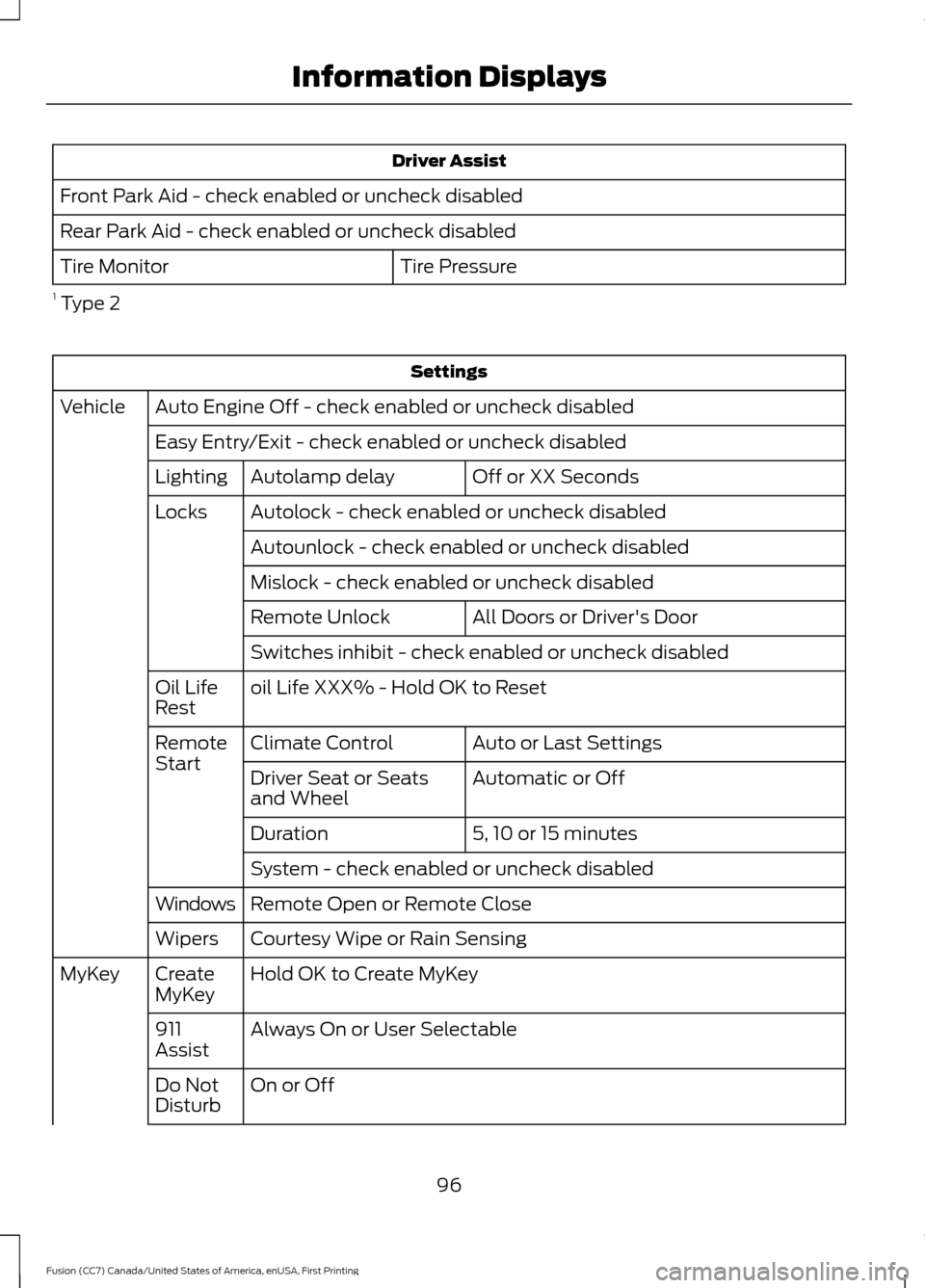
Driver Assist
Front Park Aid - check enabled or uncheck disabled
Rear Park Aid - check enabled or uncheck disabled Tire Pressure
Tire Monitor
1 Type 2 Settings
Auto Engine Off - check enabled or uncheck disabled
Vehicle
Easy Entry/Exit - check enabled or uncheck disabled Off or XX Seconds
Autolamp delay
Lighting
Autolock - check enabled or uncheck disabled
Locks
Autounlock - check enabled or uncheck disabled
Mislock - check enabled or uncheck disabled All Doors or Driver's Door
Remote Unlock
Switches inhibit - check enabled or uncheck disabled
oil Life XXX% - Hold OK to Reset
Oil Life
Rest
Auto or Last Settings
Climate Control
Remote
Start
Automatic or Off
Driver Seat or Seats
and Wheel
5, 10 or 15 minutes
Duration
System - check enabled or uncheck disabled
Remote Open or Remote Close
Windows
Courtesy Wipe or Rain Sensing
Wipers
Hold OK to Create MyKey
Create
MyKey
MyKey
Always On or User Selectable
911
Assist
On or Off
Do Not
Disturb
96
Fusion (CC7) Canada/United States of America, enUSA, First Printing Information Displays
Page 100 of 528

Settings
Always On or User Selectable
Traction
Control
Choose desired speed or Off
Max
Speed
Choose desired speed or Off
Speed
Minder
Volume Limiter - check enabled or uncheck disabled
Hold OK to Clear All MyKeys
Clear
MyKeys
Miles & Gallons, L/100km or km/L
Distance
Display
Setup
Fahrenheit (°F) or Celsius (°C)
Temper-
ature
psi, kPa or bar
Tire Pres-
sure
Choose your applicable setting
Language
1 Type 2
Information Display Controls
(Type 3) •
Press the up and down arrow buttons
to scroll through and highlight the
options within a menu.
• Press the right arrow button to enter a
sub-menu. •
Press the left arrow button to exit a
menu.
• Press and hold the left arrow button at
any time to return to the main menu
display (escape button).
• Press the OK button to choose and
confirm settings or messages.
Main menu
From the main menu bar on the left side
of the information display, you can choose
from the following categories:
• Display Mode
• Trip 1 & 2
• Fuel Economy
• Driver Assist
• Settings
97
Fusion (CC7) Canada/United States of America, enUSA, First Printing Information DisplaysE144638
Page 101 of 528

Scroll up or down to highlight one of the
categories, then press the right arrow key
or OK to enter into that category. Press the
left arrow key as needed to exit back to the
main menu.
Display Mode
Use the up/down arrow buttons to choose
between the following display options. Option 4
Option 3
Option 2
Option 1
Display mode
-
-
X
X
XXX mi (km) to empty
X
X
X
X
Fuel gauge
X
X
-
-
Round tachometer
-
-
X
-
Vertical tachometer
X
-
-
-
Engine coolant temp gauge
Intelligent AWD - AWD Gauge
• XXX mi (km) to empty: Shows the approximate distance the vehicle will travel.
• Fuel gauge: Indicates approximately how much fuel is left in the fuel tank. The fuel
gauge may vary slightly when the vehicle is in motion or on a grade. When the fuel
level becomes low, the level indicator will change to amber. When the fuel level
becomes critically low, the level indicator will change to red. Note: When a MyKey®
is in use, low fuel warnings will display earlier. The fuel icon and arrow indicates which
side of the vehicle the fuel filler door is located.
• Round tachometer: Indicates the engine speed in revolutions per minute. Driving with
your tachometer pointer continuously at the top of the scale may damage the engine.
During SelectShift Automatic ™ transmission (SST) use, the currently selected gear
will appear in the display.
• Engine coolant temperature gauge: Indicates engine coolant temperature. At normal
operating temperature, the level indicator will be in the normal range. If the engine
coolant temperature exceeds the normal range, stop the vehicle as soon as safely
possible, switch off the engine and let the engine cool.
Trip 1 & 2
You can access the menu using the
information display control. Note:
Some options may appear slightly
different or not at all if the items are
optional.
98
Fusion (CC7) Canada/United States of America, enUSA, First Printing Information Displays
Page 103 of 528

Driver Assist
Traction Control - check enabled or uncheck disabled Sport or Normal
Steering in D
Adaptive Steering
Sport or Normal
Steering in S
Blind Spot - check enabled or uncheck disabled
Cross Traffic Alert - check enabled or uncheck disabled Adaptive or Normal
Cruise Control
Driver Alert or Driver Alert Display
Driver Alert
Hill Start Assist - check enabled or uncheck disabled
Alert, Aid or Both
Mode
Lane Keeping System
High, Normal or Low
Intensity
High, Normal or Low
Alert Sensitivity
Pre-Collision
Active Braking - check enabled or uncheck
disabled
Front Park Aid - check enabled or uncheck disabled
Rear Park Aid - check enabled or uncheck disabled Tire Monitor - Hold OK to Reset
Tire Monitor
Settings
In this mode, you can configure different
driver setting choices. Note:
Some items are optional and may
not appear. Settings
Auto Engine Off - check enabled or uncheck disabled
Vehicle
Easy Entry/Exit - check enabled or uncheck disabledAuto Highbeam - check enabled or uncheck disabled
Lighting
Off or XX Seconds
Autolamp Delay
Daytime Lights - check enabled or uncheck disabled
Autolock - check enabled or uncheck disabled
Locks
100
Fusion (CC7) Canada/United States of America, enUSA, First Printing Information Displays
Page 130 of 528

SITTING IN THE CORRECT
POSITION
WARNINGS
Sitting improperly, out of position or
with the seatback reclined too far
can take weight off the seat cushion
and affect the decision of the passenger
sensing system, resulting in serious injury
or death in the event of a crash. Always sit
upright against your seat back, with your
feet on the floor. Do not recline the seatback as this
can cause the occupant to slide
under the safety belt, resulting in
serious injury in the event of a crash. Do not place objects higher than the
seatback to reduce the risk of serious
injury in the event of a crash or during
heavy braking. When you use them properly, the seat,
head restraint, safety belt and airbags will
provide optimum protection in the event
of a crash. We recommend that you follow these
guidelines:
•
Sit in an upright position with the base
of your spine as far back as possible.
• Do not recline the seatback more than
30 degrees.
• Adjust the head restraint so that the
top of it is level with the top of your
head and as far forward as possible.
Make sure that you remain
comfortable.
• Keep sufficient distance between
yourself and the steering wheel. We
recommend a minimum of 10 in
(25 cm) between your breastbone and
the airbag cover.
• Hold the steering wheel with your arms
slightly bent.
• Bend your legs slightly so that you can
press the pedals fully.
• Position the shoulder strap of the
safety belt over the center of your
shoulder and position the lap strap
tightly across your hips.
Make sure that your driving position is
comfortable and that you can maintain full
control of your vehicle.
HEAD RESTRAINTS WARNINGS
Fully adjust the head restraint before
you sit in or operate your vehicle. This
will help minimize the risk of neck
injury in the event of a crash. Do not adjust
the head restraint when your vehicle is
moving. The head restraint is a safety device.
Whenever possible it should be
installed and properly adjusted when
the seat is occupied.
127
Fusion (CC7) Canada/United States of America, enUSA, First Printing SeatsE68595
Page 137 of 528
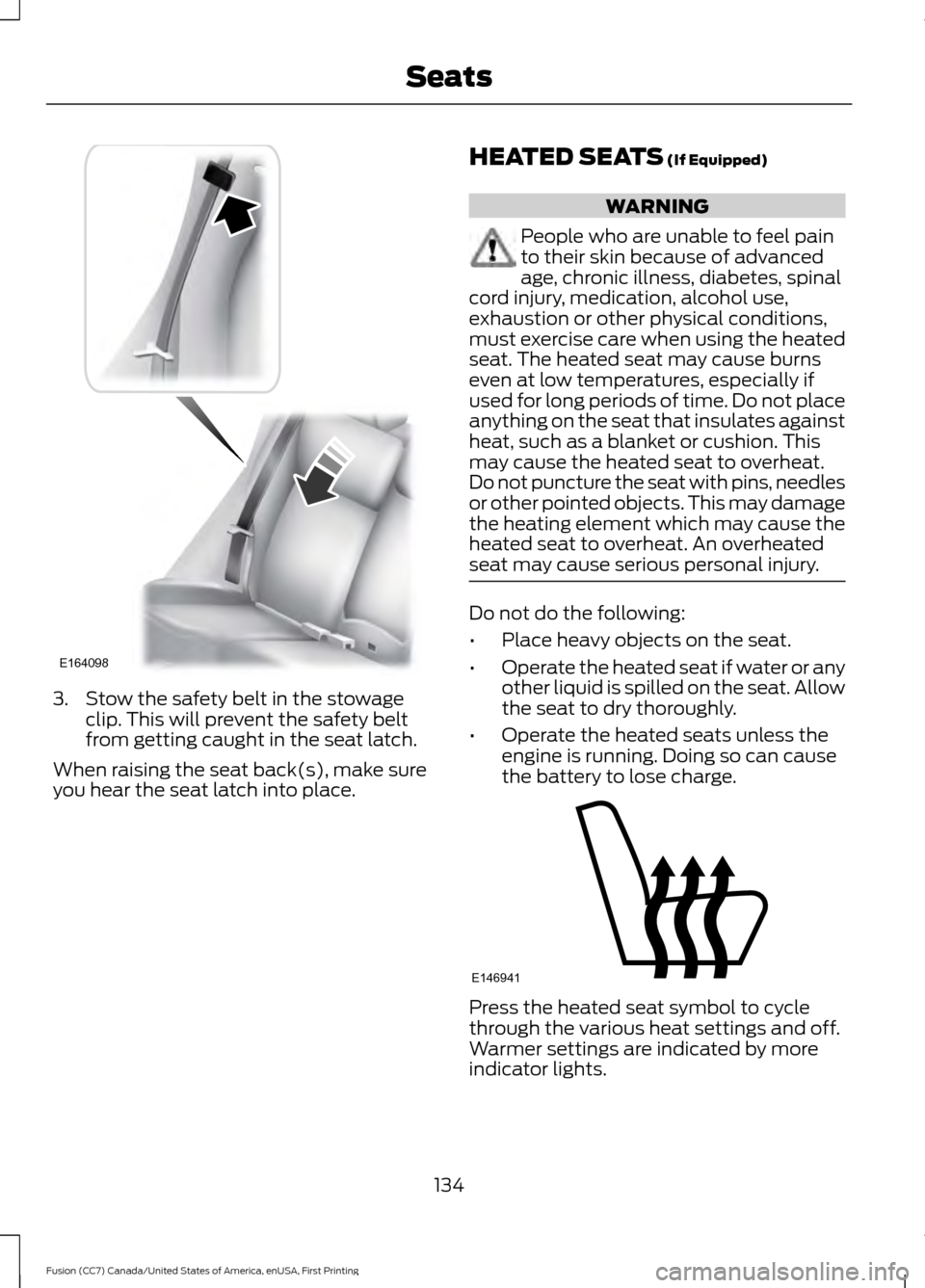
3. Stow the safety belt in the stowage
clip. This will prevent the safety belt
from getting caught in the seat latch.
When raising the seat back(s), make sure
you hear the seat latch into place. HEATED SEATS (If Equipped) WARNING
People who are unable to feel pain
to their skin because of advanced
age, chronic illness, diabetes, spinal
cord injury, medication, alcohol use,
exhaustion or other physical conditions,
must exercise care when using the heated
seat. The heated seat may cause burns
even at low temperatures, especially if
used for long periods of time. Do not place
anything on the seat that insulates against
heat, such as a blanket or cushion. This
may cause the heated seat to overheat.
Do not puncture the seat with pins, needles
or other pointed objects. This may damage
the heating element which may cause the
heated seat to overheat. An overheated
seat may cause serious personal injury. Do not do the following:
•
Place heavy objects on the seat.
• Operate the heated seat if water or any
other liquid is spilled on the seat. Allow
the seat to dry thoroughly.
• Operate the heated seats unless the
engine is running. Doing so can cause
the battery to lose charge. Press the heated seat symbol to cycle
through the various heat settings and off.
Warmer settings are indicated by more
indicator lights.
134
Fusion (CC7) Canada/United States of America, enUSA, First Printing SeatsE164098 E146941
Page 138 of 528

CLIMATE CONTROLLED SEATS
(If Equipped)
Heated Seats
WARNING
Persons who are unable to feel pain
to the skin because of advanced age,
chronic illness, diabetes, spinal cord
injury, medication, alcohol use, exhaustion,
or other physical conditions, must exercise
care when using the seat heater. The seat
heater may cause burns even at low
temperatures, especially if used for long
periods of time. Do not place anything on
the seat that insulates against heat, such
as a blanket or cushion, because this may
cause the seat heater to overheat. Do not
puncture the seat with pins, needles, or
other pointed objects because this may
damage the heating element which may
cause the seat heater to overheat. An
overheated seat may cause serious
personal injury. Do not do the following:
•
Place heavy objects on the seat.
• Operate the seat heater if water or any
other liquid spills on the seat. Allow the
seat to dry thoroughly.
• Operate the heated seats unless the
engine is running. Doing so can cause
the battery to lose charge. Press the heated seat symbol to cycle
through the various heat settings and off.
More indicator lights indicate warmer
settings.
Cooled Seats
The cooled seats will only function when
the engine is running.
To operate the cooled seats:
Press the cooled seat symbol to cycle
through the various cooling settings and
off. More indicator lights indicate cooler
settings.
If the engine falls below 350 RPM while
the cooled seats are on, the feature will
turn itself off. You will need to reactivate
it.
Climate controlled seat air filter
replacement
Your vehicle is equipped with lifetime air
filters that are integrated with the seats.
Regular maintenance or replacement is
not needed.
135
Fusion (CC7) Canada/United States of America, enUSA, First Printing SeatsE146322 E146309