2017 FORD FOCUS ELECTRIC lock
[x] Cancel search: lockPage 115 of 367
Your vehicle is equipped with a standard
DC charge feature. You can charge your
vehicle using SAEJ1772 compatible
charging stations. DC charging takes
approximately 32 minutes to charge from
0 % to 80 % ( from an empty battery to
80% charged).
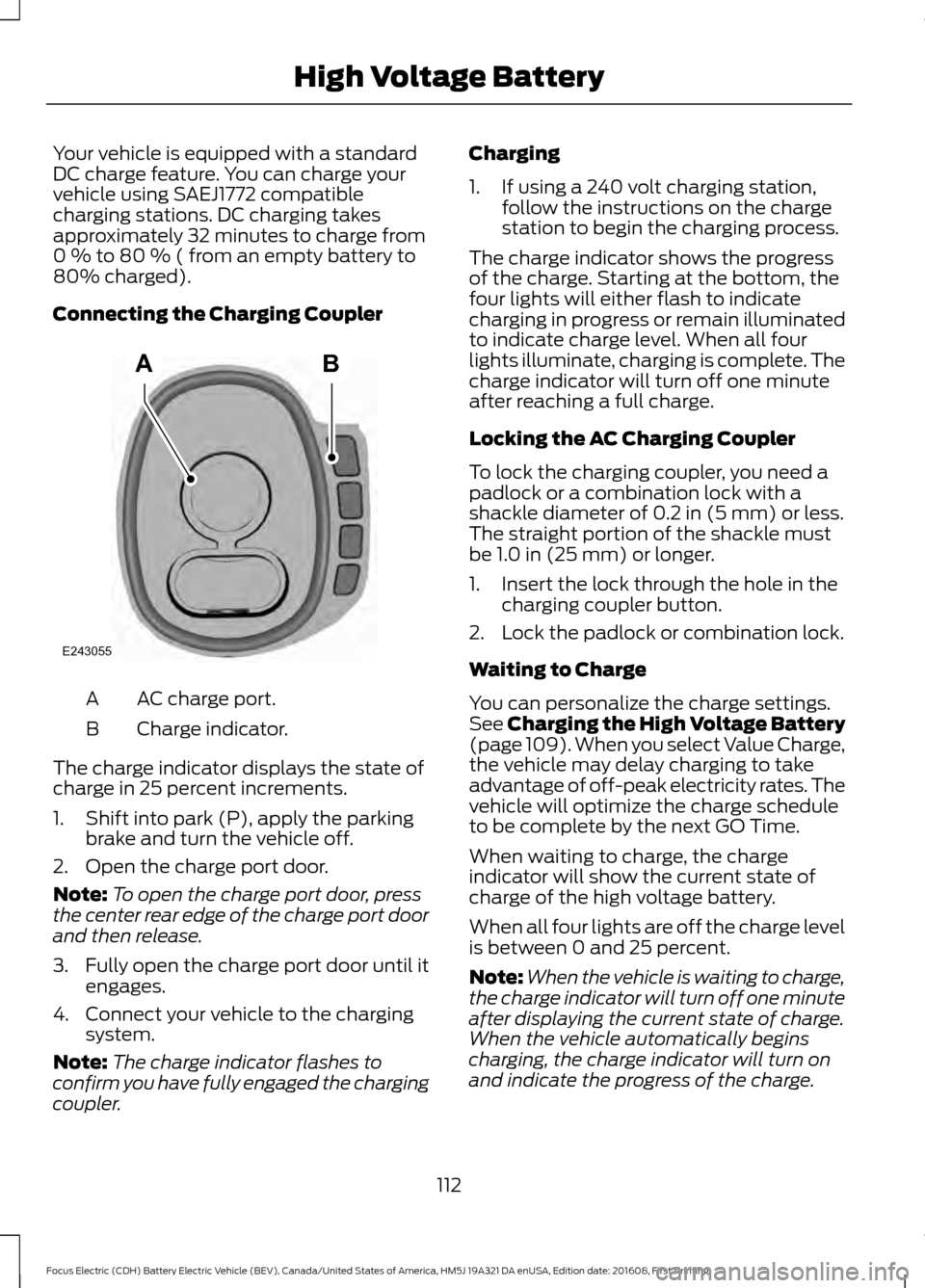
Connecting the Charging Coupler
AC charge port.
A
Charge indicator.
B
The charge indicator displays the state of
charge in 25 percent increments.
1. Shift into park (P), apply the parking brake and turn the vehicle off.
2. Open the charge port door.
Note: To open the charge port door, press
the center rear edge of the charge port door
and then release.
3. Fully open the charge port door until it
engages.
4. Connect your vehicle to the charging system.
Note: The charge indicator flashes to
confirm you have fully engaged the charging
coupler. Charging
1. If using a 240 volt charging station,
follow the instructions on the charge
station to begin the charging process.
The charge indicator shows the progress
of the charge. Starting at the bottom, the
four lights will either flash to indicate
charging in progress or remain illuminated
to indicate charge level. When all four
lights illuminate, charging is complete. The
charge indicator will turn off one minute
after reaching a full charge.
Locking the AC Charging Coupler
To lock the charging coupler, you need a
padlock or a combination lock with a
shackle diameter of 0.2 in (5 mm) or less.
The straight portion of the shackle must
be
1.0 in (25 mm) or longer.
1. Insert the lock through the hole in the charging coupler button.
2. Lock the padlock or combination lock.
Waiting to Charge
You can personalize the charge settings.
See Charging the High Voltage Battery
(page 109). When you select Value Charge,
the vehicle may delay charging to take
advantage of off-peak electricity rates. The
vehicle will optimize the charge schedule
to be complete by the next GO Time.
When waiting to charge, the charge
indicator will show the current state of
charge of the high voltage battery.
When all four lights are off the charge level
is between 0 and 25 percent.
Note: When the vehicle is waiting to charge,
the charge indicator will turn off one minute
after displaying the current state of charge.
When the vehicle automatically begins
charging, the charge indicator will turn on
and indicate the progress of the charge.
112
Focus Electric (CDH) Battery Electric Vehicle (BEV), Canada/United States of America, HM5J 19A321 DA enUSA, Edition date: 201608, First Printing High Voltage BatteryAB
E243055
Page 117 of 367
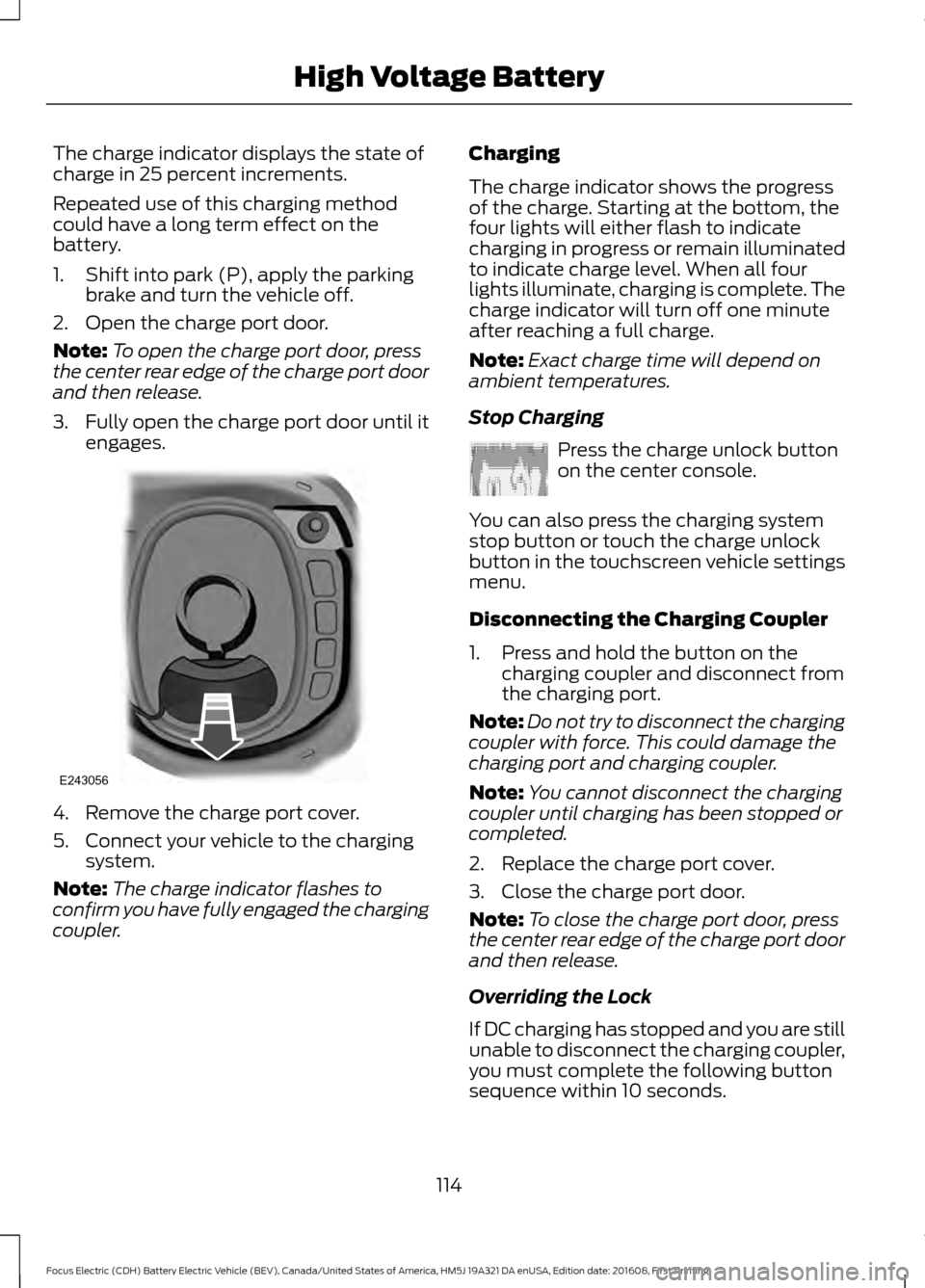
The charge indicator displays the state of
charge in 25 percent increments.
Repeated use of this charging method
could have a long term effect on the
battery.
1. Shift into park (P), apply the parking
brake and turn the vehicle off.
2. Open the charge port door.
Note: To open the charge port door, press
the center rear edge of the charge port door
and then release.
3. Fully open the charge port door until it
engages. 4. Remove the charge port cover.
5. Connect your vehicle to the charging
system.
Note: The charge indicator flashes to
confirm you have fully engaged the charging
coupler. Charging
The charge indicator shows the progress
of the charge. Starting at the bottom, the
four lights will either flash to indicate
charging in progress or remain illuminated
to indicate charge level. When all four
lights illuminate, charging is complete. The
charge indicator will turn off one minute
after reaching a full charge.
Note:
Exact charge time will depend on
ambient temperatures.
Stop Charging Press the charge unlock button
on the center console.
You can also press the charging system
stop button or touch the charge unlock
button in the touchscreen vehicle settings
menu.
Disconnecting the Charging Coupler
1. Press and hold the button on the charging coupler and disconnect from
the charging port.
Note: Do not try to disconnect the charging
coupler with force. This could damage the
charging port and charging coupler.
Note: You cannot disconnect the charging
coupler until charging has been stopped or
completed.
2. Replace the charge port cover.
3. Close the charge port door.
Note: To close the charge port door, press
the center rear edge of the charge port door
and then release.
Overriding the Lock
If DC charging has stopped and you are still
unable to disconnect the charging coupler,
you must complete the following button
sequence within 10 seconds.
114
Focus Electric (CDH) Battery Electric Vehicle (BEV), Canada/United States of America, HM5J 19A321 DA enUSA, Edition date: 201608, First Printing High Voltage BatteryE243056 E242991
Page 118 of 367
1. Press the charge unlock button on the
center console.
2. Touch the charge unlock button in the touchscreen vehicle settings menu.
3. Press the charge unlock button on the center console.
Note: A message requesting confirmation
that your vehicle is unplugged appears on
the instrument cluster. See Information
Messages (page 87).
4. Switch the power off, leave your vehicle and close the door.
5. After one minute, press and hold the button on the charging coupler and
disconnect from the charging port.
If the previous steps fail to unlock the
charging coupler, you may need to switch
the power off, then on, and off again and
wait another minute to allow the system
to reset.
If your first attempt was unsuccessful,
repeat steps 1 through 5.
If you are still unable to disconnect the
charging coupler, press the emergency
stop button on the charging system.
Note: For additional instructions, please
refer to information available from the
charging networks or the charging system
site.
Call the Ford Roadside Assistance at
1-800-241-3673 for US sold vehicles
traveling within the US or Canada and
1-800-665-2006 for Canadian sold
vehicles traveling with the US or Canada
for additional information.
HIGH VOLTAGE BATTERY CUT-
OFF SWITCH
The high voltage shut off operation shuts
off power from the high-voltage battery
after a collision, or if your vehicle receives
a substantial physical jolt. To reactivate your vehicle after either
event, perform the following steps:
1. Press the
START/STOP button to
power off your vehicle.
2. Wait for your vehicle to fully shut down
and the instrument cluster to turn off.
Note: Your vehicle may take between 30
to 90 seconds to shut down.
3. Press the brake pedal and press the START/STOP
button.
4. If your vehicle is not powered after this
sequence, repeat steps 1 through 3 up
to two more times.
Note: During this process, your vehicle
detects if the electrical system is safe and
reactivates. Once your vehicle determines
the electrical system safe, you can start your
vehicle as you would normally by pressing
the brake in combination with the
START/STOP
button.
Note: In the event your vehicle does not
reactivate after the third power cycle,
contact an authorized dealer.
115
Focus Electric (CDH) Battery Electric Vehicle (BEV), Canada/United States of America, HM5J 19A321 DA enUSA, Edition date: 201608, First Printing High Voltage Battery
Page 119 of 367
AUTOMATIC TRANSMISSION
Understanding the Positions of
Your Automatic Transmission
WARNING
Always set the parking brake fully
and make sure you shift the gearshift
lever to park (P). Switch the power
off and remove the key whenever you leave
your vehicle. The single speed transmission is built
specifically to handle the high rotational
speed range of an electric motor.
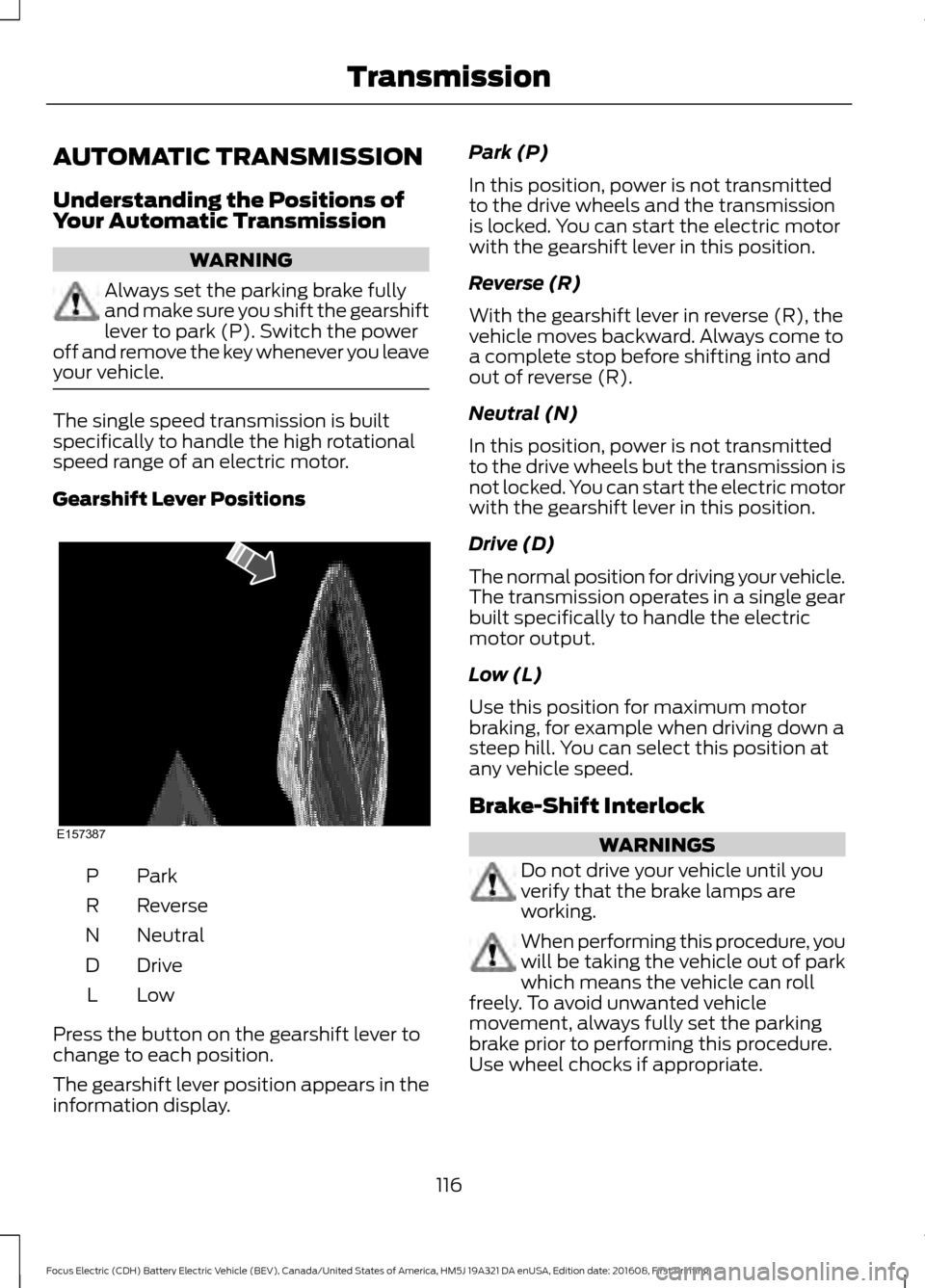
Gearshift Lever Positions
ParkP
Reverse
R
Neutral
N
Drive
D
LowL
Press the button on the gearshift lever to
change to each position.
The gearshift lever position appears in the
information display. Park (P)
In this position, power is not transmitted
to the drive wheels and the transmission
is locked. You can start the electric motor
with the gearshift lever in this position.
Reverse (R)
With the gearshift lever in reverse (R), the
vehicle moves backward. Always come to
a complete stop before shifting into and
out of reverse (R).
Neutral (N)
In this position, power is not transmitted
to the drive wheels but the transmission is
not locked. You can start the electric motor
with the gearshift lever in this position.
Drive (D)
The normal position for driving your vehicle.
The transmission operates in a single gear
built specifically to handle the electric
motor output.
Low (L)
Use this position for maximum motor
braking, for example when driving down a
steep hill. You can select this position at
any vehicle speed.
Brake-Shift Interlock
WARNINGS
Do not drive your vehicle until you
verify that the brake lamps are
working.
When performing this procedure, you
will be taking the vehicle out of park
which means the vehicle can roll
freely. To avoid unwanted vehicle
movement, always fully set the parking
brake prior to performing this procedure.
Use wheel chocks if appropriate.
116
Focus Electric (CDH) Battery Electric Vehicle (BEV), Canada/United States of America, HM5J 19A321 DA enUSA, Edition date: 201608, First Printing TransmissionE157387
Page 121 of 367

GENERAL INFORMATION
Note:
Occasional brake noise is normal. If
a metal-to-metal, continuous grinding or
continuous squeal sound is present, the
brake linings may be worn-out. Have the
system checked by an authorized dealer. If
the vehicle has continuous vibration or
shudder in the steering wheel while braking,
have it checked by an authorized dealer.
Note: Brake dust may accumulate on the
wheels, even under normal driving
conditions. Some dust is inevitable as the
brakes wear and does not contribute to
brake noise. See Cleaning the Wheels
(page 185). See
Warning Lamps and
Indicators (page 77).
Wet brakes result in reduced braking
efficiency. Gently press the brake pedal a
few times when driving from a car wash or
standing water to dry the brakes.
Brake Over Accelerator
In the event the accelerator pedal
becomes stuck or entrapped, apply steady
and firm pressure to the brake pedal to
slow the vehicle and reduce engine power.
If you experience this condition, apply the
brakes and bring your vehicle to a safe
stop. Move the transmission to park (P),
switch the engine off and apply the parking
brake. Inspect the accelerator pedal for
any interference. If none are found and the
condition persists, have your vehicle towed
to the nearest authorized dealer.
Brake Assist
Brake assist detects when you brake
heavily by measuring the rate at which you
press the brake pedal. It provides
maximum braking efficiency as long as you
press the pedal. Brake assist can reduce
stopping distances in critical situations. Anti-lock Brake System
This system helps you maintain steering
control during emergency stops by keeping
the brakes from locking. This lamp momentarily
illuminates when you turn the
ignition on. If the light does not
illuminate during start up, remains on or
flashes, the system may be disabled. Have
the system checked by an authorized
dealer. If the anti-lock brake system is
disabled, normal braking is still effective. If the brake warning lamp
illuminates when you release the
parking brake, have the system
checked by an authorized dealer.
Regenerative Braking System
This feature is used to simulate the engine
braking of an internal combustion engine
and assist the standard brake system while
recovering some of the energy of motion
and storing it in the battery to improve the
range of your vehicle. The standard brake
system is designed to fully stop the car if
regenerative braking is not available.
During regenerative braking, the motor is
spun as a generator to create electrical
current. This recharges the battery and
slows the vehicle. In effect, once the
accelerator pedal is released, the motor
changes from an energy user to an energy
producer.
When the accelerator pedal is released or
the brake pedal is applied, the brake
controller automatically detects the
amount of deceleration requested and
optimizes how much of the deceleration
will be produced by regenerative braking.
The remaining portion is generated by
118
Focus Electric (CDH) Battery Electric Vehicle (BEV), Canada/United States of America, HM5J 19A321 DA enUSA, Edition date: 201608, First Printing BrakesE144522 E144522
Page 122 of 367
standard friction braking. When the battery
is almost fully charged, the amount of
regenerative braking is limited to avoid
overcharging, and the requested
deceleration is produced by standard
friction braking alone.
Regenerative braking does not take the
place of the standard friction brakes; it only
assists them. Regenerative braking has
also been designed to interact with the
anti-lock brake system. Regenerative
braking is disabled when the anti-lock
brake system is activated or the battery is
fully charged.
HINTS ON DRIVING WITH
ANTI-LOCK BRAKES
Note:
When the system is operating, the
brake pedal may pulse and may travel
further. Maintain pressure on the brake
pedal. You may also hear a noise from the
system. This is normal.
The anti-lock braking system will not
eliminate the risks when:
• You drive too closely to the vehicle in
front of you.
• Your vehicle is hydroplaning.
• You take corners too fast.
• The road surface is poor.
PARKING BRAKE WARNING
Always set the parking brake fully
and make sure you shift the gearshift
lever to park (P). Switch the ignition
off and remove the key whenever you leave
your vehicle. Note:
Do not press the release button while
pulling the lever up.
To apply the parking brake: 1. Press the foot brake pedal firmly.
2. Pull the parking brake lever up to its
fullest extent.
Note: If you park your vehicle on a hill and
facing uphill, shift the gearshift lever to park
(P) and turn the steering wheel away from
the curb.
Note: If you park your vehicle on a hill and
facing downhill, shift the gearshift lever to
park (P) and turn the steering wheel toward
the curb.
To release the parking brake:
1. Press the brake pedal firmly.
2. Pull the lever up slightly.
3. Press the release button and push the lever down.
HILL START ASSIST WARNINGS
The system does not replace the
parking brake. When you leave your
vehicle, always apply the parking
brake and shift the transmission into park
(P) for automatic transmission or first gear
for manual transmission. You must remain in your vehicle once
you have activated the system.
During all times, you are responsible
for controlling your vehicle,
supervising the system and
intervening, if required. If the engine is revved excessively, or
if a malfunction is detected, the
system will be deactivated.
The system makes it easier to pull away
when your vehicle is on a slope without the
need to use the parking brake.
119
Focus Electric (CDH) Battery Electric Vehicle (BEV), Canada/United States of America, HM5J 19A321 DA enUSA, Edition date: 201608, First Printing Brakes
Page 127 of 367

PRINCIPLE OF OPERATION
WARNINGS
To help avoid personal injury, please
read and understand the limitations
of the system as contained in this
section. Sensing is only an aid for some
(generally large and fixed) objects when
moving on a flat surface at parking speeds.
Certain objects with surfaces that absorb
ultrasonic waves, surrounding vehicle's
parking aid systems, traffic control
systems, fluorescent lamps, inclement
weather, air brakes, and external motors
and fans may also affect the function of
the sensing system; this may include
reduced performance or a false activation. To help avoid personal injury, always
use caution when in reverse (R) and
when using the sensing system.
This system is not designed to
prevent contact with small or moving
objects. The system is designed to
provide a warning to assist the driver in
detecting large stationary objects to avoid
damaging your vehicle. The system may
not detect smaller objects, particularly
those close to the ground. Certain add-on devices such as large
trailer hitches, bike or surfboard racks
and any device that may block the
normal detection zone of the system, may
create false beeps. Note:
Keep the sensors, located on the
bumper or fascia, free from snow, ice and
large accumulations of dirt. If the sensors
are covered, the system ’s accuracy can be
affected. Do not clean the sensors with
sharp objects.
Note: If your vehicle sustains damage to
the bumper or fascia, leaving it misaligned
or bent, the sensing zone may be altered
causing inaccurate measurement of
obstacles or false alarms. Note:
The sensing system cannot be turned
off when a MyKey is present. See Principle
of Operation (page 48).
Note: If you attach certain add-on devices
such as a trailer or bike rack, the rear sensing
system may detect that add-on device and
therefore provide warnings. It is suggested
that you disable the rear sensing system
when you attach an add-on device to your
vehicle to prevent these warnings.
The sensing system warns the driver of
obstacles within a certain range of your
vehicle. The system turns on automatically
whenever you switch the ignition on. You can turn the system on or
off by pressing the parking aid
button. If your vehicle does not
have a parking aid button, the system can
be switched off through the information
display menu or from the pop-up message
that appears once you shift the
transmission into reverse (R). See General
Information
(page 80).
If a fault is present in the system, a warning
message appears in the information
display. See
Information Messages
(page 87).
REAR PARKING AID
The rear sensors are only active when the
transmission is in reverse (R). As your
vehicle moves closer to the obstacle, the
rate of the audible warning increases.
When the obstacle is less than
12 in
(30 cm) away, the warning sounds
continuously. If the system detects a
stationary or receding object farther than
12 in (30 cm)
from the corners of the
bumper, the tone sounds for only three
seconds. Once the system detects an
object approaching, the warning sounds
again.
124
Focus Electric (CDH) Battery Electric Vehicle (BEV), Canada/United States of America, HM5J 19A321 DA enUSA, Edition date: 201608, First Printing Parking AidsE139213
Page 128 of 367
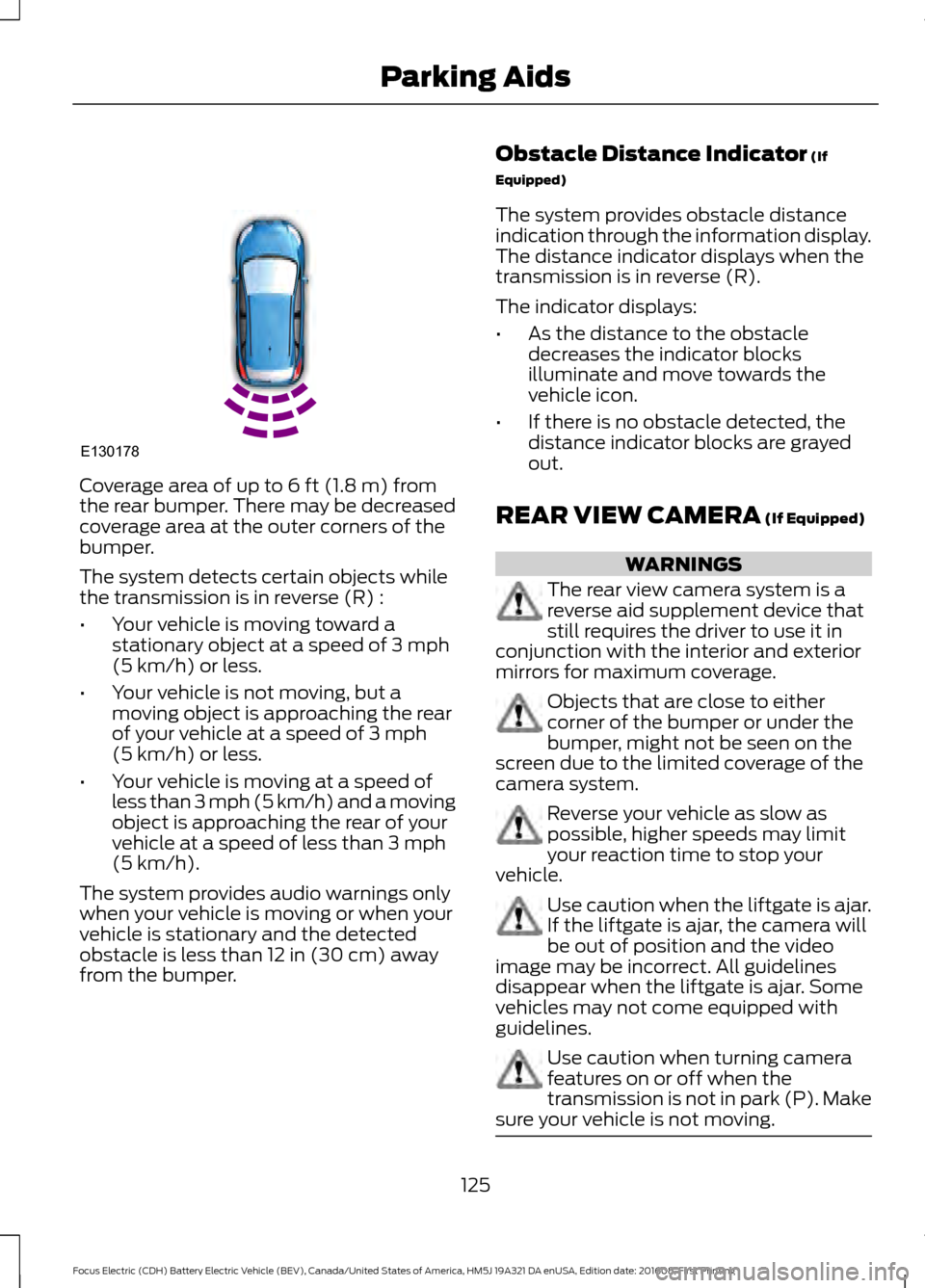
Coverage area of up to 6 ft (1.8 m) from
the rear bumper. There may be decreased
coverage area at the outer corners of the
bumper.
The system detects certain objects while
the transmission is in reverse (R) :
• Your vehicle is moving toward a
stationary object at a speed of
3 mph
(5 km/h) or less.
• Your vehicle is not moving, but a
moving object is approaching the rear
of your vehicle at a speed of
3 mph
(5 km/h) or less.
• Your vehicle is moving at a speed of
less than 3 mph (5 km/h) and a moving
object is approaching the rear of your
vehicle at a speed of less than
3 mph
(5 km/h).
The system provides audio warnings only
when your vehicle is moving or when your
vehicle is stationary and the detected
obstacle is less than
12 in (30 cm) away
from the bumper. Obstacle Distance Indicator
(If
Equipped)
The system provides obstacle distance
indication through the information display.
The distance indicator displays when the
transmission is in reverse (R).
The indicator displays:
• As the distance to the obstacle
decreases the indicator blocks
illuminate and move towards the
vehicle icon.
• If there is no obstacle detected, the
distance indicator blocks are grayed
out.
REAR VIEW CAMERA
(If Equipped) WARNINGS
The rear view camera system is a
reverse aid supplement device that
still requires the driver to use it in
conjunction with the interior and exterior
mirrors for maximum coverage. Objects that are close to either
corner of the bumper or under the
bumper, might not be seen on the
screen due to the limited coverage of the
camera system. Reverse your vehicle as slow as
possible, higher speeds may limit
your reaction time to stop your
vehicle. Use caution when the liftgate is ajar.
If the liftgate is ajar, the camera will
be out of position and the video
image may be incorrect. All guidelines
disappear when the liftgate is ajar. Some
vehicles may not come equipped with
guidelines. Use caution when turning camera
features on or off when the
transmission is not in park (P). Make
sure your vehicle is not moving. 125
Focus Electric (CDH) Battery Electric Vehicle (BEV), Canada/United States of America, HM5J 19A321 DA enUSA, Edition date: 201608, First Printing Parking AidsE130178