2017 FORD FLEX automatic transmission
[x] Cancel search: automatic transmissionPage 330 of 496
Depending on your cell phone's capability
and your market, the system may prompt
you with questions, such as setting the
current cell phone as the primary cell
phone (the cell phone SYNC automatically
tries to connect with first upon vehicle
start-up) and downloading your
phonebook.
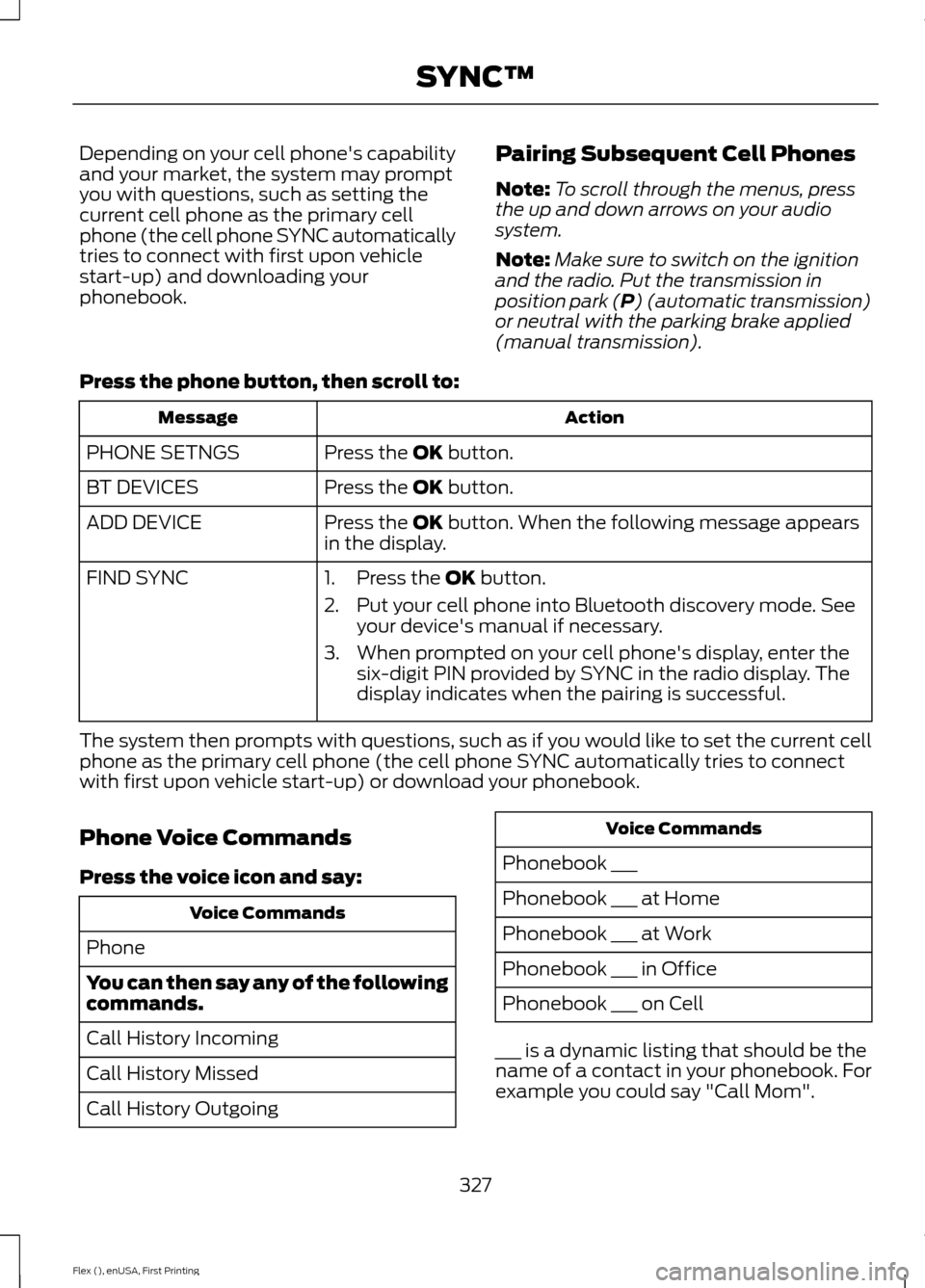
Pairing Subsequent Cell Phones
Note:
To scroll through the menus, press
the up and down arrows on your audio
system.
Note: Make sure to switch on the ignition
and the radio. Put the transmission in
position park (P) (automatic transmission)
or neutral with the parking brake applied
(manual transmission).
Press the phone button, then scroll to: Action
Message
Press the
OK button.
PHONE SETNGS
Press the
OK button.
BT DEVICES
Press the
OK button. When the following message appears
in the display.
ADD DEVICE
FIND SYNC
1. Press the
OK button.
2. Put your cell phone into Bluetooth discovery mode. See your device's manual if necessary.
3. When prompted on your cell phone's display, enter the six-digit PIN provided by SYNC in the radio display. The
display indicates when the pairing is successful.
The system then prompts with questions, such as if you would like to set the current cell
phone as the primary cell phone (the cell phone SYNC automatically tries to connect
with first upon vehicle start-up) or download your phonebook.
Phone Voice Commands
Press the voice icon and say: Voice Commands
Phone
You can then say any of the following
commands.
Call History Incoming
Call History Missed
Call History Outgoing Voice Commands
Phonebook ___
Phonebook ___ at Home
Phonebook ___ at Work
Phonebook ___ in Office
Phonebook ___ on Cell
___ is a dynamic listing that should be the
name of a contact in your phonebook. For
example you could say "Call Mom".
327
Flex (), enUSA, First Printing SYNC™
Page 445 of 496

Multi-Point inspection
Hazard warning system operation
Accessory drive belt(s)
Horn operation
Battery performance
Radiator, cooler, heater and air conditioninghoses
Engine air filter
Suspension components for leaks ordamage
Exhaust system
Steering and linkage
Exterior lamps operation
Tires (including spare) for wear and properpressure**
Fluid levels *
; fill if necessary
Windshield for cracks, chips or pits
For oil and fluid leaks
Washer spray and wiper operation
Half-shaft dust boots
* Brake, coolant recovery reservoir, automatic transmission and window washer
** If your vehicle is equipped with a temporary mobility kit, check the tire sealant expiration
Use By date on the canister. Replace as needed.
Be sure to ask your dealership service
advisor or technician about the multi-point
vehicle inspection. It is a comprehensive
way to perform a thorough inspection of
your vehicle. Your checklist gives you
immediate feedback on the overall
condition of your vehicle.
NORMAL SCHEDULED
MAINTENANCE
Intelligent Oil-Life Monitor™
Your vehicle is equipped with an Intelligent
Oil-Life Monitor that determines when you
should change the engine oil based on how
your vehicle is used. By using several
important factors in its calculations, the
monitor helps reduce the cost of owning
your vehicle and reduces environmental
waste at the same time. This means you do not have to remember
to change the oil on a mileage-based
schedule. Your vehicle lets you know when
an oil change is due by displaying a
message in the information display.
The following table provides examples of
vehicle use and its impact on oil change
intervals. It is a guideline only. Actual oil
change intervals depend on several factors
and generally decrease with severity of
use.
442
Flex (), enUSA, First Printing Scheduled Maintenance
Page 446 of 496
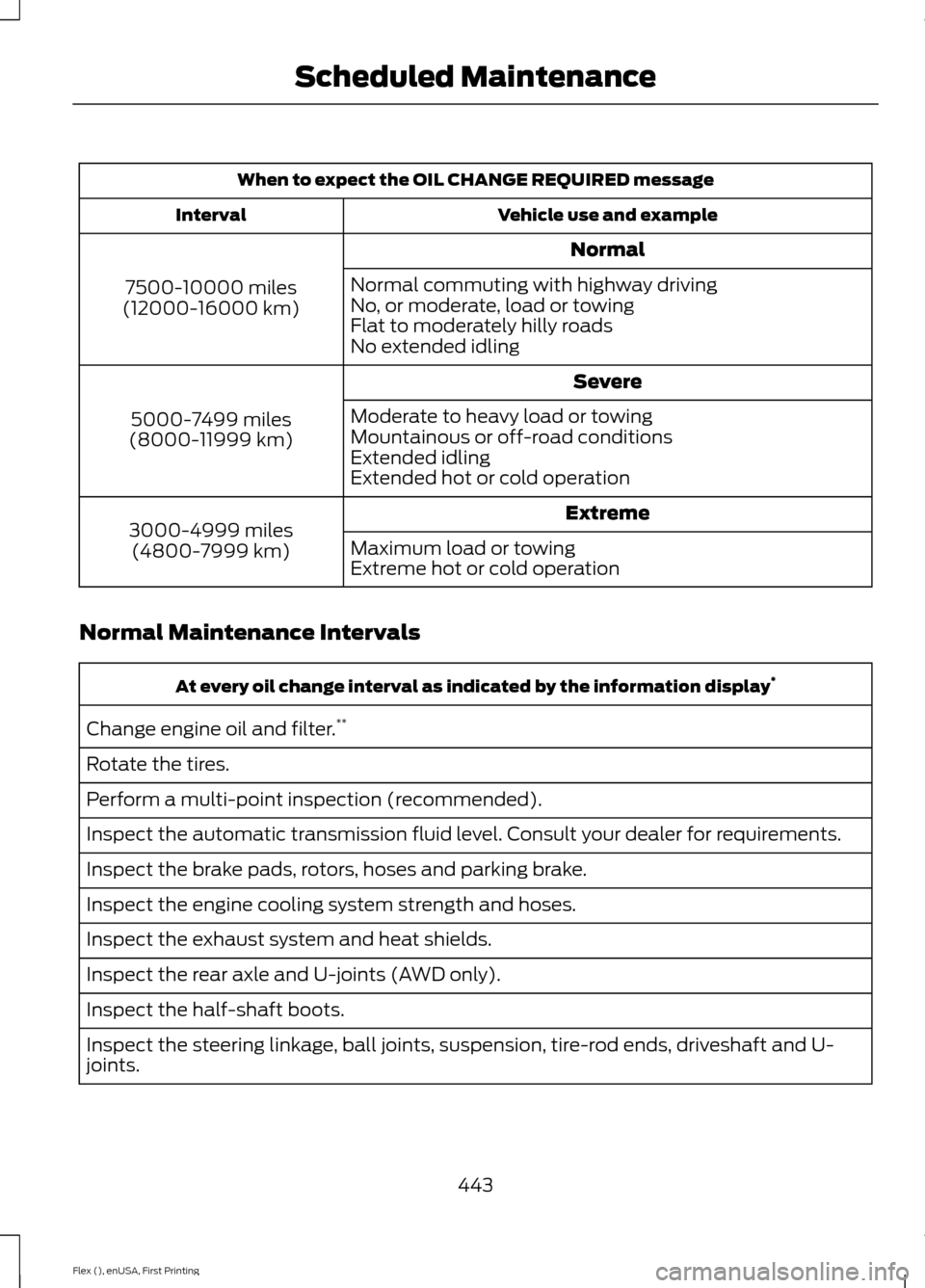
When to expect the OIL CHANGE REQUIRED message
Vehicle use and example
Interval
Normal
7500-10000 miles
(12000-16000 km) Normal commuting with highway driving
No, or moderate, load or towing
Flat to moderately hilly roads
No extended idling
Severe
5000-7499 miles
(8000-11999 km) Moderate to heavy load or towing
Mountainous or off-road conditions
Extended idling
Extended hot or cold operation
Extreme
3000-4999 miles
(4800-7999 km) Maximum load or towing
Extreme hot or cold operation
Normal Maintenance Intervals At every oil change interval as indicated by the information display
*
Change engine oil and filter. **
Rotate the tires.
Perform a multi-point inspection (recommended).
Inspect the automatic transmission fluid level. Consult your dealer for requirements.
Inspect the brake pads, rotors, hoses and parking brake.
Inspect the engine cooling system strength and hoses.
Inspect the exhaust system and heat shields.
Inspect the rear axle and U-joints (AWD only).
Inspect the half-shaft boots.
Inspect the steering linkage, ball joints, suspension, tire-rod ends, driveshaft and U-
joints.
443
Flex (), enUSA, First Printing Scheduled Maintenance
Page 447 of 496

At every oil change interval as indicated by the information display
*
Inspect the tires, tire wear and measure the tread depth.
Inspect the wheels and related components for abnormal noise, wear, looseness or
drag.
* Do not exceed one year or 10000 miles (16000 kilometers) between service intervals.
** Reset the Intelligent Oil-Life Monitor after engine oil and filter changes. See Oil Change
Indicator Reset (page 249). Other maintenance items
1
Replace cabin air filter.
Every 20000 miles (32000
km)
Replace engine air filter.
Every 30000 miles (48000
km)
Change engine coolant.2
At 100000 miles (160000
km)
Replace spark plugs.
Every 100000 miles
(160000 km) Inspect accessory drive belt(s). 3
Change automatic transmission fluid.
Every 150000 miles
(240000 km)
Replace accessory drive belt(s). 4
1 Perform these maintenance items within 3000 miles (4800 kilometers) of the last
engine oil and filter change. Do not exceed the designated distance for the interval.
2 Initial replacement at six years or 100000 miles (160000 kilometers), then every three
years or 50000 miles (80000 kilometers).
3 After initial inspection, inspect every other oil change until replaced.
4 If not replaced within the last 100000 miles (160000 kilometers).
444
Flex (), enUSA, First Printing Scheduled Maintenance
Page 448 of 496

SPECIAL OPERATING
CONDITIONS SCHEDULED
MAINTENANCE
If you operate your vehicle primarily in any
of the following conditions, you need to perform extra maintenance as indicated.
If you operate your vehicle
occasionally
under any of these conditions, it is not
necessary to perform the extra
maintenance. For specific
recommendations, see your dealership
service advisor or technician. Towing a trailer or using a car-top carrier
Change engine oil and filter as indicated by the information
display and perform services listed in the Normal Sched-
uled Maintenance chart.
As required
Inspect rear axle and U-joints (AWD only).
Inspect frequently, service
as required
Inspect half-shaft boots.
See axle maintenance items under
Exceptions.
Change automatic transmission fluid.
Every 30000 miles (48000
km)
Replace spark plugs.
Every 60000 miles (96000
km) Extensive idling or low-speed driving for long distances, as in heavy commercial use
Change engine oil and filter as indicated by the information
display and perform services listed in the Normal Sched-
uled Maintenance chart.
As required
Replace cabin air filter.
Inspect frequently, service
as required
Replace engine air filter.
Change automatic transmission fluid.
Every 30000 miles (48000
km)
Replace spark plugs.
Every 60000 miles (96000
km) Extended Hot and Cold climate operation
Change engine oil and filter. *
Every 5000 miles (8000
km)
* Hot Climates only
445
Flex (), enUSA, First Printing Scheduled Maintenance
Page 449 of 496

Operating in off-road (unpaved, sandy, dusty) and Mountainous conditions
Replace cabin air filter.
Inspect frequently, service
as required
Replace engine air filter.
Inspect the wheels and related components for abnormal
noise, wear, looseness or drag.
Every 5000 miles (8000
km)
Rotate tires, inspect tires for wear and measure tread
depth.
Change engine oil and filter.*
Every 5000 miles (8000
km) or six months
Perform multi-point inspection.
Change automatic transmission fluid.
Every 30000 miles (48000
km)
* Reset your Intelligent Oil-Life Monitor after engine oil and filter changes. See Oil Change
Indicator Reset (page 249). Exclusive use of E85 (flex fuel vehicles only)
If ran exclusively on E85, fill the fuel tank full with regular
unleaded fuel.
Every oil change
Exceptions
There are several exceptions to the Normal
Schedule:
Axle and PTU maintenance
: The Power
Transfer Unit (PTU) and rear axle (AWD
only) in your vehicle does not require any
normal scheduled maintenance. Taurus
SHO vehicles are electronically monitored
and notify the driver required by service by
displaying a message in the information
display. The PTU lubricant will be more
likely to require a fluid change if the vehicle
has extended periods of extreme or severe
duty cycle driving. Changing or checking the PTU lubricant is not necessary unless
the unit has been submerged in water,
shows sign of leakage or (Taurus SHO
only) a message indicating required service
is displayed. Contact your authorized
dealer for service.
California fuel filter replacement: If you
register your vehicle in California, the
California Air Resources Board has
determined that the failure to perform this
maintenance item does not nullify the
emission warranty or limit recall liability
before the completion of your vehicle's
useful life. Ford Motor Company, however,
urges you to have all recommended
maintenance services performed at the
specified intervals and to record all vehicle
service.
446
Flex (), enUSA, First Printing Scheduled Maintenance
Page 486 of 496

A
A/C
See: Climate Control.......................................... 116
About This Manual...........................................7
ABS See: Brakes............................................................ 175
ABS driving hints See: Hints on Driving With Anti-Lock
Brakes................................................................. 175
Accessories....................................................435 Exterior Style....................................................... 435
Interior Style........................................................ 435
Lifestyle................................................................. 435
Peace of Mind..................................................... 435
Accessories See: Replacement Parts
Recommendation............................................ 12
ACC See: Using Adaptive Cruise Control............189
Active Park Assist..........................................181 Automatic Steering into Parking
Space................................................................. 183
Deactivating the Park Assist Feature..........183
Troubleshooting the System.......................... 184
Using Active Park Assist................................... 182
Adaptive Headlamps
...................................85
Adjusting the Headlamps........................259
Horizontal Aim Adjustment.......................... 260
Vertical Aim......................................................... 259
Adjusting the Pedals
.....................................78
Adjusting the Steering Wheel - Vehicles With: Manual Adjustable Steering
Column............................................................75
Adjusting the Steering Wheel - Vehicles With: Power Adjustable Steering
Column............................................................75
Easy Entry and Exit Feature.............................. 76
End of Travel Position......................................... 76
Memory Feature.................................................... 76
AFS See: Adaptive Headlamps................................ 85
Airbag Disposal................................................51
Air Conditioning See: Climate Control.......................................... 116
Air Filter See: Changing the Engine Air Filter.............265 Alarm
See: Anti-Theft Alarm......................................... 74
All-Wheel Drive.............................................168
Ambient Lighting
............................................87
Anti-Theft Alarm............................................74
Arming the Alarm................................................. 74
Disarming the Alarm........................................... 74
Appendices....................................................457
Apps
.................................................................407
........................................................................\
.......... 407
SiriusXM Traffic and Travel Link.................. 409
At a Glance........................................................16
Audible Warnings and Indicators.............97 Headlamps On Warning Chime..................... 98
Key in Ignition Warning Chime......................... 97
Keyless Warning Alert........................................ 98
Parking Brake On Warning Chime.................98
Audio Control
...................................................76
MEDIA....................................................................... 76
Seek, Next or Previous........................................ 76
Audio System.................................................313 General Information.......................................... 313
Audio Unit - Vehicles With: AM/FM/CD/ SYNC/Satellite Radio
..............................314
Menu Structure.................................................... 316
Audio Unit - Vehicles With: Premium AM/FM/CD...................................................318
Audio Unit - Vehicles With: Sony AM/ FM/CD............................................................319
Autolamps
........................................................83
Windshield Wiper Activated
Headlamps........................................................ 83
Automatic Climate Control........................117
Automatic Climate Control - Vehicles With: Premium AM/FM/CD....................119
Automatic Transmission
...........................164
Automatic Transmission Adaptive
Learning............................................................. 167
Brake-Shift Interlock......................................... 166
If Your Vehicle Gets Stuck In Mud or Snow................................................................... 167
SelectShift Automatic ™
Transmission................................................... 164
Understanding the Positions of Your Automatic Transmission............................ 164
Automatic Transmission Fluid Check
............................................................254
Adding Transmission Fluid ............................ 255
483
Flex (), enUSA, First Printing Index
Page 490 of 496

Second Row Heated Seats.............................
138
Heated Steering Wheel................................77
Heated Windows and Mirrors...................123
Heated Exterior Mirror....................................... 124
Heated Rear Window........................................ 123
Heating See: Climate Control.......................................... 116
Hints on Controlling the Interior Climate..........................................................120
Cooling the Interior Quickly.............................. 121
General Hints....................................................... 120
Heating the Interior Quickly............................. 121
Recommended Settings for Cooling...........122
Recommended Settings for Heating............121
Side Window Defogging in Cold Weather............................................................. 122
Hints on Driving With Anti-Lock Brakes.............................................................175
Home Screen.................................................373
Hood Lock See: Opening and Closing the Hood..........244
I
Ignition Switch
...............................................149
In California (U.S. Only).............................227
Information Display Control........................77
Information Displays....................................99 General Information........................................... 99
Information Messages................................107 Adaptive Cruise Control.................................. 108
AdvanceTrac ™.................................................... 108
Alarm...................................................................... 108
Automatic Engine Shutdown........................ 109
AWD........................................................................\
109
Battery and Charging System......................... 110
Blind Spot Information and Cross Traffic Alert System..................................................... 110
Brake System......................................................... 111
Collision Warning System.................................. 111
Doors and Locks.................................................... 111
Fuel........................................................................\
.... 112
Keys and Intelligent Access............................. 112
Maintenance.......................................................... 112
MyKey....................................................................... 113
Park Aid................................................................... 114
Power Steering..................................................... 114
Seats........................................................................\
. 114Tire Pressure Monitoring System...................
115
Towing...................................................................... 115
Traction Control................................................... 115
Transmission......................................................... 115
Installing Child Restraints............................19 Child Seats............................................................... 19
Using Lap and Shoulder Belts......................... 20
Using Lower Anchors and Tethers for CHildren (LATCH)............................................ 25
Using Tether Straps............................................. 26
Instrument Cluster
.........................................93
Instrument Lighting Dimmer.....................84
Instrument Panel Overview........................16
Interior Lamps.................................................86 Front Row Map Lamps...................................... 86
Second Row Map Lamps.................................. 87
Interior Mirror
....................................................91
Auto-Dimming Mirror........................................... 91
Introduction.........................................................7
J
Jump Starting the Vehicle
.........................222
Connecting the Jumper Cables..................... 222
Jump Starting...................................................... 223
Preparing Your Vehicle..................................... 222
Removing the Jumper Cables....................... 223
K
Keyless Entry
....................................................70
SECURICODE™ Keyless Entry
Keypad................................................................. 70
Keyless Starting
............................................149
Ignition Modes..................................................... 150
Keys and Remote Controls.........................52
L
Lighting Control..............................................82 Headlamp Flasher............................................... 83
High Beams............................................................ 82
Lighting
..............................................................82
General Information............................................ 82
Load Carriers See: Roof Racks and Load Carriers............203
Load Carrying
................................................203
487
Flex (), enUSA, First Printing Index