2017 FORD FLEX instrument cluster
[x] Cancel search: instrument clusterPage 243 of 496
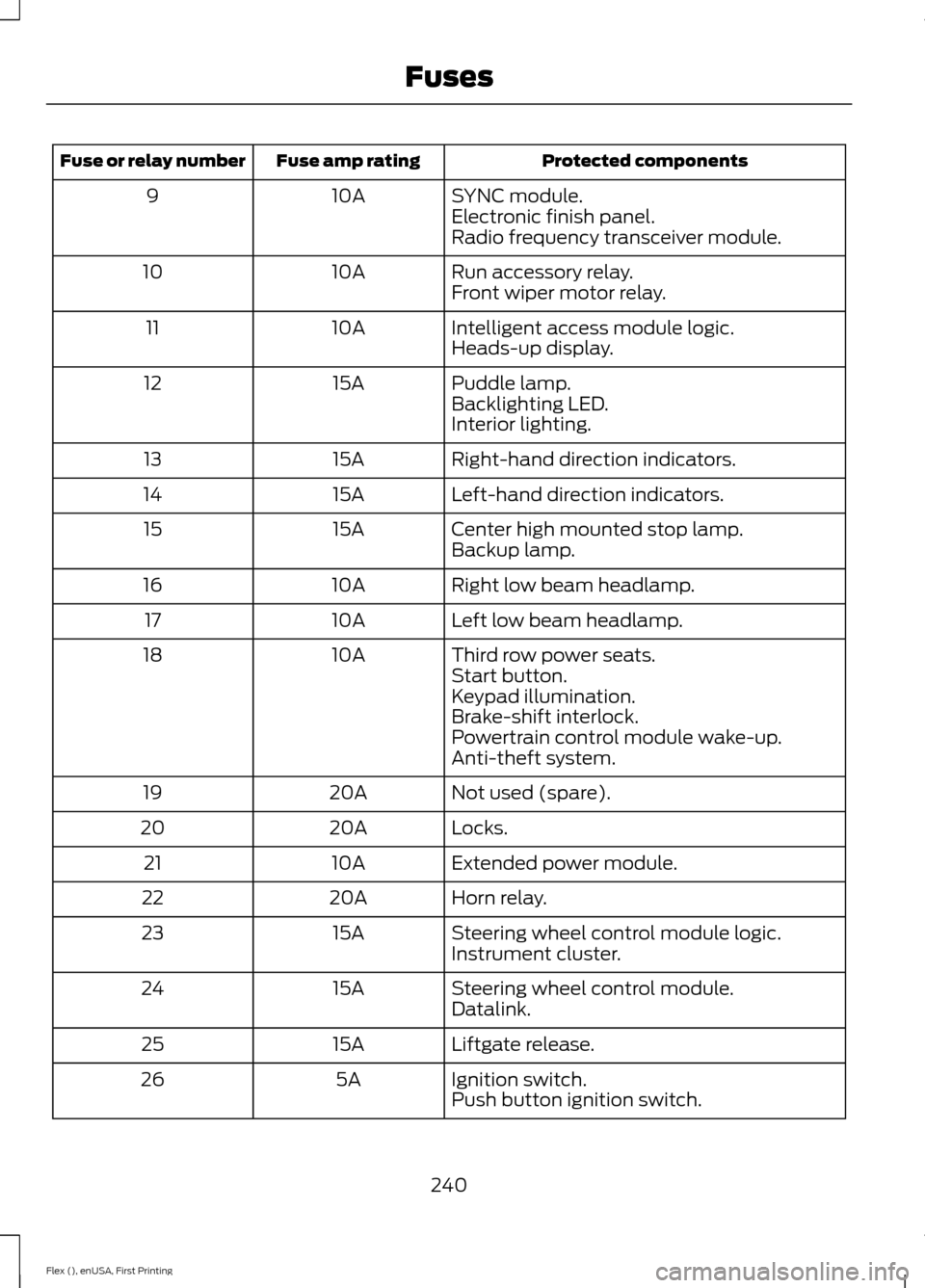
Protected components
Fuse amp rating
Fuse or relay number
SYNC module.
10A
9
Electronic finish panel.
Radio frequency transceiver module.
Run accessory relay.
10A
10
Front wiper motor relay.
Intelligent access module logic.
10A
11
Heads-up display.
Puddle lamp.
15A
12
Backlighting LED.
Interior lighting.
Right-hand direction indicators.
15A
13
Left-hand direction indicators.
15A
14
Center high mounted stop lamp.
15A
15
Backup lamp.
Right low beam headlamp.
10A
16
Left low beam headlamp.
10A
17
Third row power seats.
10A
18
Start button.
Keypad illumination.
Brake-shift interlock.
Powertrain control module wake-up.
Anti-theft system.
Not used (spare).
20A
19
Locks.
20A
20
Extended power module.
10A
21
Horn relay.
20A
22
Steering wheel control module logic.
15A
23
Instrument cluster.
Steering wheel control module.
15A
24
Datalink.
Liftgate release.
15A
25
Ignition switch.
5A
26
Push button ignition switch.
240
Flex (), enUSA, First Printing Fuses
Page 252 of 496

Only use oils certified for gasoline engines
by the American Petroleum Institute (API).
An oil with this trademark symbol
conforms to the current engine and
emission system protection standards and
fuel economy requirements of the
International Lubricants Specification
Advisory Committee (ILSAC).
To top up the engine oil level do the
following:
1. Clean the area surrounding the engine
oil filler cap before you remove it.
2. Remove the engine oil filler cap. See Under Hood Overview (page 247).
Turn it counterclockwise and remove
it.
3. Add engine oil that meets Ford specifications. See
Capacities and
Specifications (page 304). You may
have to use a funnel to pour the engine
oil into the opening.
4. Recheck the oil level.
5. If the oil level is correct, replace the dipstick and make sure it is fully seated.
6. Replace the engine oil filler cap. Turn it clockwise until you feel a strong
resistance.
Note: Do not add oil further than the
maximum mark. Oil levels above the
maximum mark may cause engine damage.
Note: Make sure you install the oil filler cap
correctly.
Note: Soak up any spillage with an
absorbent cloth immediately.
OIL CHANGE INDICATOR
RESET
Use the information display controls on
the steering wheel to reset the oil change
indicator. From the main menu scroll to: Action and description
Message
Press the right arrow button,
then from this menu scroll
to the following message.
Settings
Press the right arrow button,
then from this menu scroll
to the following message.
Vehicle
Press the right arrow button,
then from this menu scroll
to the following message.
Oil Life
Press and hold the
OK
button until the instrument
cluster displays the
following message.
Hold OK to
Reset
Reset Successful
When the oil change indic-
ator resets the instrument
cluster displays 100%.
Remaining Life
{00}%
If the instrument cluster
displays one of the following
messages, repeat the
process.
Not Reset
Reset Cancelled
249
Flex (), enUSA, First Printing Maintenance
Page 272 of 496

CLEANING THE INTERIOR
WARNINGS
Do not use cleaning solvents, bleach
or dye on the vehicle
’s safety belts,
as these actions may weaken the
belt webbing. On vehicles equipped with
seat-mounted airbags, do not use
chemical solvents or strong
detergents. Such products could
contaminate the side airbag system and
affect performance of the side airbag in a
collision. For fabric, carpets, cloth seats, safety belts
and seats equipped with side airbags:
•
Remove dust and loose dirt with a
vacuum cleaner.
• Remove light stains and soil with
Motorcraft Professional Strength
Carpet & Upholstery Cleaner.
• If grease or tar is present on the
material, spot-clean the area first with
Motorcraft Spot and Stain Remover. In
Canada, use Motorcraft Multi-Purpose
Cleaner.
• If a ring forms on the fabric after spot
cleaning, clean the entire area
immediately (but do not oversaturate)
or the ring will set.
• Do not use household cleaning
products or glass cleaners, which can
stain and discolor the fabric and affect
the flame retardant abilities of the seat
materials. CLEANING THE INSTRUMENT
PANEL AND INSTRUMENT
CLUSTER LENS WARNING
Do not use chemical solvents or
strong detergents when cleaning the
steering wheel or instrument panel
to avoid contamination of the airbag
system. Note:
Follow the same procedure as
cleaning leather seats for cleaning leather
instrument panels and leather interior trim
surfaces. See Cleaning Leather Seats
(page 270).
Clean the instrument panel and cluster
lens with a clean, damp and soft cloth,
then use a clean, dry and soft cloth to dry
these areas.
• Avoid cleaners or polishes that increase
the gloss of the upper portion of the
instrument panel. The dull finish in this
area helps protect you from
undesirable windshield reflection.
• Do not use any household cleaning
products or glass cleaners as these
may damage the finish of the
instrument panel, interior trim and
cluster lens.
• Wash or wipe your hands clean if you
have been in contact with certain
products such as insect repellent and
suntan lotion to avoid possible damage
to the interior painted surfaces.
• Do not allow air fresheners and hand
sanitizers to spill onto interior surfaces.
If a spill occurs, wipe off immediately.
Your warranty may not cover these
damages.
If a staining liquid like coffee or juice has
been spilled on the instrument panel or on
interior trim surfaces:
269
Flex (), enUSA, First Printing Vehicle Care
Page 437 of 496

General
Possible solution
Possible cause
Issue
SYNC 3 only supports four languages in a
single module for text display, voice control
and voice prompts. The country where you
bought your vehicle dictates the four
languages based on the most popular
languages spoken. If the selected language
is not available, SYNC 3 remains in the
current active language.
SYNC 3 does not support
the currently selected
language for the instru-
ment cluster and inform-
ation and entertainment
display.
The language
selected for the
instrument
cluster and
information and
entertainment
display does not
match the
SYNC 3
SYNC 3 offers several new voice control
features for a wide range of languages.
Dialing a contact name directly from the
phonebook without pre-recording (for
example,
“call John Smith ”) or selecting a
track, artist, album, genre or playlist directly
from your media player (for example, "play
artist Madonna").
language
(phone, USB,
Bluetooth
audio, voice
control and
voice prompts). SYNC 3 System Reset
The system has a System Reset feature that can be performed if the function of a SYNC
3 feature is lost. This reset is intended to restore functionality and will not erase any
information previously stored in the system (such as paired devices, phonebook, call
history, text messages, or user settings). To perform a System Reset, press and hold
the Seek Up (>>|) button while pressing and holding the Radio Power button. After
approximately 5 seconds the screen will go black. Allow 1-2 minutes for the system
reset to complete. You may then resume using the SYNC 3 system.
For additional assistance with SYNC 3
troubleshooting please call or visit the Ford
Website. Ford Support
United States: 1-800-392-3673
Customer Relation-
ship Center
Canada: 1-800-565-3673
owner.ford.com
Website
www.syncmyride.ca
www.syncmaroute.ca
434
Flex (), enUSA, First Printing SYNC™ 3
Page 487 of 496

Checking the Transmission Fluid
Level................................................................... 254
Autowipers........................................................79
Auxiliary Power Points................................145 110 Volt AC Power Point................................... 145
12 Volt DC Power Point..................................... 145
Locations............................................................... 145
AWD See: All-Wheel Drive......................................... 168
B
Battery See: Changing the 12V Battery..................... 256
Blind Spot Information System..............195
Switching the System Off and On...............196
System Errors....................................................... 196
System Limitations............................................ 196
Using the System............................................... 195
Bonnet Lock See: Opening and Closing the Hood..........244
Booster Seats..................................................28 Types of Booster Seats...................................... 29
Brake Fluid Check........................................255
Brakes................................................................175 General Information........................................... 175
Breaking-In......................................................217
Bulb Specification Chart...........................263
C
Cabin Air Filter................................................124
California Proposition 65..............................11
Capacities and Specifications - 3.5L Duratec.........................................................304
Alternative Engine Oil for Extremely Cold Climates........................................................... 307
Specifications..................................................... 304
Capacities and Specifications - 3.5L Ecoboost™.................................................308
Alternative Engine Oil for Extremely Cold Climates............................................................ 312
Specifications..................................................... 309
Capacities and Specifications................299
Cargo Nets
.....................................................203
Car Wash See: Cleaning the Exterior.............................. 266Center Console
..............................................147
Console Refrigerator and Freezer.................147
Second Row Center Console.......................... 147
Changing a Bulb..........................................260 Brake and Rear Lamps, Rear Direction
Indicator and Reversing Lamp.................262
Front Direction Indicator and Front Parking Lamp.................................................................. 261
Front Fog Lamp.................................................. 262
Headlamp.............................................................. 261
Headlamp Low Beam and Headlamp High Beam.................................................................. 261
LED Lamps........................................................... 263
License Plate Lamp.......................................... 263
Changing a Fuse...........................................242 Fuses....................................................................... 242
Changing a Road Wheel
...........................293
Dissimilar Spare Wheel and Tire Assembly
Information..................................................... 293
Tire Change Procedure.................................... 294
Changing the 12V Battery.........................256
Changing the Engine Air Filter................265
Changing the Wiper Blades
.....................258
Front Wiper Blades........................................... 258
Rear Window Wiper Blade............................. 259
Checking MyKey System Status..............60
Checking the Wiper Blades
.....................258
Child Restraint and Seatbelt Maintenance..................................................41
Child Restraint Positioning
.........................30
Child Safety.......................................................18
General Information............................................. 18
Child Safety Locks..........................................32 Left-Hand Side...................................................... 33
Right-Hand Side................................................... 33
Cleaning Leather Seats
.............................270
Cleaning Products.......................................266 Materials............................................................... 266
Cleaning the Engine
...................................268
Cleaning the Exterior..................................266 Exterior Chrome Parts...................................... 267
Exterior Plastic Parts......................................... 267
Stripes or Graphics............................................ 267
Underbody............................................................ 267
Under Hood.......................................................... 267
Cleaning the Instrument Panel and Instrument Cluster Lens........................269
Cleaning the Interior
...................................269
484
Flex (), enUSA, First Printing Index
Page 490 of 496

Second Row Heated Seats.............................
138
Heated Steering Wheel................................77
Heated Windows and Mirrors...................123
Heated Exterior Mirror....................................... 124
Heated Rear Window........................................ 123
Heating See: Climate Control.......................................... 116
Hints on Controlling the Interior Climate..........................................................120
Cooling the Interior Quickly.............................. 121
General Hints....................................................... 120
Heating the Interior Quickly............................. 121
Recommended Settings for Cooling...........122
Recommended Settings for Heating............121
Side Window Defogging in Cold Weather............................................................. 122
Hints on Driving With Anti-Lock Brakes.............................................................175
Home Screen.................................................373
Hood Lock See: Opening and Closing the Hood..........244
I
Ignition Switch
...............................................149
In California (U.S. Only).............................227
Information Display Control........................77
Information Displays....................................99 General Information........................................... 99
Information Messages................................107 Adaptive Cruise Control.................................. 108
AdvanceTrac ™.................................................... 108
Alarm...................................................................... 108
Automatic Engine Shutdown........................ 109
AWD........................................................................\
109
Battery and Charging System......................... 110
Blind Spot Information and Cross Traffic Alert System..................................................... 110
Brake System......................................................... 111
Collision Warning System.................................. 111
Doors and Locks.................................................... 111
Fuel........................................................................\
.... 112
Keys and Intelligent Access............................. 112
Maintenance.......................................................... 112
MyKey....................................................................... 113
Park Aid................................................................... 114
Power Steering..................................................... 114
Seats........................................................................\
. 114Tire Pressure Monitoring System...................
115
Towing...................................................................... 115
Traction Control................................................... 115
Transmission......................................................... 115
Installing Child Restraints............................19 Child Seats............................................................... 19
Using Lap and Shoulder Belts......................... 20
Using Lower Anchors and Tethers for CHildren (LATCH)............................................ 25
Using Tether Straps............................................. 26
Instrument Cluster
.........................................93
Instrument Lighting Dimmer.....................84
Instrument Panel Overview........................16
Interior Lamps.................................................86 Front Row Map Lamps...................................... 86
Second Row Map Lamps.................................. 87
Interior Mirror
....................................................91
Auto-Dimming Mirror........................................... 91
Introduction.........................................................7
J
Jump Starting the Vehicle
.........................222
Connecting the Jumper Cables..................... 222
Jump Starting...................................................... 223
Preparing Your Vehicle..................................... 222
Removing the Jumper Cables....................... 223
K
Keyless Entry
....................................................70
SECURICODE™ Keyless Entry
Keypad................................................................. 70
Keyless Starting
............................................149
Ignition Modes..................................................... 150
Keys and Remote Controls.........................52
L
Lighting Control..............................................82 Headlamp Flasher............................................... 83
High Beams............................................................ 82
Lighting
..............................................................82
General Information............................................ 82
Load Carriers See: Roof Racks and Load Carriers............203
Load Carrying
................................................203
487
Flex (), enUSA, First Printing Index