2017 FORD FIESTA lights
[x] Cancel search: lightsPage 359 of 450

3D city models are complete 3D models
of entire city areas including navigable
roads, parks, rivers and rendered buildings.
3D landmarks and city models appear in
3D map mode only. Coverage of these
varies and improves with updated map
releases.
Select the zoom in icon to see a
closer view of the map.
Select the zoom out icon to see
a farther away view of the map.
You can adjust the view in preset
increments. You can also pinch to zoom in
or out of the map.
The information bar tells you the names
of streets, cities or landmarks as you hover
over them with the crosshair curser.
You can change your view of the map by
tapping on the location indicator icon on
the right hand side of the screen. You can
choose from the following options: Heading up (2D map) This
always shows the direction of
forward travel to be upward on
the screen. This view is available
for map scales up to
3 mi (5 km). North up (2D map)
always
shows the northern direction to
be upward on the screen. 3D map mode
provides an
elevated perspective of the map.
Adjust this viewing angle and
rotate the map 180 degrees by
touching the map twice, and
then dragging your finger along the shaded
bar with arrows at the bottom of the map. Re-center the map by pressing
this icon whenever you scroll the
map away from your vehicle
’s
current location. Points of Interest (POI)
grouping icon: You can choose
up to three POI icons to display
on the map. If the chosen POIs
are located close together or are
at the same location a box is used to
display a single category icon instead of
repeating the same icon, in order to reduce
clutter. When you select the box on the
map, a pop-up appears indicating how
many POIs are in this location. Select the
pop up to see a list of the available POIs.
You can scroll through and select POIs
from this list.
If your vehicle is low on charge or fuel,
station icons automatically display on the
map.
If you have subscribed to SiriusXM Traffic
and Travel Link (where available), traffic
flow will be indicated on the map by green
(clear), yellow (slowing), and red
(stopped) road highlights. Traffic flow is
indicated where the information is
available and varies across the US.
You can choose to display traffic icons on
the map representing twelve different
types of incidents. See
Settings (page
367).
You can set a destination by hovering
above a location and selecting: Button
Start
357
Fiesta (CCT) Canada/United States of America, HE8J 19A321 AA enUSA, Edition date: 201607, First Printing SYNC™ 3E207752 E207753 E207750 E207749 E207748 E207751 E207754
Page 400 of 450
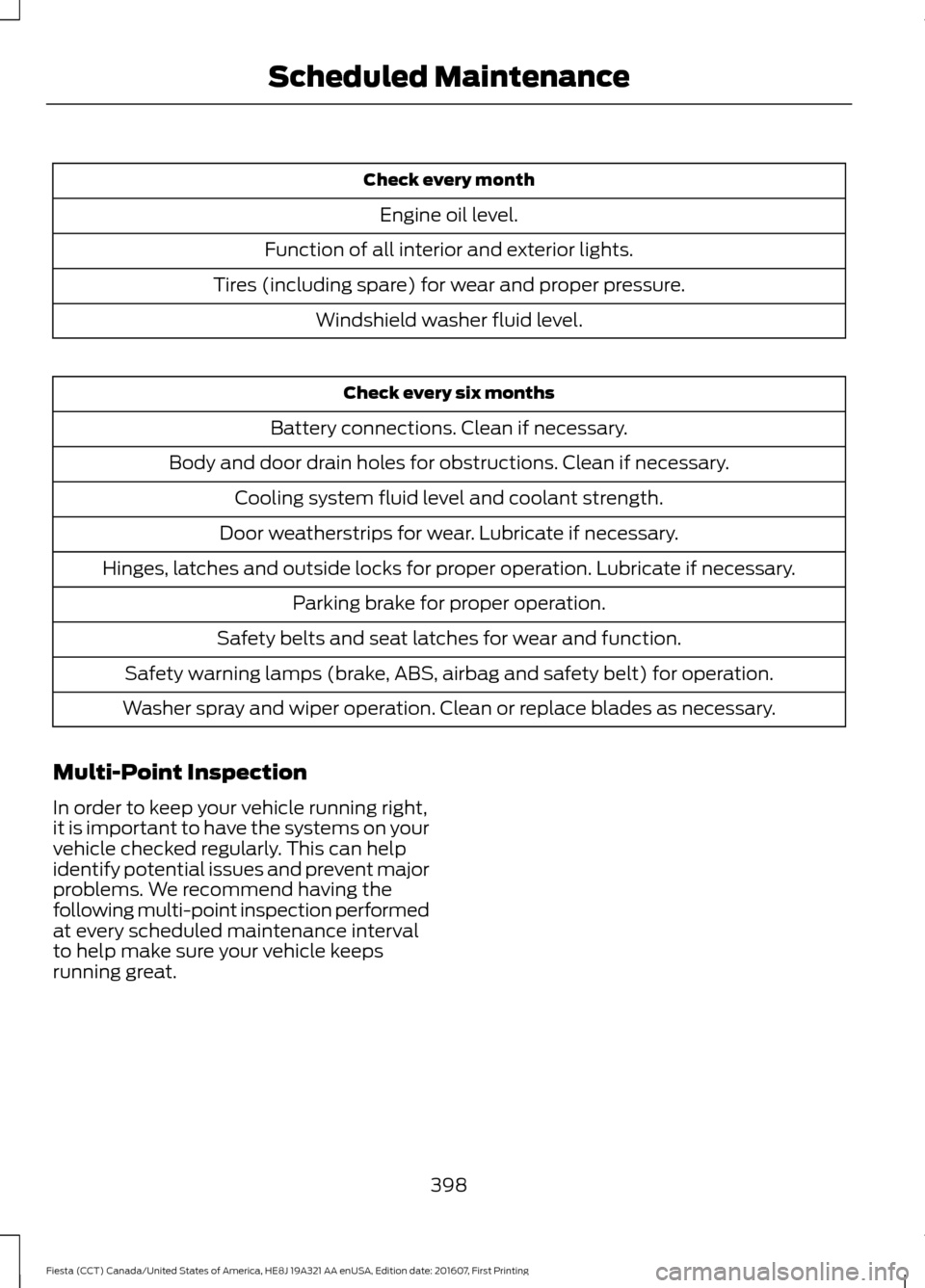
Check every month
Engine oil level.
Function of all interior and exterior lights.
Tires (including spare) for wear and proper pressure. Windshield washer fluid level. Check every six months
Battery connections. Clean if necessary.
Body and door drain holes for obstructions. Clean if necessary. Cooling system fluid level and coolant strength.
Door weatherstrips for wear. Lubricate if necessary.
Hinges, latches and outside locks for proper operation. Lubricate if necessary. Parking brake for proper operation.
Safety belts and seat latches for wear and function.
Safety warning lamps (brake, ABS, airbag and safety belt) for operation.
Washer spray and wiper operation. Clean or replace blades as necessary.
Multi-Point Inspection
In order to keep your vehicle running right,
it is important to have the systems on your
vehicle checked regularly. This can help
identify potential issues and prevent major
problems. We recommend having the
following multi-point inspection performed
at every scheduled maintenance interval
to help make sure your vehicle keeps
running great.
398
Fiesta (CCT) Canada/United States of America, HE8J 19A321 AA enUSA, Edition date: 201607, First Printing Scheduled Maintenance
Page 449 of 450
Information Contained on the Tire
Sidewall............................................................ 222
Temperature A B C............................................ 220
Traction AA A B C.............................................. 220
Treadwear............................................................ 220
Tire Pressure Monitoring System...........234 Changing Tires With a Tire Pressure
Monitoring System....................................... 235
Understanding Your Tire Pressure Monitoring System ...................................... 236
Tires See: Wheels and Tires...................................... 219
Towing a Trailer.............................................154
Towing the Vehicle on Four Wheels...........................................................154
Emergency Towing............................................. 154
Recreational Towing.......................................... 155
Towing..............................................................154
Traction Control............................................134 Principle of Operation....................................... 134
Transmission Code Designation............249
Transmission Specifications - 1.0L EcoBoost™, Automatic
Transmission..............................................243
Transmission Specifications - 1.6L Duratec-16V Ti-VCT (Sigma),
Automatic Transmission
........................244
Transmission Specifications - 5-Speed Manual Transmission
..............................245
Transmission..................................................125
Transmission See: Transmission............................................... 125
Transporting the Vehicle............................154
Trip Computer
.................................................86
U
Under Hood Overview - 1.0L EcoBoost™..................................................184
Under Hood Overview - 1.6L Duratec-16V Ti-VCT (Sigma)
.........................................185
USB Port..........................................................275
Using Cruise Control
....................................143
Switching Cruise Control Off......................... 144
Switching Cruise Control On.......................... 143
Using MyKey With Remote Start Systems..........................................................54
Using Snow Chains.....................................234 Using Stability Control...............................136
Using Summer Tires
...................................234
Using SYNC™ With Your Media Player............................................................304
Accessing Your Play Menu............................. 309
Connecting Your Digital Media Player to the USB Port.......................................................... 304
Media Menu Features....................................... 307
Media Voice Commands................................ 306
System Settings................................................... 311
What's Playing?................................................. 305
Using SYNC™ With Your Phone.............281 Accessing Features Through the Phone
Menu.................................................................. 285
Accessing Your Phone Settings................... 290
Making a Call....................................................... 284
Pairing a Cell Phone for the First Time.................................................................... 281
Pairing Subsequent Cell Phones.................282
Phone Options during an Active Call.........284
Phone Voice Commands................................ 282
Receiving Calls................................................... 284
System Settings.................................................. 291
Text Messaging.................................................. 288
Using Traction Control................................134 Switching the System Off............................... 134
System Indicator Lights and Messages.......................................................... 134
Using a Switch..................................................... 134
Using the Information Display Controls............................................................. 134
Using Voice Recognition............................278 Audio Voice Commands................................. 336
Initiating a Voice Session................................ 278
Mobile App Voice Commands...................... 339
Navigation Voice Commands....................... 338
Phone Voice Commands................................ 337
SiriusXM Traffic and Travel Link Voice Commands..................................................... 340
System Interaction and Feedback..............279
Voice Settings Commands............................ 340
Using Winter Tires.......................................234
Utilizing the Mediation/Arbitration Program (Canada Only).........................168
V
Vehicle Care
.....................................................211
447
Fiesta (CCT) Canada/United States of America, HE8J 19A321 AA enUSA, Edition date: 201607, First Printing Index