2017 FORD FIESTA audio
[x] Cancel search: audioPage 140 of 450

WARNINGS
The parking aid system may not
prevent contact with small or moving
objects that are close to the ground.
The parking aid system gives an audible
warning when it detects a large object
helping to avoid damage to your vehicle.
To help avoid personal injury you must take
care when using the parking aid system. Note:
Some add-on accessories such as
large trailer hitches, bike or surfboard racks
can cause reduced performance or false
alerts.
Note: Keep the sensors free from snow, ice
and large accumulations of dirt. Blocked
sensors may affect system accuracy. Do
not clean the sensors with sharp objects.
Note: If your vehicle sustains damage
leaving the sensors misaligned, this will
cause inaccurate measurements or false
alerts.
The system warns you of objects that are
within the detection zone of the bumper
areas.
When the parking aid system sounds a
tone, the audio system may reduce the set
volume. When the warning ends, the audio
system will return to the previously set
volume.
The rear parking aid sensors automatically
turn on when you shift into reverse (R). Coverage area of up to 72 in (183
cm) from the bumper. There is
decreased coverage area at the
outer corners of the bumper.
A
As your vehicle moves closer an obstacle,
the rate of the audible warning increases.
When the obstacle is less than 12 in
(30 cm) away, the audible warning sounds
continuously. If a stationary or receding
object is detected
12 in (30 cm) or more
from the side of your vehicle, the audible
warning sounds for only three seconds.
Once the system detects an object
approaching, the audible warning sounds
again.
The system detects objects when you shift
into reverse (R) and:
• Your vehicle is moving toward a
stationary object at a speed of
3 mph
(5 km/h) or less.
• Your vehicle is moving at a speed of
3 mph (5 km/h)
or less, and an object
is approaching your vehicle at a speed
of
3 mph (5 km/h) or less.
If a fault is present in the system, a warning
message appears in the information
display and does not allow you to switch
the system on.
138
Fiesta (CCT) Canada/United States of America, HE8J 19A321 AA enUSA, Edition date: 201607, First Printing Parking Aids
(If Equipped)E130178
Page 141 of 450

FRONT PARKING AID (If Equipped)
WARNINGS
To help avoid personal injury, please
read and understand the limitations
of the system as contained in this
section. Sensing is only an aid for some
(generally large and fixed) objects when
moving on a flat surface at parking speeds.
Certain objects with surfaces that absorb
ultrasonic waves, surrounding vehicle's
parking aid systems, traffic control
systems, fluorescent lamps, inclement
weather, air brakes, and external motors
and fans may also affect the function of
the sensing system. This may include
reduced performance or a false activation. To help avoid personal injury, always
use caution when in reverse (R) and
when using the sensing system.
The parking aid system may not
prevent contact with small or moving
objects that are close to the ground.
The parking aid system gives an audible
warning when it detects a large object
helping to avoid damage to your vehicle.
To help avoid personal injury you must take
care when using the parking aid system. Note:
Keep the sensors free from snow, ice
and large accumulations of dirt. Blocked
sensors may affect system accuracy. Do
not clean the sensors with sharp objects.
Note: If your vehicle sustains damage
leaving the sensors misaligned, this will
cause inaccurate measurements or false
alerts.
The system warns you of objects that are
within the detection zone of the bumper
areas. When the parking aid system sounds a
tone, the audio system may reduce the set
volume. When the warning ends, the audio
system will return to the previously set
volume.
The front parking aid sensors automatically
turn on when you shift into reverse (R) or
you press the parking aid button.
Coverage area of up to 31 in (80
cm) from the center of the
bumper and up to 14 in (35 cm)
to the side of the bumper.
A
As your vehicle moves closer an obstacle,
the rate of the audible warning increases.
When the obstacle is less than
12 in
(30 cm) away, the audible warning sounds
continuously. If a stationary or receding
object is detected
12 in (30 cm) or more
from the side of your vehicle, the audible
warning sounds for only three seconds.
Once the system detects an object
approaching, the audible warning sounds
again.
139
Fiesta (CCT) Canada/United States of America, HE8J 19A321 AA enUSA, Edition date: 201607, First Printing Parking Aids
(If Equipped)E184301
A
Page 142 of 450

The system detects objects when you shift
into reverse (R) or you press the parking
aid button and:
•
Your vehicle is moving toward a
stationary object at a speed of 3 mph
(5 km/h) or less.
• Your vehicle is moving at a speed of
3 mph (5 km/h)
or less, and an object
is approaching your vehicle at a speed
of
3 mph (5 km/h) or less.
If a fault is present in the system, a warning
message appears in the information
display and does not allow you to switch
the system on.
Sensing System Audible Warnings
Audible warnings sound when large objects
are within the sensor coverage areas of
either bumper in the following manner:
• You will hear a high-pitched tone from
the front audio system speakers when
large objects are within the sensor
coverage area of the front bumper.
• You will hear a lower-pitched tone
from the rear audio system speakers
when large objects are within the
sensor coverage area of the rear
bumper.
• The parking aid system prioritises
audible warnings based on large
objects that are the closest to your
vehicle ’s front or rear bumper. For
example, if an object is
24 in (60 cm)
from the front bumper and at the same
time, an object is only
16 in (40 cm)
from the rear bumper, you will hear the
lower-pitched tone from the rear audio
system speakers. •
You will hear an alternating audible
warning from the front and rear audio
system speakers if large objects are
less than
12 in (30 cm) from the front
and rear bumpers.
• If the object is more than 12 in (30 cm)
from the side of the bumper area, the
audible warning sounds for three
seconds. If the object is less than
12 in
(30 cm) from the side of the bumper
area the audible warning sounds
continuously.
Switching the Parking Aid System
Off
Press the button to switch the system off.
The system remains off until you switch
the ignition off.
REAR VIEW CAMERA WARNINGS
Do not place objects in front of the
camera.
The rear view camera system is a
reverse aid supplement device that
still requires the driver to use it in
conjunction with the interior and exterior
mirrors for maximum coverage. Objects that are close to either
corner of the bumper or under the
bumper, might not be seen on the
screen due to the limited coverage of the
camera system. Reverse your vehicle slowly as higher
speeds might limit your reaction time
to stop your vehicle.
Use caution when the liftgate is ajar.
If the liftgate is ajar, the camera will
be out of position and the video
image may be incorrect. All guidelines
disappear when the liftgate is ajar. Some
vehicles may not come equipped with
guidelines.
140
Fiesta (CCT) Canada/United States of America, HE8J 19A321 AA enUSA, Edition date: 201607, First Printing Parking Aids
(If Equipped)
Page 180 of 450

Protected Component
Fuse Rating
Fuse Number
Ignition switch.
15A
F1
Auto-dimming interior mirror.
7.5A
F2 Autowipers.
Heater relay control.
Instrument cluster.
7.5A
F3
Passenger airbag deactivation switch.
7.5A
F4
Passenger sensing system.
Secondary on-board diagnostic control module.
15A
F5
Reversing lamps.
10A
F6
Instrument cluster.
7.5A
F7
Information and entertainment display.
Moonroof.
7.5A
F8
Remote keyless entry.
20A
F9
Remote keyless starting.
Audio unit.
15A
F10
SYNC module.
Windshield wipers.
20A
F11
Climate control.
7.5A
F12
Rear window wiper.
15A
F13
Remote keyless entry.
20A
F14
Remote keyless starting.
Windshield wipers.
15A
F15
Exterior mirrors.
5A
F16
Power windows.
Heated seats.
15A
F17
Brake lamp.
10A
F18
Instrument cluster.
7.5A
F19
Airbags.
10A
F20
Electronic power assist steering.
7.5A
F21
Instrument cluster.
178
Fiesta (CCT) Canada/United States of America, HE8J 19A321 AA enUSA, Edition date: 201607, First Printing Fuses
Page 181 of 450

Protected Component
Fuse Rating
Fuse Number
Ignition.
Windshield wipers.
Passive anti-theft system.
Accelorator position sensor.
7.5A
F22 Powertrain control module.
Anti-lock brake system.
Stability assist.
Transmission control unit.
7.5A
F23
Audio unit.
7.5A
F24
Heated exterior mirrors.
7.5A
F25
Central locking system.
7.5A
F26
Not used.
-
F27
Not used.
-
F28
Not used.
-
F29
Not used.
-
F30
Rear power windows.
30A
F31
Battery back-up sounder.
20A
F32 Rear auxiliary power points.
Auxiliary power points.
20A
F33
Front power windows.
30A
F34
Moonroof.
20A
F35
Not used.
-
F36 Protected Component
Relay Number
Ignition relay.
R1
Not used.
R2
Not used.
R3
Driver heated seat.
R4
Passenger heated seat.
R5
179
Fiesta (CCT) Canada/United States of America, HE8J 19A321 AA enUSA, Edition date: 201607, First Printing Fuses
Page 259 of 450
GENERAL INFORMATION
Radio Frequencies and Reception Factors
Radio reception factors
The further you travel away from an FM station, the weaker
the signal and the weaker the reception.
Distance and Strength
Hills, mountains, tall buildings, bridges, tunnels, freeway
overpasses, parking garages, dense tree foliage and
thunderstorms can interfere with the reception.
Terrain
When you pass near a radio transmission tower, a stronger
signal can override a weaker signal and can cause interfer-
ence in the audio system.
Station overload
CD and CD Player Information
Note: CD units play commercially pressed
4.75-inch (12 centimeter) audio compact
discs only. Due to technical incompatibility,
certain recordable and re-recordable
compact discs may not function correctly
when used in Ford CD players.
Note: Do not insert CDs with homemade
paper (adhesive) labels into the CD player
as the label may peel and cause the CD to
become jammed. You should use a
permanent felt tip marker rather than
adhesive labels on your homemade CDs.
Ballpoint pens may damage CDs. Please
contact an authorized dealer for further
information.
Note: Do not use any irregularly shaped
discs or discs with a scratch protection film
attached.
Always handle discs by their edges only.
Clean the disc with an approved CD
cleaner only. Wipe it from the center of the
disc toward the edge. Do not clean in a
circular motion.
Do not expose discs to direct sunlight or
heat sources for extended periods. MP3 and WMA Track and Folder
Structure
Audio systems capable of recognizing and
playing MP3 and WMA individual tracks
and folder structures work as follows:
•
There are two different modes for MP3
and WMA disc playback: MP3 and
WMA track mode (system default) and
MP3 and WMA folder mode.
• MP3 and WMA track mode ignores any
folder structure on the MP3 and WMA
disc. The player numbers each MP3
and WMA track on the disc (noted by
the MP3 or WMA file extension) from
T001 to a maximum of T255. The
maximum number of playable MP3 and
WMA files may be less depending on
the structure of the CD and exact
model of radio present.
257
Fiesta (CCT) Canada/United States of America, HE8J 19A321 AA enUSA, Edition date: 201607, First Printing Audio System
Page 260 of 450
•
MP3 and WMA folder mode represents
a folder structure consisting of one
level of folders. The CD player numbers
all MP3 and WMA tracks on the disc
(noted by the MP3 or WMA file
extension) and all folders containing
MP3 and WMA files, from F001 (folder)
T001 (track) to F253 T255.
• Creating discs with only one level of
folders helps with navigation through
the disc files.
If you are burning your own MP3 and WMA
discs, it is important to understand how
the system reads the structures you create.
While various files may be present, (files
with extensions other than MP3 and
WMA), only files with the MP3 and WMA
extension are played; other files are
ignored by the system. This enables you to
use the same MP3 and WMA disc for a
variety of tasks on your work computer,
home computer and your in-vehicle
system. In track mode, the system displays and
plays the structure as if it were only one
level deep (all MP3 and WMA files play,
regardless of being in a specific folder). In
folder mode, the system only plays the
MP3 and WMA files in the current folder.
AUDIO UNIT - VEHICLES WITH:
AM/FM/CD WARNING
Driving while distracted can result in
loss of vehicle control, crash and
injury. We strongly recommend that
you use extreme caution when using any
device that may take your focus off the
road. Your primary responsibility is the safe
operation of your vehicle. We recommend
against the use of any hand-held device
while driving and encourage the use of
voice-operated systems when possible.
Make sure you are aware of all applicable
local laws that may affect the use of
electronic devices while driving. 258
Fiesta (CCT) Canada/United States of America, HE8J 19A321 AA enUSA, Edition date: 201607, First Printing Audio System
Page 261 of 450
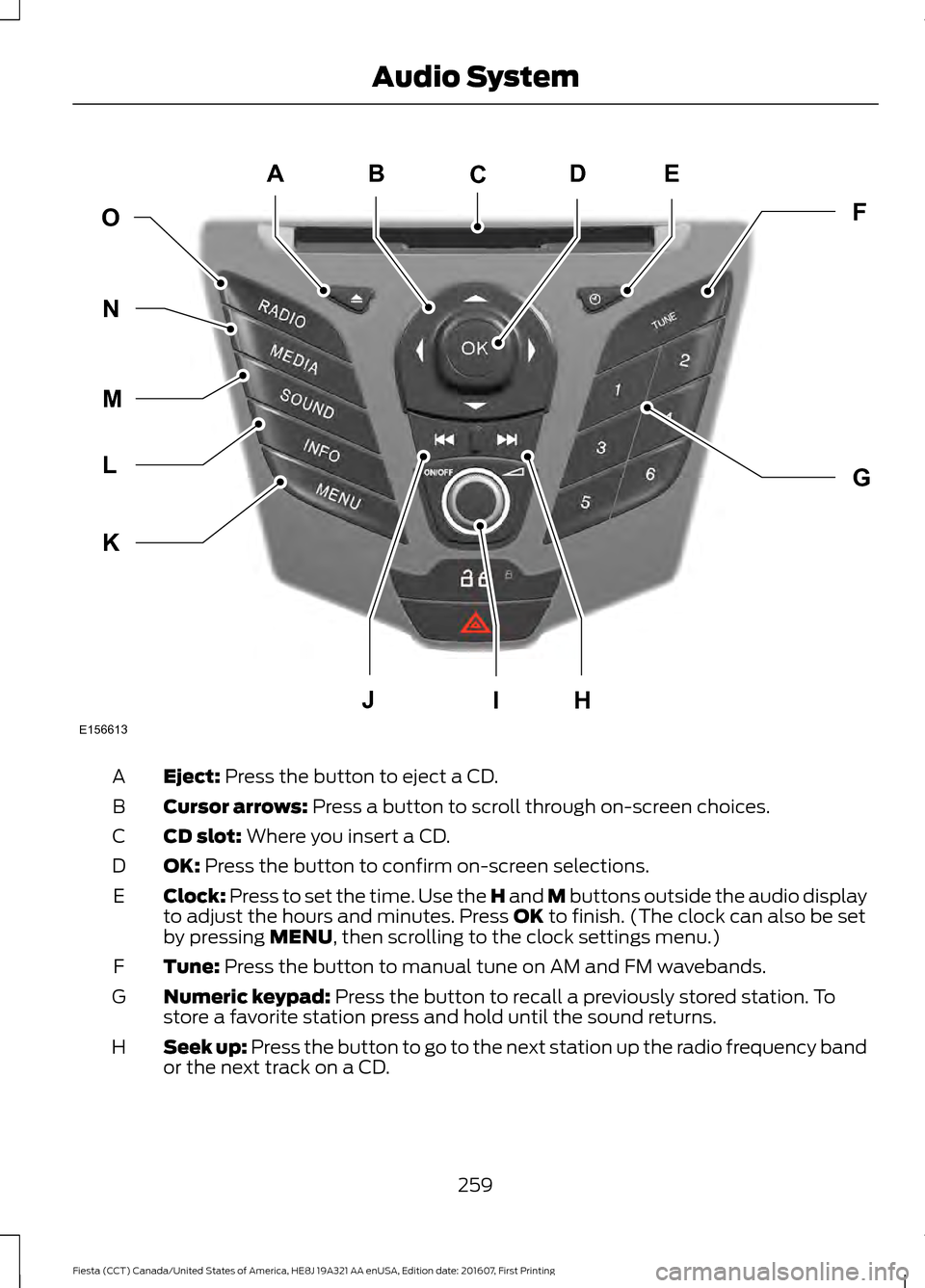
Eject: Press the button to eject a CD.
A
Cursor arrows:
Press a button to scroll through on-screen choices.
B
CD slot:
Where you insert a CD.
C
OK:
Press the button to confirm on-screen selections.
D
Clock:
Press to set the time. Use the H and M buttons outside the audio display
to adjust the hours and minutes. Press OK to finish. (The clock can also be set
by pressing MENU, then scrolling to the clock settings menu.)
E
Tune:
Press the button to manual tune on AM and FM wavebands.
F
Numeric keypad:
Press the button to recall a previously stored station. To
store a favorite station press and hold until the sound returns.
G
Seek up: Press the button to go to the next station up the radio frequency band
or the next track on a CD.
H
259
Fiesta (CCT) Canada/United States of America, HE8J 19A321 AA enUSA, Edition date: 201607, First Printing Audio SystemE156613
ED
OF
G
K
L
M
N
JHI
C
A
B