2017 FORD F650 AUX
[x] Cancel search: AUXPage 305 of 382
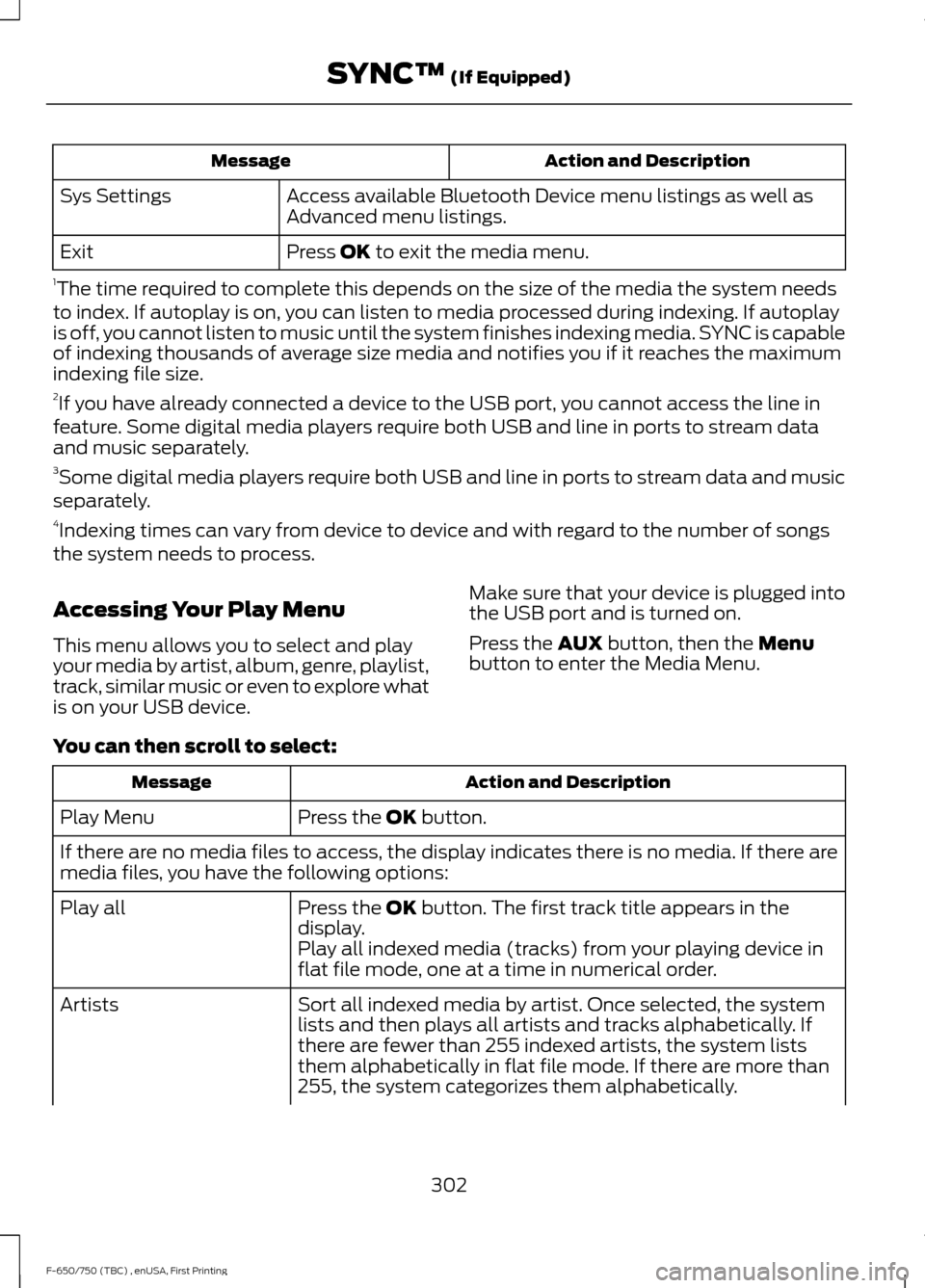
Action and Description
Message
Access available Bluetooth Device menu listings as well as
Advanced menu listings.
Sys Settings
Press OK to exit the media menu.
Exit
1 The time required to complete this depends on the size of the media the system needs
to index. If autoplay is on, you can listen to media processed during indexing. If autoplay
is off, you cannot listen to music until the system finishes indexing media. SYNC is capable
of indexing thousands of average size media and notifies you if it reaches the maximum
indexing file size.
2 If you have already connected a device to the USB port, you cannot access the line in
feature. Some digital media players require both USB and line in ports to stream data
and music separately.
3 Some digital media players require both USB and line in ports to stream data and music
separately.
4 Indexing times can vary from device to device and with regard to the number of songs
the system needs to process.
Accessing Your Play Menu
This menu allows you to select and play
your media by artist, album, genre, playlist,
track, similar music or even to explore what
is on your USB device. Make sure that your device is plugged into
the USB port and is turned on.
Press the
AUX button, then the Menu
button to enter the Media Menu.
You can then scroll to select: Action and Description
Message
Press the
OK button.
Play Menu
If there are no media files to access, the display indicates there is no media. If there are
media files, you have the following options:
Press the
OK button. The first track title appears in the
display.
Play all
Play all indexed media (tracks) from your playing device in
flat file mode, one at a time in numerical order.
Sort all indexed media by artist. Once selected, the system
lists and then plays all artists and tracks alphabetically. If
there are fewer than 255 indexed artists, the system lists
them alphabetically in flat file mode. If there are more than
255, the system categorizes them alphabetically.
Artists
302
F-650/750 (TBC) , enUSA, First Printing SYNC™
(If Equipped)
Page 307 of 382

Action and Description
Message
Play music similar to what is currently playing from the USB
port. The system uses the metadata information of each song
to compile a playlist for you. *
Similar music
1. Press the OK button.
2. The system creates a new list of similar songs and begins
playing. This feature does not include tracks with incom-
plete metadata information. Press the
OK button.
Exit the current menu.
Return
* With certain playing devices, if your metadata tags are not populated, the tracks are not
available in voice recognition, play menu or similar music. However, if you place these
tracks onto your playing device in "Mass Storage Device Mode", they are available in voice
recognition, play menu browsing and similar music. The system places Unknown items
into any unpopulated metadata tag.
System Settings
System settings provide access to your
Bluetooth Devices and Advanced menu
features. Bluetooth Devices
The Bluetooth Devices menu allows you
to enable, disable, add, connect and delete
a Bluetooth device.
Press the
AUX button, then the Menu
button to enter the Media Menu.
You can then scroll to: Action and Description
Message
Press the
OK button.
Sys Settings
Press the
OK button.
Bluetooth device
You can then select one of the following:
Pair more devices to the system. *
Add Device
1. Press the
OK button. When find SYNC appears in the
display, press the OK button again.
2. Follow the directions in your phone's manual to put your phone into discovery mode. A six-digit PIN appears in the
display.
3. When prompted on your phone's six-digit display, enter the PIN.
304
F-650/750 (TBC) , enUSA, First Printing SYNC™
(If Equipped)
Page 308 of 382

Action and Description
Message
Connect a previously paired Bluetooth-enabled phone.
Connect BT
1. Press OK to select and view a list of devices.
2. Scroll until the desired device is chosen and press
OK to
connect the device.
Turn the Bluetooth feature on and off. **
Bluetooth On and Off
1.Press the OK button and scroll to toggle between on and
off.
2. Make a selection and press the
OK button.
Delete a paired media device.
Delete
1. Press the
OK button and scroll to select the device.
2. Press the
OK button to confirm.
Delete all previously paired devices.
Delete all
1. Press the
OK button.
2. Press the
OK button to confirm.
Exit the current menu.
Return
* This is a speed-dependent feature. It is only available when your vehicle is traveling at 3
mph (5 km/h) or less.
** Setting Bluetooth to off disconnects all Bluetooth devices and turns off all Bluetooth
features.
Advanced
The Advanced menu allows you to access
and set prompts, languages, defaults and
perform a master reset. Press the
AUX button, then the Menu
button to enter the Media Menu.
You can then scroll to: Action and Description
Message
Press the
OK button.
Sys Settings
Press the
OK button.
Advanced
You can then select one of the following:
305
F-650/750 (TBC) , enUSA, First Printing SYNC™
(If Equipped)
Page 315 of 382

AUXILIARY SWITCHES (If Equipped)
For maximum vehicle performance, keep
the following information in mind when
adding accessories or equipment to your
vehicle:
•
When adding accessories, equipment,
passengers and luggage to your
vehicle, do not exceed the total weight
capacity of the vehicle or of the front
or rear axle (GVWR or GAWR as
indicated on the Safety Compliance
Certification label). Ask an authorized
dealer for specific weight information.
• The Federal Communications
Commission (FCC) and Canadian
Radio Telecommunications
Commission (CRTC) regulate the use
of mobile communications systems
equipped with radio transmitters, for
example, two-way radios, telephones
and theft alarms. Any such equipment
installed in your vehicle should comply
with Federal Communications
Commission (FCC) and Canadian
Radio Telecommunications
Commission (CRTC) regulations, and
should be installed by an authorized
dealer.
• An authorized dealer needs to install
mobile communications systems.
Improper installation may harm the
operation of your vehicle, particularly
if the manufacturer did not design the
mobile communication system
specifically for automotive use.
• If you or an authorized Ford dealer add
any non-Ford electrical or electronic
accessories or components to your
vehicle, you may adversely affect
battery performance and durability. In
addition, you may also adversely affect
the performance of other electrical
systems in the vehicle. The auxiliary switch option package
provides four switches, mounted in the
center of the instrument panel. These
switches operate only while the ignition is
in the on position, whether the engine is
running or not. Ford recommends, however,
that the engine remain running to maintain
battery charge when using the auxiliary
switches for extended periods of time or
higher current draws.
Note:
When your vehicle has a diesel
engine, use the auxiliary switches only while
the engine is running. The glow plugs also
drain battery power when the ignition key is
in the on position. Using the auxiliary
switches, even for limited amounts of time,
can cause your battery to drain quickly and
prevent your vehicle from restarting.
When switched on, the auxiliary switches
provide 8 amps, 12 amps or 20 amps of
electrical battery power for a variety of
personal or commercial uses.
The relay box for the auxiliary switches is
on the end of the left side of the instrument
panel. See your authorized dealer for
service.
The relays are coded as shown:
312
F-650/750 (TBC) , enUSA, First Printing AccessoriesE163431
Page 316 of 382

Each switch includes a power lead, a
blunt-cut and sealed wire located below
the instrument panel and to the left of the
steering column.
The power leads are coded as shown: Fuse
Amp
Rating
Wire
Color
Circuit
Number
Switch
25A
Yellow
CAC05
AUX 1
25A
Green
with
Brown Trace
CAC06
AUX 2
10A
Violet
with
Green Trace
CAC07
AUX 3
15A
Brown
CAC08
AUX 4
Learn more about auxiliary switches
by visiting: Web Address
www.fleet.ford.com/truckbbas/
313
F-650/750 (TBC) , enUSA, First Printing AccessoriesE163432 E209714
Page 374 of 382

2
2-Speed Rear Axle........................................118
Axle Shifting.......................................................... 118
A
A/C See: Climate Control........................................... 70
About This Manual...........................................7
Diesel Engine Information................................... 8
Minor Troubleshooting Guide............................ 9
Warnings.................................................................... 8
ABS See: Brakes............................................................ 119
ABS driving hints See: Hints on Driving With Anti-Lock
Brakes................................................................ 120
Accessories.....................................................312
Accessories See: Replacement Parts
Recommendation............................................ 13
Adjusting the Headlamps........................205 Horizontal Aim Adjustment.......................... 206
Vertical Aim Adjustment................................ 205
Adjusting the Steering Wheel
...................44
Air Brakes.........................................................123 Air Chamber Stroke Indication...................... 124
Cam Brakes - Automatic Slack Adjusters........................................................... 124
Emergency Air Brake.......................................... 124
Air Conditioning See: Climate Control........................................... 70
Air Filter See: Changing the Engine Air Filter - 6.7L
Diesel.................................................................. 210
See: Changing the Engine Air Filter - 6.8L.................................................................... 209
Air Induction System Inspection.............217 Chassis-mounted Charge Air Cooler...........218
Air Suspension
...............................................136
Air Suspension Dump Button........................ 136
Connecting and Disconnecting a Trailer with Air Suspension and Air Suspension
Dump Button................................................... 136
Suspension Conversions................................. 136
System Indicator Light...................................... 136
Appendices....................................................348 Audible Warnings and Indicators..............61
Beltminder Warning............................................. 61
Door Ajar................................................................... 61
Headlamps On Warning Chime....................... 61
Key in Ignition Warning Chime......................... 61
Parking Brake On Warning Chime................... 61
Audio Control
..................................................44
Media........................................................................\
45
Seek, Next or Previous........................................ 45
Audio Input Jack...........................................279
Audio System
.................................................272
General Information.......................................... 272
Audio Unit - Vehicles With: AM/FM/CD/ SYNC..............................................................274
Audio Unit - Vehicles With: AM/FM
......273
Automatic Transmission.............................112
Brake-Shift Interlock.......................................... 115
If Your Vehicle Gets Stuck In Mud or Snow................................................................... 116
Understanding the Shift Positions of a 6– Speed Automatic Transmission..........112
Understanding your SelectShift™ Automatic transmission............................... 113
Automatic Transmission Fluid Check.............................................................198
Transmission Fluid Level................................. 199
Auxiliary Power Points..................................81 110 Volt AC Power Points.................................... 81
12 Volt DC Power Point........................................ 81
Locations.................................................................. 81
Auxiliary Switches
........................................312
Axle Inspection.............................................222
Front Axle.............................................................. 222
B
Battery See: Changing the 12V Battery..................... 203
Bonnet Lock See: Opening and Closing the Hood............181
Booster Seats..................................................25 Types of Booster Seats...................................... 25
Brake Fluid Check.......................................200
Brakes................................................................119 General Information........................................... 119
Brake System Inspection...........................219 Air Brakes............................................................... 219
Driveline Parking Brake..................................... 221
371
F-650/750 (TBC) , enUSA, First Printing Index
Page 376 of 382

Draining the Fuel Filter Water Trap - 6.7L
Diesel.............................................................202
Draining the Diesel Fuel Conditioner Module (DFCM)............................................................. 202
Driving Aids.....................................................134
Driving Hints...................................................143
Driving Through Water................................147 Operation in Standing Water.......................... 147
DRL See: Daytime Running Lamps......................... 48
E
Economical Driving......................................144
Electrical System Inspection
....................217
Accessory Feed Connections.......................... 217
Electronic Locking Differential..................117 Activating the Locking Differential...............118
Driver-Controlled Locking Differential.........117
Servicing a Vehicle with a Locking
Differential........................................................ 118
Emission Control System - Diesel..........105 Oxidation Catalytic Converter and Diesel
Particulate Filter System............................ 105
Emission Control System - Gasoline........................................................103
On-Board Diagnostics (OBD-II)................... 104
Readiness for Inspection and Maintenance (I/M) Testing................................................... 105
End User License Agreement.................348 SYNC End User License Agreement
(EULA).............................................................. 348
Engine Block Heater
.....................................88
Rapid Heat Supplemental Heating
System................................................................ 89
Using the Engine Block Heater....................... 89
Engine Coolant Check - 6.7L Diesel.............................................................194
Adding Coolant................................................... 195
Checking Coolant Corrosion Inhibitor Additive Strength .......................................... 197
Coolant Change.................................................. 198
Engine and Secondary Cooling System Refill Procedure.............................................. 196
Engine-driven Cooling Fan (Fan Clutch)............................................................... 198
Recycled Coolant................................................ 197
Severe Climates................................................... 197Engine Coolant Check - 6.8L...................189
Adding Coolant................................................... 190
Coolant Change.................................................. 192
Engine Coolant Temperature Management................................................... 193
Engine-driven Cooling Fan (Fan Clutch)............................................................... 192
Fail-Safe Cooling................................................ 192
Recycled Coolant................................................. 191
Severe Climates.................................................. 192
Engine Idle Shutdown..................................88
Engine Immobilizer See: Passive Anti-Theft System..................... 42
Engine Oil Check - 6.7L Diesel.................186 Adding Engine Oil............................................... 187
Engine Oil Check - 6.8L
..............................185
Adding Engine Oil............................................... 185
Engine Oil Dipstick - 6.7L Diesel.............185
Engine Oil Dipstick - 6.8L..........................185
Engine Specifications - 6.7L Diesel
.......252
Drivebelt Routing............................................... 252
Engine Specifications - 6.8L
....................252
Drivebelt Routing............................................... 252
Entering, Exiting or Climbing on This Vehicle..............................................................15
Environment.....................................................16
Essential Towing Checks...........................140 Before Towing a Trailer..................................... 140
Hitches................................................................... 140
Safety Chains....................................................... 140
Trailer Brakes....................................................... 140
Trailer Lamps....................................................... 140
When Towing a Trailer...................................... 140
Event Data Recording See: Data Recording............................................. 12
Exhaust Brake................................................124 Exhaust Brake Operating
Characteristics................................................ 126
Exhaust System Inspection......................218
Export Unique Options.................................14
Exterior Mirrors
.................................................51
Auxiliary Convex Mirrors...................................... 51
Clearance Lamps................................................. 52
Foldaway Exterior Mirrors...................................51
Heated Exterior Mirrors...................................... 52
Power Exterior Mirrors......................................... 51
Signal Indicator Mirrors...................................... 52
Telescoping Mirrors.............................................. 52
373
F-650/750 (TBC) , enUSA, First Printing Index