2017 FORD F450 SUPER DUTY ignition
[x] Cancel search: ignitionPage 73 of 642
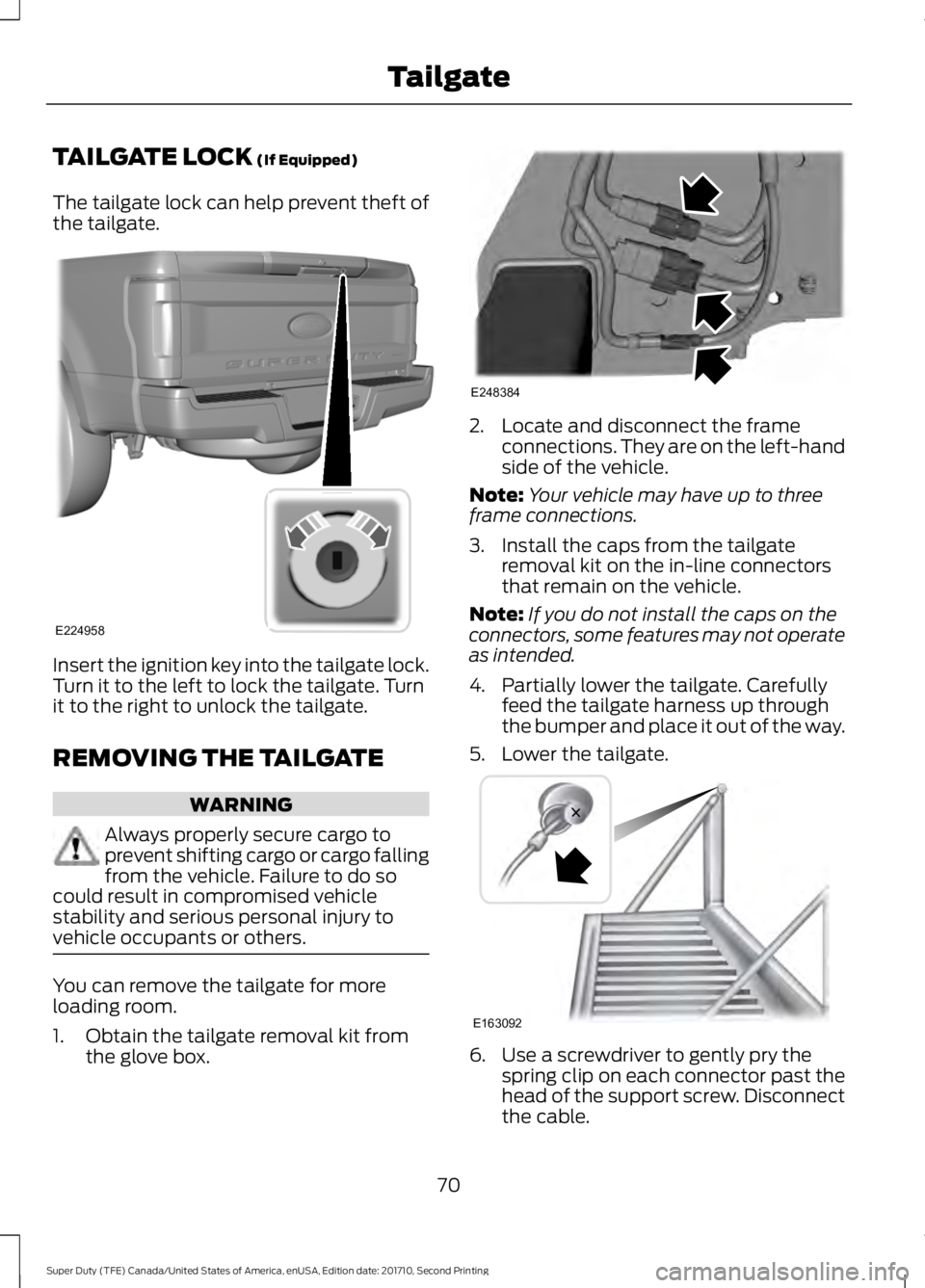
TAILGATE LOCK (If Equipped)
The tailgate lock can help prevent theft ofthe tailgate.
Insert the ignition key into the tailgate lock.Turn it to the left to lock the tailgate. Turnit to the right to unlock the tailgate.
REMOVING THE TAILGATE
WARNING
Always properly secure cargo toprevent shifting cargo or cargo fallingfrom the vehicle. Failure to do socould result in compromised vehiclestability and serious personal injury tovehicle occupants or others.
You can remove the tailgate for moreloading room.
1. Obtain the tailgate removal kit fromthe glove box.
2. Locate and disconnect the frameconnections. They are on the left-handside of the vehicle.
Note:Your vehicle may have up to threeframe connections.
3. Install the caps from the tailgateremoval kit on the in-line connectorsthat remain on the vehicle.
Note:If you do not install the caps on theconnectors, some features may not operateas intended.
4. Partially lower the tailgate. Carefullyfeed the tailgate harness up throughthe bumper and place it out of the way.
5. Lower the tailgate.
6. Use a screwdriver to gently pry thespring clip on each connector past thehead of the support screw. Disconnectthe cable.
70
Super Duty (TFE) Canada/United States of America, enUSA, Edition date: 201710, Second Printing
TailgateE224958 E248384 E163092
Page 77 of 642
PASSIVE ANTI-THEFT
SYSTEM
Note: The system is not compatible withnon-Ford aftermarket remote start systems.Use of these systems may result in enginestarting problems and a loss of securityprotection.
Note: Metallic objects, electronic devicesor a second coded key on the same keychain may result in vehicle startingproblems, especially if they are too close tothe key when starting your vehicle. Preventthese objects from touching the coded keywhen starting your vehicle. Switch theignition off, move all objects on the keychain away from the coded key and restartyour vehicle if a problem occurs.
Note: Do not leave a duplicate coded keyin your vehicle. Always take your keys andlock all doors when leaving your vehicle.
SecuriLock®
The system helps prevent the engine fromstarting unless you use a coded keyprogrammed to your vehicle. Using thewrong key may prevent your vehicle fromstarting. A message may appear in theinformation display.
If you are unable to start your vehicle witha coded key, it is not operating correctly.A message may appear in the informationdisplay.
Automatic Arming
The system arms when you switch theignition off.
Automatic Disarming
The system disarms when you switch theignition on with a coded key.
Replacement Keys
Note:Your vehicle comes with two keys.
The integrated keyhead transmitterfunctions as a programmed ignition keythat operates all the locks and starts yourvehicle, as well as a remote control.
The intelligent access key functions as aprogrammed key that operates the driverdoor lock and turns on the intelligentaccess with push button start system, aswell as a remote control.
If your coded keys are lost or stolen andyou do not have an extra coded key, youneed to erase the key codes from yourvehicle and program new coded keys.Contact an authorized dealer.
Store an extra programmed key away fromyour vehicle in a safe place. You canpurchase replacement keys or remotecontrols from an authorized dealer.
Programming a Spare IntegratedKeyhead Transmitter
Note:You can program a maximum of sixkeys to your vehicle. All six can be integratedkeyhead transmitters.
You can program your own integratedkeyhead transmitter or standardSecuriLock coded keys to your vehicle.This procedure programs both the vehicleimmobilizer keycode and the remotecontrol to your vehicle.
Only use integrated keyhead transmittersor standard SecuriLock keys.
You must have two previouslyprogrammed coded keys and the newunprogrammed key readily accessible.Contact an authorized dealer to have thespare key programmed if two previouslyprogrammed keys are not available.
Read and understand the entire procedurebefore you begin.
1.Insert the first previously programmedcoded key into the ignition.
74
Super Duty (TFE) Canada/United States of America, enUSA, Edition date: 201710, Second Printing
Security
Page 78 of 642
2.Switch the ignition from off to on. Keepthe ignition on for at least 3 seconds,but no more than 10 seconds.
3.Switch the ignition off and remove thefirst coded key from the ignition.
4. After at least 3 seconds but within 10seconds of switching the ignition off,insert the second previously coded keyinto the ignition.
5.Switch the ignition from off to on. Keepthe ignition on for at least 3 seconds,but no more than 10 seconds.
6.Switch the ignition off and remove thesecond previously programmed codedkey from the ignition.
7. After at least 3 seconds but within 10seconds of switching the ignition offand removing the previouslyprogrammed coded key, insert the newunprogrammed key into the ignition.
8.Switch the ignition from off to on. Keepthe ignition on for at least six seconds.
9.Remove the newly programmed codedkey from the ignition.
If you have successfully programmed thenew integrated keyhead transmitter, it willstart your vehicle and operate the remoteentry system.
If programming was unsuccessful, wait 10seconds and repeat steps 1 through 9. Ifyou are still unsuccessful, take your vehicleto your authorized dealer.
Programming a Spare IntelligentAccess Key
Note:You can program a maximum of sixkeys to your vehicle. All six must beintelligent access keys.
This procedure programs both the vehicleimmobilizer keycode and the remotecontrol to your vehicle.
You must have two previouslyprogrammed intelligent access keys insideyour vehicle and the new unprogrammedintelligent access key readily accessible.Contact an authorized dealer to have thespare key programmed if two previouslyprogrammed keys are not available.
Make sure that the ignition is switched offbefore beginning this procedure. Make surethat you close all the doors beforebeginning and that they remain closedthroughout the procedure. Carry out allsteps within 30 seconds of starting thesequence. Stop and wait for at least oneminute before starting again if you carryout any steps out of sequence.
Read and understand the entire procedurebefore you begin.
1. Remove the key blade from thetransmitter.
75
Super Duty (TFE) Canada/United States of America, enUSA, Edition date: 201710, Second Printing
Security
Page 79 of 642
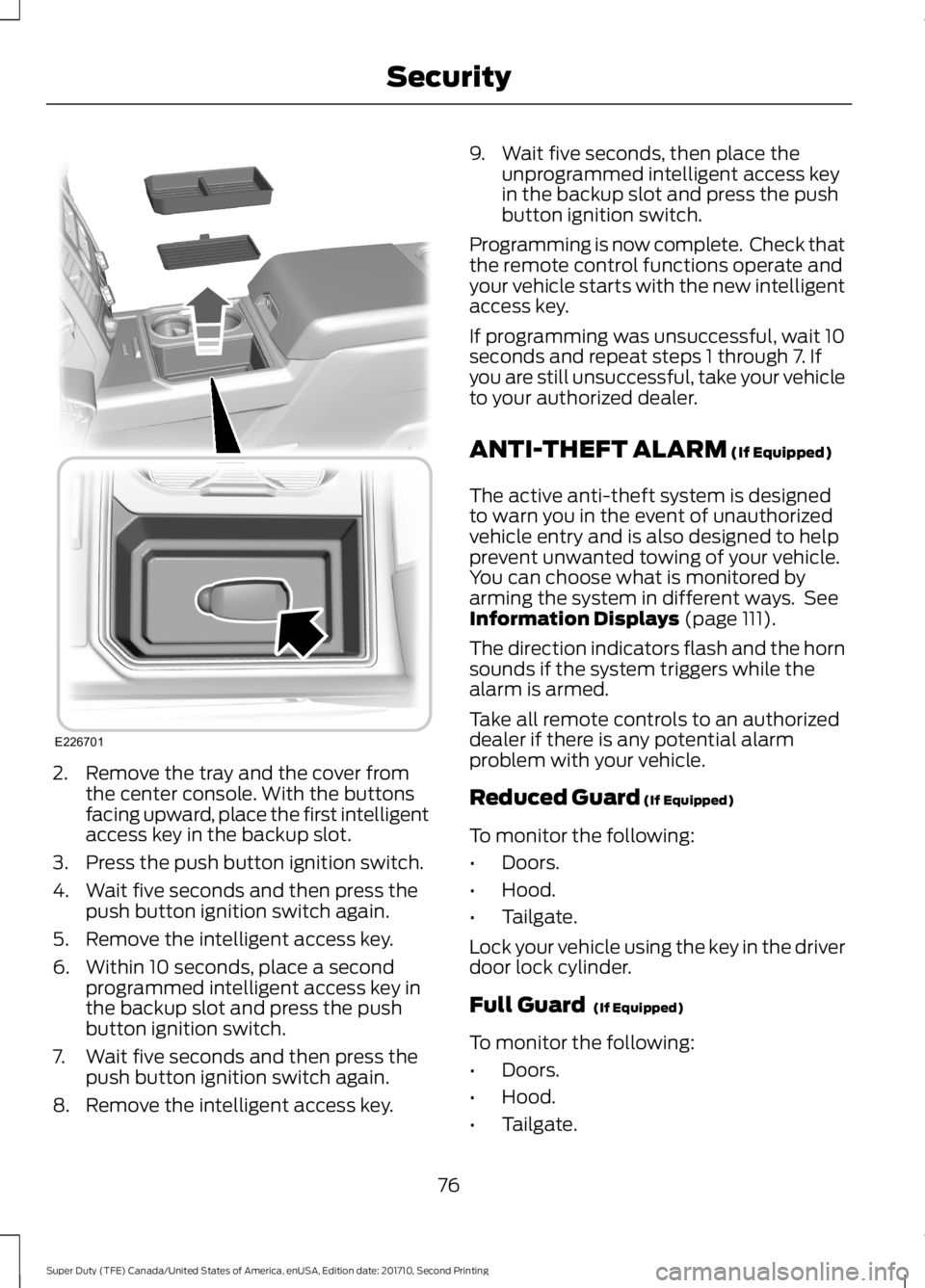
2. Remove the tray and the cover fromthe center console. With the buttonsfacing upward, place the first intelligentaccess key in the backup slot.
3. Press the push button ignition switch.
4. Wait five seconds and then press thepush button ignition switch again.
5. Remove the intelligent access key.
6. Within 10 seconds, place a secondprogrammed intelligent access key inthe backup slot and press the pushbutton ignition switch.
7. Wait five seconds and then press thepush button ignition switch again.
8. Remove the intelligent access key.
9. Wait five seconds, then place theunprogrammed intelligent access keyin the backup slot and press the pushbutton ignition switch.
Programming is now complete. Check thatthe remote control functions operate andyour vehicle starts with the new intelligentaccess key.
If programming was unsuccessful, wait 10seconds and repeat steps 1 through 7. Ifyou are still unsuccessful, take your vehicleto your authorized dealer.
ANTI-THEFT ALARM (If Equipped)
The active anti-theft system is designedto warn you in the event of unauthorizedvehicle entry and is also designed to helpprevent unwanted towing of your vehicle.You can choose what is monitored byarming the system in different ways. SeeInformation Displays (page 111).
The direction indicators flash and the hornsounds if the system triggers while thealarm is armed.
Take all remote controls to an authorizeddealer if there is any potential alarmproblem with your vehicle.
Reduced Guard (If Equipped)
To monitor the following:
•Doors.
•Hood.
•Tailgate.
Lock your vehicle using the key in the driverdoor lock cylinder.
Full Guard (If Equipped)
To monitor the following:
•Doors.
•Hood.
•Tailgate.
76
Super Duty (TFE) Canada/United States of America, enUSA, Edition date: 201710, Second Printing
SecurityE226701
Page 80 of 642
•Movement inside your vehicle.
•Change in vehicle inclination, forexample, unwanted towing.
Lock your vehicle using the remote controlor the power door lock control with theaccompanying door open and then closeall doors.
Note:Do not choose full monitor mode ifmovement within the vehicle is likely tooccur or when the vehicle is in transport.
Note:For correct operation of the interiormotion detection system, make sure allwindows are closed prior to arming thesystem. This helps prevent accidental alarmactivation due to external influences andmake sure of correct interior motiondetection. Additionally, the interior motionsensing system will not arm if any door isajar.
Arming the Alarm
The alarm is ready to arm when there isnot a key in the ignition. Lock your vehicleto arm the alarm.
The direction indicators flash once afteryou lock your vehicle. This indicates thealarm is in the pre-armed mode. It fullyarms after 20 seconds.
Disarming the Alarm
Disarm the alarm by any of the followingactions:
•Press the power door unlock buttonwithin the 20-second pre-armed mode.
•Unlock the doors with the remotecontrol or keyless entry keypad.
•Switch the ignition on or start yourvehicle.
•Use a key in the driver door lockcylinder to unlock your vehicle, thenswitch the ignition on within 12seconds.
Note:Pressing the panic button on theremote control stops the horn and directionindicators, but will not disarm the system.
77
Super Duty (TFE) Canada/United States of America, enUSA, Edition date: 201710, Second Printing
Security
Page 84 of 642
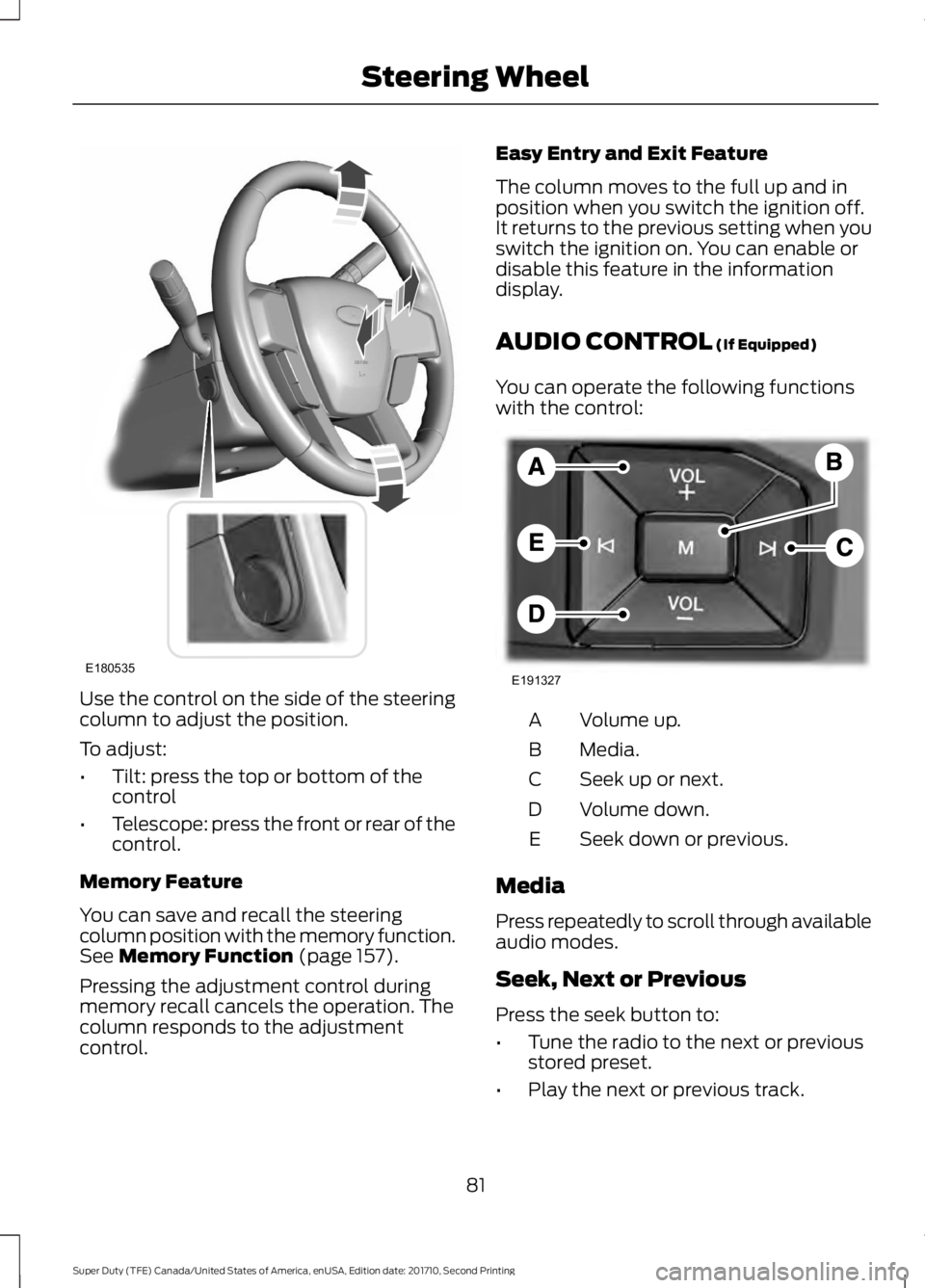
Use the control on the side of the steeringcolumn to adjust the position.
To adjust:
•Tilt: press the top or bottom of thecontrol
•Telescope: press the front or rear of thecontrol.
Memory Feature
You can save and recall the steeringcolumn position with the memory function.See Memory Function (page 157).
Pressing the adjustment control duringmemory recall cancels the operation. Thecolumn responds to the adjustmentcontrol.
Easy Entry and Exit Feature
The column moves to the full up and inposition when you switch the ignition off.It returns to the previous setting when youswitch the ignition on. You can enable ordisable this feature in the informationdisplay.
AUDIO CONTROL (If Equipped)
You can operate the following functionswith the control:
Volume up.A
Media.B
Seek up or next.C
Volume down.D
Seek down or previous.E
Media
Press repeatedly to scroll through availableaudio modes.
Seek, Next or Previous
Press the seek button to:
•Tune the radio to the next or previousstored preset.
•Play the next or previous track.
81
Super Duty (TFE) Canada/United States of America, enUSA, Edition date: 201710, Second Printing
Steering WheelE180535 E191327
Page 90 of 642
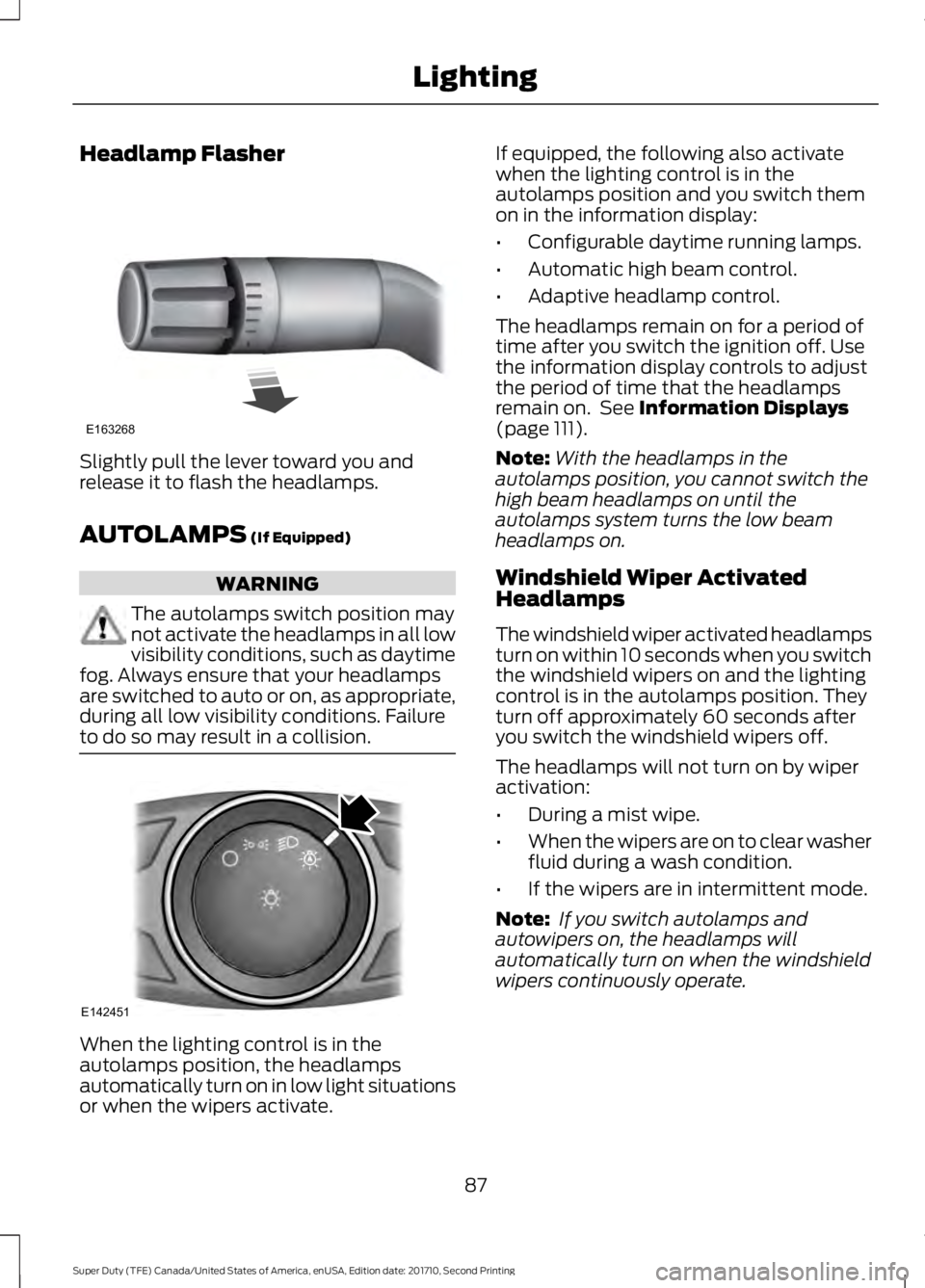
Headlamp Flasher
Slightly pull the lever toward you andrelease it to flash the headlamps.
AUTOLAMPS (If Equipped)
WARNING
The autolamps switch position maynot activate the headlamps in all lowvisibility conditions, such as daytimefog. Always ensure that your headlampsare switched to auto or on, as appropriate,during all low visibility conditions. Failureto do so may result in a collision.
When the lighting control is in theautolamps position, the headlampsautomatically turn on in low light situationsor when the wipers activate.
If equipped, the following also activatewhen the lighting control is in theautolamps position and you switch themon in the information display:
•Configurable daytime running lamps.
•Automatic high beam control.
•Adaptive headlamp control.
The headlamps remain on for a period oftime after you switch the ignition off. Usethe information display controls to adjustthe period of time that the headlampsremain on. See Information Displays(page 111).
Note:With the headlamps in theautolamps position, you cannot switch thehigh beam headlamps on until theautolamps system turns the low beamheadlamps on.
Windshield Wiper ActivatedHeadlamps
The windshield wiper activated headlampsturn on within 10 seconds when you switchthe windshield wipers on and the lightingcontrol is in the autolamps position. Theyturn off approximately 60 seconds afteryou switch the windshield wipers off.
The headlamps will not turn on by wiperactivation:
•During a mist wipe.
•When the wipers are on to clear washerfluid during a wash condition.
•If the wipers are in intermittent mode.
Note: If you switch autolamps andautowipers on, the headlamps willautomatically turn on when the windshieldwipers continuously operate.
87
Super Duty (TFE) Canada/United States of America, enUSA, Edition date: 201710, Second Printing
LightingE163268 E142451
Page 91 of 642
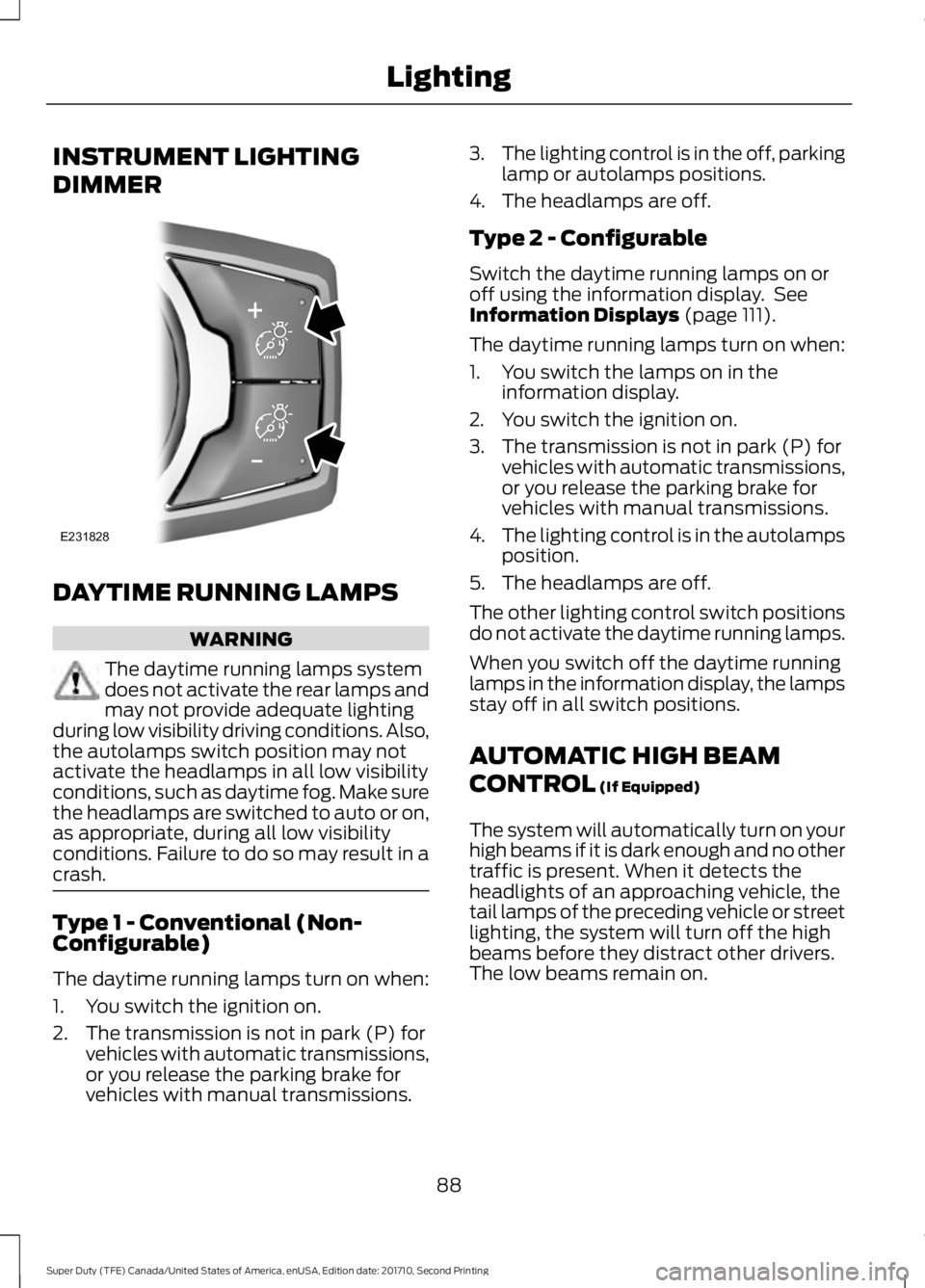
INSTRUMENT LIGHTING
DIMMER
DAYTIME RUNNING LAMPS
WARNING
The daytime running lamps systemdoes not activate the rear lamps andmay not provide adequate lightingduring low visibility driving conditions. Also,the autolamps switch position may notactivate the headlamps in all low visibilityconditions, such as daytime fog. Make surethe headlamps are switched to auto or on,as appropriate, during all low visibilityconditions. Failure to do so may result in acrash.
Type 1 - Conventional (Non-Configurable)
The daytime running lamps turn on when:
1. You switch the ignition on.
2. The transmission is not in park (P) forvehicles with automatic transmissions,or you release the parking brake forvehicles with manual transmissions.
3.The lighting control is in the off, parkinglamp or autolamps positions.
4. The headlamps are off.
Type 2 - Configurable
Switch the daytime running lamps on oroff using the information display. SeeInformation Displays (page 111).
The daytime running lamps turn on when:
1. You switch the lamps on in theinformation display.
2. You switch the ignition on.
3. The transmission is not in park (P) forvehicles with automatic transmissions,or you release the parking brake forvehicles with manual transmissions.
4.The lighting control is in the autolampsposition.
5. The headlamps are off.
The other lighting control switch positionsdo not activate the daytime running lamps.
When you switch off the daytime runninglamps in the information display, the lampsstay off in all switch positions.
AUTOMATIC HIGH BEAM
CONTROL (If Equipped)
The system will automatically turn on yourhigh beams if it is dark enough and no othertraffic is present. When it detects theheadlights of an approaching vehicle, thetail lamps of the preceding vehicle or streetlighting, the system will turn off the highbeams before they distract other drivers.The low beams remain on.
88
Super Duty (TFE) Canada/United States of America, enUSA, Edition date: 201710, Second Printing
LightingE231828