2017 FORD F150 mirror controls
[x] Cancel search: mirror controlsPage 99 of 599
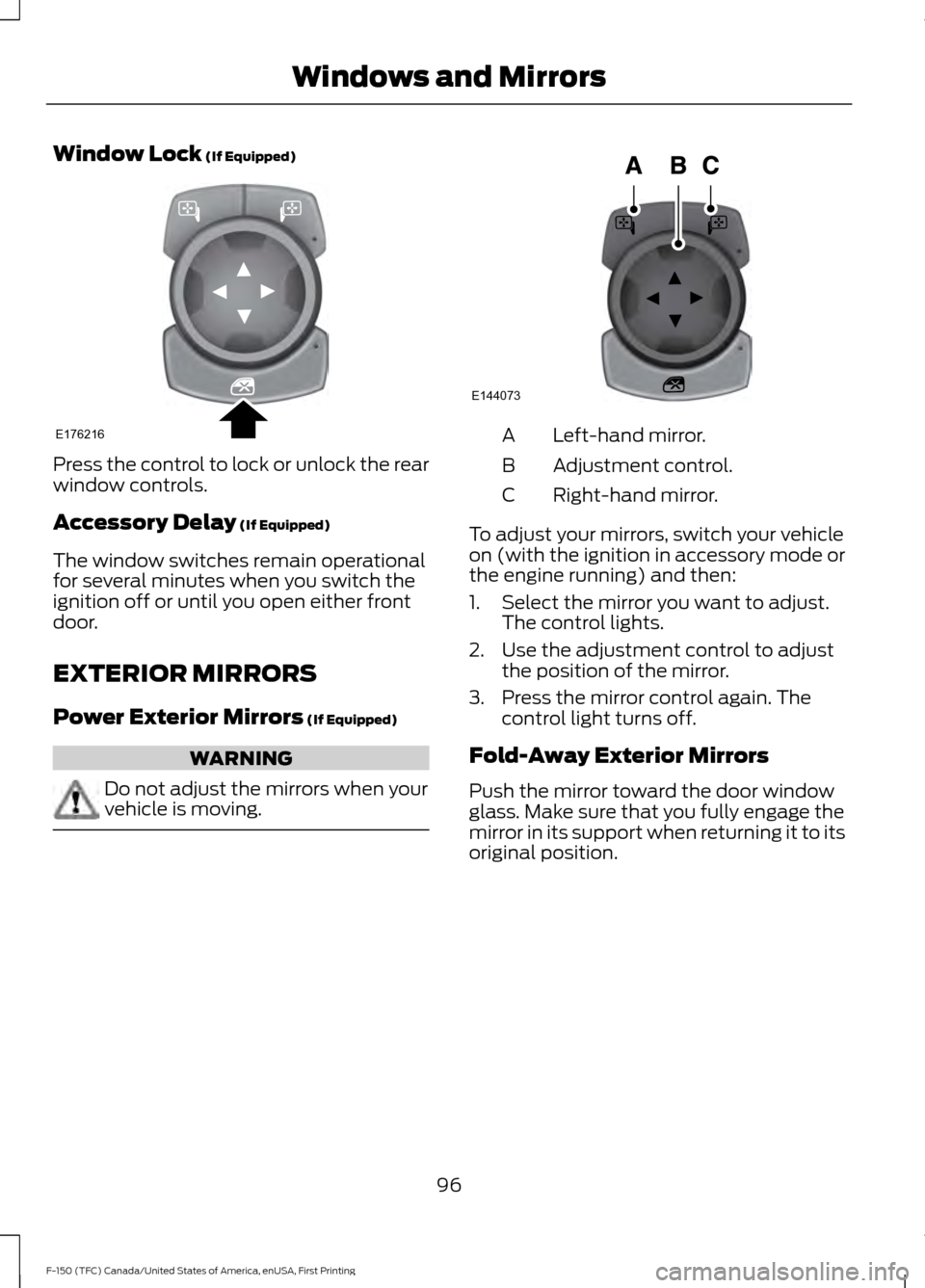
Window Lock (If Equipped)
Press the control to lock or unlock the rear
window controls.
Accessory Delay
(If Equipped)
The window switches remain operational
for several minutes when you switch the
ignition off or until you open either front
door.
EXTERIOR MIRRORS
Power Exterior Mirrors
(If Equipped) WARNING
Do not adjust the mirrors when your
vehicle is moving. Left-hand mirror.
A
Adjustment control.
B
Right-hand mirror.
C
To adjust your mirrors, switch your vehicle
on (with the ignition in accessory mode or
the engine running) and then:
1. Select the mirror you want to adjust. The control lights.
2. Use the adjustment control to adjust the position of the mirror.
3. Press the mirror control again. The control light turns off.
Fold-Away Exterior Mirrors
Push the mirror toward the door window
glass. Make sure that you fully engage the
mirror in its support when returning it to its
original position.
96
F-150 (TFC) Canada/United States of America, enUSA, First Printing Windows and MirrorsE176216 E144073
Page 101 of 599

To adjust your mirrors, make sure you
switch your vehicle on (with the ignition in
accessory mode or the engine running) and
then:
1. Press and release the control. It lights.
2. Press the adjustment control to
position the mirrors.
•Press the left arrow to extend the
mirrors out. Press the right arrow to
retract the mirrors in.
• Press the up or down arrow to fold
the mirrors toward the window
glass. Press the up or down arrow
again to fold the mirrors out.
Note: Moving the mirrors 10 or more times
within one minute, or repeated folding and
unfolding of the mirrors while holding the
control down during full travel, may disable
the system to protect the motors from
overheating. Wait approximately three
minutes with the vehicle running, and up to
10 minutes with the vehicle off, for the
system to reset and for function to return to
normal.
Heated Exterior Mirrors (If Equipped)
See Heated Windows and Mirrors (page
147
). Memory Mirrors
(If Equipped)
You can save and recall the mirror
positions through the memory function.
See
Memory Function (page 154).
Auto-dimming Feature
(If Equipped)
The driver exterior mirror automatically
dims when the interior auto-dimming
mirror turns on.
Direction Indicator Mirrors (If Equipped)
While the vehicle is running, the
forward-facing portion of the appropriate
mirror housing blinks when you switch on
the direction indicator.
Puddle Lamps
(If Equipped)
The lamps on the bottom part of the mirror
housing light when you use your
transmitter to unlock the doors or when
you open a door.
Clearance Lamps
(If Equipped)
The lower, outer part of the mirror housings
light when you switch the headlamps or
parking lamps on.
Spot Lamps
(If Equipped)
The area lights are on the forward-facing
portion of the mirror housing. You can
switch them on and off by using the
controls located on the instrument panel.
See
Lighting (page 87).
360-Degree Camera
(If Equipped)
Each mirror includes a camera.
Integrated Blind Spot Mirror
(If
Equipped) WARNING
Objects in the blind spot mirror are
closer than they appear.
98
F-150 (TFC) Canada/United States of America, enUSA, First Printing Windows and MirrorsE176218
Page 104 of 599
WARNINGS
When closing the moonroof, you
should verify that it is free of
obstructions and make sure that
children and pets are not in the proximity
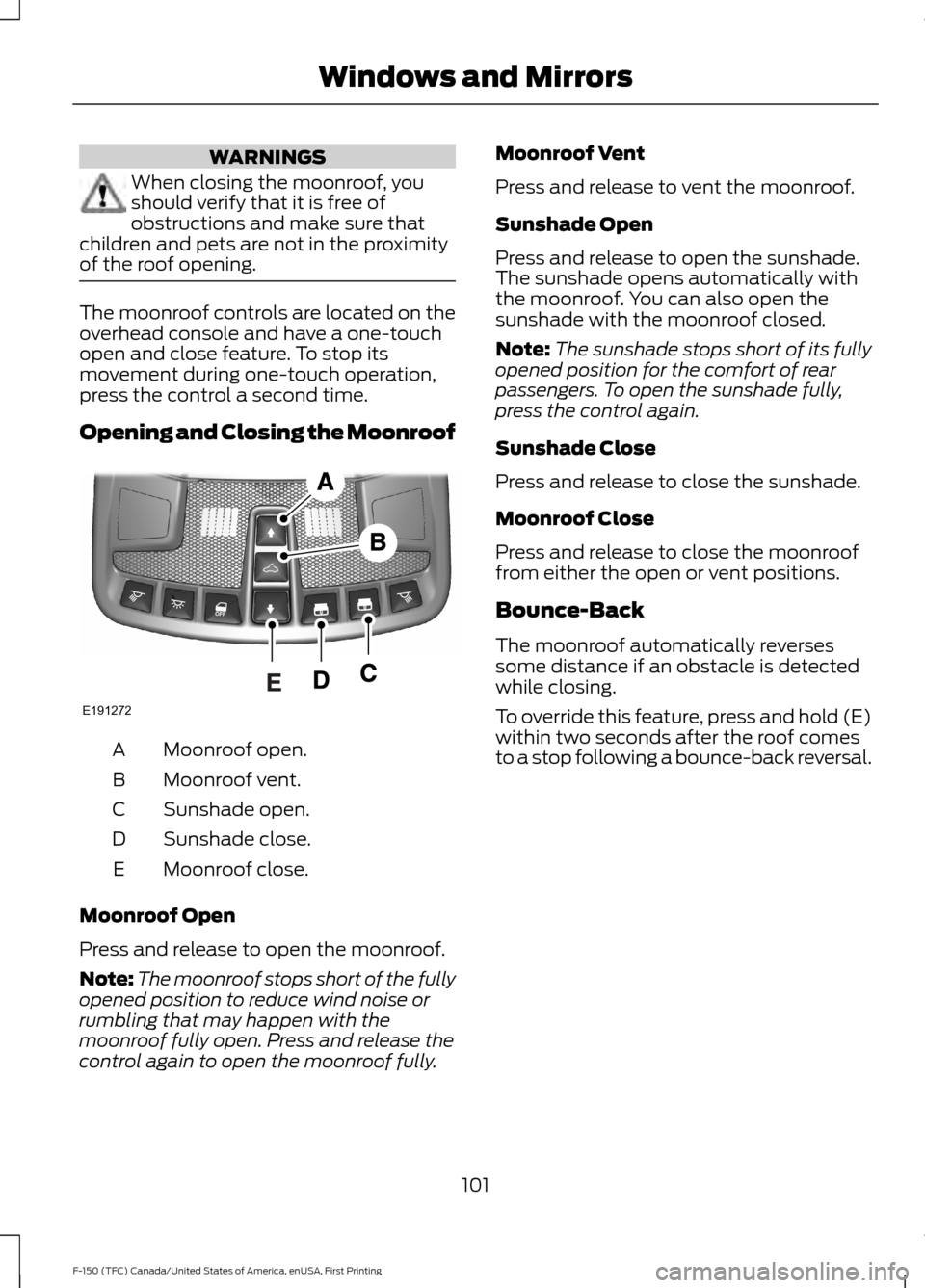
of the roof opening. The moonroof controls are located on the
overhead console and have a one-touch
open and close feature. To stop its
movement during one-touch operation,
press the control a second time.
Opening and Closing the Moonroof
Moonroof open.
A
Moonroof vent.
B
Sunshade open.
C
Sunshade close.
D
Moonroof close.
E
Moonroof Open
Press and release to open the moonroof.
Note: The moonroof stops short of the fully
opened position to reduce wind noise or
rumbling that may happen with the
moonroof fully open. Press and release the
control again to open the moonroof fully. Moonroof Vent
Press and release to vent the moonroof.
Sunshade Open
Press and release to open the sunshade.
The sunshade opens automatically with
the moonroof. You can also open the
sunshade with the moonroof closed.
Note:
The sunshade stops short of its fully
opened position for the comfort of rear
passengers. To open the sunshade fully,
press the control again.
Sunshade Close
Press and release to close the sunshade.
Moonroof Close
Press and release to close the moonroof
from either the open or vent positions.
Bounce-Back
The moonroof automatically reverses
some distance if an obstacle is detected
while closing.
To override this feature, press and hold (E)
within two seconds after the roof comes
to a stop following a bounce-back reversal.
101
F-150 (TFC) Canada/United States of America, enUSA, First Printing Windows and MirrorsE191272
Page 158 of 599
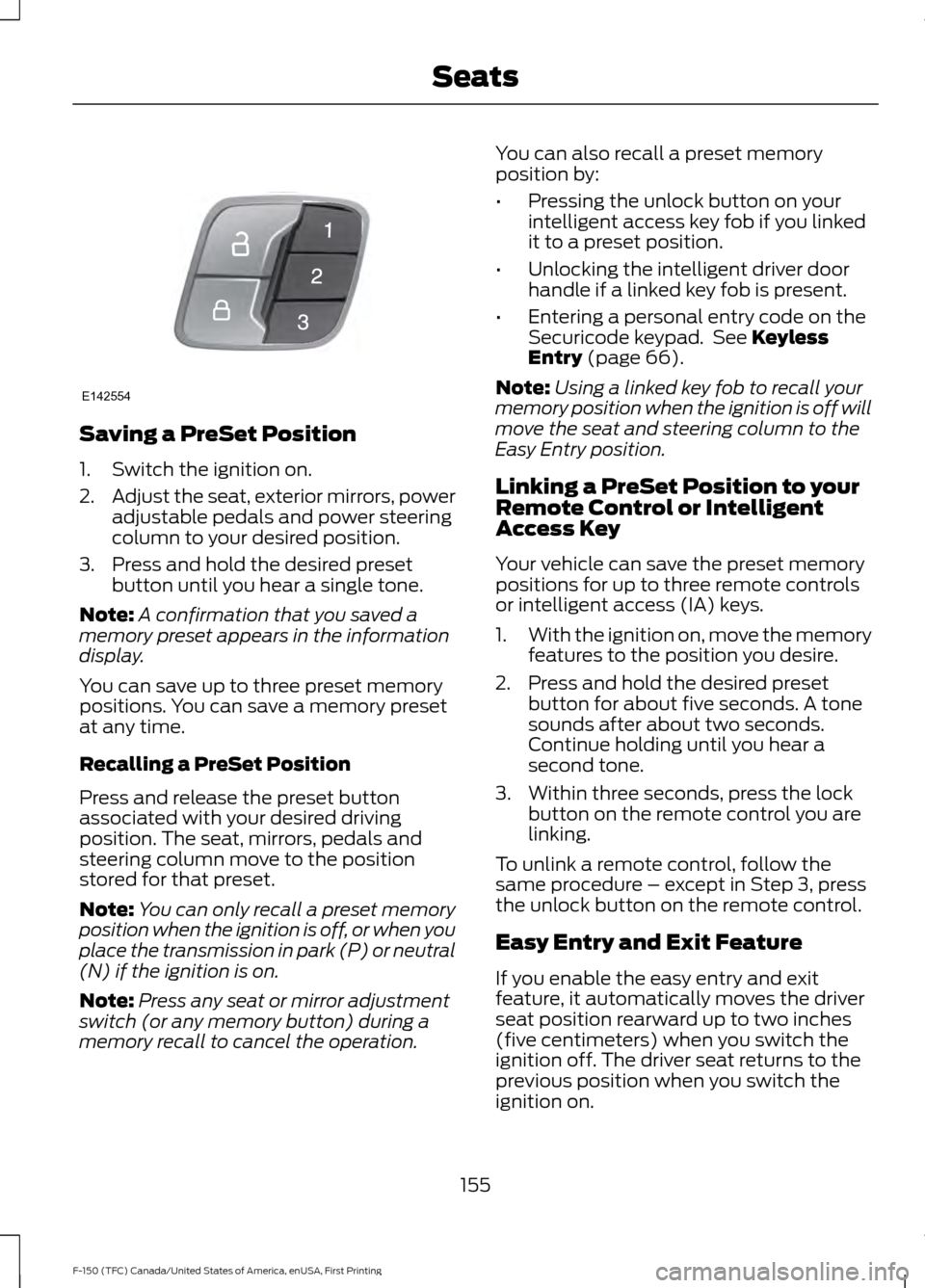
Saving a PreSet Position
1. Switch the ignition on.
2.
Adjust the seat, exterior mirrors, power
adjustable pedals and power steering
column to your desired position.
3. Press and hold the desired preset button until you hear a single tone.
Note: A confirmation that you saved a
memory preset appears in the information
display.
You can save up to three preset memory
positions. You can save a memory preset
at any time.
Recalling a PreSet Position
Press and release the preset button
associated with your desired driving
position. The seat, mirrors, pedals and
steering column move to the position
stored for that preset.
Note: You can only recall a preset memory
position when the ignition is off, or when you
place the transmission in park (P) or neutral
(N) if the ignition is on.
Note: Press any seat or mirror adjustment
switch (or any memory button) during a
memory recall to cancel the operation. You can also recall a preset memory
position by:
•
Pressing the unlock button on your
intelligent access key fob if you linked
it to a preset position.
• Unlocking the intelligent driver door
handle if a linked key fob is present.
• Entering a personal entry code on the
Securicode keypad. See Keyless
Entry (page 66).
Note: Using a linked key fob to recall your
memory position when the ignition is off will
move the seat and steering column to the
Easy Entry position.
Linking a PreSet Position to your
Remote Control or Intelligent
Access Key
Your vehicle can save the preset memory
positions for up to three remote controls
or intelligent access (IA) keys.
1. With the ignition on, move the memory
features to the position you desire.
2. Press and hold the desired preset button for about five seconds. A tone
sounds after about two seconds.
Continue holding until you hear a
second tone.
3. Within three seconds, press the lock button on the remote control you are
linking.
To unlink a remote control, follow the
same procedure – except in Step 3, press
the unlock button on the remote control.
Easy Entry and Exit Feature
If you enable the easy entry and exit
feature, it automatically moves the driver
seat position rearward up to two inches
(five centimeters) when you switch the
ignition off. The driver seat returns to the
previous position when you switch the
ignition on.
155
F-150 (TFC) Canada/United States of America, enUSA, First Printing SeatsE142554
Page 593 of 599
Recommended Settings for Cooling..........146
Recommended Settings for Heating..........146
Side Window Defogging in Cold
Weather............................................................. 147
Hints on Driving With Anti-Lock Brakes...........................................................203
Home Screen.................................................472
Hood Lock See: Opening and Closing the Hood............317
I
Ignition Switch
...............................................168
In California (U.S. Only).............................301
Information Display Control
.......................83
Information Displays....................................110
General Information........................................... 110
Information Messages
................................126
4WD........................................................................\
140
Active Park............................................................. 127
Adaptive Cruise Control.................................... 127
AdvanceTrac and Traction Control..............128
Airbag...................................................................... 128
Alarm and Security............................................ 128
Battery and Charging System........................ 129
Blind Spot Information and Cross Traffic Alert System.................................................... 129
Collision Warning System............................... 130
Doors and Locks................................................. 130
Driver Alert.............................................................. 131
Drivetrain................................................................. 131
Engine....................................................................... 131
Fuel........................................................................\
... 132
Keys and Intelligent Access............................ 132
Lane Keeping System........................................ 133
Maintenance......................................................... 133
MyKey...................................................................... 134
Off Road................................................................. 134
Park Aid.................................................................. 135
Park Brake.............................................................. 135
Power Steering.................................................... 136
Pro Trailer Backup Assist................................. 136
Remote Start........................................................ 137
Seats....................................................................... 138
Side-Wind............................................................. 138
Starting System ................................................. 138
Tire Pressure Monitoring System.................. 139
Trailer....................................................................... 139Installing Child Restraints.............................17
Child Seats............................................................... 17
Combining Seatbelt and LATCH Lower Anchors for Attaching Child Safety
Seats.................................................................... 26
Front Seat Tether Strap Attachment (Regular Cab).................................................... 27
Rear Seat Tether Strap Attachment (Crew Cab and Super Cab)...................................... 28
Use of Inboard Lower Anchors from the Outboard Seating Positions (Center
Seating Use) ..................................................... 25
Using Inflatable Seatbelts (Rear Seat Outboard Positions)....................................... 22
Using Lap and Shoulder Belts (Except Front Center Position of Super Cab and Crew
Cab)...................................................................... 18
Using Lap and Shoulder Belts (Front Center Position of Super Cab and Crew
Cab)..................................................................... 20
Using Lower Anchors and Tethers for CHildren (LATCH)........................................... 24
Using Tether Straps............................................. 26
Instrument Cluster
.......................................102
Instrument Lighting Dimmer.....................88
Interior Lamps
.................................................92
Front Interior Lamps........................................... 92
Rear Interior Lamps............................................. 94
Interior Mirror
...................................................99
Auto-Dimming Mirror......................................... 99
Introduction.........................................................7
J
Jump Starting the Vehicle........................295 Connecting the Jumper Cables.................... 295
Jump Starting..................................................... 296
Preparing Your Vehicle.....................................295
Removing the Jumper Cables....................... 296
K
Keyless Entry...................................................66 SECURICODE™ KEYLESS ENTRY
KEYPAD.............................................................. 66
Keyless Starting............................................168 Ignition Modes..................................................... 169
Keys and Remote Controls.........................53
590
F-150 (TFC) Canada/United States of America, enUSA, First Printing Index