Page 84 of 599
Use the control on the side of the steering
column to adjust the position.
To adjust:
•
tilt: press the top or bottom of the
control
• telescope: press the front or rear of the
control.
Memory Feature
You can save and recall the steering
column position with the memory function.
See Memory Function (page 154).
Pressing the adjustment control during
memory recall cancels the operation. The
column responds to the adjustment
control. Easy Entry and Exit Feature
The column moves to the full up and in
position when you switch the ignition off.
It returns to the previous setting when you
switch the ignition on. You can enable or
disable this feature in the information
display.
AUDIO CONTROL
(If Equipped)
You can operate the following functions
with the control: Volume up.
A
Media.
B
Seek up or next.
C
Volume down.
D
Seek down or previous.
E
Media
Press repeatedly to scroll through available
audio modes.
Seek, Next or Previous
Press the seek button to:
• Tune the radio to the next or previous
stored preset.
• Play the next or previous track.
81
F-150 (TFC) Canada/United States of America, enUSA, First Printing Steering WheelE180535 E191327
Page 85 of 599
Press and hold the seek button to:
•
Tune the radio to the next station up
or down the frequency band.
• Seek through a track.
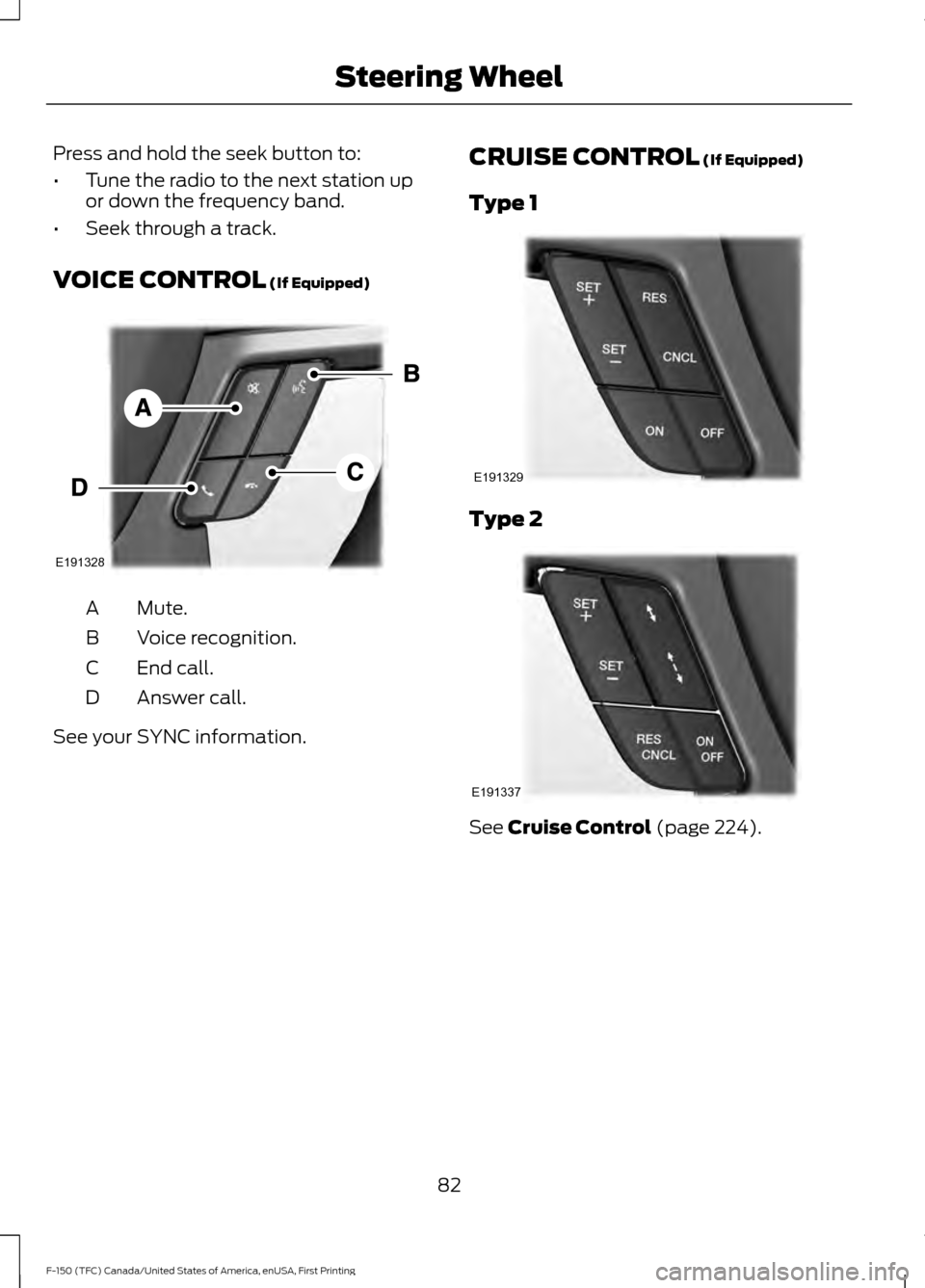
VOICE CONTROL (If Equipped) Mute.
A
Voice recognition.
B
End call.
C
Answer call.
D See your SYNC information. CRUISE CONTROL
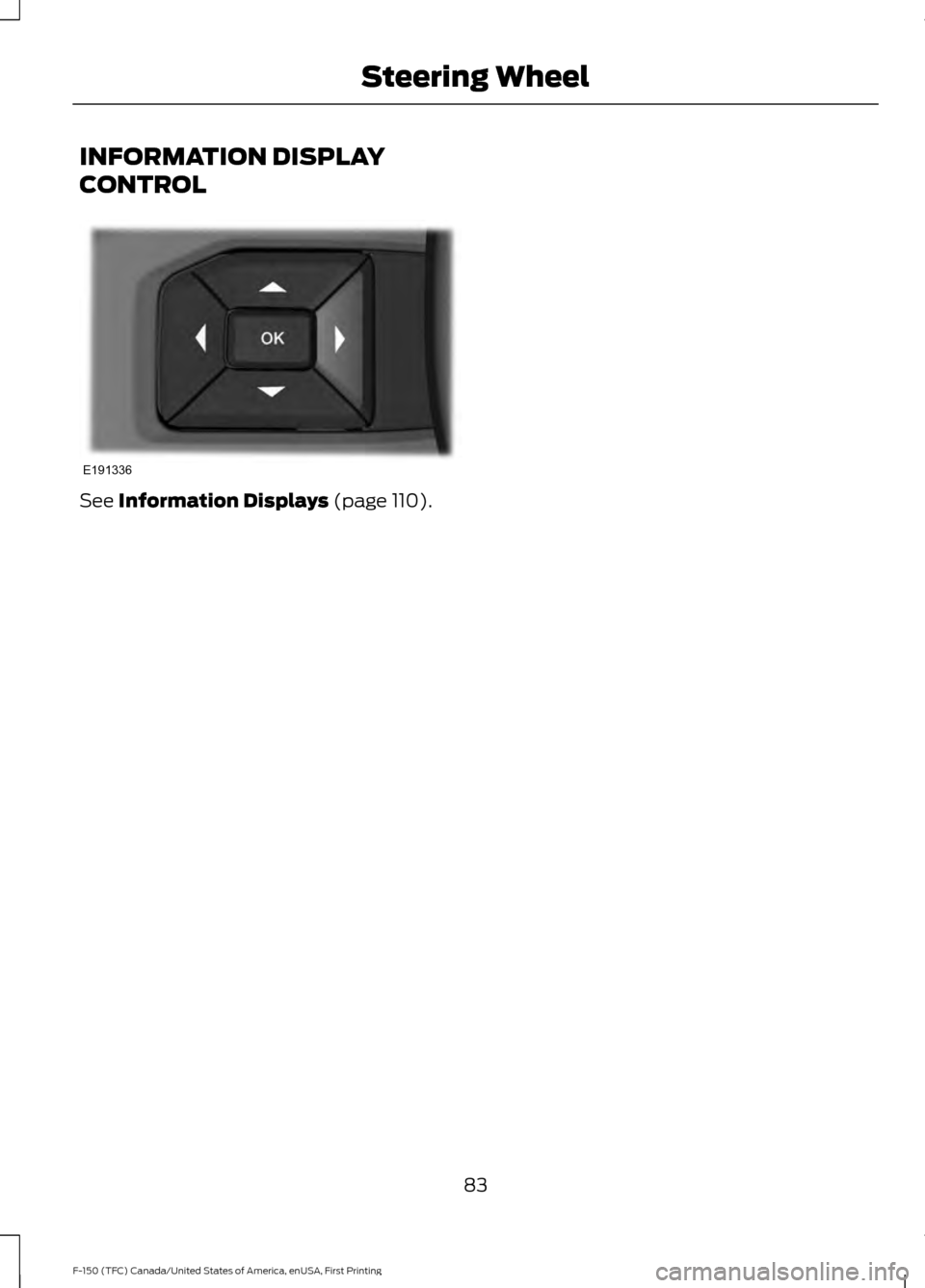
(If Equipped)
Type 1 Type 2
See
Cruise Control (page 224).
82
F-150 (TFC) Canada/United States of America, enUSA, First Printing Steering WheelE191328 E191329 E191337
Page 86 of 599
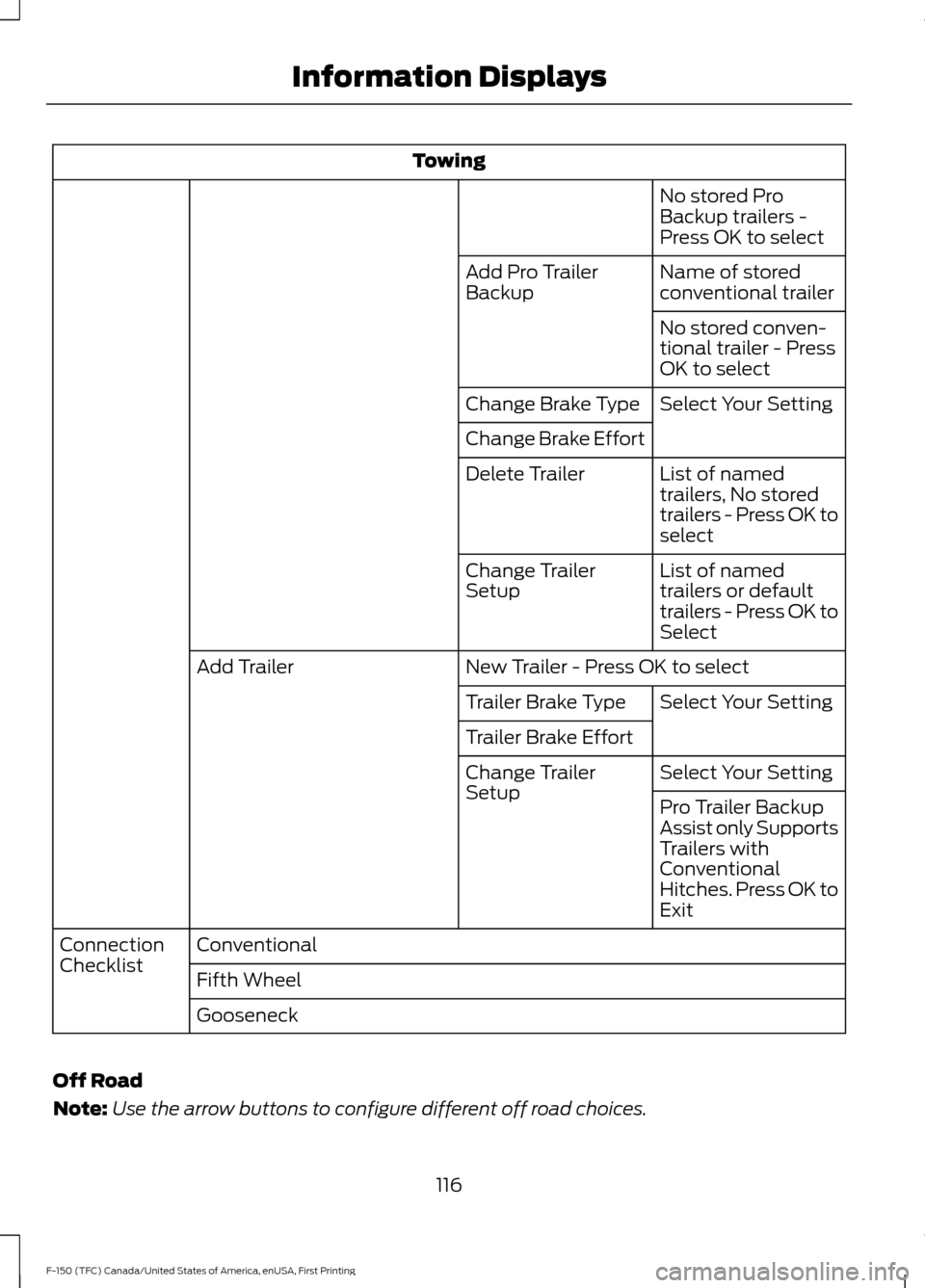
INFORMATION DISPLAY
CONTROL
See Information Displays (page 110).
83
F-150 (TFC) Canada/United States of America, enUSA, First Printing Steering WheelE191336
Page 109 of 599

If it illuminates when you are driving, check
that you do not have the parking brake
engaged. If you do not have the parking
brake engaged, this indicates low brake
fluid level or a brake system malfunction.
Have the system checked immediately by
an authorized dealer.
WARNING
Driving your vehicle with the warning
lamp on is dangerous. A significant
decrease in braking performance
may occur. It will take you longer to stop
your vehicle. Have your vehicle checked by
your authorized dealer immediately. Driving
extended distances with the parking brake
engaged can cause brake failure and the
risk of personal injury. Check 4X4 (If Equipped)
Illuminates with the message
CHECK 4X4 when a four-wheel
drive fault is present. See
Using
Four-Wheel Drive (page 193).
Cruise Control
(If Equipped) Illuminates gray or green when
you switch this feature on. See
Using Cruise Control
(page
224).
Direction Indicator Illuminates when the left or right
turn signal or the hazard warning
flasher is turned on. If the
indicators stay on or flash faster, check for
a burned out bulb.
Door Ajar Displays when the ignition is on
and any door is not completely
closed. Electronic Locking Differential Illuminates when using the
electronic locking differential.
Electric Park Brake
(If Equipped) It will illuminate or flash when
the electric parking brake has a
malfunction. See
Electric
Parking Brake (page 204).
Engine Coolant Temperature Illuminates when the engine
coolant temperature is high.
Stop the vehicle as soon as
possible, switch off the engine and let cool.
See
Engine Coolant Check (page 323).
Engine Oil If it illuminates with the engine
running or when you are driving,
this indicates a malfunction.
Stop your vehicle as soon as it is safe to
do so and switch the engine off. Check the
engine oil level. See
Engine Oil Check
(page 322).
Note: Do not resume your journey if it
illuminates despite the level being correct.
Have the system checked by your authorized
dealer immediately.
Fasten Safety Belt It will illuminate and a chime will
sound to remind you to fasten
your safety belt.
Four-Wheel Drive Indicators
(If
Equipped)
Note: Some indicators will appear different
depending on vehicle options.
106
F-150 (TFC) Canada/United States of America, enUSA, First Printing Instrument Cluster E71340 E163170 E146190
Page 110 of 599

Illuminates momentarily when you select
two-wheel drive high.
Illuminates when the automatic
four-wheel drive system is engaged.
Illuminates when four-wheel drive low is
engaged.
Illuminates when four-wheel drive high is
engaged.
Front Airbag
If it fails to illuminate when you
start your vehicle, continues to
flash or remains on, it indicates
a malfunction. Have the system checked
by an authorized dealer.
Front Fog Lamps (If Equipped) It will illuminate when you switch
the front fog lamps on.
High Beam Illuminates when you switch the
high beam headlamps on. It will
flash when you use the
headlamp flasher. Hill Descent
(If Equipped) Illuminates when hill descent is
switched on.
Low Fuel Level Illuminates when the fuel level
is low or the fuel tank is nearly
empty. Refuel as soon as
possible.
Low Tire Pressure Warning Illuminates when your tire
pressure is low. If the lamp
remains on with the engine
running or when driving, check your tire
pressure as soon as possible.
It will also illuminate momentarily when
you switch the ignition on to confirm the
lamp is functional. If it does not illuminate
when you switch the ignition on, or begins
to flash at any time, have the system
checked by your authorized dealer.
Parking Lamps It will illuminate when you switch
the parking lamps on.
Powertrain Malfunction/Reduced
Power/Electronic Throttle Control Illuminates when the system has
detected a powertrain or an
all-wheel drive fault. Contact an
authorized dealer as soon as possible.
107
F-150 (TFC) Canada/United States of America, enUSA, First Printing Instrument ClusterE163173 E181778 E181781 E181780 E181779 E163171
Page 113 of 599
GENERAL INFORMATION
WARNING
Driving while distracted can result in
loss of vehicle control, crash and
injury. We strongly recommend that
you use extreme caution when using any
device that may take your focus off the
road. Your primary responsibility is the safe
operation of your vehicle. We recommend
against the use of any hand-held device
while driving and encourage the use of
voice-operated systems when possible.
Make sure you are aware of all applicable
local laws that may affect the use of
electronic devices while driving. Various systems on your vehicle can be
controlled using the information display
controls on the steering wheel.
Corresponding information is displayed in
the information display.
Note:
Some options may appear slightly
different or not at all if the items are
optional.
Note: Trailer options are not available if
your vehicle speed is greater than 3 mph
(5 km/h).
Note: Some MyKey menu options only
appear if MyKey is enabled and at least one
MyKey is programmed. This icon gives you the ability to
switch a feature on or off. A
check in the box indicates the
feature is enabled, and unchecked
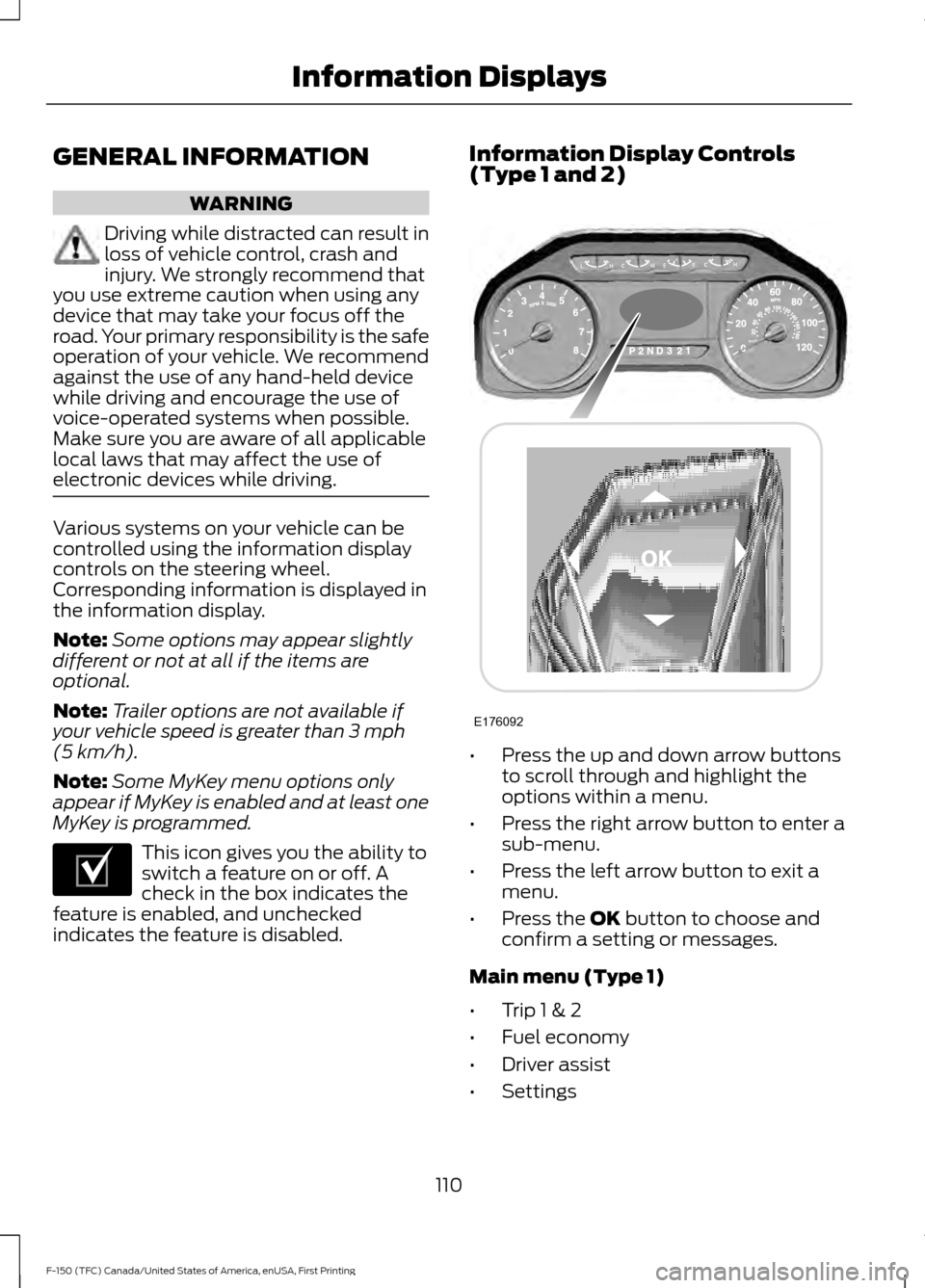
indicates the feature is disabled. Information Display Controls
(Type 1 and 2)
•
Press the up and down arrow buttons
to scroll through and highlight the
options within a menu.
• Press the right arrow button to enter a
sub-menu.
• Press the left arrow button to exit a
menu.
• Press the
OK button to choose and
confirm a setting or messages.
Main menu (Type 1)
• Trip 1 & 2
• Fuel economy
• Driver assist
• Settings
110
F-150 (TFC) Canada/United States of America, enUSA, First Printing Information DisplaysE204495 E176092
Page 114 of 599

Trip 1 & 2
Note:
Use the arrow buttons to choose between the following trip options. Trip 1 & 2
Digital Speed - Press OK for km/h
Trip Odometer
Trip Timer
DTE
Average Fuel
• Digital Speed - Shows a digital display of your vehicle speed.
• Trip Odometer - Registers the mileage of individual journeys.
• Trip Timer - Registers the time of individual journeys.
• DTE - Shows the approximate distance your vehicle can travel before running out of
fuel.
• Average Fuel - Shows the average fuel economy for a given trip.
Note: Press and hold OK to reset the currently displayed trip information.
Fuel Economy
Note: Use the arrow buttons to choose the desired fuel economy display. Fuel Economy
Distance to E
Instant Fuel Economy
Average Fuel Economy
Auto StartStop status
• Distance to E - Shows the approximate distance your vehicle can travel before running
out of fuel.
• Instant Fuel Economy - Shows your instantaneous fuel usage.
• Average Fuel Economy - Shows the average fuel usage based on time. Press and hold
OK to reset this value.
• Auto StartStop status - Shows the current status of the auto startstop system.
Note: You can reset your average fuel economy by pressing and holding the
OK button on
the left hand steering wheel controls.
111
F-150 (TFC) Canada/United States of America, enUSA, First Printing Information Displays
Page 119 of 599
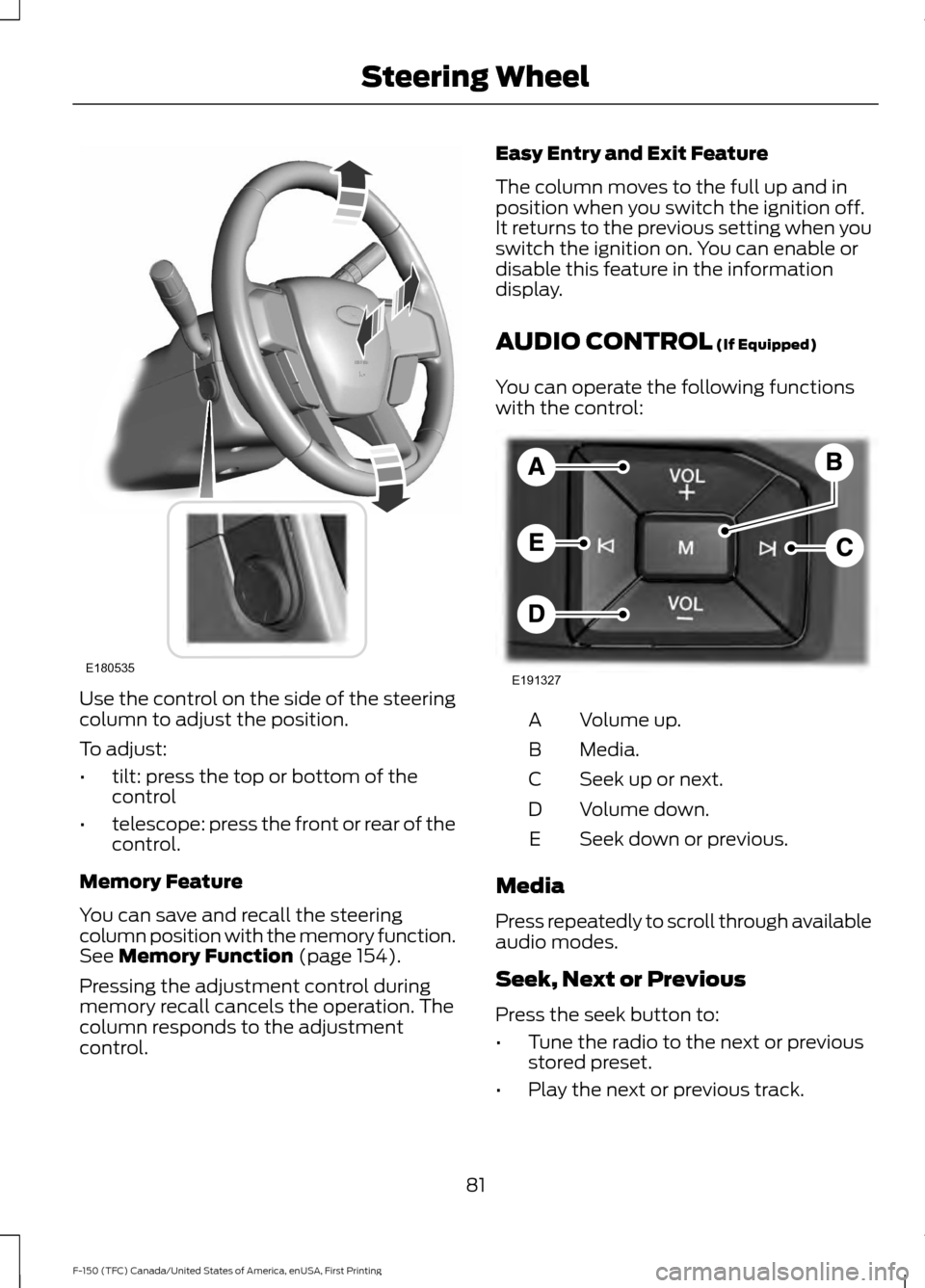
Towing
No stored Pro
Backup trailers -
Press OK to select
Name of stored
conventional trailer
Add Pro Trailer
Backup
No stored conven-
tional trailer - Press
OK to select
Select Your Setting
Change Brake Type
Change Brake Effort
List of named
trailers, No stored
trailers - Press OK to
select
Delete Trailer
List of named
trailers or default
trailers - Press OK to
Select
Change Trailer
Setup
New Trailer - Press OK to select
Add Trailer
Select Your Setting
Trailer Brake Type
Trailer Brake Effort
Select Your Setting
Change Trailer
Setup
Pro Trailer Backup
Assist only Supports
Trailers with
Conventional
Hitches. Press OK to
Exit
Conventional
Connection
Checklist
Fifth Wheel
Gooseneck
Off Road
Note: Use the arrow buttons to configure different off road choices.
116
F-150 (TFC) Canada/United States of America, enUSA, First Printing Information Displays