2017 FORD F150 instrument cluster
[x] Cancel search: instrument clusterPage 5 of 599
Anti-Theft Alarm............................................76
Power Running Boards
Using Power Running Boards....................78
Steering Wheel
Adjusting the Steering Wheel...................80
Audio Control
...................................................81
Voice Control
...................................................82
Cruise Control..................................................82
Information Display Control
.......................83
Pedals
Adjusting the Pedals....................................84
Wipers and Washers
Windshield Wipers........................................85
Autowipers.......................................................85
Windshield Washers.....................................86
Lighting
Lighting Control
..............................................87
Autolamps........................................................87
Instrument Lighting Dimmer.....................88
Daytime Running Lamps
............................89
Automatic High Beam Control.................89
Front Fog Lamps.............................................91
Direction Indicators
........................................91
Spot Lamps
.......................................................91
Interior Lamps
.................................................92
Ambient Lighting
...........................................94
Windows and Mirrors
Power Windows
.............................................95
Exterior Mirrors
................................................96
Interior Mirror
...................................................99
Sliding Windows..........................................100
Sun Visors
.......................................................100
Moonroof........................................................100 Instrument Cluster
Gauges
..............................................................
102
Warning Lamps and Indicators...............105
Audible Warnings and Indicators...........108
Information Displays
General Information.....................................110
Information Messages
................................126
Climate Control
Manual Climate Control..............................141
Automatic Climate Control
.......................143
Hints on Controlling the Interior Climate.........................................................144
Heated Windows and Mirrors
...................147
Cabin Air Filter
................................................147
Remote Start.................................................148
Seats
Sitting in the Correct Position..................149
Head Restraints
............................................149
Manual Seats
..................................................151
Power Seats
....................................................152
Memory Function
.........................................154
Rear Seats.......................................................156
Heated Seats
.................................................156
Climate Controlled Seats...........................157
Front Seat Armrest......................................159
Rear Seat Armrest........................................159
Universal Garage Door Opener
Universal Garage Door Opener...............160
Auxiliary Power Points
Auxiliary Power Points................................164
Storage Compartments
Center Console
..............................................166
2
F-150 (TFC) Canada/United States of America, enUSA, First Printing Table of Contents
Page 8 of 599

Cleaning Products......................................340
Cleaning the Exterior...................................341
Waxing.............................................................342
Cleaning the Engine....................................342
Cleaning the Windows and Wiper Blades..........................................................343
Cleaning the Interior...................................343
Cleaning the Instrument Panel and Instrument Cluster Lens.......................344
Cleaning Leather Seats.............................344
Repairing Minor Paint Damage
..............345
Cleaning the Wheels
..................................346
Vehicle Storage
............................................346
Wheels and Tires
General Information...................................349
Tire Care
...........................................................351
Using Snow Chains.....................................366
Tire Pressure Monitoring System
...........367
Changing a Road Wheel............................372
Technical Specifications
..........................380
Capacities and Specific- ations
Engine Specifications - 2.7L EcoBoost™.................................................381
Engine Specifications - 3.5L.....................381
Engine Specifications - 3.5L Ecoboost™................................................382
Engine Specifications - 5.0L...................383
Motorcraft Parts - 2.7L EcoBoost™
......383
Motorcraft Parts - 3.5L..............................384
Motorcraft Parts - 3.5L Ecoboost™......385
Motorcraft Parts - 5.0L
.............................385
Vehicle Identification Number
...............386
Vehicle Certification Label.......................387
Transmission Code Designation............387
Capacities and Specifications - 2.7L EcoBoost™...............................................388
Capacities and Specifications - 3.5L....392 Capacities and Specifications - 3.5L
Ecoboost™................................................396
Capacities and Specifications - 5.0L..............................................................400
Audio System
General Information...................................405
Audio Unit - Vehicles With: AM/FM......406
Audio Unit - Vehicles With: AM/FM/ CD.................................................................408
Audio Unit - Vehicles With: AM/FM/ SYNC..............................................................411
Audio Unit - Vehicles With: AM/FM/CD/ SYNC/Satellite Radio
.............................413
Audio Unit - Vehicles With: Sony AM/FM/ CD...................................................................415
Digital Radio
...................................................417
Satellite Radio
...............................................419
USB Port
..........................................................422
Media Hub
......................................................422
SYNC™
General Information
...................................423
Using Voice Recognition...........................425
Using SYNC™ With Your Phone
............427
SYNC™ Applications and Services......439
Using SYNC™ With Your Media Player...........................................................444
SYNC™ Troubleshooting.........................453
SYNC™ 3
General Information
....................................461
Home Screen
.................................................472
Using Voice Recognition............................473
Entertainment..............................................480
Climate...........................................................490
Phone...............................................................492
Navigation......................................................498
Apps
.................................................................506
Settings...........................................................509
SYNC™ 3 Troubleshooting.......................521
5
F-150 (TFC) Canada/United States of America, enUSA, First Printing Table of Contents
Page 52 of 599

•
Objects hanging off the seatback.
• Objects stowed in the seatback map
pocket.
• Objects placed on the occupant's lap.
• Cargo interference with the seat
• Other passengers pushing or pulling on
the seat.
• Rear passenger feet and knees resting
or pushing on the seat.
The conditions listed above may cause the
weight of a properly seated occupant to
be incorrectly interpreted by the front
passenger sensing system. The person in
the front passenger seat may appear
heavier or lighter due to the conditions
described in the previous list. Make sure the front passenger
sensing system is operating
properly. See Crash Sensors
and Airbag Indicator (page 51).
If the airbag readiness light is lit, do the
following:
The driver and adult passengers should
check for objects lodged underneath the
front passenger seat or cargo interfering
with the seat.
If objects are lodged or cargo is interfering
with the seat, please take the following
steps to remove the obstruction:
• Pull your vehicle over.
• Turn your vehicle off.
• Driver or adult passengers should
check for any objects lodged
underneath the front passenger seat
or cargo interfering with the seat.
• Remove the obstruction(s) (if found).
• Restart your vehicle. •
Wait at least two minutes and verify
that the airbag readiness light in the
instrument cluster is no longer
illuminated.
• If the airbag readiness light in the
instrument cluster remains illuminated,
this may or may not be a problem due
to the front passenger sensing system.
Do not attempt to repair or service the
system. Take your vehicle immediately to
an authorized dealer.
If it is necessary to modify an advanced
front airbag system to accommodate a
person with disabilities, contact the Ford
Customer Relationship Center.
SIDE AIRBAGS WARNINGS
Do not place objects or mount
equipment on or near the airbag
cover, on the side of the seatbacks
(of the front seats), or in front seat areas
that may come into contact with a
deploying airbag. Failure to follow these
instructions may increase the risk of
personal injury in the event of a crash. Do not use accessory seat covers.
The use of accessory seat covers
may prevent the deployment of the
side airbags and increase the risk of injury
in an accident. Do not lean your head on the door.
The side airbag could injure you as it
deploys from the side of the
seatback. Do not attempt to service, repair, or
modify the airbag, its fuses or the
seat cover on a seat containing an
airbag as you could be seriously injured or
killed. Contact your authorized dealer as
soon as possible.
49
F-150 (TFC) Canada/United States of America, enUSA, First Printing Supplementary Restraints System
Page 55 of 599

Your vehicle has a collection of crash and
occupant sensors which provide
information to the restraints control
module which deploys (activates) the
front safety belt pretensioners, optional
rear inflatable safety belts, driver airbag,
passenger airbag, seat mounted side
airbags, and the Safety Canopy®. Based
on the type of crash (frontal impact, side
impact or rollover), the restraints control
module will deploy the appropriate safety
devices.
The restraints control module also
monitors the readiness of the above safety
devices plus the crash and occupant
sensors. The readiness of the safety
system is indicated by a warning indicator
light in the instrument cluster or by a
backup tone if the warning light is not
working. See Instrument Cluster (page
102). Routine maintenance of the airbag is
not required.
A difficulty with the system is indicated by
one or more of the following: The readiness light will not
illuminate immediately after the
ignition is turned on.
• The readiness light will either flash or
stay lit.
• A series of five beeps will be heard. The
tone pattern will repeat periodically
until the problem, the light or both are
repaired.
If any of these things happen, even
intermittently, have the supplemental
restraint system serviced at an authorized
dealer immediately. Unless serviced, the
system may not function properly in the
event of a crash. The fact that the safety belt pretensioners
or front airbags did not activate for both
front seat occupants in a crash does not
mean that something is wrong with the
system. Rather, it means the restraints
control module determined the accident
conditions (crash severity, belt usage)
were not appropriate to activate these
safety devices.
•
The design of the front airbags is to
activate only in frontal and near-frontal
crashes (not rollovers, side impacts or
rear impacts unless the crash causes
sufficient frontal deceleration).
• The design of the safety belt
pretensioners and optional rear
inflatable safety belts is to activate in
frontal, near-frontal and side crashes,
and in rollovers.
• The design of the side airbags is to
inflate in certain side impact crashes.
Side airbags may activate in other
types of crashes if the vehicle
experiences sufficient sideways motion
or deformation.
• The design of the Safety Canopy is to
inflate in certain side impact crashes
or rollover events. The Safety Canopy
may activate in other types of crashes
if the vehicle experiences sufficient
sideways motion or deformation, or a
certain likelihood of rollover.
AIRBAG DISPOSAL
Contact your authorized dealer as soon as
possible. Airbags must be disposed of by
qualified personnel.
52
F-150 (TFC) Canada/United States of America, enUSA, First Printing Supplementary Restraints System
Page 89 of 599

Use the rotary control to adjust the
sensitivity of the rain sensor. With low
sensitivity, the wipers will operate when
the sensor detects a large amount of
moisture on the windshield. With high
sensitivity, the wipers will operate when
the sensor detects a small amount of
moisture on the windshield. Adjust the
rotary control toward the windshield to
increase the moisture sensitivity.
Keep the outside of the windshield clean
because the rain sensor is very sensitive. If
the area around the interior mirror is dirty,
then the wipers may turn on, for example,
if dirt, mist or insects hit the windshield.
The courtesy wipe feature turns on after
using the windshield washers to remove
any excess washer fluid and debris.
Note:
You can adjust the courtesy wipe
settings in the instrument cluster. See
Information Displays (page 110).
WINDSHIELD WASHERS
Note: Do not operate the wipers on a dry
windshield. This may scratch the glass,
damage the wiper blades or cause the wiper
motor to burn out. Always use the
windshield washer before wiping a dry
windshield.
Note: Do not operate the washers when
the washer reservoir is empty. This may
cause the washer pump to overheat. •
A brief press causes a single wipe
without washer fluid.
• A brief press and hold causes the
wipers to swipe three times with
washer fluid.
• A long press and hold will turn on the
wipers and washer fluid for up to 10
seconds.
A wipe will occur a few seconds after
washing to clear any remaining washer
fluid. You can switch this feature on or off
in the information display. See
Information Displays
(page 110).
86
F-150 (TFC) Canada/United States of America, enUSA, First Printing Wipers and WashersE172818
Page 105 of 599
GAUGES
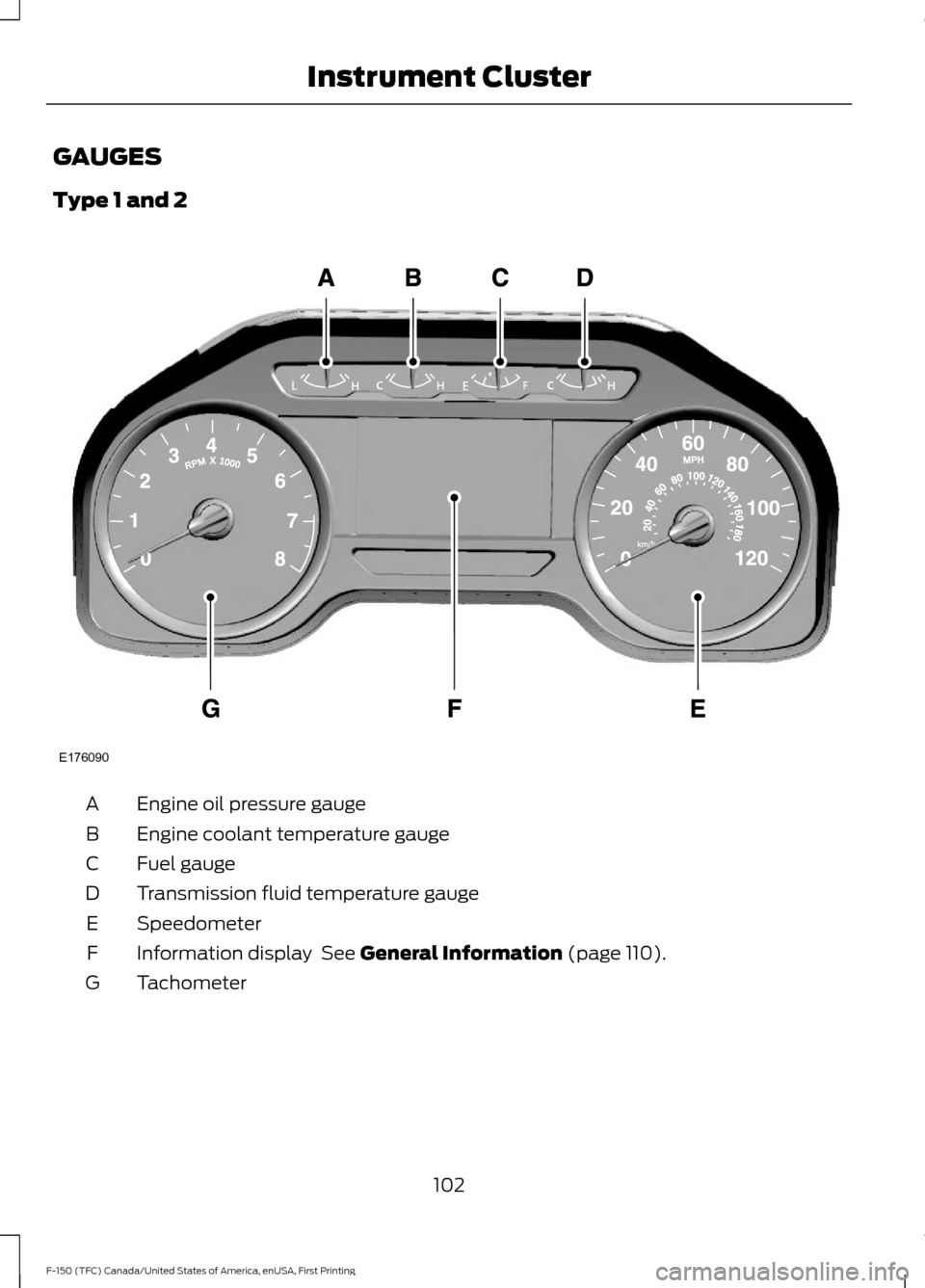
Type 1 and 2
Engine oil pressure gauge
A
Engine coolant temperature gauge
B
Fuel gauge
C
Transmission fluid temperature gauge
D
Speedometer
E
Information display See General Information (page 110).
F
Tachometer
G
102
F-150 (TFC) Canada/United States of America, enUSA, First Printing Instrument ClusterE176090
Page 106 of 599
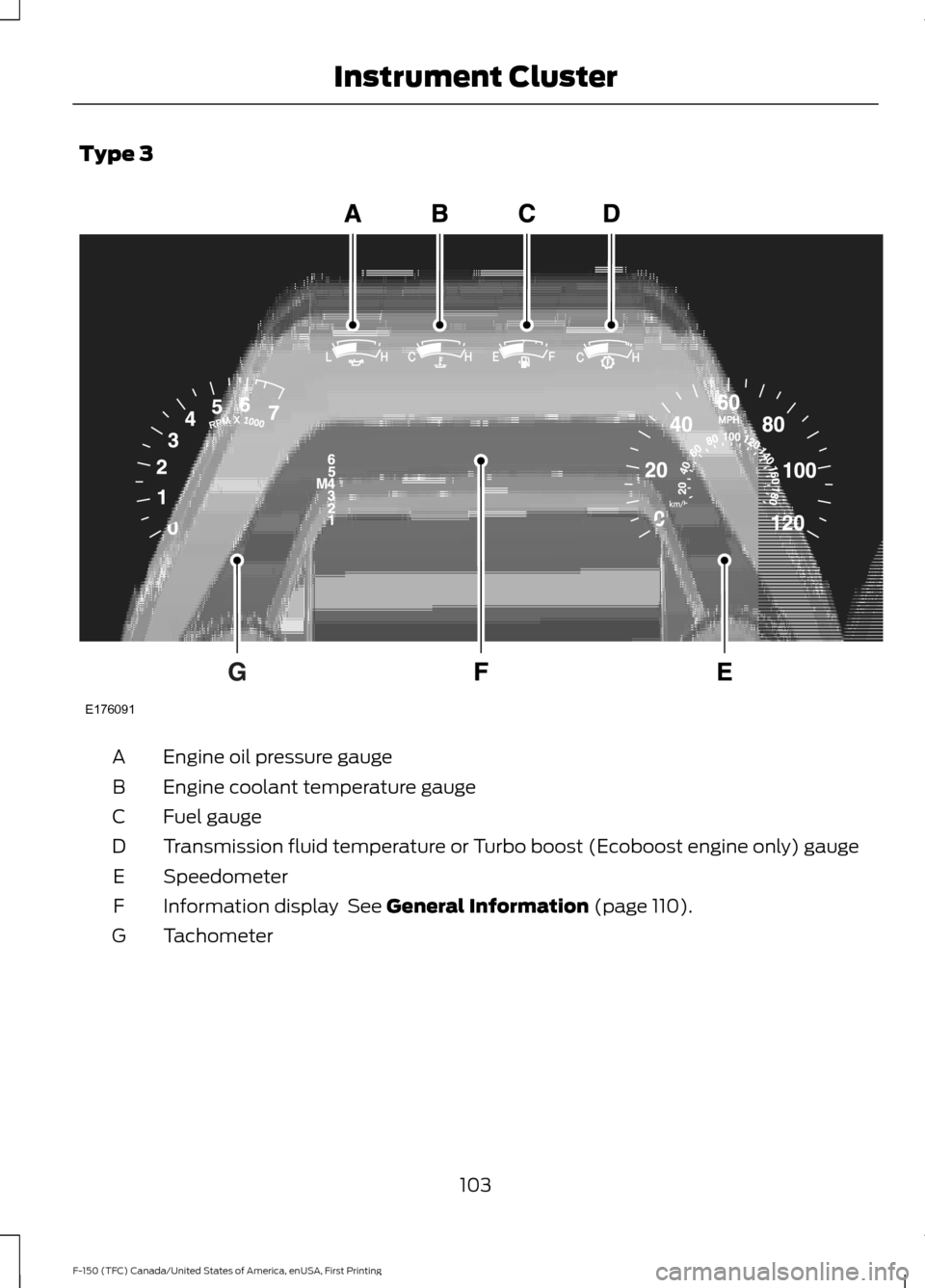
Type 3
Engine oil pressure gauge
A
Engine coolant temperature gauge
B
Fuel gauge
C
Transmission fluid temperature or Turbo boost (Ecoboost engine only) gauge
D
Speedometer
E
Information display See General Information (page 110).
F
Tachometer
G
103
F-150 (TFC) Canada/United States of America, enUSA, First Printing Instrument ClusterE176091
Page 107 of 599

Engine Oil Pressure Gauge
Indicates engine oil pressure. The needle
should stay in the normal operating range
(between L and H). If the needle falls
below the normal range, stop your vehicle,
turn off the engine and check the engine
oil level. Add oil if needed. If the oil level is
correct, have your vehicle checked by an
authorized dealer.
Engine Coolant Temperature
Gauge
WARNING
Never remove the coolant reservoir
cap while the engine is running or hot.
Indicates engine coolant temperature. At
normal operating temperature, the level
indicator will be in the normal range. If the
engine coolant temperature exceeds the
normal range, stop your vehicle as soon as
safely possible, switch off the engine and
let the engine cool.
Fuel Gauge
Note:
The fuel gauge may vary slightly
when your vehicle is moving or on a gradient.
Switch the ignition on. The fuel gauge will
indicate approximately how much fuel is
left in the fuel tank. The arrow adjacent to
the fuel pump symbol indicates on which
side of your vehicle the fuel filler door is
located.
The needle should move toward F when
you refuel your vehicle. If the needle points
to E after adding fuel, this indicates your
vehicle needs service soon.
After refueling some variability in needle
position is normal: •
It may take a short time for the needle
to reach F after leaving the gas station.
This is normal and depends upon the
slope of pavement at the gas station.
• The fuel amount dispensed into the
tank is a little less or more than the
gauge indicated. This is normal and
depends upon the slope of pavement
at the gas station.
• If the gas station nozzle shuts off
before the tank is full, try a different
gas pump nozzle.
Low Fuel Reminder
A low fuel reminder triggers at 50 mi
(80 km) to empty.
Transmission Fluid Temperature
Gauge
Indicates transmission fluid temperature.
At normal operating temperature, the level
indicator will be in the normal range. If the
transmission fluid temperature exceeds
the normal range, stop the vehicle as soon
as safely possible and verify the airflow is
not restricted such as snow or debris
blocking airflow through the grill. Also,
higher than normal operating temperature
can be caused by special operation
conditions (i.e. snowplowing, towing or
off-road use). Refer to Special operating
conditions in the scheduled maintenance
information for instructions. Operating the
transmission for extended periods with the
gauge in the higher than normal area may
cause internal transmission damage. You
need to alter the severity of your driving
conditions to lower the transmission
temperature into the normal range. If the
gauge continues to show high
temperatures, see an authorized dealer.
104
F-150 (TFC) Canada/United States of America, enUSA, First Printing Instrument Cluster