2017 FORD EXPLORER steering wheel
[x] Cancel search: steering wheelPage 445 of 541
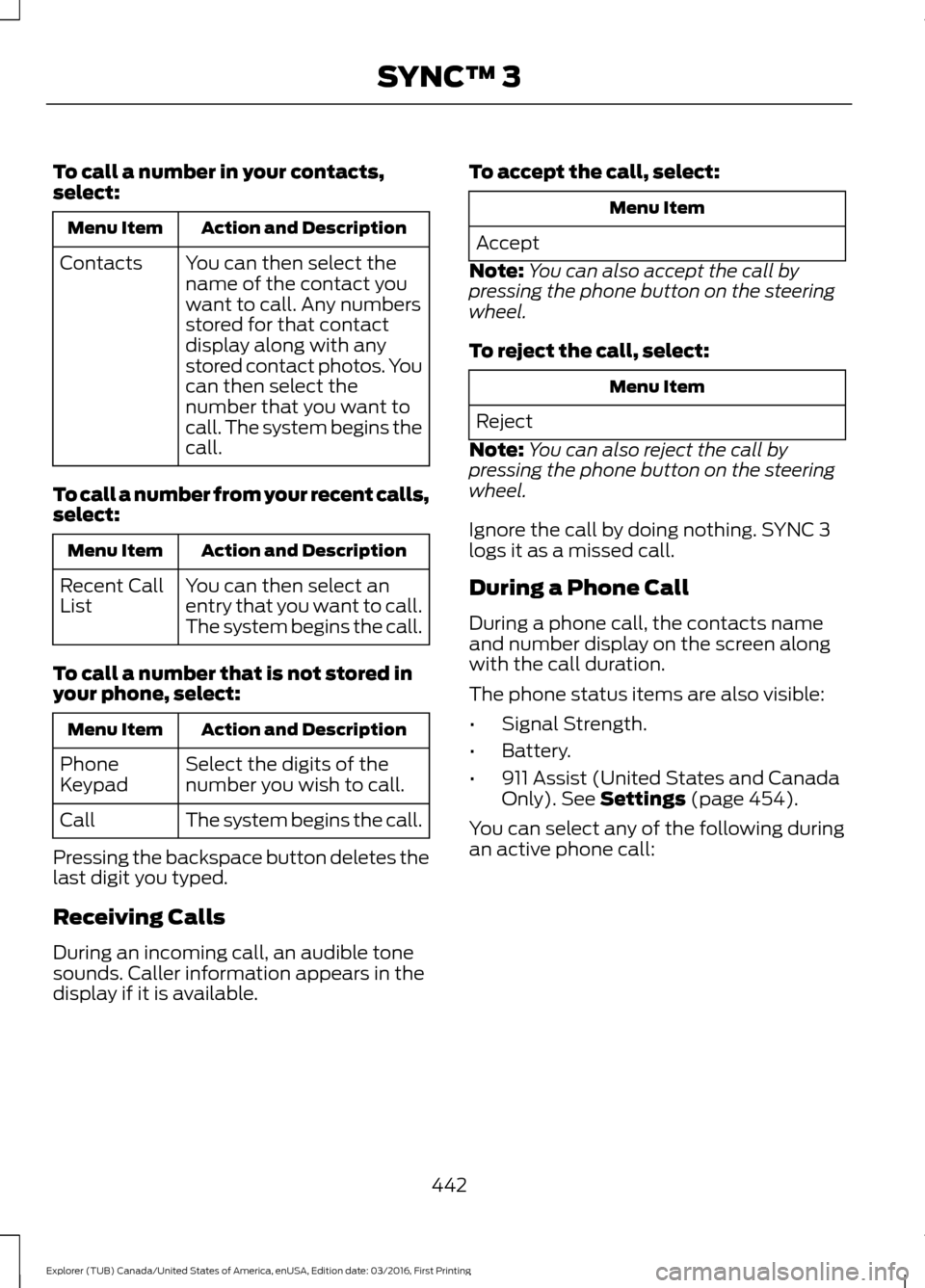
To call a number in your contacts,
select:
Action and Description
Menu Item
You can then select the
name of the contact you
want to call. Any numbers
stored for that contact
display along with any
stored contact photos. You
can then select the
number that you want to
call. The system begins the
call.
Contacts
To call a number from your recent calls,
select: Action and Description
Menu Item
You can then select an
entry that you want to call.
The system begins the call.
Recent Call
List
To call a number that is not stored in
your phone, select: Action and Description
Menu Item
Select the digits of the
number you wish to call.
Phone
Keypad
The system begins the call.
Call
Pressing the backspace button deletes the
last digit you typed.
Receiving Calls
During an incoming call, an audible tone
sounds. Caller information appears in the
display if it is available. To accept the call, select: Menu Item
Accept
Note: You can also accept the call by
pressing the phone button on the steering
wheel.
To reject the call, select: Menu Item
Reject
Note: You can also reject the call by
pressing the phone button on the steering
wheel.
Ignore the call by doing nothing. SYNC 3
logs it as a missed call.
During a Phone Call
During a phone call, the contacts name
and number display on the screen along
with the call duration.
The phone status items are also visible:
• Signal Strength.
• Battery.
• 911 Assist (United States and Canada
Only). See Settings (page 454).
You can select any of the following during
an active phone call:
442
Explorer (TUB) Canada/United States of America, enUSA, Edition date: 03/2016, First Printing SYNC™ 3
Page 446 of 541
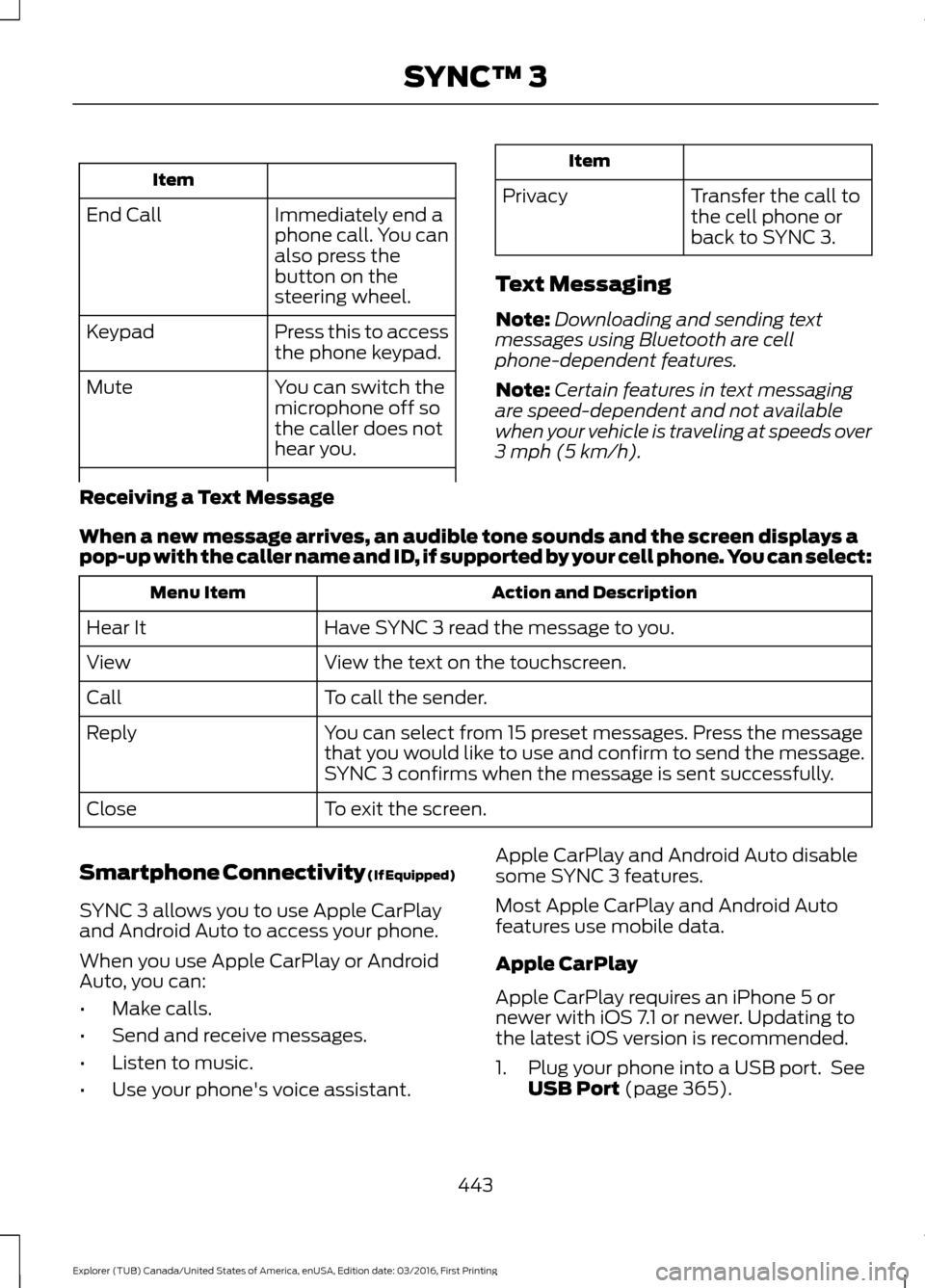
Item
Immediately end a
phone call. You can
also press the
button on the
steering wheel.
End Call
Press this to access
the phone keypad.
Keypad
You can switch the
microphone off so
the caller does not
hear you.
Mute Item
Privacy Transfer the call to
the cell phone or
back to SYNC 3.
Text Messaging
Note: Downloading and sending text
messages using Bluetooth are cell
phone-dependent features.
Note: Certain features in text messaging
are speed-dependent and not available
when your vehicle is traveling at speeds over
3 mph (5 km/h).
Receiving a Text Message
When a new message arrives, an audible tone sounds and the screen displays a
pop-up with the caller name and ID, if supported by your cell phone. You can select: Action and Description
Menu Item
Have SYNC 3 read the message to you.
Hear It
View the text on the touchscreen.
View
To call the sender.
Call
You can select from 15 preset messages. Press the message
that you would like to use and confirm to send the message.
SYNC 3 confirms when the message is sent successfully.
Reply
To exit the screen.
Close
Smartphone Connectivity (If Equipped)
SYNC 3 allows you to use Apple CarPlay
and Android Auto to access your phone.
When you use Apple CarPlay or Android
Auto, you can:
• Make calls.
• Send and receive messages.
• Listen to music.
• Use your phone's voice assistant. Apple CarPlay and Android Auto disable
some SYNC 3 features.
Most Apple CarPlay and Android Auto
features use mobile data.
Apple CarPlay
Apple CarPlay requires an iPhone 5 or
newer with iOS 7.1 or newer. Updating to
the latest iOS version is recommended.
1. Plug your phone into a USB port. See
USB Port
(page 365).
443
Explorer (TUB) Canada/United States of America, enUSA, Edition date: 03/2016, First Printing SYNC™ 3
Page 455 of 541
HERE is the digital map provider for the
navigation application. If you find map data
errors, you may report them directly to
HERE by going to
www.here.com/mapcreator. HERE
evaluates all reported map errors and
responds with the result of their
investigation by e-mail.
Map coverage includes the USA (including
Puerto Rico and the US Virgin Islands),
Canada and Mexico.
APPS
The system enables voice, steering wheel,
and touch screen control of SYNC 3
AppLink enabled smartphone apps. Once
an app is running through AppLink, you can
control main features of the app through
voice commands and steering wheel
controls.
Note:
Available AppLink enabled apps will
vary by market.
Note: You must pair and connect your
smartphone via Bluetooth to SYNC 3 to
access AppLink.
Note: iPhone users need to connect the
phone to the USB port.
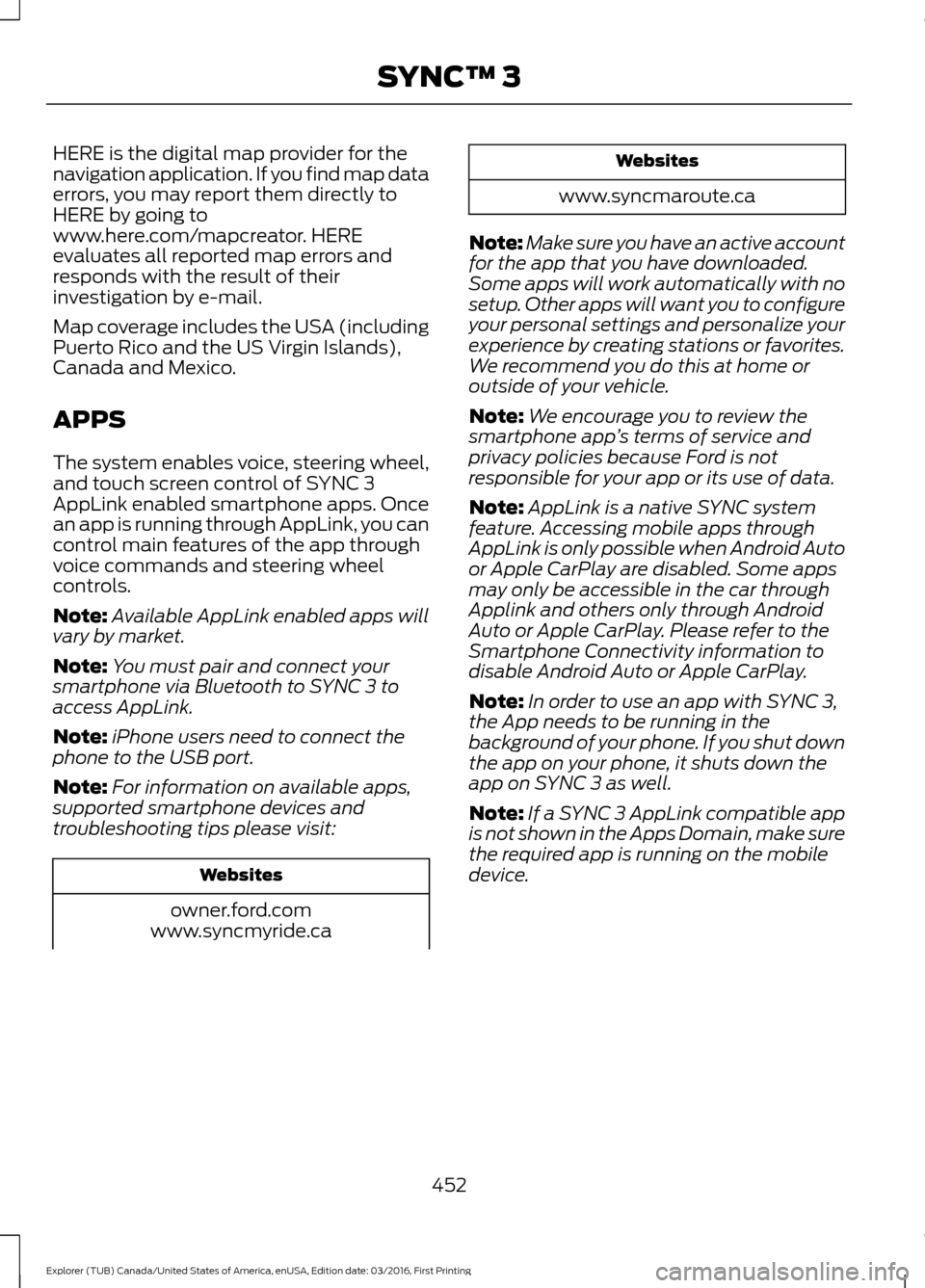
Note: For information on available apps,
supported smartphone devices and
troubleshooting tips please visit: Websites
owner.ford.com
www.syncmyride.ca Websites
www.syncmaroute.ca
Note: Make sure you have an active account
for the app that you have downloaded.
Some apps will work automatically with no
setup. Other apps will want you to configure
your personal settings and personalize your
experience by creating stations or favorites.
We recommend you do this at home or
outside of your vehicle.
Note: We encourage you to review the
smartphone app ’s terms of service and
privacy policies because Ford is not
responsible for your app or its use of data.
Note: AppLink is a native SYNC system
feature. Accessing mobile apps through
AppLink is only possible when Android Auto
or Apple CarPlay are disabled. Some apps
may only be accessible in the car through
Applink and others only through Android
Auto or Apple CarPlay. Please refer to the
Smartphone Connectivity information to
disable Android Auto or Apple CarPlay.
Note: In order to use an app with SYNC 3,
the App needs to be running in the
background of your phone. If you shut down
the app on your phone, it shuts down the
app on SYNC 3 as well.
Note: If a SYNC 3 AppLink compatible app
is not shown in the Apps Domain, make sure
the required app is running on the mobile
device.
452
Explorer (TUB) Canada/United States of America, enUSA, Edition date: 03/2016, First Printing SYNC™ 3
Page 490 of 541

When to expect the OIL CHANGE REQUIRED message
Vehicle use and example
Interval
Normal
7500-10000 miles
(12000-16000 km) Normal commuting with highway driving
No, or moderate, load or towing
Flat to moderately hilly roads
No extended idling
Severe
5000-7499 miles
(8000-11999 km) Moderate to heavy load or towing
Mountainous or off-road conditions
Extended idling
Extended hot or cold operation
Extreme
3000-4999 miles
(4800-7999 km) Maximum load or towing
Extreme hot or cold operation
Normal Maintenance Intervals At every oil change interval as indicated by the information display
*
Change engine oil and filter. **
Rotate the tires.
Perform a multi-point inspection (recommended).
Inspect the automatic transmission fluid level. Consult your dealer for requirements.
Inspect the brake pads, rotors, hoses and parking brake.
Inspect the engine cooling system strength and hoses.
Inspect the exhaust system and heat shields.
Inspect the rear axle and U-joints (four wheel drive only).
Inspect the half-shaft boots.
Inspect the steering linkage, ball joints, suspension, tire-rod ends, driveshaft and U-
joints.
487
Explorer (TUB) Canada/United States of America, enUSA, Edition date: 03/2016, First Printing Scheduled Maintenance
Page 530 of 541

1
180 Degree Camera...................................208
Camera Views.................................................... 208
Using the 180 degree camera system.............................................................. 208
4
4WD See: Four-Wheel Drive....................................... 181
A
A/C See: Climate Control.......................................... 127
About This Manual...........................................7
ABS See: Brakes........................................................... 186
ABS driving hints See: Hints on Driving With Anti-Lock
Brakes................................................................ 186
Accessories....................................................479 Exterior Style....................................................... 479
Interior Style......................................................... 479
Lifestyle................................................................. 479
Peace of Mind..................................................... 479
Accessories See: Replacement Parts
Recommendation............................................ 12
ACC See: Using Adaptive Cruise Control.............210
Active Park Assist.........................................199 Deactivating the Active Park Assist
Feature............................................................. 203
Parallel Parking, Perpendicular Parking, Parallel Park Out Assist.............................. 199
Troubleshooting the System......................... 203
Adjusting the Headlamps
........................288
Vertical Aim Adjustment................................ 288
Adjusting the Pedals.....................................74
Adjusting the Steering Wheel - Vehicles With: Manual Adjustable Steering
Column............................................................70
Adjusting the Steering Wheel - Vehicles With: Power Adjustable Steering
Column............................................................70
Easy Entry and Exit Feature............................... 71End of Travel Position..........................................
71
Memory Feature..................................................... 71
Airbag Disposal..............................................48
Air Conditioning See: Climate Control.......................................... 127
Air Filter See: Changing the Engine Air Filter............296
Alarm See: Anti-Theft Alarm........................................ 69
Anti-Theft Alarm............................................69 Arming the Alarm................................................ 69
Disarming the Alarm........................................... 69
Appendices....................................................502
Apps..................................................................452 ........................................................................\
.......... 452
SiriusXM Traffic and Travel Link................... 453
Audible Warnings and Indicators
.............98
Automatic Transmission Warning
Chime
.................................................................. 98
Engine On Warning Chime............................... 98
Headlamps On Warning Chime..................... 98
Key in Ignition Warning Chime........................ 98
Keyless Warning Alert ....................................... 98
Parking Brake On Warning Chime.................98
Audio Control....................................................71 Seek and Media..................................................... 72
Type 1........................................................................\
.. 71
Type 2........................................................................\
. 71
Audio System
.................................................351
General Information.......................................... 351
Audio Unit - Vehicles With: AM/FM/CD/ SYNC.............................................................352
Audio Unit - Vehicles With: Premium AM/FM/CD..................................................355
Audio Unit - Vehicles With: Sony AM/ FM/CD
...........................................................356
Menu Structure.................................................. 358
Autolamps........................................................79 Windshield Wiper Activated
Headlamps........................................................ 79
Automatic Climate Control - Vehicles With: Premium AM/FM/CD...................128
Automatic Climate Control - Vehicles With: Sony Audio System.......................130
Automatic High Beam Control..................81 Activating the System........................................ 82
Manually Overriding the System.................... 82
527
Explorer (TUB) Canada/United States of America, enUSA, Edition date: 03/2016, First Printing Index
Page 534 of 541

Type 1........................................................................\
.
91
Type 2....................................................................... 92
Type 3....................................................................... 93
General Information on Radio Frequencies...................................................49
Intelligent Access................................................. 49
General Maintenance Information.......483
Multi-Point Inspection..................................... 485
Owner Checks and Services......................... 484
Protecting Your Investment.......................... 483
Why Maintain Your Vehicle?......................... 483
Why Maintain Your Vehicle at Your Dealership?..................................................... 483
Getting Assistance Outside the U.S. and Canada.........................................................258
Getting the Services You Need...............255 Away From Home.............................................. 255
Global Opening..............................................86 Opening the Windows....................................... 86
H
Handbrake See: Parking Brake.............................................. 187
Hazard Warning Flashers
.........................250
HDC See: Using Hill Descent Control.................... 193
Headlamp Adjusting See: Adjusting the Headlamps.................... 288
Headlamp Exit Delay
...................................80
Headlamp Removal See: Removing a Headlamp......................... 290
Head Restraints
.............................................137
Adjusting the Head Restraint......................... 138
Tilting Head Restraints .................................... 139
Heated Seats...................................................151 Front Seats............................................................. 151
Second Row Heated Seats............................. 152
Heated Steering Wheel
................................73
Heated Windows and Mirrors..................135 Heated Exterior Mirrors..................................... 135
Heated Rear Window........................................ 135
Heated Wiper Park............................................. 135
Heating See: Climate Control.......................................... 127
Hill Start Assist..............................................187 Switching the System On and Off...............188
Using Hill Start Assist........................................ 187Hints on Controlling the Interior
Climate..........................................................132
Cooling the Interior Quickly............................. 133
General Hints........................................................ 132
Heating the Interior Quickly............................ 132
Recommended Settings for Cooling...........133
Recommended Settings for Heating...........133
Side Window Defogging in Cold Weather............................................................. 134
Hints on Driving With Anti-Lock Brakes............................................................186
Home Screen
.................................................418
Hood Lock See: Opening and Closing the Hood...........272
I
Ignition Switch
...............................................162
In California (U.S. Only)............................256
Information Display Control
.......................73
Information Displays....................................99 General Information........................................... 99
Information Messages
.................................113
4WD........................................................................\
.. 113
Adaptive Cruise Control.................................... 114
AdvanceTrac ™..................................................... 114
Alarm........................................................................\
114
Automatic Engine Shutdown.......................... 115
Automatic High Beam Control....................... 115
Battery and Charging System......................... 116
Blind Spot Information and Cross Traffic Alert System..................................................... 116
Brake System......................................................... 117
Collision Warning System................................. 117
Doors and Locks................................................... 117
Driver Alert............................................................. 118
Electronic Stability Control.............................. 118
Engine...................................................................... 118
Fuel........................................................................\
... 119
Hill Descent Control........................................... 119
Hill Start Assist..................................................... 119
Keys and Intelligent Access............................ 120
Lane Keeping System......................................... 121
Maintenance.......................................................... 121
MyKey...................................................................... 122
Park Aid................................................................... 122
Park Brake.............................................................. 122
Power Steering..................................................... 123
531
Explorer (TUB) Canada/United States of America, enUSA, Edition date: 03/2016, First Printing Index
Page 537 of 541

Power Seats.....................................................141
Multi-Contour Front Seats With Active
Motion ............................................................... 142
Power Lumbar..................................................... 142
Power Steering Fluid Check....................285
Power Windows.............................................85 Accessory Delay................................................... 85
Bounce-Back......................................................... 85
One-Touch Down................................................. 85
One-Touch Up....................................................... 85
Window Lock......................................................... 85
Pre-Collision Assist
......................................227
Using the Pre-Collision Assist
System.............................................................. 228
Protecting the Environment........................15
R
Rear Parking Aid............................................195 Obstacle Distance Indicator.......................... 196
Rear Passenger Climate Controls..........134
Rear Seats
.......................................................144
Adjusting the Rear Seats................................. 144
Rear Under Floor Storage.........................230 Adjustable Load Floor...................................... 230
Cargo Management System......................... 230
Rear View Camera
......................................204
Camera Guidelines........................................... 206
Manual Zoom...................................................... 207
Obstacle Distance Indicator.......................... 207
Rear Camera Delay........................................... 207
Using the Rear View Camera System.............................................................. 205
Rear View Camera See: Rear View Camera.................................. 204
Rear Window Wiper and Washers
...........76
Rear Camera Washer........................................... 77
Rear Window Washer.......................................... 77
Rear Window Wiper............................................. 76
Recommended Towing Weights
...........239
Refueling...........................................................171 System Warnings................................................ 173
Remote Control..............................................50 Car Finder................................................................ 53
Integrated Keyhead Transmitters .................50
Intelligent Access Key........................................ 50
Memory Feature.................................................... 52
Remote Start......................................................... 53Replacing the Battery..........................................
51
Sounding a Panic Alarm.................................... 53
Remote Start.................................................136 Automatic Settings............................................ 136
Removing a Headlamp.............................290
Repairing Minor Paint Damage..............302
Replacement Parts Recommendation........................................12
Collision Repairs.................................................... 12
Scheduled Maintenance and Mechanical Repairs.................................................................. 12
Warranty on Replacement Parts..................... 12
Replacing a Lost Key or Remote Control............................................................54
Reporting Safety Defects (Canada Only).............................................................260
Reporting Safety Defects (U.S. Only).............................................................260
Roadside Assistance
..................................249
Vehicles Sold in Canada: Getting Roadside
Assistance....................................................... 249
Vehicles Sold in Canada: Roadside Assistance Program Coverage................250
Vehicles Sold in Canada: Using Roadside Assistance....................................................... 250
Vehicles Sold in the United States: Getting Roadside Assistance................................... 249
Vehicles Sold in the United States: Using Roadside Assistance................................... 249
Roadside Emergencies..............................249
Roof Racks and Load Carriers
..................231
Adjusting the Crossbar..................................... 232
Thumbwheel Kit.................................................. 231
Running-In See: Breaking-In................................................. 246
Running Out of Fuel
.....................................170
Adding Fuel From a Portable Fuel
Container............................................................ 171
Filling a Portable Fuel Container.................... 171
S
Safety Canopy ™
............................................46
Safety Precautions......................................168
Satellite Radio..............................................362
Satellite Radio Electronic Serial Number
(ESN)................................................................ 363
Satellite Radio Reception Factors..............363
534
Explorer (TUB) Canada/United States of America, enUSA, Edition date: 03/2016, First Printing Index
Page 538 of 541

SIRIUS® Satellite Radio Service..................
363
Troubleshooting................................................. 364
Scheduled Maintenance Record............491
Scheduled Maintenance..........................483
Seatbelt Extension........................................39
Seatbelt Height Adjustment......................36
Seatbelt Reminder.........................................37 Belt-Minder™......................................................... 37
Seatbelts...........................................................32 Principle of Operation......................................... 32
Seatbelt Warning Lamp and Indicator Chime..............................................................36
Conditions of operation..................................... 37
Seats..................................................................137
Security..............................................................68
Settings...........................................................454 911 Assist............................................................... 459
Ambient Lighting............................................... 465
Bluetooth.............................................................. 456
Clock...................................................................... 456
Display................................................................... 465
General.................................................................. 463
Media Player........................................................ 455
Mobile Apps......................................................... 462
Navigation............................................................460
Phone..................................................................... 457
Radio...................................................................... 460
Sound..................................................................... 454
Valet Mode.......................................................... 466
Vehicle................................................................... 465
Voice Control...................................................... 466
Wi-Fi....................................................................... 464
Side Airbags
.....................................................45
Side Sensing System...................................197 Obstacle Distance Indicator.......................... 198
Sitting in the Correct Position..................137
Snow Chains See: Using Snow Chains.................................. 321
Special Notices................................................12 New Vehicle Limited Warranty......................... 12
Notice to Owners of Pickup Trucks and Utility Type Vehicles........................................ 13
On Board Diagnostics Data Link Connector............................................................ 13
Special Instructions.............................................. 12
Using Your Vehicle as an Ambulance............13
Using Your Vehicle With a Snowplow............13 Special Operating Conditions Scheduled
Maintenance..............................................489
Exceptions........................................................... 490
Speed Control See: Cruise Control........................................... 209
Stability Control...........................................190 Principle of Operation...................................... 190
Starter Switch See: Ignition Switch........................................... 162
Starting a Gasoline Engine.......................163 Automatic Engine Shutdown......................... 165
Failure to Start..................................................... 164
Guarding Against Exhaust Fumes...............166
Important Ventilating Information..............166
Stopping the Engine When Your Vehicle is Moving............................................................... 165
Stopping the Engine When Your Vehicle is Stationary......................................................... 165
Vehicles with an Ignition Key.......................... 163
Vehicles with Keyless Start............................. 163
Starting and Stopping the Engine..........162 General Information.......................................... 162
Steering...........................................................226 Electric Power Steering................................... 226
Steering Wheel................................................70
Storage Compartments..............................161
Sunroof See: Moonroof...................................................... 89
Sun Visors.........................................................89 Illuminated Vanity Mirror................................... 89
Supplementary Restraints System..........41 Principle of Operation......................................... 41
Symbols Glossary.............................................7
SYNC™ 3.......................................................404
General Information......................................... 404
SYNC™ 3 Troubleshooting.....................466
SYNC™ Applications and Services........................................................382
911 Assist............................................................... 382
SYNC Mobile Apps............................................ 384
SYNC™...........................................................366 General Information......................................... 366
SYNC™ Troubleshooting
.........................396
535
Explorer (TUB) Canada/United States of America, enUSA, Edition date: 03/2016, First Printing Index