2017 FORD EXPEDITION display
[x] Cancel search: displayPage 108 of 500

Engine Messages
Action
Message
Displays when the engine has reduced power to helpreduce high engine temperature.
Power Reduced to Lower Engine
Temp
Informs you that you are exiting your vehicle and theengine is on.
Engine On
Fuel Messages Action
Message
Displays when the fuel fill inlet may not be properly closed.
Check Fuel Fill Inlet
Displays as an early reminder of a low fuel condition.
Fuel Level Low
Keys and Intelligent Access Messages Action
Message
Displays if the system does not detect the intelligent access
key in the following three scenarios: When you press the start/ stop button in an attempt to either start the engine or cycle
through the ignition states. When the engine is running and a
door is opened then closed. When the vehicle ’s speed exceeds
10 mph (16 km/h) for the first time after starting.
No Key Detected
Displays during spare key programming, when an intelligentaccess key is programmed to the system.
Key Programmed x Keys
Total
Displays during spare key programming when the maximumnumber of keys have been programmed.
Max Number of Keys
Programmed
Displays when you press the start/stop button without
applying the brake pedal. This is a reminder that you must
apply the brake pedal when pressing the start/stop button in order to start the engine.
Press Brake to Start
105
Expedition (TB7) Canada/United States of America, enUSA, Edition date: 03/2016, First Printing Information Displays
Page 109 of 500

Action
Message
Displays when you press the start/stop button to shut off theengine and an Intelligent Access Key is not detected inside the vehicle.
Restart Now or Key is
Needed
Displays when the vehicle is in the accessory ignition state.
Accessory Power Active
This message displays when there is a problem with your
vehicle ’s starting system. Contact an authorized dealer for
service.
Starting System Fault
Maintenance Messages Action
Message
Stop the vehicle as soon as safely possible and switch off the
engine. Check the oil level. If the warning stays on or continuesto come on with your engine running, contact an authorized dealer as soon as possible.
LOW Engine Oil Pressure
Displays when the engine oil life remaining is 10% or less.
Change Engine Oil Soon
Displays when the oil life left reaches 0%.
Oil Change Required
Displays when the engine coolant temperature is excessively high.
Engine Coolant Overtem-
perature
The powertrain needs service due to a powertrain malfunction.
See Manual
Displays when the washer fluid is low and needs to be refilled.
Washer Fluid Level LOW
Your vehicle is still in Factory mode. This may not allow somefeatures to operate properly. Contact an authorized dealer.
Factory Mode Contact
Dealer
Your vehicle is still in Transport mode. This may not allow
some features to operate properly. Contact an authorized dealer.
Transport Mode Contact
Dealer
106
Expedition (TB7) Canada/United States of America, enUSA, Edition date: 03/2016, First Printing Information Displays
Page 110 of 500

MyKey
™ Messages Action
Message
Displays when MyKey is active.
MyKey active Drive
Safely
Displays when starting the vehicle and MyKey is in use andthe MyKey speed limit is on.
Speed Limited to xx
MPH/km/h
Displays when a MyKey is in use and the MyKey speed limit is
on and the vehicle speed is approaching 80 mph (130 km/h).
Near Vehicle Top Speed
Displays when a MyKey is in use and the optional setting is onand the vehicle exceeds a preselected speed.
Check Speed Drive
Safely
Displays when a MyKey is in use and Belt-Minder activates.
Buckle Up to Unmute
Audio
Displays when attempting to program a spare key using two existing MyKeys.
Could Not Program
Integrated Key
You have reached the speed limit set for your MyKey.
Vehicle at Top Speed of
MyKey Setting
With a MyKey in use, AdvanceTrac turns on.
AdvanceTrac On MyKey
Setting
With a MyKey in use, traction control turns on.
Traction Control On
MyKey Setting
MyKey park aid cannot be deactivated with a MyKey in use,park aid is always on.
MyKey Park Aid Cannot
be Deactivated
Off Road Messages Action
Message
Displays when your vehicle speed requirement for offroad mode entry has not been met.
For Off Road Slow to 5MPH
Displays when off road mode becomes active.
Enter Off Road Mode Enabled
Displays when off road mode becomes inactive.
Exiting Off Road Mode
Displays when hill descent control mode deactivates.
Hill Descent Control Off
Displays when hill descent speed exceeds 20 MPH (32KM/H).
For Hill Descent Reduce Speed
107
Expedition (TB7) Canada/United States of America, enUSA, Edition date: 03/2016, First Printing Information Displays
Page 111 of 500
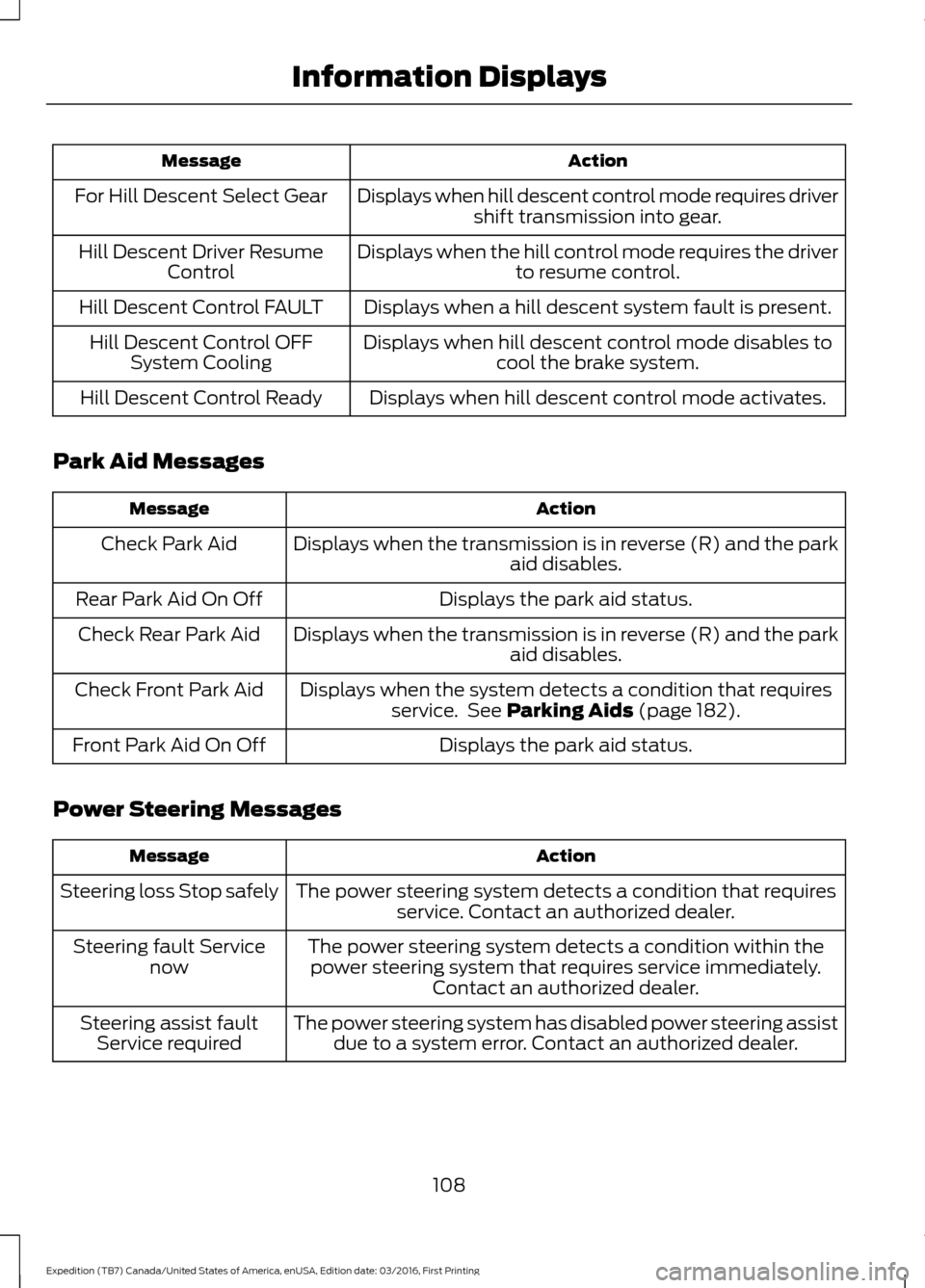
Action
Message
Displays when hill descent control mode requires drivershift transmission into gear.
For Hill Descent Select Gear
Displays when the hill control mode requires the driverto resume control.
Hill Descent Driver Resume
Control
Displays when a hill descent system fault is present.
Hill Descent Control FAULT
Displays when hill descent control mode disables tocool the brake system.
Hill Descent Control OFF
System Cooling
Displays when hill descent control mode activates.
Hill Descent Control Ready
Park Aid Messages Action
Message
Displays when the transmission is in reverse (R) and the park aid disables.
Check Park Aid
Displays the park aid status.
Rear Park Aid On Off
Displays when the transmission is in reverse (R) and the parkaid disables.
Check Rear Park Aid
Displays when the system detects a condition that requiresservice. See Parking Aids (page 182).
Check Front Park Aid
Displays the park aid status.
Front Park Aid On Off
Power Steering Messages Action
Message
The power steering system detects a condition that requiresservice. Contact an authorized dealer.
Steering loss Stop safely
The power steering system detects a condition within thepower steering system that requires service immediately. Contact an authorized dealer.
Steering fault Service
now
The power steering system has disabled power steering assistdue to a system error. Contact an authorized dealer.
Steering assist fault
Service required
108
Expedition (TB7) Canada/United States of America, enUSA, Edition date: 03/2016, First Printing Information Displays
Page 112 of 500

Remote Start Messages
Action
Message
Displays as a reminder to turn the key to on to drive the vehicle after a remote start.
To Drive: Turn Key to On
Displays as a reminder to apply the brake and the start buttonto drive the vehicle after a remote start.
To Drive: Press Brake
and START Button
Suspension System Messages Action
Message
Displays when there is a problem with your vehicle ’s suspen-
sion system. Contact an authorized dealer for service.
Driver Select Susp.
malfunction Service required
Tire Messages Action
Message
Displays when one or more tires on your vehicle have low tire pressure.
Tire Pressure LOW
Displays when the tire pressure monitoring system is
malfunctioning. If the warning stays on or continues to come on, contact an authorized dealer.
Tire Pressure Monitor
Fault
Displays when a tire pressure sensor is malfunctioning or your
spare tire is in use. See Wheels and Tires (page 273). If thewarning stays on or continues to come on, contact an authorized dealer.
Tire Pressure Sensor
Fault
Trailer Messages Action
Message
Displays the current gain setting for the trailer brakewhen a trailer is not connected.
Trailer Brake Gain: XX.X No
Trailer
Displays and a chime sounds in response to faultssensed by the TBC.
Trailer Brake Module Fault
Displays when a correct trailer connection is sensedduring a given ignition cycle.
Trailer Connected
109
Expedition (TB7) Canada/United States of America, enUSA, Edition date: 03/2016, First Printing Information Displays
Page 113 of 500

Action
Message
Displays when a trailer connection becomes discon-
nected, either intentionally or unintentionally, and the
system senses it during a given ignition cycle. Disregard
this status if your vehicle is not equipped with a factory installed trailer brake controller. This message may
appear when an aftermarket TBC is used even when the trailer is connected.
Trailer Disconnected
Displays when the trailer sway control detects trailersway.
Trailer Sway Reduce Speed
Displays if there are certain faults in your vehicle wiringand the trailer wiring or brake system.
Wiring Fault On Trailer
Displays the current gain setting from the trailer brake.
Trailer Brake Gain XX.X
There is a fault with your vehicle trailer lighting module.See Towing a Trailer (page 203).
Trailer Lighting Module Fault
See Manual
There is a fault with your trailer stop lamp. Check your lamp.
Trailer Stop Lamps Fault Check
Lamps
There is a fault with your trailer turn lamp. Check your lamp.
Trailer Left Turn Lamps Fault
Check Lamps
There is a fault with your trailer turn lamp. Check yourlamp.
Trailer Right Turn Lamps Fault
Check Lamps
There is a fault with your trailer park lamp. Check yourlamp.
Trailer Park Lamps Fault Check
Lamps
There is a fault with your trailer battery. See
Towing
a Trailer (page 203).
Trailer Battery Not Charging See
Manual
Transmission Messages Action
Message
Displays as a reminder to shift into park (P).
Transmission not in Park
Displays when the transfer case is NOT in the neutral position.The message indicates that your vehicle is NOT safe to tow with all four wheels on the ground.
Neutral Tow Disabled
Displays when the transfer case is in the neutral position. Themessage indicates that your vehicle is safe to tow with all four wheels on the ground.
Neutral Tow Enabled
Leave Transmission In Neutral
110
Expedition (TB7) Canada/United States of America, enUSA, Edition date: 03/2016, First Printing Information Displays
Page 114 of 500

4WD Messages
Action
Message
Displays when a 4X4 system fault is present.
Check 4X4
Displays when the 4X4 system is making a shift.
4X4 Shift In Progress
Displays when trying to select 4X4 Low.
For 4X4 Low Apply Brake
Displays when you select 4X4 LOW with the vehiclestopped.
For 4X4 Low Shift to N
Displays when you select 4X4 LOW while the vehicleis moving.
For 4X4 Low Slow To 3 MPH
Displays when you select 2WD with the vehiclestopped in 4X4 LOW.
To Exit 4X4 Low Apply Brake
Displays when you select 2WD with the vehiclestopped in 4X4 LOW.
To Exit 4X4 Low Shift To N
Displays when you select 2WD while the vehicle isoperating in 4X4 LOW.
To Exit 4X4 Low Slow To 3 MPH
May display when shifting to or from 4X4 LOW.
Shift Delayed Pull Forward
111
Expedition (TB7) Canada/United States of America, enUSA, Edition date: 03/2016, First Printing Information Displays
Page 123 of 500

HEATED WINDOWS AND
MIRRORS
Heated Rear Window
Note:
Make sure the engine is running
before operating the heated windows. Press the button to clear the
heated rear window of thin ice
and fog. The heated rear window
will automatically turn off after a short
period of time. Start the engine before you
switch the heated rear window on.
Note: Do not use razor blades or other
sharp objects to clean or remove decals
from the inside of the heated rear window.
The vehicle warranty does not cover
damage caused to the heated rear window
grid lines.
Heated Exterior Mirror (If Equipped)
When you switch the heated rear window
on, the heated exterior mirrors will
automatically turn on.
Note: Do not remove ice from the mirrors
with a scraper or adjust the mirror glass
when it is frozen in place.
Note: Do not clean the mirror housing or
glass with harsh abrasives, fuel or other
petroleum-based cleaning products.
REMOTE START
(If Equipped)
The remote start feature allows you to
pre-condition the interior of your vehicle.
The climate control system works to
achieve comfort according to your previous
settings.
Note: You cannot adjust the system during
remote start operation. Turn the ignition on to return the system
to its previous settings. You can now make
adjustments normally, but you need to turn
certain vehicle-dependent features back
on, such as:
•
Heated seats.
• Cooled seats.
• Heated steering wheel.
• Heated mirrors.
• Heated rear window.
You can adjust the default remote start
settings using the information display
controls. See
Information Displays
(page 91).
Automatic Settings
In hot weather, the system is set to
72°F
(22°C). The cooled seats are set to high
(if available, and selected to AUTO in the
information display).
In moderate weather, the system either
heats or cools (based on previous
settings). The rear defroster, heated
mirrors and heated seats do not
automatically turn on.
In cold weather, the system is set to
72°F
(22°C). The heated seats are set to high
(if available, and selected to AUTO in the
information display). The rear defroster
and heated mirrors automatically turn on.
120
Expedition (TB7) Canada/United States of America, enUSA, Edition date: 03/2016, First Printing Climate ControlE184884