Page 385 of 497

Button
Start
Range Rings and Charge Points (EnergiOnly)
Shaded rings appear on the map when youare driving in EV Now mode. The inner ringwith no shading indicates a safe range youcan travel using plug-in power only. Thelightly shaded outer band reflects areas
you may or may not be able to reach whilein EV Now mode. If your destination iswithin this band, your vehicle may operatein Auto EV mode, running the engine asneeded. The darker shaded area, beyondthe rings, is not likely reachable using onlythe vehicle's available plug-in energy.
The rings represent approximate ranges.Actual route distances, road grades,vehicle speed, accessory usage and otherconditions affect how far your vehicle cantravel in EV Now mode before recharging.
You can select charging POI's so that youcan always see them on the map when thescale is 5 mi (8 km) or lower.
To switch this on from the settings menuselect:
Menu Item
Navigation
Map Preferences
You can then switch the POI Icons on.
Menu Item
With the POI icons switched on, you canselect:
Select POIs
Travel
Charging
382
C-MAX Energi / C-MAX Hybrid (CCG) Canada/United States of America, enUSA, First Printing
SYNC™ 3E235274
Page 394 of 497
Charge Settings
This screen allows you to set up thecharging convenience features.
Note:You can set up and edit thesefeatures using the MyFord Mobile internetapplication. For more information on visitthe Ford website.
391
C-MAX Energi / C-MAX Hybrid (CCG) Canada/United States of America, enUSA, First Printing
SYNC™ 3E231146
Page 395 of 497

To improve the charging experience, your vehicle has the following conveniencefeatures:
DescriptionFeature
Your vehicle schedules its charging time for when the utility ratesare lowest. Contact your utility company to see what rates areavailable.
Value Charge
Your vehicle starts charging immediately after you connect thecharging plug.Charge Now
Get the most miles out of every charge by conditioning yourplugged in vehicle. Set the cabin temperature when you set yourGO Time in order to use energy from your home, or chargingstation, instead of your vehicle battery.
Cabin Conditioning
Setting GO Times allows you to control charging schedules andcabin conditioning settings so your vehicle is ready to drive whenyou are. By setting a GO Time, your vehicle can use your valuecharge settings to minimize your electricity costs but still prioritizegetting a full charge before your GO Time. A calendar view allowsyou to program two GO Times per day for each day of the week.
My GO Times
Note: Remember, you must plug in your vehicle for My GO Timeto work.
Note:Charging to 100% by your next GOTime will always be the priority. When ValueCharge is selected, charging outside ofoff-peak times may be necessary in orderto be fully charged by your GO Time.
Charge Settings Screen
Each of the four areas highlighted belowshow a different feature of the chargesettings screen.
392
C-MAX Energi / C-MAX Hybrid (CCG) Canada/United States of America, enUSA, First Printing
SYNC™ 3
Page 396 of 497
My GO Time summary displays the next GO Time and cabin temperaturesetting.A
Charging status and actual times displays charging status with the chargingstart time, end time, and duration.B
Charge profile and mode displays the charging profile and charging mode forthe vehicle's present location.C
Estimated charge time limits displays the estimated minimum and maximumtimes to fully charge the high-voltage battery and the battery’s present stateof charge as a percentage of total plug-in capacity.
D
393
C-MAX Energi / C-MAX Hybrid (CCG) Canada/United States of America, enUSA, First Printing
SYNC™ 3E231147
Page 398 of 497

Action and DescriptionMenu ItemItem
This area of the screen shows your scheduled Go Time andyour cabin conditioning information.My GO TimesA
This is the time and date of your next set drive time. Yourvehicle automatically schedules charging and cabin condi-tioning to finish by this time.
Next GO TimeB
This is the chosen cabin conditioning setting for this GOTime.TemperatureC
This accesses your GO Time Schedule (see GO TimeSchedule later in this section).EditD
This cancels the cabin conditioning for the present GO Time.Once you touch Skip, the GO Time and Temperature greyout, and the LED illuminates on the Skip button. Touch thebutton again to switch on the cabin conditioning. Thisfeature allows you to ignore the present GO Time withouthaving to delete it or having to switch off the entire schedule(see GO Time Schedule later in this section). After thepresent GO Time passes, this feature resets.
SkipE
Conflict Notification
The system alerts you to any conflicts byhighlighting areas of the screen in coloredtext.
If your battery cannot have a full charge by the scheduled drive time, the systemhighlights your next GO Time and Charge Complete time and the followingmessage appears:
Action and DescriptionMenu Item
This is normal; the vehicle is informing you of the conflicting situation.This notification only displays when the gearshift selector lever is inposition P.
Charge timenot sufficientto meetscheduledGO Timesettings
Note: Charging occurs as soon as you plug the vehicle in. The systemlimits cabin conditioning to 15 minutes before your GO Time.
395
C-MAX Energi / C-MAX Hybrid (CCG) Canada/United States of America, enUSA, First Printing
SYNC™ 3
Page 399 of 497
To eliminate the conflict notificationimmediately or to prevent a conflict in thefuture, try the following:
•Switch the present GO Time to occurlater.
•Plug the vehicle into a 240V highcurrent charging station instead ofusing the 120V low current conveniencecord. Higher power charging yieldsshorter charge times.
•Plug the vehicle in sooner.
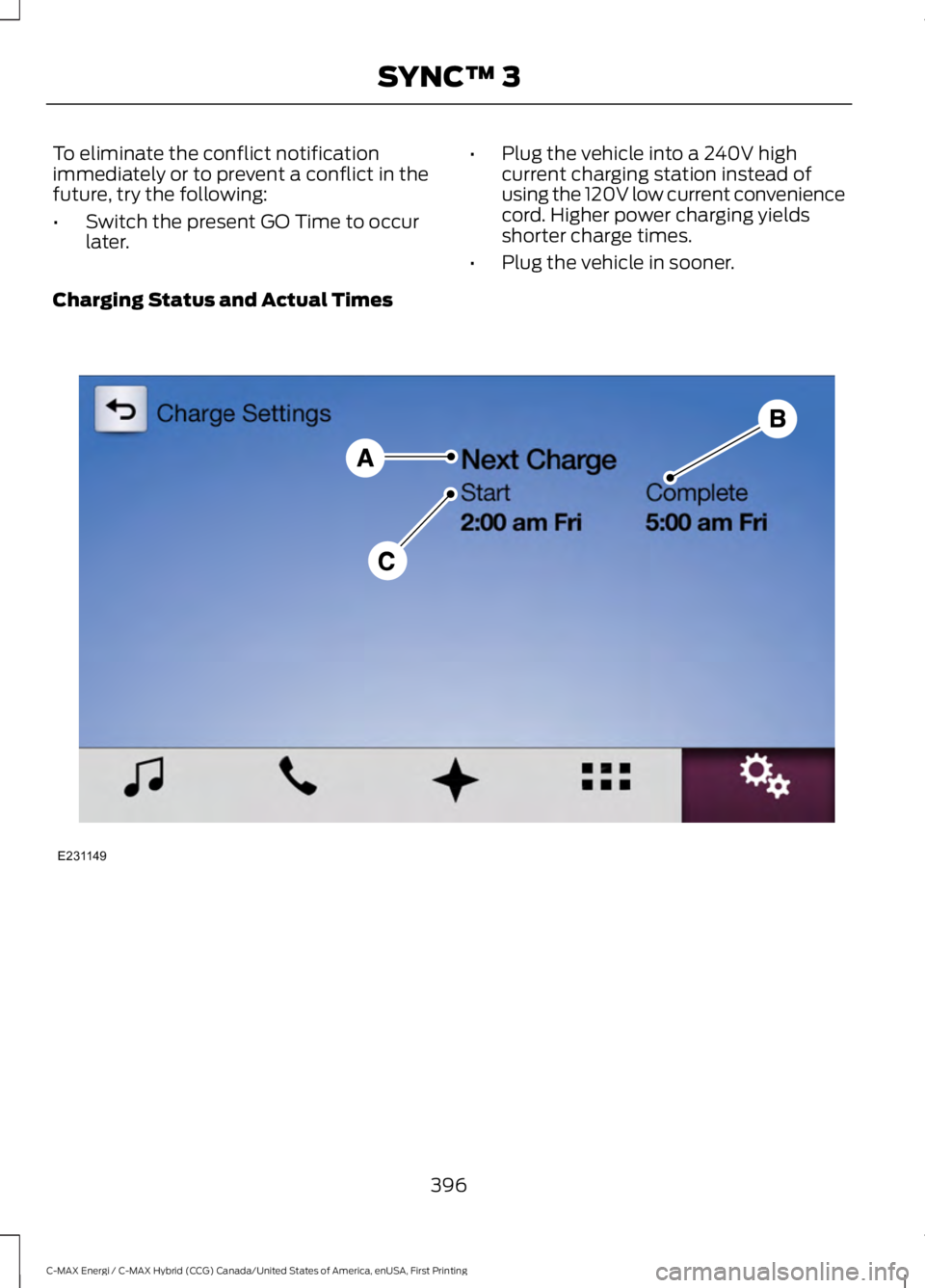
Charging Status and Actual Times
396
C-MAX Energi / C-MAX Hybrid (CCG) Canada/United States of America, enUSA, First Printing
SYNC™ 3E231149
Page 400 of 497
Action and DescriptionMenu ItemItem
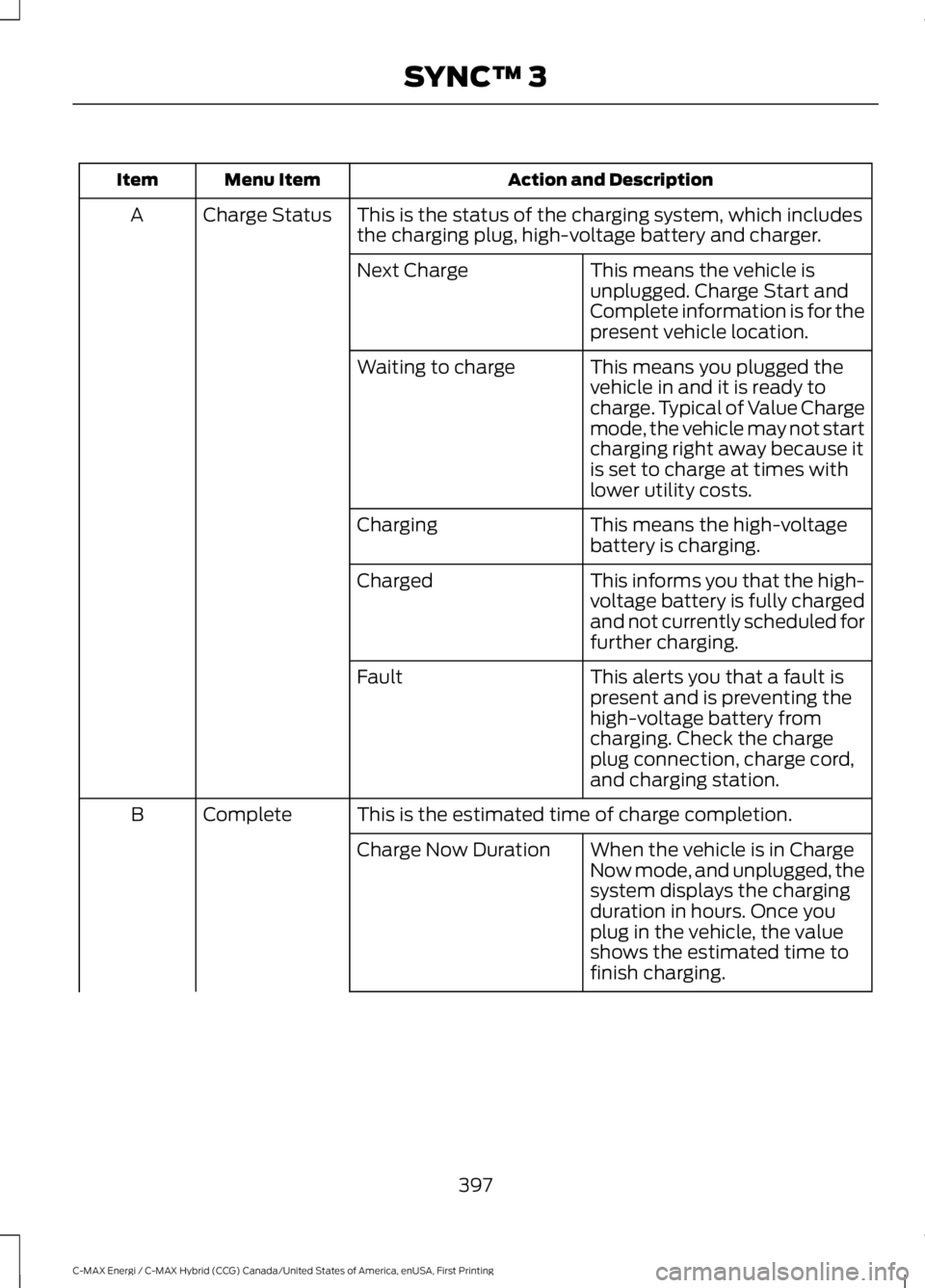
This is the status of the charging system, which includesthe charging plug, high-voltage battery and charger.Charge StatusA
This means the vehicle isunplugged. Charge Start andComplete information is for thepresent vehicle location.
Next Charge
This means you plugged thevehicle in and it is ready tocharge. Typical of Value Chargemode, the vehicle may not startcharging right away because itis set to charge at times withlower utility costs.
Waiting to charge
This means the high-voltagebattery is charging.Charging
This informs you that the high-voltage battery is fully chargedand not currently scheduled forfurther charging.
Charged
This alerts you that a fault ispresent and is preventing thehigh-voltage battery fromcharging. Check the chargeplug connection, charge cord,and charging station.
Fault
This is the estimated time of charge completion.CompleteB
When the vehicle is in ChargeNow mode, and unplugged, thesystem displays the chargingduration in hours. Once youplug in the vehicle, the valueshows the estimated time tofinish charging.
Charge Now Duration
397
C-MAX Energi / C-MAX Hybrid (CCG) Canada/United States of America, enUSA, First Printing
SYNC™ 3
Page 401 of 497
Action and DescriptionMenu ItemItem
When the vehicle is in ValueCharge mode, the systemdisplays the estimated chargecomplete time. It is normal forthe estimated complete timeto change when charging. Thevehicle keeps charging until thehigh-voltage battery is fullycharged.
Scheduled ChargeComplete Time
This is the scheduled start time of charging.StartC
When the vehicle is in ChargeNow mode, and unplugged, themessage At Plug In appears,indicating the vehicle immedi-ately starts charging once youplug it in. Once you plug it in,the system shows the actualcharge start time.
At Plug-In
When the vehicle is in ValueCharge mode, the systemdisplays the scheduled chargestart time (for example, 8:00PM). Once charging starts, thesystem continues to display theactual charge start time.
Scheduled Charge StartTime
398
C-MAX Energi / C-MAX Hybrid (CCG) Canada/United States of America, enUSA, First Printing
SYNC™ 3