2017 FORD C MAX ENERGI temperature
[x] Cancel search: temperaturePage 108 of 497
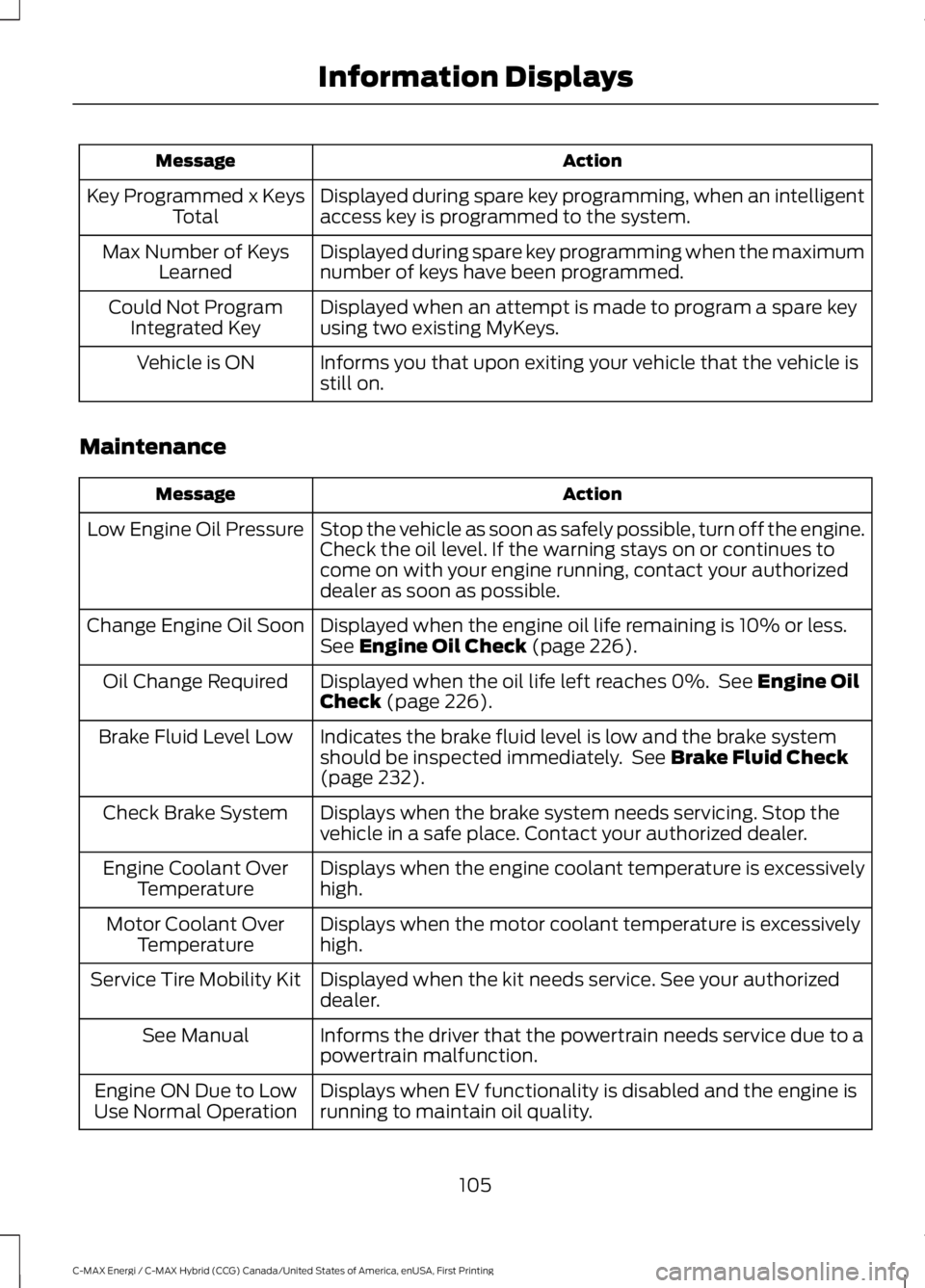
ActionMessage
Displayed during spare key programming, when an intelligentaccess key is programmed to the system.Key Programmed x KeysTotal
Displayed during spare key programming when the maximumnumber of keys have been programmed.Max Number of KeysLearned
Displayed when an attempt is made to program a spare keyusing two existing MyKeys.Could Not ProgramIntegrated Key
Informs you that upon exiting your vehicle that the vehicle isstill on.Vehicle is ON
Maintenance
ActionMessage
Stop the vehicle as soon as safely possible, turn off the engine.Check the oil level. If the warning stays on or continues tocome on with your engine running, contact your authorizeddealer as soon as possible.
Low Engine Oil Pressure
Displayed when the engine oil life remaining is 10% or less.See Engine Oil Check (page 226).Change Engine Oil Soon
Displayed when the oil life left reaches 0%. See Engine OilCheck (page 226).Oil Change Required
Indicates the brake fluid level is low and the brake systemshould be inspected immediately. See Brake Fluid Check(page 232).
Brake Fluid Level Low
Displays when the brake system needs servicing. Stop thevehicle in a safe place. Contact your authorized dealer.Check Brake System
Displays when the engine coolant temperature is excessivelyhigh.Engine Coolant OverTemperature
Displays when the motor coolant temperature is excessivelyhigh.Motor Coolant OverTemperature
Displayed when the kit needs service. See your authorizeddealer.Service Tire Mobility Kit
Informs the driver that the powertrain needs service due to apowertrain malfunction.See Manual
Displays when EV functionality is disabled and the engine isrunning to maintain oil quality.Engine ON Due to LowUse Normal Operation
105
C-MAX Energi / C-MAX Hybrid (CCG) Canada/United States of America, enUSA, First Printing
Information Displays
Page 112 of 497

AUTOMATIC CLIMATE CONTROL
AUTO: Press to switch on automatic operation. Adjust to select the desiredtemperature. Fan speed, air distribution, air conditioning operation, and outsideor recirculated air are automatically adjusted to heat or cool the vehicle tomaintain the desired temperature. You can also switch off dual zone mode bypressing and holding for more than two seconds.
A
Fan speed control: Adjusts the volume of air circulated in the vehicle.B
Climate control display: Shows the temperature settings and fan speed.C
Air distribution control: Press to switch airflow from the windshield,instrument panel, or footwell vents on or off. You can distribute air through anycombination of these vents.
D
Heated rear window: Press to switch the heated rear window on and off. SeeHeated Windows and Mirrors (page 112).E
A/C: Press to switch the air conditioning on or off. Air conditioning cools yourvehicle using outside air. Use A/C with recirculated air to improve performanceand efficiency.
F
Note: In certain conditions (for example, maximum defrost), the air conditioningcompressor may continue to operate even though the air conditioning isswitched off.
Passenger temperature control: Adjust the temperature setting on thepassenger side.G
Recirculated air: Press to switch between outside air and recirculated air. Theair currently in the passenger compartment recirculates. This may reduce thetime needed to cool the interior (when used with A/C) and reduce unwantedodors from entering your vehicle.
H
109
C-MAX Energi / C-MAX Hybrid (CCG) Canada/United States of America, enUSA, First Printing
Climate ControlE222398
Page 113 of 497

Note: Recirculated air may turn on and off automatically (or prevent you fromswitching on) in all modes except MAX A/C to reduce the risk of fogging or toimprove cooling efficiency.
Heated seats: Press to switch the heated seats on and off. See Heated Seats(page 120).I
MAX A/C: Press for maximum cooling. The driver and passenger settings setto LO, recirculated air flows through the instrument panel vents, air conditioningautomatically turns on and the fan automatically adjusts to the highest speed.
J
MAX Defrost: Press to switch on defrost. The driver and passenger settingsset to HI, outside air flows through the windshield vents, and fan automaticallyadjusts to the highest speed. You can also use this setting to defrost and clearthe windshield of a thin covering of ice. The heated rear window alsoautomatically turns on when you select maximum defrost.
K
Note: To prevent window fogging, you cannot select recirculated air whenmaximum defrost is on.
Power: Press to switch the system on and off. When the system is off, itprevents outside air from entering the vehicle.L
Driver temperature control: Adjust the temperature setting on the driver side.This control also adjusts the passenger side temperature when you switch offdual zone mode.
M
Temperature Control
You can set a temperature between 60°F(15.5°C) and 85°F (29.5°C). If you selectLO, the system is set to permanent cooling.If you select HI, the system is set topermanent heating.
Note:If you select LO or HI, the systemdoes not maintain a stable temperature.
Single Zone Temperature Control
In this mode, the climate control systemlinks the temperature settings for both thedriver’s side and passenger’s side. If youadjust the setting using the rotary controlon the driver’s side, the system adjusts thetemperature to the same setting on thepassenger’s side.
To switch back to single zone control fromdual zone, press and hold AUTO for a fewseconds. The passenger’s side temperatureswitches to the driver’s side temperaturesetting.
110
C-MAX Energi / C-MAX Hybrid (CCG) Canada/United States of America, enUSA, First Printing
Climate ControlE183686
Page 114 of 497

Dual Zone Temperature Control
Select a temperature for the passenger’sside using the rotary control on thepassenger’s side. Single zone temperaturecontrol automatically switches off. Thetemperature on the driver’s side remainsunchanged. You can now adjust the driver’sside and passenger’s side temperaturesindependently. The display shows thetemperature settings for each side.
Smart Zone
If there is not an occupant in the frontpassenger seat, the climate control systemmay default to single zone in order toimprove fuel economy (if you werepreviously in dual zone operation). Whenthis occurs, dual zone turns off and thepassenger set point changes to match thedriver's set point.
Press the dual zone button or adjust thepassenger set point normally if dual zoneoperation is desired without a passengerpresent. The system remains in dual zoneoperation until you switch the vehicle off.
The Smart Zone feature can be disabled(and re-enabled) by pressing and holdingthe dual zone button. Both set pointdisplays begin flashing to signify that thefeature is disabled. The system returns toprevious state after the dual zone buttonis released.
To re-enable the Smart Zone feature:Press and hold the dual zone button formore than four seconds. Only the driver'sset point display will begin flashing tosignify that the feature is re-enabled. Theclimate control system returns to theprevious state after the dual zone buttonis released.
HINTS ON CONTROLLING THE
INTERIOR CLIMATE
General Hints
WARNING
Prolonged use of recirculated air maycause the windows to fog up. If thewindows fog up, follow the settingsfor demisting the windshield.
Note:You may feel a small amount of airfrom the footwell air vents regardless of theair distribution setting.
Note:To reduce humidity build-up insideyour vehicle, do not drive with the systemswitched off or with recirculated air alwaysswitched on.
Note:Do not place objects under the frontseats as this may interfere with the airflowto the rear seats.
Note:Remove any snow, ice or leaves fromthe air intake area at the base of thewindshield.
Note:To improve the time to reach acomfortable temperature in hot weather,drive with the windows open until you feelcold air through the air vents.
Note:Clean the inside glass surfacesregularly using recommended glass cleaner.Small dirt particles on the glass mayincrease the incidence of fog.
In mild weather, you can improve your fueleconomy when using the climate controlsystem by using outside air instead of airconditioning:
•Turn the temperature control knob sothe interior temperature is set to LO.
•Set the air distribution to instrumentpanel or floor (or both).
•Press A/C to turn the air conditioningoff.
111
C-MAX Energi / C-MAX Hybrid (CCG) Canada/United States of America, enUSA, First Printing
Climate Control
Page 115 of 497
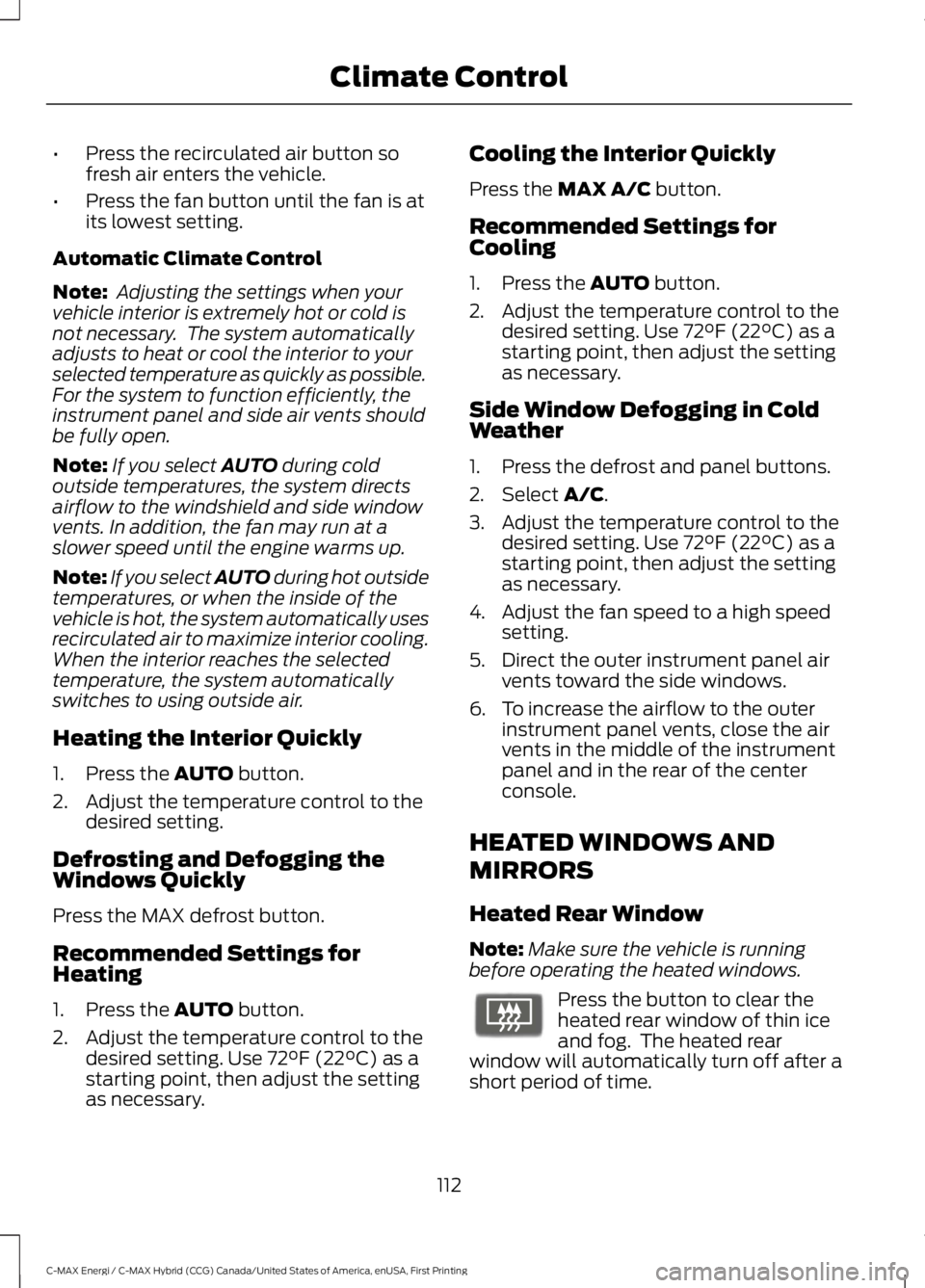
•Press the recirculated air button sofresh air enters the vehicle.
•Press the fan button until the fan is atits lowest setting.
Automatic Climate Control
Note: Adjusting the settings when yourvehicle interior is extremely hot or cold isnot necessary. The system automaticallyadjusts to heat or cool the interior to yourselected temperature as quickly as possible.For the system to function efficiently, theinstrument panel and side air vents shouldbe fully open.
Note:If you select AUTO during coldoutside temperatures, the system directsairflow to the windshield and side windowvents. In addition, the fan may run at aslower speed until the engine warms up.
Note:If you select AUTO during hot outsidetemperatures, or when the inside of thevehicle is hot, the system automatically usesrecirculated air to maximize interior cooling.When the interior reaches the selectedtemperature, the system automaticallyswitches to using outside air.
Heating the Interior Quickly
1. Press the AUTO button.
2. Adjust the temperature control to thedesired setting.
Defrosting and Defogging theWindows Quickly
Press the MAX defrost button.
Recommended Settings forHeating
1. Press the AUTO button.
2. Adjust the temperature control to thedesired setting. Use 72°F (22°C) as astarting point, then adjust the settingas necessary.
Cooling the Interior Quickly
Press the MAX A/C button.
Recommended Settings forCooling
1. Press the AUTO button.
2. Adjust the temperature control to thedesired setting. Use 72°F (22°C) as astarting point, then adjust the settingas necessary.
Side Window Defogging in ColdWeather
1. Press the defrost and panel buttons.
2. Select A/C.
3. Adjust the temperature control to thedesired setting. Use 72°F (22°C) as astarting point, then adjust the settingas necessary.
4. Adjust the fan speed to a high speedsetting.
5. Direct the outer instrument panel airvents toward the side windows.
6. To increase the airflow to the outerinstrument panel vents, close the airvents in the middle of the instrumentpanel and in the rear of the centerconsole.
HEATED WINDOWS AND
MIRRORS
Heated Rear Window
Note:Make sure the vehicle is runningbefore operating the heated windows.
Press the button to clear theheated rear window of thin iceand fog. The heated rearwindow will automatically turn off after ashort period of time.
112
C-MAX Energi / C-MAX Hybrid (CCG) Canada/United States of America, enUSA, First Printing
Climate ControlE72507
Page 116 of 497

Note: Do not use razor blades or othersharp objects to clean or remove decalsfrom the inside of the heated rear window.The vehicle warranty does not coverdamage caused to the heated rear windowgrid lines.
Heated Exterior Mirrors (If Equipped)
When you switch the heated rearwindow on, the heated exteriormirrors will automatically turnon.
Note:Do not remove ice from the mirrorswith a scraper or adjust the mirror glasswhen it is frozen in place.
Note:Do not clean the mirror housing orglass with harsh abrasives, fuel or otherpetroleum-based cleaning products.
CABIN AIR FILTER
The cabin air filter is under the instrumentpanel in the passenger footwell area.
The system filters airborne particles suchas dust, spores and pollen in the airsupplied to and recirculated in the interiorof your vehicle.
Make sure you have a cabin air filterinstalled at all times. Running the systemwithout a filter in place could degrade ordamage the system.
Your vehicle cabin air filter gives you andyour passengers the following benefits:
•It improves your driving comfort byreducing particle concentration.
•It improves the interior compartmentcleanliness.
•It protects the climate controlcomponents from particle deposits.
Change the air filter element at the properintervals.
For additional cabin air filter information,or to replace the filter, see an authorizeddealer.
REMOTE START (If Equipped)
You can switch this feature on or off andadjust the settings using the informationdisplay.
The system adjusts the interiortemperature depending on your chosensettings during remote start.
You cannot adjust the climate controlsetting during remote start operation.When you switch the ignition on, theclimate control system will return to theprevious settings. You can now makeadjustments.
You can switch on certainvehicle-dependent features when needed,such as:
•Heated seats.
•Cooled seats.
•Heated steering wheel.
•Heated mirrors.
•Heated rear window.
Automatic Settings
In hot weather, the system is set to 72°F(22°C). The cooled seats are set to high(if available, and selected to AUTO in theinformation display).
In moderate weather, the system eitherheats or cools (based on previoussettings). The rear defroster, heatedmirrors and heated or cooled seats do notautomatically turn on.
In cold weather, the system is set to 72°F(22°C). The heated seats are set to high(if available, and selected to AUTO in theinformation display). The heated rearwindow and heated mirrors automaticallyturn on.
113
C-MAX Energi / C-MAX Hybrid (CCG) Canada/United States of America, enUSA, First Printing
Climate ControlE72507
Page 123 of 497

HEATED SEATS (If Equipped)
WARNING
People who are unable to feel painto their skin because of advancedage, chronic illness, diabetes, spinalcord injury, medication, alcohol use,exhaustion or other physical conditions,must exercise care when using the heatedseat. The heated seat may cause burnseven at low temperatures, especially ifused for long periods of time. Do not placeanything on the seat that insulates againstheat, such as a blanket or cushion. Thismay cause the heated seat to overheat.Do not puncture the seat with pins, needlesor other pointed objects. This may damagethe heating element which may cause theheated seat to overheat. An overheatedseat may cause serious personal injury.
Do not do the following:
•Place heavy objects on the seat.
•Operate the heated seat if water or anyother liquid is spilled on the seat. Allowthe seat to dry thoroughly.
•Operate the heated seats unless theengine is running. Doing so can causethe battery to lose charge.
Press the heated seat symbol to cyclethrough the various heat settings and off.Warmer settings are indicated by moreindicator lights.
REAR SEAT ARMREST (If Equipped)
Fold the armrest down to use the armrestand cupholder.
120
C-MAX Energi / C-MAX Hybrid (CCG) Canada/United States of America, enUSA, First Printing
SeatsE146941 E138656
Page 132 of 497

GENERAL INFORMATION
WARNINGS
Extended idling at high enginespeeds can produce very hightemperatures in the engine andexhaust system, creating the risk of fire orother damage.
Do not park, idle or drive your vehicleon dry grass or other dry groundcover. The emission system heats upthe engine compartment and exhaustsystem, creating the risk of fire.
Do not start the vehicle in a closedgarage or in other enclosed areas.Exhaust fumes can be toxic. Alwaysopen the garage door before you start thevehicle.
If you smell exhaust fumes insideyour vehicle, have your vehiclechecked by an authorized dealerimmediately. Do not drive your vehicle ifyou smell exhaust fumes.
If you disconnect the battery, your vehiclemay exhibit some unusual drivingcharacteristics for approximately 5 mi(8 km) after you reconnect it. This isbecause the engine management systemmust realign itself with the engine. You candisregard any unusual drivingcharacteristics during this period.
The powertrain control system meets allCanadian interference-causing equipmentstandard requirements regulating theimpulse electrical field or radio noise.
When you start your vehicle, avoid pressingthe accelerator pedal until the ready todrive indicator illuminates. Only use theaccelerator pedal when you have difficultystarting your vehicle.
IGNITION SWITCH
0 (off) - The ignition is off.
Note:When you switch the ignition off andleave your vehicle, do not leave your key inthe ignition. This could cause your vehiclebattery to lose charge.
I (accessory) - Allows the electricalaccessories, such as the radio, to operatewhile the engine is not running.
Note:Do not leave the ignition key in thisposition for too long. This could cause yourvehicle battery to lose charge.
II (on) - All electrical circuits areoperational and the warning lamps andindicators illuminate.
III (start) - starts the vehicle into Ready toDrive mode (indicated by the green "Readyto Drive" icon on the instrument cluster).
KEYLESS STARTING (If Equipped)
Note:The keyless starting system may notfunction if the key is close to metal objectsor electronic devices such as cellularphones.
Note:A valid key must be located insideyour vehicle to switch the ignition on andstart the vehicle.
129
C-MAX Energi / C-MAX Hybrid (CCG) Canada/United States of America, enUSA, First Printing
Starting and Stopping the EngineE72128