Page 140 of 350

INSTRUMENT CLUSTER DISPLAY
Your vehicle may be equipped with an Instrument
Cluster Display, which offers useful information to the
driver. With the ignition in the STOP/OFF position (and
the key removed, for vehicles with mechanical key),
opening/closing of a door will activate the display for
viewing, and display the total miles or kilometers in the
odometer. Your Instrument Cluster Display is designed
to display important information about your vehicle’s
systems and features. Using a driver interactive display
located on the instrument panel, your Instrument Clus-
ter Display can show you how systems are working and
give you warnings when they aren’t. The steering wheel
mounted controls allow you to scroll through and enter
the main menus and submenus. You can access the
specific information you want and make selections and
adjustments.
Instrument Cluster Display And Controls
The driver-interactive Instrument Cluster Display is
located in the center of the instrument cluster.The system display consists of the following:
•
System Status
• Vehicle Information Warning Message Displays
•
Personal Settings (Customer-Programmable Features)
• Outside Temperature Display
• Trip Computer Functions
• Tire Pressure Monitoring Display
Instrument Cluster Display
138 UNDERSTANDING YOUR INSTRUMENT PANEL
Page 141 of 350
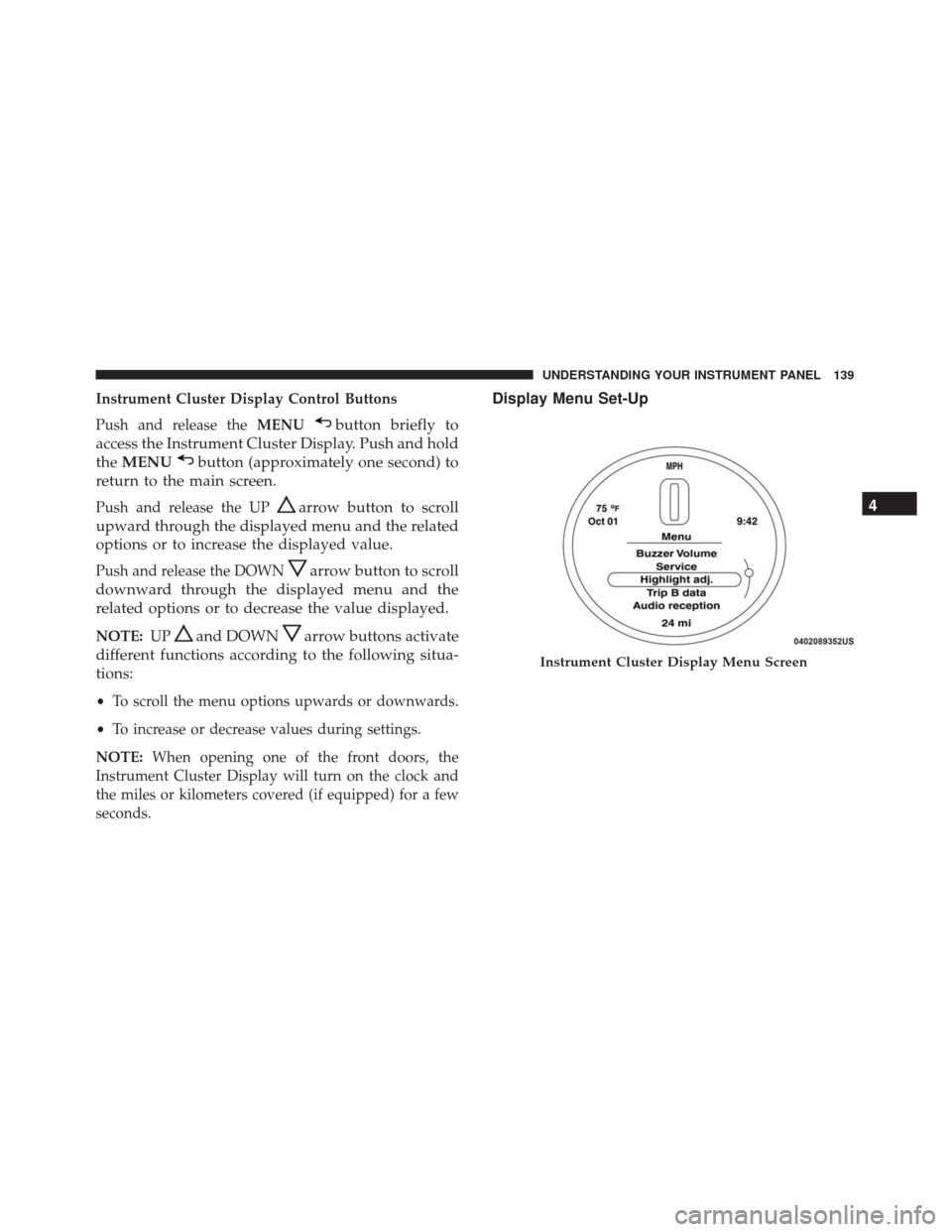
Instrument Cluster Display Control Buttons
Push and release theMENU
button briefly to
access the Instrument Cluster Display. Push and hold
the MENU
button (approximately one second) to
return to the main screen.
Push and release the UParrow button to scroll
upward through the displayed menu and the related
options or to increase the displayed value.
Push and release the DOWNarrow button to scroll
downward through the displayed menu and the
related options or to decrease the value displayed.
NOTE: UPand DOWNarrow buttons activate
different functions according to the following situa-
tions:
• To scroll the menu options upwards or downwards.
• To increase or decrease values during settings.
NOTE: When opening one of the front doors, the
Instrument Cluster Display will turn on the clock and
the miles or kilometers covered (if equipped) for a few
seconds.
Display Menu Set-Up
Instrument Cluster Display Menu Screen
4
UNDERSTANDING YOUR INSTRUMENT PANEL 139
Page 142 of 350

The menu comprises a series of functions arranged in a
cycle. Push and release theUP
andDOWNar-
row buttons to access the different options and
settings (setup).
The setup menu can be activated by pushing the
MENU
button. A single push on the UPor
DOWN
arrow button will scroll through the
setup menu options. The menu includes the follow-
ing functions:
• Buzzer Volume •
Service (Only if equipped)
• Headlight Adjustment (Only if equipped)
• Trip B Data
• Audio Repetition — If Equipped
• Navigation Repetition — If Equipped
Selecting An Option Of The Main Menu Without Sub-
menu.
1. Briefly push and release the MENU
button to
select the main menu option to set.
2. Push and release the UPorDOWNarrow
button (by single pushes) to select the new setting.
3. Briefly push and release the MENUbutton to
store the new setting and go back to the main
menu option previously selected.
Selecting An Option Of The Main Menu With Submenu.
1. Briefly push and release the MENU
button to
display the first submenu option.
2. Push and release the UPorDOWNarrow
button (by single pushes) to scroll through all the
submenu options.
Instrument Cluster Display Menu Screen Continued
140 UNDERSTANDING YOUR INSTRUMENT PANEL
Page 143 of 350
3. Briefly push and release theMENUbutton to
select the displayed submenu option and to open
the relevant setup menu.
4. Push and release the UPorDOWNarrow
button (by single pushes) to select the new setting
for this submenu option.
5. Briefly push and release the MENUbutton to
store the new setting and go back to the previ-
ously selected submenu option.
6. Push and hold the MENUbutton to return to the
main menu (short hold) or the main screen (longer
hold).
Oil Change Message Reset
Your vehicle is equipped with an engine oil change
indicator system. The “Change Engine Oil” message
will appear in the Instrument Cluster Display for ap-
proximately 5 seconds after a single chime has sounded
to indicate the next scheduled oil change interval. The
engine oil change indicator system is duty cycle based,
which means the engine oil change interval may fluc-
tuate, dependent upon your personal driving style.
Unless reset, this message will continue to display each
time you turn the ignition switch to the ON/RUN position. To turn off the message temporarily, push and
release the
MENU
button. To reset the oil change
indicator system (after performing the scheduled
maintenance), refer to the following procedure.
1. Turn the ignition switch to the ON position. (do not start the engine.)
2. Fully push the accelerator pedal slowly, three times within 10 seconds.
3. Turn the ignition switch to the OFF/LOCK position.
NOTE: If the indicator message illuminates when you
start the vehicle, the oil change indicator system did not
reset. If necessary, repeat this procedure.
Trip Computer
The Trip Computer is located in the instrument cluster.
It features a driver-interactive display (displays infor-
mation such as trip information, range, fuel consump-
tion, average speed, and travel time).
Trip Button
The TRIP button, located on the right steering column
stalk, can be used to display and to reset the previously
described values.
4
UNDERSTANDING YOUR INSTRUMENT PANEL 141
Page 144 of 350

•A short button push displays the different values.
• A long button push resets the system and then starts
a new trip.
New Trip
To reset:
• Push and hold the TRIPbutton to reset the system
manually.
• When the “Trip distance” reaches 99999.9 kilometers
(621370 miles) or when the “Travel time” reaches
99.59 (99 hours and 59 minutes), the system is reset
automatically.
• Disconnecting/Reconnecting the battery resets the
system.
NOTE: If the reset operation occurs in the presence of
the screens concerning Trip A or Trip B, only the
information associated with Trip A or Trip B functions
will be reset.
Start Of Trip Procedure
With the ignition on, push and hold the TRIPbutton for
over 2 seconds to reset trip information.
Exit Trip
To exit the Trip function, wait until all the values have
been displayed or hold the MENUbutton for longer
than one second.
Briefly push and release the MENUbutton to go back to
the menu screen or push and hold the MENU(approxi-
mately one second) to go back to the main screen
without storing settings.
Tire Pressure
This function will be used to display the tire pressures
individually for all four tires by location.
Trip Functions
Both trip functions are resettable (reset — start of new
trip).
“Trip A” can be used to display the figures relating to:
• Trip Distance A
• Average Fuel Consumption
• Average Speed A
• Travel Time A (Driving Time)
142 UNDERSTANDING YOUR INSTRUMENT PANEL
Page 145 of 350

“Trip B” can be used to display the figures relating to:
•Trip Distance B
• Average Fuel Consumption
• Average Speed B
• Travel Time B (Driving Time)
“Current Trip” can be used to display the figures
relating to:
• Range
• Instantaneous Fuel Consumption
NOTE: “Trip B” functions may be excluded (see “Trip
B Data”). “Range” and “Instantaneous Fuel Consump-
tion” cannot be reset.
Values Displayed
Range
This indicates the distance which may be traveled with
the fuel remaining in the tank, assuming that driving
conditions will not change. The message “----” will
appear on the display in the following cases:
• Distance less than 30 miles (or 50 km). •
The vehicle is parked for a long time with the engine
running.
NOTE: The range depends on several factors: driving
style, type of route (freeway, residential, mountain
roads, etc.), and conditions of use of the vehicle (load,
tire pressure, etc.). Trip planning must take into account
the above notes.
Distance Traveled
This value shows the distance covered since the last
reset.
Average Fuel Economy
This value shows the approximate average fuel con-
sumption since the last reset.
Instantaneous Fuel Economy
This indicates the fuel consumption. The value is con-
stantly updated. The message “----” will appear on the
display if the vehicle is parked with the engine running.
Average Speed
This value shows the vehicle’s average speed as a
function of the overall time elapsed since the last reset.
4
UNDERSTANDING YOUR INSTRUMENT PANEL 143
Page 146 of 350
Travel Time
This value shows the time elapsed since the last reset.
Submenu Personal Settings
Buzzer Volume (Adjusting The Failure/Warning
Buzzer Volume)
With this function the volume of the buzzer accompa-
nying any failure/warning indication can be adjusted
to Low, Medium, High.To adjust the volume proceed as follows:
1. Briefly push and release the
MENU
button. Push
and release the UP
orDOWNarrow button,
then highlight the Buzzer Volume. Push and re-
lease the MENU
button to enter the Buzzer
Volume MENU.
2. Push and release the UPorDOWNarrow
button for setting.
3. Briefly push and release the MENUbutton to go
back to the menu screen, or push and hold the
MENU
button (approximately one second) to
go back to the main screen without storing the
settings.
Buzzer Volume Submenu Settings:
• Off
• Low
• Medium
• High
• Return to MENU
Buzzer Volume Submenu Display
144 UNDERSTANDING YOUR INSTRUMENT PANEL
Page 147 of 350
Service – If Equipped
This function allows you to display the information
about mileage intervals for servicing your car.
To view this information, proceed as follows:
1. Briefly push and release theMENUbutton to enter
the Main MENU.
2. Push and release the UP
orDOWNarrow
button to select Service. Push and release the
MENU button, push and release the UP
or
DOWN
arrow button to reset.
NOTE: IMPORTANT The “Scheduled Servicing Plan”
includes car maintenance at fixed intervals.
This is displayed automatically, with ignition key at
MAR-ON, before servicing or, where provided, 30 days
before servicing.
Headlight Adjustment – If Equipped
When this function is activated the cluster will display
the headlight adjustment features.
Service Submenu Display
Headlight Adjustment Submenu Display
4
UNDERSTANDING YOUR INSTRUMENT PANEL 145