Page 156 of 350
After pressing “Custom” on the touchscreen, you may
select from one of the below menu items:
Setting NameSelectable Options
Fuel Consumption MPG (US)MPG (UK) L/100 km km/L
Temperature °C °F
Pressure psi kPa
Voice
Setting Name Selectable Options
Voice Response Length Brief Long
Show Command List AlwaysWith Help Never
Clock & Date
After pressing the “Clock & Date” button on the touch-
screen, the following settings will be available:
Setting Name Selectable Options
Set Time and Format 12 hour24 hour
NOTE: Press the corresponding arrow above and below the current time to adjust, then select “AM” or “PM.”
154 UNDERSTANDING YOUR INSTRUMENT PANEL
Page 157 of 350
Setting NameSelectable Options
Show Time Status OnOff
Set Date Set Date
NOTE: Press the corresponding arrows above and below the current date to adjust.
Sync Time — If Equipped OnOff
NOTE: When in the “Sync Time” display, you may sync the time with GPS.
Safety/Assistance
After pressing the “Safety/Assistance” button on the
touchscreen, the following setting will be available:
Setting Name Selectable Options
Hill Start Assist OnOff
4
UNDERSTANDING YOUR INSTRUMENT PANEL 155
Page 158 of 350
Lights
After pressing the “Lights” button on the touchscreen,
the following settings will be available.
Setting NameSelectable Options
Daytime Running Lights OnOff
Doors & Locks
After pressing the “Doors & Locks” button on the
touchscreen, the following setting will be available.
Setting Name Selectable Options
Auto Door Locks OnOff
NOTE: When the “Auto Door Locks” feature is selected, all doors will lock automatically when the vehicle
reaches a speed of 12 mph (20 km/h).
Remote Door Unlock/Door Unlock DriverAll
NOTE: When “Driver” is selected, only the driver ’s door will unlock on the first push of the key fob UNLOCK
button, you must push the key fob UNLOCK button twice to unlock the passenger ’s doors. When “All” is
selected, all of the doors will unlock on the first press of the key fob UNLOCK button.
156 UNDERSTANDING YOUR INSTRUMENT PANEL
Page 159 of 350
Engine Off Options
After pressing the “Engine Off Options” button on the
touchscreen, the following settings will be available.
Setting NameSelectable Options
Radio Off Delay 0 min.20 min.
Audio
After pressing the “Audio” button on the touchscreen,
the following settings will be available:
Setting Name Selectable Options
Equalizer +–
NOTE:
•When in the “Equalizer” display, you may adjust the Bass, Mid and Treble settings.
•Bass/Mid/Treble allow you to simply slide your finger up or down to change the setting as well as press
directly on the desired setting. Balance/Fade When in the “Balance/ Fade” display, you may adjust the Balance settings.
Auto-On Radio OnOffRecall Last
NOTE: When the “Auto-On Radio” feature is selected, the radio automatically turns on when vehicle is in run
or will recall whether it was on or off at last ignition off.
4
UNDERSTANDING YOUR INSTRUMENT PANEL 157
Page 160 of 350
Setting NameSelectable Options
Radio Off With Door On Off
NOTE: When the “Radio Off With Door” feature is selected, the radio will remain on until the driver or pas-
senger door is opened or when the Radio Off Delay time expires.
Phone/Bluetooth
After pressing the “Phone/Bluetooth” button on the
touchscreen, the following settings will be available:
Setting Name Selectable Options
Paired Phones List of Paired Phones
NOTE: The “Paired Phones” feature shows which phones are paired to the Phone/Bluetooth system. For fur-
ther information, refer to the Uconnect Owner ’s Manual Supplement.
158 UNDERSTANDING YOUR INSTRUMENT PANEL
Page 161 of 350

SiriusXM Setup — If Equipped
After pressing the “SiriusXM Setup” button on the
touchscreen, the following settings will be available:
Setting NameSelectable Options
Tune Start OnOff
NOTE: “Tune Start” begins playing the current song from the beginning when you tune to a music channel us-
ing one of the twelve presets, so you can enjoy the complete song. This feature occurs the first time the preset
is selected during that current song. Tune Start works in the background, so you will not even realize it’s on,
except that you will miss the experience of joining your favorite song with only a few seconds left to play.
Channel Skip Channel Skip
NOTE: SiriusXM can be programmed to designate a group of channels that are the most desirable to listen to
or to exclude undesirable channels while scanning.
Subscription Information Subscription Info
NOTE:
•New vehicle purchasers or lessees will receive a free limited time subscription to SiriusXM Satellite Radio
with your radio. Following the expiration of the free services, it will be necessary to access the information
on the Subscription Information screen to re-subscribe.
•Write down the SIRIUS ID numbers for your receiver. To reactivate your service, either call the number listed
on the screen or visit the provider online.
NOTE: SiriusXM Travel Link is a separate subscription
and is available for U.S. residents only.
4
UNDERSTANDING YOUR INSTRUMENT PANEL 159
Page 162 of 350
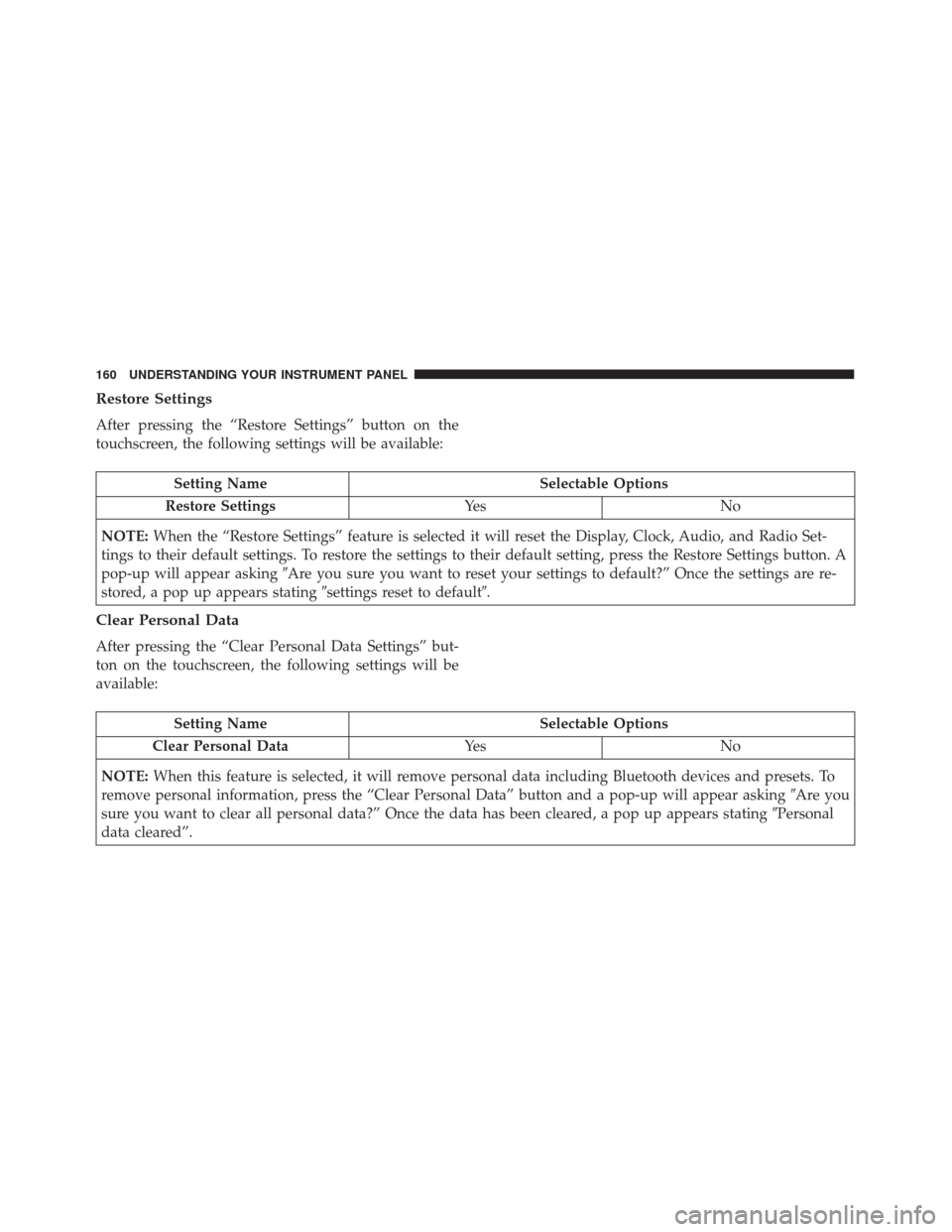
Restore Settings
After pressing the “Restore Settings” button on the
touchscreen, the following settings will be available:
Setting NameSelectable Options
Restore Settings Ye sN o
NOTE: When the “Restore Settings” feature is selected it will reset the Display, Clock, Audio, and Radio Set-
tings to their default settings. To restore the settings to their default setting, press the Restore Settings button. A
pop-up will appear asking �Are you sure you want to reset your settings to default?” Once the settings are re-
stored, a pop up appears stating �settings reset to default�.
Clear Personal Data
After pressing the “Clear Personal Data Settings” but-
ton on the touchscreen, the following settings will be
available:
Setting Name Selectable Options
Clear Personal Data Ye sN o
NOTE: When this feature is selected, it will remove personal data including Bluetooth devices and presets. To
remove personal information, press the “Clear Personal Data” button and a pop-up will appear asking �Are you
sure you want to clear all personal data?” Once the data has been cleared, a pop up appears stating �Personal
data cleared”.
160 UNDERSTANDING YOUR INSTRUMENT PANEL
Page 163 of 350
UCONNECT 5.0/5.0 NAV VOICE RECOGNITION
QUICK TIPS
Introducing Uconnect
Start using Uconnect Voice Recognition with these
helpful quick tips. It provides the key Voice Commands
and tips you need to know to control your Uconnect
system.
Get Started
1. Visit UconnectPhone.com to check mobile deviceand feature compatibility and to find phone pairing
instructions.
2. Reduce background noise. Wind and passenger con- versations are examples of noise that may impact
recognition.
3. Speak clearly at a normal pace and volume while facing straight ahead. The microphone is positioned
on the rearview mirror and aimed at the driver.
4. Each time you give a Voice Command, you must first push either the VR or PHONE button, wait until
after the beep, then say your Voice Command.
5. You can interrupt the help message or system prompts by pushing the VR or PHONE button and
saying a Voice Command from current category.
Uconnect 5.0/5.0 NAV
4
UNDERSTANDING YOUR INSTRUMENT PANEL 161


