Page 127 of 350

Transmission Fault Warning Light
Red TelltaleLight What It Means
Transmission Fault Warning Light
This light will illuminate (together with a message in the Instrument Cluster Display and a
buzzer) to indicate a transmission fault. This light indicates that the transmission fluid tem-
perature is running hot. This may occur with severe usage. If this light turns on, safely pull
over and stop the vehicle. Then, place the transmission into NEUTRAL and run the engine
at idle speed or apply light foot pressure to increase the engine speed RPM until the Trans-
mission Temperature light turns off. Contact your authorized dealer if the message remains
after restarting the engine.
WARNING!
If you continue operating the vehicle when the
Transmission Temperature Warning Light is illumi-
nated you could cause the fluid to boil over, come in
contact with hot engine or exhaust components and
cause a fire.
CAUTION!
Continuous driving with the Transmission Tem-
perature Warning Light illuminated will eventually
cause severe transmission damage or transmission
failure.
4
UNDERSTANDING YOUR INSTRUMENT PANEL 125
Page 131 of 350

Electronic Stability Control (ESC) Activation/Malfunction Indicator Light
Yellow TelltaleLight What It Means
Electronic Stability Control (ESC) Activation/Malfunction Indicator Light
The “ESC Activation/Malfunction Indicator Light” in the instrument cluster will come on
when the ignition switch is turned to the ON/RUN position. It should go out with the en-
gine running. If the “ESC Activation/Malfunction Indicator Light” comes on continuously
with the engine running, a malfunction has been detected in the ESC system. If this light
remains on after several ignition cycles, and the vehicle has been driven several miles (kilo-
meters) at speeds greater than 30 mph (48 km/h), see your authorized dealer as soon as
possible to have the problem diagnosed and corrected.
•
The “ESC Off Indicator Light” and the “ESC Activation/Malfunction Indicator Light”
come on momentarily each time the ignition switch is turned to ON/RUN.
• Each time the ignition is turned to ON/RUN, the ESC system will be ON even if it was
manually turned off previously.
• The ESC system will make buzzing or clicking sounds and flash the ESC activation light
when it is active. This is normal; the sounds will stop when ESC becomes inactive
following the maneuver that caused the ESC activation. 4
UNDERSTANDING YOUR INSTRUMENT PANEL 129
Page 137 of 350

Glow Plug Light — If Equipped
Yellow TelltaleLight What It Means
Glow Plug Light — If Equipped
This vehicle will inhibit engine cranking when the ambient temperature is less than –22° F
(–30° C) and the oil temperature sensor reading indicates an engine block heater has not
been used. The Glow Plug light will flash during in cold weather for up to 10 seconds.
If equipped with a block heater harness the message
�Plug In Engine Heater�, will be dis-
played in the instrument cluster when the ambient temperature is below 5°F (-15° C) at the
time the engine is shut off as a reminder to avoid possible crank delays at the next cold
start.
Green Telltale Indicator Lights
Turn Signal Indicator Lights
Green Tell- tale Light What It Means
Turn Signal Indicator Lights
The instrument cluster arrow will flash independently for the LEFT or RIGHT turn signal as
selected, as well as the exterior turn signal lamp(s) (front and rear) as selected when the multi-
function lever is moved down (LEFT) or up (RIGHT).
4
UNDERSTANDING YOUR INSTRUMENT PANEL 135
Page 140 of 350

INSTRUMENT CLUSTER DISPLAY
Your vehicle may be equipped with an Instrument
Cluster Display, which offers useful information to the
driver. With the ignition in the STOP/OFF position (and
the key removed, for vehicles with mechanical key),
opening/closing of a door will activate the display for
viewing, and display the total miles or kilometers in the
odometer. Your Instrument Cluster Display is designed
to display important information about your vehicle’s
systems and features. Using a driver interactive display
located on the instrument panel, your Instrument Clus-
ter Display can show you how systems are working and
give you warnings when they aren’t. The steering wheel
mounted controls allow you to scroll through and enter
the main menus and submenus. You can access the
specific information you want and make selections and
adjustments.
Instrument Cluster Display And Controls
The driver-interactive Instrument Cluster Display is
located in the center of the instrument cluster.The system display consists of the following:
•
System Status
• Vehicle Information Warning Message Displays
•
Personal Settings (Customer-Programmable Features)
• Outside Temperature Display
• Trip Computer Functions
• Tire Pressure Monitoring Display
Instrument Cluster Display
138 UNDERSTANDING YOUR INSTRUMENT PANEL
Page 141 of 350
Instrument Cluster Display Control Buttons
Push and release theMENU
button briefly to
access the Instrument Cluster Display. Push and hold
the MENU
button (approximately one second) to
return to the main screen.
Push and release the UParrow button to scroll
upward through the displayed menu and the related
options or to increase the displayed value.
Push and release the DOWNarrow button to scroll
downward through the displayed menu and the
related options or to decrease the value displayed.
NOTE: UPand DOWNarrow buttons activate
different functions according to the following situa-
tions:
• To scroll the menu options upwards or downwards.
• To increase or decrease values during settings.
NOTE: When opening one of the front doors, the
Instrument Cluster Display will turn on the clock and
the miles or kilometers covered (if equipped) for a few
seconds.
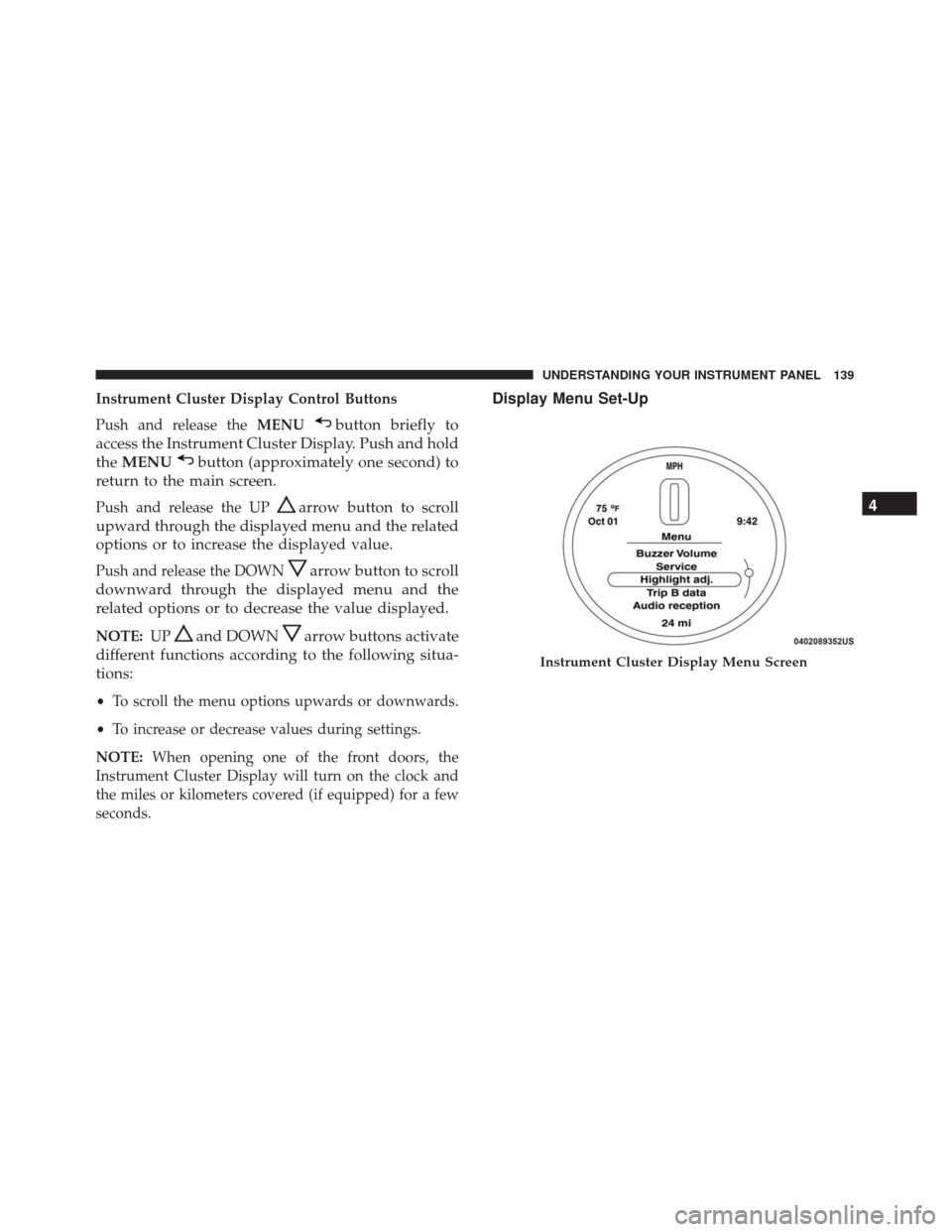
Display Menu Set-Up
Instrument Cluster Display Menu Screen
4
UNDERSTANDING YOUR INSTRUMENT PANEL 139
Page 142 of 350

The menu comprises a series of functions arranged in a
cycle. Push and release theUP
andDOWNar-
row buttons to access the different options and
settings (setup).
The setup menu can be activated by pushing the
MENU
button. A single push on the UPor
DOWN
arrow button will scroll through the
setup menu options. The menu includes the follow-
ing functions:
• Buzzer Volume •
Service (Only if equipped)
• Headlight Adjustment (Only if equipped)
• Trip B Data
• Audio Repetition — If Equipped
• Navigation Repetition — If Equipped
Selecting An Option Of The Main Menu Without Sub-
menu.
1. Briefly push and release the MENU
button to
select the main menu option to set.
2. Push and release the UPorDOWNarrow
button (by single pushes) to select the new setting.
3. Briefly push and release the MENUbutton to
store the new setting and go back to the main
menu option previously selected.
Selecting An Option Of The Main Menu With Submenu.
1. Briefly push and release the MENU
button to
display the first submenu option.
2. Push and release the UPorDOWNarrow
button (by single pushes) to scroll through all the
submenu options.
Instrument Cluster Display Menu Screen Continued
140 UNDERSTANDING YOUR INSTRUMENT PANEL
Page 143 of 350
3. Briefly push and release theMENUbutton to
select the displayed submenu option and to open
the relevant setup menu.
4. Push and release the UPorDOWNarrow
button (by single pushes) to select the new setting
for this submenu option.
5. Briefly push and release the MENUbutton to
store the new setting and go back to the previ-
ously selected submenu option.
6. Push and hold the MENUbutton to return to the
main menu (short hold) or the main screen (longer
hold).
Oil Change Message Reset
Your vehicle is equipped with an engine oil change
indicator system. The “Change Engine Oil” message
will appear in the Instrument Cluster Display for ap-
proximately 5 seconds after a single chime has sounded
to indicate the next scheduled oil change interval. The
engine oil change indicator system is duty cycle based,
which means the engine oil change interval may fluc-
tuate, dependent upon your personal driving style.
Unless reset, this message will continue to display each
time you turn the ignition switch to the ON/RUN position. To turn off the message temporarily, push and
release the
MENU
button. To reset the oil change
indicator system (after performing the scheduled
maintenance), refer to the following procedure.
1. Turn the ignition switch to the ON position. (do not start the engine.)
2. Fully push the accelerator pedal slowly, three times within 10 seconds.
3. Turn the ignition switch to the OFF/LOCK position.
NOTE: If the indicator message illuminates when you
start the vehicle, the oil change indicator system did not
reset. If necessary, repeat this procedure.
Trip Computer
The Trip Computer is located in the instrument cluster.
It features a driver-interactive display (displays infor-
mation such as trip information, range, fuel consump-
tion, average speed, and travel time).
Trip Button
The TRIP button, located on the right steering column
stalk, can be used to display and to reset the previously
described values.
4
UNDERSTANDING YOUR INSTRUMENT PANEL 141
Page 147 of 350
Service – If Equipped
This function allows you to display the information
about mileage intervals for servicing your car.
To view this information, proceed as follows:
1. Briefly push and release theMENUbutton to enter
the Main MENU.
2. Push and release the UP
orDOWNarrow
button to select Service. Push and release the
MENU button, push and release the UP
or
DOWN
arrow button to reset.
NOTE: IMPORTANT The “Scheduled Servicing Plan”
includes car maintenance at fixed intervals.
This is displayed automatically, with ignition key at
MAR-ON, before servicing or, where provided, 30 days
before servicing.
Headlight Adjustment – If Equipped
When this function is activated the cluster will display
the headlight adjustment features.
Service Submenu Display
Headlight Adjustment Submenu Display
4
UNDERSTANDING YOUR INSTRUMENT PANEL 145