2017 FIAT 124 SPIDER display
[x] Cancel search: displayPage 170 of 300
Caution!
Do not apply excessive force to the
camera. You could alter the position and
angle of the camera. Do not disassemble,
modify or remove it as this could
compromise the seal.
The camera’s cover is made of plastic.
Do not apply degreasers, organic solvents,
wax or glass polish to the camera’s cover.
If some substance ends up on the cover,
clean it off immediately with a soft cloth.
Do not rub the cover too much, nor
polish it with abrasive compounds or hard
brushes. The cover could be damaged and
create image problems.
If the vehicle has been involved in a
frontal, lateral or rear collision, the rear
parking camera’s alignment (location or
installation angle) may have been altered.
Contact a Authorized Dealer.
If the display shows "no video signal",
there may be a problem with the camera.
Contact an Authorized Dealer.
Display
Note: The images on the display can
show a situation that differs from the
actual view.
The field of view varies depending on
the vehicle and the road conditions. The
field of view is limited. Objects below
the bumper or around its ends may not
be displayed. The distance displayed by the image
differs from the real one as the rear
parking camera is equipped with a
special lens.
The camera could capture any
non-standard accessories installed on
the vehicle. Do not install non-standard
accessories that could interfere with the
camera’s view, such as lights or
reflectors.
GUID-07080913987987Camera View
1 — Rear Bumper
2 — Blocked Area
GUID-07080913988988Camera Field Of View
168
STARTING AND OPERATING
Page 171 of 300
Note:If it is difficult to see the display
under the following conditions, it does
notmeanthatthisisduetoa
malfunction:
In dark areas.
When the temperature around the
lens is particularly high/low.
When the camera is wet from rain
or due to a high atmospheric humidity.
When there is some foreign deposit
around the camera, for example mud.
When the camera lens reflects
sunlight or a headlight beam.
The image on the display may be
delayed if the temperature around the
camera is low.
Caution!
To avoid vehicle damage, ParkView
should only be used as a parking aid. The
ParkView camera is unable to view every
obstacle or object in your drive path.
To avoid vehicle damage, the vehicle
must be driven slowly when using ParkView
to be able to stop in time when an obstacle
is seen. It is recommended that the driver
look frequently over his/her shoulder when
using ParkView.
Looking At The Display
The width of the vehicles guide lines
(yellow) are displayed on the screen as
a reference to show the width of the
vehicle compared to the width of the
parking space to be entered in reverse.
Vehicle Width Guide Lines
(Yellow): these guide lines serve as a
reference showing the width of the
vehicle.
Distance Guide Lines : these lines
indicate the approximate distance of a
point measured from the rear of the
vehicle (from the end of the bumper).
The red and yellow line indicates the
pointsatabout19in(50cm),forthe
red line and 39 in (1 m) for the yellow
line, from the rear bumper (central point
of each line).
Warning!
Drivers must be careful when backing up
even when using the ParkView Rear Back
Up Camera. Always check carefully behind
your vehicle, and be sure to check for
pedestrians, animals, other vehicles,
obstructions, or blind spots before backing
up. You are responsible for the safety of
your surroundings and must continue to
pay attention while backing up. Failure to
do so can result in serious injury or death.
Rear-View Monitor
Operation
The operating modes of the rear-view
monitor when the vehicle is in reverse
vary depending on traffic, road and
vehicle conditions. Also the amount of
turning and the duration of the
maneuver vary depending on the
conditions, therefore is important to
check the effective situation and adapt
the steering.
Note: The images from the rear
parking camera shown on the monitor
are reversed (mirror image).
07080913-111-111Vehicle Width Guide Lines
169
Page 172 of 300
Give consideration to the below
information before you use the
rear-view camera:
1. Put the gear selector in the Reverse
(R) position to switch the display to
rear-view camera mode.
2. Check the surrounding conditions
and begin backing up.3. Once the vehicle starts to enter the
parking space, proceed slowly in
reverse keeping the vehicle width guide
lines away from the two sides of the
parking space.
4. Continue to make corrections with
the steering wheel until the vehicle
width guide lines are parallel with the
two sides of the parking space.
5. Once they are parallel, straighten the
steering wheel and reverse slowly into
the parking space. Continue to check
the vehicle’s surroundings and stop in
the best position possible (if the parking
space has dividing lines, check that the
vehicle width guide lines are parallel
with them).
6. When the gear selector is moved
from the Reverse (R) position and put in
any other position, the screen returns to
the previous display mode.
Note:
Since there may be some differences
between the displayed image, as
indicated below, and the real
conditions, always check with your own
GUID-07080913989989Entering Parking Spot
A — Rear Camera View
B — Check Surrounding Area
GUID-07080913990990Entering Parking Spot
A — Rear Camera View
B — Check Surrounding Area
170
STARTING AND OPERATING
Page 173 of 300
eyes that the area behind the vehicle
and the surrounding area are
completely safe:
In the image of the parking space
(or garage) shown below, although the
rear of the vehicle and the distance
guide lines seem parallel on the
monitor, on the ground they may not
be.
When you enter a parking space
with a dividing line only on one side,
the dividing line and the vehicle width
guide line may appear parallel on the
monitor but they may not be so on the
ground.
Road Conditions And
Displayed Image
There are some differences between
the road and what is actually shown on
the display.
The different perception of distance
could lead to an accident. The
conditions that can lead to a different
perception of distance, listed below,
must be taken into consideration. When The Vehicle Slopes Due To
The Weight Of Passengers And
Load:
When the vehicle is rear-heavy, the
object on the screen seems to be
further than it really is.
When The Road Behind The Vehicle
Slopes Steeply:
When the vehicle is on a steep uphill
(downhill) slope, the object on the
screen seems to be further than it
really is.GUID-07080913991991Loaded Vehicle Camera Angle
1 — Object
2— Variance
GUID-07080913992992Downhill Camera Angle
1 — Distance Between The Vehicle And
Object Displayed On The Screen
2 — Actual Distance Between The
Vehicle And Object
3 — Appears Farther Than Actual
Distance
4 — Object At Actual Position
5 — Object On Screen
171
Page 174 of 300
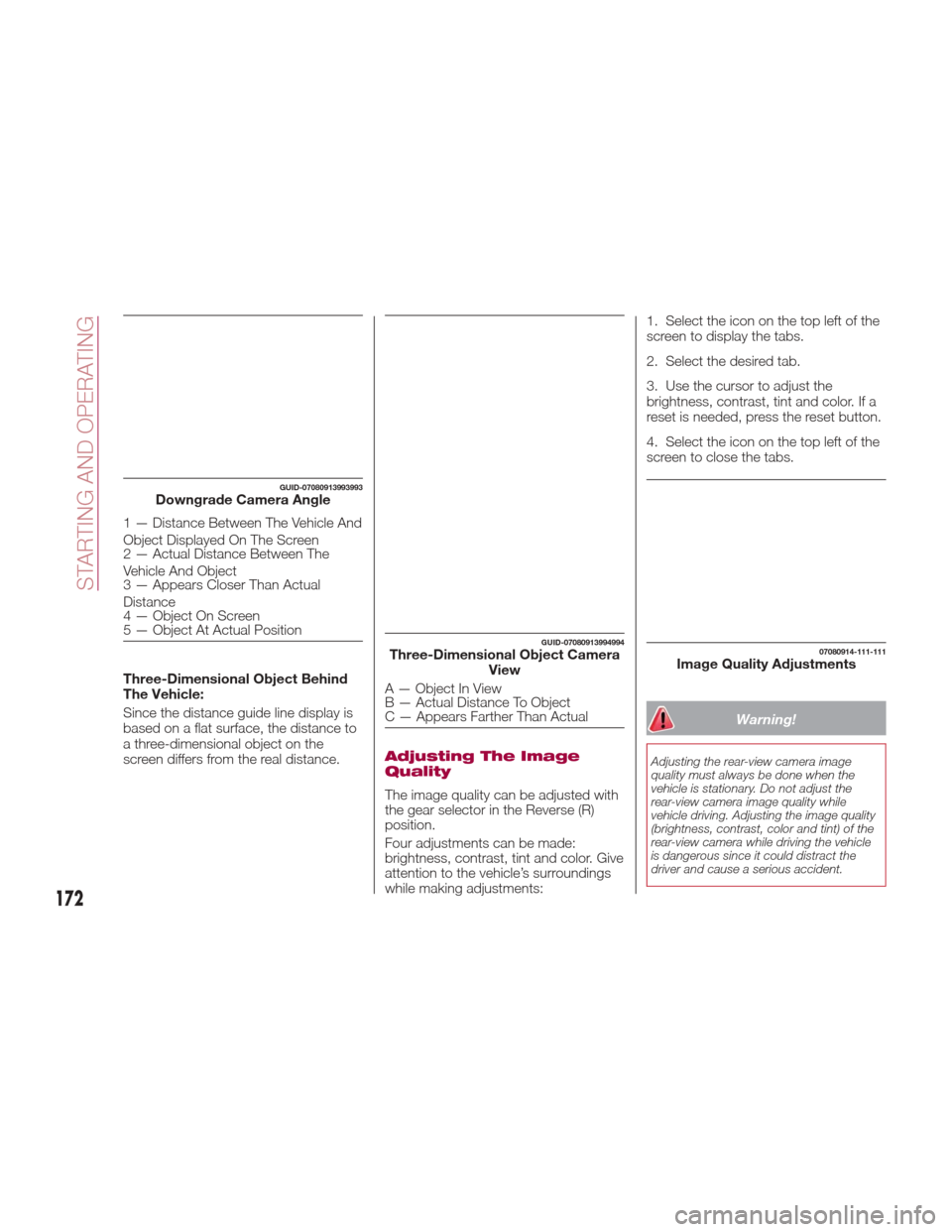
Three-Dimensional Object Behind
The Vehicle:
Since the distance guide line display is
based on a flat surface, the distance to
a three-dimensional object on the
screen differs from the real distance.
Adjusting The Image
Quality
The image quality can be adjusted with
the gear selector in the Reverse (R)
position.
Four adjustments can be made:
brightness, contrast, tint and color. Give
attention to the vehicle’s surroundings
while making adjustments:1. Select the icon on the top left of the
screen to display the tabs.
2. Select the desired tab.
3. Use the cursor to adjust the
brightness, contrast, tint and color. If a
reset is needed, press the reset button.
4. Select the icon on the top left of the
screen to close the tabs.
Warning!
Adjusting the rear-view camera image
quality must always be done when the
vehicle is stationary. Do not adjust the
rear-view camera image quality while
vehicle driving. Adjusting the image quality
(brightness, contrast, color and tint) of the
rear-view camera while driving the vehicle
is dangerous since it could distract the
driver and cause a serious accident.
GUID-07080913993993Downgrade Camera Angle
1 — Distance Between The Vehicle And
Object Displayed On The Screen
2 — Actual Distance Between The
Vehicle And Object
3 — Appears Closer Than Actual
Distance
4 — Object On Screen
5 — Object At Actual Position
GUID-07080913994994Three-Dimensional Object Camera
View
A—ObjectInView
B — Actual Distance To Object
C — Appears Farther Than Actual
07080914-111-111Image Quality Adjustments
172
STARTING AND OPERATING
Page 227 of 300
INTRODUCTION
Be extremely careful and prevent injury
to yourself and others or damage to
your vehicle when using this Owner’s
Manual for inspection and maintenance.
If you are unsure about any procedure it
describes, we strongly urge you to have
a reliable and qualified service shop
perform the work, preferably at your
Authorized Dealer.
Factory-trained FCA technicians and
genuine FCA parts are best for your
vehicle. Without this expertise and the
parts that have been designed and
made especially for your vehicle,
inadequate, incomplete, and insufficient
servicing may result in problems. This
could lead to vehicle damage or an
accident and injuries.
For expert advice and quality service,
contact your Authorized Dealer.
To continue New Vehicle Limited
Warranty eligibility and to protect your
investment, it is your responsibility to
properly maintain your vehicle
according to factory recommended
schedules outlined in this Owner’s
Manual. As part of this you must keep
your maintenance records, receipts,
repair orders and any other documents
as evidence this maintenance was
performed. You must present these
documents, should any New Vehicle
Limited Warranty coverage
disagreement occur. Failure to do so
can result in your New Vehicle LimitedWarranty being voided either in whole
or in part.
This evidence may consist of the
following:
The FCA Scheduled Maintenance
Record, refer to the Warranty Booklet,
must be completely filled out showing
mileage, repair order number, date for
each service, and signed by a qualified
automotive service technician who
service vehicles.
Original copies of repair orders or
other receipts that include the mileage
and date the vehicle was serviced.
Each receipt should be signed by a
qualified automotive service technician.
For self maintenance, a statement
that you completed the maintenance
yourself, displaying mileage and the
date the work was performed. Also,
receipts for the replacement parts (fluid,
filters, etc.) indicating the date and
mileage must accompany this
statement.
Note:
If you elect to perform maintenance
yourself or have your vehicle serviced at
a location other than an Authorized
Dealer, FCA requires that all fluids, parts
and materials must meet FCA
standards for durability and
performance as described in this
Owner’s Manual. Claims against the warranty resulting
from lack of maintenance, as opposed
to defective materials or authorized FCA
workmanship, will not be honored.
Any auto repair shop using parts
equivalent to your vehicle's original
equipment may perform maintenance.
But we recommend that it always be
done by an Authorized Dealer using
genuine FCA parts. Selecting
“Maintenance Monitor” enables the
system to notify you of your vehicle's
approaching inspection/servicing
period.
Owner Maintenance
Precautions
The owner or a qualified service
technician should make these vehicle
inspections at the indicated intervals to
ensure safe and dependable operation.
Bring any problem to the attention of an
Authorized Dealer or qualified service
technician as soon as possible.
When refueling perform inspection
of:
Brake and clutch fluid level
Engine coolant level
Engine oil level
Washer fluid level
At least monthly perform inspection
of:
Tire inflation pressures
225
Page 289 of 300

Electronic Vehicle Information
Center (EVIC) Setup Menu.....78
EVIC Display ..............78
Emergency flap opening ........176
Emergency Key ..............19
Emergency, In Case Of .........209
Hazard Warning Flasher ......185
Jacking ..........204,205,238
Jump Starting .........218,219
Overheating .............220
Towing ............. .221,223
Emission control system .........74
Engine .................. .267
Exhaust Gas Caution ........175
Fails To Start .............220
Flooded, Starting ..........220
Jump Starting .........218,219
Overheating .............220
Starting ..............21,220
Engine compartment ..........232
Engine coolant (level check) ......233
Engine oil (level check) .........233
Environment protection systems ....74
Essential information ............3
Ethanol .................. .173
Event Data Recorder ..........146
Exhaust Gas Caution ..........175
Exterior Lights ...............38Flash-To-Pass...............40
Flashers Hazard Warning ...........185
Turn Signal ...............41
Flooded Engine Starting ........220
Fluid And Lubricants ..........275
Fluid Capacities .............274
Fog Lights ..................41
Follow Me Home .............41
Front lights (light bulbs) .........188
Front Wipers Wiper Operation ...........42
Fuel Additives ...............174
Clean Air ...............173
Ethanol ............... .173
Materials Added ...........174
Methanol ...............173
Fuel Consumption Display ........88
Fuel Economy Monitor ..........88
Fuel filler cap ...............175
Fuel filler door ...............175
Fuse block (engine compartment) . .198
Fuse block (interior) ...........202
Fuses (interior) ..............196
Fuses (underhood) ............197
Gasoline, Clean Air...........173
Gasoline, Reformulated ........173Gear selector positions
.........154
GVWR .................. .177
Hazard Warning Flasher........185
Hazardous driving ............179
Head Restraints ............34,35
Headlight ..................38
Headlights
Adjusting The Headlight Abroad. .42
High Beam ...............40
Passing .................40
Heavy-duty use of the vehicle (scheduled servicing) ........226
HomeLink (Garage Door Opener) . . .58
Hood Release ...............69
How to use this manual ..........3
Identification Data............264
Inside Rearview Mirror ..........36
Instrument Cluster Display DID Menu Items . . . .79,80,82,83,84
EVIC Menu Items . . .79,80,82,83,84
Interior Lights ................62
Interiors ................. .259
Internal Equipment ............61
Jack Location..............204
Jack Operation ........204,205,238
Jump Starting ............218,219
Key Fob..................14
Emergency Key ............14