2017 FIAT 124 SPIDER display
[x] Cancel search: displayPage 107 of 300

Message Indicated On
Display — If Equipped
With Fiat Connect
7.0 System
If a message is displayed in the center
display, take appropriate action (in a
calm manner) according to the
displayed message.
If the following messages are displayed
in the center display, a vehicle system
may be malfunctioning:
Engine Coolant Temperature
High: displays if the engine coolant
temperature has increased excessively.
Changing System Malfunction :
displays if the charging system has a
malfunction.
Temperature Warning :the
following message is displayed when
the temperature around the center
display is high. Lowering the
temperature of the inside of the vehicle
or the temperature around the center
display by avoiding direct sunlight is
recommended.
Stop the vehicle in a safe place and
contact an Authorized Dealership.
Warning Sound Is
Activated
Lights-On Reminder
If lights are on and the ignition is placed
in the ACC position, or the ignition is
placed in the OFF position, a
continuous beep sound will be heard
when the driver's door is opened.
Note:
When the ignition is placed in the
ACC position, the “Ignition not cycled
Off Warning Beep” overrides the
lights-on reminder.
A personalized function is available
to change the sound volume for the
lights-on reminder.
Air Bag/Seat Belt Pretensioner
System Warning Beep
If there is a problem with the air
bag/seat belt pretensioner systems and
the warning light illumination, a warning
beep sound will be heard for about
5 seconds every minute.
The air bag and seat belt pretensioner
system warning beep sound will
continue to be heard for approximately
35 minutes. Contact an Authorized
Dealership as soon as possible.
Caution!
Do not drive the vehicle with the air
bag/seat belt pretensioner system warning
beep sounding. Driving the vehicle with the
air bag/seat belt pretensioner system
warning beep sounding is dangerous. In a
collision, the air bags and the seat belt
pretensioner system will not deploy and this
could result in death or serious injury.
Contact an Authorized Dealership as soon
as possible.
Seat Belt Warning Beep
Except Mexico
If the driver's seat belt is not fastened
when the ignition is in the ON position,
a beep sound will be heard for about
6 seconds.
If the driver or the passengers seat belt
is not fastened and the vehicle is driven
at a speed faster than about 12 MPH
(20 km/h), a beep sound will be heard
again for a specified period of time.
Until a seat belt is fastened or a given
period of time has elapsed, the beep
sound will not stop even if the vehicle
speed falls below 12 MPH (20 km/h).
Note:
To allow the passenger occupant
classification sensor to function
properly, do not place and sit on an
additional seat cushion on the
105
Page 110 of 300
PERSONALIZATION FEATURES
Overview
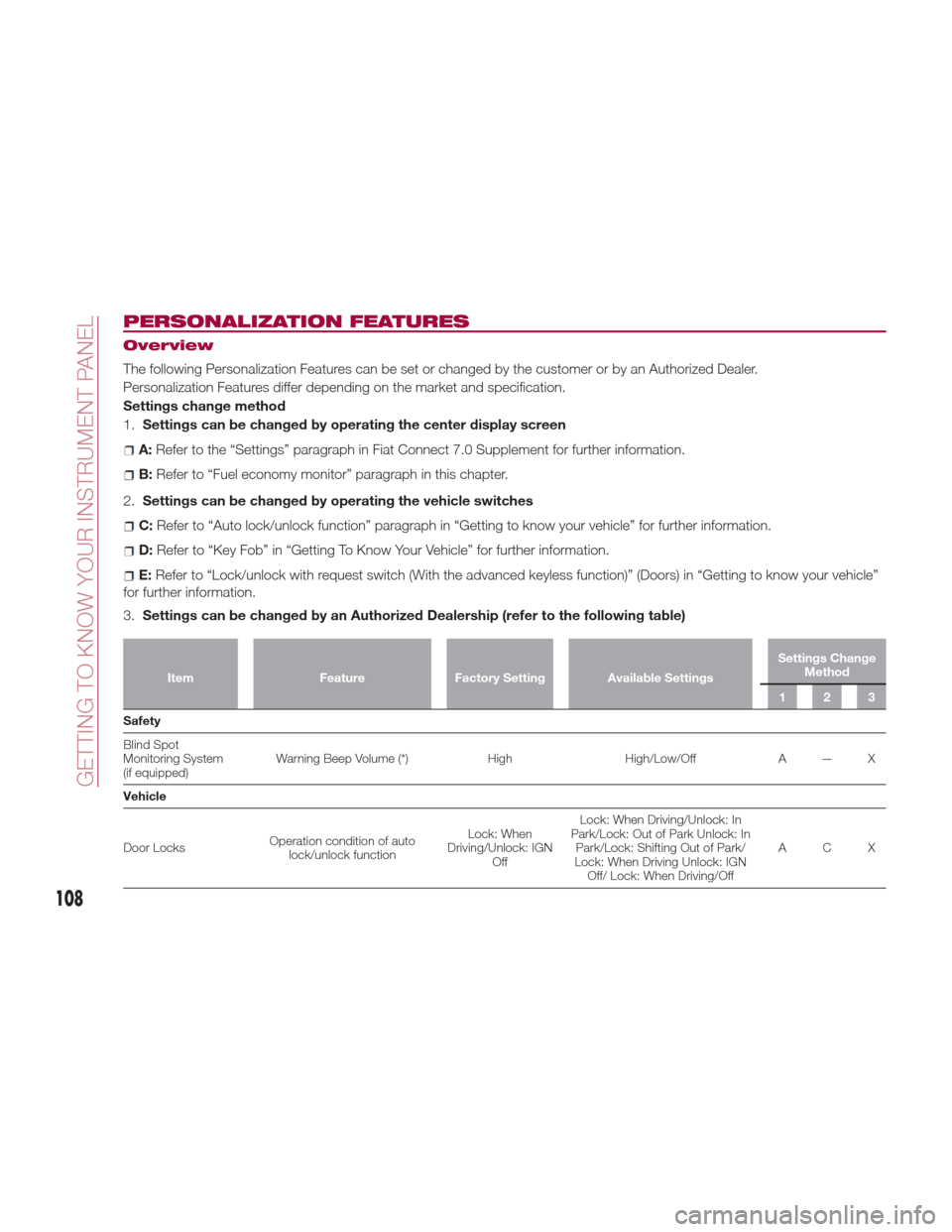
The following Personalization Features can be set or changed by the customer or by an Authorized Dealer.
Personalization Features differ depending on the market and specification.
Settings change method
1.Settings can be changed by operating the center display screen
A:Refer to the “Settings” paragraph in Fiat Connect 7.0 Supplement for further information.
B: Refer to “Fuel economy monitor” paragraph in this chapter.
2. Settings can be changed by operating the vehicle switches
C:Refer to “Auto lock/unlock function” paragraph in “Getting to know your vehicle” for further information.
D:Refer to “Key Fob” in “Getting To Know Your Vehicle” for further information.
E:Refer to “Lock/unlock with request switch (With the advanced keyless function)” (Doors) in “Getting to know your vehicle”
for further information.
3. Settings can be changed by an Authorized Dealership (refer to the following table)
Item FeatureFactory Setting Available Settings Settings Change
Method
123
Safety
Blind
Spot
Monitoring System
(if equipped) Warning Beep Volume (*)
HighHigh/Low/Off A — X
Vehicle
Door Locks Operation condition of auto
lock/unlock function Lock: When
Driving/Unlock: IGN Off Lock: When Driving/Unlock: In
Park/Lock: Out of Park Unlock: In Park/Lock: Shifting Out of Park/
Lock: When Driving Unlock: IGN Off/ Lock: When Driving/Off ACX
108
GETTING TO KNOW YOUR INSTRUMENT PANEL
Page 112 of 300
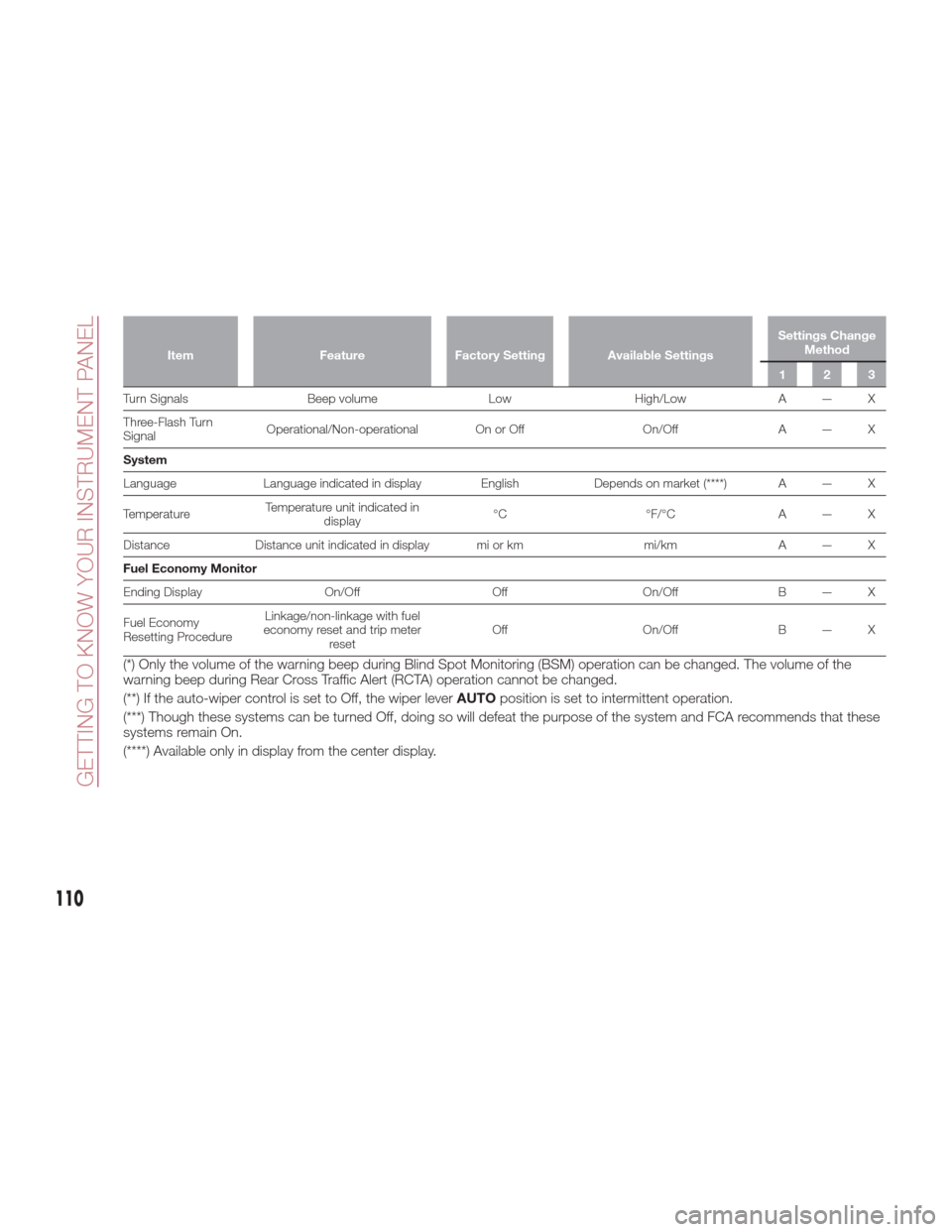
ItemFeatureFactory Setting Available Settings Settings Change
Method
123
Turn Signals Beep volumeLowHigh/LowA — X
Thr
ee-Flash Turn
Signal Operational/Non-operational On or Off
On/OffA — X
System
Language Language indicated in display English Depends on market (****) A — X
Temperature Temperature unit indicated in
display °C
°F/°CA — X
Distance Distance unit indicated in display mi or km mi/kmA — X
Fuel Economy Monitor
Ending Display On/OffOffOn/OffB — X
Fuel Economy
Resetting Procedure Linkage/non-linkage with fuel
economy reset and trip meter reset Off
On/OffB — X
(*) Only the volume of the warning beep during Blind Spot Monitoring (BSM) operation can be changed. The volume of the
warning beep during Rear Cross Traffic Alert (RCTA) operation cannot be changed.
(**) If the auto-wiper control is set to Off, the wiper lever AUTOposition is set to intermittent operation.
(***) Though these systems can be turned Off, doing so will defeat the purpose of the system and FCA recommends that these
systems remain On.
(****) Available only in display from the center display.
110
GETTING TO KNOW YOUR INSTRUMENT PANEL
Page 123 of 300

Tire Pressure Monitoring System —
Sport Grade
The TPMS system monitors the
pressure for each tire.
If tire pressure is too low in one or more
tires, the system will inform the driver
via the
warning light in the
instrument cluster and by the warning
beep sound.
The tire pressure sensors installed on
each wheel send tire pressure data by
radio signal to the receiver unit in the
vehicle.
TPMS does not alleviate your need to
check the pressure and condition of all
four tires regularly.
Each tire, including the spare (if
provided), should be checked monthly
when cold and inflated to the inflation
pressure recommended by the vehicle
manufacturer on the vehicle placard or
tire inflation pressure label. (If your
vehicle has tires of a different size than
the size indicated on the vehicle placard
or tire inflation pressure label, you
should determine the proper tire
inflation pressure for those tires.)
As an added safety feature, your vehicle
has been equipped with a tire pressure
monitoring system (TPMS) that
illuminates a low tire pressure telltale
when one or more of your tires is
significantly under-inflated. Accordingly,
when the low tire pressure telltale
illuminates, you should stop and check
your tires as soon as possible, and inflate them to the proper pressure.
Driving on a significantly under-inflated
tire causes the tire to overheat and can
lead to tire failure. Under-inflation also
reduces fuel efficiency and tire tread life,
and may affect the vehicle's handling
and stopping ability. Please note that
the TPMS is not a substitute for proper
tire maintenance, and it is the driver's
responsibility to maintain correct tire
pressure, even if under-inflation has not
reached the level to trigger illumination
of the TPMS low tire pressure telltale.
Your vehicle has also been equipped
with a TPMS malfunction indicator to
indicate when the system is not
operating properly. [For vehicles with a
dedicated MIL telltale, add the following
statement: The TPMS malfunction
indicator is provided by a separate
telltale, which displays the symbol
“TPMS” when illuminated.] [For vehicles
with a combined low tire pressure/MIL
telltale, add the following statement:
The TPMS malfunction indicator is
combined with the low tire pressure
telltale. When the system detects a
malfunction, the telltale will flash for
approximately one minute and then
remain continuously illuminated. This
sequence will continue upon
subsequent vehicle start-ups as long as
the malfunction exists.] When the
malfunction indicator is illuminated, the
system may not be able to detect or
signal low tire pressure as intended.
TPMS malfunctions may occur for a
variety of reasons, including the
installation of replacement or alternate
tires or wheels on the vehicle that
prevent the TPMS from functioning
properly. Always check the TPMS
malfunction telltale after replacing one
or more tires or wheels on your vehicle
to ensure that the replacement or
alternate tires and wheels allow the
TPMS to continue to function properly.
System Error Activation
When the
warning light flashes,
there may be a system malfunction.
Contact your Authorized Dealer.
A system error activation may occur in
the following cases:
When there is equipment or a device
near the vehicle using the same radio
frequency as that of the tire pressure
sensors.
When a metallic device such as a
non-genuine navigation system is
equipped near the center of the
dashboard, which may block radio
signals from the tire pressure sensor to
the receiver unit.
When using the following devices in
the vehicle that may cause radio
interference with the receiver unit.
A digital device such as a personal
computer.
A current converter device such as a
DC-AC converter.
121
Page 156 of 300

DRIVE (D), and MANUAL (M)(+/–) shift
positions.
The transmission may be shifted freely
from REVERSE (R), to NEUTRAL (N), to
DRIVE (D), to MANUAL (M)(+/–).
Note:
Even if you intend to use the automatic
transmission functions as a traditional
automatic, you should also be aware
that you can inadvertently shift into
manual shift mode and an inappropriategear may be retained as the vehicle
speed increases. If you notice the
engine speed going higher or hear the
engine racing, confirm you have not
accidentally slipped into manual shift
mode (refer to “Manual Shift Mode”
paragraph in this section).
Shift Position Indication
The gear selector position PARK (P) is
indicated when the ignition is placed in
the ON mode.
Note:
If one of the following actions is
performed, the gear selector position is
displayed for five minutes even if the
ignition is placed in a mode other
than ON.
The ignition is placed in the OFF
mode.
The driver's door is opened.
Gear Position Indication
In MANUAL (M) shift mode, the “M” of
the shift position indication illuminates
and the number of the selected gear is
displayed.
Gear Selector Positions
The gear selector position indicator light
in the instrument cluster illuminates.
The gear selector must be in PARK (P)
or NEUTRAL (N) to operate the starter.
Park (P)
PARK (P) locks the transmission and
prevents the rear wheels from rotating.
Warning!
Never use the PARK position as a
substitute for the park brake. Always apply
the park brake fully when parked to guard
against vehicle movement and possible
injury or damage.
Your vehicle could move and injure you
and others if it is not in PARK. Check by
trying to move the gear selector out of
PARK with the brake pedal released. Make
sure the transmission is in PARK before
leaving the vehicle.
It is dangerous to shift out of PARK or
NEUTRAL if the engine speed is higher than
idle speed. If your foot is not firmly pressing
the brake pedal, the vehicle could accelerate
quickly forward or in reverse. You could lose
control of the vehicle and hit someone or
something. Only shift into gear when the
engine is idling normally and your foot is
firmly pressing the brake pedal.
Unintended movement of a vehicle
could injure those in or near the vehicle. As
with all vehicles, you should never exit a
vehicle while the engine is running. Before
exiting a vehicle, always apply the park
brake, shift the transmission into PARK,
and turn the ignition OFF. When the ignition
is in the OFF mode, the transmission is
locked in PARK, securing the vehicle
against unwanted movement.
When leaving the vehicle, always make
sure the ignition is in the OFF mode,
remove the key fob from the vehicle, and
lock the vehicle.
GUID-05210200LHD12AT001Gear Selector And Pattern
154
STARTING AND OPERATING
Page 162 of 300
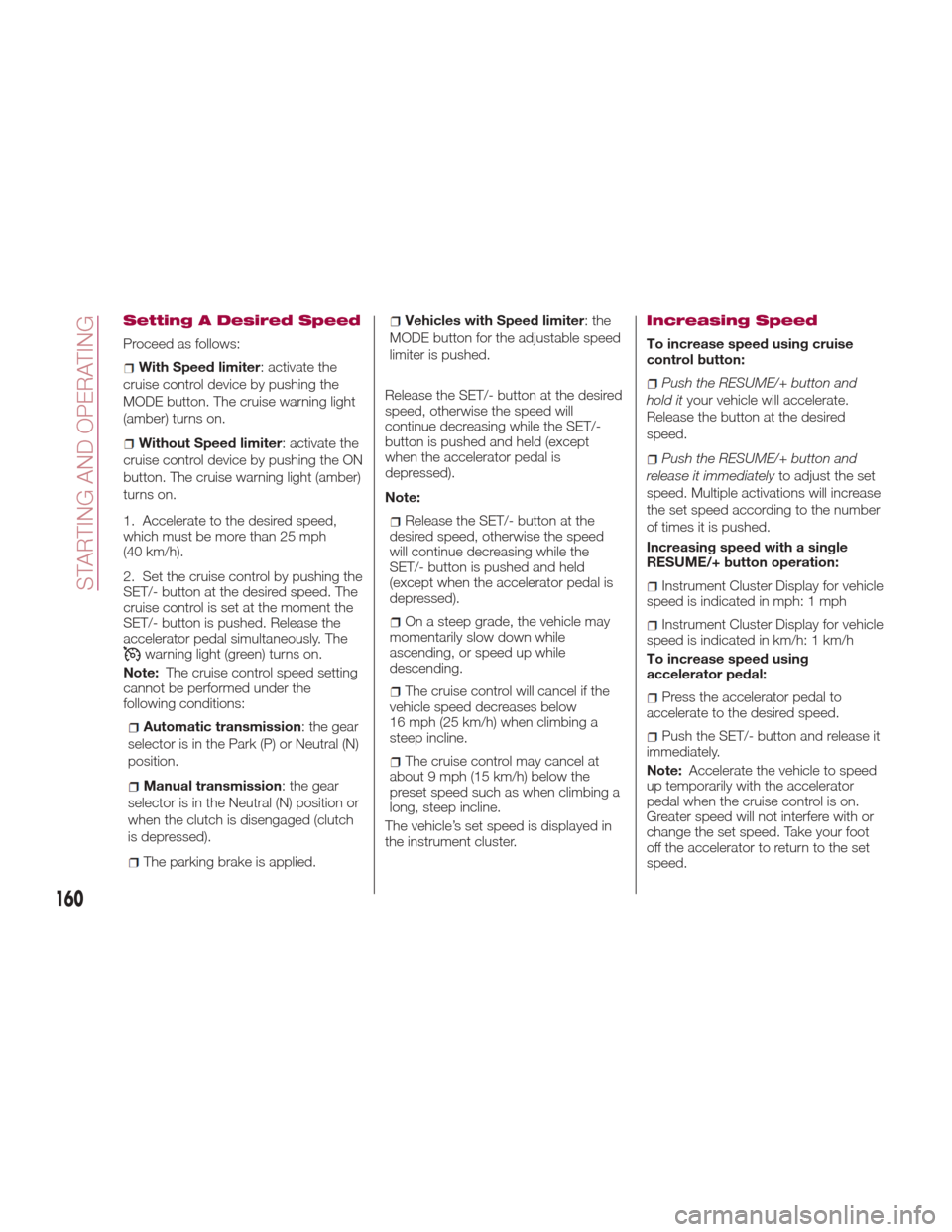
Setting A Desired Speed
Proceed as follows:
With Speed limiter: activate the
cruise control device by pushing the
MODE button. The cruise warning light
(amber) turns on.
Without Speed limiter : activate the
cruise control device by pushing the ON
button. The cruise warning light (amber)
turns on.
1. Accelerate to the desired speed,
which must be more than 25 mph
(40 km/h).
2. Set the cruise control by pushing the
SET/- button at the desired speed. The
cruise control is set at the moment the
SET/- button is pushed. Release the
accelerator pedal simultaneously. The
warning light (green) turns on.
Note: The cruise control speed setting
cannot be performed under the
following conditions:
Automatic transmission : the gear
selector is in the Park (P) or Neutral (N)
position.
Manual transmission : the gear
selector is in the Neutral (N) position or
when the clutch is disengaged (clutch
is depressed).
The parking brake is applied.
Vehicles with Speed limiter :the
MODE button for the adjustable speed
limiter is pushed.
Release the SET/- button at the desired
speed, otherwise the speed will
continue decreasing while the SET/-
button is pushed and held (except
when the accelerator pedal is
depressed).
Note:
Release the SET/- button at the
desired speed, otherwise the speed
will continue decreasing while the
SET/- button is pushed and held
(except when the accelerator pedal is
depressed).
On a steep grade, the vehicle may
momentarily slow down while
ascending, or speed up while
descending.
The cruise control will cancel if the
vehicle speed decreases below
16 mph (25 km/h) when climbing a
steep incline.
The cruise control may cancel at
about 9 mph (15 km/h) below the
preset speed such as when climbing a
long, steep incline.
The vehicle’s set speed is displayed in
the instrument cluster.
Increasing Speed
To increase speed using cruise
control button:
Push the RESUME/+ button and
hold it your vehicle will accelerate.
Release the button at the desired
speed.
Push the RESUME/+ button and
release it immediately to adjust the set
speed. Multiple activations will increase
the set speed according to the number
of times it is pushed.
Increasing speed with a single
RESUME/+ button operation:
Instrument Cluster Display for vehicle
speed is indicated in mph: 1 mph
Instrument Cluster Display for vehicle
speed is indicated in km/h: 1 km/h
To increase speed using
accelerator pedal:
Press the accelerator pedal to
accelerate to the desired speed.
Push the SET/- button and release it
immediately.
Note: Accelerate the vehicle to speed
up temporarily with the accelerator
pedal when the cruise control is on.
Greater speed will not interfere with or
change the set speed. Take your foot
off the accelerator to return to the set
speed.
160
STARTING AND OPERATING
Page 163 of 300
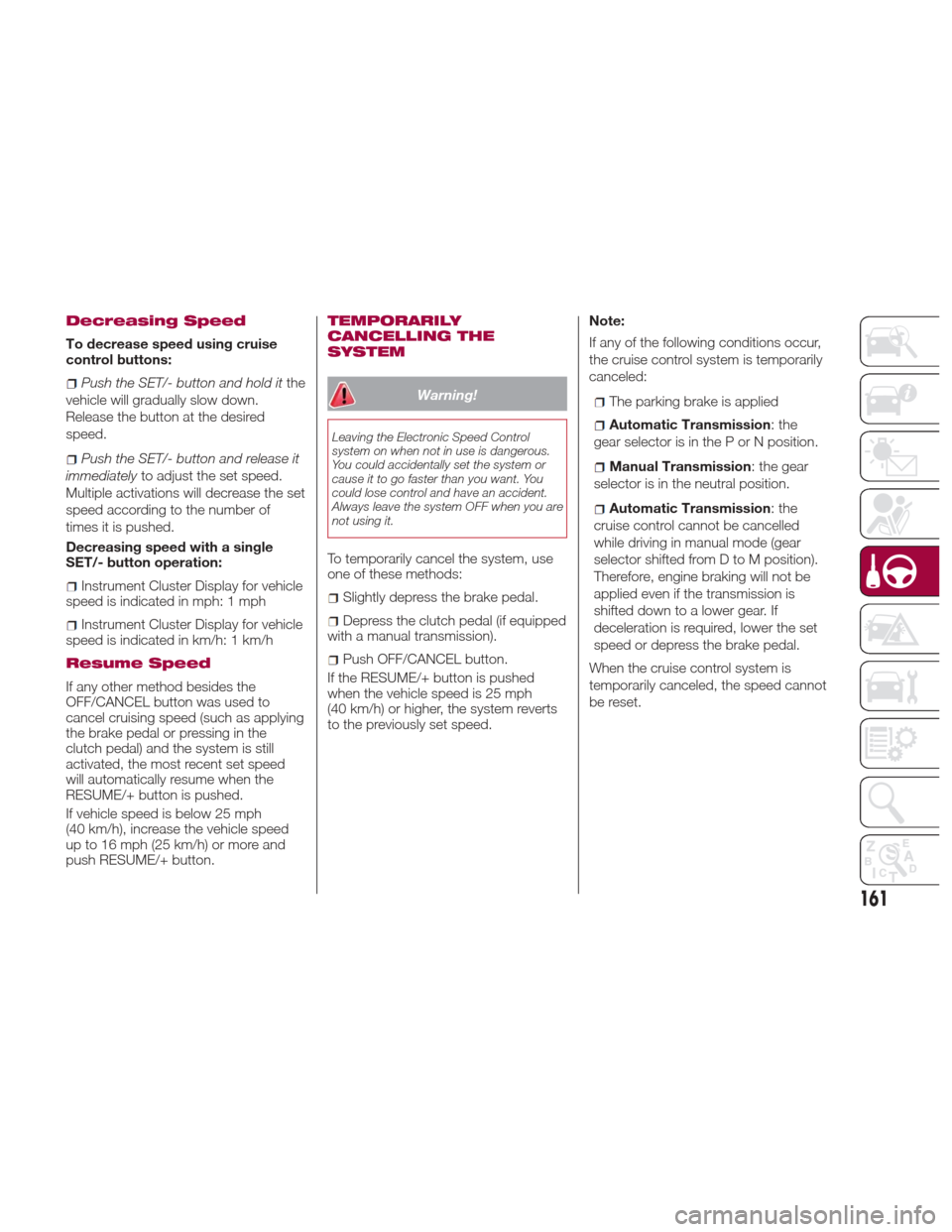
Decreasing Speed
To decrease speed using cruise
control buttons:
Push the SET/- button and hold itthe
vehicle will gradually slow down.
Release the button at the desired
speed.
Push the SET/- button and release it
immediately to adjust the set speed.
Multiple activations will decrease the set
speed according to the number of
times it is pushed.
Decreasing speed with a single
SET/- button operation:
Instrument Cluster Display for vehicle
speed is indicated in mph: 1 mph
Instrument Cluster Display for vehicle
speed is indicated in km/h: 1 km/h
Resume Speed
If any other method besides the
OFF/CANCEL button was used to
cancel cruising speed (such as applying
the brake pedal or pressing in the
clutch pedal) and the system is still
activated, the most recent set speed
will automatically resume when the
RESUME/+ button is pushed.
If vehicle speed is below 25 mph
(40 km/h), increase the vehicle speed
up to 16 mph (25 km/h) or more and
push RESUME/+ button.
TEMPORARILY
CANCELLING THE
SYSTEM
Warning!
Leaving the Electronic Speed Control
system on when not in use is dangerous.
You could accidentally set the system or
cause it to go faster than you want. You
could lose control and have an accident.
Always leave the system OFF when you are
not using it.
To temporarily cancel the system, use
one of these methods:
Slightly depress the brake pedal.
Depress the clutch pedal (if equipped
with a manual transmission).
Push OFF/CANCEL button.
If the RESUME/+ button is pushed
when the vehicle speed is 25 mph
(40 km/h) or higher, the system reverts
to the previously set speed. Note:
If any of the following conditions occur,
the cruise control system is temporarily
canceled:
The parking brake is applied
Automatic Transmission
:the
gear selector is in the P or N position.
Manual Transmission : the gear
selector is in the neutral position.
Automatic Transmission :the
cruise control cannot be cancelled
while driving in manual mode (gear
selector shifted from D to M position).
Therefore, engine braking will not be
applied even if the transmission is
shifted down to a lower gear. If
deceleration is required, lower the set
speed or depress the brake pedal.
When the cruise control system is
temporarily canceled, the speed cannot
be reset.
161
Page 169 of 300

PARKVIEW REAR
BACKUP CAMERA —
IF EQUIPPED
Operation
The camera is located on the trunk.
Switching the display to rear-view
monitor mode
Put the gear selector in the Reverse (R)
position when the ignition is switched to
ON to switch the display to rear-view
camera mode.
Note:
When the gear selector is moved
from the Reverse (R) position and put
in any other position, the screen
returns to the previous display mode.
When parking, take the utmost care
over obstacles that may be above or
under the camera’s display range.
When the display is cold, the
images could scroll on the monitor or
the screen and could be more blurred
than usual, making it difficult to check
the conditions of the area around the
vehicle. Always use extreme caution
and verify the real conditions of the
area behind the vehicle with you own
eyes.
If water, snow or mud is deposited
on the camera lens, clean it with a soft
cloth. If this does not clean it, use a
mild detergent.
If the camera is subjected to abrupt
temperature changes (from hot to cold
or vice versa), the rear-view monitor
may not work properly.
When replacing tires, contact an
Authorized Dealer. Replacing the tires
can cause the guide lines that appear
on the display to be diverted.
Warning!
Always use extreme caution and verify
the real conditions of the area behind the
vehicle. Backing up while looking only at
the screen is dangerous and can lead to an
accident or collision with an object. The
rear-view monitor is simply a system to aid
reversing. The view on the display can
show a situation that differs from the real
one.
Do not use the rear-view monitor under
the following conditions:
Roads covered in ice or snow.
When snow chains are mounted or the
temporary space saver spare wheel is
fitted.
The rear trunk is not completely closed.
The vehicle is on a sloping road.
Using the rear-view monitor under the
conditions listed above is dangerous and
can cause damage to persons and/or the
vehicle.
07040110-124-008Rear Camera Location
167