Page 145 of 329

To adjust the setting of a programmable feature, press the
desired setting option. Once in the desired setting option,
press and release the preferred setting until a check-mark
appears next to the setting, showing that the setting has
been selected.
Once the setting is complete, press the Back Arrow button
on the touchscreen to return to the previous menu or press
the X button on the touchscreen to close out of the settingsscreen. Pressing the Up or Down Arrow button on the right
side of the screen will allow you to toggle up or down
through the list of available settings.
Display
After pressing the Display button on the touchscreen the
following settings will be available.
Setting Name
Selectable Options
Display Mode Manual Auto
Display Brightness With Headlights ON +-
NOTE:
To make changes to the �Display Brightness with Headlights ON� setting, the headlights must be on and the interior
dimmer switch must not be in the �party�or�parade� positions.
Display Brightness With Headlights OFF +-
NOTE:
To make changes to the �Display Brightness with Headlights OFF� setting, the headlights must be off and the interior
dimmer switch must not be in the �party�or�parade� positions.
4
UNDERSTANDING YOUR INSTRUMENT PANEL 143
Page 149 of 329

Safety & Driving Assistance — If Equipped
After pressing the Safety & Driving Assistance button on
the touchscreen the following settings will be available:
Setting NameSelectable Options
ParkView Backup Camera Delay OnOff
NOTE:
The “ParkView Backup Camera Delay” setting determines whether or not the screen will display the rear view image
with dynamic grid lines for up to 10 seconds after the vehicle is shifted out of REVERSE. This delay will be canceled
if the vehicle’s speed exceeds 8 mph (13 km/h), the transmission is shifted into PARK, or the ignition is switched to
the OFF position. Hill Start Assist — If Equipped
Lights
After pressing the Lights button on the touchscreen the
following settings will be available:
Setting Name Selectable Options
Headlight Off Delay 0 sec30 sec 60 sec 90 sec
NOTE:
When the “Headlight Off Delay” feature is selected, it allows the adjustment of the amount of time the headlights
remain on after the engine is shut off.
4
UNDERSTANDING YOUR INSTRUMENT PANEL 147
Page 150 of 329
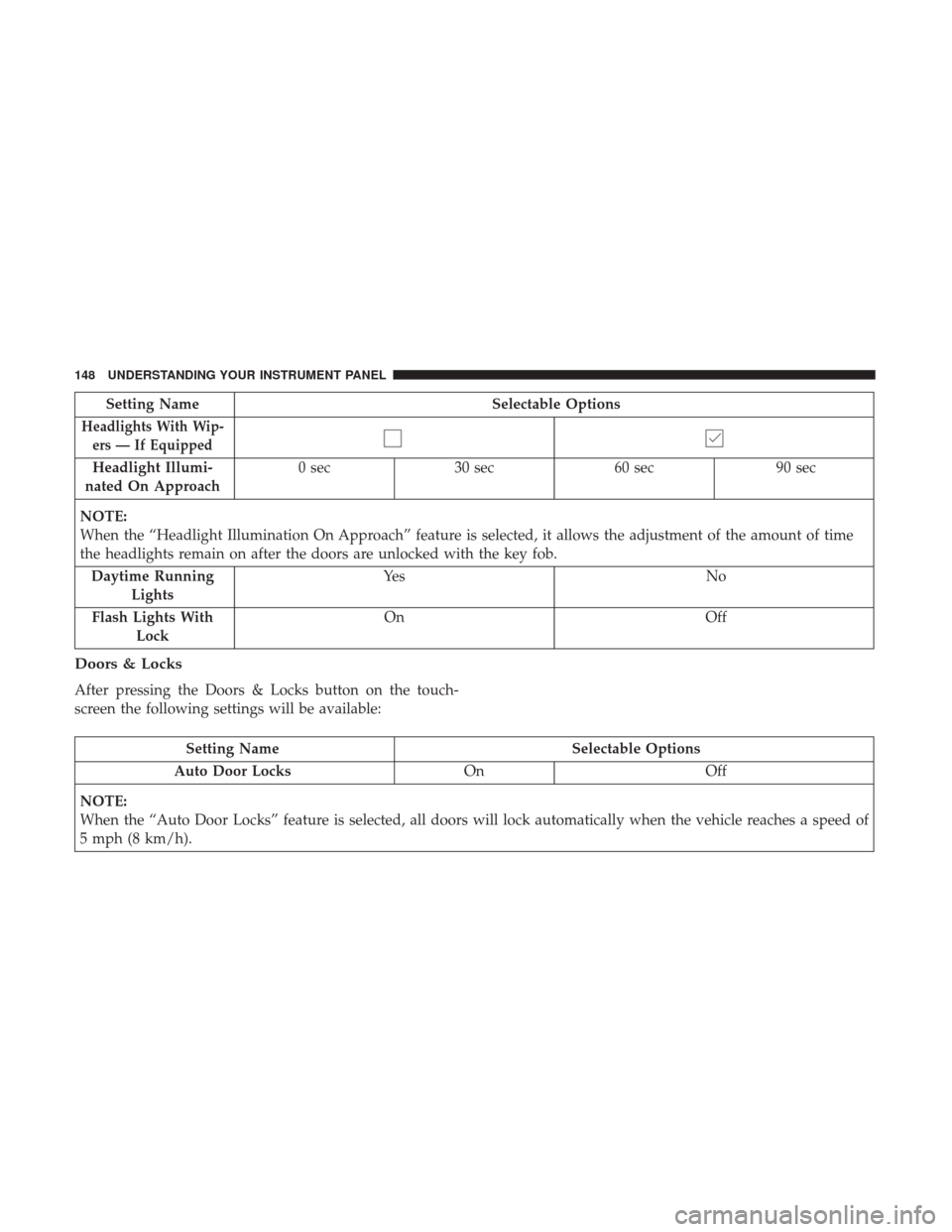
Setting NameSelectable Options
Headlights With Wip-
ers — If Equipped
Headlight Illumi-
nated On Approach 0 sec
30 sec 60 sec 90 sec
NOTE:
When the “Headlight Illumination On Approach” feature is selected, it allows the adjustment of the amount of time
the headlights remain on after the doors are unlocked with the key fob. Daytime Running Lights Ye s
N o
Flash Lights With Lock On
Off
Doors & Locks
After pressing the Doors & Locks button on the touch-
screen the following settings will be available:
Setting Name Selectable Options
Auto Door Locks OnOff
NOTE:
When the “Auto Door Locks” feature is selected, all doors will lock automatically when the vehicle reaches a speed of
5 mph (8 km/h).
148 UNDERSTANDING YOUR INSTRUMENT PANEL
Page 151 of 329

Setting NameSelectable Options
Auto Unlock On Exit
NOTE:
When the “Auto Unlock On Exit” feature is selected, all doors will unlock when the vehicle is stopped, the transmis-
sion is in the PARK or NEUTRAL position and the driver’s door is opened. Flash Lights With Lock
Sound Horn With Lock Off1st Press 2nd Press
1st Press Of Key Fob Unlocks Driver DoorAll Doors
NOTE:
When �Driver Door� is selected with 1st Press Of Key Fob Unlocks, only the driver’s door will unlock with the first
press of the key fob unlock button. You must press the key fob unlock button twice to unlock the passenger’s doors.
When �All Doors� is selected for 1st Press Of Key Fob Unlocks, all doors will unlock on the first press of the key fob
unlock button. If the vehicle is programmed 1st Press Of Key Fob Unlocks “All Doors,” all doors will unlock no mat-
ter which Passive Entry equipped door handle is grasped. If 1st Press Of Key Fob Unlocks “Driver Door” is pro-
grammed, only the driver ’s door will unlock when the driver ’s door is grasped. With Passive Entry, if 1st Press Of
Key Fob Unlocks “Driver Door” is programmed, touching the handle more than once will result in only the driver ’s
door opening. If “Driver Door” is selected, once the driver door is opened, the interior door lock/unlock switch can
be used to unlock all doors (or use key fob).
Passive Entry — If Equipped OnOff
NOTE:
The “Passive Entry” feature allows you to lock and unlock the vehicles door(s) without having to push the key fob
lock or unlock buttons.
4
UNDERSTANDING YOUR INSTRUMENT PANEL 149
Page 152 of 329
Engine Off Options
After pressing the Engine Off Options button on the
touchscreen the following settings will be available:
Setting NameSelectable Options
Engine Off Power De-
lay — If Equipped0 sec 45 sec5 minutes 10 minutes
NOTE:
When the “Engine Off Power Delay” feature is selected, the power window switches, radio, Uconnect phone system
(if equipped), DVD video system (if equipped), power sunroof (if equipped), and power outlets will remain active for
up to 10 minutes after the ignition is cycled to OFF. Opening either front door will cancel this feature. Headlight Off Delay +-
NOTE:
When the “Headlight Off Delay” feature is selected, it allows the adjustment of the amount of time the headlights
remain on after the engine is shut off.
150 UNDERSTANDING YOUR INSTRUMENT PANEL
Page 181 of 329

Uconnect Access (8.4 NAV)
WARNING!
ALWAYS obey traffic laws and pay attention to the
road. Some Uconnect Access services, including 9-1-1
and Assist, will NOT work without an operable
1X(voice/data) or 3G(data) network connection.
NOTE: Your vehicle may be transmitting data as autho-
rized by the subscriber.
An included trial and/or subscription is required to take
advantage of the Uconnect Access services in the next
section of this guide. To register with Uconnect Access,
press the “Apps” button on the 8.4-inch touchscreen to get
started. Detailed registration instructions can be found on
the next page.
NOTE: Uconnect Access is available only on equipped
vehicles purchased within the continental United States,
Alaska and Hawaii. Services can only be used where
coverage is available; see coverage map for details.
9-1-1 Call
Theft Alarm Notification
Remote Door Lock/Unlock
Stolen Vehicle Assistance
Remote Horn and Lights
Yelp Search
Voice Texting
Roadside Assistance Call
3G Wi-Fi Hotspot***
***Extra charges apply.
Vehicle Health Alert
Your vehicle will send you an email alert if it senses a
problem under the hood with one of your vehicles key
systems. For further information go to the Mopar Owner
Connect website moparownerconnect.com.
4
UNDERSTANDING YOUR INSTRUMENT PANEL 179
Page 298 of 329
REPLACEMENT BULBS
Interior Bulbs
Bulb Number
Message Center Indicators Serviced At Authorized Dealer
Cluster LED (Serviced At Authorized Dealer)
Gauge Pack Serviced At Authorized Dealer
Heater Control Serviced At Authorized Dealer
Interior Lamp LED (Serviced At Authorized Dealer)
Courtesy Foot Well Lights W3W
Cargo Lamp (Coupe Liftgate) LED (Serviced At Authorized Dealer)
Exterior Bulbs
Bulb Number
Low/High Beam Headlamp HID (Serviced At Authorized Dealer)
Front Park/Turn Signal Lamp LED (Serviced At Authorized Dealer)
Daytime Running Lamp (DRL) LED (Serviced At Authorized Dealer)
Front Side Marker Lamp 2821M
Center High Mounted Stop Lamp (CHMSL) LED (Serviced At Authorized Dealer)
Tail/Stop/Turn Signal Lamp LED (Serviced At Authorized Dealer)
Rear Marker Lamp 2821M
Backup Lamp LED (Serviced At Authorized Dealer)
License Lamp LED (Serviced At Authorized Dealer)
296 MAINTAINING YOUR VEHICLE
Page 304 of 329

MAINTENANCE SCHEDULES
The Scheduled Maintenance services listed in this manual
must be done at the times or mileages specified to protect
your vehicle warranty and ensure the best vehicle perfor-
mance and reliability. More frequent maintenance may be
needed for vehicles in severe operating conditions, such as
dusty areas and very short trip driving. Inspection and
service should also be done anytime a malfunction is
suspected.
NOTE: Under no circumstances should oil change inter-
vals exceed 6,000 miles (10 000 km) or six months,
whichever comes first.
CAUTION!
Failure to perform the required maintenance items
may result in damage to the vehicle.At Each Stop For Fuel
•
Check the engine oil level about five minutes after a
fully warmed engine is shut off. Checking the oil level
while the vehicle is on level ground will improve the
accuracy of the oil level reading. Add oil only when the
level is at or below the ADD or MIN mark.
• Check the windshield washer solvent, and add if re-
quired.
Once A Month
• Check tire pressure and look for unusual wear or
damage. Rotate tires at the first sign of irregular wear,
even if it occurs before your next scheduled service.
• Inspect the battery, and clean and tighten the terminals
as required.
• Check the fluid levels of the coolant reservoir, brake
master cylinder, power steering, and transmission, and
add as needed.
• Check all lights and all other electrical items for correct
operation.
302 MAINTENANCE SCHEDULES