Page 244 of 510
White Telltale Indicator Lights
Cruise Control Ready Indicator Light
White TelltaleLight What It Means
Cruise Control Ready Indicator Light
This light will turn on when the electronic speed control is ON, but not set.
Blue Telltale Indicator Lights
High Beam Indicator Light
Blue Telltale
Light What It Means
High Beam Indicator Light
This indicator shows that the high beam headlights are on. Push the multifunction control lever
away from you to switch the headlights to high beam. Pull the lever toward you to switch the
headlights back to low beam. Pull the lever toward you for a temporary high beam on,
�flash to
pass� scenario.
242 UNDERSTANDING YOUR INSTRUMENT PANEL
Page 255 of 510
Customer Programmable Features — Radio 4.3
Settings
In this mode the Uconnect system allows you to access
programmable features that may be equipped such as
Display, Clock, Safety & Driving Assistance, Lights, Doors
& Locks, Heated Seats, Engine Off Operation, Compass
Settings, Audio and Phone/Bluetooth Setup through but-
tons on the faceplate and touchscreen.
NOTE:Only one touchscreen area may be selected at a
time. Push the SETTINGS button on the faceplate to access the
Settings screen, use the “Page Up”/“Page Down” buttons
on the touchscreen to scroll through the following settings.
Press the desired setting button on the touchscreen to
change the setting using the description shown on the
following pages for each setting.
1 — Radio 4.3 Buttons On The Faceplate
Radio 4.3 Buttons On The Touchscreen
4
UNDERSTANDING YOUR INSTRUMENT PANEL 253
Page 265 of 510
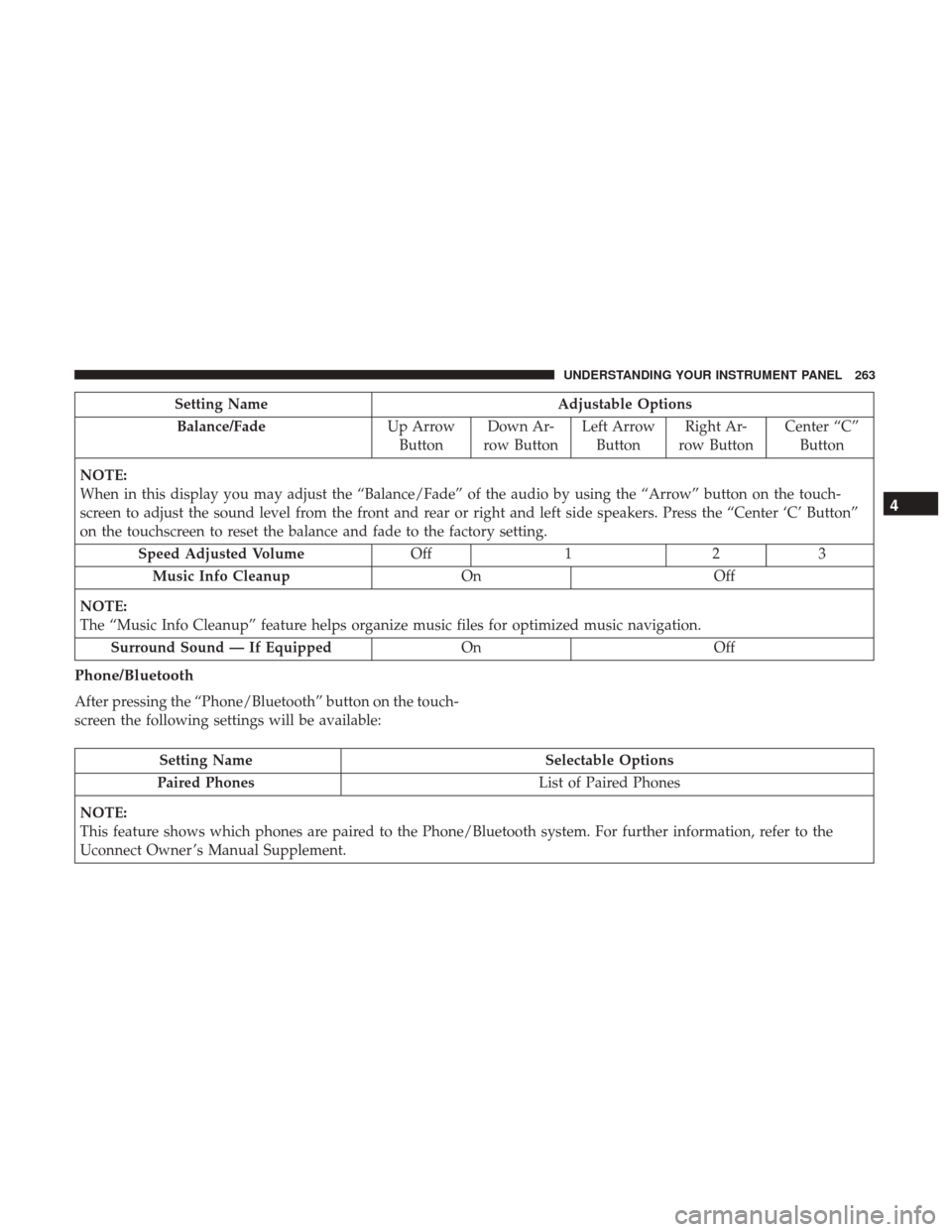
Setting NameAdjustable Options
Balance/Fade Up Arrow
Button Down Ar-
row Button Left Arrow
Button Right Ar-
row Button Center “C”
Button
NOTE:
When in this display you may adjust the “Balance/Fade” of the audio by using the “Arrow” button on the touch-
screen to adjust the sound level from the front and rear or right and left side speakers. Press the “Center ‘C’ Button”
on the touchscreen to reset the balance and fade to the factory setting. Speed Adjusted Volume Off123
Music Info Cleanup OnOff
NOTE:
The “Music Info Cleanup” feature helps organize music files for optimized music navigation. Surround Sound — If Equipped OnOff
Phone/Bluetooth
After pressing the “Phone/Bluetooth” button on the touch-
screen the following settings will be available:
Setting Name Selectable Options
Paired Phones List of Paired Phones
NOTE:
This feature shows which phones are paired to the Phone/Bluetooth system. For further information, refer to the
Uconnect Owner ’s Manual Supplement.
4
UNDERSTANDING YOUR INSTRUMENT PANEL 263
Page 267 of 510
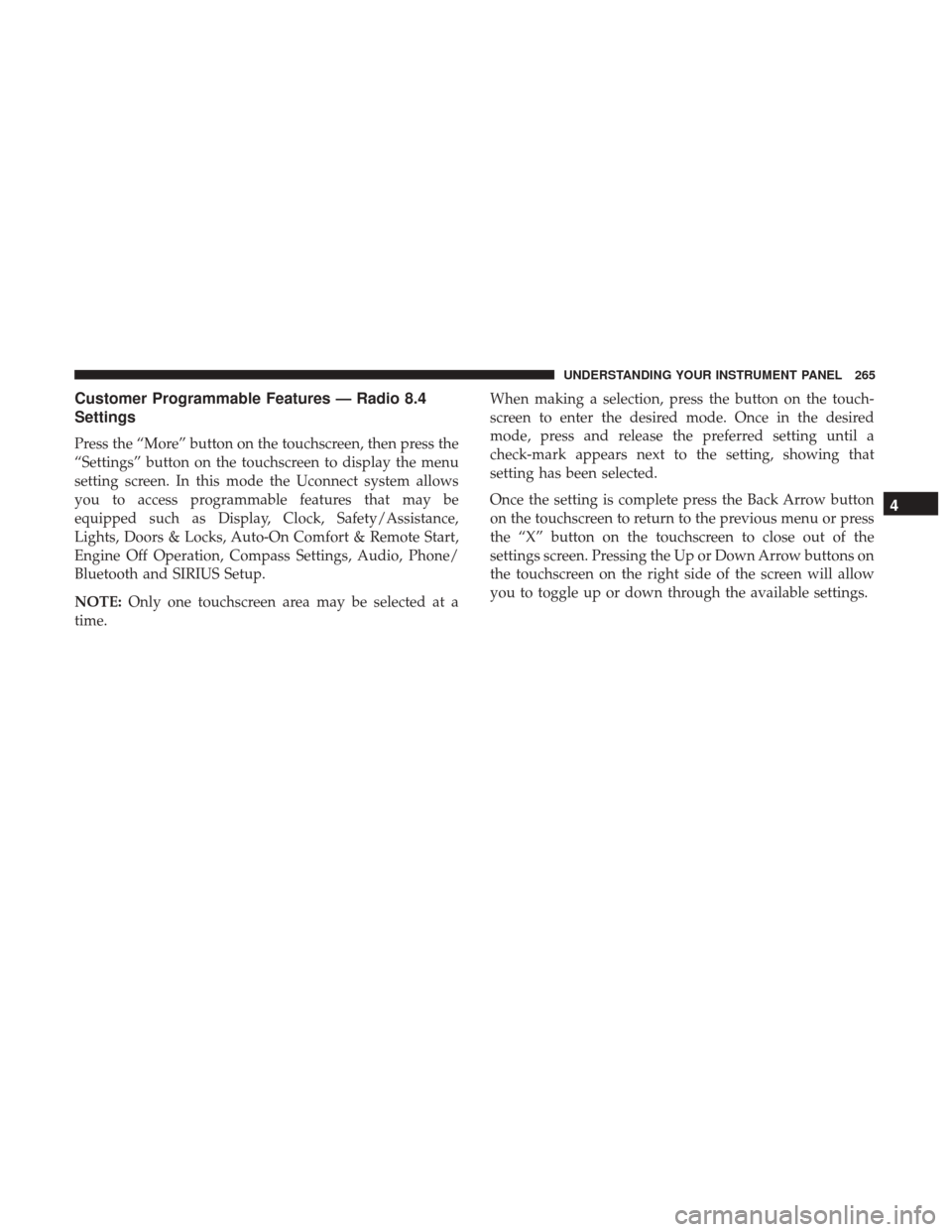
Customer Programmable Features — Radio 8.4
Settings
Press the “More” button on the touchscreen, then press the
“Settings” button on the touchscreen to display the menu
setting screen. In this mode the Uconnect system allows
you to access programmable features that may be
equipped such as Display, Clock, Safety/Assistance,
Lights, Doors & Locks, Auto-On Comfort & Remote Start,
Engine Off Operation, Compass Settings, Audio, Phone/
Bluetooth and SIRIUS Setup.
NOTE:Only one touchscreen area may be selected at a
time. When making a selection, press the button on the touch-
screen to enter the desired mode. Once in the desired
mode, press and release the preferred setting until a
check-mark appears next to the setting, showing that
setting has been selected.
Once the setting is complete press the Back Arrow button
on the touchscreen to return to the previous menu or press
the “X” button on the touchscreen to close out of the
settings screen. Pressing the Up or Down Arrow buttons on
the touchscreen on the right side of the screen will allow
you to toggle up or down through the available settings.
4
UNDERSTANDING YOUR INSTRUMENT PANEL 265
Page 280 of 510
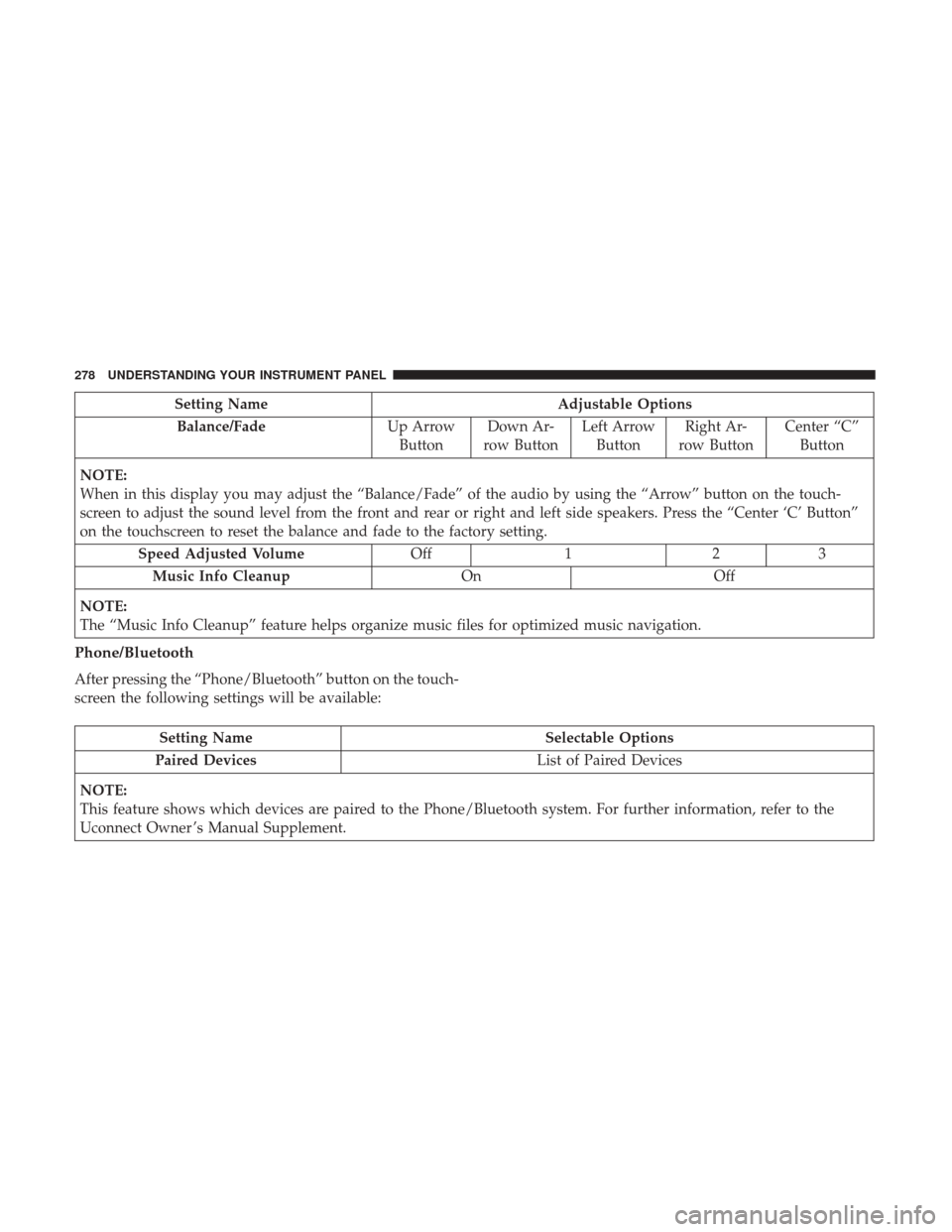
Setting NameAdjustable Options
Balance/Fade Up Arrow
Button Down Ar-
row Button Left Arrow
Button Right Ar-
row Button Center “C”
Button
NOTE:
When in this display you may adjust the “Balance/Fade” of the audio by using the “Arrow” button on the touch-
screen to adjust the sound level from the front and rear or right and left side speakers. Press the “Center ‘C’ Button”
on the touchscreen to reset the balance and fade to the factory setting. Speed Adjusted Volume Off123
Music Info Cleanup OnOff
NOTE:
The “Music Info Cleanup” feature helps organize music files for optimized music navigation.
Phone/Bluetooth
After pressing the “Phone/Bluetooth” button on the touch-
screen the following settings will be available:
Setting Name Selectable Options
Paired Devices List of Paired Devices
NOTE:
This feature shows which devices are paired to the Phone/Bluetooth system. For further information, refer to the
Uconnect Owner ’s Manual Supplement.
278 UNDERSTANDING YOUR INSTRUMENT PANEL
Page 305 of 510

NOTE:In Sync mode, this button will also automatically
adjust the passenger temperature setting at the same time.
15. Temperature Control (Radio 4.3 Only)
Press the driver or passenger temperature button on the
touchscreen to regulate the temperature of the air inside
the passenger compartment. Moving the temperature bar
into the red area, indicates warmer temperatures. Moving
the temperature bar into the blue area indicates cooler
temperatures. Driver and passenger have independent
temperature control if Sync mode is not illuminated.
Climate Control Functions
A/C (Air Conditioning)
The Air Conditioning (A/C) button allows the operator to
manually activate or deactivate the air conditioning sys-
tem. When the air conditioning system is turned on, cool
dehumidified air will flow through the outlets into the
cabin. For improved fuel economy, press the A/C button to
turn off the air conditioning and manually adjust the
blower and airflow mode settings. Also, make sure to select
only Panel, Bi-Level or Floor modes. NOTE:
•
For Manual Climate Controls, if the system is in Mix,
Floor or Defrost Mode, the A/C can be turned off, but
the A/C system shall remain active to prevent fogging of
the windows.
• If fog or mist appears on the windshield or side glass,
select Defrost mode and adjust blower speed if needed.
• If your air conditioning performance seems lower than
expected, check the front of the A/C condenser (located
in front of the radiator), for an accumulation of dirt or
insects. Clean with a gentle water spray from the front of
the radiator and through the condenser.
MAX A/C
MAX A/C sets the control for maximum cooling perfor-
mance.
Press and release to toggle between MAX A/C and the
prior settings. The button on the touchscreen illuminates
when MAX A/C is ON.
In MAX A/C, the blower level and mode position can be
adjusted to desired user settings. Pressing other settings
will cause the MAX A/C operation to switch to the selected
setting and MAX A/C to exit.
4
UNDERSTANDING YOUR INSTRUMENT PANEL 303
Page 314 of 510
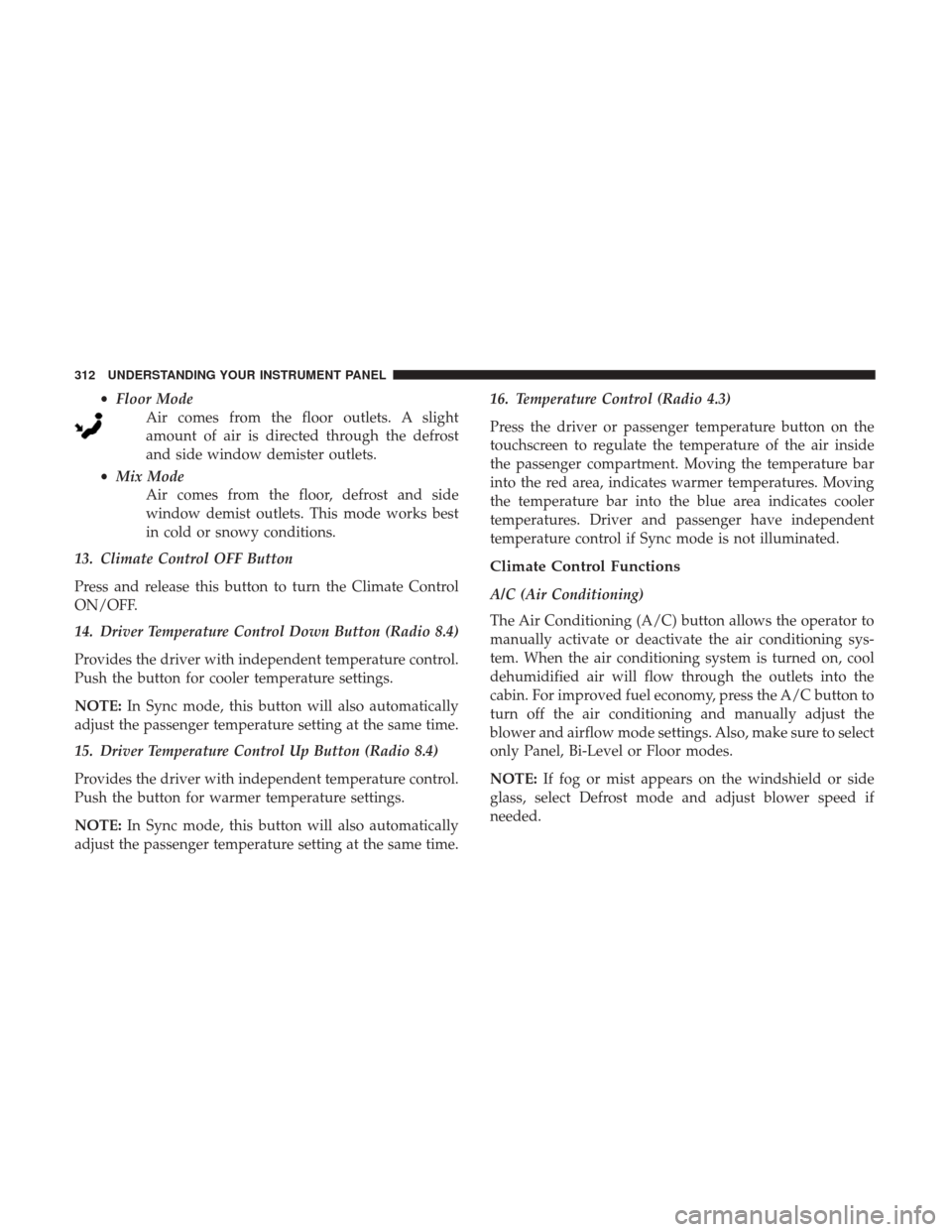
•Floor Mode
Air comes from the floor outlets. A slight
amount of air is directed through the defrost
and side window demister outlets.
• Mix Mode
Air comes from the floor, defrost and side
window demist outlets. This mode works best
in cold or snowy conditions.
13. Climate Control OFF Button
Press and release this button to turn the Climate Control
ON/OFF.
14. Driver Temperature Control Down Button (Radio 8.4)
Provides the driver with independent temperature control.
Push the button for cooler temperature settings.
NOTE: In Sync mode, this button will also automatically
adjust the passenger temperature setting at the same time.
15. Driver Temperature Control Up Button (Radio 8.4)
Provides the driver with independent temperature control.
Push the button for warmer temperature settings.
NOTE: In Sync mode, this button will also automatically
adjust the passenger temperature setting at the same time. 16. Temperature Control (Radio 4.3)
Press the driver or passenger temperature button on the
touchscreen to regulate the temperature of the air inside
the passenger compartment. Moving the temperature bar
into the red area, indicates warmer temperatures. Moving
the temperature bar into the blue area indicates cooler
temperatures. Driver and passenger have independent
temperature control if Sync mode is not illuminated.
Climate Control Functions
A/C (Air Conditioning)
The Air Conditioning (A/C) button allows the operator to
manually activate or deactivate the air conditioning sys-
tem. When the air conditioning system is turned on, cool
dehumidified air will flow through the outlets into the
cabin. For improved fuel economy, press the A/C button to
turn off the air conditioning and manually adjust the
blower and airflow mode settings. Also, make sure to select
only Panel, Bi-Level or Floor modes.
NOTE:
If fog or mist appears on the windshield or side
glass, select Defrost mode and adjust blower speed if
needed.
312 UNDERSTANDING YOUR INSTRUMENT PANEL
Page 462 of 510
Interior Fuses
The interior fuse panel is located on the passenger side
under the instrument panel.
CavityCartridge Fuse Mini-Fuse Description
F100 30 Amp Pink –110V AC Inverter – If Equipped
F101 –10 Amp Red Interior Lights
F102 –20 Amp Yellow Cigar Lighter in Instrument Panel/Left Rear
Power Outlet
F103 –20 Amp Yellow Power Outlet in Console Bin/Power Outlet
in Rear of Console
F105 –20 Amp Yellow Heated Seats – If Equipped
F106 –20 Amp Yellow Rear Power Outlet
F107 –10 Amp Red Rear Camera – If Equipped
F108 –15 Amp Blue Instrument Panel
F109 –10 Amp Red Climate Control/HVAC
F110 –10 Amp Red Occupant Restraint Controller
F112 –10 Amp Red Spare
F114 –20 Amp Yellow Rear HVAC Blower/Motor
F115 –20 Amp Yellow Rear Wiper Motor
F116 30 Amp Pink –Rear Defroster (EBL)
460 MAINTAINING YOUR VEHICLE


