Page 220 of 530

Adaptive Cruise Control (ACC) Set Without Target Light — If Equipped
Green TelltaleLight What It Means
Adaptive Cruise Control (ACC) Set Without Target Light
This will display the distance setting for the ACC system when the system is engaged. Refer to “Adap-
tive Cruise Control (ACC)” in “Understanding The Features Of Your Vehicle” for further information.
Adaptive Cruise Control (ACC) Set With Target Light — If Equipped
Green Telltale
Light What It Means
Adaptive Cruise Control (ACC) Set With Target Light
This will display when the ACC is set and a target vehicle is detected. Refer to “Adaptive Cruise
Control (ACC)” in “Understanding The Features Of Your Vehicle” for further information.
LaneSense Indicator Light — If Equipped
Green Telltale
Light What It Means
LaneSense Indicator Light — If Equipped
The LaneSense indicator is solid green when both lane markings have been detected and the sys-
tem is “armed” to provide visual warnings in the instrument cluster and a torque warning in the
steering wheel if an unintentional lane departure occurs. Refer to “LaneSense — If Equipped
�in
“Understanding The Features Of Your Vehicle” for further information.
218 UNDERSTANDING YOUR INSTRUMENT PANEL
Page 222 of 530
White Telltale Indicator Lights
Cruise Control Ready Indicator Light
White TelltaleLight What It Means
Cruise Control Ready Indicator Light
This light will turn on when the speed control is on, but not set.
LaneSense Indicator Light — If Equipped
White Telltale
Light What It Means
LaneSense Indicator Light — If Equipped
When the LaneSense system is on, the LaneSense indicator is solid white when only the left lane
marking has been detected and the system is ready to provide visual warnings in the instrument
cluster display if an unintentional lane departure occurs. Refer to “LaneSense — If Equipped
�in
“Understanding The Features Of Your Vehicle” for further information.
220 UNDERSTANDING YOUR INSTRUMENT PANEL
Page 223 of 530
Adaptive Cruise Control (ACC) Ready Light — If Equipped
White TelltaleLight What It Means
Adaptive Cruise Control (ACC) Ready Light — If Equipped
This light will turn on when the adaptive cruise control is on, but not set.
INSTRUMENT CLUSTER DISPLAY
The instrument cluster display features an interactive
display which is located in the instrument cluster. This system conveniently allows the driver to select a
variety of useful information by pushing the arrow buttons
located on the left side of the steering wheel. The instru-
ment cluster display menu items consist of the following:
•
Speedometer
• Vehicle Info
• Performance — If Equipped
• Driver Assist — If Equipped
• Fuel Economy
• Trip
• Audio
• Messages
• Screen Setup
Instrument Cluster Display
4
UNDERSTANDING YOUR INSTRUMENT PANEL 221
Page 226 of 530

4. Push and hold theOKbutton to reset oil life. If
conditions are met, the gauge and numeric display will
update to show 100%. If conditions are not met, a popup
message of �To reset oil life engine must be off with
ignition in run� will be displayed (for five seconds), and
the user will remain at the Oil Life screen.
5. Push and release the upordown arrow button to exit
the submenu screen.
NOTE: If the indicator message illuminates when you
start the vehicle, the oil change indicator system did not
reset. If necessary, repeat this procedure.
Secondary Method Of Resetting Engine Oil Life
1. Without pressing the brake pedal, push the ENGINE START/STOP button and place the ignition to the
ON/RUN position (do not start the engine).
2. Fully press the accelerator pedal, slowly, three times within ten seconds.
3. Without pressing the brake pedal, push the ENGINE START/STOP button once to return the ignition to the
OFF/LOCK position. NOTE:
If the indicator message illuminates when you start
the vehicle, the oil change indicator system did not reset. If
necessary, repeat this procedure.
Performance Shift Indicator (PSI) — If Equipped
The Performance Shift Indicator (PSI) is enabled on ve-
hicles with manual transmission, or when a vehicle with
automatic transmission is in manual shift mode. The PSI
provides the driver with a visual indication within the
instrument cluster display when the driver configured gear
shift point has been reached and the driver is still acceler-
ating. This indication notifies the driver to change gear
corresponding to the configured RPMs in the head unit.
Cruise Control
This area will show reconfigurable white telltales. These
telltales include:
• Cruise Control Ready
This telltale will illuminate white to indicate that
the Cruise Control system is activated.
224 UNDERSTANDING YOUR INSTRUMENT PANEL
Page 227 of 530

•Cruise Control Set
This telltale will illuminate green when the elec-
tronic speed control is set. Refer to “Speed Con-
trol” in “Understanding The Features Of Your
Vehicle” for further information.
Instrument Cluster Display Selectable Menu Items
Push and release the upordown arrow button until the
desired Selectable Menu item is displayed in the instru-
ment cluster display.
Follow the Menu or submenu prompts as desired.
Speedometer
Push and release the upordown arrow button until the
speedometer menu is displayed in the instrument cluster
display. Push and release the OKbutton to toggle units
(km/h or mph) of the speedometer.
Vehicle Info
Push and release the upordown arrow button until the
“Vehicle Info” menu is displayed in the instrument cluster
display. Push and release the rightorleft arrow button to
scroll through the submenus items of “Vehicle Info.” Fol-
low the directional prompts to access or reset any of the
following “Vehicle Info” submenu items: •
Tire Pressure Monitor
• Coolant Temp
• Trans Temp
• Oil Temp
• Oil Pressure
• Oil Life
• Battery Voltage
• AWD Status — If Equipped
Performance Features — If Equipped
WARNING!
Measurement of vehicle statistics with the Perfor-
mance Features is intended for off-highway or off-road
use only and should not be done on any public
roadways. It is recommended that these features be
used in a controlled environment and within the limits
of the law. The capabilities of the vehicle as measured
by the performance pages must never be exploited in a
reckless or dangerous manner, which can jeopardize
the user ’s safety or the safety of others. Only a safe,
attentive, and skillful driver can prevent accidents.
4
UNDERSTANDING YOUR INSTRUMENT PANEL 225
Page 229 of 530

Push and release theupordown arrow button until the
Driver Assist menu is displayed in the instrument cluster
display.
Adaptive Cruise Control (ACC) Feature
The instrument cluster display displays the current ACC
system settings. The information displayed depends on
ACC system status.
Push the Adaptive Cruise Control (ACC) on/off button
(located on the steering wheel) until one of the following
displays in the instrument cluster display:
Adaptive Cruise Control Off
When ACC is deactivated, the display will read “Adaptive
Cruise Control Off.”
Adaptive Cruise Control Ready
When ACC is activated but the vehicle speed setting has
not been selected, the display will read “Adaptive Cruise
Control Ready.”
Push the SET + or the SET- button (located on the steering
wheel) and the following will display in the instrument
cluster display: ACC SET
When ACC is set, the set speed will display in the
instrument cluster.
The ACC screen may display once again if any ACC
activity occurs, which may include any of the following:
•
Distance Setting Change
• System Cancel
• Driver Override
• System Off
• ACC Proximity Warning
• ACC Unavailable Warning
For further information, refer to “Adaptive Cruise Control
(ACC) — If Equipped” in “Understanding The Features Of
Your Vehicle.”
LaneSense — If Equipped
The instrument cluster display displays the current La-
neSense system settings. The information displayed de-
pends on LaneSense system status and the conditions that
need to be met. For further information, refer to “La-
neSense — If Equipped” in “Understanding The Features
Of Your Vehicle.”
4
UNDERSTANDING YOUR INSTRUMENT PANEL 227
Page 351 of 530

ELECTRIC POWER STEERING
The electric power steering system will give you good
vehicle response and increased ease of maneuverability in
tight spaces. The system will vary its assist to provide light
efforts while parking and good feel while driving. If the
electric steering system experiences a fault that prevents it
from providing assist, you will still have the ability to steer
the vehicle manually.
Alternate electric power steering efforts can be selected
through the Uconnect System. Refer to ”Customer Pro-
grammable Features” or “Performance Control — If
Equipped” within “Uconnect Settings” in “Understanding
Your Instrument Panel” for further information.
WARNING!
Continued operation with reduced assist could pose a
safety risk to yourself and others. Service should be
obtained as soon as possible.If the Electric Power Steering warning icon is
displayed and the “SERVICE POWER STEER-
ING” or the “POWER STEERING ASSIST OFF –
SERVICE SYSTEM” message is displayed within the instrument cluster, this indicates the vehicle needs to be
taken to the dealer for service. Refer to “Instrument Cluster
Display” in “Understanding Your Instrument Panel” for
further information.
NOTE:
•
Even if the power steering assistance is no longer
operational, it is still possible to steer the vehicle. Under
these conditions there will be a substantial increase in
steering effort, especially at low speeds and during
parking maneuvers.
• If the condition persists, see your authorized dealer for
service.
FUEL SAVER TECHNOLOGY 5.7L ENGINE ONLY —
IF EQUIPPED
This feature offers improved fuel economy by shutting off
four of the engine’s eight cylinders during light load and
cruise conditions. The system is automatic with no driver
inputs or additional driving skills required.
NOTE: This system may take some time to return to full
functionality after a battery disconnect.
5
STARTING AND OPERATING 349
Page 477 of 530
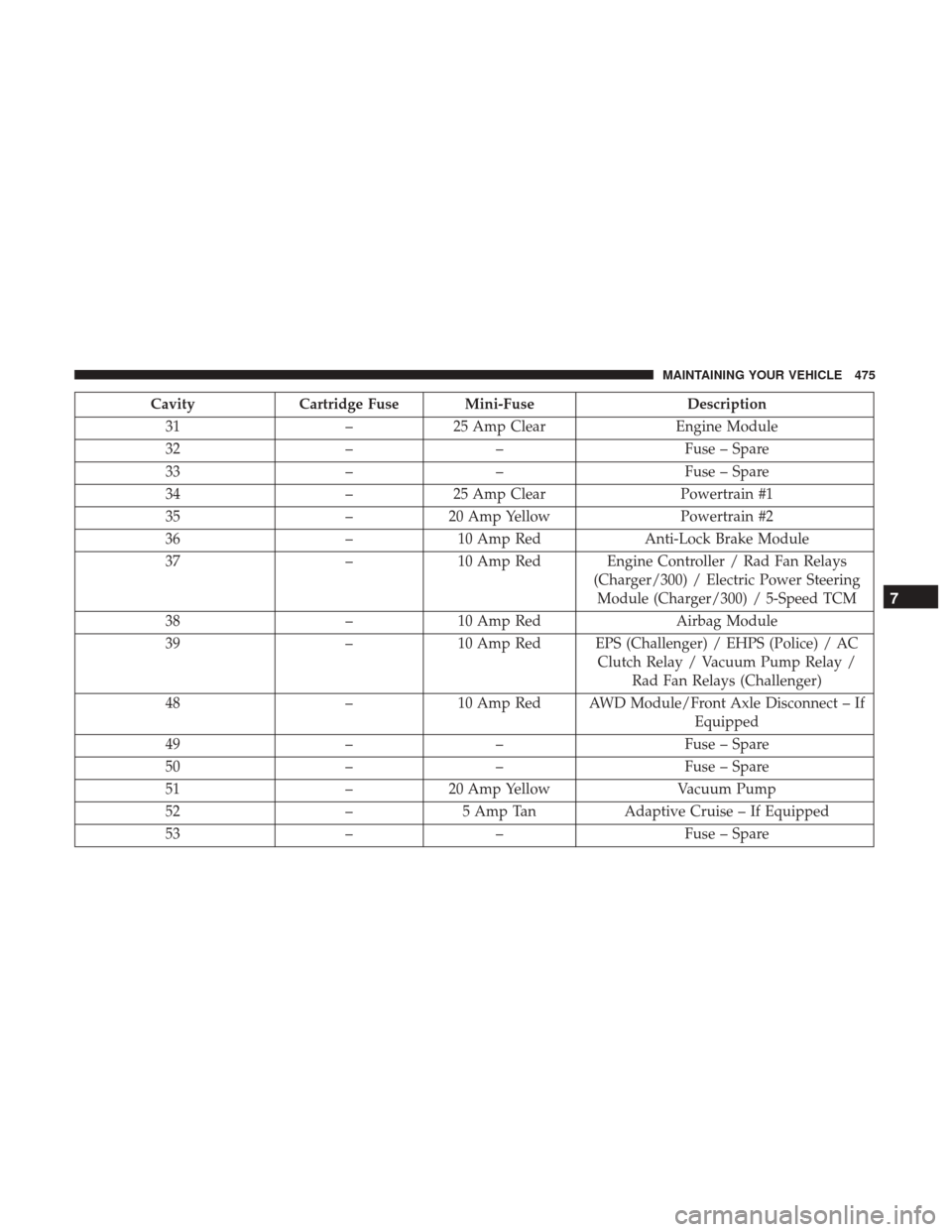
CavityCartridge Fuse Mini-Fuse Description
31 –25 Amp Clear Engine Module
32 –– Fuse – Spare
33 –– Fuse – Spare
34 –25 Amp Clear Powertrain #1
35 –20 Amp Yellow Powertrain #2
36 –10 Amp Red Anti-Lock Brake Module
37 –10 Amp Red Engine Controller / Rad Fan Relays
(Charger/300) / Electric Power SteeringModule (Charger/300) / 5-Speed TCM
38 –10 Amp Red Airbag Module
39 –10 Amp Red EPS (Challenger) / EHPS (Police) / AC
Clutch Relay / Vacuum Pump Relay /Rad Fan Relays (Challenger)
48 –10 Amp Red AWD Module/Front Axle Disconnect – If
Equipped
49 –– Fuse – Spare
50 –– Fuse – Spare
51 –20 Amp Yellow Vacuum Pump
52 –5 Amp Tan Adaptive Cruise – If Equipped
53 –– Fuse – Spare
7
MAINTAINING YOUR VEHICLE 475