Page 415 of 527
62
1
110
1011
Audio and Telematics
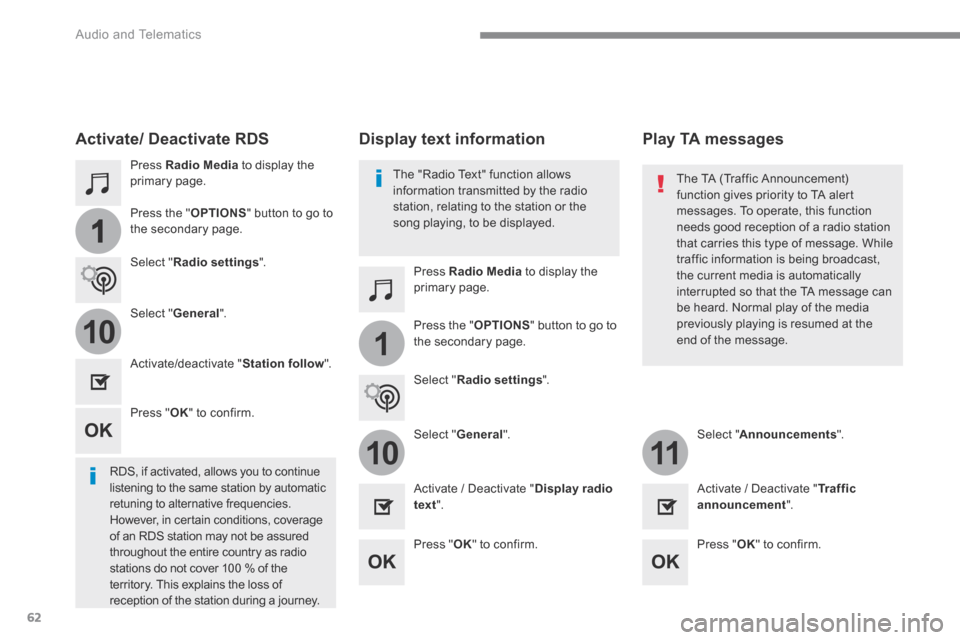
Press Radio Media to display the primary page.
Press Radio Media to display the primary page.
Press the " OPTIONS " button to go to
the secondary page.
Press the " OPTIONS " button to go to the secondary page.
Select " Radio settings ".
Select " Radio settings ".
Select " General ".
Select " General ". Select " Announcements ".
Activate/deactivate " Station follow ".
Activate / Deactivate " Display radio text ". Activate / Deactivate " Tr a f f i c announcement ".
Activate/ Deactivate RDS
RDS, if activated, allows you to continue listening to the same station by automatic retuning to alternative frequencies. However, in certain conditions, coverage of an RDS station may not be assured throughout the entire country as radio stations do not cover 100 % of the
territory. This explains the loss of reception of the station during a journey.
Press " OK " to confirm.
Press " OK " to confirm. Press " OK " to confirm.
The "Radio Text" function allows information transmitted by the radio station, relating to the station or the song playing, to be displayed.
Display text information Play TA messages
The TA (Traffic Announcement) function gives priority to TA alert messages. To operate, this function
needs good reception of a radio station that carries this type of message. While traffic information is being broadcast, the current media is automatically interrupted so that the TA message can be heard. Normal play of the media previously playing is resumed at the end of the message.
Page 416 of 527
63
.
1
10
3
Audio and Telematics
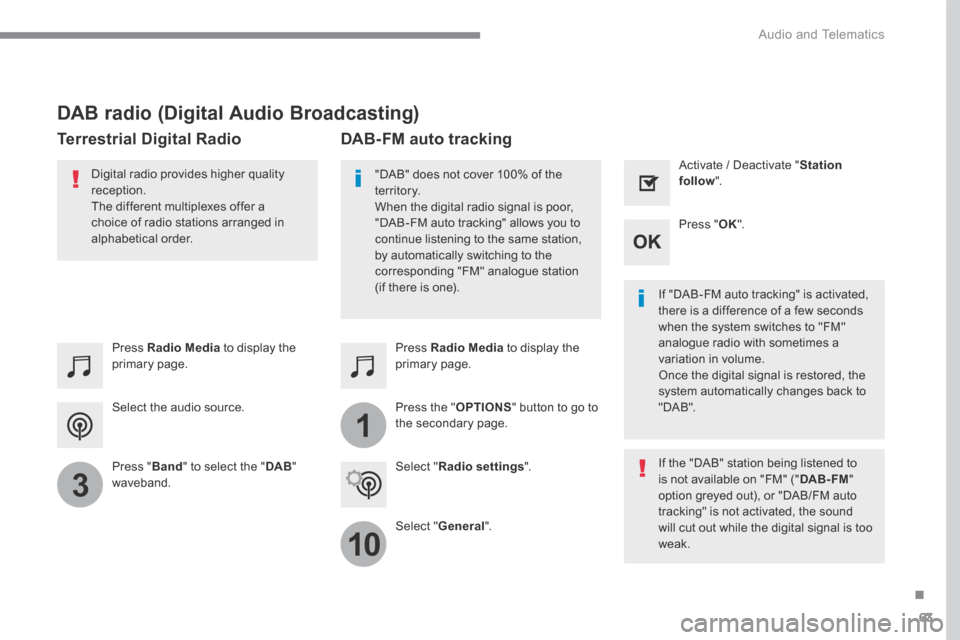
Select the audio source.
Press Radio Media to display the primary page.
Press " Band " to select the " DAB " waveband.
Press Radio Media to display the primary page.
Press the " OPTIONS " button to go to the secondary page.
DAB-FM auto tracking
"DAB" does not cover 100% of the te r r i to r y. When the digital radio signal is poor, "DAB-FM auto tracking" allows you to continue listening to the same station, by automatically switching to the corresponding "FM" analogue station (if there is one). If "DAB-FM auto tracking" is activated, there is a difference of a few seconds when the system switches to "FM" analogue radio with sometimes a variation in volume. Once the digital signal is restored, the system automatically changes back to " D A B " .
Digital radio provides higher quality reception. The different multiplexes offer a choice of radio stations arranged in
alphabetical order.
If the "DAB" station being listened to is not available on "FM" (" DAB- FM " option greyed out), or "DAB/FM auto tracking" is not activated, the sound will cut out while the digital signal is too w e a k .
Select " Radio settings ".
Select " General ".
Activate / Deactivate " Station follow ".
Press " OK ".
DAB radio (Digital Audio Broadcasting)
Terrestrial Digital Radio
Page 417 of 527
64
Audio and Telematics
Media
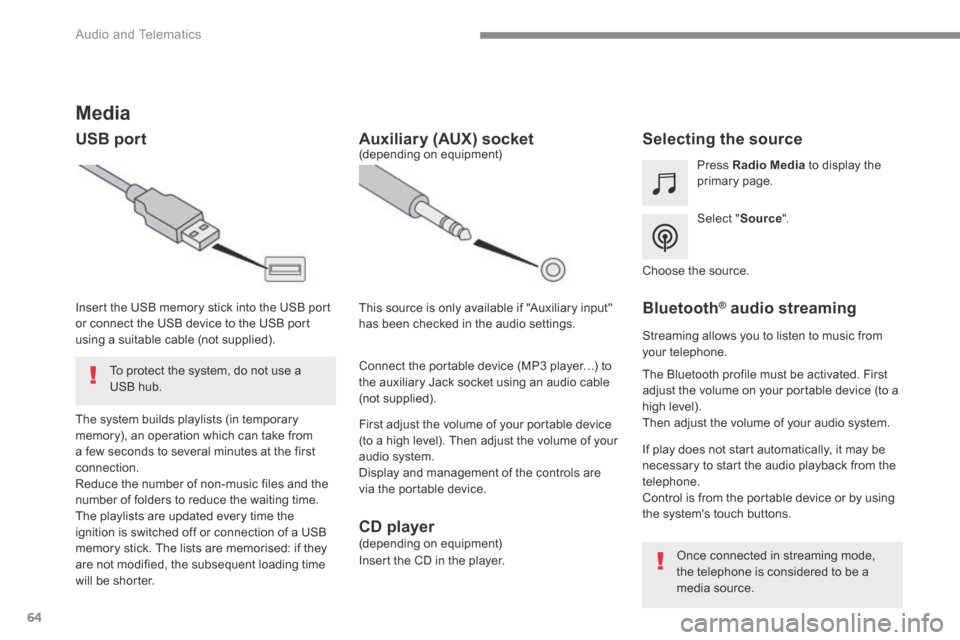
USB port Selecting the source
Select " Source ".
Press Radio Media to display the primary page.
The system builds playlists (in temporary memory), an operation which can take from a few seconds to several minutes at the first connection. Reduce the number of non-music files and the number of folders to reduce the waiting time. The playlists are updated every time the ignition is switched off or connection of a USB memory stick. The lists are memorised: if they are not modified, the subsequent loading time will be shorter.
Insert the USB memory stick into the USB port or connect the USB device to the USB port using a suitable cable (not supplied).
Auxiliary (AUX) socket
First adjust the volume of your portable device (to a high level). Then adjust the volume of your audio system. Display and management of the controls are via the portable device.
This source is only available if "Auxiliary input" has been checked in the audio settings.
(depending on equipment)
Connect the portable device (MP3 player…) to the auxiliary Jack socket using an audio cable (not supplied).
Choose the source.
Bluetooth ® Bluetooth ® Bluetooth audio streaming ® audio streaming ®
Streaming allows you to listen to music from your telephone.
The Bluetooth profile must be activated. First adjust the volume on your portable device (to a high level). Then adjust the volume of your audio system.
If play does not start automatically, it may be necessary to start the audio playback from the telephone. Control is from the portable device or by using the system's touch buttons.
Once connected in streaming mode, the telephone is considered to be a media source.
To protect the system, do not use a USB hub.
CD player (depending on equipment)
Insert the CD in the player.
Page 424 of 527
71
.
1
1
27
28
29
30
23
24
25
26
Audio and Telematics
Level 2Level 3Comments
Telephone
OPTIONS
Settings
Security Make driving safe.
Voicemail Enter and save the number for the telephone voicemail.
Ringtone Adjust the ringtone volume.
Statistics Display data for the telephone connected.
Save the options.
Telephone
OPTIONS
Quick messages
Delayed
Select a quick message from the categories, as required.
My arrival
Not available
Other
Page 432 of 527
79
.
2
5
6
7
3
4
Audio and Telematics
Level 1Level 2Comments
Settings
Color schemes
Color schemes: 1,2,3, ... Having chosen the color scheme, save the setting.
Settings
Audio settings
Ambience Select the sound ambience.
Distribution Sound distribution by the Arkamys © system. © system. ©
Sound Adjust the volume or activate linked to speed.
Voice Adjust the voice volume.
Ringtone Adjust the ringtone volume.
Save the settings.
Settings
Turn off screen
Function allowing the display to be switched off. Pressing the screen reactivates it.
Settings
Profile (1, 2, 3) Activate the profile selected.
Page 434 of 527
81
.
1
15
16
1
1
11
12
13
14
9
8
10
Audio and Telematics
Level 2Level 3Level 4Comments
Settings
OPTIONS
System settings
Units
Distance and fuel consumption Set the units used for distance, fuel consumption and temperature. Temperature
Factory settings Reinitialize Restore the factory settings.
System info View
View the versions of the different modules
(system, mapping, risk areas) installed in the system as well as the updates available.
Save the settings.
Settings
OPTIONS
Languages
All
Select the language then confirm.
Europe
Asia
America
Having selected the language, save the setting.
Settings
OPTIONS
Screen configuration
Animation Activate or deactivate settings.
Brightness Move the cursor to adjust the brightness of the screen and/or of the instrument panel.
Save the settings.
Page 436 of 527
83
.
1
17
18
1
1
20
19
21
22
Audio and Telematics
Level 2Level 3Level 4Comments
Settings
OPTIONS
Setting the time-date
Date Date Enter the date and select the date format. Date format:
Time
Time Set the time.
Time Zone Define the time zone.
Time format: Select the time format: 12h / 24h.
Synchronisation with GPS (UTC): Activate or deactivate synchronisation with the satellites.
Save the settings.
Settings
OPTIONS
Setting of the profiles
Profile 1
Enter settings for the profiles. Profile 2
Profile 3
Common profile
Save the settings.
Settings
OPTIONS
Driver screen configuration
Personalisation of the dashboard Choose and select the display information required on the dashboard.
Confirm the selections.
Page 437 of 527

84
3
4
5
6
7
1
19
Audio and Telematics
Press Settings to display the primary page.
Profile settings Audio settings
Press Settings to display the primary page.
Select " Audio settings ".
Select " Ambience ".
Or
" Position ".
Or " Sound ".
Or " Voice ".
Or
" Ringtone ".
On-board audio: Arkamys © Sound © Sound ©
Staging optimises the distribution of sound in the passenger compartment.
The settings for " Position " (All passengers, Driver and Front only) are common to all sources.
Activate or Deactivate " Touch tones ", " Volume linked to speed " and " Auxiliary input ".
The sound distribution (or spatialisation with the Arkamys © system) is audio © system) is audio ©
processing that allows the quality of the sound to be adapted according to the number of passengers in the vehicle.
Available only with the front and rear speakers configuration.
The audio Ambience settings (6 ambiences available) as well as the Bass , Medium and Tr e b l e settings are different and independent for each sound source. Activate or Deactivate " Loudness ".
Press " OK " to save the settings.
Press " OK " to confirm.
Press the " OPTIONS " button to go to the secondary page.
Select " Profile 1 ", " Profile 2 ",
" Profile 3 " or " Common profile ".
Select " Setting of the profiles ".
Press this button to enter a name for the profile using the virtual keypad.
As a safety measure and because it requires the sustained attention of the driver, changes to settings must only be done with the vehicle stationary . vehicle stationary . vehicle stationary


