2017 Citroen GRAND C4 PICASSO change time
[x] Cancel search: change timePage 307 of 527

305
C4-Picasso-II_en_Chap08_en-cas-panne_ed02-2016
Directional dipped beam
headlamps (xenon model)Main beam headlamps (xenon model)
F Remove the protective plastic cover by pulling the tab.
F
P
ush the connector.
F
R
emove the bulb and change it.
For reassembly, carry out these operations in
reverse order.
D5S xenon bulbs must be changed
by a CITROËN dealer or a qualified
workshop, as there is a risk of
electrocution.
In the event of failure of one of
the D5S bulbs, it is recommended that
the bulb on the other side be changed
at the same time.
The headlamps have polycarbonate
lenses with a protective coating:
F
d
o not clean them using a dr y
or abrasive cloth, nor with a
detergent or solvent product,
F
u
se a sponge and soapy water or
a
pH neutral product,
F
w
hen using a high pressure washer
on persistent marks, do not keep
the lance directed towards the
lamps or their edges for too long,
so as not to damage their protective
coating and seals.
Changing a bulb should only be done
after the headlamp has been switched
off for several minutes (risk of serious
burns).
F
D
o not touch the bulb directly with
your fingers, use a lint-free cloth.
It is imperative to use only anti-
ultraviolet (UV) type bulbs to avoid
damaging the headlamp.
Always replace a failed bulb with a
new bulb with the same type and
specification.
8
In the event of a breakdown
Page 340 of 527

338
C4-Picasso-II_en_Chap10_index-alpha_ed02-2016
Net .................................................................120
Number plate lamps ...................................... 3
12
Safety, children
....................2
42, 245, 246, 250,
252, 255, 256, 258, 260
Scented air freshener
...................................10
5
Screen, cold climate
.....................................26
6
Screenwash, front
......................................... 2
25
Screenwash, rear
...............................
...........224
SCR (Selective Catalytic Reduction) system
................
.........................................282
Seat belts
......................2
36, 237, 239, 240, 251
Seats, electric
................................................. 78
Se
ats, front
...............................
...........76, 78, 79
Seats, heated
...............................
...................82
Seats, rear
.................................... 8
4, 86, 88, 89
Selector, gear
................................................ 14
2
Serial number, vehicle
..................................33
4
Service indicator
............................................. 38
S
ervicing
...............................
............................ 9
Settings, equipment
.................................. 1
1, 13
Range
................
..............................................51
Range, AdBlue
® ............................... ...............43
Reading lamps, rear ...................................... 11
3
Rear screen, demisting
................................. 10
4
Recharging the battery
................................. 32
0
Recirculation, air
...............................
........96, 99
Reduction of electrical load
.......................... 2
70
Regeneration of the particle filter
.................28
0
Reinitialisation of the under-inflation detection system
......................................... 20
6
Reinitialising the remote control
.....................59
R
emote control
.................................... 5
3 -57, 60
Removing a wheel
..............................
..........300
Removing the mat
...............................
..........112
Pads, brake
...................................................
2
81
Paint colour code
.......................................... 33
4
Oil change
...............................
......................
277
Oil consumption
............................................
2
77
OIl, engine
...............................
......................
277
Opening the bonnet
......................................
2
74
Opening the boot
..............................
. 53, 55, 64
Opening the doors
...............................
.....53, 55
Opening the panoramic sunroof blind
.......... 2
28 Panoramic glass sunroof
..............................
2
28
Parcel shelf, rear
................................... 11
3 , 118
Park Assist
............................ 1
97, 199, 201, 202
Parking brake
................................................
2
81
Parking brake, electric
..........................
13
3, 13 8
Parking sensors, front
...................................
19
3
Parking sensors, rear.................................... 192
Plates, identification ...................................... 334
Port, USB
......................................................
111
P
ressures, tyres
................... 2
88, 293, 303, 334
Pre-tensioning seat belts
..............................
24
0
Priming pump
...............................
.................
324
Priming the fuel system
................................
3
24
Protecting children
....................... 2
42, 245, 246,
250, 252, 255, 256, 258, 260
Puncture
................
........................287, 294, 296
N
S
R
P
O
Mountings, Isofix ...............................
............254
Multimedia, rear ............................... .............115 Replacing bulbs ............................
3 04, 308-311
Replacing fuses .............................. ..............313
Replacing the air filter
...................................28
0
Replacing the oil filter
...................................28
0
Replacing the passenger compartment
filter
........
.....................................................280
Resetting the service indicator
.......................40
R
esetting the trip recorder
..............................46
R
eversing camera
...............................
..........19 4
Reversing lamp
..................................... 3
08-311
Roof bars
....................................................... 2
72
Running out of fuel (Diesel)
..........................3
24
Alphabetical index
Page 354 of 527

1
.
Audio and Telematics
CITROËN Connect Nav
GPS satellite navigation - Applications - Multimedia audio - Bluetooth ® GPS satellite navigation - Applications - Multimedia audio - Bluetooth ® GPS satellite navigation - Applications - Multimedia audio - Bluetooth telephone ® telephone ®
Contents First steps 2
Steering mounted controls 5
Menus 6
Voice commands 8
Navigation 14
Connected navigation 30
Applications 40
Radio Media 54
Telephone 66
Settings 78
Frequently asked questions 88
The system is protected in such a way that it will only operate in your vehicle. Displaying of the Energy Economy Mode message signals that a change to standby is imminent.
The different functions and settings described vary according to the version and configuration of your vehicle.
The link below gives access to OSS (Open Source Software) codes for the system. http://www.psa-peugeot-citroen.com/oss
As a safety measure and because it requires sustained attention by the driver, the pairing of a Bluetooth mobile telephone with the Bluetooth hands-free system of your audio system must be done with the vehicle stationaryand the ignition on.
Page 358 of 527

5
.
Audio and Telematics
Steering mounted controls
Media (short press): change the multimedia source. Telephone (short press): call. Call in progress (short press): access to telephone menu. Telephone (long press): reject an incoming call, end call, access to telephone menu.
Decrease volume.
Voice commands : Short press, system voice commands. Long press, smartphone voice commands via the system. Mute / Restore the sound. Or Mute by pressing the volume
increase and decrease buttons simultaneously. Restore the sound by pressing one of the two volume buttons.
Radio (rotate): automatic search for the previous / next station. Media (rotate): previous / next track, move in a list. Short press : confirm a selection; other than selection, access to presets.
Radio : display the list of stations. Media : display the list of tracks. Radio (press and hold): update the list of stations received.
Increase volume.
Page 386 of 527

33
.
7
28
27
26
29
30
Audio and Telematics
Level 1Level 2Level 3Comments
Navigation Select the orientation of the map; north up, vehicle direction up or perspective.
Navigation
TOMTOM TR AFFIC
On connection of the system to a network, "TOMTOM TR AFFIC" is displayed instead of "TMC", for use of all of the options available, in real time.
Navigation
Weather
Select the options. The map display the route chosen, depending on options.
Stations
Car park
Tr a f f i c
Danger area
Map color Select the display mode for the map.
POI on map
Commercial
Select the POIs available.
Geographic
Leisure
Public
Travel
Save the options.
View map Modify city Select or change a city.
Zoom out / zoom in using the touch buttons or with two fingers on the screen.
Page 416 of 527
63
.
1
10
3
Audio and Telematics
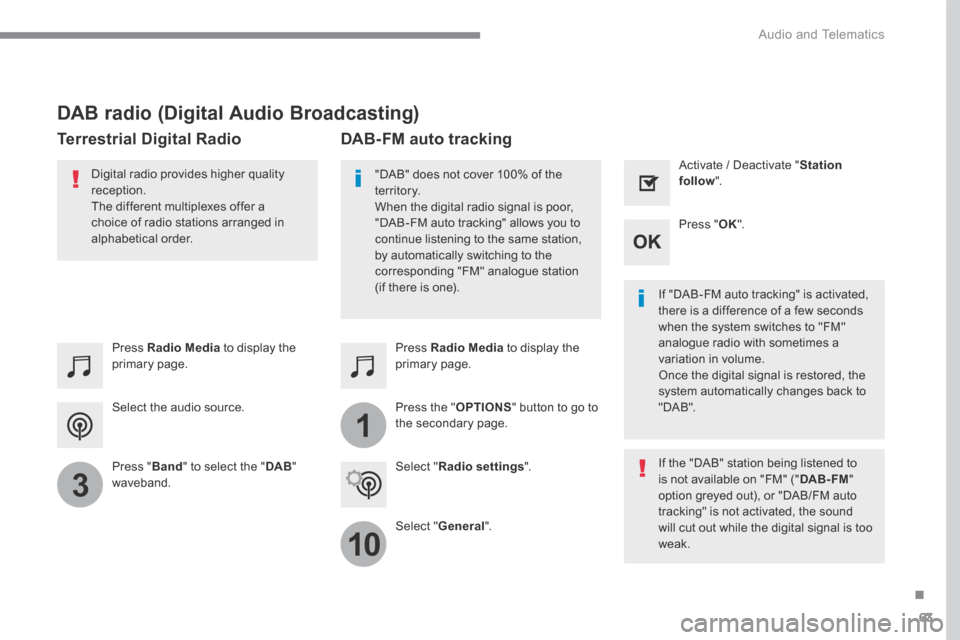
Select the audio source.
Press Radio Media to display the primary page.
Press " Band " to select the " DAB " waveband.
Press Radio Media to display the primary page.
Press the " OPTIONS " button to go to the secondary page.
DAB-FM auto tracking
"DAB" does not cover 100% of the te r r i to r y. When the digital radio signal is poor, "DAB-FM auto tracking" allows you to continue listening to the same station, by automatically switching to the corresponding "FM" analogue station (if there is one). If "DAB-FM auto tracking" is activated, there is a difference of a few seconds when the system switches to "FM" analogue radio with sometimes a variation in volume. Once the digital signal is restored, the system automatically changes back to " D A B " .
Digital radio provides higher quality reception. The different multiplexes offer a choice of radio stations arranged in
alphabetical order.
If the "DAB" station being listened to is not available on "FM" (" DAB- FM " option greyed out), or "DAB/FM auto tracking" is not activated, the sound will cut out while the digital signal is too w e a k .
Select " Radio settings ".
Select " General ".
Activate / Deactivate " Station follow ".
Press " OK ".
DAB radio (Digital Audio Broadcasting)
Terrestrial Digital Radio
Page 439 of 527
86
111
8
9
10
15
161
Audio and Telematics
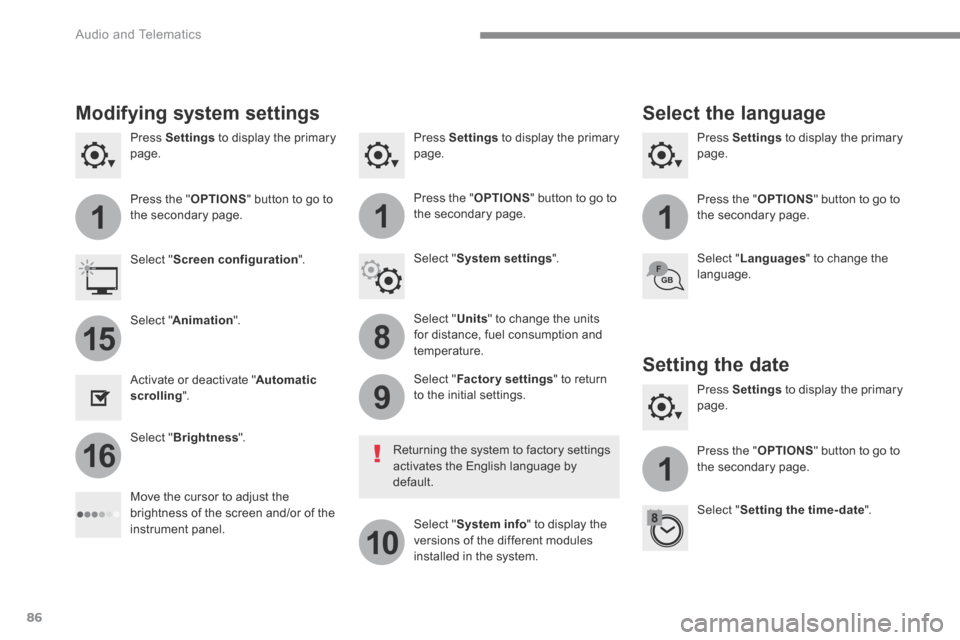
Press Settings to display the primary page. Press Settings to display the primary page. Press Settings to display the primary page.
Press the " OPTIONS " button to go to the secondary page. Press the " OPTIONS " button to go to the secondary page. Press the " OPTIONS " button to go to the secondary page.
Select " System settings ". Select " Screen configuration ".
Select " Units " to change the units for distance, fuel consumption and temperature.
Select " Languages " to change the language.
Activate or deactivate " Automatic scrolling ".
Move the cursor to adjust the brightness of the screen and/or of the instrument panel.
Select " Factory settings " to return to the initial settings.
Select " System info " to display the versions of the different modules installed in the system.
Modifying system settings
Returning the system to factory settings activates the English language by default.
Select " Animation ".
Select " Brightness ".
Select the language
Press Settings to display the primary page.
Press the " OPTIONS " button to go to the secondary page.
Select " Setting the time- date ".
Setting the date
Page 440 of 527
87
.
1
17
18
Audio and Telematics
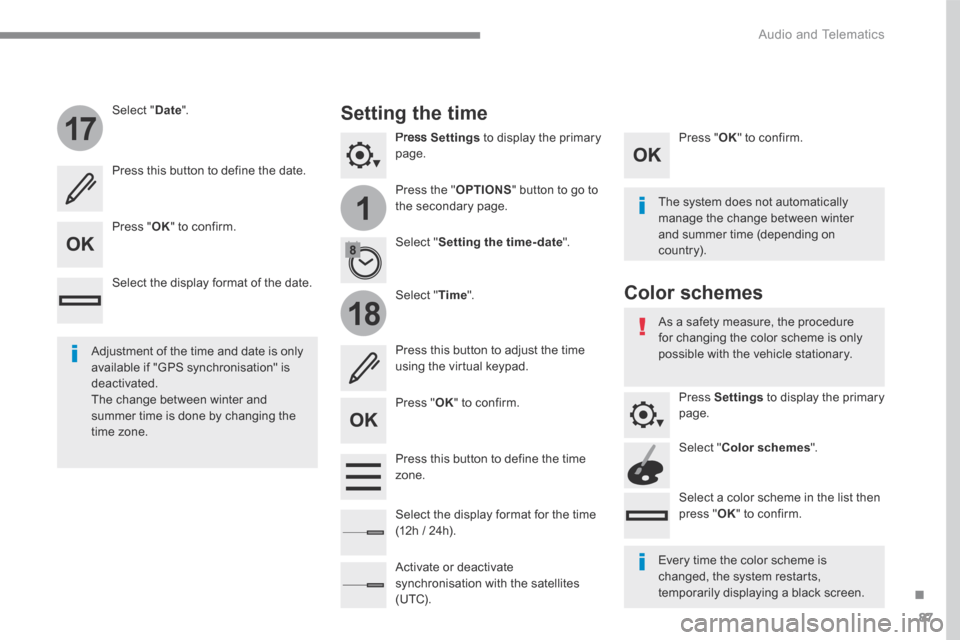
Press Settings to display the primary page.
Press the " OPTIONS " button to go to the secondary page.
Select " Date ".
Select " Time ".
Select " Setting the time- date ".
Adjustment of the time and date is only available if "GPS synchronisation" is deactivated. The change between winter and summer time is done by changing the time zone.
The system does not automatically manage the change between winter and summer time (depending on c ountr y).
Setting the time
Press this button to define the date.
Press this button to adjust the time using the virtual keypad.
Press " OK " to confirm.
Press " OK " to confirm.
Press " OK " to confirm.
Press this button to define the time z o n e .
Select the display format of the date.
Select the display format for the time (12h / 24h).
Activate or deactivate synchronisation with the satellites (UTC).
Every time the color scheme is changed, the system restarts, temporarily displaying a black screen.
As a safety measure, the procedure for changing the color scheme is only possible with the vehicle stationary.
Press Settings to display the primary page.
Select " Color schemes ".
Select a color scheme in the list then press " OK " to confirm.
Color schemes