Page 43 of 421

41
DS4_en_Chap01_instruments-de-bord_ed01-2016
Starting preventedYou have exceeded the authorised
driving limit: the starting prevention
system inhibits engine starting.
Every time the ignition is switched on, the
SERVICE and engine diagnostic warning
lamps come on and the UREA warning lamp
flashes, accompanied by the temporary display
of "NO START IN" and 0 miles or kilometres
-
("NO START IN 0 miles" means "Starting
prevented").
To be able to start the engine, you must call on
a CITROËN dealer or a qualified workshop.
Type 2 instrument panel
A system that prevents engine
starting is activated automatically
from 650
miles (1 100 km) after
confirmation of a fault with the SCR
emissions control system. Have the
system checked by a CITROËN dealer
or a qualified workshop as soon as
possible.
In the event of a fault with the SCR emissions control system
The UREA, SERVICE and diagnostic warning
lamps comes on, accompanied by an audible
signal and the display of the message
"Emissions fault".
The alert is triggered when driving when the
fault is detected for the first time, then when
switching on the ignition for subsequent
journeys, while the fault persists. In the event of the detection of a fault
If it is a temporary fault, the alert
disappears during the next journey,
after self-diagnosis of the SCR system.
01
Instruments
Page 45 of 421
43
DS4_en_Chap01_instruments-de-bord_ed01-2016
Manual test in the type 2 instrument panel central screen
This function allows you to check the status of the vehicle systems (reminder of the "activated" / "deactivated" status of the configurable functions) and
to display the alerts log.
F
W
ith the engine running, to start a manual
test, briefly press the ".../000" button on
the instrument panel. The following information appears successively
in the instrument panel central screen:
-
e
ngine oil level indicator,
-
s
ervice indicator,
-
c
urrent warnings and alert messages, if
a ny,
-
t
he range for the AdBlue additive and the
SCR system for BlueHDi Diesel versions,
-
s
tatus of configurable functions.This information also appears every
time the ignition is switched on
(automatic test).
01
Instruments
Page 47 of 421
45
DS4_en_Chap01_instruments-de-bord_ed01-2016
Lighting dimmer
Permits manual adjustment of the brightness of
the instruments and controls to suit the ambient
light level. Only operates when the vehicle
lighting is on in night mode.F
P
ress this button to change the brightness
of the instruments and controls.
F
W
hen the lighting reaches the minimum
setting, release this button, then press
again to increase it.
or
F
W
hen the lighting reaches the maximum
setting, release this button, then press
again to reduce it.
F
W
hen the lighting reaches the level of
brightness required, release this button.
This indicator and the lighting
value appear in the middle of the
instrument panel during adjustment
to show the setting from the 16 levels
available.Deactivation
When the vehicle lighting is off, or in day mode
(daytime running lamps on), pressing the button
does not have any effect.
Activation
01
Instruments
Page 48 of 421

46
DS4_en_Chap01_instruments-de-bord_ed01-2016
When driving at night, it allows certain
instrument panel displays to be switched off so
as to reduce visual fatigue for the the driver.
The essential driving information, such as
the vehicle speed, warning lamps, automatic
gearbox gear selected, cruise control or speed
limiter information, remains on in the instrument
panel.
Black panel (comfortable night
driving display)
F With the vehicle lighting on, press this button again to
activate the function.
F
P
ress this button again to
deactivate the function. In the instrument panel, you can change the
colour of its dials independently from that of the
display screens.
There are five colour variants, from white to
blue.
Customising the instrument
panel colours
Touch screen tablet
You can returns to the current display
at any time by pressing the black
screen or one of the menu buttons.
In automatic illumination of headlamps
mode, the "Black panel" function is
automatically deactivated once the
ambient light level attains an adequate
level.
F
P
ress the appropriate button as many
times as needed to obtain the desired
c o l o u r.
A.
F
or the dials.
B.
F
or the display screens.
01
Instruments
Page 49 of 421
47
DS4_en_Chap01_instruments-de-bord_ed01-2016
Monochrome screen C
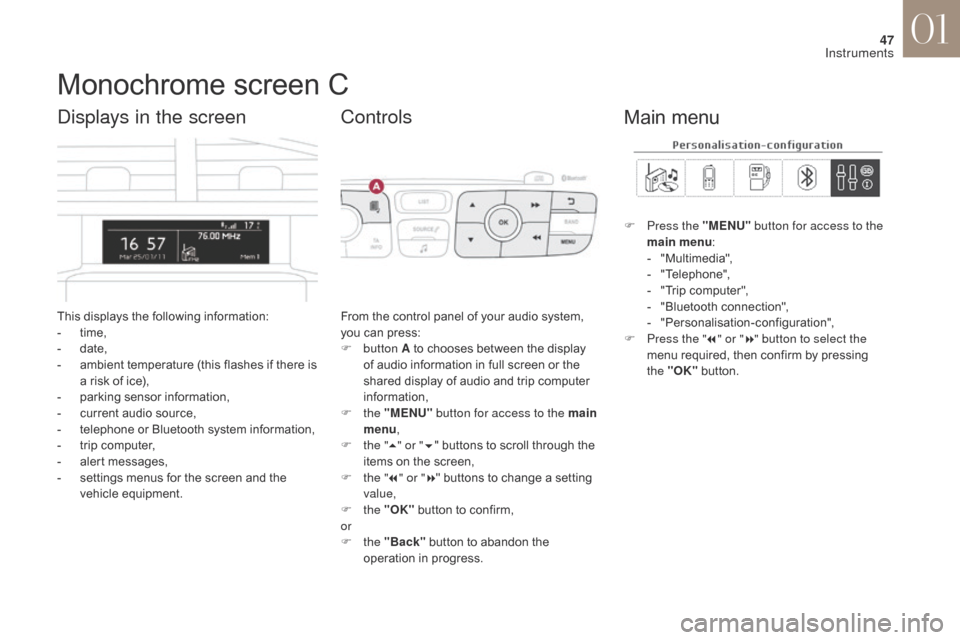
This displays the following information:
- t ime,
-
d
ate,
-
a
mbient temperature (this flashes if there is
a risk of ice),
-
p
arking sensor information,
-
c
urrent audio source,
-
t
elephone or Bluetooth system information,
-
t
rip computer,
-
a
lert messages,
-
s
ettings menus for the screen and the
vehicle equipment.
Displays in the screen
From the control panel of your audio system,
you can press:
F
button A to chooses between the display
of audio information in full screen or the
shared display of audio and trip computer
information,
F
the "MENU" button for access to the main
menu ,
F
t
he "5" or " 6" buttons to scroll through the
items on the screen,
F
t
he "7" or " 8" buttons to change a setting
value,
F
the "OK" button to confirm,
or
F
the "Back" button to abandon the
operation in progress.
Controls
F Press the "MENU" button for access to the
main menu :
-
"
Multimedia",
-
"
Telephone",
-
"
Trip computer",
-
"
Bluetooth connection",
-
"
Personalisation-configuration",
F
P
ress the " 7" or " 8" button to select the
menu required, then confirm by pressing
the "OK" button.
Main menu
01
Instruments
Page 54 of 421
52
DS4_en_Chap01_instruments-de-bord_ed01-2016
Menus
Navigation
Telephone Radio Media Driving
Gives access to the trip computer
and, depending on version, allows
settings to be adjusted for certain
functions.Settings
Allows configuration of the display
and the system. Connected services
The connected services are
accessible via Bluetooth, Wi-
Fi, CarPlay™ or MirrorLink™
connections.
Press one of the buttons on the control panel
for direct access to a particular menu.
1.
V
olume / mute.
For more information on the touch screen
tablet, refer to the Audio and telematics
section.
01
Instruments
Page 60 of 421
58
DS4_en_Chap01_instruments-de-bord_ed01-2016
Type 2 instrument panel central screen
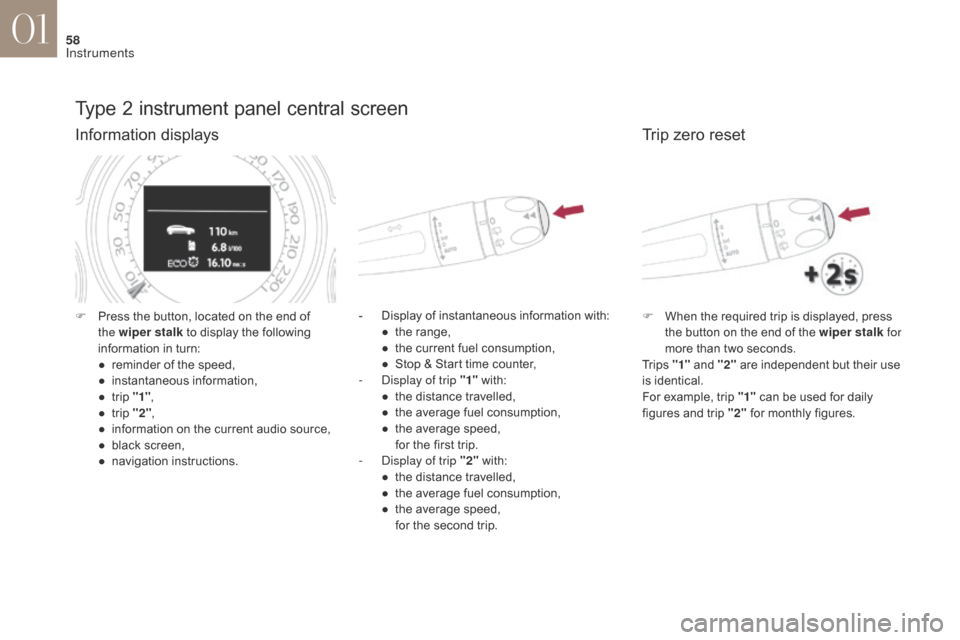
Information displays
- Display of instantaneous information with:● t he range,
●
t
he current fuel consumption,
●
S
top & Start time counter,
-
D
isplay of trip "1" with:
●
t
he distance travelled,
●
t
he average fuel consumption,
●
t
he average speed,
f
or the first trip.
-
D
isplay of trip "2" with:
●
t
he distance travelled,
●
t
he average fuel consumption,
●
t
he average speed,
f
or the second trip.
F
P
ress the button, located on the end of
the wiper stalk to display the following
information in turn:
●
r
eminder of the speed,
●
in
stantaneous information,
●
t
rip "1" ,
●
t
rip "2" ,
●
i
nformation on the current audio source,
●
b
lack screen,
●
n
avigation instructions.
Trip zero reset
F When the required trip is displayed, press the button on the end of the wiper stalk for
more than two seconds.
Tr i p s "1" and "2" are independent but their use
is identical.
For example, trip "1" can be used for daily
figures and trip "2" for monthly figures.
01
Instruments
Page 81 of 421

79
DS4_en_Chap02_ouvertures_ed01-2016
This system allows automatic simultaneous locking of the doors and boot as soon as the speed of
the vehicle exceeds 6 mph (10 km/h).
Anti-intrusion security
OperationActivation / Deactivation
If one of the doors or the boot is open, the
automatic central locking does not take place.
Carrying long or
voluminous objects
If you want to drive with the boot open,
you should press the central locking
button to lock the doors. Other wise,
every time the speed of the vehicle
exceeds 6 mph (10 km/h), the locks
will rebound and the alerts mentioned
above will appear.
Pressing the central locking button unlocks the
vehicle.
Above 6 mph (10 km/h), this unlocking is
te m p o r a r y. Driving with the doors locked may
render access for the emergency
services difficult in an emergency.
This is signalled by the sound of
the locks rebounding, accompanied
by illumination of this symbol in the
instrument panel, an audible signal
and the display of an alert message.
F
W
ith the ignition on, press this button
until an audible signal starts and a
corresponding message is displayed.
The state of the system stays in memory when
switching off the ignition. You can activate or deactivate this function
permanently.
02
Access


