Page 96 of 260

94
Berlingo2VU_en_Chap05_Securite_ed02-2016
94
Berlingo2VU_en_Chap05_Securite_ed02-2016
REVERSING CAMERA
The reversing camera is activated
automatically when reverse gear is
engaged.
The image is displayed in the touch
screen tablet.
The reversing camera function may be
completed with parking sensors.The reversing camera cannot in
any circumstances be a substitute
for vigilance on the part of the
driver. High pressure jet washing
When washing your vehicle, do
not direct the lance within 30 cm of
the camera lens.
The superimposed representation of
guide lines helps with the manoeuvre.
They are represented by lines marked
"on the ground" and do not allow the
position of the vehicle to be determined
relative to tall obstacles (for example:
other vehicles, ...).
Some deformation of the image is
normal. The blue lines represent the general
direction of the vehicle (the difference
corresponds to the width of your
vehicle without the mirrors).
The red lines represent a distance of
about 30 cm beyond the edge of your
vehicle's rear bumper.
The green lines represent distances of
about 1 and 2 metres beyond the edge
of your vehicle's rear bumper.
The turquoise blue curves represent
the maximum turning circle.
Opening the tailgate causes the
display to disappear.
Clean the reversing camera regularly
using a soft, dry cloth.
Parking sensors
Page 159 of 260
157
Berlingo2VU_en_Chap08_Aide-rapide_ed02-2016Berlingo2VU_en_Chap08_Aide-rapide_ed02-2016
Dashboard fuses
Tilt the cover to gain access to the
fuses.Fuses
F Amperes
A Allocation
1 15 Rear wiper
2 30 Central locking
3 5 Airbags
4 10 Air conditioning, diagnostic socket, mirror control,
headlamp beam
5 30 Electric windows
6 30 Locks
7 5Rear courtesy lamp, front map reading lamp, roof
console
8 20 Audio equipment, screen, tyre under-inflation
detection, alarm and siren
9 30 Front and rear 12V socket
10 15 Central column 11 15 Low current ignition switch
12 15 Rain and sunshine sensor, airbag
13 5 Instrument panel
14 15 Parking sensors, digital air conditioning controls,
hands-free kit
15 30 Locks
16 - Not used 17 40 Heated rear screen/mirrors
QUICK HELP
8
Changing a fuse
Page 160 of 260
158
Berlingo2VU_en_Chap08_Aide-rapide_ed02-2016Berlingo2VU_en_Chap08_Aide-rapide_ed02-2016
Passenger compartment fuses
Fuses F Amperes
A Allocation
1 - Not used
2 20 Heated seats
3 - Not used
4 15 Folding mirrors relay
5 15 Refrigeration equipment socket relay
Towing / towbar /
coachbiuilders / floor cab fuses
The designations communicated are
an indication only as this additional
box relates to other information which
depends on the converter-coachbuilder
for which the handbook cannot be
used as a technical support.
Fuses F Amperes
A Allocation
1 15 Not used
2 15 Ignition, generator operating relay
3 15 Trailer 12V supply
4 15 Permanent supply for the modifiers
5 40 Hazard warning lamps
Changing a fuse
Page 167 of 260
165
Berlingo2VU_en_Chap09_Caract_technique_ed02-2016
Berlingo2VU_en_Chap09_Caract_technique_ed02-2016
Short - L1Long - L2
625 850750
L Overall length 43804628
H Overall height 1805-1834
A Wheelbase 2728
B Front overhang 925
C Rear overhang 727975
D Width over panels: without mirrors
1810
with mirrors 2112
E Width of front track 1505
F Width of rear track 1554
G Rear floor load length 18002050
I Load length with front passenger seat folded 30003250
DIMENSIONSV
an (mm)
The vehicle is available in 2 lengths (L1 and L2),
refer to the tables.
Dimensions
TECHNICAL DATA
9
Page 170 of 260
168
Berlingo2VU_en_Chap09_Caract_technique_ed02-2016
Berlingo2VU_en_Chap09_Caract_technique_ed02-2016
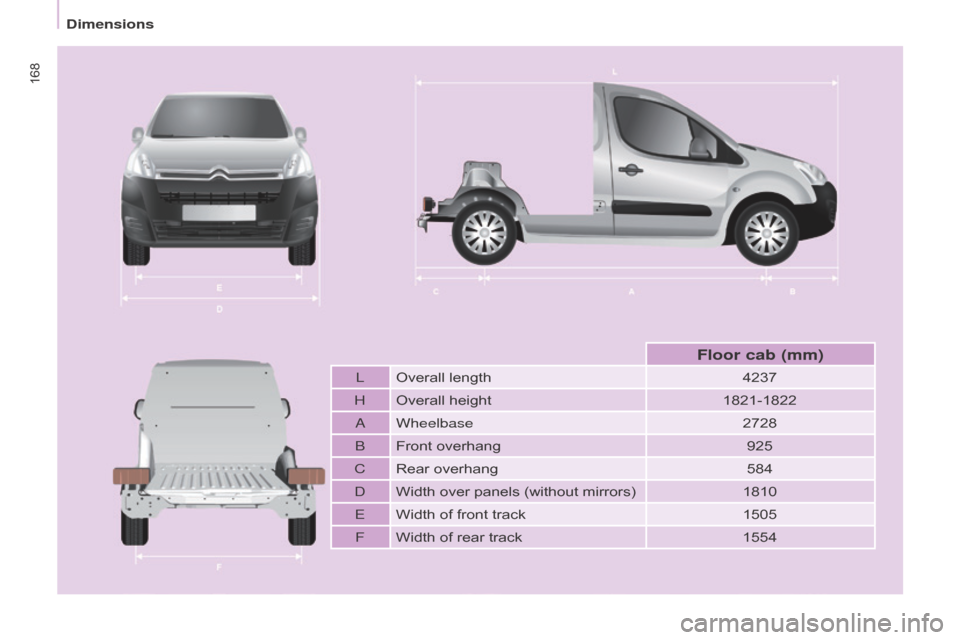
LOverall length 4237
H Overall height 1821-1822
A Wheelbase 2728
B Front overhang 925
C Rear overhang 584
D Width over panels (without mirrors) 1810
E Width of front track 1505
F Width of rear track 1554
Floor cab (mm)
Dimensions
Page 173 of 260
171
Berlingo2VU_en_Chap10a_SMEGplus_ed02-2016
7-inch touch screen tablet
GPS satellite navigation - Multimedia audio - Bluetooth® telephone
Contents
First steps
1 72
Steering mounted controls
1
74
M e n u s
17
5
Navigation
1
76
Navigation - Guidance
1
84
Tr a f fi c
1
8 8
Radio Media
1
90
Radio
19
6
DAB (Digital Audio Broadcasting) radio
1
98
Media
20
0
Settings
2
02
Connected services
2
10
MirrorLink
TM 210
CarPlay® 214
Telephone
2
16
Frequently asked questions
2
24
The system is protected in such a way that it will only operate in
your vehicle. As a safety measure, the driver should only carry out operations
which require prolonged attention while the vehicle is stationary.
The display of an energy economy mode message signals that
electrical systems operating are going into standby.
Refer to the energy economy mode section.
Audio and Telematics
TECHNOLOGY on BOARD
10
Page 175 of 260

173
Berlingo2VU_en_Chap10a_SMEGplus_ed02-2016
Volume adjustment (each source is
independent, including traffic announcements
(TA) and navigation instructions).
Mute the sound by pressing simultaneously on
the volume increase and reduce buttons.
Unmute the sound by pressing one of the two
volume buttons.Press Menu
to display the menu
carousel.
Increase volume.
Reduce volume.
Selecting the audio source (depending on
version):
-
"
FM" / "DAB"* / "AM"* stations.
-
"
USB" memory stick.
-
S
martphone via MirrorLink
TM or CarPlay®.
-
T
elephone connected by Bluetooth®* and
Bluetooth®* audio streaming.
-
M
edia player connected to the auxiliary
socket ( jack, cable not supplied).
* Depending on equipment.
Short-cuts: using the touch buttons in the upper
band of the touch screen tablet, it is possible to
go directly to the selection of the audio source
or the list of stations (or titles, depending on the
s o u r c e).
The screen is of the "resistive" type, it
is necessary to press firmly, particularly
for "flick" gestures (scrolling through a
list, moving the map...). A simple wipe
will not be enough. Pressing with more
than one finger is not recognised.
The screen can be used when wearing
gloves. This technology allows use at
all temperatures. In very high temperatures, the volume
may be limited to protect the system.
The return to normal takes place when
the temperature in the passenger
compartment drops.
To clean the screen, use a soft
non-abrasive cloth (spectacles cloth)
without any additional product.
Do not use pointed objects on the
screen.
Do not touch the screen with wet
hands.
Audio and Telematics
TECHNOLOGY on BOARD
10
Page 177 of 260
175
Berlingo2VU_en_Chap10a_SMEGplus_ed02-2016
Menus
Settings
Radio Media
Navigation
Driving
Connected services Telephone
Adjust the settings for sound (balance,
ambience, ...), colour schemes and the display
(language, units, date, time, ...).
Select an audio source, a radio station, display
photographs.
Enter navigation settings and choose a
destination.
Access to the trip computer.
Activate, deactivate or enter settings for certain
vehicle functions.
Operate certain applications on your
smartphone via MirrorLink
TM or CarPlay®.
Connect a telephone by Bluetooth
®.
Access to the CarPlay® function after
connection of your smartphone by USB cable.
(Depending on equipment)
(Depending on equipment)
Audio and Telematics
TECHNOLOGY on BOARD
10