Page 157 of 328
155
Berlingo-2-VU_en_Chap08_Aide rapide_ed01-2015Berlingo-2-VU_en_Chap08_Aide rapide_ed01-2015
Dashboard fuses
Tilt the cover to gain access to the
fuses.Fuses
F Amperes
Aa llocation
1 15 Rear wiper
2 30 Central locking
3 5 Airbags
4 10 Air conditioning, diagnostic socket, mirror control,
headlamp beam
5 30 Electric windows
6 30 Locks
7 5Rear courtesy lamp, front map reading lamp, roof
console
8 20 Audio equipment, screen, tyre under-inflation
detection, alarm and siren
9 30 Front and rear 12V socket
10 15 Central column 11 15 Low current ignition switch
12 15 Rain and sunshine sensor, airbag
13 5 Instrument panel
14 15 Parking sensors, digital air conditioning controls,
hands-free kit
15 30 Locks
16 - Not used 17 40 Heated rear screen/mirrors
QUICK HELP
8
Changing a fuse
Page 262 of 328
4
Instruments and controls
Instrument panel
p.5 Drive selector
p.11
Display screens
p.10
Page 263 of 328
5
INSTRUMENTS AND CONTROLS
Instrument panel
Current energy consumption and
generation indicator
p.6 Traction battery state of charge
indicator
p.7
Dedicated warning and indicator lamps
p.9 Drive selector position
p.11 Estimated remaining range
p.10 Heating and air conditioning
systems energy consumption
indicator
p.8, 13 and 14
"Ready"
lamp
p.9
Page 265 of 328

7
INSTRUMENTS AND CONTROLS
Traction battery - State of charge indicator
The state of charge of the traction
battery is displayed continuously when
the vehicle is switched on.
Low energy alerts
Two successive energy level alerts
indicate that the energy available has
dropped to a low level:
With the motor stopped, ignition
off, opening the driver's door
wakes the indicator.
1st level: Reserve
This warning lamp comes
on when the state of charge
of the traction battery is low.
Illumination of this warning
lamp is accompanied by an
audible signal.
2nd level: Critical
This warning lamp, associated
with the reserve warning lamp,
comes on in the instrument
panel when the state of charge
of the traction battery is critical.
Illumination of this warning
lamp is accompanied by a
regular audible warning.
Check the remaining range
indicated in the instrument panel
screen.
Put the vehicle on charge as soon as
possible. Put the vehicle on charge.
The remaining range is no longer
calculated. The power of the drive
train is progressively reduced.
The heating and air conditioning are
stopped (even if the needle indicating
their consumption is not in the ECO
position). From this state of charge of the
battery, the level of heating or
air conditioning is progressively
reduced.
For more information, refer to
pages 8, 13-14.
Page 268 of 328
10
DISPLAY SCREENS
Screen (depending on
equipment level)
Each press of the button on the end
of the windscreen wiper stalk displays
successively the different trip computer
information, depending on the type of
screen.
Setting the units
Range
It displays:
- the estimated range remaining,
- the additional range available
by using the ECO
mode on the
heating and air conditioning control
panel,
- the additional range after stopping
the heating and air conditioning.
They display:
- a trip distance recorder (choice of
trip 1 or 2),
- the average energy consumption from
the battery (over 62 miles (100 km)),
- the speed.
Trips (1 and 2)
This screen displays an estimate of the
number of miles or kilometres driving
range before the battery has to be
charged.
Instrument panel
Page 269 of 328

11
INSTRUMENTS AND CONTROLS
Starting the vehicle
- To start the vehicle, the
drive selector must be in
position P
,
- press the brake pedal,
- torn the ignition key in the
switch.
STARTING PROCEDURE
This indicator lamp comes on
when the vehicle is ready to drive.
-
Press the brake pedal,
-
select R
or D
,
-
release the brake pedal and
press the accelerator pedal to
move off.
The selection appears in the current
energy consumption screen in the
instrument panel.
Drive selector
If the drive selector is not in position P
and/or if the brake pedal is not
pressed, The vehicle will not start.
Repeat the procedure for starting the
vehicle.
The selection of position D
or R
on
the drive selector determines the drive
direction. It is preferable to be at a
full stop before changing the drive
direction.
P
(Park). Parking. Move the
selector to position P
, there is
an audible signal.
N
(Neutral). Move the
selector to position N
, there is
an audible signal.
Do not select this position, even
momentarily, when the vehicle is
moving.
The vehicle is free-wheeling. Select D
to return to forward drive.
D
(Drive). Forward drive.
Move the selector to
position D
, there is an audible
signal.
It is recommended that you keep
your foot on the brake pedal when
selecting positions R
or D
.
R
(Reverse). Reverse
drive. Move the selector to
position R
, there is an audible
signal.
Only engage reverse when the
vehicle is immobilised.
When moving from position R
to
position P
, N
is displayed momentarily
in the instrument panel.
There is an audible signal when
changing drive position with the
selector.
The audible signal is deactivated if the
user has chosen to inhibit operation of
the "Rear parking sensors".
The driver must be particularly
vigilant when driving the electric
vehicle as it makes very little noise
when moving.
Ready
Parking the vehicle
When leaving the vehicle, it is strongly
recommended that you apply the parking
brake, place the drive selector in position P
then switch off the ignition.
There is an audible signal on opening the
driver's door if:
-
the ignition is still on (" Ready
" lamp on),
-
the vehicle has not been correctly
immobilised (drive selector not in
position P
).
An alert message is displayed in the screen.
Page 278 of 328

20
If this is not the case, charging ha snot
started; repeat the procedure ensuring
that all connections are correct.
If the ambient temperature is lower
than -25° C, charging may not be
possible.
-
check that the charging
lamp in the instrument panel
and the green CHARGING
indicator in the controller are
on (not fl ashing).
The traction battery state of charge
indicator is displayed in the instrument
panel and the position of the needle
progresses as the battery is charged.
As a safety measure, the motor
will not start when the charging
cable is connected to the vehicle's
socket. Also, any attempt to start
the motor interrupts the charging
procedure. It will then be necessary to
disconnect and reconnect the charging
cable plug to continue charging.
To optimise the service life of
the main battery, recharge it
completely every fi fteen days.
For a complete charge, follow the
normal charging procedure without
interruption until it stops automatically,
confi rmed by charging lamp going off
in the instrument panel. Opening the
driver's door temporarily wakes the
state of charge indicator allowing the
state of charge of the traction battery to
be checked.
The commencement of charging
is confi rmed by fl ashing of the
direction indicators.
Page 279 of 328
21
CHARGING THE TRACTION BATTERY
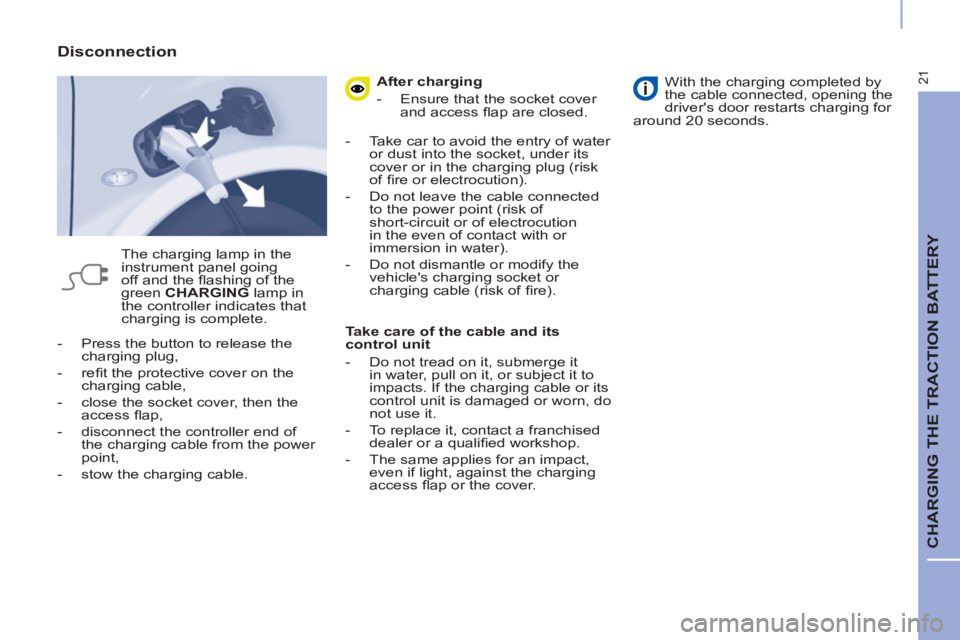
- Press the button to release the
charging plug,
- refi t the protective cover on the
charging cable,
- close the socket cover, then the
access fl ap,
- disconnect the controller end of
the charging cable from the power
point,
- stow the charging cable.
Disconnection
The charging lamp in the
instrument panel going
off and the fl ashing of the
green CHARGING
lamp in
the controller indicates that
charging is complete.
After charging
- Ensure that the socket cover
and access fl ap are closed.
- Take car to avoid the entry of water
or dust into the socket, under its
cover or in the charging plug (risk
of fi re or electrocution).
- Do not leave the cable connected
to the power point (risk of
short-circuit or of electrocution
in the even of contact with or
immersion in water).
- Do not dismantle or modify the
vehicle's charging socket or
charging cable (risk of fi re).
Take care of the cable and its
control unit
- Do not tread on it, submerge it
in water, pull on it, or subject it to
impacts. If the charging cable or its
control unit is damaged or worn, do
not use it.
- To replace it, contact a franchised
dealer or a qualifi ed workshop.
- The same applies for an impact,
even if light, against the charging
access fl ap or the cover.
With the charging completed by
the cable connected, opening the
driver's door restarts charging for
around 20 seconds.


